Yes. LitExtension can migrate both product categories and subcategories from your Source Store into separate Shopify collections.
If you select the additional option “Migrate Source Store categories into Shopify Smart Collections,” the corresponding category and subcategory names will also be added to the relevant products as tags. Shopify then uses these tags to assign products to the appropriate smart collections automatically.
However, Shopify doesn’t support sub-collections in its admin. Therefore, after the migration, you’ll need to recreate the original category hierarchy on your storefront manually:
- From your Shopify admin, go to Content > Menus.
- Open your existing Main menu, or click Add menu to create a new one.
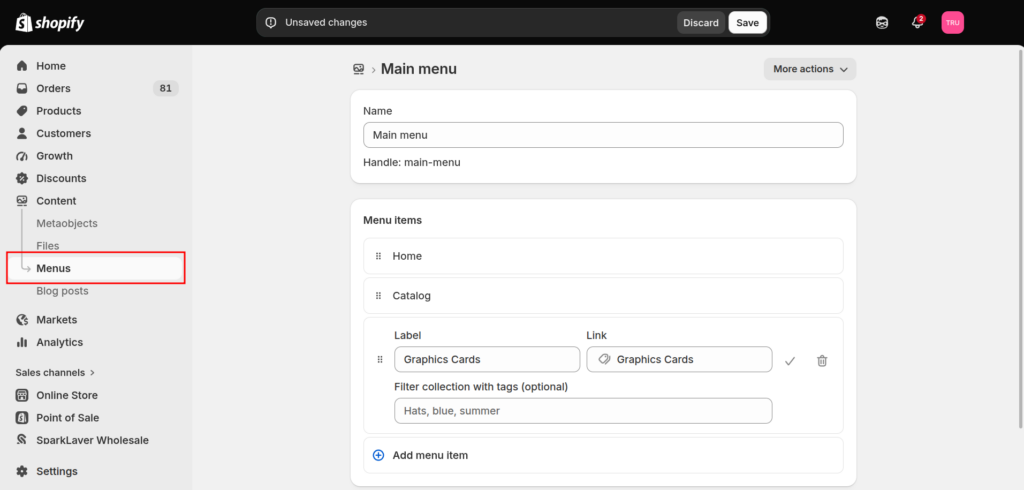
- Add the parent category as a menu item and link it to the corresponding migrated collection.
- Add each subcategory as another menu item and link it to its respective collection.
- Use the drag handle beside a subcategory to move it below and slightly to the right of its parent category.
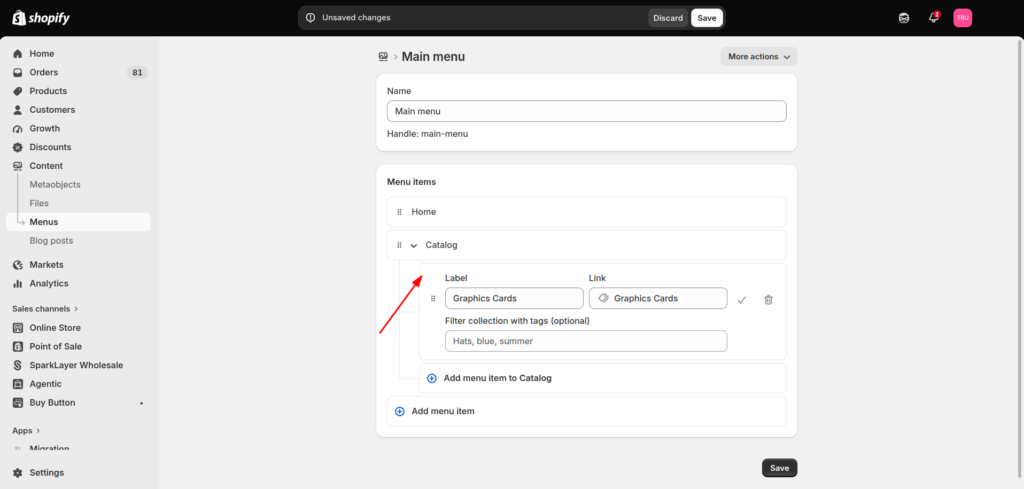
- Repeat these steps for the remaining categories, then click Save.
In case you have any other questions, please email us at [email protected].
