Creating 301 redirects helps preserve your link equity when migrating to PrestaShop. Your old URLs carry over to your new store, so after the switch, customers and search engines are automatically directed to the correct new page instead of hitting a 404 error, even if you later remove your old store permanently.
To set up 301 redirects during a PrestaShop migration, follow these three steps:
- Step 1: Set up your Source Cart and Target Cart. Choose and configure your platforms by filling in the corresponding information or installing the LitExtension Connector if required.
- Step 2: Select the data to migrate. Under the “Select Additional Options” section, tick on the “Create the 301 redirects on your target store after migration”.
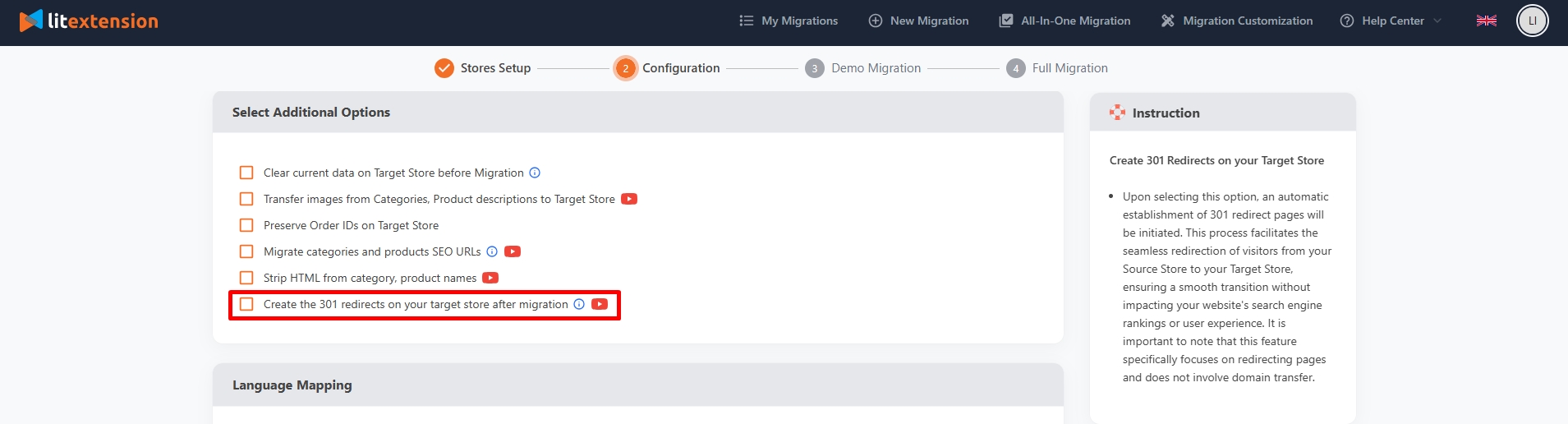
- Step 3: Perform the full migration. LitExtension automatically sets up the redirects, so your old URLs point customers and search engines to their corresponding new pages on PrestaShop.
For a visualization of how this option works, watch our video tutorial below:
If you have other questions or inquiries, please contact our Support Agents via live chat or email us at [email protected].
