LitExtension can migrate your SEO URLs to OpenCart as part of your data transfer, helping you prevent the 404 Not Found error after the OpenCart migration. This is available as an Additional Option during migration setup, called “Migrate categories and products SEO URLs,” which carries over your existing SEO-friendly URLs for products and categories instead of generating new ones on your OpenCart store.
To migrate your SEO URLs successfully, follow these 3 steps:
- Step 1. Set up your Source Cart and Target Cart
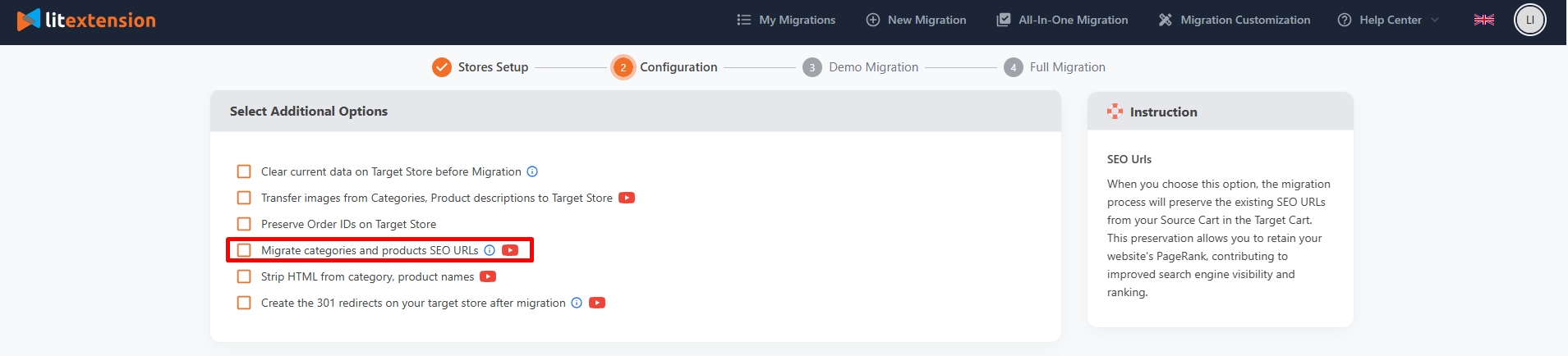
- Step 2. Select data to migrate. In the “Select Additional Options” section, tick on “Migrate categories and products SEO URLs”.
- Step 3. Run the full migration.
Please note that this option might incur an additional fee. If you choose our All-in-One Migration Service, our experts will help you transfer SEO URLs to OpenCart securely with no extra charge. For more information about how this service works, check out our SEO URLs Migration Service here.
If you have other questions or inquiries, please contact our Support Agents via live chat or email us at [email protected].
