Move your WooCommerce store to Shopify with LitExtension’s automated migration tool. Transfer products, customers, orders, coupons, pages, blog posts, images, categories, and SEO URLs while keeping your current WooCommerce store active during the migration.
Start with a Free Demo Migration to preview how your data will appear on Shopify. After reviewing the demo results, you can run the full migration or get expert support for more complex WooCommerce data.






Why Migrate from WooCommerce to Shopify?
Moving from WooCommerce to Shopify is not always about leaving a bad platform behind. WooCommerce is still a strong choice for merchants who want deep WordPress flexibility, full control over hosting, and the ability to customize almost every part of their store.
However, as your business grows, managing WooCommerce can become more time-consuming. Store owners may need to deal with hosting performance, plugin conflicts, security updates, backups, checkout stability, and technical troubleshooting more often. At that point, switching from WooCommerce to Shopify can make daily store management simpler and more predictable.
Many merchants choose to convert WooCommerce to Shopify when they want a hosted platform with built-in security, reliable checkout, easier maintenance, and a larger ecosystem for scaling eCommerce operations. Shopify can also make it easier for non-technical teams to manage products, orders, payments, shipping, and sales channels from one admin.
A WooCommerce to Shopify migration is especially worth considering if:
- Your WooCommerce store depends on too many plugins or custom fixes.
- Site speed, checkout stability, or hosting maintenance is becoming harder to manage.
- Your product catalog, order volume, or customer base is growing quickly.
- You want to move from WooCommerce to Shopify while keeping important store data, order history, and SEO URLs.
- Your team wants a more managed platform so they can focus more on sales, marketing, and customer experience.
With LitExtension, you can migrate from WooCommerce to Shopify safely by transferring products, customers, orders, coupons, blog posts, images, categories, and SEO URLs with Free Demo Migration before running the full migration.

Compare WooCommerce to Shopify Migration Options
Before you migrate from WooCommerce to Shopify, it is important to choose the right migration method based on your store size, data complexity, SEO requirements, and technical resources. A small store with a simple product catalog may only need a basic import, while a growing store with orders, customers, coupons, blog content, product variations, and SEO URLs will need a more structured WooCommerce to Shopify migration process.
Here are the most common ways to transfer WooCommerce to Shopify:
| Migration option | Best for | Main limitations | Recommended for |
|---|---|---|---|
| Manual CSV export and import | Very small stores with a limited number of products | Time-consuming, easy to miss data, not ideal for customers, orders, coupons, redirects, or complex product variations | Merchants who only need to migrate products from WooCommerce to Shopify |
| Shopify native import tools or basic import apps | Stores with simple product data | May not cover full WooCommerce data, historical orders, customer details, blog posts, SEO URLs, or plugin-related data | Basic product import, not full store migration |
| Automated migration tool | Stores that need to move products, customers, orders, categories, coupons, images, and SEO URLs with less manual work | Requires proper data mapping and post-migration review | Merchants who want a faster and safer WooCommerce migration to Shopify |
| Expert-assisted migration service | Larger stores, SEO-sensitive stores, or stores with custom fields, plugin data, complex variations, multilingual content, or special requirements | Requires project review before full migration | Businesses that need WooCommerce to Shopify migration services with technical support and quality assurance |
If your project also involves WordPress content or data outside WooCommerce, explore our WordPress to Shopify migration service so our experts can assess the broader source setup.
For most merchants, the safest approach is to start with a Free Demo Migration. This allows you to preview how your WooCommerce data will appear on Shopify before running the full migration. If your store has complex product attributes, custom order data, SEO traffic, or plugin-dependent content, LitExtension experts can help review the migration scope, configure additional options, and support you through the full move from WooCommerce to Shopify.
>>> Read our full WooCommerce vs Shopify comparison to understand the key differences in pricing, ease of use, SEO, apps, security, support, and scalability before planning your migration.
Benefits of Switching from WooCommerce to Shopify
Switching from WooCommerce to Shopify can help store owners reduce technical workload, simplify daily operations, and create a more stable foundation for growth. Instead of managing hosting, plugin updates, security patches, and performance issues separately, merchants can run their store on a hosted eCommerce platform where many core technical tasks are handled within the platform.
Here are the main benefits merchants often expect after a WooCommerce to Shopify migration:
1. Easier day-to-day store management
WooCommerce offers strong flexibility, especially for merchants who already use WordPress. However, that flexibility often comes with more technical responsibility. Store owners may need to manage hosting, plugin compatibility, backups, security updates, speed optimization, and troubleshooting on an ongoing basis.
After you move from WooCommerce to Shopify, many daily tasks can be managed from one Shopify admin, including products, orders, customers, discounts, payments, shipping, taxes, and sales channels. This can make store operations easier for teams that do not want to rely heavily on developers for routine updates.
2. A more stable checkout experience
Checkout stability is one of the biggest reasons merchants consider migrating from WooCommerce to Shopify. With WooCommerce, checkout performance can depend on your hosting environment, theme, plugins, payment gateway setup, and custom code. If one part of that setup causes a conflict, it can affect the buying experience.
Shopify provides a hosted checkout environment built for eCommerce transactions. For growing stores, this can help reduce the risk of checkout issues caused by plugin conflicts, server limits, or performance problems during high-traffic periods.
3. Less technical maintenance
A WooCommerce store often requires regular maintenance across WordPress core, WooCommerce, themes, extensions, hosting, caching, backups, and security tools. This setup can work well when managed properly, but it may become harder to maintain as the store grows.
When merchants convert WooCommerce to Shopify, they can reduce many of these technical maintenance tasks. Shopify handles hosting, platform updates, security infrastructure, and core eCommerce functionality, allowing store owners to spend more time on products, marketing, customer experience, and growth.
4. Simpler product and order operations
As a WooCommerce catalog grows, managing products, variations, images, categories, stock, orders, and customer records can become more complex. This is especially true for stores with many SKUs, product attributes, custom fields, or plugin-based product data.
Shopify provides a more centralized admin experience for product, inventory, order, customer, discount, and sales channel management. For merchants who need to migrate products from WooCommerce to Shopify, this can also be a good time to review product structure, clean up outdated data, and prepare collections more clearly for the new store.
5. Better scalability for growing businesses
WooCommerce can be highly scalable with the right hosting, development support, and technical setup. However, some merchants reach a point where they want a more managed platform that requires less infrastructure planning and fewer plugin dependencies.
Switching from WooCommerce to Shopify can be useful for businesses that are expanding their catalog, increasing order volume, selling across multiple channels, or preparing for international growth. Shopify’s ecosystem of apps, integrations, themes, payment options, and sales channels can make it easier to support the next stage of growth.
6. A cleaner opportunity to improve store structure
A platform migration is not only a data transfer. It is also a chance to review how your store is organized. Before you transfer WooCommerce to Shopify, you can evaluate product categories, collections, product descriptions, images, metadata, outdated pages, customer data, and order history.
This review can help you avoid carrying old structural issues into the new Shopify store. It can also make the migration process more useful because you are not just moving data, but improving the foundation of the store.
7. More predictable SEO planning during replatforming
Organic traffic is one of the biggest concerns when merchants migrate from WooCommerce to Shopify. Product URLs, category URLs, blog posts, metadata, image alt text, internal links, and redirects should be reviewed before launch.
A well-planned WooCommerce to Shopify migration should include SEO URL mapping, redirect planning, metadata checks, sitemap review, and post-migration testing. This helps reduce the risk of traffic loss and gives the new Shopify store a cleaner structure for future SEO growth. If you need broader support for replatforming, data transfer, and post-migration checks, you can also explore LitExtension’s Shopify migration services.
After reviewing these benefits, the next step is to understand what WooCommerce data can be moved to Shopify and which data types may require extra checking before migration.
How to Migrate from WooCommerce to Shopify?
Get a quick overview of how LitExtension migrates your store from WooCommerce to Shopify. If your store contains complex data, custom SEO URLs, custom fields, or plugin-generated content, we recommend reviewing the detailed guide below before starting your migration.

Install or open the LitExtension Store Migration Tool in your Shopify dashboard. Then, choose WooCommerce as your Source Cart and connect it to your Shopify store using automatic setup or manual connector upload.

Choose the entities you want to transfer WooCommerce to Shopify such as products, product categories, customers, orders, and more.

Start your full migration after reviewing the demo results. Once the process begins, LitExtension runs the transfer on its server, so you do not need to keep your browser open.
Migrate from WooCommerce to Shopify: Full Walkthrough
The 3-step process above gives you a quick overview of how to migrate from WooCommerce to Shopify. This full walkthrough explains the process in more detail, from preparing your WooCommerce and Shopify stores to selecting data, running a demo migration, reviewing the results, completing the full transfer, and checking your Shopify store before launch.
Use this walkthrough as a practical checklist before you move from WooCommerce to Shopify, especially if your store has product variations, historical orders, customer records, blog content, SEO URLs, custom fields, or plugin-dependent data.
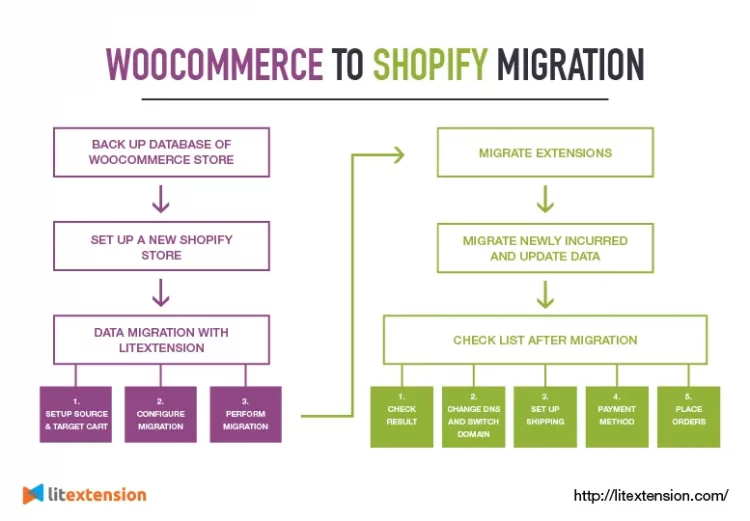
Before You Start: Prepare Your Stores and Back Up Data
Before setting up the migration, make sure your Shopify store is active and you have admin access to both Shopify and WooCommerce. You should also review your WooCommerce store and decide which data needs to be moved, such as products, customers, pages, blog posts, coupons, orders, images, and SEO URLs.
It is also recommended to back up your WooCommerce store before starting the migration. LitExtension does not modify your source store during the transfer, but having a backup gives you an extra safety layer in case you need to review or restore your original data later.

If your WooCommerce store uses plugins for reviews, subscriptions, memberships, loyalty programs, custom product options, or custom fields, list them before migration. Some plugin-related data may need extra checking or support from LitExtension experts when moving to Shopify.
Step 1: Start a New Migration in LitExtension

Log in to your LitExtension account and click “+ New Migration”.

In the Setup Target Store section, click “Install LitExtension App”. You will be redirected to the Shopify App Store to install the LitExtension Store Migration Tool.
If the app has already been installed on your Shopify store, click “Open” instead. Once you are inside the app, click “+ Create New Migration” to start setting up your WooCommerce to Shopify migration.
Before moving on, make sure:
- You are inside the LitExtension Store Migration Tool in your Shopify dashboard.
- Your Shopify store is active and ready to receive data.
- You are ready to connect your WooCommerce store as the Source Cart.
Step 2: Connect WooCommerce as the Source Cart
In the Source Cart Setup step, choose WooCommerce from the drop-down menu.
Then, select one of the available connection methods:
- Automatic setup: Choose this option if you want LitExtension to connect to your WooCommerce store directly. Enter your Source Cart URL, Username, and Password, then follow the on-screen instructions.
- Manual connector setup: Choose “I want to manually upload the connector!” if you prefer to install the connector yourself. Download the connector file and upload it to your WooCommerce store by following the instructions shown in the app. When the connection is successful, you will see the message “Connector is successfully installed!”. Then, click “Next: Configure Your Migration” to continue.

Step 3: Select Data to Migrate from WooCommerce to Shopify
On the Configure Your Migration screen, select the entities you want to move from WooCommerce to Shopify.
For this migration flow, LitExtension supports key WooCommerce data such as products, customers, pages, blog posts, and coupons. You can select only the entities you need or click “Select all” to migrate all supported data.
If your main goal is to import products from WooCommerce to Shopify, select Products and review your product data carefully, including:
- Product names
- Descriptions
- Product images
- SKUs
- Prices
- Stock
- Attributes
- Variations
- Categories
- SEO fields

>>> Important note: If you want to transfer customers and orders from WooCommerce to Shopify, your Shopify store needs to be on the Shopify Grow plan or higher. If your current Shopify plan does not meet this requirement, LitExtension can help transfer these entities through its CSV File Migration service.
Step 4: Configure Additional Migration Options
After selecting entities, review the Additional Options. These options help control how WooCommerce data will appear in Shopify after the migration.
Two important options to review are:
- Clear current data on Target Store before migration: Use this option if your Shopify store already contains test data or old imported data that you do not want to keep. This helps reduce the risk of duplicate records after migration.
- Create 301 redirects on your Target Store after migration: Use this option if you want old WooCommerce URLs to redirect to the corresponding pages on your new Shopify store. This is especially important if your WooCommerce store already has SEO traffic, backlinks, or indexed product and category URLs.
Do not choose options too quickly just to move to the next step. If your Shopify store already has data, or if SEO URLs are important to your WooCommerce to Shopify migration, review these options carefully before continuing.
Step 5: Map Language and Order Status
Before running the migration, map your language and order status settings.
WooCommerce and Shopify may use different language structures or order status names. Mapping them correctly helps your migrated data appear more accurately in Shopify.
For example: WooCommerce order statuses should be matched with the closest Shopify order statuses so your order history is easier to review after migration.

Step 6: Run Free Demo Migration
Click “Next: Start Free Demo Migration” to run a sample migration before transferring all data.
The Demo Migration lets you preview how LitExtension transfers WooCommerce data to Shopify. This is the safest way to check the result before running the full WooCommerce to Shopify migration.
After the demo migration finishes, open your Shopify admin and review the sample data carefully.
Check the data included in your demo, such as:
- Product titles and descriptions
- Product images
- Variants and attributes
- Prices and inventory
- Customers, if selected
- Pages and blog posts, if selected
- Coupons, if selected
- SEO URLs and redirects, if selected
If something does not look right, do not run the Full Migration yet. Go back and adjust your selected entities, Additional Options, language mapping, or order status mapping first.
Before moving on, make sure:
- Demo data appears correctly in Shopify.
- Products and variants look clean.
- Images, pages, blog posts, coupons, and SEO URLs have been checked if included.
- You are confident enough to run the Full Migration.
Step 7: Run Full WooCommerce to Shopify Migration

When the demo result looks correct, continue with the Full Migration.
LitExtension will transfer your selected WooCommerce data to Shopify based on the entities, options, and mapping settings you configured earlier. The migration runs on LitExtension’s server, so you do not need to keep your computer or browser open during the transfer.

When the WooCommerce to Shopify migration is complete, LitExtension will send you an email notification.
After Full Migration, make sure:
- You have received the completion email.
- Your selected WooCommerce data has been transferred to Shopify.
- You are ready to review the full result inside Shopify.
Step 8: Review the Migration Results in Shopify
After the Full Migration, open your Shopify admin and check the migrated data again.
Review the data you selected during setup, such as products, customers, pages, blog posts, coupons, images, variants, collections, SEO URLs, and redirects.
If your WooCommerce store uses plugins for reviews, subscriptions, memberships, loyalty programs, custom product options, or custom fields, review those data types separately before launch.
Step 9: Keep Shopify Updated Before Going Live
Your WooCommerce store can stay active during the migration, so new orders, customers, or product updates may appear while you are preparing Shopify for launch.
If new data is added after the Full Migration, LitExtension provides post-migration services to help keep Shopify updated:
- Recent Data Migration imports newly added entities to Shopify.
- Smart Update updates modified data from WooCommerce and imports new entities at the same time.
- Re-Migration lets you run the migration again if you need to restart or correct the transfer.
Use these services if you need more time to review your Shopify store, test checkout, configure apps, prepare redirects, and switch your domain before going live.
Review WooCommerce Plugins and Shopify App Alternatives
If your WooCommerce store relies on plugins for reviews, subscriptions, loyalty programs, product options, memberships, or other custom features, you should review which Shopify apps can replace those functions after migration. WooCommerce plugins and Shopify apps do not always store or structure data in the same way, so some plugin-related data may need custom handling.
For plugin-related data, check whether the information can be recreated in Shopify, replaced with a Shopify app, or migrated through a custom setup. If custom migration is required, the scope should be reviewed before proceeding.
Post Migration Steps
After your data migrates to Shopify successfully, your store is almost ready to launch. However, a few important post-migration steps are necessary to ensure everything works properly, your data is accurate, and customers can shop without any issues.- Check migration results: Once you transfer your stores to Shopify, it’s essential to carefully review all migrated data. Go through your product listings to confirm that images, descriptions, variants, prices, and inventory levels are correct. If you migrate products from WooCommerce to Shopify in bulk, small inconsistencies can occur, so double-checking helps prevent future issues. Also review customer accounts, order history, and key pages to ensure your WooCommerce migration to Shopify is complete and accurate.
- Change DNS and switch domain: After verification, point your domain’s DNS to Shopify to finalize the process. Double-check the connection to ensure your website loads perfectly and avoid any disruption during this final stage.
- Set up your shipping: After you convert WooCommerce to Shopify, you’ll need to configure your shipping settings again. Set up shipping zones, delivery methods, and rates that align with your business model. A clear and optimized shipping setup not only improves customer trust but also enhances conversions on your new Shopify store.
- Choose payment methods: Enable and configure your preferred payment gateways such as Shopify Payments, PayPal, or Stripe. During any WooCommerce to Shopify migration, ensuring a smooth and secure checkout experience is critical. Take time to test each payment method so customers can complete purchases without issues.
- Place test orders: Before going live, perform several test transactions to simulate real customer behavior. Check the entire process from product selection to checkout, order confirmation, and email notifications. This final step helps you identify and fix any hidden issues after switching from WooCommerce to Shopify, ensuring your store is fully ready for launch.
Common WooCommerce to Shopify Migration Issues and How LitExtension Helps
When switching from WooCommerce to Shopify, some migration issues may appear because the two platforms use different data structures, URL formats, app ecosystems, and theme systems. LitExtension helps you identify these risks before migration and provides support options to reduce data errors, broken links, and post-migration cleanup.
| Migration issue | Why it happens | How LitExtension helps |
|---|---|---|
| Data mapping and compatibility | WooCommerce data may not always have a direct equivalent in Shopify, especially for custom fields, categories, product attributes, and plugin-related data. | LitExtension reviews your store data and helps map WooCommerce entities to the most suitable Shopify structure where supported. |
| Custom functionality and plugins | WooCommerce stores often rely on WordPress plugins for reviews, subscriptions, memberships, product options, loyalty programs, or custom workflows. | LitExtension can help identify plugin-dependent data and check whether it can be migrated to a selected Shopify app or handled through custom migration. |
| Design and theme migration | WooCommerce themes cannot be transferred directly to Shopify because both platforms use different theme systems. | LitExtension can recommend a suitable Shopify theme. For stores that need a similar look and feel, Shopify Development Services can help customize the new storefront. |
| Product variants and attributes | WooCommerce and Shopify manage variations, attributes, and product options differently, which may affect catalog structure after migration. | LitExtension maps WooCommerce variations and attributes to Shopify variants/options where supported and helps review product data during demo migration. |
| Categories and collections | WooCommerce categories do not work exactly the same way as Shopify collections. | Additional Options can help migrate WooCommerce categories into Shopify automated collections using product tags and collection rules. |
| SEO URLs and redirects | Moving from WooCommerce to Shopify can change URL structures, which may cause 404 errors or SEO traffic loss if not handled properly. | LitExtension supports 301 redirects from old WooCommerce URLs to matching Shopify URLs where available. |
| Live store updates and downtime | Your WooCommerce store may continue receiving new customers, orders, and product updates while the Shopify store is being prepared. | LitExtension keeps the source store unchanged during data migration and offers Recent Data Migration, Smart Update, and Re-migration to sync new or modified data before go-live. |
Final thoughts
A successful WooCommerce to Shopify migration requires more than just transferring data, it involves careful preparation, accurate data mapping, and proper post-migration setup.
With LitExtension, you can:
- Transfer WooCommerce to Shopify without downtime
- Maintain URL structure with proper 301 redirects
- Ensure data accuracy and integrity
Join 200,000+ businesses that have migrated with LitExtension. Start a Free Demo Migration to preview how your WooCommerce products, customers, orders, and URLs will be transferred to Shopify before running the full migration.
What Data Can Be Migrated From WooCommerce to Shopify
Not all WooCommerce data moves to Shopify in the same way. Since the two platforms structure store information differently, each data group should be mapped, reviewed, and tested before the full migration. Use the tabs below to check which WooCommerce fields can be migrated to Shopify and prepare any data that may need extra handling during your WooCommerce to Shopify migration.


-
Products
- Product Name, Product Description
- Slug
- Product image/Thumbnail
- Product gallery.
- Regular Price, Sale price.
- Product category.
- SKU
- Quantity
- Stock management
- Brand / Manufacturer
- Weight, Dimensions: Length, Width, Height.
- Attributes
- Tags
- Product variation
- Publish Status
- Meta Description, Meta Title
Products Categories
- Name, Description.
- Slug
Thumbnail - Meta description,
Meta title.
-
Customer
- First name + Last name
Customer Billing/Shipping Address
Customer Address
- First name, Last name.
- Company
- Address line 1, Address line 2.
- City, Postcode / ZIP, Country / Region, State.
- Phone
-
Orders
- Order number
- Order notes
- Order total.
- Date created
- Status
- Customer
- Tax
- Discount
- Shipping
- Currency
- Payment method
- Billing/Shipping address
Order Items
- Product name
- Price
- Qty
- SKU
-
- Rule
- Coupon Code
- Discount type
- Coupon expiry date
- Usuage limit per user
- Usuage limit per coupon
Coupon Amount
-
- Title
- URL Key
- Status
- Meta Title, Meta Description.
Content
-
- Title, Content
- Author
- Featured image
- Slug
- Status
- Category
- Tags
- Meta title, Meta description
(*) If the data you want to migrate from WooCommerce to Shopify is not listed, please get in touch with us.


Leave The Work For The Experts

Migrate From WooCommerce To Other Platforms


How Your Data Is Secured During Migration?

Server Security

Data Security

Data Access Restriction

GDPR Compliance

NDA

Payment Security
Why Thousands of Merchants Trust LitExtension?


Who We Truly Are? Let Our Customer Define!

I am in the process of moving my existing website over to Shopify. As this is my 4th iteration of my website, I knew I didn’t want to do the migration part myself again! Using this service meant that I could concentrate on running my business for a couple of days while the migration was being done for me.
Lotus was phenomenal! She is detailed-oriented and works extremely fast! She helped with the migration from Wix to Shopify in no time. Thank you so much Lotus and everyone at LitExtension!

We migrate with Litextension our shop from shopware to shopify. The team was great to work with. During the process we identified a few issues. But everything was fully resolved in two days. We are satisfied with the work from Litextension.
It was great service from those guys! Verry complex case with very old Woocommerce to new Woocommerce store!
I built our new Shopify site myself but with no developer experience. I really struggled migrating products, customers and order history. It was a bit overwhelming until I found Lit. They helped me set it up and did the contract. Emailed me at every stage and listened to my feedback. I found them on Thursday and by Monday the work was completed.
The team at LitExtension was great to work with, and also showed great patience with my migration needs. We had a large website, with many products and variants and they were able to do everything we needed, even some custom requests. Great people and great company.
Took most of the work off our hands. The team were great and went out of their way to get the migration from J2store to Shopify completed. The time zone differences were slightly difficult but that didn’t stop the work from being completed.