Migrate from Lightspeed to Shopify with LitExtension’s expert-managed All-in-One Migration Service. We transfer supported products, product categories, customers, and orders while mapping your store data to Shopify’s structure.
Our migration experts handle source assessment, data mapping, Demo Migration, full migration, and validation. Route-specific options such as 301 redirects and Shopify Smart Collections can also be configured as part of the migration.
Read our 3,000+ reviews on 


How to Migrate from Lightspeed to Shopify
Our Lightspeed to Shopify migration service follows a structured, expert-managed process to ensure your store data is properly transferred, reviewed, and prepared for launch. From the initial assessment to final validation, our team takes care of each stage of your migration.

1. Consulting with Migration Experts
Our migration experts review your Lightspeed store, assess the available data, and understand your requirements for the new Shopify store. We identify the data to be transferred, review your existing store structure, and create a migration plan tailored to your business needs.

2. Data Mapping and Store Setup
Our team maps your supported Lightspeed data to the appropriate Shopify fields and configures the necessary migration options. We then perform a Demo Migration so you can review how your products, customers, orders, and other selected data appear in Shopify before proceeding with the full migration.

3. Perform Full Data Migration
Once you approve the demo results, our experts proceed with the full Lightspeed to Shopify migration. We monitor the data transfer, review the migrated records, and perform post-migration checks to help ensure your Shopify store is ready for launch.
Why Should You Migrate from Lightspeed to Shopify
#1. Shopify offers a far larger app and integration ecosystem than Lightspeed
Shopify’s App Store gives merchants thousands of ready-made apps for marketing, shipping, loyalty, subscriptions, and multichannel selling, so stores can add new capabilities without custom development. Lightspeed’s ecosystem is smaller and leans more heavily on its own built-in retail and point-of-sale tools, which suits brick-and-mortar operations but offers fewer options for merchants who want to extend their online storefront specifically.
#2. Shopify scales more easily as order volume and sales channels grow
Shopify’s infrastructure is built to handle traffic spikes and high order volumes without merchants needing to manage servers or performance tuning themselves, and it connects natively to channels like Instagram, TikTok, and Amazon from the same dashboard. Lightspeed was designed primarily around retail and point-of-sale operations, so merchants focused on pure online growth often find Shopify’s storefront tools more purpose-built for that direction.
#3. Shopify includes a more complete built-in checkout and payments experience
Shopify Payments lets merchants accept major cards and popular wallets directly, without setting up a separate payment gateway, and its checkout is continuously optimized for conversion. This reduces the setup work merchants face when launching a new storefront and gives customers a more consistent buying experience at checkout.
Lightspeed to Shopify Migration Checklist – What to Prepare
Before you start your Lightspeed to Shopify migration, a little preparation goes a long way toward a smooth, accurate transfer. Review the items below so your store and your LitExtension migration team start from the same page.
- Confirm which data you want transferred, such as products, product categories, customers, and order history.
- Back up your current Lightspeed store data before any migration work begins.
- Gather your Lightspeed store credentials and admin access details for the technical consultation.
- Set up your Shopify account and choose a plan if you haven’t already.
- Review your product catalog for duplicate SKUs, missing images, or incomplete descriptions.
- Note any custom fields, attributes, or manufacturer data you want mapped correctly to Shopify.
- List any apps currently handling reviews, coupons, or content on your Lightspeed store, since these run on separate apps after the migration.
- Schedule your migration during a lower-traffic period to minimize disruption to customers.
How to Migrate from Lightspeed to Shopify with LitExtension All-in-One Migration Service
If you want a safe, hands-off way to complete your Lightspeed to Shopify migration, LitExtension’s All-in-One Migration Service puts the entire project in the hands of our migration experts. Instead of configuring settings or running the transfer yourself, our team manages every stage of the move, so you can keep running your Lightspeed store while we build your new Shopify store behind the scenes.
Here’s how our experts carry out your Lightspeed to Shopify migration from start to finish.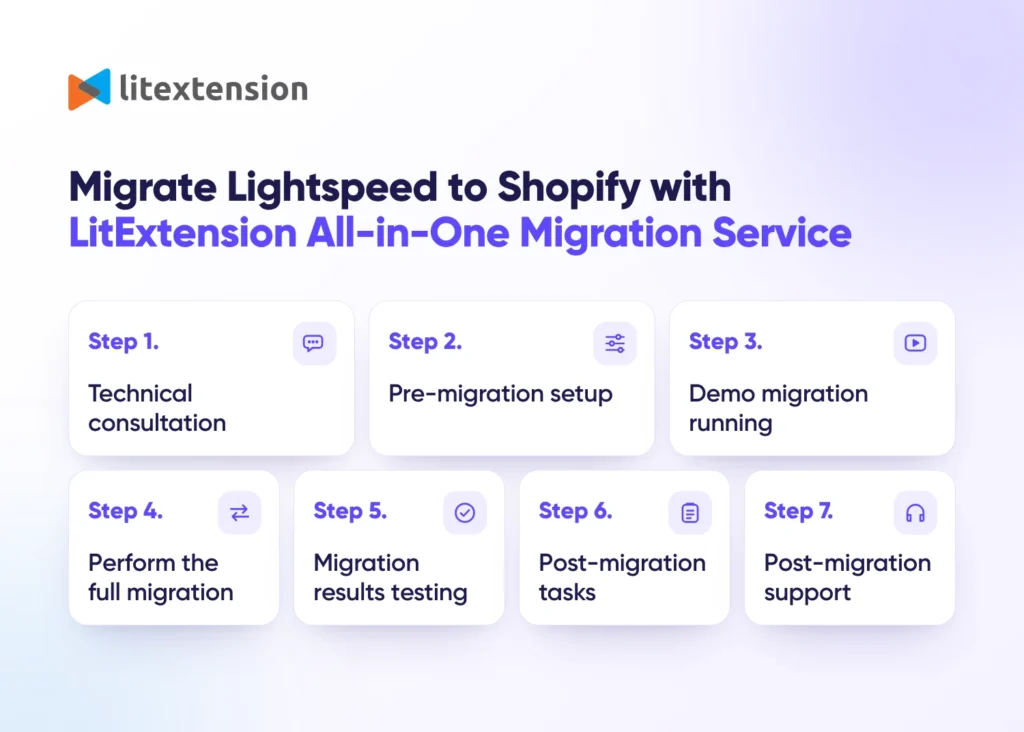
Step 1. Technical consultation with LitExtension experts
Your migration starts with a one-on-one consultation with a LitExtension specialist. During this call, we review your Lightspeed store’s size, structure, and data, including your products, categories, customers, and order history, so we understand exactly what needs to move to Shopify. If your store relies on custom attributes, manufacturer data, or other specialized setups, we document these details upfront so nothing gets lost or mismatched later. The consultation ends with a Service-Level Agreement (SLA) that sets out your project timeline, data volume, and any special requirements, giving both sides a clear reference point before work begins.
Step 2. Pre-migration setup
Next, our team prepares both your Lightspeed and Shopify stores for the transfer. We confirm that your Lightspeed store is ready to export and gather the store URL, admin credentials, and any technical details needed to connect securely to your new Shopify store. We then map your Lightspeed data structure, such as product categories and manufacturer records, to the matching fields on Shopify, adjusting the configuration for any custom data your store uses. By the end of this step, every data type is mapped and validated, setting the stage for an accurate full migration.
Step 3. Demo migration running
Before transferring your full store, we run a free demo migration to confirm everything is configured correctly. This moves a small sample of your Lightspeed products, customers, and orders into your Shopify store so you can preview exactly how your data will look once the project is complete. Our team reviews the demo results internally and resolves any inconsistencies before moving forward with the full migration.
Step 4. Perform full Lightspeed to Shopify migration
Once you approve the demo results, we run the complete migration, transferring all your selected products, categories, customers, and orders into your new Shopify store according to the plan we built together. The entire process runs on LitExtension’s secure cloud servers, so your Lightspeed store stays live and fully operational the whole time, with no downtime and no need to pause your business.
Step 5. Migration results testing
After the full transfer completes, our team thoroughly checks every migrated data type against your original Lightspeed store to confirm accuracy. If we find any missing fields, formatting issues, or mismatches, we fix them right away. Once everything checks out, we send you a detailed migration report so you can review the final results with confidence.
Step 6. Post-migration tasks
Since your Lightspeed store remains active during the migration, it may collect new orders or customer updates while the transfer is running. To keep your new Shopify store current, LitExtension includes a set of free post-migration services during the Technical Support window:
- Unlimited Recent Data migration for new data under 5% of your initial migration volume.
- Two Re-migrations if you need to run the full transfer again.
- Unlimited Smart Update to refresh data already migrated during the initial run.
Step 7. Customer support post migration
Our support doesn’t end once your Lightspeed to Shopify migration is complete. For up to 60 days afterward, LitExtension’s dedicated support team is available to answer questions, troubleshoot issues, and help you get comfortable with your new Shopify store. Whatever you need, from a technical fix to general guidance, we’re here to make sure your transition feels fully supported.
Manually Transfer Data from Lightspeed to Shopify
If your budget is tight, moving your store from Lightspeed to Shopify manually costs nothing but your own time. You simply export your data from Lightspeed and import it into Shopify yourself, with no service fee attached.
That said, manual migration comes with real trade-offs. The process is easy to get wrong, since a single mismatched column or incorrectly formatted file can cause products, customers, or orders to import incompletely or not at all. It’s also time-consuming, especially for stores with a large catalog or order history, and it demands a fair amount of technical skill to clean, format, and map your data correctly between two platforms that don’t structure information the same way.
For most merchants, LitExtension’s Automated Migration Tool or All-in-One Migration Service is the faster, safer, and more accurate way to complete a Lightspeed to Shopify migration, since both handle data mapping and validation automatically. But if you’d still like to migrate manually, here’s how to do it step by step.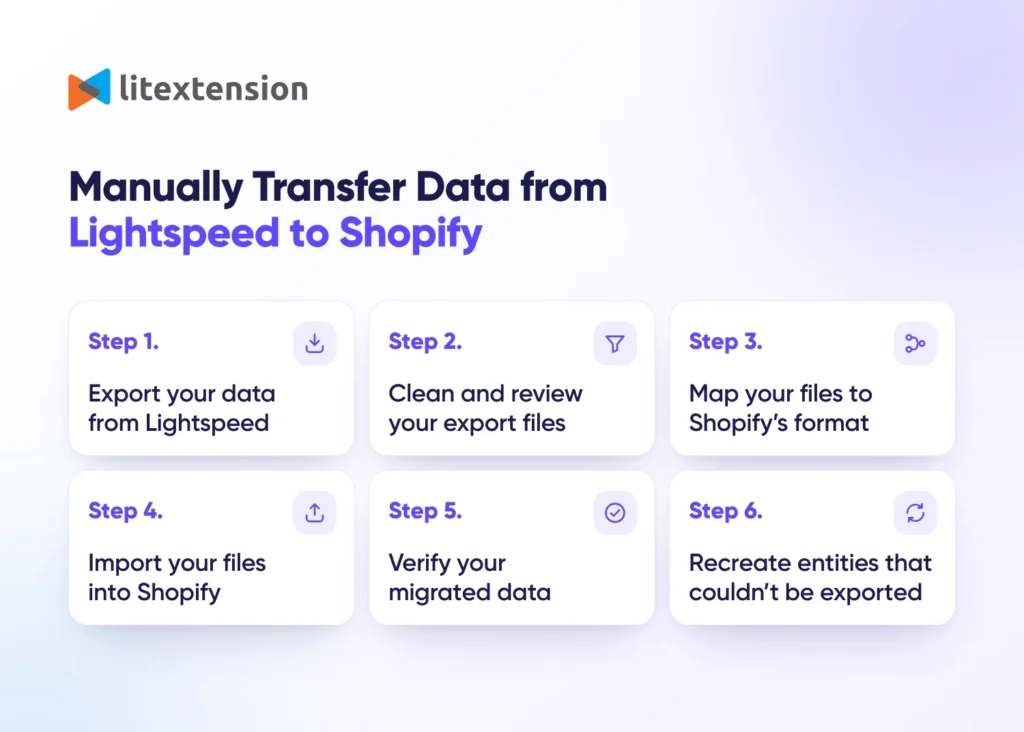
Step 1. Export your data from Lightspeed
Log in to your Lightspeed admin panel and export your products, product categories, customers, and orders as separate files. Lightspeed only supports exporting these core data types, so content such as reviews, coupons, or blog posts won’t be part of this export.
Step 2. Clean and review your export files
Open each exported file and check for missing values, duplicate SKUs, or inconsistent formatting. Pay close attention to product variants and manufacturer details, since these often need extra formatting work before they’ll import cleanly into Shopify.
Step 3. Map your Lightspeed fields to Shopify’s format
Shopify expects data in its own CSV structure, which differs from Lightspeed’s export format. Rename and reorganize your columns to match Shopify’s required fields, such as mapping Lightspeed’s Manufacturer field to Shopify’s Vendor field, before you attempt to import.
Step 4. Import your files into Shopify
In your Shopify admin, use the built-in import tool to upload your prepared products, customers, and orders files one at a time. Shopify validates each file on upload, so review any error messages carefully and correct your file before retrying a failed import.
Step 5. Verify your migrated data
Once the import finishes, check your new Shopify store against your original Lightspeed store. Confirm that product details, pricing, customer records, and order history all appear correctly before you consider the migration complete.
Step 6. Recreate anything Lightspeed couldn’t export
If your Lightspeed store relies on an app for reviews, coupons, or additional content, these won’t transfer through a manual file export. You’ll need to set up the matching functionality on Shopify separately, typically through a Shopify app, and follow that app’s own import guidance to bring the data across.
Lightspeed to Shopify Data Mapping
Lightspeed and Shopify use different data structures, field names, and content organization methods. During migration, supported source data must be mapped to the appropriate fields in your new Shopify store.
LitExtension’s migration experts review this mapping to help ensure that your selected data is transferred to the correct destination fields.
Explore the mapping tables below to understand how Lightspeed data is transferred to Shopify as part of the migration process.
Category
| Lightspeed Field | Shopify Field |
|---|---|
| Title | Title |
| Description or Content | Description |
| SEO | Redirects or handle |
| Image | Image |
| Meta description | SEO description |
| Page title | SEO title |
Product
| Lightspeed Field | Shopify Field |
|---|---|
| Title | Title |
| Description or Content | Description |
| SEO URL | Redirects |
| Images | Media |
| Visibility | Status |
| Tags | Tags |
| Price | Price |
| Categories | Collections |
| SKU | SKU |
| Quantity | Quantity |
| Track the inventory | Track quantity |
| Brand | Vendor |
| Weight | Weight |
| Attributes | Metafields |
| Dimensions | Metafields |
| Page title | Page Title |
| SEO Description | Meta Description |
| Variants | Variants |
| Barcode | Barcode |
| Cost | Cost |
Customer
| Lightspeed Field | Shopify Field |
|---|---|
| First and last name | Customer name |
| Phone | Phone number |
Customer address
| Lightspeed Field | Shopify Field |
|---|---|
| First name | First name |
| Last name | Last name |
| House number | Address → Company |
| Address 1 | Address → Address |
| Address 2 | Address → Apartment, suite, etc. |
| City | Address → City |
| Post code | Address → Postcode |
| Country | Address → Country |
| Region | Address → State |
Order
| Lightspeed Field | Shopify Field |
|---|---|
| Order number | Order number |
| Created at | Order date |
| Status | Payment status |
| Fulfillment status | |
| Customer | Customer |
| Notes | Note |
| Tax | VAT |
| Shipment | Shipping |
| Items | Subtotal |
| Grand Total | Paid |
Order billing/shipping address
| Lightspeed Field | Shopify Field |
|---|---|
| First name | First name |
| Last name | Last name |
| House number | Address → Company |
| Address 1 | Address → Address |
| Address 2 | Address → Apartment, suite, etc. |
| City | Address → City |
| Postcode | Address → Postcode |
| Country | Address → Country |
| State | Address → State |
| Phone | Address → Phone |
Order items
| Lightspeed Field | Shopify Field |
|---|---|
| Product name | Product name |
| Line item price | Line item price |
| Quantity | Quantity |
| SKU | SKU |
Let our migration experts handle the technical complexity of moving your store from Lightspeed to Shopify. Review your migration results with a free demo before committing to the full transfer, and get dedicated assistance throughout the process.
What Data We Can Migrate from Lightspeed to Shopify
Use the tabs below to see which Lightspeed data fields we can migrate to Shopify.


-
Products
- Name, SKU, Status
- Short Description, Full Description
- Price, Special Price
- Quantity, Manage Stock
- Meta Title, Meta Description
- Weight, Width, Height, Depth
- Product Tags
- Variants
- Thumbnail Image, Additional Images
Product Categories
- Name, Description
- Image
- Meta Title, Meta Description
-
Customers
- First Name, Last Name, Email
-
Orders
- Order ID, Order Date
- Order Status
- Order Items
- Total Price, Sub Price
- Discount Price, Tax Price, Shipping Price
- Customer Name, Email
- Billing Address, Shipping Address
Can’t find the data you need to migrate? Contact us or click on the Live Chat in the right corner for a free consultation.


Leave The Work For The Experts

How Your Data Is Secured During Migration
At LitExtension, we prioritize data security and use strict practices, technologies, and policies to keep your data protected throughout the migration. Learn more in our Data Security Policy.

Server Security

Data Security

Data Access Restriction

GDPR Compliance

NDA

Payment Security
Why Choose LitExtension for Lightspeed to Shopify Migration?


Who We Truly Are? Let Our Customer Define!

LitExtension was always professional, patient, and very reliable during an extensive migration effort we were involved. They answered all the questions, and kept track of all the problems until we reached a final solution. Excelent service!

We have used LitExtension for an extensive Lightspeed to Shopify migration as well as minor Shopify to Shopify migration. Both experiences were great, they’re very thorough with their testing and set up and more than happy to support and rectify any anomalies that appear during your project. Often they flag things you might not have thought of yet. Both times very happy with the results.
We have never migrated a shop and were nervous at first, but both Malphite and Ben were so wonderful, patient and efficient. Don’t hesitate to use LitExtension, they provide EXCEPTIONAL service! I highly recommend them and would use them again!