CSV Files to PrestaShop migration is built for situations where PrestaShop’s own importer falls short, such as large files or complex fields. Run it yourself with our Automated Migration Tool, or let LitExtension’s All-in-One team map your products, customers, and orders for you, without relying on that native tool.
A free demo lets you check the results before anything’s final. You’ll get up to 60 days of support after your Full Migration completes, no technical skill required.
Read our 3,000+ reviews on 



How to Perform CSV Files to PrestaShop Migration

1. Add Your Files and Connect PrestaShop
Select Files as your Source Cart, then upload your files or add a Google Sheets, Dropbox, Drive, or OneDrive link. Data types are detected automatically.

2. Select Data and Migration Options
Choose which entities to bring over: products, categories, customers, and orders. Then turn on whichever Migration Options fit your PrestaShop setup.

3. Run Demo and Full Migration
Preview the results with a free demo, then confirm your order and launch the full migration. Your data will be securely transferred to your destination.
Step-by-Step Guide to Importing CSV Files into PrestaShop
Step 1. Prepare Your Data and Connect PrestaShop
Prepare the data you want to migrate, such as products, product categories, customers, and orders. Use separate files for each data type where possible. If an export is split into multiple files, you can upload the parts together.
Sign in to the LitExtension app, open New Migration, and select Files (CSV, Excel, Google Sheets) as the Source Cart Type.
Add your data using one or more of these methods:
- File Upload: Upload CSV, TSV, XLSX, or XLSM files. You can add up to 50 files, with a maximum size of 50 MB per file.
- Google Sheets: Set sharing to Anyone with the link can view, open the tab you want to import, and copy its URL. Each link reads one tab, so add a separate link for each additional tab.
- Link: Add a public link to an individual CSV or Excel file from Dropbox, Google Drive, or OneDrive. The link must open the file without requiring a login.
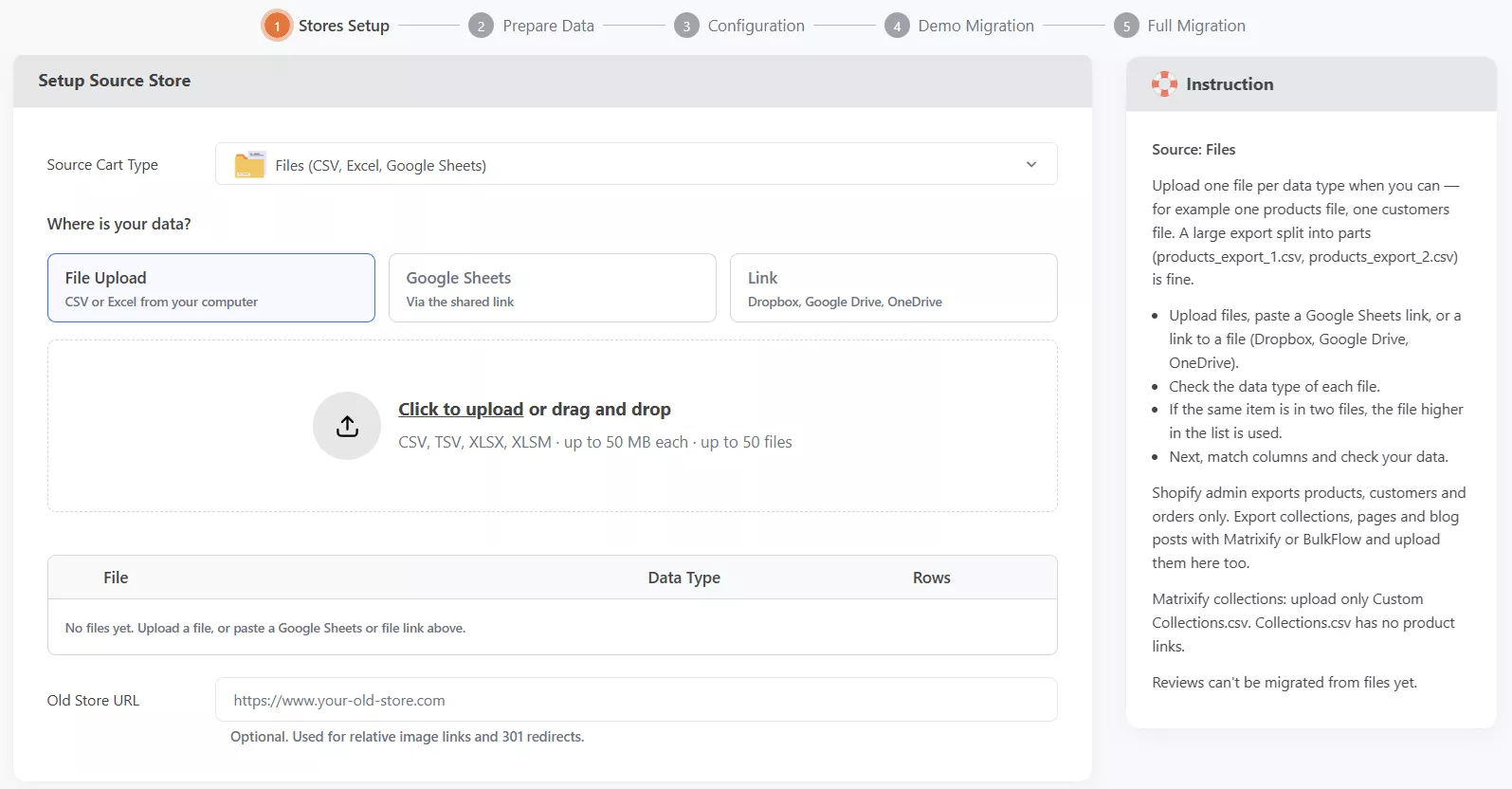
Review the uploaded-file list and check the File, Data Type, and Rows columns. Correct any incorrectly detected data type. If the same product or customer appears in multiple files, the system uses the record from the file listed first.
Make sure image URLs are publicly accessible. Add the optional Old Store URL if your files contain relative image paths, such as /images/product.jpg, or if you need supported redirect options.
Select PrestaShop as the Target Cart Type, enter the required store details, and follow the connection instructions. Back up your PrestaShop store, note any existing records that must remain, and pause automated customer emails or workflows that imported records could trigger. Once the target store is connected, continue to Prepare Data.
Step 2. Map Your Fields, Check Your Data, and Configure the Migration
Review Field Mapping to match the columns in your files to the corresponding PrestaShop fields. LitExtension automatically maps recognized file formats. Use the record previews to check the mapped values and adjust any incorrect matches.
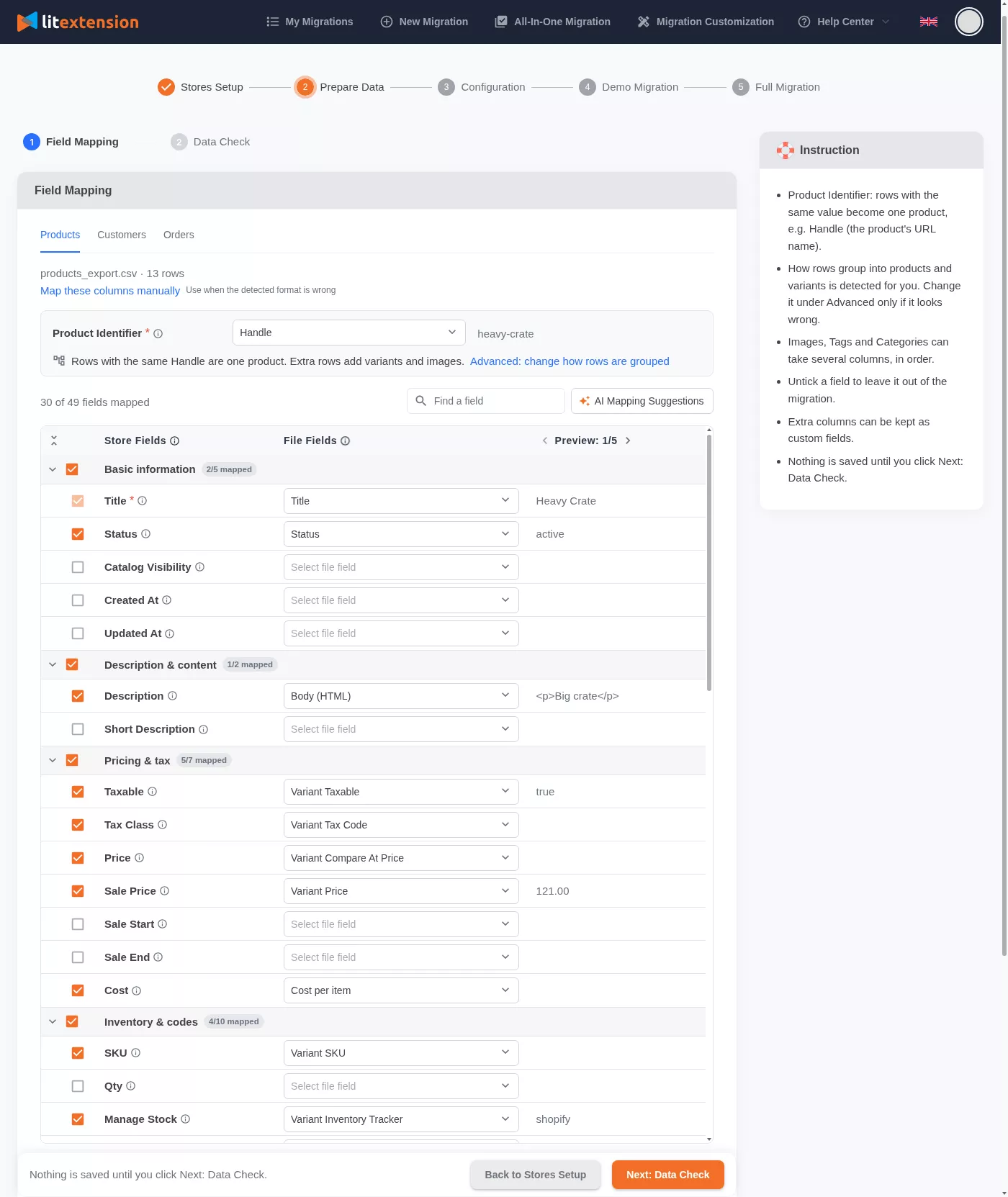
Select the correct Product Identifier so rows belonging to the same product are grouped with their variants and images. Check product names, SKUs, prices, quantities, image links, and the fields used to associate related records.
For customers, choose an available ID, email, or phone column as the Customer Identifier. Deselect fields you do not want to migrate. Specialized fields also need usable source values and a compatible available mapping; a column label alone does not establish working target behavior.
Use AI Mapping Suggestions if unfamiliar column names make mapping difficult.
Click Next: Data Check to save the mapping and validate the entire dataset. Data Check does not transfer data.
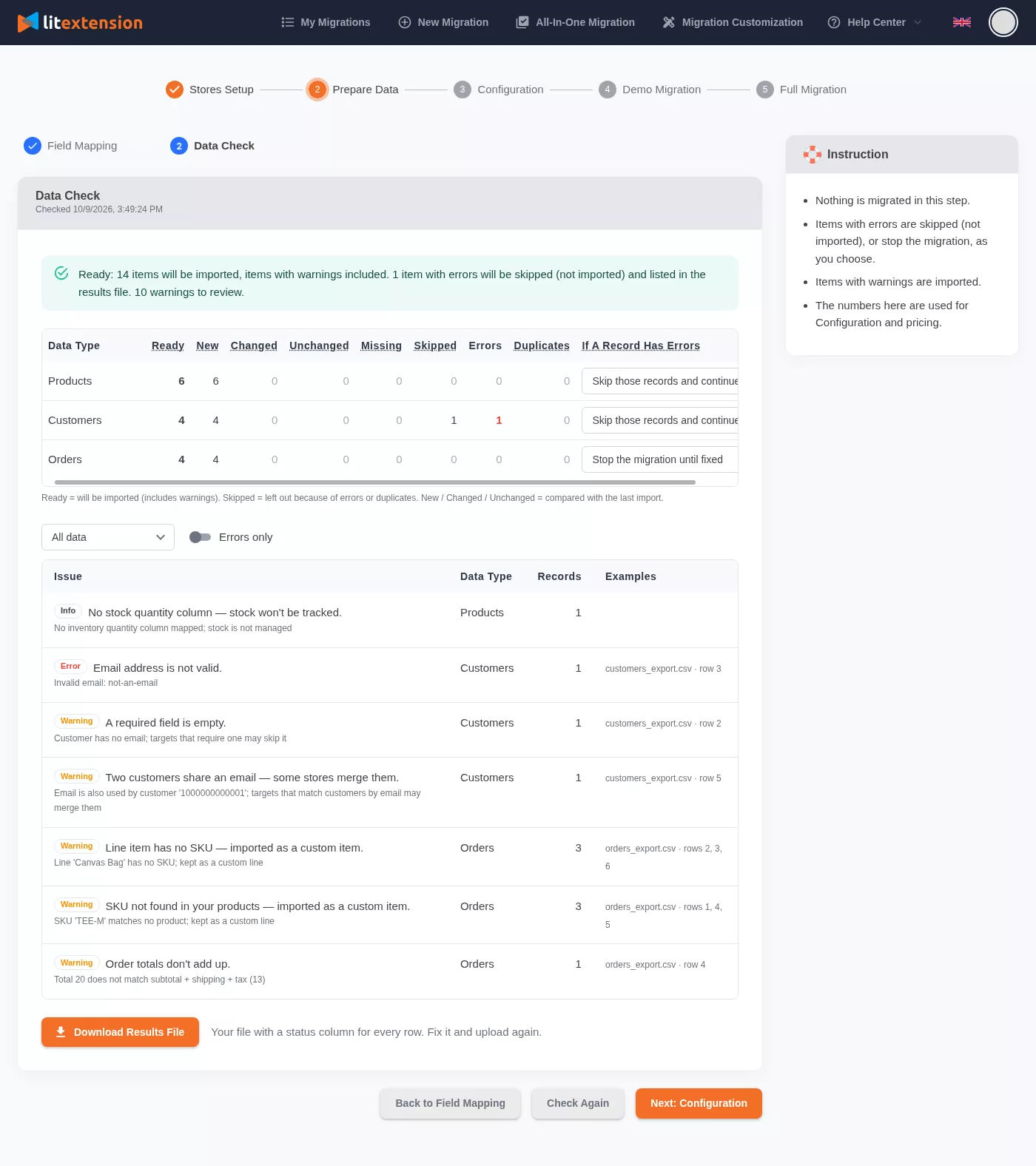
Review the results before continuing. The summary shows the records that are Ready to import, along with Skipped records and Errors / Duplicates. Each issue is marked by level:
- Error: The affected record is not imported.
- Warning: The record is imported but should be reviewed.
- Info: Information only.
Choose how to handle records with errors: Skip those records and continue, or Stop the migration until fixed.
To correct problems, download the Results File, review the status information for each row, fix the affected records, and replace the uploaded file. Then click Check Again.
If you edited a file accessed through a shared link, use Refresh link or add the link again before checking the data. The system downloads linked files when they are added, so later edits are not picked up automatically.
Run Data Check again whenever you change a file, Google Sheet, or mapping. The system requires an up-to-date check before migration can start.
Once the data is ready, open Configuration. Select the supported data types you want to transfer to PrestaShop, such as products, product categories, customers, and orders. Reviews are not currently supported through Files Migration.
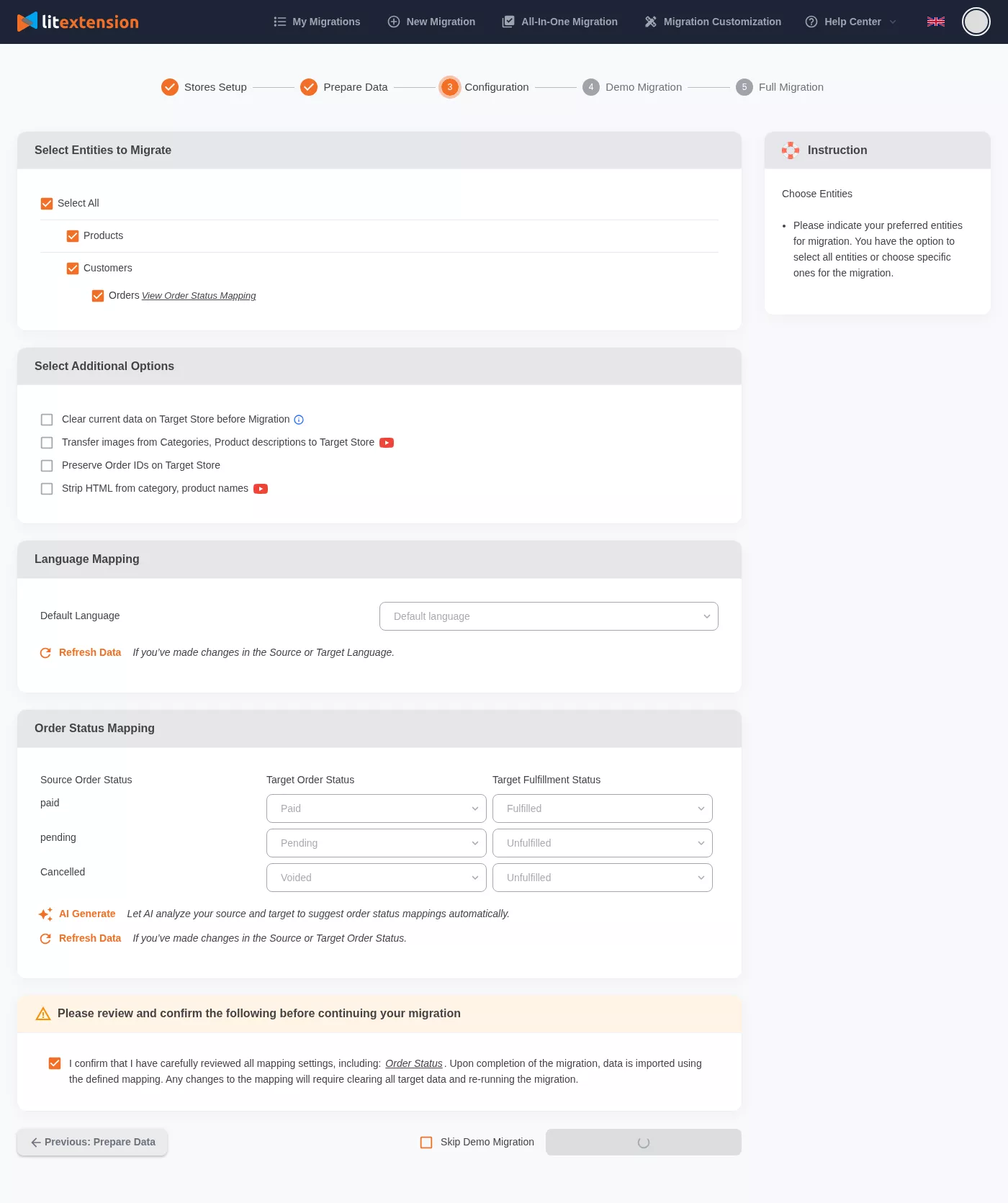
Choose the additional options available for your migration and review Order Status Mapping where available. Check the selected data types and settings, confirm that you have reviewed the configuration, and click Next: Start Free Demo Migration.
Step 3. Run a Demo, Review the Results, and Run Full Migration
The free demo transfers a small sample of records to PrestaShop. Keep the source files and Google Sheets unchanged while it runs. You can close the page, and LitExtension sends an email when the demo finishes.
When the demo finishes, use View to inspect the migrated records in the PrestaShop Back Office. Compare them with the source files and check:
- Products: Names, SKUs, prices, special prices, variants, quantities, and images.
- Product Categories: Names, descriptions, images, and sort order.
- Customers: Names, email addresses, billing addresses, and customer groups.
- Orders: Order statuses, amounts, billing and shipping addresses, and associated customer and product information.
Verify the results of any additional options you selected. If you enabled redirects, open sample old URLs and check that they lead to the correct PrestaShop pages. Where relevant, also check original order references, cleaned names, images embedded in descriptions, and the result of any target data cleanup.
If you find incorrect or missing information, return to the source data or Field Mapping, make the necessary changes, run Check Again, and select Demo Again.
Once the demo results are correct, click Next: Confirm Orders, review the price, complete payment, and start Full Migration. This transfers all selected records eligible after Data Check. If the source data or mapping has changed, the system requires another check before payment.
Track progress in My Migrations. You can close your browser and return to check the migration later. Keep the required PrestaShop access and image links available until the transfer is complete. LitExtension sends an email when the migration finishes.
After completion, compare the migrated record counts with the eligible records from Data Check and review representative products, categories, customers, orders, and other selected data. Check their values, images, and relationships, then test the relevant customer journeys in your PrestaShop store.
Join 200,000+ businesses that have migrated with LitExtension. Start a Free Demo Migration to preview how your CSV file products, customers, and orders will be transferred to PrestaShop before running the full migration.
What Data Can Be Migrated From CSV Files to PrestaShop
The following data can be migrated to PrestaShop. To confirm which data from your CSV file can be migrated to PrestaShop, please contact us for free consultation.


-
Products
- Name, SKU, Short Description, Full Description, Status.
- Manufacturer, Tax Class.
- Price, Special Price.
- Quantity, Manage Stock.
- Meta Title, Meta Description.
- Weight, Width, Height, Depth.
- Product Tags.
- Up-sells, Cross-sells.
- Attributes: Name, Values.
- Grouped Products: Associated Products.
- Variants: Name, SKU, Weight, Quantity, Manage Stock, Image, Price, Special Price.
- Thumbnail Image, Additional Images.
Products Categories
- Name, Description.
- Sort Order.
- Image.
- Meta Title, Meta Description.
-
- First Name, Last Name, Email.
- Billing Address.
- Username.
- Customer Groups.
- Status.
- Created Date.
- Displayname.
-
- Order ID.
- Order Date.
- Order Status.
- Order Items (Name, SKU, Option), Product Price, Quantity.
- Sub Price, Discount Price, Tax Price, Shipping Price, Total Price.
- Order Comments.
- Transaction, invoice.
- Customer Name, Email.
- Billing Address, Shipping Address.
Can’t find the data you need to migrate? Contact us or click on the Live Chat in the right corner for a free consultation.


Prefer an Expert-Managed Migration?
Discuss your source files, mapping requirements, and PrestaShop setup with our experts if you want help preparing an All-in-One project.

How Your Data Is Secured During Migration?

Server Security

Data Security

Data Access Restriction

GDPR Compliance

NDA

Payment Security
Why Choose CSV Files to PrestaShop Migration Services


Who We Truly Are? Let Our Customer Define!

LitExtension did an incredible job with our CSV files to PrestaShop migration! We had thousands of products, customer data, and order history in CSV format, and the team managed to transfer everything perfectly. The process was straightforward, and the communication was excellent throughout. What I appreciated most was how they ensured all the data was mapped correctly, avoiding any errors or missing information.

I was nervous about migrating my store from CSV files to PrestaShop, but LitExtension made it so easy. They handled the entire process with great care, transferring all our product information, including images and descriptions, as well as customer details and orders. I loved how they double-checked everything to ensure accuracy and even assisted with mapping the fields properly. The service was quick, efficient, and reliable.
We had a complex CSV database to move to PrestaShop, and LitExtension managed it brilliantly. They migrated our products, categories, and customer data with impressive accuracy. The customer support team was always available to answer our questions, and they made the whole migration process smooth.


