Shopify to BigCommerce migration is more than exporting data from one platform and importing it into another. You need to move products, variants, collections, customers, orders, blogs, pages, SEO URLs, and other store data into BigCommerce’s structure while reducing downtime, broken links, and data loss.
LitExtension supports merchants with an expert-managed Shopify to BigCommerce migration service. Our team reviews your Shopify data, maps it to BigCommerce’s structure, transfers key entities, preserves SEO-critical information, and validates migration results before and after launch.
Based on 3,000+ reviews on: 
 Serchen
How to Perform Shopify to BigCommerce Migration

#1: Shopify to BigCommerce Migration Consulting with Experts
We review your unique requirements and provide personalized recommendations to ensure your migration from Shopify to BigCommerce is well-prepared.

#2: Shopify Data Mapping and BigCommerce Store Setup
Our specialists will handle everything from setting up your BigCommerce store to integrating apps, ensuring a seamless migration from Shopify to BigCommerce.

#3: Perform Full Shopify to BigCommerce Migration
Start full migration from Shopify to BigCommerce. Once the migration process is kicked off, it will constantly run even when you turn off your browser.
Shopify to BigCommerce Migration Methods
There are two main ways to migrate from Shopify to BigCommerce: working with a managed migration service or transferring data manually through CSV export and import. The right method depends on your store size, data complexity, SEO requirements, and how much technical work your team can handle.
Manual migration may work for small stores with simple product data. However, if your store has variants, collections, customers, orders, blogs, pages, SEO URLs, metafields, app-generated data, or custom workflows, a managed Shopify to BigCommerce migration service is usually safer and easier to control.
Method 1. Migrate from Shopify to BigCommerce with LitExtension
Step 1. Technical consultation
At the early stage, contact LitExtension and share your migration requirements, including your Shopify store size, data types, custom needs, SEO concerns, and expected launch timeline.
Our team will analyze how the data of your Shopify store is organized and review store-specific configurations that might influence the migration. During these discussions, any special conditions, limitations, or potential risks will be identified and communicated early, so that there is complete transparency before we move forward.
Once both sides agree upon all technical details and the migration scope, we will formalize the terms in a Service Level Agreement (SLA). The moment you review and approve the SLA, our Shopify to BigCommerce migration officially begins.
> Note: In some cases, additional work may be required for manually created records, third-party app data, custom fields, or other non-native Shopify data. If this applies to your migration, the scope and any additional fees will be communicated in advance.
Step 2. Pre-migration preparation
With the scope finalized, our team will prepare your BigCommerce store for the migration.
Specifically, we will configure essential store settings and establish the necessary connections to set up the destination environment. This process helps ensure BigCommerce is fully ready to receive data from your Shopify store before any transfer takes place.
At the same time, we review data mapping rules to improve migration accuracy and reduce the risk of missing, mismatched, or incorrectly structured data. In case your Shopify store uses custom fields or non-standard data structures, the migration rules will be tailored accordingly so that all information fits correctly once it is transferred into BigCommerce.
Step 3. Demo Shopify to BigCommerce migration
Now that the BigCommerce environment has been fully prepared, we move on to the demo migration.
For this step, our experts will transfer a limited portion of your data (products, customers, and orders), so you can review how your Shopify information appears and functions within BigCommerce before the full migration takes place.
Preview results aside, the demo migration also allows us to identify and resolve any technical issues early on. Only after you confirm that the demo outcome meets your expectations do we proceed to the next step.
> Note: For eCommerce stores with fewer than 2,000 entities, this demo migration is optional and will be skipped unless you request it.
Step 4. Full Shopify to BigCommerce migration
After the demo results are approved, we proceed with the full Shopify to BigCommerce migration.
At this stage, our team manages the data transfer, monitors the migration progress, and checks key entities throughout the process. The goal is to move approved Shopify data into BigCommerce as accurately and consistently as possible.
Required migration options, such as 301 redirects or other data-handling requests, will be reviewed and implemented based on the approved migration scope. This helps keep the process transparent while ensuring important Shopify data is transferred and validated properly.
Step 5. Quality assurance after migration
Once the Shopify to BigCommerce migration is fully completed, we move on to a thorough quality assurance process.
Our team systematically reviews products, variants, collections, customer information, orders, pages, blogs, metadata, and other selected data types based on the migration scope. If inconsistencies or discrepancies are identified during this review, they will be investigated and addressed before final handover.
Step 6. Post-migration services
Even after your BigCommerce store is live, our support continues during the transition period – when your Shopify store may still be generating new data.
To keep both platforms aligned, we offer a set of post-migration services designed to handle ongoing changes and ensure data consistency:
- Recent data migration allows newly created data to be transferred an unlimited number of times after the migration is completed (provided it does not exceed 5% of the original data volume).
- Remigration means you can request us to redo the migration 2 times if necessary, completely free.
- Smart update enables you to synchronize updates and changes from Shopify to BigCommerce at any time after the migration is finished.
In addition to these services, you also receive 60 days of free technical support. Together, these services ensure your BigCommerce store continues to operate smoothly as it transitions into regular day-to-day operations.
Step 7. Customer support availability
Last but not least, our commitment extends beyond the migration itself. LitExtension’s support team remains available to assist you whenever guidance is needed, with guaranteed response times. With the exception of national holidays, we will make sure you always have access to timely, reliable assistance whenever questions or issues arise.
Method 2. Manually transfer data from Shopify to BigCommerce
Manual migration gives you direct control over exported files and imported data, but it also requires careful formatting, field mapping, and post-import validation.
This method is usually more suitable for small stores with simple product data. For larger stores or stores with variants, collections, orders, blogs, pages, SEO URLs, metafields, app-generated data, or custom logic, manual migration can become time-consuming and risky.
If you still prefer to proceed manually, follow the steps below.
Step 1. Export your data from Shopify
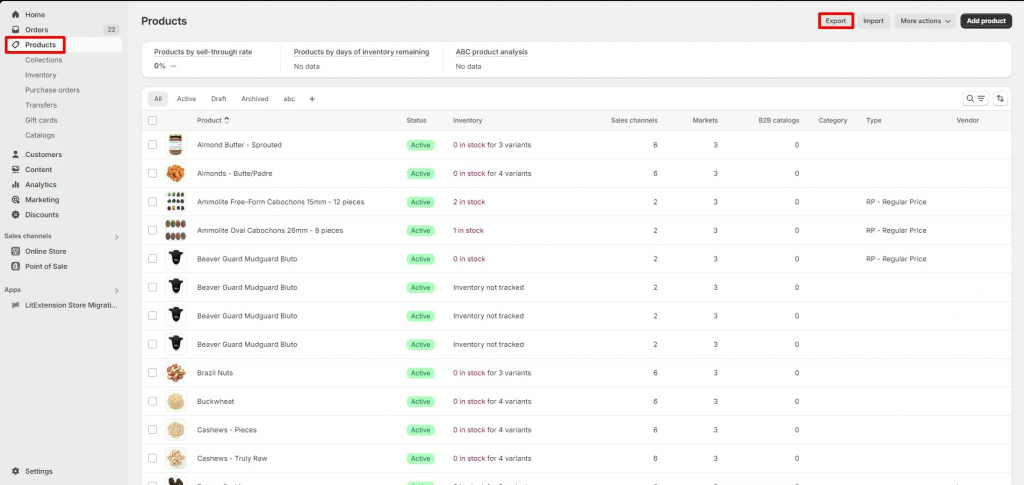
- From your Shopify dashboard, go to “Products” > “Export”.
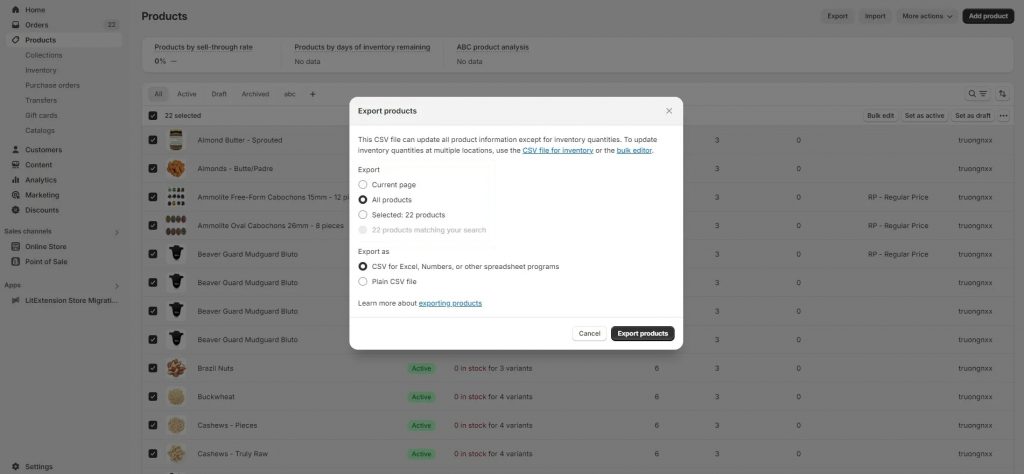
- In the pop-up window, tick the “All products” and “CSV for Excel, Numbers, or other spreadsheet program” options. Then, click the “Export products” button to start the process.
- Now, access the email that is associated with your Shopify store. The download link for your exported Shopify products will be shown there.
Please repeat these steps to export your customers and orders data. Unfortunately, since Shopify doesn’t support exporting everything in a single click, you’ll need to manage each dataset individually.
Step 2. Format your data to match BigCommerce requirements
Before the actual Shopify to BigCommerce migration, you’ll need to configure your exported data to make it compatible with the new platform’s system. This will ensure a smooth importing process later on.
- First, download a sample BigCommerce CSV file for reference.
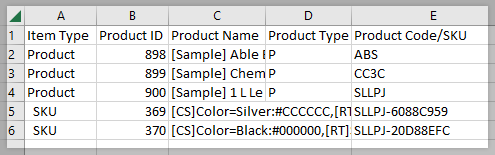
- Then, map the data from your Shopify CSV file to match the BigCommerce CSV file. In this step, feel free to remove any column that you don’t want to add to your new store.
- When everything is adjusted, double-check your file to prevent failed imports.
Step 3. Import your data into BigCommerce
Once your CSV files are formatted, you can begin the import from Shopify to BigCommerce.
- Go to the BigCommerce admin panel and navigate to “Products” => “Import”.
- After that, upload your CSV files and map the fields accordingly.
- Finally, start the import and wait for confirmation.
Step 4. Test your BigCommerce store
Now that your data is successfully imported, it’s important to check every part of your store before launching to ensure it works properly with no data loss.
What May Require Extra Review During Shopify to BigCommerce Migration?
Some Shopify data and store settings may require extra review before being transferred to BigCommerce. Standard store data such as products, customers, orders, coupons, pages, blogs, and images can usually be planned within the migration scope, but some Shopify-specific elements do not move in the same way as regular data.
Areas that may need extra review include:
- Shopify themes and frontend layouts: Which usually need to be rebuilt or redesigned on BigCommerce.
- Checkout customizations: Because Shopify and BigCommerce handle checkout settings differently.
- Shopify apps and app-generated data: Especially reviews, subscriptions, bundles, loyalty data, product options, or custom workflows.
- Metafields and custom fields: Which may need mapping to BigCommerce custom fields, metafields, apps, or custom development.
- Customer passwords and payment details: These usually cannot be transferred directly because of platform security rules.
- SEO URLs, redirects, internal links, metadata, and tracking scripts: These should be checked before launch to reduce broken links and reporting issues.
Reviewing these items before the full migration helps clarify what can be transferred, what should be recreated in BigCommerce, and what may require custom handling.
What Data Can Be Migrated From Shopify to BigCommerce


-
Products
- Title, Description
- Handle
- Media
- Price / Compare-at Price, Price, Cost
- Collections, SKU
- Quantity, Track quantity
- Vendor
- Weight
- Metafields
- Page Title, Meta Description
- Variants
Product Categories
- Title, Description
- Handle
- Image
- SEO description, SEO title
-
Customers
- Customer name
- Phone number
- Address: (Street Address, Suburb, Zip Code, City, State, Country, First Name, Last Name).
Customer Address
- First name, Last name
- Company, Address
- City, Postcode, Country, State
- Phone
-
- Order number, Order date
- Payment status
- Customer
- Tax
- Discount
- Subtotal
- Paid
- Line item (product name, SKU, price)
-
- Title
- Discount code, Discount type
- End date
- Customer eligibility
- Discount Value
- Minimum purchase amount
-
- Title
- Handle
- Content
- Page Title
- Meta Description
-
- Title
- Handle
- Content
- Author
- Featured image
- Visibility
- Tags
- Meta description
(*) If you cannot find the data you want to migrate to BigCommerce, please get in touch with us.


Leave The Work For The Experts
If you’re non-tech, let our BigCommerce migration experts handle your migration from A to Z.
Save your time for more important tasks.









How Your Data Is Secured During Migration?

Server Security

Data Security

Data Access Restriction

GDPR Compliance

NDA

Payment Security
Why choose Shopify to BigCommerce Migration Services


Who We Truly Are? Let Our Customer Define!

I hired LitExtension to help me migrate to BigCommerce from Shopify. I’ve had their help once before when I was migrating from one Shopify account to another. Service and communication was perfect and they helped me with some additional customizations so that my Bigcommerce store could work smoothly with the plugins we needed. The team and Andy Dang were amazing! Servid, expertise and speed was on point. If I ever need to migrate my store again (God I wish not!) I will go straight to Litextension!
We have been working with LitExtension for about three weeks now on migrating our 3 websites from Shopify over to BigCommerce. The experience has been nothing but positive. Working directly with Jay the entire time has been a pleasure. He is very responsive and has been able to answer any question I throw at him. We switched from another migrating platform to this company and don’t regret it at all. If you are looking to migrate your website then no need to shop anywhere else. LitExtension is the only option you need to get it done, and get it done properly.
I’ve used LitExtension for my migration from Shopify to BigCommerce. Customer service prior to purchase was great, migration was really quick and well done. Andy, the assigned agent, is very professional and efficient, helped a lot with some changes and migration updates. Highly recommend!