osCommerce to Shopify Migration

Based on 3,000+ reviews on:  

LitExtension provides a secure, expert-managed osCommerce to Shopify migration that easily transfers all your important store data. This process transfers your products, customers, orders, and blogs to your new platform, validated through a Demo Migration before the Full Migration.

With over 15 years of industry experience and more than 300,000 successful migrations across 140+ platform types, we can help you overcome any challenge in data migration process.

 | LitExtension is an Official Shopify Partner

How to Perform osCommerce to Shopify Migration

Setup Carts

1. Connect Your osCommerce and Shopify Stores

Select osCommerce as your Source Cart and Shopify as your Target Cart, then enter your store URL and follow the setup instructions to link both platforms.

Select Entites

2. Select Data and Migration Options

Choose the products, categories, orders, customers, and other supported data you want to migrate, then select the Migration Options needed for your Shopify setup.

Full Migration

3. Run Demo and Full Migration

Run a free Demo Migration to review sample results. After validation, start the Full Migration to transfer the selected osCommerce data to Shopify.

Step-by-Step Guide: Migrating from osCommerce to Shopify

Follow these steps to easily move your store from osCommerce to Shopify using the LitExtension tool:

  • Go to the LitExtension app.
  • Sign up with your email, or use Google to log in fast.
  • If you already have an account, just enter your email and password.

Check the “Remember Me” box to log in faster next time. This helps you track your progress and get quick support.

Watch our video tutorial to see exactly how it works:

Step 1: Connect Your Source Cart and Target Cart

First, connect LitExtension to both osCommerce and Shopify so it can move your data.

On the Migration Page, click Create New Migration.

1.1. Set Up Your Source Cart (osCommerce)
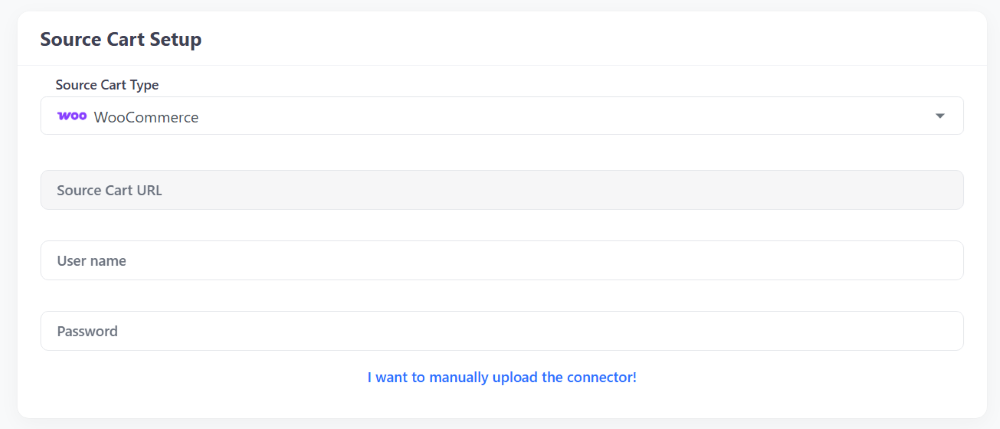
Source Cart Setup

Choose osCommerce from the drop-down menu and enter your store’s web address (URL).

You will see instructions based on your choice. You can connect your store in three ways:

1.2. Set Up Your Target Cart (Shopify)
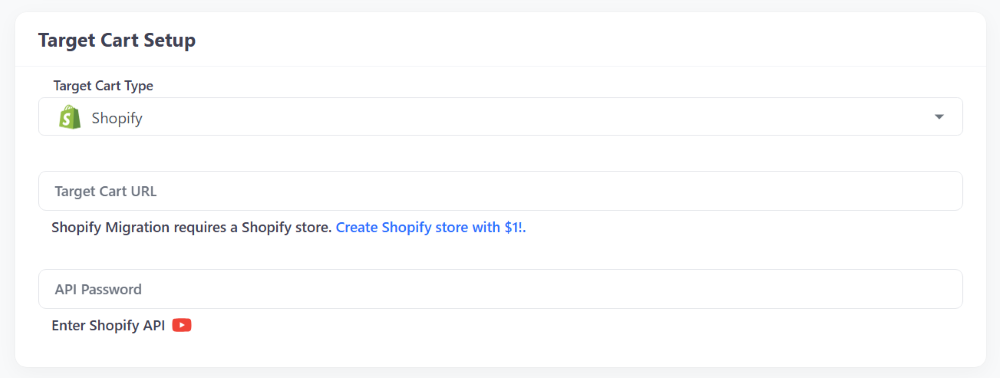
Target Cart Setup

Choose Shopify from the drop-down menu and type in your Shopify URL.

Follow the same steps you used above to connect Shopify using a Connector, API, or CSV file.

Step 2: Choose What to Move from osCommerce to Shopify

Now, pick the exact data you want to copy over. You can also pick extra settings to boost your new store’s SEO and setup.

Select Data to Migrate
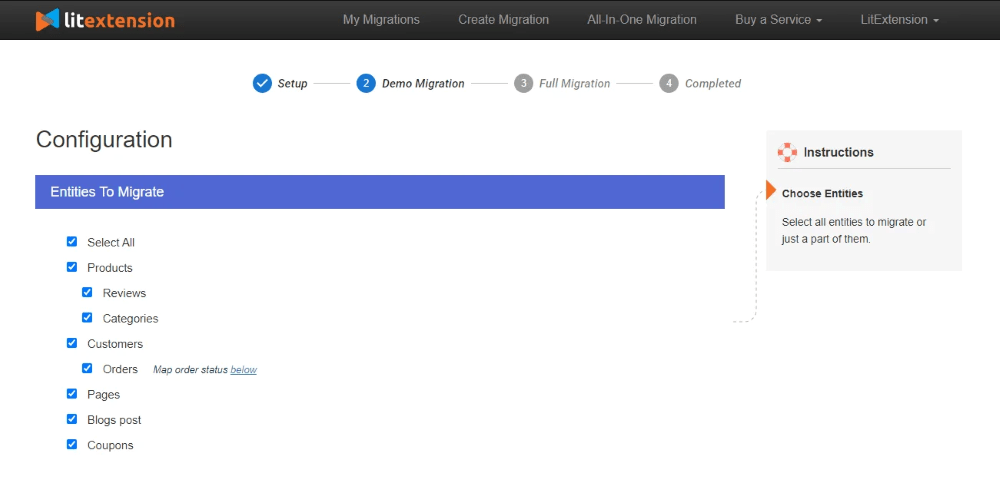
Entities Selection Page

Choose what you want to move. For an osCommerce to Shopify move, you can select:

  • Products
  • Product Categories
  • Customers
  • Orders
  • Coupons
  • Blog Posts

You can also just click Select All to move everything.

If you need to move something not on this list, please contact LitExtension experts for help.

Select the Additional Options

Check out the Additional Options to customize your move. Popular choices include:

  • Clear data on Shopify before moving: Deletes old data on your new store to prevent duplicates.
  • Keep old IDs for products, customers, and orders: Keeps your data numbers the same so everything stays linked and easy to manage.
  • Create 301 Redirects: Automatically sends visitors from your old store links to your new Shopify links so you don’t lose traffic.
  • Remove HTML tags: Cleans up messy code in your product and category names.
  • Turn osCommerce Categories into Shopify Collections: Shopify uses Collections instead of categories. This option converts them for you automatically.

Got questions? Ask our live chat support for free advice.

Step 3: Start Full Migration

Once you’ve picked your data and settings, you’re ready to go.

We suggest running a Demo Migration first to see how it works. Read our demo guide to learn more.

If you want to skip the demo, check Skip Demo Migration and click Start Full Migration.
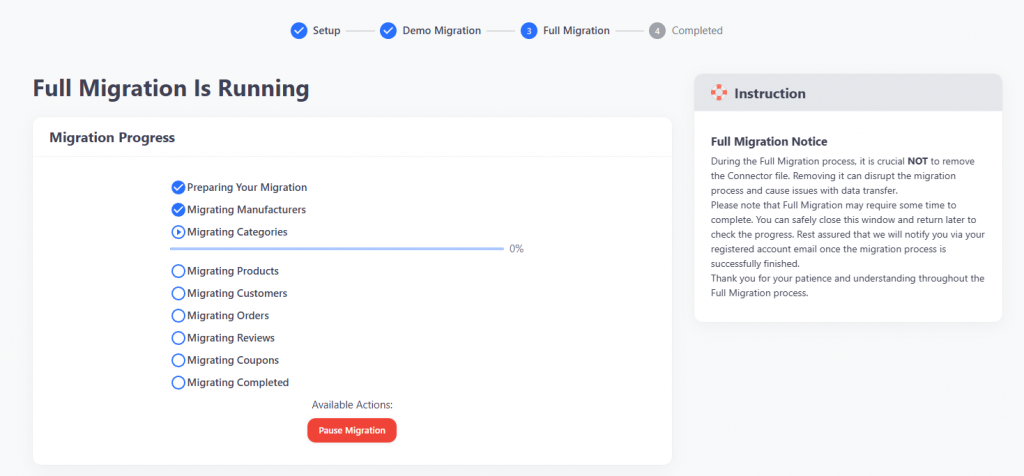
Full Migration

The move takes a little time depending on how much data you have. Because LitExtension runs in the cloud, you can close your browser or turn off your computer while it works. You can check your progress anytime on the migration page.

You will need to pay before the full move starts. We accept many payment methods, like PayPal, Bank Transfers, and Crypto.

After the Move: osCommerce to Shopify Checklist

When you see “Full Migration Is Completed”, it’s time to check your new store.

  • Check Product Visibility: Most items will show up right away. Out-of-stock items are hidden by default. Search your store to find them.
  • Look at Product Details: Make sure descriptions, images, options (variants), and SEO tags look right.
  • Check Your Setup: Remember, Shopify uses Collections and Tags. Your osCommerce categories should now be Shopify Collections.
  • Check the Back-End: Log into Shopify and make sure your customer list and old orders are there.

Read our full Post Migration Checklist for more details.

Ready to Migrate from osCommerce to Shopify?

Join 200,000+ businesses that have migrated with LitExtension. Start a Free Demo Migration to preview how your osCommerce products, customers, orders, and URLs will be transferred to Shopify before running the full migration.

What Data Can Be Migrated from osCommerce to Shopify

Use the tabs below to see which osCommerce data fields we can migrate to Shopify.
  • Products

    • Name, SKU, Short Description, Description, Status,
    • Manufacturer, Weight.
    • Price, Special Price.
    • Manage Stock, Quantity.
    • Meta Title, Meta Description.
    • Options, Option Value.
    • Thumbnail Image, Additional Images.

    Products Categories

    • Name.
    • Image.
    • First Name, Last Name, Email.
    • Newsletter.
    • Billing Address: First Name, Last Name, Company, Address 1, Address 2, Country, State, City, Zip Code. Telephone.
    • Shipping Address: First Name, Last Name, Company, Address 1, Address 2, Country, State, City, Zip Code, Telephone.
    • Order ID, Order Date, Order Status.
    • Customer Name, Email.
    • Billing Address. Shipping Address.
    • Order Items.
    • Sub Price, Tax Price, Shipping Price, Total Price.
    • Order Comments.
    • Name, Image.
    • Coupon Code.
    • Discount Amount/Percent.
    • Created Date, Status, Rate.
    • User Name.
    • Reviews Text.
    • Title, Description.
    • URL.
    • Image.
    • Categories.
    • Title, Created Date, Content.
    • Products (Name, Description, Option).
    • Categories (Name).

(*) Please note that the data listed above may vary depending on your Source Store.

Additional Options

LitExtension offers Additional Migration Options to simplify complex tasks and ensure a smoother, more accurate store migration.

Create 301 Redirects to Your Shopify Store

Automatically maps every osCommerce URL to its matching page on Shopify, so bookmarked links and search rankings survive the move to your new store.

Preserve Order IDs on Your Shopify Store
Carries over your original osCommerce order numbers exactly as they were, keeping your records and internal tracking consistent once everything lands on Shopify.
Strip HTML Tags from Category & Product Names
Automatically cleans out any leftover HTML markup in your osCommerce category or product titles before it reaches your Shopify store, so names display cleanly.
Clear Data on Your Shopify Store Before Migration
Wipes out sample or placeholder data already sitting in your Shopify store for the entities you’re migrating, so nothing from osCommerce collides or duplicates with what’s already there.
Migrate Images in Product, Category, & Blog Post Descriptions
Brings over images tucked inside your osCommerce product, category, or blog descriptions, not just the standalone gallery images, so your Shopify content looks exactly as it did before.
Migrate Categories to Shopify Smart Collections
Automatically add relevant product tags during migration to Shopify, allowing subcategories to be displayed similarly to those on your osCommerce store.

Migration Pricing

The cost of migration from to depends on how many entities you have on your store. The Pricing Estimator will help you to get how much does it cost. The pricing is billed in USD.
Number Of Products

Number Of Orders
Number Of Customers
Number Of Blog Posts

Total Entities:

  • Products;
  • Orders;
  • Customers;
  • Blog Posts

Automated Migration (Self-service)

Quick & affordable with easy 3-step approach.
price

OR

All-in-One Migration Service

Migration done by our migration experts.
price

Choose Your Migration Plan

Compare features and support levels to find the migration service that fits your timeline, budget, and needs.

Automated Migration

$0

All-in-One Migration Service

$0
FREE Demo Migration Unlimited FREE Demo Migration Unlimited FREE Demo Migration
Migration Process 3-step migration tool with easy-to-follow wizard guide Expert-managed migration with Personal Assistant & QA testing
Additional Options

FREE up to 6 Additional Options
(Save $50–$150)

FREE all Additional Options
Migration Testing Done by yourself Done by LitExtension experts
Technical Support 60-day technical support (after Full Migration is completed) Upto 60-day technical support (after Full migration is completed)
Post-migration Support

Free & Unlimited Recent Migration

Free & Unlimited Smart Update

Free & Unlimited Re-migration

Free & Unlimited Recent Migration

Free & Unlimited Smart Update

Free 02 Re-migration

Receive Support Request 24/7 24/7
Support Channels Ticket Ticket, Slack/WhatsApp
Money-back guarantee 30-day money-back guarantee 30-day money-back guarantee
Response Time Commitment 24 hours 24 hours

Popular Questions About osCommerce to Shopify Migration

Not seeing your question listed here? Contact Us for the quickest answer.
Will I lose my SEO rankings when migrating from osCommerce to Shopify?

If handled correctly, using the “Create 301 Redirects” Additional Option, you can maintain your search rankings. The most critical step is setting up 301 redirects from your old osCommerce URLs to your new Shopify URLs to preserve link equity, along with accurately mapping meta titles, meta descriptions, and image alt text.

Can customer passwords be migrated from osCommerce to Shopify?

No. Because Shopify uses its own proprietary, strict password encryption protocols, passwords can’t be directly transferred from osCommerce. Customers typically need to be invited to reactivate their accounts and create a new password on their first login to the new Shopify store.

Will my osCommerce store go offline during the migration?

No, your osCommerce store won’t experience downtime. Data extraction and migration happen in the background, so your old store stays fully live and operational, letting you keep processing sales while the new Shopify environment is being populated.

How long does an osCommerce to Shopify migration take?

It depends entirely on the size of your database. A small store with a few hundred products can finish in just a few hours. Larger stores with tens of thousands of products, customers, and years of order history can take a few days to a couple of weeks, including pre-migration setup and post-migration testing.

Is there a free option for migrating a small osCommerce store?

Yes. Stores with fewer than 100 products, customers, and orders combined qualify for a complete migration at no cost.

What if my osCommerce store is down or has server issues?

LitExtension offers three connection methods for osCommerce: installing a Connector file, using API keys, or uploading CSV files directly, the CSV option specifically covers cases where your server is inaccessible or experiencing issues.

Are osCommerce discount amounts included in coupon migration?

Yes. LitExtension migrates the coupon code along with its discount amount or percentage from osCommerce to Shopify, so your active promotions carry the correct value after the switch.

How are osCommerce product options handled on Shopify?

LitExtension maps your osCommerce product options and option values into Shopify’s variant structure, so choices like size or color continue to work correctly on your new store.

Leave The Work For The Experts

If you’re non-tech, let our Shopify migration experts handle your migration from A to Z.
Save your time for more important tasks.

How Your Data Is Secured During Migration?

We at LitExtension prioritize data security and have a set of practices, technologies and policies in place to ensure the highest level of security for your data. Check out our Data Security Policy.
Server Security

Server Security

All migration jobs will be carried out on Linode servers located in the USA, Euro, Australia, Singapore,…
Server Security

Data Security

The data is protected by HTTPS secure protocol and 128-bit SSL encryption. Nothing is stored on LitExtension’s servers.
Server Security

Data Access Restriction

Only authorized LitExtension experts can access the source code to handle custom migration requests.
Server Security

GDPR Compliance

LitExtension is compliant with GDPR regulations, a global data protection law passed by the European Union.
Server Security

NDA

We do not keep your credentials or import records after the migration. Your data is guaranteed not to be disclosed or used for any other purposes rather than the migration.
Server Security

Payment Security

Your payment is processed by Paypal – the #1 worldwide payment gateway. Hence, LitExtension does not store any payment data.

Why choose osCommerce to Shopify Migration Services

3-Step Simplicity
3-Step Simplicity
Migrate from osCommerce to Shopify in just 3 simple steps, no coding required.
24/7 Expert Support
24/7 Expert Support

Get all your questions answered, even on holidays, with our dedicated support team.

Selling While Migrating
Keep taking orders on osCommerce as usual, the migration doesn’t interrupt your live store’s operation.
Data Quality Assurance
Check the results through a Demo Migration first, confirming accuracy before we run the Full Migration.
FREE 60-Day Updates
FREE 60-Day Updates

Keep your data up-to-date with free Re-migrations, Smart Updates, and Recent Migrations within 60 days after your Full Migration completes.

Risk-Free Experience

We stand behind our service 100%. Our 30-day money-back guarantee applies when a qualifying technical issue can’t be resolved under our policy, contact our team for details.

Testimonials: Our Success Stories

“If you’re looking for a team to handle your migration between e-commerce platforms, I would highly recommend LitExtension. Steve and his team were fantastic”
Mr. YouKay

Who We Truly Are? Let Our Customer Define!

Luca
Italy
We decided to migrate from obsolete OsCommerce to Shopify, but after 1.5 years of struggling with outdated procedures and issues like missing photos and inconsistent fields, we discovered LitExtension. Their team understood our needs, handled everything efficiently, and promptly made any necessary corrections. In just two weeks, we were almost ready to launch our new Shopify store. Wonderful service – thank you so much!
Grace Fisher
Australia
I was looking for a migration service that could handle my OsCommerce to Shopify store, and LitExtension delivered. They migrated everything perfectly, including my custom product variations and unique shipping settings. I’m incredibly impressed with their service!
Merel Vos
Netherlands
The migration from OsCommerce to Shopify was a huge success thanks to LitExtension! They migrated everything flawlessly, including my custom product variations and unique shipping settings. I’m very happy with the service.

    Case Studies

    WooCommerce to Shopify

    We’ve successfully migrated
    300+ Products
    63,000+ Customers
    129,000+ Orders

    WooCommerce to Shopify Plus

    We’ve successfully migrated
    70+ Products
    35,000+ Customers
    85,000+ Orders

    Volusion to Shopify

    We’ve successfully migrated
    700+ Products
    20,000+ Customers
    61,000+ Orders
    Start a Free Trial and Enjoy 3 Months of Shopify for $1. Try Now ➜
    Hello there
    Create Shopify Store for $1/month! Try Now ➜