Magento to WooCommerce Migration
Move your Magento 1 or Magento 2 store data to WooCommerce with LitExtension. Transfer products, categories, customer accounts, order history, reviews, and other supported records while your Magento store remains open for business.
Choose Automated Migration to run the transfer yourself, or All-in-One Migration for expert setup, data migration, and validation. You can also migrate products without transferring customers or orders.
Start with a Free Demo to check how your selected data appears in WooCommerce before proceeding with the Full Migration.
(*) Not sure whether to switch? See if WooCommerce fits your store →
Based on 3,000+ reviews on:
Serchen
Should You Migrate from Magento to WooCommerce?
Moving from Magento to WooCommerce may be worth considering when the resources required to maintain Magento no longer match your store’s operational needs. WooCommerce is not automatically the better platform for every business, but it can be a more practical choice in the following situations:
- You want to reduce technical complexity. Magento provides extensive commerce capabilities, but maintaining, updating, and customizing the platform can require substantial development and server resources. WooCommerce may be easier to manage for teams already familiar with WordPress.
- You need tighter integration between content and commerce. Because WooCommerce runs on WordPress, product pages, landing pages, blog content, and other marketing assets can be managed within the same content management system.
- You want to build your store around the WordPress and WooCommerce ecosystem. WooCommerce provides access to a broad ecosystem of extensions, WordPress plugins, themes, and developers. This can make it easier to find suitable solutions for common payment, shipping, marketing, and store management requirements.
- Your current Magento setup is more complex than your business requires. Stores that do not rely on Magento-specific enterprise, B2B, multi-store, or highly customized functionality may find WooCommerce more closely aligned with their day-to-day operations and budget.
Before making the decision, compare the functionality you currently use in Magento with the WooCommerce extensions, custom development, and hosting resources required to replace it.
How to Migrate from Magento to WooCommerce
With Automated Migration, you can move supported Magento data to WooCommerce in three steps: connect your stores, select your data, and run the migration. Start with a Free Demo to check the results. For expert-managed setup, migration, and validation, choose our All-in-One Migration Service.

#1: Connect Magento and WooCommerce
Select Magento as the Source Cart and WooCommerce as the Target Cart. Enter the required store details and follow the connection instructions displayed on the migration setup screen.

#2: Select the Data to Migrate
Choose the Magento entities you want to transfer, review the available migration options, and configure language, order status, and other supported mappings where applicable.

#3: Run and Review the Migration
Start a Free Demo or proceed with the Full Migration. The process runs in the background, so you do not need to keep your browser open. Review the migrated data on WooCommerce once the transfer is complete.
How to Migrate from Magento to WooCommerce with LitExtension: Full Walkthrough
This walkthrough explains how to connect your Magento and WooCommerce stores, select the data and migration options, run a Free Demo, and complete the Full Migration with LitExtension.
Pre-Migration: Sign up and get started
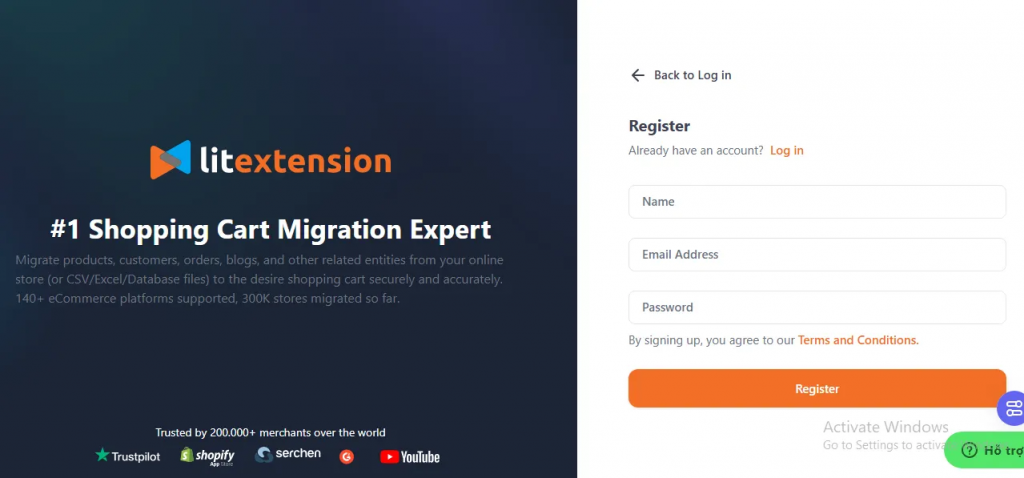
Create a LitExtension account or sign in to your existing account. You can also continue with Google for faster access.
Step 1. Connect your Magento and WooCommerce stores
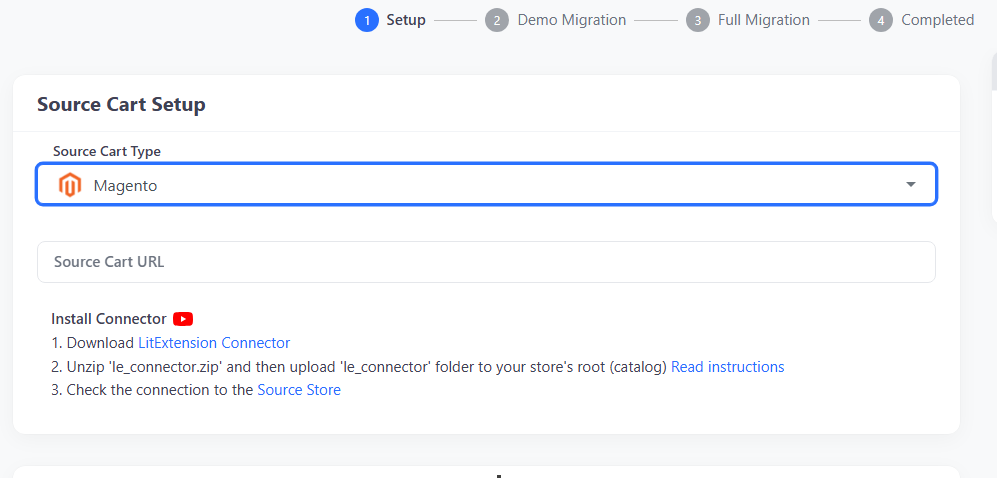
Once logged in, go to Migration and select Create New Migration. Choose Magento as the Source Cart and enter your Magento store URL.
Download the LitExtension Connector from the migration setup page, extract the package, and upload the le_connector folder to the root directory of your Magento store. Wait for the connection confirmation before continuing. Magento Cloud and other restricted environments may require a different deployment method, so follow the corresponding setup guide or contact LitExtension if direct upload is unavailable.
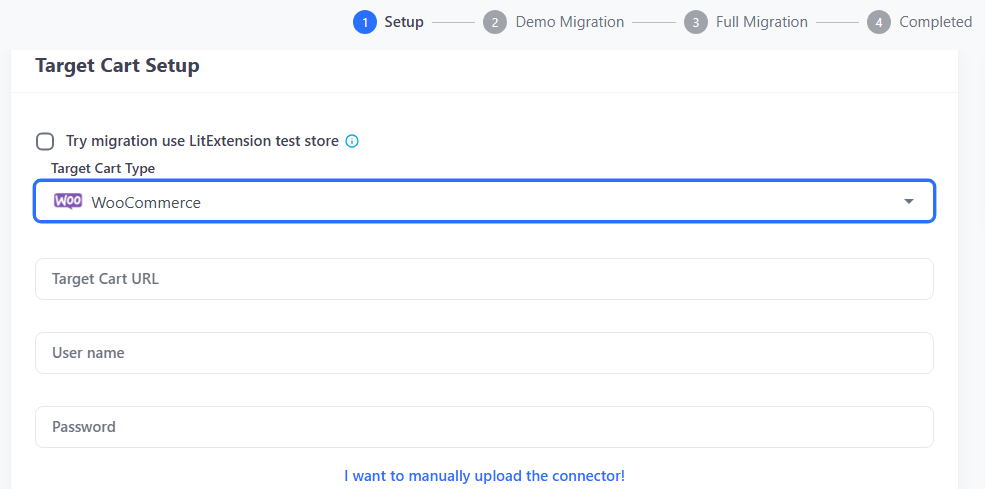
Next, select WooCommerce as the Target Cart and enter your WooCommerce store URL. Upload the le_connector folder to the WordPress root directory—the same directory that contains wp-admin, wp-content, and wp-includes. Confirm that LitExtension can connect to both stores, then continue to the migration configuration.
Step 2. Select the data to migrate
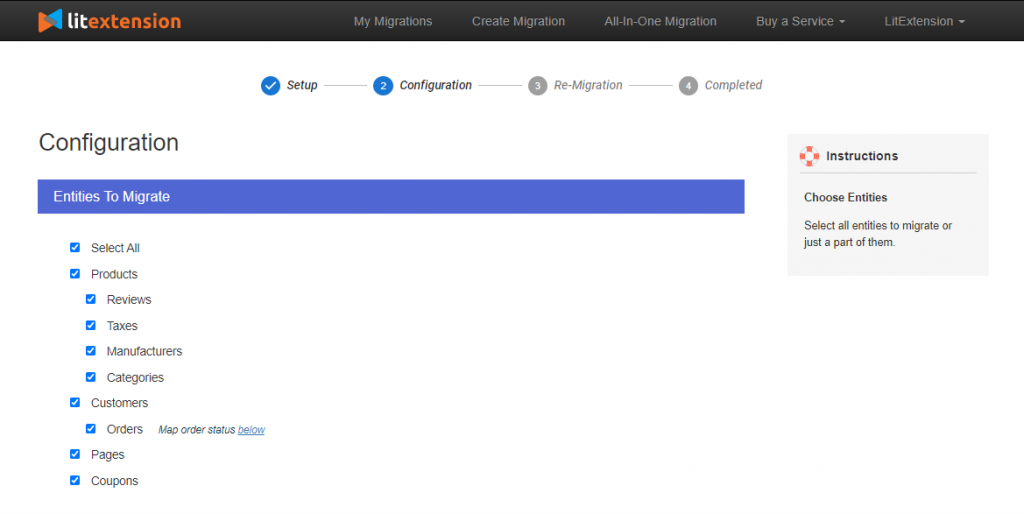
Choose the Magento entities you want to move, such as products, categories, customers, orders, reviews, coupons, and CMS pages. Use Select All for all supported entities, or select only those required for your migration. To migrate products from Magento to WooCommerce without customers or orders, select Products and the related entities you need. Review the supported scope for categories, images, attributes, variations, and product relationships so your catalog can be checked as a connected set of data.
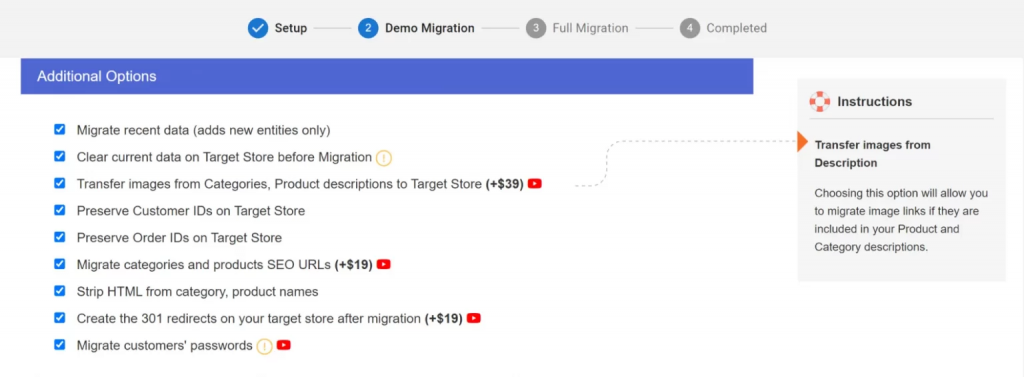
Next, select your Additional Options and configure the available mappings. If WooCommerce already contains data you want to keep, leave Clear Existing Data unselected and ask LitExtension to assess potential conflicts before proceeding. Review any custom fields or extension-generated data with our team to confirm the required mapping and quotation.
Step 3. Run the migration
Run a Free Demo Migration to transfer a small sample of supported Magento data to WooCommerce at no cost. Review how representative products, categories, customers, orders, images, attributes, and other selected data appear on the target store before proceeding with the Full Migration.
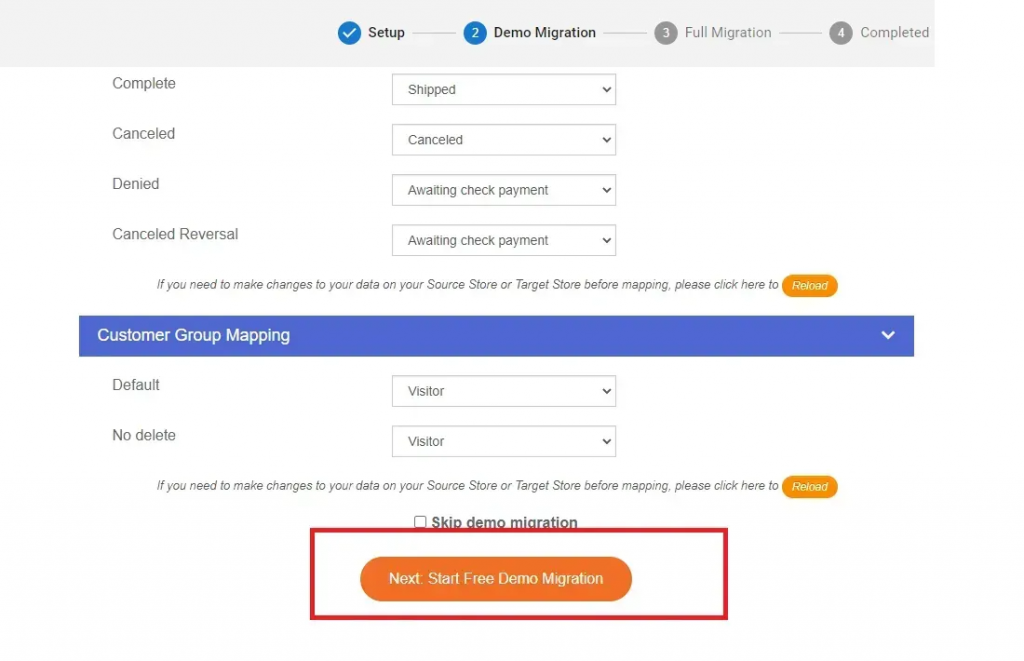
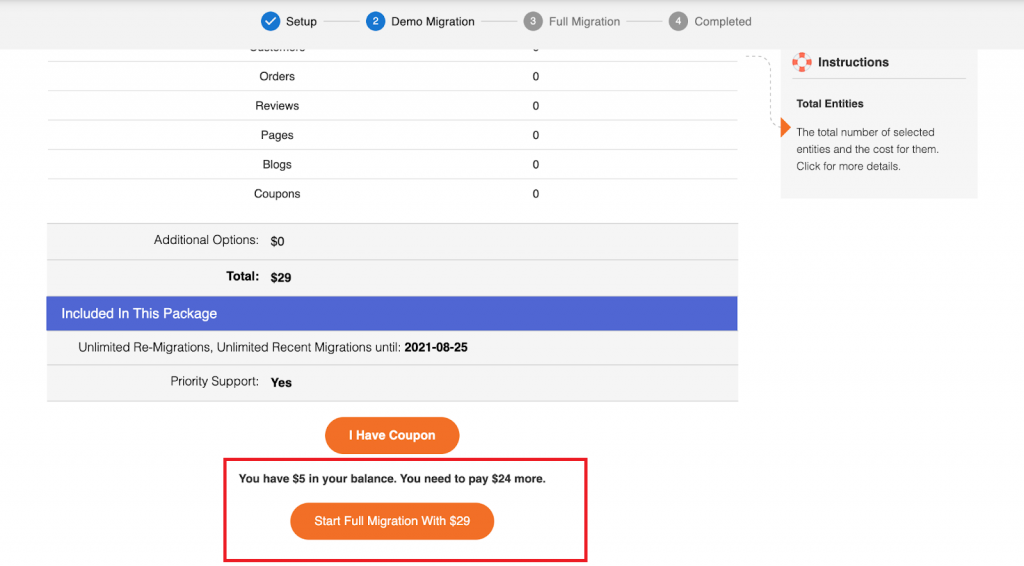
If the results meet your requirements, return to your LitExtension account and start the Full Migration. The migration runs in the background, so you do not need to keep your browser open. LitExtension will notify you by email when the process is complete.
Post-Migration Services and Support
After your Automated Full Migration is completed, you receive 60 days of technical support. If your Magento store continues receiving orders or product updates, use the appropriate post-migration service to prepare your WooCommerce data for launch:
- Recent Data Migration: Transfer supported products, customers, and orders added since the initial migration. Free use is subject to the applicable service period and a new-data allowance of up to 5% of your initial migration package.
- Smart Update: Update supported fields of products already migrated to WooCommerce. Confirm which product changes your migration can synchronize before running the update.
- Re-migration: Repeat the migration for the same project when a fresh transfer is needed. Automated Migration includes free, unlimited re-migrations within the applicable service period.
Before launching WooCommerce, review new records and product changes with LitExtension to choose the appropriate service and confirm the final data checks.
See how LitExtension handled a real Magento to WooCommerce migration project, including historical business data, 301 redirects, preserved order IDs, HTML cleanup, and two rounds of QA testing.
Magento to WooCommerce Post-Migration Checklist
Before launching WooCommerce, check the migrated data against your agreed scope and test the store functions your customers will use.
- Reconcile your data: Compare entity counts and investigate unexpected differences. Check that products retain their category assignments, reviews remain linked to the correct products, and orders are associated with the appropriate customers.
- Review your catalog: Test representative product types, including supported configurable, grouped, and downloadable products. Check attributes, variations, prices, stock, images, and any agreed custom mappings in both the admin and storefront.
- Check customer accounts and orders: Test customer login using the agreed password-migration or reset method. Review addresses, order history, statuses, line items, discounts, taxes, and totals.
- Validate SEO continuity: Test important Magento URLs against their WooCommerce destinations. Check redirects, metadata, canonical tags, internal links, and the sitemap, including any custom URLs requiring separate handling.
- Test store functionality: Place test orders and check payment, shipping, tax, coupon, and email behavior. Your website team should also validate replacement plugins and integrations separately from the data transfer.
- Complete the final data update: Transfer eligible new records or supported product changes using the appropriate post-migration service. Recheck the affected data after this final update.
- Confirm launch readiness: Agree on data acceptance with your team before the website team completes the domain switch and launch. Retain Magento access and backups until the new store has been reviewed.
Contact LitExtension about missing, duplicated, or incorrectly mapped records before making extensive manual changes to the migrated data.
Run a Free Demo to preview how selected Magento data and migration options work with your WooCommerce store.
What Data Can Be Migrated From Magento to WooCommerce
Review the standard data fields LitExtension can transfer and how your Magento data is mapped to the corresponding WooCommerce structure.
-
Products
- Name, SKU, Short Description, Full Description, Status.
- Manufacturer.
- Tax Class.
- Price, Special Price.
- Quantity, Manage Stock.
- Meta Title, Meta Description.
- Weight, Width, Height, Depth.
- Product Tags.
- Up-sells, Cross-sells.
- Attributes: Name, Values.
- Downloadable Products: Files, Max Downloads, Expiration Date.
- Grouped Products: Associated Products.
- Variants: Name, SKU, Weight, Quantity, Manage Stock, Image, Price, Special Price.
- Thumbnail Image, Additional Images.
Product Categories
- Name, Description.
- Sort Order.
- Image.
- Meta Title, Meta Description.
-
- First Name, Last Name, Email.
- Billing Address: First Name, Last Name, Company, Address 1, Address 2, Country, State, City, Zip Code, Telephone.
- Shipping Address: First Name, Last Name, Company, Address 1, Address 2, Country, State, City, Zip Code, Telephone.
-
- Order ID.
- Order Date.
- Order Status.
- Order Items (Name, SKU, Option), Product Price, Quantity.
- Sub Price, Discount Price, Tax Price, Shipping Price, Total Price.
- Order Comments.
- Customer Name, Email.
- Billing Address (First Name, Last Name, Company, Address 1, Address 2, Country, State, City, Zip Code, Telephone).
- Shipping Address (First Name , Last Name, Company, Address 1, Address 2, Country, State, City, Zip Code, Telephone)
-
- Name.
- Image.
-
- Tax Class (Name).
- Tax rate (Country, Rate).
-
- Name.
- Description.
- Coupon Code.
- Coupon Date.
- Customer Groups.
- Uses Per Coupon, Uses Per Customer.
- Discount Amount/Percent.
- Coupon from date, Coupon to date.
-
- Created Date.
- Status.
- Rate.
- User Name, User Email.
- Comment.
-
- Title.
- Created Date.
- Description.
- Categories.
- Thumbnail Image.
-
- Title.
- Created Date.
- Description.
- Categories.
- Thumbnail Image.
-
- Products (Name, Description, Attribute)
- Categories (Name, Description)
- CMS Page (Name, Description)
- Blogs (Name, Description)
(*) The supported data may vary depending on your Magento version, store configuration, installed extensions, custom fields, and WooCommerce setup. Contact us if your store contains custom or extension-generated data. View mapping requirements →
Magento to WooCommerce Mapping Requirements
Some Magento data needs a different structure or additional plugins on WooCommerce. Review the following mapping requirements when preparing your target store.
Configurable Products and Variations
Magento configurable products become WooCommerce variable products, with supported child products represented as variations under their parent product. Attributes such as size or color define the available variations; descriptive attributes do not automatically become variation choices.
In LitExtension’s standard migration flow, products with more than 1,000 possible attribute combinations are transferred without their related variants and options. Review these products with LitExtension before Full Migration to determine suitable handling.
Product Options and Add-Ons
LitExtension normally converts supported product options into variations. To retain selectable options instead, install and activate the paid WooCommerce Product Add-Ons extension before migration.
Add-ons do not behave like separate variations and do not retain individual variation-level SKUs, stock quantities, or images. The suitable approach depends on whether each product choice needs its own inventory and other individual data.
Customer Groups and User Roles
Magento customer groups are not automatically recreated or assigned in WooCommerce during standard migration. To retain customer segmentation, prepare corresponding WordPress user roles and assign customers after migration, or ask LitExtension to assess a customized solution.
Group-based prices, discounts, and permissions require separate review; transferring customer accounts does not automatically reproduce these rules.
Customer Passwords and Login Compatibility
For supported Magento password formats, LitExtension can help customers retain their existing login passwords on WooCommerce. The free LitExtension Customer Password Migration plugin may be required on your WooCommerce target store.
Custom password settings or authentication extensions need a compatibility check before migration. Test customer login during the Demo and prepare a password-reset process if the source format is unsupported.
SEO Metadata and Plugin Compatibility
WooCommerce requires a compatible SEO plugin to receive supported product and category meta titles and descriptions. Install your chosen plugin before migration and provide its name to LitExtension so compatibility and destination fields can be checked.
Existing metadata in a custom Magento field or an extension-specific structure may require additional mapping rather than following the standard transfer.
Store Views and Multilingual Setup
For supported multilingual migration through WPML, install and configure the required WPML modules and all destination languages before migration. Translated products and categories appear as language-specific versions in WooCommerce.
Content in languages not configured in WPML will not be transferred through this setup. Magento store views can also differ in ways beyond language, so their content and settings need to be reviewed before deciding how they map to the target store.
Additional Options
Choose the Additional Options you need during migration setup. Included options vary by plan; custom requirements may need a separate quote.
Direct supported Magento URLs to their corresponding WooCommerce pages to reduce broken links and preserve SEO signals. Review custom URLs with LitExtension before migration and test important redirects before launch.
Keep your original Magento order numbers on migrated WooCommerce orders using a supported order-number plugin. Install the plugin before migration and review existing order numbers on the target store to identify potential conflicts.
Remove unwanted HTML tags from product and category names during the data transfer.
Remove existing WooCommerce data associated with the selected entities before importing data from Magento. Use this option only when the target data is no longer needed.
Transfer supported images embedded in product, category, and blog descriptions instead of leaving them connected to the Magento store.
(*) Planning your migration? Review the Magento to WooCommerce preparation checklist →
What to Prepare Before Migrating from Magento to WooCommerce
Before starting your Magento to WooCommerce migration, prepare both stores and identify the data and functionality your business needs to retain. This helps separate the standard data transfer from requirements that need additional configuration, replacement plugins, or custom migration work.
1. Prepare Your Magento Source Store
- Back up your store. Create a current backup of the Magento database and store files, including product media. Keep the backup available throughout migration and launch preparation.
- Confirm access. Make sure you can access the Magento admin and the hosting environment needed to deploy the LitExtension Connector. If your store runs on Magento Cloud or another restricted environment, confirm the appropriate deployment method before starting.
- Document your setup. Record whether your store uses Magento 1, Magento 2, Magento Open Source, or Adobe Commerce. Include store views, languages, product types, custom attributes, active extensions, and connected systems such as ERP, CRM, or inventory management.
- Define what to keep. Identify the products, customers, orders, and other records you want to transfer. Review test records, duplicate entries, and outdated content before deciding what to exclude; avoid deleting source data simply to prepare for migration.
2. Prepare Your WooCommerce Target Store
- Set up the destination. Install WordPress and WooCommerce on an accessible staging or target website. Confirm that the required store connection can be established before scheduling the migration.
- Prepare mapping requirements. Configure destination languages and install the compatible plugins required for your agreed migration scope. Depending on your setup, these may support multilingual content, SEO metadata, product add-ons, customer passwords, or preserved order numbers.
- Plan replacement functionality. Magento themes, extensions, checkout customizations, and integrations are not copied as part of a standard data migration. List the functions your store relies on and assign the WooCommerce configuration or development work needed to reproduce them.
- Protect existing data. Back up any WooCommerce records you need to retain and tell LitExtension that the target already contains data. Review potential conflicts involving SKUs, customer accounts, and order numbers before using the Clear Existing Data option.
3. Define the Migration and Launch Plan
- Confirm the scope. Agree on the entities, fields, relationships, and Additional Options required for your migration. Request a separate assessment for bundle products, complex pricing rules, custom fields, or extension-generated records instead of assuming they follow the standard transfer.
- Prepare test examples. Identify representative products and records for the Demo review. Include different product types, variations, images, customer accounts, and historical orders so the test reflects your actual store requirements.
- Collect important URLs. Prepare Magento product, category, CMS, and other valuable content URLs. Identify custom or extension-generated URLs and agree on their WooCommerce destinations and redirect handling.
- Plan the final update. If Magento continues receiving orders or product changes, agree on how eligible new data and supported updates will reach WooCommerce before launch. Coordinate this with the team preparing the new storefront.
- Assign responsibilities. Confirm who will approve migrated data, test checkout and integrations, handle redirects, and complete the domain switch. Keep the data-migration work and website-launch tasks coordinated within the agreed project scope.
Share your store details and special requirements with LitExtension before the Full Migration. An early assessment helps confirm the mapping, required plugins, customization costs, and responsibilities before the transfer begins.
Migration Pricing
Total Entities:
- Products;
- Orders;
- Customers;
- Blog Posts
Automated Migration (Self-service)
OR
All-in-One Migration Service
Choose Your Migration Plan
Compare features and support levels to find the migration service that fits your timeline, budget, and needs.
Automated Migration$0 |
All-in-One Migration Service$0 |
|
|---|---|---|
| FREE Demo Migration | Unlimited FREE Demo Migration | Unlimited FREE Demo Migration |
| Migration Process | 3-step migration tool with easy-to-follow wizard guide | Expert-managed migration with Personal Assistant & QA testing |
| Additional Options |
FREE up to 6 Additional Options |
FREE all Additional Options |
| Migration Testing | Done by yourself | Done by LitExtension experts |
| Technical Support | 60-day technical support (after Full Migration is completed) | Upto 60-day technical support (after Full migration is completed) |
| Post-migration Support |
Free & Unlimited Recent Migration Free & Unlimited Smart Update Free & Unlimited Re-migration |
Free & Unlimited Recent Migration Free & Unlimited Smart Update Free 02 Re-migration |
| Receive Support Request | 24/7 | 24/7 |
| Support Channels | Ticket | Ticket, Slack/WhatsApp |
| Money-back guarantee | 30-day money-back guarantee | 30-day money-back guarantee |
| Response Time Commitment | 24 hours | 24 hours |
Frequently Asked Questions
Yes. LitExtension supports Magento 1 to WooCommerce migration and Magento 2 to WooCommerce migration, including the latest supported releases and many earlier versions. Custom modules, modified database structures, and extension-generated data may require additional assessment. Share your Magento version and custom requirements before starting to confirm the appropriate migration scope.
Supported data includes products, categories, customers, orders, reviews, coupons, CMS pages, blog content, images, and related information. Availability varies by Magento version, store configuration, and selected migration options. Check the supported-data table above for individual fields, and request an assessment for custom fields or data created by Magento extensions.
Yes. You can select products without transferring your full customer and order history. Review the associated categories, images, attributes, and variations needed to keep your catalog usable in WooCommerce. Run a Free Demo with representative products to check the resulting structure before proceeding with the full product migration.
Supported Magento configurable products are mapped to WooCommerce variable products, with their associated variations and attributes where supported. Complex option combinations, custom product types, and extension-generated fields may need separate handling. Test products with different SKUs, prices, stock levels, and images to verify the mapping before Full Migration.
Customers can retain their existing passwords when the Magento password format and store configuration are supported. A free LitExtension Customer Password Migration plugin may be required on WooCommerce to support their initial login. Custom authentication systems need compatibility checks; if direct password migration is unavailable, prepare a password-reset process before launch.
Yes, but existing WooCommerce products, customers, and orders should be reviewed before migration. Back up the target store, confirm which records must remain, and assess potential duplicates or identifier conflicts. Do not enable Clear Data if you need to preserve existing records. Any merging or custom matching requirements should be agreed in advance.
Magento themes and extensions cannot run directly on WooCommerce. Your storefront design, checkout customizations, payment and shipping settings, and other platform-specific features need suitable WooCommerce alternatives or development work. Supported data generated by Magento extensions can be assessed separately, but transferring that data does not recreate the extension’s functionality.
Migration can affect organic visibility when URLs, content, internal links, or page templates change. Transferring supported SEO metadata and setting up accurate 301 redirects helps search engines connect old URLs with their new destinations. Rankings cannot be guaranteed. Validate redirects, canonical tags, indexability, and important landing pages before and after launch.
Automated Migration is free for up to 100 total entities, with paid migrations starting at $29. This is separate from the Free Demo, which transfers a limited sample for testing. Your final cost depends on entity count and migration requirements. Use the Pricing Estimator above; All-in-One Migration and custom work are quoted separately.
The data-transfer time depends on entity count, image volume, server performance, and the complexity of your Magento data. Custom mapping and validation can require additional time. Preparing the WooCommerce design, integrations, testing, and launch also affects the overall project schedule. Request an estimate based on your store’s scope rather than assuming a fixed completion time.
Yes. Your Magento store remains operational during the data transfer, so customers can continue browsing and placing orders. Before switching to WooCommerce, transfer eligible new records using Recent Data Migration and review supported product changes with Smart Update where needed. Availability and free allowances depend on your selected plan and service period.
Supported multilingual content can be transferred when WooCommerce has a compatible multilingual setup and the required target languages are prepared. Magento websites, stores, and store views do not always map directly to WooCommerce. Review language-specific content, currencies, and store-level differences in advance, then test representative translations before Full Migration.
Leave The Work For The Experts
If you’re non-tech, let our WooCommerce migration experts handle your migration from A to Z.
Save your time for more important tasks.

How Your Data Is Secured During Migration?

Server Security

Data Security

Data Access Restriction

GDPR Compliance

NDA

Payment Security
Why Choose LitExtension for Automated Magento to WooCommerce Migration?
3-Step Simplicity
Migrate from Magento to WooCommerce in only 3 simple steps with our automated tool – no coding skills required.
24/7 Expert Support
Get expert assistance whenever you need it, 24/7, including weekends and public holidays throughout your migration.
Selling While Migrating
Your Magento store stays fully functional during the entire migration – no disruptions, no lost sales, no customer drop-offs.
Verifiable Migration Results
Run a Free Demo to preview your Magento data on WooCommerce and verify the results before starting Full Migration.
60-Day Post-Migration Support
Receive 60 days of technical support and free, unlimited post-migration services after Full Migration is completed.
30-Day Money-Back Guarantee
Migrate with confidence, backed by a 30-day money-back guarantee under the applicable refund conditions.
Testimonials: Our Success Stories
“Everything that was promised to us by LitExtension was delivered, and then some. As far as the price goes, they were the most competitively priced service available on the market.” – Mr. James
Who We Truly Are? Let Our Customer Define!

Andy Dang is one of the most amazing, kind and helpful people I have ever worked with! He made my transfer from magento to woocommerce such a simple process with excellent communication! I would highly recommend Litextension for your data transfer needs and if you are lucky you will get Andy to manage your project because he is simply the best!!
Harry and the team at LitExtension did excellent work in helping us migrate our website from Magento to WooCommerce. Throughout our months-long project they were helpful, responsive, and informative. Their team would be our first choice the next time we need to take on a project like this.
Great pricing and easy to use service. I really didn’t have a lot of effort, just writing a few emails and the job got done. I even had special requirements, because of a lot of custom fields. For a small additional fee also that was migrated.
I had a great experience Migrating from Magento to Woocommerce. Support was outstanding with great expertise. If you what to migrate you webshop I recommend LitExtension.