Magento to Shopify Migration

rating star rating star rating star rating star rating star Based on 3,000+ reviews on: trustpilot review white serchen white   G2 01

LitExtension provides fast, accurate, and secure migration from Magento to Shopify through an automated three-step process. Our intuitive workflow allows you to easily transfer important store data–including products, orders, customers, and more–to Shopify with 100% data integrity. We ensure a seamless migration with zero downtime, preserving data accuracy and security.

logo  | LitExtension is an Official Shopify Partner

What Data Can Be Migrated From Magento to Shopify

  • Products

    • Name, Description.
    • Slug.
    • Product image/Thumbnail.
    • Product gallery.
    • Price, Sale price.
    • Product category.
    • SKU.
    • Status.
    • Quantity.
    • Stock management.
    • Brand / Manufacturer.
    • Weight.
    • Attributes.
    • Configurable products.
    • Option.
    • Meta Description, Meta Title.

    Products Categories

    • Name, Description.
    • Slug.
    • Thumbnail.
    • Meta description, Meta title.
  • Customer

    • First name, Last name.
    • Email.

    Customer Address

    • First name, Last name.
    • Company.
    • Address line 1, Address line 2.
    • City, Postcode / ZIP, Country / Region, State.
    • Phone.
  • Orders

    • Order Number, Order Total.
    • Date Created.
    • Status.
    • Customer.
    • Tax.
    • Discount.

    Order Billing

    • First name, Last name.
    • Company.
    • Address line 1, Address line 2.
    • City, Postcode / ZIP, Country / Region, State.
    • Phone.

    Order Items

    • Product name.
    • Price.
    • QTY.
    • SKU.
  • Coupons

    • Rule.
    • Coupon Code.
    • Start, End.
    • Uses per Customer, Uses per Coupon.
    • Discount Amount.
  • CMS Pages

    • Title.
    • URL Key.
    • Status.
    • Content.
  • Blogs

    • Title.
    • URL.
    • Status.
    • Content.

Can’t find the data you need to migrate to Shopify? Contact us or click on the Live Chat in the right corner for a free consultation.

Additional Options

Clear Data On Shopify Before Migration

You can clear data on Shopify based on selected entities to migrate, avoiding data conflicts. More Details

Preserve Order IDs on Shopify Store

This option helps retain your Order ID, making it easier to manage orders after migration. More Details

Create 301 Redirects on Shopify Store

Automatically redirect your Magento’s URLs to Shopify. Avoid losing traffic after the migration. More Details

Migrate Images from Products, Categories, Blog Descriptions

This option helps you to migrate images in descriptions of products, categories, and blog posts. More Details

Strip HTML Tags from Category and Product Names

Strip HTML tags from category and product names automatically when migrating your store. More Details

Migrate Categories into Shopify Automated Collections

Automatically add tags to your products. You can show sub-categories just like in your Source Store. More Details

Magento to Shopify Migration Never Been Easier

Join 200,000+ customers who have grown businesses with LitExtension. Try free demo to see how easy and efficient the migration can be.

How to Migrate from Magento to Shopify in 3 Steps

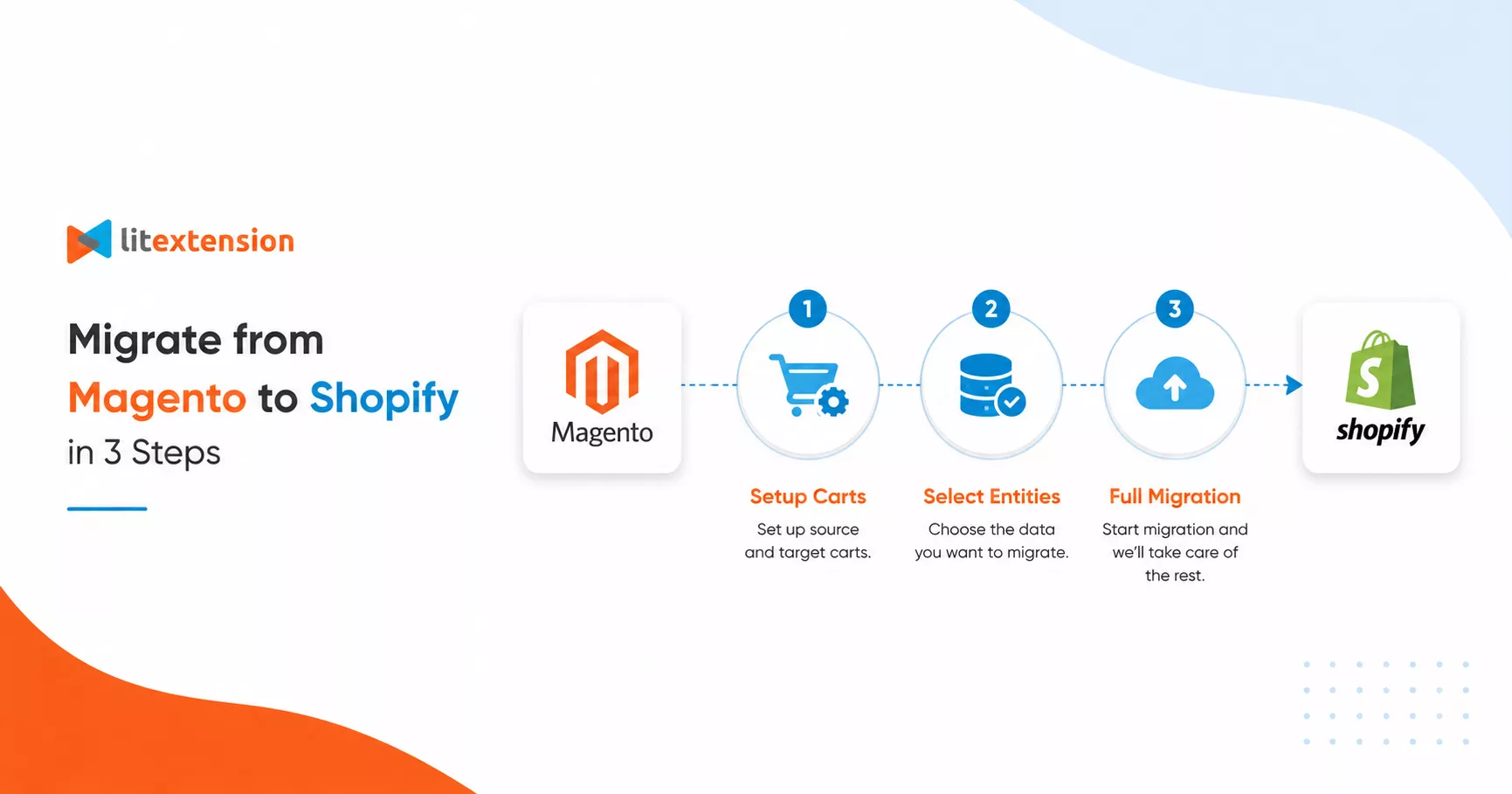
Migrating from Magento to Shopify with LitExtension is straightforward, secure, and accurate. Complete your migration in just three simple steps.

Setup Carts

#1: Set Up Source and Target Carts

Select Magento as “Source Cart” and Shopify as “Target Cart”. Enter the store URL and follow the brief instructions to set up migration.

Select Entites

#2: Select Data to Migrate to Shopify

Select the entities you want to retain during the Magento to Shopify migration, such as products, categories, orders, customers, and more.

Full Migration

#3: Start Magento to Shopify Migration

Run the migration from Magento to Shopify and wait for the chosen data to be transferred. The process runs automatically in the background.

How to Migrate from Magento to Shopify with an Automated Tool

To get started, open the LitExtension app. Sign up with your email or connect through Google for instant access. Already have an account? Enter your email and password to log in.

Check the “Remember Me” box to skip the login step next time. Staying logged in lets you track your migration progress and reach technical support faster.

Quick summary to migrate your store data to Shopify:

  • Connect and set up Magento and Shopify via URL.
  • Configure your migration by selecting Products, Customers, Orders, and other data that need to be migrated.
  • Run the demo migration to check if it works correctly as you want, and then run the full migration.
  • Check the post-migration checklist before going live.
  • Launch your Shopify store and monitor it for data errors; contact LitExtension support if needed.

How to Migrate from Magento to Shopify

Step 1: Set Up Source and Target Carts

This step connects the LitExtension migration system to both your Magento store and your Shopify store, so the tool can read and transfer your data between the two platforms.

On the Migration Page, click Create New Migration.

1.1. Set Up Source Cart

Source Cart Setup

In the Source Cart Setup section, choose Magento from the drop-down menu as your Source Cart, then enter your Source Cart URL.

Each cart type asks for different connection details, which appear after you select it. You have three ways to connect:

  • Install a Connector for open-source carts.
  • Enter API Keys for hosted carts.
  • Upload CSV Files if your store has crashed, if you have security concerns, or if you are on a cloud server.

1.2. Set Up Target Cart

Target Cart Setup

In the Target Cart Setup section, choose Shopify from the drop-down menu as your Target Cart and enter your Target Cart URL.

Follow the same steps as above to connect LitExtension to your Shopify store using a Connector, API, or CSV file.

Step 2: Configure Your Migration

Once both carts are connected, configure exactly what data moves and how. You can also turn on additional options to improve performance and SEO on your new Shopify store.

2.1. Select Entities: Products, Customers, Orders, and More
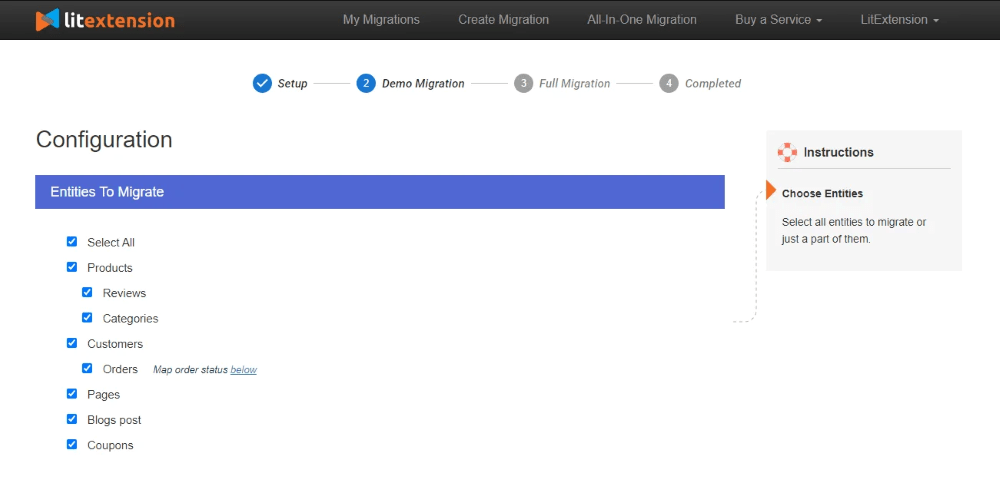
Entities Selection Page

In the Entities To Migrate section, pick the data types you want to transfer. For a Magento to Shopify migration, the available entities are:

  • Products
  • Customers
  • Orders
  • Coupons
  • CMS Pages
  • Blog

Click Select All to move everything at once. If you need to migrate data not listed here, contact the LitExtension team and we will help you find the right solution.

2.2. Set the Additional Options

After selecting entities, review the Additional Options section. The most common choices are:

  • Clear target cart data before migration
  • Preserve IDs for products, customers, and orders
  • Create 301 redirects from source to target cart
  • Strip HTML tags from category and product names
  • Migrate Source Store categories into Shopify Automated Collections

Not sure which options apply to you? Contact live chat for a free consultation before you start.

Step 3: Run the Full Migration

With your entities selected and options configured, you are ready to transfer your store data to Shopify. If you want to test the process first, choose Demo Migration. You can read about the benefits of Demo Migration and follow our step-by-step guide to run one.

To skip testing, tick Skip Demo Migration and click Start Full Migration.
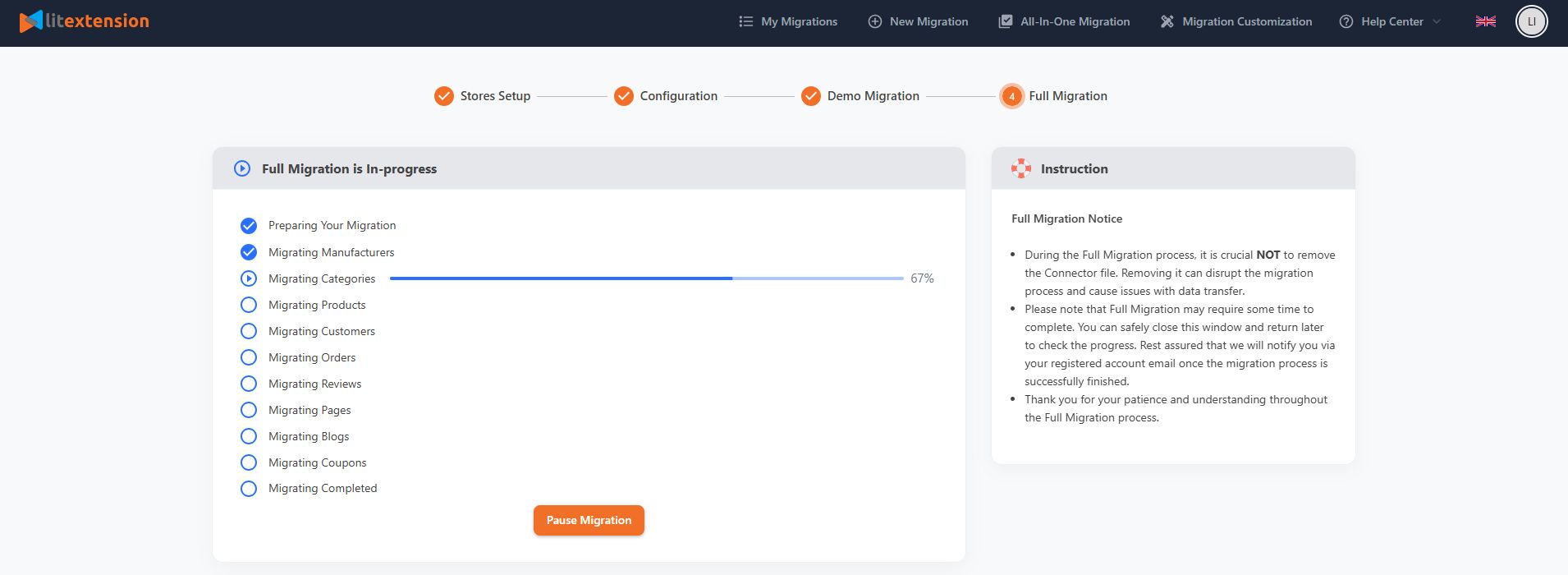
Full Migration

Migration time depends on how many entities you are transferring. LitExtension runs on a cloud-based system, so you do not need to keep your browser or internet connection open while the migration runs. Check the Migration Progress section at any time to see where things stand.

Post-Migration Checklist: 9 Steps Before You Go Live

A completed data transfer is only the halfway point. Stores that launch without issues are the ones that run a structured post-migration checklist. These are the nine steps every Shopify merchant should complete before flipping the switch.

1. Verify Core Data Integrity

Compare total record counts between your Magento source store and your new Shopify store. Products, customers, orders, and categories should match in quantity. Once the numbers align, open a sample of records from each entity type and confirm:

  • Products are assigned to the correct categories.
  • Orders are still linked to the right customer accounts.
  • Historical order data, including taxes, shipping methods, and payment statuses, is consistent.

2. Validate Data Quality

Check product names, descriptions, SKUs, prices, variants, attributes, and images against your source store. Look for truncated text, mismatched decimal values, and incorrectly reformatted variant logic. Pay close attention to currency formatting: Magento and Shopify handle multi-currency and tax-inclusive pricing differently.

For customer data, audit email addresses, billing and shipping details, customer group assignments, and account statuses. If customer passwords were migrated, test login on sample accounts to confirm customers can access their profiles.

3. Review Error Logs and Migration Exceptions

Go through the migration report and identify failed entities, unsupported data types, and skipped records. For each exception, decide the required action: manual correction, a custom migration rule, or a re-run of that specific data subset. Fixing these now prevents missing products or incomplete order histories from appearing later.

4. Run a Delta Migration for New or Updated Data

If your Magento store stayed live during the initial migration, new data was created after the first transfer ran. Set a clear cutoff point for your initial transfer, then re-migrate recent orders, new customer accounts, and updated product data created after that timestamp. Recheck record counts and spot-test recent orders to confirm they appear correctly in Shopify.

5. Reconfigure Integrations and Third-Party Apps

Payment gateways, shipping providers, tax tools, CRM platforms, ERP systems, email marketing services, and analytics tools do not transfer automatically. For each integration:

  • Reinstall essential apps from the Shopify App Store and reconnect them using updated API keys or credentials.
  • Place test orders to confirm that payments process, shipping rates calculate, tax rules apply, and order data syncs correctly.

In our experience, payment gateway misconfiguration is the most common issue merchants find after launch when they skip this step.

6. Restore and Test Communication Channels

Confirm that sender domains, email templates, and SMTP or third-party email service connections are correctly set up in Shopify. Then run end-to-end tests that cover:

  • Order confirmation and shipping update emails
  • Password reset flows
  • Contact forms and live chat tools

7. Update Knowledge Base and Internal Links

Magento and Shopify use different URL structures, so every internal link pointing to an old Magento URL becomes a dead end for users and search engines. Audit your help center, FAQ pages, blog posts, and policy pages for outdated links. Update them to match the new Shopify store structure, and make sure proper 301 redirects are in place for any URLs that changed during migration.

8. Update Templates, Automations, and Workflows

Review product page templates, checkout layouts, and email designs for branding and layout consistency. Then audit backend automations: order fulfillment rules, inventory update triggers, customer segmentation logic, abandoned cart flows, and marketing sequences. Rebuild or adjust each one using Shopify’s native tools or compatible apps, then test using controlled scenarios before go-live.

9. Check Tracking, Reporting, and SEO

Verify that Google Analytics, Google Tag Manager, advertising pixels, and reporting dashboards are installed correctly and collecting data. On the SEO side, review URL structures, meta titles, meta descriptions, and canonical tags across key pages. Test all redirects and submit an updated XML sitemap to Google Search Console. This step is especially important for large Magento stores, where broken redirect chains can cause measurable ranking drops in the weeks after launch.

How LitExtension Solves Common Magento to Shopify Migration Problems

Every migration has predictable failure points. Here is how LitExtension addresses the most common ones before they become problems for your store.

How LitExtension Solves Common Magento to Shopify Migration Problems

Data Mapping and Compatibility

  • Problem: Some Magento data does not match Shopify’s data structure.
  • Solution: Our support team reviews compatibility issues with you before the migration starts and maps your data correctly from the beginning.

Custom Functionality and Extensions

  • Problem: Magento extensions and custom features may not exist on Shopify.
  • Solution: We identify your current custom features and find alternative apps in the Shopify App Store.

Design and Theme Migration

  • Problem: You cannot transfer Magento themes directly to Shopify.
  • Solution: We can recommend a new Shopify theme. If you want to recreate your existing store design, our Shopify Development Services can build it for you.

Product Variants and Attributes

  • Problem: Magento and Shopify handle product variants and attributes differently, which can cause display issues after migration.
  • Solution: Use our additional option to “Migrate Source Store categories into Shopify Smart Collections” to organize your products automatically.

SEO and URL Redirection

  • Problem: Switching platforms changes your URL structure, which can damage your SEO and create broken links.
  • Solution: Use our additional option to create 301 redirects. This automatically points your old Magento URLs to your new Shopify URLs and protects your search rankings.

Store Downtime

  • Problem: You want to avoid losing sales while your store is being moved.
  • Solution: Your Magento store stays live and continues to accept orders during the data transfer. You will only experience brief downtime at the final step when you point your domain to Shopify.

A successful Magento to Shopify migration requires careful planning, accurate data mapping, and proper setup. With LitExtension, you can migrate data without store downtime, protect your SEO with proper 301 redirects, and maintain data accuracy throughout the entire process. We help you move to Shopify cleanly, reduce risk, and launch your new store ready for business.

Migration Pricing

The cost of migration from to depends on how many entities you have on your store. The Pricing Estimator will help you to get how much does it cost. The pricing is billed in USD.
Number Of Products

Number Of Orders
Number Of Customers
Number Of Blog Posts

Migration Pricing

The cost of migration from to depends on how many entities you have on your store. The Pricing Estimator will help you to get how much does it cost. The pricing is billed in USD.
Total Entities:
  • Products;
  • Orders;
  • Customers;
  • Blog Posts
icon auto ok
Automated Migration (Self-service)
Quick & affordable with easy 3-step approach.
$79

OR

icon allisone 1
All-in-One Migration Service
Migration done by our migration experts.
$79

Choose Your Migration Plan

Compare features and support levels to find the migration service that fits your timeline, budget, and needs.

Automated Migration

$0

All-in-One Migration Service

$0
FREE Demo Migration Unlimited FREE Demo Migration Unlimited FREE Demo Migration
Migration Process 3-step migration tool with easy-to-follow wizard guide Expert-managed migration with Personal Assistant & QA testing
Additional Options

FREE up to 6 Additional Options
(Save $50–$150)

FREE all Additional Options
Migration Testing Done by yourself Done by LitExtension experts
Technical Support 60-day technical support (after Full Migration is completed) Upto 60-day technical support (after Full migration is completed)
Post-migration Support

Free & Unlimited Recent Migration

Free & Unlimited Smart Update

Free & Unlimited Re-migration

Free & Unlimited Recent Migration

Free & Unlimited Smart Update

Free 02 Re-migration

Receive Support Request 24/7 24/7
Support Channels Ticket Ticket, Slack/WhatsApp
Money-back guarantee 30-day money-back guarantee 30-day money-back guarantee
Response Time Commitment 24 hours 24 hours

Choose Your Migration Plan

All-in-One Migration Service

$0
FREE Demo Migration Unlimited FREE Demo Migration
Migration Process Expert-managed migration with Personal Assistant & QA testing
Additional Options FREE all Additional Options
Migration Testing

Done by LitExtension experts

Technical Support Upto 60-day technical support (after Full migration is completed)
Post-migration Support

Free & Unlimited Recent Migration

Free & Unlimited Smart Update

Free 02 Re-migration

Support Response Time 24/7
Support Channels Ticket, Slack/WhatsApp
Money-back guarantee 30-day money-back guarantee
Response Time Commitment 24 hours

FAQs about Magento to Shopify Migration

Not seeing your question listed here? Contact Us for the quickest answer.

How to perform Magento to Shopify migration?

  1. Set Up Source and Target Carts. Select Magento as “Source Cart” and Shopify as “Target Cart”. Enter the store URL and follow the brief instructions to set up migration.
  2. Select Data to Migrate to Shopify. Select the entities you want to retain during the Magento to Shopify migration, such as products, categories, orders, customers, and more.
  3. Start Magento to Shopify Migration. Run the migration from Magento to Shopify and wait for the chosen data to be transferred. The process runs automatically in the background.

Why aren’t my product variations migrating from Magento to Shopify?

It’s usually due to Shopify’s limit of 99 variants and 3 options per product. Magento allows more complex product configurations, so any variants beyond Shopify’s limit won’t be imported. To resolve this, you can split oversized products into smaller groups or use Shopify apps that extend variant management after migration.

How long does it take to migrate from Magento to Shopify?

The time to migrate from Magento to Shopify depends on your store’s data volume and complexity.

Using the LitExtension migration app, most small to medium stores complete migration within a few hours. Larger stores with tens of thousands of products, customers, or orders may take up to several days to fully transfer and verify data.

You can also run a Demo Migration to estimate the duration before performing the full migration.

Why are my sales reports inaccurate after the migration?

Your sales report is distorted because the Shopify API does not allow refund transactions to be backdated. While historical orders keep their original dates, all migrated refunds are recorded on the date of the migration. This inflates previous months by removing deductions and creates a massive, artificial deficit in your current month.

Discrepancies may also stem from a standard 72-hour data processing lag or mismatched time zone and currency settings between platforms. This is a one-time migration artifact; all future transactions will record accurately in real-time.

Can I migrate orders and customers from Magento to Shopify Basic?

While you can migrate to Shopify Basic, this plan does not support direct API-based migration for orders and customers.

To move your data from Magento, you have two primary options:

  • The first option is to use a CSV file. This involves exporting your Magento data, and our technical team applies custom-coded solutions to handle the data import, as Shopify’s native tools have certain limitations.
  • Alternatively, you can upgrade your Shopify plan to a tier that allows full API access. This upgrade enables a more seamless experience, allowing for the direct and automated transfer of all order and customer data via LitExtension’s automated tools.

Can I migrate product options and attributes from Magento to Shopify?

Yes. LitExtension migrates Magento product options and attributes to Shopify while maintaining data structure. While Shopify typically limits products to 3 options and 100 variants, eligible stores can now accommodate up to 2,000 variants. Product attributes are converted into Shopify metafields to preserve additional details. If your inventory exceeds these default constraints, custom solutions are available upon request.

How much does a Magento to Shopify migration cost?

The cost of a Magento to Shopify migration typically ranges from $59 for a self-service data transfer to over $30,000 for a full-scale agency rebuild, depending primarily on your data volume and the need for custom design.

While the LitExtension automated tool provides a budget-friendly, precision-engineered solution for migrating core entities, the All-in-One Service offers a managed, hands-off experience for complex stores starting at $169.

Ultimately, your investment is dictated by whether you require a simple data shift or a comprehensive platform overhaul involving custom theme development and advanced app integrations.

Is it possible to move Magento bundle products?

Yes. You can migrate Magento bundle products using the LitExtension migration tool. When transferring between Magento stores, all bundle configurations and components are preserved. For migrations to Shopify or other platforms that don’t natively support bundle products, you can use a bundle or product options app on the target store, and the migration setup will be adjusted to maintain accurate product relationships.

Can I migrate from Magento to Shopify for free with LitExtension?

Yes. You can migrate from Magento to Shopify for free with LitExtension if your store has fewer than 100 products, 100 customers, and 100 orders. The Free Migration plan includes all essential data types, unlimited demo migrations, and one full migration at no cost.

If your Magento store exceeds the free migration limit (100 products, customers, or orders), you can still proceed with a full migration using LitExtension’s automated service. You’ll only pay for the additional entities beyond the free threshold, while maintaining the same accuracy, security, and technical support throughout the process.

Why can’t I migrate order dates from Magento to Shopify?

Shopify’s API automatically generates the created_at timestamp and prohibits manual overrides. To preserve your original Magento order history, migration tools map the original order time to the processed_at field, which Shopify uses for most internal reporting and order displays.

For this data to remain accurate, you must manually synchronize the time zone and date format settings between your Magento source and Shopify destination; otherwise, your historical analytics will be distorted. While this specific alignment is available for Magento migrations, most other platforms are restricted by Shopify’s default logic, which strictly dictates order dates via the processed_at value.

Can I migrate currencies from Magento to Shopify?

When migrating from Magento to Shopify, product prices automatically adopt your Shopify store’s default currency without conversion; a £100 item becomes $100 if your new store is set to USD.

Conversely, LitExtension migrates historical order data using the original source currency to maintain accurate financial records. If you require historical orders to be converted to match your Shopify default currency instead, a custom migration package is necessary to facilitate that adjustment.

Will our customers’ accounts be retained when we migrate from Magento to Shopify?

The migration transfers names, emails, and shipping details, but Shopify’s encryption prevents password migration. As a result, imported profiles appear “Disabled.” You must manually send account activation emails from the Shopify admin to re-engage them.

However, Shopify’s modern login flow simplifies this process: customers can now use passwordless login via a one-time 6-digit email code. Additionally, the system automatically creates profiles for new email addresses, and integration with the Shop app allows for one-tap checkouts with pre-filled Shop Pay details.

Leave The Work For The Experts

If you’re non-tech, let our Shopify migration experts handle your migration from A to Z.
Save your time for more important tasks.

vincent b34167bf

How Your Data Is Secured During Migration?

We at LitExtension prioritize data security and have a set of practices, technologies and policies in place to ensure the highest level of security for your data. Check out our Data Security Policy.
Server Security

Server Security

All migration jobs will be carried out on Linode servers located in the USA, Euro, Australia, Singapore,…

Data Security

Data Security

The data is protected by HTTPS secure protocol and 128-bit SSL encryption. Nothing is stored on LitExtension’s servers.

Data Access Restriction

Data Access Restriction

Only authorized LitExtension experts can access the source code to handle custom migration requests.

GDPR Compliance

GDPR Compliance

LitExtension is compliant with GDPR regulations, a global data protection law passed by the European Union.

NDA

NDA

We do not keep your credentials or import records after the migration. Your data is guaranteed not to be disclosed or used for any other purposes rather than the migration.

Payment Security

Payment Security

Your payment is processed by Paypal – the #1 worldwide payment gateway. Hence, LitExtension does not store any payment data.

Why choose Automated Migration for Magento to Shopify

#1 Shopping Cart Migration Expert

3-Step Simplicity

Migrate from Magento to Shopify in only 3 simple steps with our automated tool – no coding skills required.

24/7 Professional Support

24/7 Expert Support

Get all your questions answered, even on holidays, with our dedicated support team.

No Technical Skill Needed

Selling While Migrating

Your Magento store stays fully functional during the entire migration – no disruptions, no lost sales, no customer drop-offs.

100% Uptime

Data Quality Assurance

Benefit from precise manual testing to ensure accuracy and data integrity throughout your migration.

3Month Migration Assurance

FREE 60-Day Updates

Keep your data up-to-date with free Re-migrations, Smart Updates, and Recent Migrations within 60 days following the migration start.

30day Money Back Guarantee

Risk-Free Experience

We stand behind our service 100%. Try it risk-free with our 30-day money-back guarantee–no questions asked.

Your Success, Our Motivation

“I’m so impressed with their software, their support, they went above and beyond to make sure the process is easy and simple.”

Clayton Bates – Founder of Inspire Small Business
Who We Truly Are? Let Our Customer Define!
Mritunjay Kumar
IN

As per my experience of the last 3 months of the project journey, I want to say one thing litextension’s Few Team members are very cooperative. I would especially like to thank Dean who is taking care of the technical department and Bruce from the Sales team has helped me a lot to migrate my Magento data into the Shopify store. Now, I am planning to work with the same team for another project. Thanks a lot, Dean and Bruce for your help.

Louis van Empel
NL

I have used this company for 12 different projects, and was satisfied each time. Used them to migrate Magento to Shopify. Multi store, multilingual, sometimes complex projects. They have expertise and offer great customer service. I’m very satisfied and glad they’re out there to help us and save us a lot of time with each project!

Max Z
US

My company needed a migration from Magento to Shopify. We had a very complicated case which needed someone with a lot of experience to resolve. I’m very glad I found LitExtention. They are very experienced and their support is amazing. They have assigned a migration expert name Circle to my project. Circle was very knowledgeable and resolved all the issues, and successfully migrated all of our information to Shopify. We were also assigned a customer support team member name Ethan. Ethan was overseeing the project and making sure all our needs were met. Great job!

    Try Free Demo
    Join 200K+ merchants who have grown businesses with us. Try Free Demo to visualize how easy and efficient the cart migration can be.
    All-in-One Migration
    Save time for more important tasks by letting our experts take care of your eCommerce platform migration project from beginning to end.
    Start a Free Trial and Enjoy 3 Months of Shopify for $1. Try Now ➜
    Hello there
    Create Shopify Store for $1/month! Try Now ➜
    30+ Shopify AI Tools To Grow Your Shopify Store