Based on 3,000+ reviews on:


LitExtension provides a fast, accurate, and secure migration solution from Magento to Shopify through an automated three-step process. Our intuitive workflow allows you to easily transfer your critical store data – including products, orders, customers, and more – to Shopify while maintaining data integrity. We ensure a seamless, uninterrupted migration process that preserves data accuracy and security.
Whether you want a simple step-by-step guide to move your data using our automated tool, or want our experts to handle your full Magento to Shopify migration, we provide reliable solutions.
 | LitExtension is an Official Shopify Partner
What Data Can Be Migrated From Magento to Shopify


-
Products
- Name, Description.
- Slug.
- Product image/Thumbnail.
- Product gallery.
- Price, Sale price.
- Product category.
- SKU.
- Status.
- Quantity.
- Stock management.
- Brand / Manufacturer.
- Weight.
- Attributes.
- Configurable products.
- Option.
- Meta Description, Meta Title.
Products Categories
- Name, Description.
- Slug.
- Thumbnail.
- Meta description, Meta title.
-
Customer
- First name, Last name.
- Email.
Customer Address
- First name, Last name.
- Company.
- Address line 1, Address line 2.
- City, Postcode / ZIP, Country / Region, State.
Phone.
-
Orders
- Order Number, Order Total.
- Date Created.
- Status.
- Customer.
- Tax.
- Discount.
Order Billing
- First name, Last name.
- Company.
- Address line 1, Address line 2.
- City, Postcode / ZIP, Country / Region, State.
Phone.
Order Items
- Product name.
- Price.
- QTY.
- SKU.
-
Coupons
- Rule.
- Coupon Code.
- Start, End.
- Uses per Customer, Uses per Coupon.
- Discount Amount.
-
CMS Pages
- Title.
- URL Key.
- Status.
- Content.
-
Blogs
Title. URL. Status. Content.
Can’t find the data you need to migrate to Shopify? Contact us or click on the Live Chat in the right corner for a free consultation.
Additional Options
Clear Data On Shopify Before Migration
You can clear data on Shopify based on selected entities to migrate, avoiding data conflicts. More Details →
RecommendedPreserve Order IDs on Shopify Store
This option helps retain your Order ID, making it easier to manage orders after migration. More Details →
 How It Works Recommended
Create 301 Redirects on Shopify Store
Automatically redirect your Magento’s URLs to Shopify. Avoid losing traffic after the migration. More Details →
RecommendedMigrate Images from Products, Categories, Blog Descriptions
This option helps you to migrate images in descriptions of products, categories, and blog posts. More Details →
Strip HTML Tags from Category and Product Names
Strip HTML tags from category and product names automatically when migrating your store. More Details →
Migrate Categories into Shopify Automated Collections
Automatically add tags to your products. You can show sub-categories just like in your Source Store. More Details →
Join 200,000+ customers who have grown businesses with LitExtension. Try free demo to see how easy and efficient the migration can be.
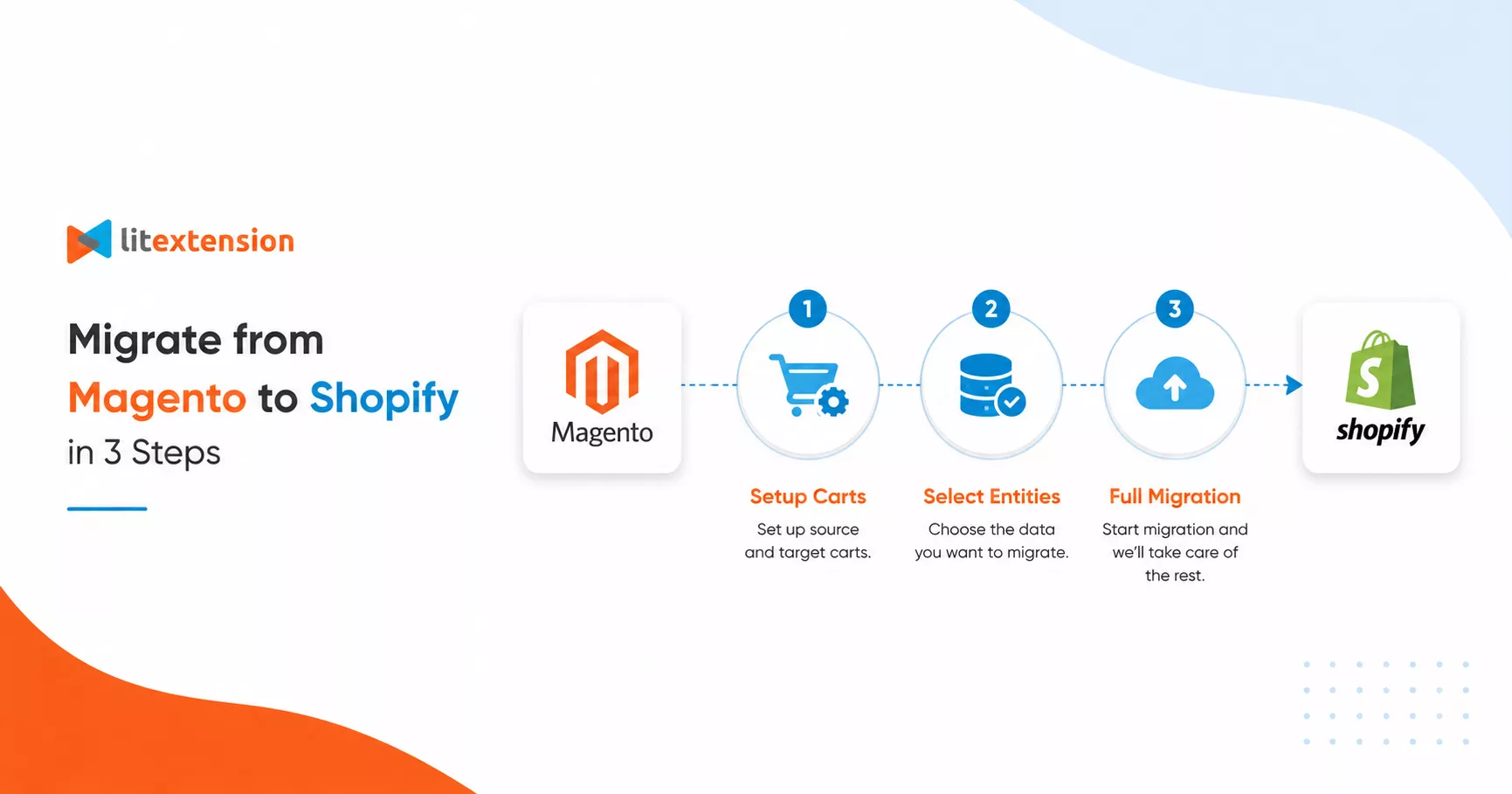
Perform Magento to Shopify Migration in 3 Steps
Migrating from Magento to Shopify with LitExtension is straightforward, secure, and accurate. Complete your migration in just three simple steps.

Step 1: Set Up Source and Target Carts
Select Magento as “Source Cart” and Shopify as “Target Cart”. Enter the store URL and follow the brief instructions to set up migration.

Step 2: Select Data to Migrate to Shopify
Select the entities you want to retain during the Magento to Shopify migration, such as products, categories, orders, customers, and more.

Step 3: Start Magento to Shopify Migration
Run the migration from Magento to Shopify and wait for the chosen data to be transferred. The process runs automatically in the background.
How to Migrate from Magento to Shopify with LitExtension Automated Tool
To get started, install the LitExtension Store Migration app in Shopify Shopify App Store. Then follow the detailed instructions below.
Quick summary to migrate your store data to Shopify:
- Connect and set up Magento and Shopify via URL.
- Configure your migration by selecting Products, Customers, Orders, and other data that need to be migrated.
- Run the demo migration to check if it works correctly as you want, and then run the full migration.
- Check the post-migration checklist before going live.
- Launch your Shopify store and monitor it for data errors; contact LitExtension support if needed.
Step 1: Set Up Source and Target Carts
This step connects the LitExtension Store Migration app to your Magento store, so the tool can read and transfer your data between the two platforms.
On the Migration Page, click Create New Migration.
1.1. Set Up Source Cart
In the Source Cart Setup section, choose Magento from the drop-down menu as your Source Cart, then enter your Source Cart URL.
Each cart type asks for different connection details, which appear after you select it. You have three ways to connect:
- Install a Connector for open-source carts.
- Enter API Keys for hosted carts.
- Upload CSV Files if your store has crashed, if you have security concerns, or if you are on a cloud server.
1.2. Set Up Target Cart
Target Cart is already set to Shopify by default; you don’t need to set up or connect Shopify.
Step 2: Configure Your Migration
After connecting both platforms, configure your migration settings and the corresponding field mappings.
During the migration from Magento to Shopify, field mapping is essential when data fields share the same function but use different naming conventions.
You can also enable additional options to optimize your new store’s performance and SEO post-migration.
2.1. Select Entities: Products, Customers, Orders, and More
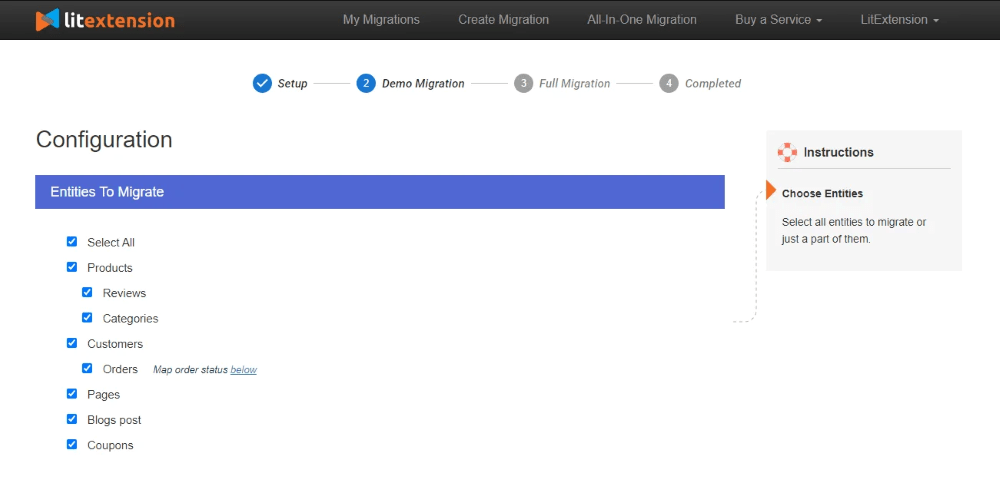
In the Entities To Migrate section, pick the data types you want to transfer. For a Magento to Shopify migration, the available entities are:
- Products
- Customers
- Orders
- Coupons
- CMS Pages
- Blog
Click Select All to move everything at once. If you need to migrate data not listed here, contact the LitExtension team and we will help you find the right solution.
2.2. Set the Additional Options
After selecting entities, review the Additional Options section. The most common choices are:
- Clear target cart data before migration
- Preserve IDs for products, customers, and orders
- Create 301 redirects from source to target cart
- Strip HTML tags from category and product names
- Migrate Source Store categories into Shopify Automated Collections
Not sure which options apply to you? Contact live chat for a free consultation before you start.
Step 3: Run the Full Migration
With your entities selected and options configured, you are ready to transfer your store data to Shopify. If you want to test the process first, choose Demo Migration. You can read about the benefits of Demo Migration and follow our step-by-step guide to run one.
To skip testing, tick Skip Demo Migration and click Start Full Migration.
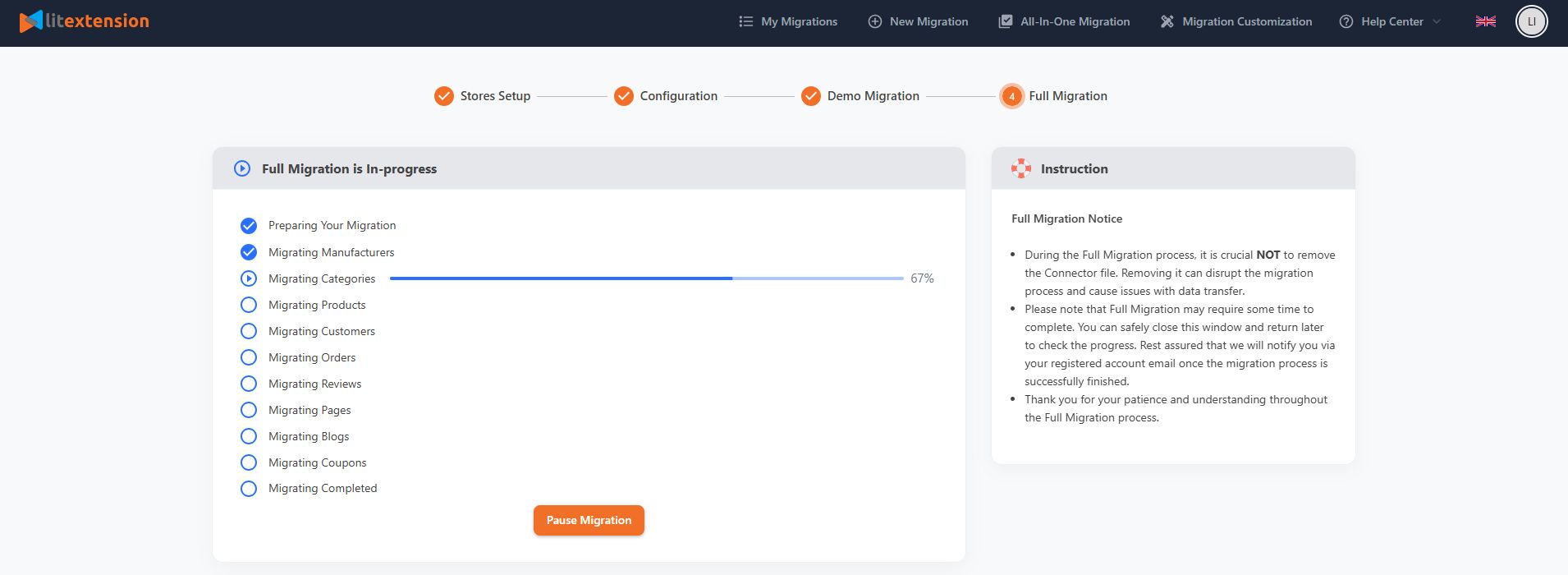
Migration time depends on how many entities you are transferring. LitExtension runs on a cloud-based system, so you do not need to keep your browser or internet connection open while the migration runs. Check the Migration Progress section at any time to see where things stand.
Post-Migration Checklist: 9 Steps Before You Go Live
A completed data transfer is only the halfway point. Stores that launch without issues are the ones that run a structured post-migration checklist. These are the nine steps every Shopify merchant should complete before flipping the switch.

Please note that you can always contact LitExtension’s customer service for assistance with post-migration.
1. Verify Core Data Integrity
Compare total record counts between your Magento source store and your new Shopify store. Products, customers, orders, and categories should match in quantity. Once the numbers align, open a sample of records from each entity type and confirm:
- Products are assigned to the correct categories.
- Orders are still linked to the right customer accounts.
- Historical order data, including taxes, shipping methods, and payment statuses, is consistent.
If there is a significant error regarding data integrity, please contact us for troubleshooting and use the re-migration function of the LitExtension Store Migration app, which is completely free.
2. Validate Data Quality
Check product names, descriptions, SKUs, prices, variants, attributes, and images against your source store. Look for truncated text, mismatched decimal values, and incorrectly reformatted variant logic.
For customer data, audit email addresses, billing and shipping details, customer group assignments, and account statuses. If customer passwords were migrated, test login on sample accounts to confirm customers can access their profiles.
3. Review Error Logs and Migration Exceptions
Go through the LitExtension migration report and identify failed entities, unsupported data types, and skipped records. For each exception, decide the required action: manual correction, a custom migration rule, or a re-run of that specific data subset. Fixing these now prevents missing products or incomplete order histories from appearing later.
4. Run a Delta Migration for New or Updated Data
Your Magento store remained live during the initial migration, meaning new data was created after the first transfer ran. Set a clear cutoff point for your initial migration, then re-migrate the recent orders, new customer accounts, and updated product data created after that timestamp. Finally, verify record counts and spot-test recent orders to confirm they appear correctly in Shopify.
LitExtension offers Recent Data Migration function for free for 60 days (If total amount of new data must not exceed 5% of the total data).
5. Reconfigure Integrations and Third-Party Apps
Payment gateways, shipping providers, tax tools, CRM platforms, ERP systems, email marketing services, and analytics tools do not transfer automatically. For each integration:
- Reinstall essential apps from the Shopify App Store and reconnect them using updated API keys or credentials.
- Place test orders to confirm that payments process, shipping rates calculate, tax rules apply, and order data syncs correctly.
In our experience, payment gateway misconfiguration is the most common issue merchants find after launch when they skip this step.
Note: If you have further questions regarding Shopify third-party apps that provide functionality similar to Magento, our team at LitExtension is always ready to assist you.
6. Restore and Test Communication Channels
Confirm that sender domains, email templates, and SMTP or third-party email service connections are correctly set up in Shopify. Then run end-to-end tests that cover:
- Order confirmation and shipping update emails
- Password reset flows
- Contact forms and live chat tools
7. Update Knowledge Base and Internal Links
Magento and Shopify use different URL structures, so every internal link pointing to an old Magento URL becomes a dead end for users and search engines. Audit your help center, FAQ pages, blog posts, and policy pages for outdated links. Update them to match the new Shopify store structure, and make sure proper 301 redirects are in place for any URLs that changed during migration.
8. Update Templates, Automations, and Workflows
Review product page templates, checkout layouts, and email designs for branding and layout consistency. Then audit backend automations: order fulfillment rules, inventory update triggers, customer segmentation logic, abandoned cart flows, and marketing sequences. Rebuild or adjust each one using Shopify’s native tools or compatible apps, then test using controlled scenarios before go-live.
9. Check Tracking, Reporting, and SEO
Verify that Google Analytics, Google Tag Manager, advertising pixels, and reporting dashboards are installed correctly and collecting data. On the SEO side, review URL structures, meta titles, meta descriptions, and canonical tags across key pages. Test all redirects and submit an updated XML sitemap to Google Search Console. This step is especially important for large Magento stores, where broken redirect chains can cause measurable ranking drops in the weeks after launch.
How LitExtension Solves Common Magento to Shopify Migration Problems
Every migration has predictable failure points. Here is how LitExtension addresses the most common ones before they become problems for your store.
Data Mapping and Compatibility
- Problem: Some Magento data does not match Shopify’s data structure.
- Solution: Our support team reviews compatibility issues with you before the migration starts and maps your data correctly from the beginning.
Custom Functionality and Extensions
- Problem: Magento extensions and custom features may not exist on Shopify.
- Solution: We identify your current custom features and find alternative apps in the Shopify App Store.
Design and Theme Migration
- Problem: You cannot transfer Magento themes directly to Shopify.
- Solution: We can recommend a new Shopify theme. If you want to recreate your existing store design, our Shopify Development Services can build it for you.
Product Variants and Attributes
- Problem: Magento and Shopify handle product variants and attributes differently, which can cause display issues after migration.
- Solution: Use our additional option to “Migrate Source Store categories into Shopify Smart Collections” to organize your products automatically.
SEO and URL Redirection
- Problem: Switching platforms changes your URL structure, which can damage your SEO and create broken links.
- Solution: Use our additional option to create 301 redirects. This automatically points your old Magento URLs to your new Shopify URLs and protects your search rankings.
Store Downtime
- Problem: You want to avoid losing sales while your store is being moved.
- Solution: Your Magento store stays live and continues to accept orders during the data transfer. You will only experience brief downtime at the final step when you point your domain to Shopify.
A successful Magento to Shopify migration requires careful planning, accurate data mapping, and proper setup. With LitExtension, you can migrate data without store downtime, protect your SEO with proper 301 redirects, and maintain data accuracy throughout the entire process. We help you move to Shopify cleanly, reduce risk, and launch your new store ready for business.


If you’re non-tech, let our Shopify migration experts handle your migration from A to Z.
Save your time for more important tasks.

How Your Data Is Secured During Migration?

Server Security
All migration jobs will be carried out on Linode servers located in the USA, Euro, Australia, Singapore,…

Data Security
The data is protected by HTTPS secure protocol and 128-bit SSL encryption. Nothing is stored on LitExtension’s servers.

Data Access Restriction
Only authorized LitExtension experts can access the source code to handle custom migration requests.

GDPR Compliance
LitExtension is compliant with GDPR regulations, a global data protection law passed by the European Union.

NDA
We do not keep your credentials or import records after the migration. Your data is guaranteed not to be disclosed or used for any other purposes rather than the migration.

Payment Security
Your payment is processed by Paypal – the #1 worldwide payment gateway. Hence, LitExtension does not store any payment data.
Why choose Automated Migration for Magento to Shopify