PrestaShop to Shopify Migration

rating star rating star rating star rating star rating star Based on 3,000+ reviews on: trustpilot review white serchen white   G2 01

LitExtension provides fast, accurate, and secure migration services from PrestaShop to Shopify through an automated three-step process. Our intuitive workflow allows you to easily transfer critical store data including products, orders, customers, etc. to Shopify. We ensure a seamless migration with zero downtime, preserving data accuracy and security.

logo  | LitExtension is an Official Shopify Partner

What Data Can Be Migrated from PrestaShop to Shopify

  • Products

    • Product name, Description.
    • Summary.
    • Images.
    • Price, Specific prices, Cost.
    • Categories.
    • Stocks, When out of stock.
    • Brand.
    • UPC/EAN/MPN.
    • Weight, With/Height/Depth.
    • Combinations.
    • Status.
    • Friendly URL.
    • Tags.
    • Meta Tag Title, Meta Tag Description.

    Products Categories

    • Name, Description, Additional description.
    • Friendly URL.
    • Thumbnail.
    • Meta title, Meta description.
  • Customers

    • E-Mail.
    • Name.
    • Addresses.

    Customer Address

    • First Name, Last Name.
    • Company.
    • Address 1, Address 2.
    • City, Postcode, Country.
    • Phone.
  • Orders

    • Order Number, Order Date.
    • Status.
    • Customer.
    • Products.
    • Discount
    • Shipping.
    • Total.
    • Invoice/Shipping address.
    • Note.

    Order Items 

    • Product name.
    • Base price.
    • Qty.
    • SKU.
    • Name.
    • Code.
    • Valid.
    • Limit to a single customer.
    • Amount, Minimum amount.
    • Title.
    • Friendly URL.
    • SEO Title, SEO Description.
    • Page content.

(*) Please note that the data listed above may vary depending on your Source Store.

Additional Options

Clear Data On Shopify Before Migration

You can clear the data on Shopify in accordance with selected entities for migration… More Details

Preserve Order IDs on Shopify Store

This option helps keep your order ID the same during your store migration… More Details

Create 301 Redirects on Shopify Store

Automatically redirect your old store’s URLs to the new ones during the migration… More Details

Migrate Images from Products, Categories, Blog Descriptions

This option helps you to migrate images in descriptions of products, categories, and blog posts… More Details

Strip HTML Tags from Category and Product Names

Strip HTML tags from category and product names automatically when migrating your store More Details

Migrate Categories into Shopify Automated Collections

Automatically add tags to your products. You can show sub-categories just like in your Source Store… More Details

Store Migration Never Been Easier
Join 200,000+ customers who have grown business with LitExtension. Try free demo to visualize how easy and efficient the cart to cart migration can be.

How to Perform PrestaShop to Shopify Migration

Three main steps you need to take to automate the migration from PrestaShop to your new Shopify store:
Setup Carts

#1: Set-up PrestaShop and Shopify Stores

Select PrestaShop as “Source Cart” and Shopify as “Target Cart” from the dropdown list. Enter the store URL and follow the brief instructions to migrate from PrestaShop to Shopify.

Select Entites

#2: Select Data to Migrate from PrestaShop to Shopify

Select the entities you want to migrate from Prestashop to Shopify, such as products, product categories, customers, orders, additional options, etc., to meet your needs.

Full Migration

#3: Perform Full PrestaShop to Shopify Migration

Perform a full migration of PrestaShop to Shopify. Once the process is started, it will continue to run even if you close your browser, as our data transfer is cloud-based.

Step-by-Step Guide to Migrating from PrestaShop to Shopify

To start your automated migration from Prestashop to Shopify using LitExtension migration tool:

  • Access the LitExtension app.
  • Sign up using your email, or connect via Google for instant access.
  • If you already have an account, simply enter your email and password to login.

Check the “Remember Me” box to speed up your next login. Staying logged in will help you track the migration process and contact technical support more quickly.

We also have a detailed video tutorial on how to use LitExtension migration app, check it out:

Step 1: Set Up Source & Target Carts

The first step is to connect the LitExtension data migration system with Prestashop and Shopify, so that the system will have access to data from these two platforms for migration purposes.

On the Migration Page screen, select Create New Migration.

1.1. Set Up Source Cart
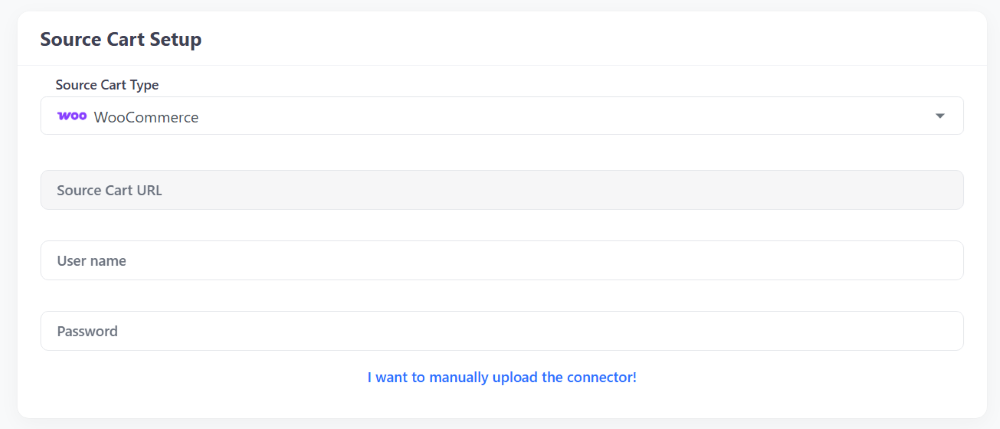
Source Cart Setup

In Source Cart Setup section, select Prestashop as your Source Cart from the drop-down menu and enter your Source Cart URL.

Each cart type requires different information, which will be shown once you select your Source Cart. There are three ways to connect your store:

  • Install Connector for open-source carts.
  • Provide API Keys for hosted carts.
  • Import CSV Files if your store has crashed, you have security concerns, face technical issues, or use a cloud server.

1.2. Setup Target Cart
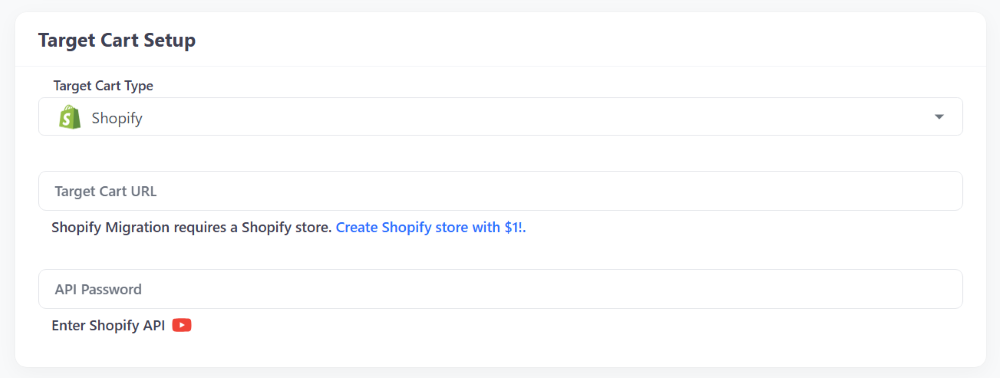
Target Cart Setup

In Target Cart Setup section, select Shopify as your Target Cart from the drop-down menu and enter your Target Cart URL.

Follow the same process in the Source Cart Setup section to connect LitExtension to your Shopify store using a Connector, API, or CSV file.

Step 2: Configure Prestashop to Shopify Migration

After connecting to Source (Prestashop) and Target Carts (Shopify), the next step is to select the data you want to migrate.

You can also enable additional options to enhance performance and SEO for your Shopify store.

Entities Selection
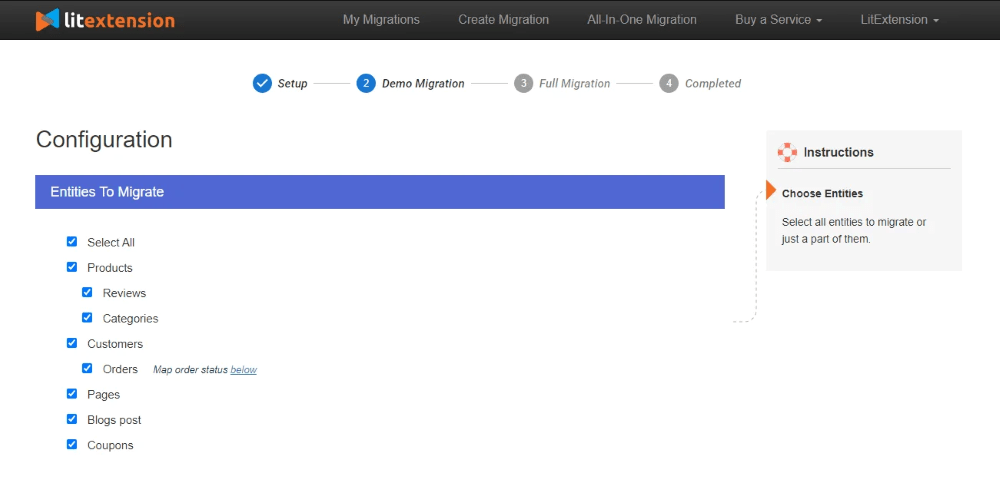
Entities Selection Page

In Entities To Migrate section, select the entities you want to migrate.

For the Prestashop to Shopify pair, the entities you can migrate are:

  • Products
  • Product Categories
  • Customers
  • Orders
  • Coupons
  • CMS Pages
  • Blog

Or click Select All to transfer everything.

For data you want to migrate that is not listed here, please contact LitExtension experts so we can assist and advise on alternative solutions.

Additional Options

After selecting your data, configure the Additional Options section. Common choices include:

  • Clear target cart data before migration: This option allows you to delete the data (on the Target Store) in accordance with selected entities for migration. It is to avoid mixing and duplication of data during the migration process.
  • Preserve IDs for products, customers, and orders: With this option, the IDs of your product, customer and order will be kept the same in your Target Store just as in your Source Store. This option is necessary to keep the connection among entities after the migration. Besides that, it helps you manage your Products, Customers and Orders easily.
  • Create 301 Redirects from source to target cart: The 301 Redirects option allows you to automatically redirect your old store’s Product and Category URLs to the new ones during the migration. This ensures that your previous links continue to work, helping to maintain a smooth customer experience after replatforming.
  • Strip HTML tags from category and product names: Categories, product names in your Source store may already wear HTML tags. However, these tags might have been configured improperly or your new store does not need them anymore.
  • Migrate Source Store Categories into Shopify Automated Collections: Shopify doesn’t have sub-categories, instead, it provides collections. Therefore, during the migration to Shopify, choosing this option will migrate all of your categories including sub-categories to Shopify collections.

If you need to answer questions about additional options, you can contact live chat for free consultation.

Step 3: Perform Prestashop to Shopify Migration

After selecting the data to migrate to Shopify and configuring additional options, continue with the Full Migration.

If you need a demo to see if the data is moving correctly, choose Demo Migration. You can learn more about the benefits of using Demo Migration and how to implement it through our detailed step-by-step guide.

Otherwise, simply tick Skip Demo Migration and click Start Full Migration to begin.
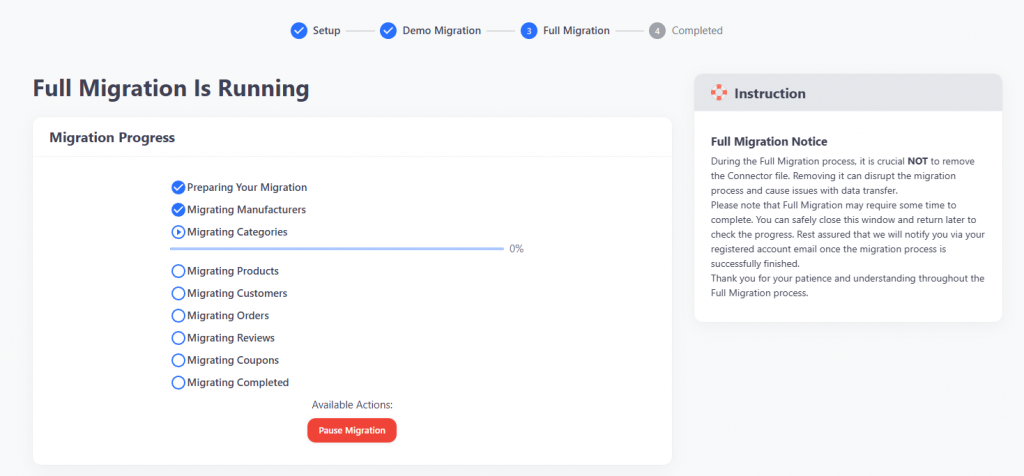
Full Migration

The migration process may take a few minutes or longer depending on the number of entities being transferred. LitExtension runs on a cloud-based system, you don’t need to keep your browser or internet connection active during the migration. Additionally, you can easily check the migration progress through the Migration progress section.

Before starting, you’ll be asked to complete the payment. LitExtension supports multiple payment methods, including PayPal, Skrill, Western Union, Bank Transfer, and Cryptocurrencies.

Prestashop to Shopify Post-Migration Checklist

The final step is to double-check the results of the migration process from Prestashop to Shopify:

Once the system displays the “Full Migration Is Completed” screen, immediately review your results. Verifying data integrity ensures that all information has transferred correctly to your new Shopify store.

Checking Product Visibility. Most products will appear automatically on your storefront. However, out-of-stock products are hidden by default. To verify these items, locate them via the catalog or use the onsite search function.

Review Product Details. Inspect the following data points for accuracy:

  • Product descriptions.
  • Images.
  • Variants.
  • Meta descriptions.

Understanding Shopify Structure. Shopify uses Collections and Tags rather than categories and subcategories. Data from your source store’s categories and subcategories is automatically mapped to the corresponding collections and tags in Shopify.

After validating the storefront, log in to the Shopify admin panel. Browse the back-end to confirm that all customer data and historical orders are accurate and complete.

For details, read about Post Migration Checklist: 10 Things You Must Do, compiled by our team of migration experts.

If you face any challenges during the setup, data transfer, or post-migration review, do not hesitate to reach out. Contact the LitExtension Customer Support team at any time, we are available 24/7 to ensure your migration is accurate, secure, and successful.

Migration Pricing

The cost of migration from to depends on how many entities you have on your store. The Pricing Estimator will help you to get how much does it cost. The pricing is billed in USD.
Number Of Products

Number Of Orders
Number Of Customers
Number Of Blog Posts

Migration Pricing

The cost of migration from to depends on how many entities you have on your store. The Pricing Estimator will help you to get how much does it cost. The pricing is billed in USD.
Total Entities:
  • Products;
  • Orders;
  • Customers;
  • Blog Posts
icon auto ok
Automated Migration (Self-service)
Quick & affordable with easy 3-step approach.
$79

OR

icon allisone 1
All-in-One Migration Service
Migration done by our migration experts.
$79

Choose Your Migration Plan

Compare features and support levels to find the migration service that fits your timeline, budget, and needs.

Automated Migration

$0

All-in-One Migration Service

$0
FREE Demo Migration Unlimited FREE Demo Migration Unlimited FREE Demo Migration
Migration Process 3-step migration tool with easy-to-follow wizard guide Expert-managed migration with Personal Assistant & QA testing
Additional Options

FREE up to 6 Additional Options
(Save $50–$150)

FREE all Additional Options
Migration Testing Done by yourself Done by LitExtension experts
Technical Support 60-day technical support (after Full Migration is completed) Upto 60-day technical support (after Full migration is completed)
Post-migration Support

Free & Unlimited Recent Migration

Free & Unlimited Smart Update

Free & Unlimited Re-migration

Free & Unlimited Recent Migration

Free & Unlimited Smart Update

Free 02 Re-migration

Receive Support Request 24/7 24/7
Support Channels Ticket Ticket, Slack/WhatsApp
Money-back guarantee 30-day money-back guarantee 30-day money-back guarantee
Response Time Commitment 24 hours 24 hours

Choose Your Migration Plan

All-in-One Migration Service

$0
FREE Demo Migration Unlimited FREE Demo Migration
Migration Process Expert-managed migration with Personal Assistant & QA testing
Additional Options FREE all Additional Options
Migration Testing

Done by LitExtension experts

Technical Support Upto 60-day technical support (after Full migration is completed)
Post-migration Support

Free & Unlimited Recent Migration

Free & Unlimited Smart Update

Free 02 Re-migration

Support Response Time 24/7
Support Channels Ticket, Slack/WhatsApp
Money-back guarantee 30-day money-back guarantee
Response Time Commitment 24 hours

Questions About PrestaShop to Shopify Migration

Not seeing your question listed here? Contact Us for the quickest answer.

Is Shopify better than PrestaShop?

Shopify is better for ease of use, hosting, and customer support, making it ideal for beginners or businesses focused on quick setup. PrestaShop, being open-source, offers greater customization and lower costs but requires technical skills. Choose Shopify for simplicity or PrestaShop for flexibility and control.

How long does it take to migrate from PrestaShop to Shopify?

There’s no fixed duration for migrating a PrestaShop store to Shopify. The time needed depends on variables like the size of your product catalog, the number of customer records, and the complexity of your PrestaShop configuration. Contact our team for a personalized consultation and timeframe estimate.

How do I migrate from PrestaShop to Shopify without losing SEO?

Concerned about SEO during your PrestaShop to Shopify migration? We’ve got you covered. Our platform offers automated 301 redirects, ensuring a seamless transition for both search engines and users. This feature maps your old PrestaShop URLs to the corresponding pages on your new Shopify store, preserving your search rankings and user experience.

What should I do if I encounter issues after migrating from PrestaShop to Shopify?

Choose LitExtension for a stress-free migration with 24/7 expert support. Get 60 days of free updates, including re-migration options, and a 30-day money-back guarantee for complete peace of mind.

Does LitExtension offer a Free Migration service?

Yes! If your PrestaShop store has fewer than 100 products, 100 customers, and 100 orders, you can migrate to Shopify completely free of charge. The Free Migration includes essential data, unlimited demo migrations, and one full migration.

Do I need technical skills to migrate?

Not necessarily. Automated tools handle most of the process, but some Shopify customization may require basic technical knowledge or expert help. For instructions on using the tool, please refer to the Shopping Cart Migration Guide.

Can I continue selling on PrestaShop while migrating?

Yes, you can keep your PrestaShop store active during migration. Once your Shopify store is ready, you can redirect traffic to it.

Additionally, we offer Re-Migration, Recent Migration, and Smart Update for 60 days from the start date, keeping your data in sync after migration. New customers within 60 days from PrestaShop will be updated to Shopify.

Will customers receive email notifications from Shopify throughout the migration process?

Shopify often does not send client email notifications during migration. We also recommend that you disable any third-party email or shipping apps in your Shopify store to stop them from automatically sending messages to customers when transferring orders.

What will happen to my PrestaShop store after migration?

Your PrestaShop store remains fully functional during and after migration. We preserve your original store exactly as is, ensuring uninterrupted operations while you transition. Following verification of the completed migration, you’ll have complete freedom to maintain, archive, or deactivate your PrestaShop store.

What if my store has more than 100 entities?

If your PretaShop store exceeds 100 products, customers, or orders, you can still use our automated migration service at a very affordable rate. You’ll only pay for the additional entities beyond the free limit, and you’ll still benefit from the same accuracy, security, and support.

Leave The Work For The Experts

If you’re non-tech, let our Shopify migration experts handle your migration from A to Z.
Save your time for more important tasks.

vincent b34167bf

How Your Data Is Secured During Migration?

We at LitExtension prioritize data security and have a set of practices, technologies and policies in place to ensure the highest level of security for your data. Check out our Data Security Policy.
Server Security

Server Security

All migration jobs will be carried out on Linode servers located in the USA, Euro, Australia, Singapore,…
Server Security

Data Security

The data is protected by HTTPS secure protocol and 128-bit SSL encryption. Nothing is stored on LitExtension’s servers.
Server Security

Data Access Restriction

Only authorized LitExtension experts can access the source code to handle custom migration requests.
Server Security

GDPR Compliance

LitExtension is compliant with GDPR regulations, a global data protection law passed by the European Union.
Server Security

NDA

We do not keep your credentials or import records after the migration. Your data is guaranteed not to be disclosed or used for any other purposes rather than the migration.
Server Security

Payment Security

Your payment is processed by Paypal – the #1 worldwide payment gateway. Hence, LitExtension does not store any payment data.

Why choose Automated Migration for Shopify Migration

#1 Shopping Cart Migration Expert

3-Step Process

Achieve a seamless PrestaShop to Shopify migration in just 3 easy steps with our automated tool—no coding skills required!

24/7 Professional Support

24/7 Expert Support

Access around-the-clock expert support – whenever you need help, we’re here, even on holidays.

No Technical Skill Needed

Selling While Migrating

Keep your sales uninterrupted throughout the migration process with our zero downtime commitment.

100% Uptime

Data Quality Assurance

Enjoy data accuracy and quality assurance through meticulous manual testing in every migration.

3Month Migration Assurance

FREE 60-Day Updates

Enjoy free Re-migrations, Recent Migrations, and Smart Updates for 60 days from your start date, keeping your data synchronized after migration.

30day Money Back Guarantee

Risk-Free Experience

Try our service with confidence, backed by a 30-day money-back guarantee – your satisfaction is our top priority.

Your Success, Our Motivation

“If you’re looking for a team to handle your migration between e-commerce platforms, I would highly recommend LitExtension. Steve and his team were fantastic”
Mr. YouKay

Who We Truly Are? Let Our Customer Define!

Eugen Mincu
RO

The import was not exceptional from the beginning, having quite a few customized things in PrestaShop. However, all the people I contacted at LitExtension took a keen interest in making things work out well. They even intervened and adapted the module so that all the data would transfer to Shopify. I would definitely turn to them again if I had to go through this process once more. Thank you.

Mihai N.
RO

We had a great experience with LitExtension during our migration. We migrated over 30000 products with their specifications data, 60000 customers and 60000 orders. The LitExtension team helped us through the whole thing, with very quick responses and good solutions when we would get stuck and needed to find ways to adapt old data to the new platform. Our migration was from PrestaShop to Shopify. If we were to do it again, we would choose LitExtension again as well.

Abigail Samaniego
PH

Great customer support. Support was available even before trial and while trying to select the best way to migrate our Prestashop to Shopify. Once migrated, the team was still able to help us update the migrated data.

Gui Rodrigues
US

LitExtension made my migration from PrestaShop to Shopify possible and Jay from the team made my experience phenomenal. He was very capable, attentive, professional, and willing to go the extra distance to make sure our issues were resolved. On our launch day he was even available after hours to make sure it went smoothly and as scheduled. I highly recommend Jay and his team from LitExtension when it comes to any sort of data migration. They know what they are doing and know how to take care of the customer.

    Try Free Demo

    Join 200K+ merchants who have grown businesses with us. Try Free Demo to visualize how easy and efficient the cart migration can be.

    All-in-One Migration

    Save time for more important tasks by letting our experts take care of your eCommerce platform migration project from beginning to end.
    Start a Free Trial and Enjoy 3 Months of Shopify for $1. Try Now ➜
    Hello there
    Create Shopify Store for $1/month! Try Now ➜
    30+ Shopify AI Tools To Grow Your Shopify Store