Based on 2,000+ reviews on:


Migrate products, combinations, categories, customers, orders, coupons, CMS pages, images, and SEO URLs from PrestaShop to WooCommerce with LitExtension. Run a Free Demo first to preview your migrated data before starting the Full Migration, while your current PrestaShop store remains active.
Configure and run the transfer yourself with Automated Migration, or choose our All-in-One Migration Service to have LitExtension experts manage the setup, migration, testing, and agreed post-migration requirements. Stores with specific prices, multilingual content, custom modules, or other non-standard data can have their migration scope reviewed before the transfer.
(*) Before you start, see why merchants move to WooCommerce, compare migration methods, and review what to prepare right here.
Why Move from PrestaShop to WooCommerce?
PrestaShop and WooCommerce are both open-source eCommerce platforms, so moving to WooCommerce is not necessarily about replacing an inferior platform. The switch makes more sense when WordPress better fits how your team manages content, marketing, store development, and day-to-day website operations.
Common reasons for migrating from PrestaShop to WooCommerce include:
- Manage commerce and content within WordPress: Run your product catalog and orders alongside pages, blog content, landing pages, and other WordPress-based marketing activities in the same environment.
- Build around your existing WordPress workflow: WooCommerce can be a practical choice for businesses whose internal team, developers, or agency already work with WordPress plugins, themes, analytics tools, and content workflows.
- Recreate store functionality using WooCommerce extensions and custom development: Select the plugins, integrations, and custom solutions needed for payments, shipping, product options, subscriptions, marketing, and other store requirements.
WooCommerce will not automatically reproduce every feature or customization from PrestaShop. Before migrating, identify which data can be transferred directly and which store functions need to be configured, rebuilt, or handled separately.
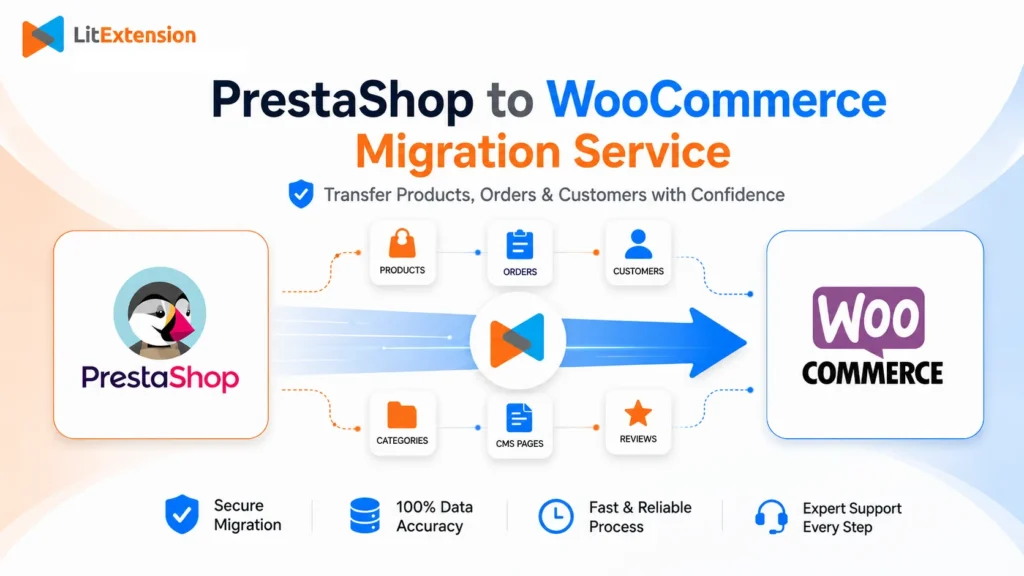
PrestaShop to WooCommerce Migration Methods
There is no single migration method that fits every PrestaShop store. The right method depends on the data you need to transfer, the complexity of your store, your technical resources, and how much of the migration you want to manage yourself.
| Migration method | Best for | What to consider |
|---|---|---|
| Manual CSV import | Very small stores that only need to move a basic product catalog | WooCommerce can import standard product data from CSV, but customers, orders, combinations, specific prices, CMS pages, images, and SEO URLs usually require separate handling. |
| PrestaShop to WooCommerce plugin | Merchants who want to perform the import directly within WordPress or WooCommerce | Check the supported PrestaShop versions, entities, premium extensions, multilingual capabilities, and SEO features. You will be responsible for configuration and result validation. |
| Automated migration tool | Stores with supported data whose teams want to configure and monitor the transfer themselves | Review the supported entities and additional options, run a Free Demo, and validate the migrated data before starting the Full Migration. |
| Expert-managed migration service | Businesses that want specialists to set up, manage, and test the migration | Confirm what is included in the migration scope, especially for complex data, custom requirements, SEO redirects, and post-migration work. |
| Custom migration | Stores with non-standard fields, module-generated data, multistore setups, or unique workflows | Custom data may require tailored mapping. Features created by PrestaShop modules normally need to be rebuilt using WooCommerce plugins, configuration, or custom development. |
LitExtension offers two ways to migrate from PrestaShop to WooCommerce. With Automated Migration, you configure the transfer, run a Free Demo, and review the results yourself. With the All-in-One Migration Service, LitExtension experts manage the agreed migration setup, data transfer, testing, and post-migration tasks. If your store contains custom fields, module-generated data, or other non-standard requirements, the migration scope should be reviewed before you choose a solution.
Before You Migrate PrestaShop to WooCommerce
Before starting the migration, confirm what needs to be transferred, what must be rebuilt in WooCommerce, and how the final store switch will be handled. A clear migration plan can help prevent missing data, broken URLs, and unexpected configuration work before launch.
Create a current backup of your PrestaShop store
Back up both your PrestaShop database and store files before making major changes. The database contains records such as products, categories, customers, and orders, while images, theme files, and module files are normally stored separately on the server. Keep the backup in a secure location and make sure it can be accessed if needed.
Define the data migration scope
List the data you need to move, including products, combinations, categories, customers, orders, coupons, CMS pages, images, specific prices, and SEO metadata. Confirm which historical records must be retained and whether any outdated or unnecessary data can be excluded from the migration.
A clear scope also makes it easier to estimate the migration cost, select the appropriate method, and identify records that may need additional mapping.
Review custom modules and store functionality
Check both the data generated by custom PrestaShop modules and the functions those modules provide. Module-generated records may require custom mapping, while features such as loyalty programs, custom checkout fields, product configurators, pricing rules, or other workflows may need to be rebuilt with WooCommerce plugins or custom development.
Do not assume that migrating the associated data will automatically recreate the original module or its functionality in WooCommerce.
Prepare the WooCommerce target store
Make sure WordPress and WooCommerce are installed, accessible, and ready to connect. Review the target permalink structure and prepare any plugins that directly affect how migrated data will be organized, such as multilingual, SEO, or other data-related plugins.
Payment methods, shipping rules, taxes, email notifications, and other operational settings should be configured and tested before launch, but they do not all need to be completed before the initial data migration.
Plan SEO redirects and the final store switch
Export or record important PrestaShop product, category, and CMS page URLs before migration. Decide how old URLs will redirect to the corresponding WooCommerce pages, and review metadata and internal links after the transfer.
You should also decide when to run the Full Migration and how to handle new products, customers, and orders created on PrestaShop before WooCommerce goes live. Depending on your launch plan, you may use Recent Migration or schedule a short update freeze after the final data check.
(*) Migration scope note: Product combinations, specific prices, customer groups, multilingual content, custom module data, and non-standard URL structures may require additional mapping or review because PrestaShop and WooCommerce organize these elements differently.
What Data Can Be Migrated
from PrestaShop to WooCommerce
LitExtension can migrate core eCommerce and content data from PrestaShop to WooCommerce, including products and combinations, categories, customers, orders, coupons, and CMS pages. Explore each data group below to see the standard fields supported during the transfer.


-
Products
- Product name, Description.
- Images
- Price, Specific prices.
- Categories
- Reference
- Stocks, When out of stock.
- UPC/EAN/MPN
- Weight, With/Height/Depth.
- Combinations
- Status
- Friendly URL
- Tags
- Meta Tag Title, Meta Tag Description.
Product Categories
- Name, Description.
- Friendly URL
- Thumbnail
- Meta title, Meta description.
-
Customer
- Name
- Addresses
Customer Address
- First Name, Last Name.
- Company
- Address 1, Address 2.
- City, Postcode, Country.
- Phone
-
Orders
- Order Number, Order Date.
- Status
- Customer
- Products
- Discount
- Shipping
- Total
- Invoice/Shipping address
- Note
Order Items
- Product name
- Base price
- Qty
- SKU
-
- Code
- Valid
- Limit to a single customer
- Amount, Minimum amount.
-
- Title
- SEO Title, SEO Description.
- Page content
(*) Please note that the data listed above may vary depending on your Source Store.
Additional Options
Clear Data On WooCommerce Before Migration
You can delete the data on WooCommerce in accordance with selected entities for migration… More Details →
RecommendedPreserve Order IDs, Customer IDs on WooCommerce Store
This option helps keep your customer IDs or order IDs the same during your store migration… More Details →
 How It Works Recommended
Create 301 Redirects on WooCommerce Store
Automatically redirect your old store’s URLs to the new ones during the migration… More Details →
RecommendedMigrate Images from Products, Categories, Blog Descriptions
This option helps you to migrate images in descriptions of products, categories, and blog posts… More Details →
Strip HTML Tags from Category and Product Names
Strip HTML tags from category and product names automatically when migrating your store … More Details →
How to Perform PrestaShop to WooCommerce Migration

Select PrestaShop as “Source Cart” and WooCommerce as “Target Cart” from the dropdown list. Afterward, enter store URL and follow brief instructions to set up the WooCommerce migration process.

Choose the entities you want within the eCommerce site migration such as products, categories, orders, customers, SEO URLs, and even more.

Let’s start the PrestaShop to WooCommerce migration. Once the migration process is kicked off, it will constantly run even when you turn off your browser.
How to Migrate PrestaShop to WooCommerce with LitExtension: Full Walkthrough
Once your WooCommerce store is ready and you know which data needs to be transferred, you can start setting up the migration. The process below shows how to migrate PrestaShop to WooCommerce with LitExtension, from connecting both stores to checking the migrated data after the transfer.
Step 1. Set up PrestaShop as your Source Cart
First, choose PrestaShop as the Source Cart. This is the store you want to migrate data from.
Enter your PrestaShop store URL and follow the connection instructions. Depending on your store setup, you may need to download and upload the LitExtension connector to your PrestaShop root folder so the migration tool can securely access the data needed for transfer.
Before moving to the next step, make sure your PrestaShop store is accessible and the connection is working properly.
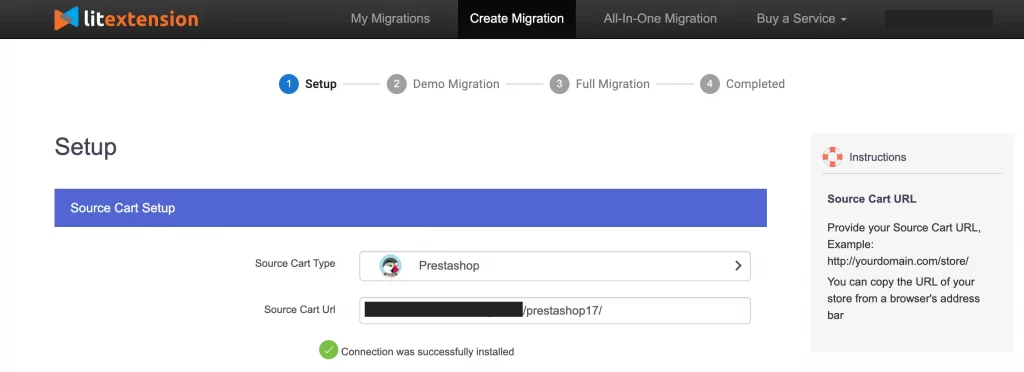
Step 2. Set up WooCommerce as your Target Cart
Next, choose WooCommerce as the Target Cart. This is the store where your PrestaShop data will be moved.
Enter your WooCommerce store URL and follow the setup instructions to connect your target store. Your WooCommerce store should already have the basic setup ready, including WordPress, WooCommerce, permalink settings, theme direction, and any essential plugins you plan to use after migration.
This helps the migrated data fit into a cleaner WooCommerce structure instead of being imported into an unfinished store.
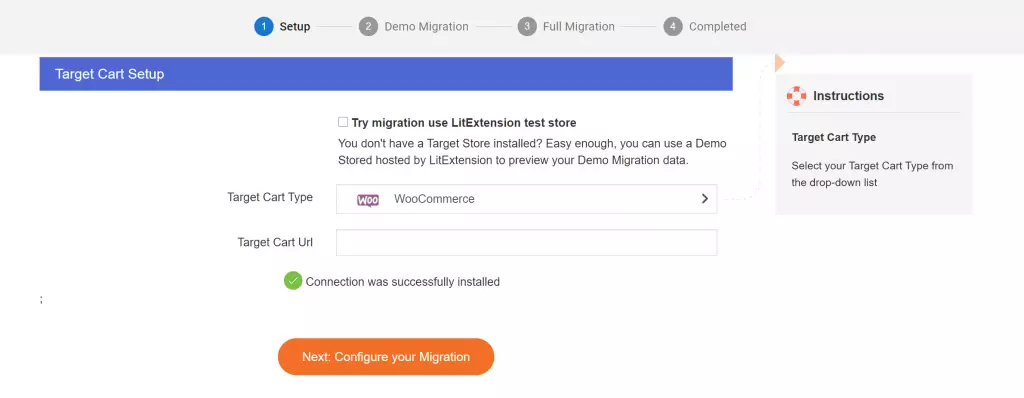
> Don’t mind contacting the LitExtension support team in case you meet any problems.
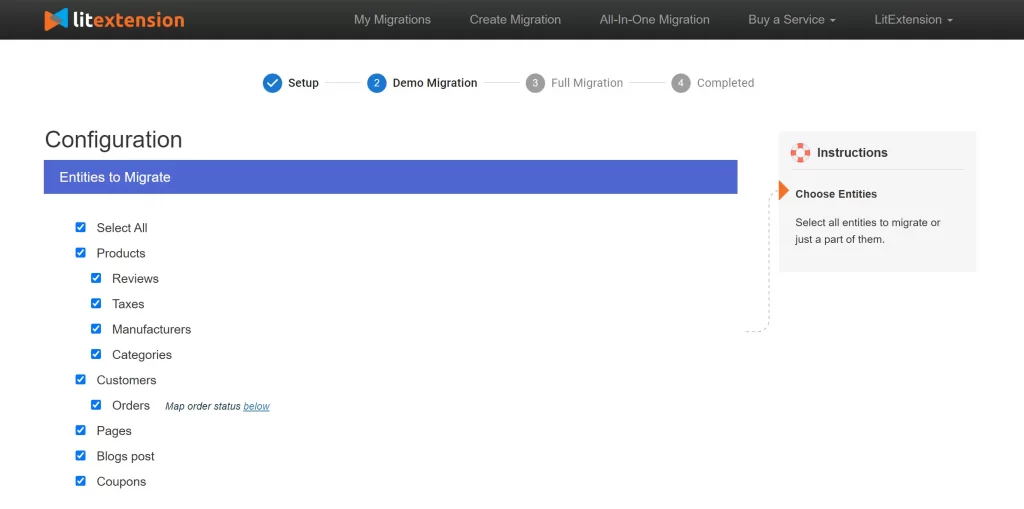
Step 3. Select the data you want to migrate
After both stores are connected, choose the data entities you want to move from PrestaShop to WooCommerce.
Common data types include products, product categories, customers, orders, coupons, CMS pages, images, and SEO-related data. If your PrestaShop store has product combinations, specific prices, custom fields, multilingual data, or module-generated data, review the available options carefully before continuing.
This step is important because not every store needs to migrate everything. Some merchants may only need products and categories, while others may need full historical data, including customers, orders, coupons, CMS pages, and SEO URLs.
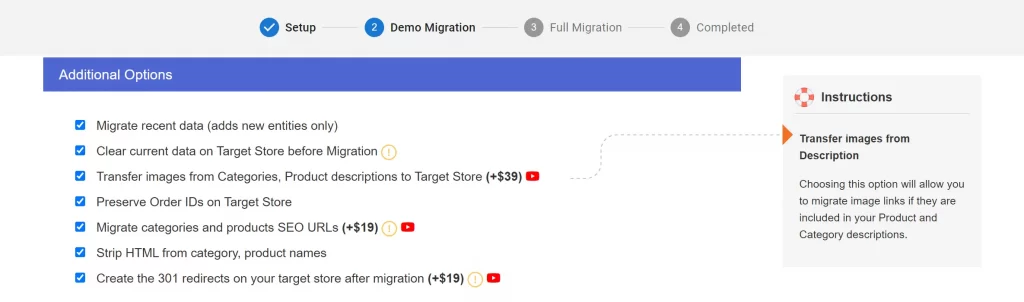
Step 4. Choose additional migration options
Next, review the additional migration options available for your PrestaShop to WooCommerce migration.
Depending on your store requirements, you may want to preserve order IDs, migrate images from product descriptions, create 301 redirects, clear existing target store data before migration, or keep customer and order data structured as closely as possible to the original PrestaShop store.
You should only select the options that match your migration plan. For example, if SEO is important, URL and redirect-related options should be reviewed carefully before the full transfer.
Step 5. Map languages, currencies, and order statuses if needed
If your PrestaShop store uses multiple languages, currencies, or custom order statuses, you may need to map them to the corresponding WooCommerce settings.
This step helps WooCommerce understand how to organize migrated orders, localized content, and store records. It is especially useful for stores with multilingual catalogs, international customers, or custom order workflows.
If your store has a simple setup, this step may be quick. If your store has more complex localization or order rules, review the mapping carefully before running the migration.
Step 6. Run a Free Demo Migration
Before performing the full migration, run a Free Demo Migration first.
The demo migration transfers a limited amount of data so you can preview how your PrestaShop records appear in WooCommerce. This gives you a chance to check sample products, product combinations, categories, customers, orders, images, CMS pages, and SEO fields before moving the full store.
This step is useful because it helps you catch mapping issues early, before the full transfer begins.
Step 7. Review the demo results
After the demo is complete, review the migrated sample data inside WooCommerce.
Check whether product names, descriptions, prices, stock, combinations, images, categories, customer details, order information, CMS pages, and SEO fields appear correctly. You should also test whether important product and category URLs are handled according to your migration plan.
If something does not look right, adjust the migration settings or contact the LitExtension team before running the full migration.
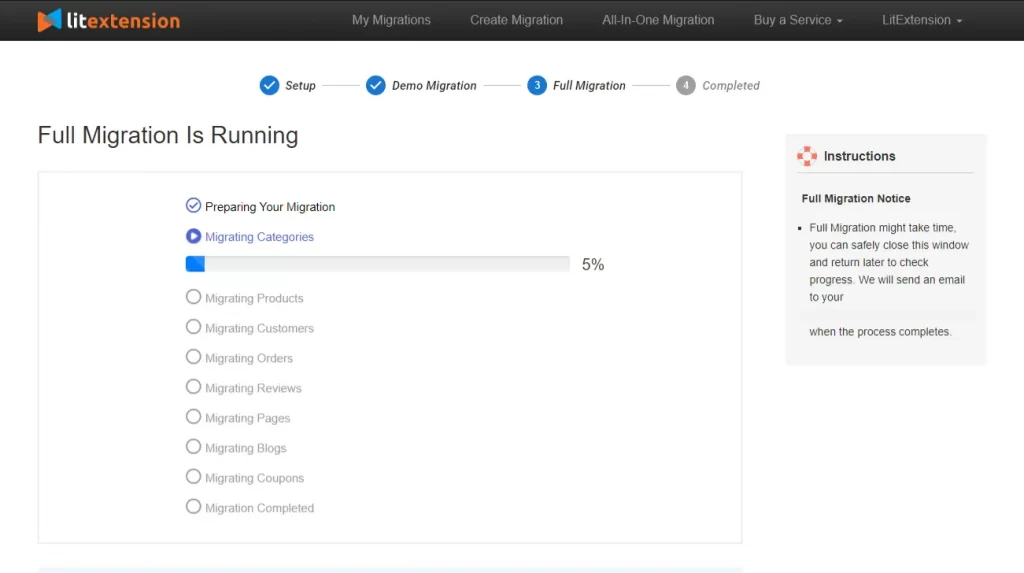
Step 8. Perform the full PrestaShop to WooCommerce migration
Once the demo result looks correct, you can proceed with the full migration.
During the full transfer, LitExtension will move the selected PrestaShop data to WooCommerce based on your configured settings and migration options. You should avoid making major structural changes to either store while the migration is running, especially changes related to products, categories, customers, or order data.
Your current PrestaShop store can continue operating during the migration, but it is still important to review the final result carefully before launching the WooCommerce store.
Step 9. Check your WooCommerce store after migration
After the full migration is complete, review your WooCommerce store before going live.
Check migrated products, product variations, categories, customers, orders, coupons, CMS pages, images, internal links, SEO metadata, and important URLs. You should also test checkout, payment methods, shipping rules, tax settings, email notifications, and account pages.
If your store received new orders or customers on PrestaShop during the migration process, you may need to migrate recent data before switching fully to WooCommerce.
Post-Migration Checklist for Your WooCommerce Store
After the full PrestaShop to WooCommerce migration is complete, you should review your new store carefully before making it live. This helps catch data, SEO, checkout, or display issues early and gives your team time to fix them before customers start using the WooCommerce store.
- Review migrated products and combinations: Check your migrated products, product names, descriptions, SKU/reference, prices, stock quantity, images, categories, tags, and metadata. If your PrestaShop store uses product combinations, review how they appear as WooCommerce variations and make sure option values, prices, stock, and images are displayed correctly.
- Check customers and order history: Review customer records, billing details, shipping addresses, order history, order statuses, totals, taxes, discounts, shipping fees, and order comments. If customer groups or customer passwords require extra handling, make sure your team has a plan for account access, password reset communication, or customer role mapping.
- Verify CMS pages, images, and internal links: Check migrated CMS pages, page content, embedded images, internal links, and navigation menus. Images inside product descriptions, category descriptions, or CMS content may need extra review depending on how they were stored in PrestaShop.
- Test checkout, payment, shipping, and tax settings: Before launch, place test orders in WooCommerce to confirm that checkout, payment gateways, shipping methods, tax rules, email notifications, and order confirmation pages work properly. This step is important because these settings are usually rebuilt in WooCommerce rather than copied directly from PrestaShop.
- Review SEO URLs and redirects: Check important product URLs, category URLs, CMS page URLs, metadata, canonical tags, and redirect rules. If your PrestaShop store used friendly URLs, make sure the new WooCommerce permalink structure and 301 redirects are reviewed before switching traffic to the new store.
- Migrate recent data if needed: If your PrestaShop store continued receiving new orders, customers, or product updates during the migration process, review whether recent data needs to be migrated before launch. This helps keep the WooCommerce store up to date before you fully switch platforms.
- Monitor the store after launch: After going live, monitor traffic, rankings, checkout behavior, order flow, customer accounts, broken links, and site performance. Keep the old PrestaShop store backup available for a while in case your team needs to compare records or recover missing information.


Leave The Work For The Experts
If you’re non-tech, let our WooCommerce migration experts handle your migration from A to Z.
Save your time for more important tasks.

How Your Data Is Secured During Migration?

Server Security

Data Security

Data Access Restriction

GDPR Compliance

NDA

Payment Security
Why choose Automated Migration for WooCommerce Migration