Volusion to OpenCart Migration
 Based on 3,000+ reviews on:


Migrate Volusion to OpenCart in 3 easy steps with LitExtension. Our automated tool securely transfers your products, orders, customers, coupons, reviews, etc. to ensure business continuity. Try our free demo today to see how easy your Volusion to OpenCart migration can be.
What Data Can Be Migrated From Volusion to OpenCart


-
Products
- Name, Model/SKU, Description, Status.
- Manufacturer.
- Tax Class.
- Product ID.
- Price, Special Price, Special Price From-To Date.
- Meta Title, Meta Keywords, Meta Description, URL Key.
- Weight, Width, Height, Length.
- Related Products, Product Tags, EAN, UPC.
- Attributes (Name, Values).
- Product Options, Product Filter.
- Downloadable Products.
- Image (Thumbnail Image, Additional Images).
- Stock Availability.
Product Categories
- Name, Description, Status.
- Image (Thumbnail Image, Additional Images).
- Meta Title, Meta Description, Meta Keywords.
-
- ID, First Name, Last Name, Email, Created Date, Telephone.
- Passwords.
- Customer Group.
- Newsletter.
- Address (Zip Code, City, State, Country, First Name, Last Name).
-
- Order ID.
- Order Date, Order Status.
- Order Items (Name, SKU, Option), Product Price, Quantity.
- Sub Price, Discount Price, Tax Price, Shipping Price, Total Price.
- History.
- Customer Name, Email.
- Billing Address (First Name, Last Name, Company, Address 1, Address 2, Country, State, City, Zip Code, Telephone).
- Shipping Address (First Name, Last NameCompany, Address 1, Address 2, Country, State, City, Zip Code, Telephone).
-
- Name.
- Image.
-
- Tax Class (Name, Tax rate).
- Tax Rates (Country, Percent, Tax name, Type).
-
- Name.
- Discount Amount, Type Discount.
- Coupon Code, Coupon Date, Coupon Expire Date.
-
- Created Date, Status, Rate, User Name.
- Product.
- Comment.
-
- Title, Description.
- Meta Title, Meta Description, Meta Keyword.
- Created Date.
- URL Key.
-
- Products (Name, Short Description, Description, Meta Title, Meta Description, Attributes).
- Categories (Name, Description, Meta Title, Meta Description).
- CMS Page (Name, Description, Meta Title, Meta Description).
- Additional fee may apply.
(*) Please note that the data listed above may vary depending on your Source Store.
Additional Options
Clear Data On OpenCart Before Migration
You can clear the data on OpenCart in accordance with selected entities for migration… More Details →
RecommendedPreserve Product, Order, Customer IDs on OpenCart Store
This option helps keep your product ID, customer ID or order ID the same during your store migration… More Details →
 How It Works Recommended
Migrate Images from Products, Categories, Blog Descriptions
This option helps you to migrate images in descriptions of products, categories, and blog posts… MoreDetails →
Strip HTML Tags from Category and Product Names
Strip HTML tags from category and product names automatically when migrating your store … More Details →
How to Perform Volusion to OpenCart Migration

#1: Set-up Volusion to OpenCart Stores
Select Volusion as “Source Cart” and OpenCart as “Target Cart” from the dropdown list. Afterward, enter store URL and follow brief instructions to set up the OpenCart migration process.

#2: Select Data You Want To Migrate to OpenCart
Choose the entities you want for the Volusion to OpenCart migration such as products, categories, orders, customers, SEO URLs, and even more.

#3: Perform Full Volusion to OpenCart Migration
Let’s start the Volusion to OpenCart Migration. Once the migration process is kicked off, it will constantly run even when you turn off your browser.
Step-by-Step Guide to Migrating from Volusion to OpenCart
To start your automated migration from Volusion to OpenCart using LitExtension migration tool:
- Access the LitExtension app.
- Sign up using your email, or connect via Google for instant access.
- If you already have an account, simply enter your email and password to login.
Check the “Remember Me” box to speed up your next login. Staying logged in will help you track the migration process and contact technical support more quickly.
We also have a detailed video tutorial on how to use LitExtension migration app, check it out:
Step 1: Set Up Source & Target Carts
The first step is to connect the LitExtension data migration system with Volusion and OpenCart, so that the system will have access to data from these two platforms for migration purposes.
On the Migration Page screen, select Create New Migration.
1.1. Set Up Source Cart
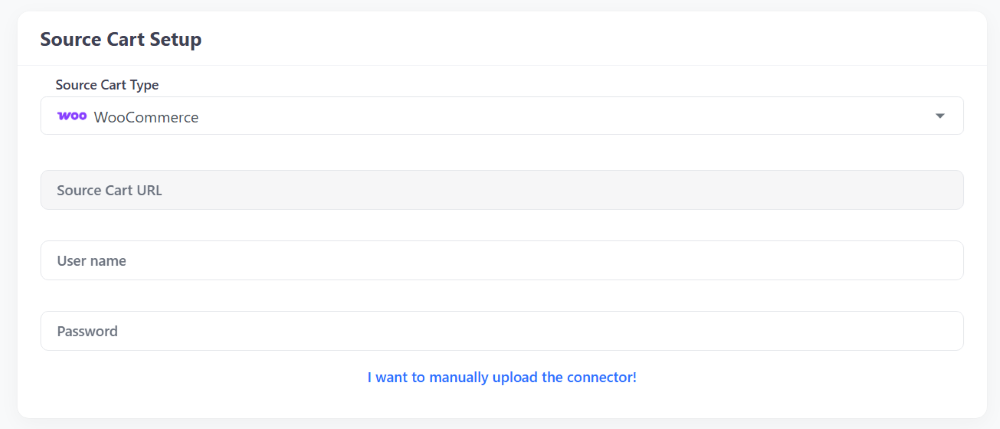
In Source Cart Setup section, select Volusion as your Source Cart from the drop-down menu and enter your Source Cart URL.
Each cart type requires different information, which will be shown once you select your Source Cart. There are three ways to connect your store:
- Install Connector for open-source carts.
- Provide API Keys for hosted carts.
- Import CSV Files if your store has crashed, you have security concerns, face technical issues, or use a cloud server.
1.2. Setup Target Cart
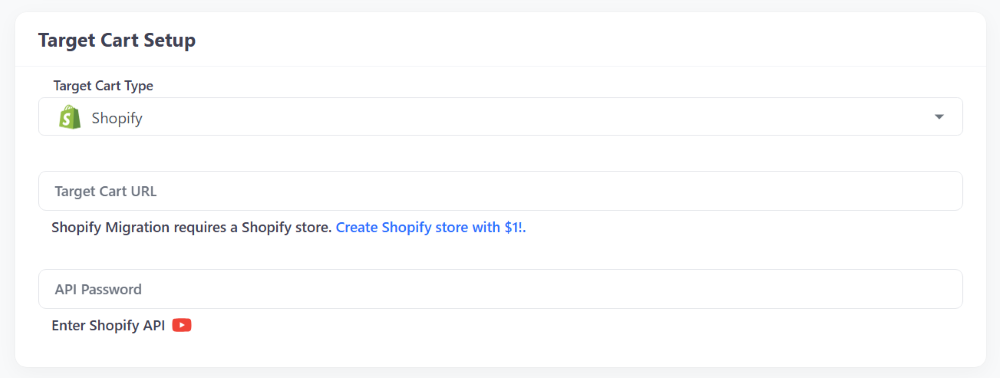
In Target Cart Setup section, select OpenCart as your Target Cart from the drop-down menu and enter your Target Cart URL.
Follow the same process in the Source Cart Setup section to connect LitExtension to your OpenCart store using a Connector, API, or CSV file.
Step 2: Configure Volusion to OpenCart Migration
After connecting to Source (Volusion) and Target Carts (OpenCart), the next step is to select the data you want to migrate.
You can also enable additional options to enhance performance and SEO for your OpenCart store.
Entities Selection
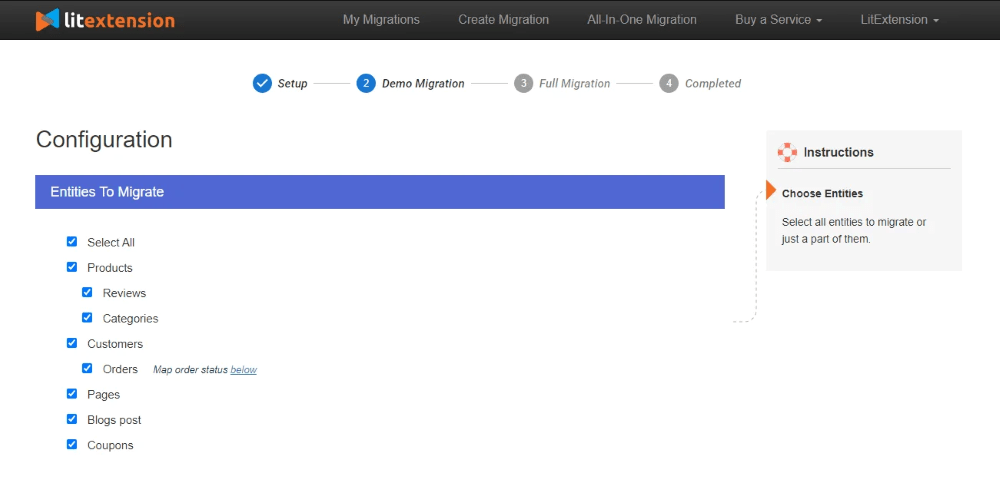
In Entities To Migrate section, select the entities you want to migrate.
For the Volusion to OpenCart pair, the entities you can migrate are:
- Products
- Product Categories
- Customers
- Orders
- Manufacturers
- Taxs
- Reviews
- Coupons
- CMS Pages
Or click Select All to transfer everything.
For data you want to migrate that is not listed here, please contact LitExtension experts so we can assist and advise on alternative solutions.
Additional Options
After selecting your data, configure the Additional Options section. Common choices include:
- Clear target cart data before migration: This option allows you to delete the data (on the Target Store) in accordance with selected entities for migration. It is to avoid mixing and duplication of data during the migration process.
- Preserve IDs for products, customers, and orders: With this option, the IDs of your product, customer and order will be kept the same in your Target Store just as in your Source Store. This option is necessary to keep the connection among entities after the migration. Besides that, it helps you manage your Products, Customers and Orders easily.
- Strip HTML tags from category and product names: Categories, product names in your Source store may already wear HTML tags. However, these tags might have been configured improperly or your new store does not need them anymore.
If you need to answer questions about additional options, you can contact live chat for free consultation.
Step 3: Perform Volusion to OpenCart Migration
After selecting the data to migrate to OpenCart and configuring additional options, continue with the Full Migration.
If you need a demo to see if the data is moving correctly, choose Demo Migration. You can learn more about the benefits of using Demo Migration and how to implement it through our detailed step-by-step guide.
Otherwise, simply tick Skip Demo Migration and click Start Full Migration to begin.
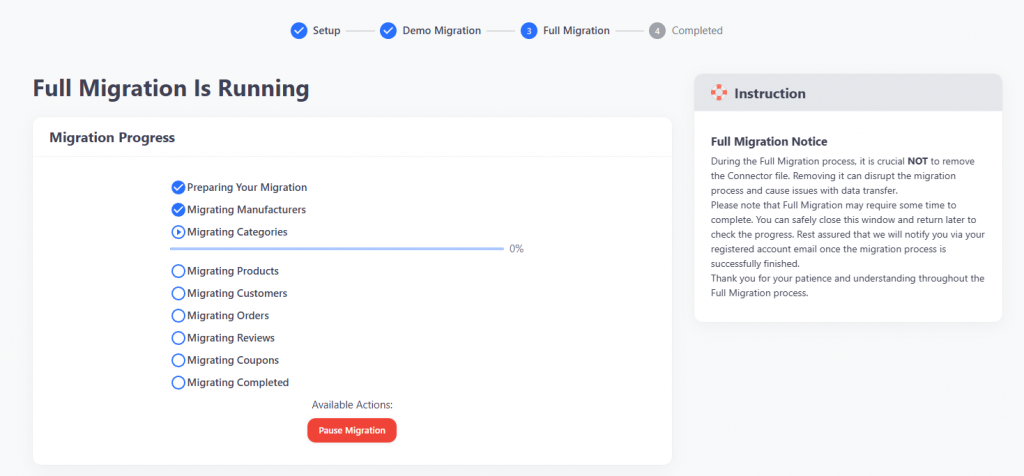
The migration process may take a few minutes or longer depending on the number of entities being transferred. LitExtension runs on a cloud-based system, you don’t need to keep your browser or internet connection active during the migration. Additionally, you can easily check the migration progress through the Migration progress section.
Before starting, you’ll be asked to complete the payment. LitExtension supports multiple payment methods, including PayPal, Skrill, Western Union, Bank Transfer, and Cryptocurrencies.
Volusion to OpenCart Post-Migration Checklist
The final step is to double-check the results of the migration process from Volusion to OpenCart:
Once the system displays the “Full Migration Is Completed” screen, immediately review your results. Verifying data integrity ensures that all information has transferred correctly to your new OpenCart store.
Checking Product Visibility. Most products will appear automatically on your storefront. However, out-of-stock products are hidden by default. To verify these items, locate them via the catalog or use the onsite search function.
Review Product Details. Inspect the following data points for accuracy:
- Product descriptions.
- Images.
- Variants.
- Meta descriptions.
After validating the storefront, log in to the OpenCart admin panel. Browse the back-end to confirm that all customer data and historical orders are accurate and complete.
For details, read about Post Migration Checklist, compiled by our team of migration experts.
If you face any challenges during the setup, data transfer, or post-migration review, do not hesitate to reach out. Contact the LitExtension Customer Support team at any time, we are available 24/7 to ensure your migration is accurate, secure, and successful.


Leave The Work For The Experts
If you’re non-tech, let our OpenCart migration experts handle your migration from A to Z.
Save your time for more important tasks.

How Your Data Is Secured During Migration?

Server Security

Data Security

Data Access Restriction

GDPR Compliance

NDA

Payment Security
Why choose Automated Migration for OpenCart Migration