Choosing between Wix, Squarespace, and Shopify starts with what your website needs to do. Are you building a portfolio, taking bookings, or running an online store where products and orders shape your daily work?
This Wix vs Squarespace vs Shopify comparison looks at what each platform lets you do, where its limitations matter, and what you may need to pay extra for—so you can choose based on your business, not just the starting price.
Wix vs Squarespace vs Shopify – At a Glance
Start with your website’s main job, then consider the trade-off you are willing to make.
| Platform | Choose it if… | Main trade-off |
|---|---|---|
| Wix | You want to build and customize a business website yourself, with the option to sell products or take bookings alongside your main services. |
More layout freedom means more design decisions. Check whether your preferred editor and plan support the mobile layout and business features you need. |
| Squarespace | You want a polished portfolio, content website, or brand website that also sells products, memberships, or digital content. |
A more structured design experience gives you less freedom in some areas. Selling fees also vary by plan and product type. |
| Shopify | Selling products is the website’s main purpose, and you need to manage orders, inventory, and sales channels as the business grows. |
Some content, design, and specialized selling requirements need additional apps or development, which can increase your costs. |
If you are comparing all three for an online store, look beyond the storefront design. Payment options, product requirements, and the cost of essential features can change which platform makes the most sense.
Wix vs Squarespace vs Shopify: Pricing and Additional Costs
Wix starts at a lower price for a business website, while Squarespace offers the lowest starting subscription for an online store among the standard plans compared below. However, transaction fees and paid extras can change which platform costs less for your business.
All prices below are in USD per month, billed annually, before taxes.
| Platform | Standard plans and prices | Starting plan for a full online store |
|---|---|---|
| Wix |
|
Core: $29/month |
| Squarespace |
|
Basic: $19/month, plus a 2% commerce transaction fee |
| Shopify |
|
Basic: $29/month |
This comparison covers standard website plans. Wix Studio and Shopify Plus serve different requirements, while Shopify Starter does not offer the same full online storefront as Basic.
If you are deciding between the standard Wix plans and Wix Studio, our Wix pricing guide explains the separate plan options and additional costs.
Sources: Wix pricing, Squarespace pricing, and Shopify pricing.
What can increase your total cost?
- Transaction fees can outweigh a lower subscription price. Squarespace Basic adds a 2% commerce transaction fee, while Core removes it. At $1,000 in monthly sales subject to that fee, Basic would cost $39 in subscription and commerce fees, compared with $29 on Core. Both totals exclude payment processing and other expenses. Separate fees apply to digital content and memberships. See the Squarespace plan details for the applicable fees.
- Your payment provider also matters. Shopify can charge additional transaction fees when you use a third-party payment provider. Orders processed through Shopify Payments avoid those third-party fees, but payment processing charges still apply. Review the Shopify Payments fee details before choosing your payment setup.
Beyond payment fees, budget for any paid apps, premium templates, domain renewals, and additional services your website needs. Check what your chosen plan includes before treating its subscription as your complete running cost.
Which platform offers better value?
For a website that does not need online payments, Wix Light has the lowest starting subscription among these plans. Squarespace Basic is cheaper to start selling with, but its commerce transaction fee makes Core worth considering as sales increase.
For regular online selling, Wix Core, Squarespace Core, and Shopify Basic all cost $29 per month with annual billing. The deciding factor is therefore which plan covers your requirements with the fewest additional expenses—not simply which platform advertises the lowest starting price.
Wix vs Squarespace vs Shopify: Ease of Use and Website Design
All three platforms let you build a website without writing code, but their editors work differently. Wix emphasizes direct control over page layouts, Squarespace combines visual editing with a grid, and Shopify organizes storefront design around reusable templates, sections, and blocks.
The best fit depends on whether you want to position individual elements yourself, work within a more structured layout, or apply a consistent design across your store.
Wix: Flexible page editing, with more layout decisions
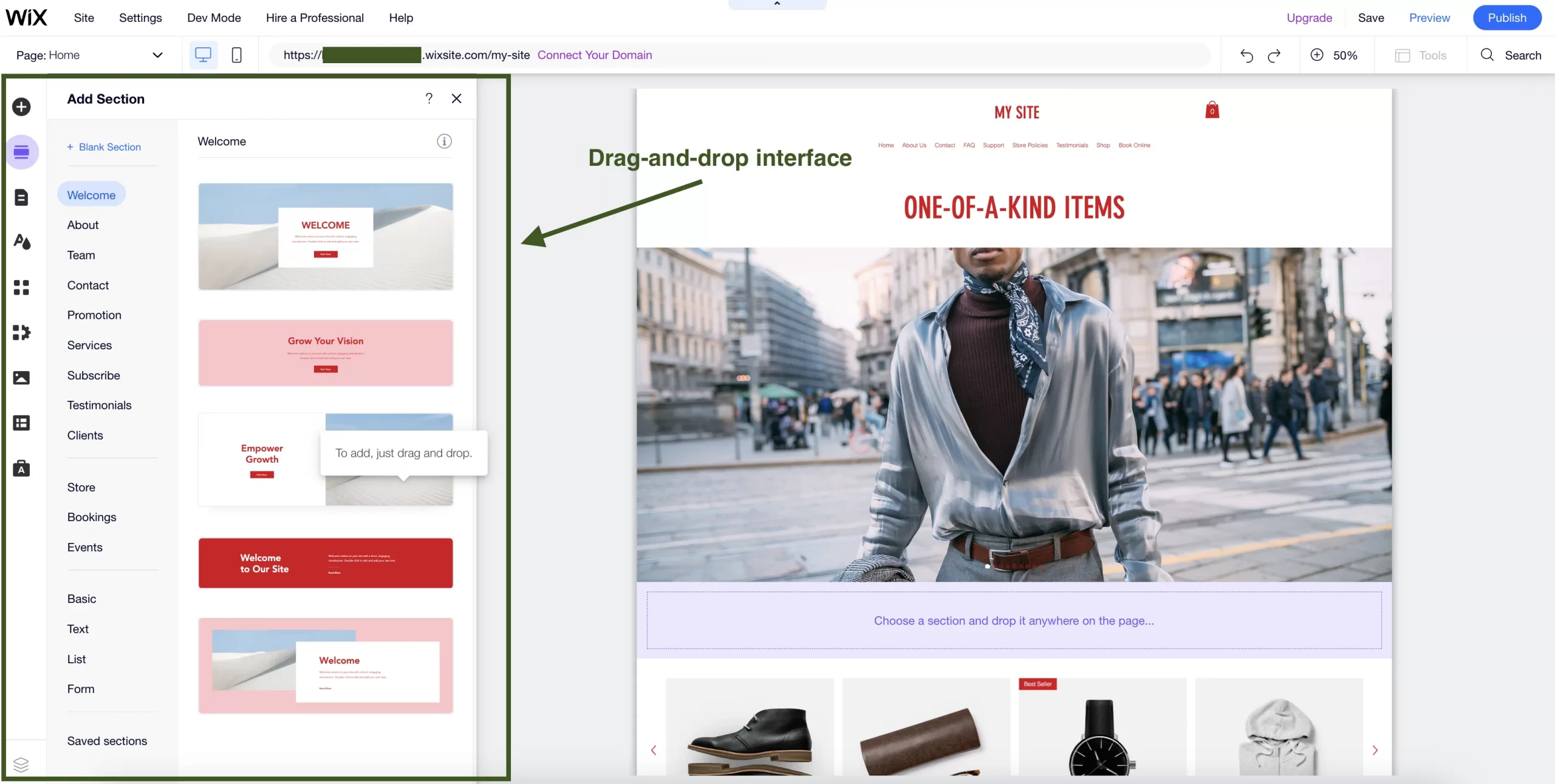
Wix Editor lets you drag and position elements on the page, giving you considerable control over how text, images, and other content fit together. This suits business owners who have a particular layout in mind and want to adjust it visually.
That freedom also means taking responsibility for spacing, alignment, and the mobile version of your design. Wix creates a mobile-friendly version automatically, but you should review and adjust it rather than assume every desktop change will look right on a smaller screen.
Wix Studio offers a different editing experience, including responsive breakpoints for controlling layouts at different screen sizes. These controls provide more flexibility for detailed design work, but they should not be confused with the standard Wix Editor used in this comparison.
Another limitation to consider is template switching: you cannot simply apply a different template to an existing Wix site. Changing templates involves creating another site and transferring the relevant content and settings.
>>> Browse our selection of Wix templates to find a starting layout that suits your content before building out the site.
Squarespace: Visual layout control within a grid
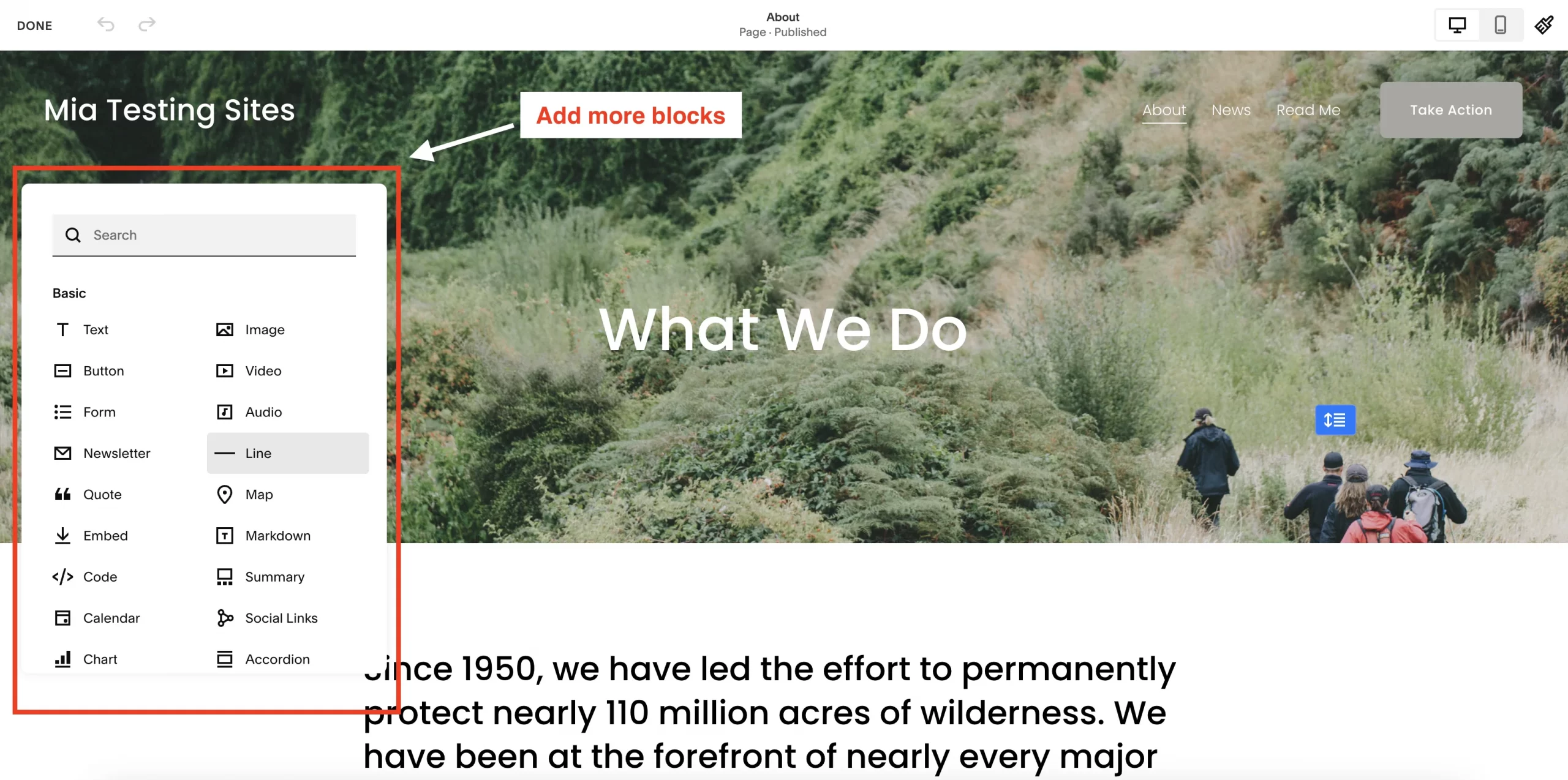
Squarespace’s Fluid Engine editor lets you move, resize, and overlap blocks within a grid. It offers more layout freedom than a basic editor that only lets you insert content into fixed positions, while the grid provides a reference for arranging elements.
For example, you can place text beside an image on desktop, then arrange those blocks differently on mobile. In Fluid Engine sections, the desktop and mobile layouts can be adjusted independently, although changes to shared content, such as text or button links, affect both.
This approach suits users who want to shape their pages visually without positioning everything on an unrestricted canvas. However, Fluid Engine is not used in every editing area, so check how the specific pages you need can be customized.
Shopify: Reusable layouts built around your storefront
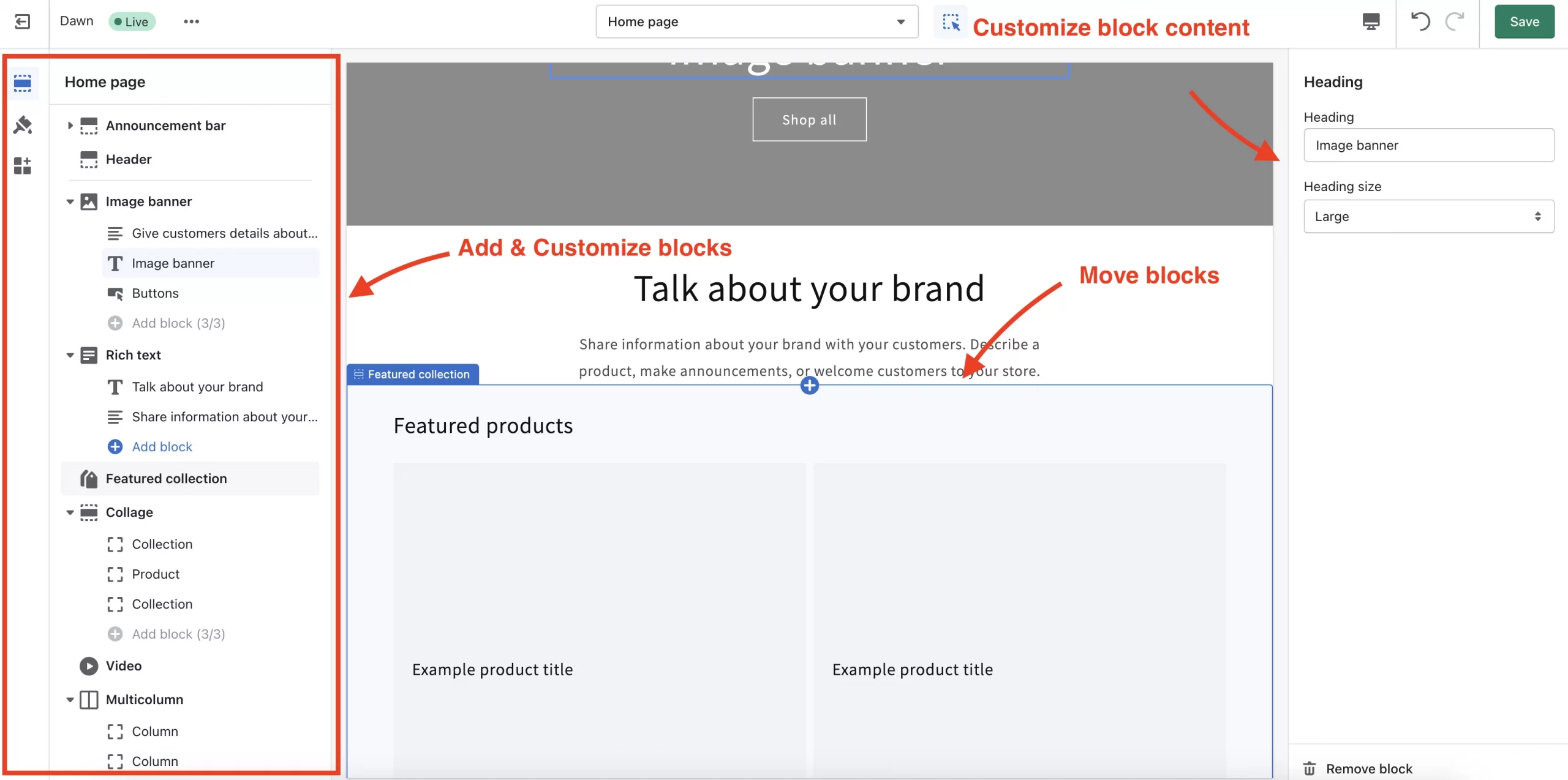
Shopify’s theme editor uses templates containing sections and blocks. You can select a product, collection, or other page template, rearrange its content, and adjust the settings your theme provides.
The template system matters when you manage multiple similar pages. A layout change can apply to all products assigned to that template, helping you keep the storefront consistent without redesigning every product page individually. If a group of products needs a different layout, you can assign it another template.
The trade-off is that your theme determines many of the available controls. Before choosing one, check its product-page layouts, navigation, image presentation, and mobile settings. A layout outside those capabilities may require another theme, an app, or custom development.
>>> Our selection of Shopify themes can help you compare storefront layouts before choosing a design.
Wix vs Squarespace vs Shopify: eCommerce Features
All three platforms support online selling, but the differences become clearer when you examine your products, payment methods, and fulfillment requirements. A store selling a few standard products has different needs from one managing complex variants, multiple stock locations, or in-person sales.
Product options and inventory management
Start by checking whether each platform can represent your products correctly. Product options are attributes such as size, color, and material; variants are the combinations customers can purchase.
| Product limit | Wix | Squarespace | Shopify |
|---|---|---|---|
| Options per product | Up to 6 | Up to 6 | Up to 3 |
| Variants per product | Up to 1,000 | Up to 250 | Up to 2,048 |
These are native limits, not a ranking of overall product flexibility. Shopify supports more variant combinations, but Wix and Squarespace allow more separate option types. A product requiring four independently stocked options therefore needs closer assessment on Shopify, even if its total number of variants is relatively small.
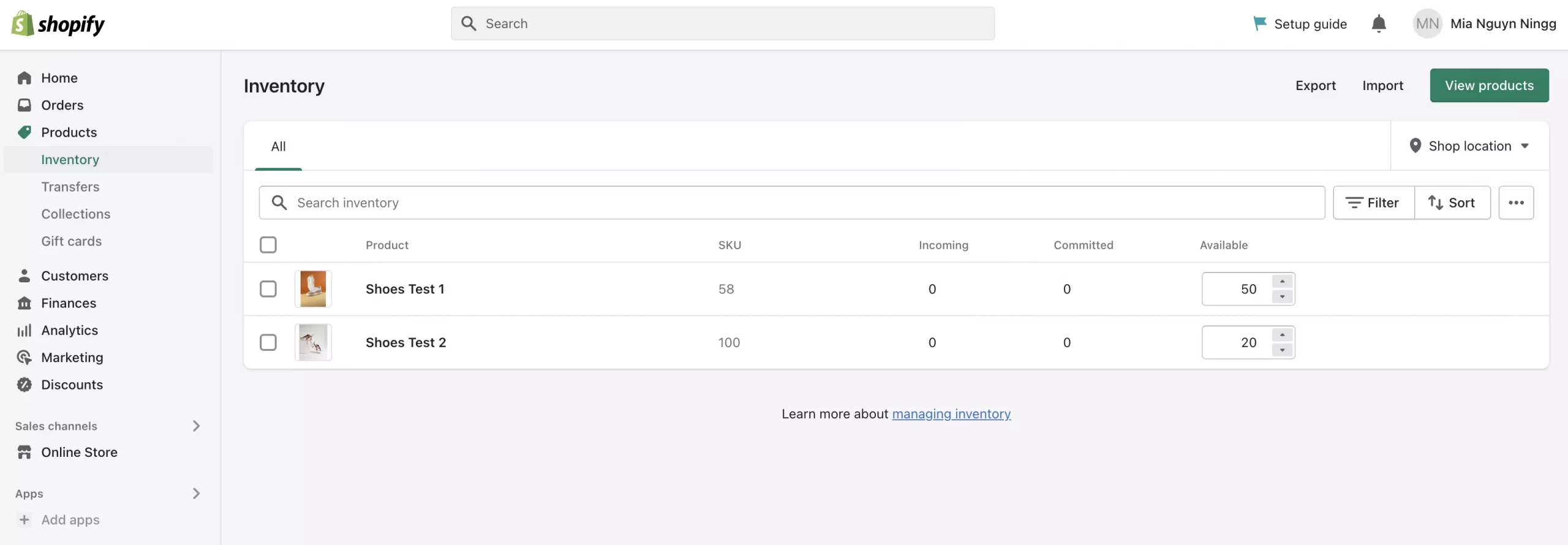
For inventory, Shopify supports tracking stock across locations and transferring it between them. Wix also supports product and variant stock tracking, including bulk updates. Squarespace lets you manage stock for products and variants, but stores with more complex warehouse requirements should assess the complete workflow and any necessary integrations before choosing.
Payments and checkout
Check whether your preferred payment provider works in your business’s country before comparing checkout features. Shopify and Wix offer their own payment services alongside third-party providers. Squarespace supports Squarespace Payments, Stripe, and PayPal, subject to availability.
Payment providers and payment methods are not interchangeable: connecting a provider does not automatically make every wallet, installment option, or currency available. Confirm the methods your customers use and whether they support the products you intend to sell.
Also check the transaction fees described in the pricing section. A payment setup that works technically may still be more expensive for your business.
Shipping and order fulfillment
The important question is whether you can charge the right delivery rate for each order, not simply whether a platform offers shipping.
- Shopify: Shipping profiles let you apply different rules to products and fulfillment locations. Built-in carrier rates are available in supported regions, while connecting your own carrier account can require a qualifying plan or an additional fee.
- Wix: You can configure shipping regions, delivery methods, and rates, with delivery profiles for products that need different rules. Third-party apps can provide additional carrier and fulfillment connections.
- Squarespace: Flat-rate and weight-based shipping can cover straightforward delivery requirements. Check plan and regional eligibility if you need carrier-calculated rates, shipping labels, or a fulfillment extension.
Before choosing, test a representative order containing products with different delivery requirements. This helps reveal whether the checkout calculates the rate you expect or needs additional configuration.
In-person selling and POS
Shopify is worth particular consideration if you need to coordinate online sales with retail locations, stock transfers, and store operations. However, Shopify POS features, supported hardware, and integrated payment processing depend on your plan and location.
Wix also offers POS options, with availability depending on the solution and country. Squarespace supports in-person selling through its app in the United States and United Kingdom, although available payment methods differ between the two.
For occasional markets or pop-up events, check the specific device and payment method you need. For a permanent retail store, also compare staff permissions, returns, inventory workflows, and ongoing POS costs.

Selling across countries and currencies
If you plan to sell beyond your home market, check three things separately: the languages customers can browse in, the currencies they can pay in, and the prices or products you can offer by market. A translated website alone does not guarantee that customers can complete checkout in their local currency.
Shopify Markets lets you configure localized experiences for different markets, including language, currency, product availability, and pricing; the payment setup determines which currencies customers can actually use at checkout. Wix also supports multi-currency checkout for eligible Wix Stores using supported payment providers and methods. Squarespace can reach international customers, but its store uses one currency, so check how the selected payment provider handles a customer’s local currency at checkout.
For a store selling mainly in one country, these differences may have little impact. If you plan to operate across several markets, test the complete buying journey for each one before choosing a platform.
Dropshipping and print on demand
All three platforms can connect to external fulfillment services, so dropshipping or print on demand alone does not automatically determine the winner. Shopify offers a broad app ecosystem, Wix supports supplier integrations, and Squarespace connects to services such as Printful.
Compare the supplier connection you actually plan to use: can it publish your products, synchronize stock, send orders for fulfillment, and return tracking information? Product costs, shipping coverage, and integration fees matter more than the total number of available apps.
Our recommendation: Put Shopify on your shortlist when inventory and fulfillment coordination are central to the business. Wix and Squarespace remain viable options when their native product limits, payment options, and delivery workflows cover your requirements. Choose based on the operations you need to run, rather than assuming every online store needs the most extensive feature set.
Apps and Integrations
Apps and integrations matter when your website needs functionality beyond its built-in tools. The key difference is not simply how many apps each platform offers, but whether you can connect the services your business relies on without adding unnecessary cost or manual work.
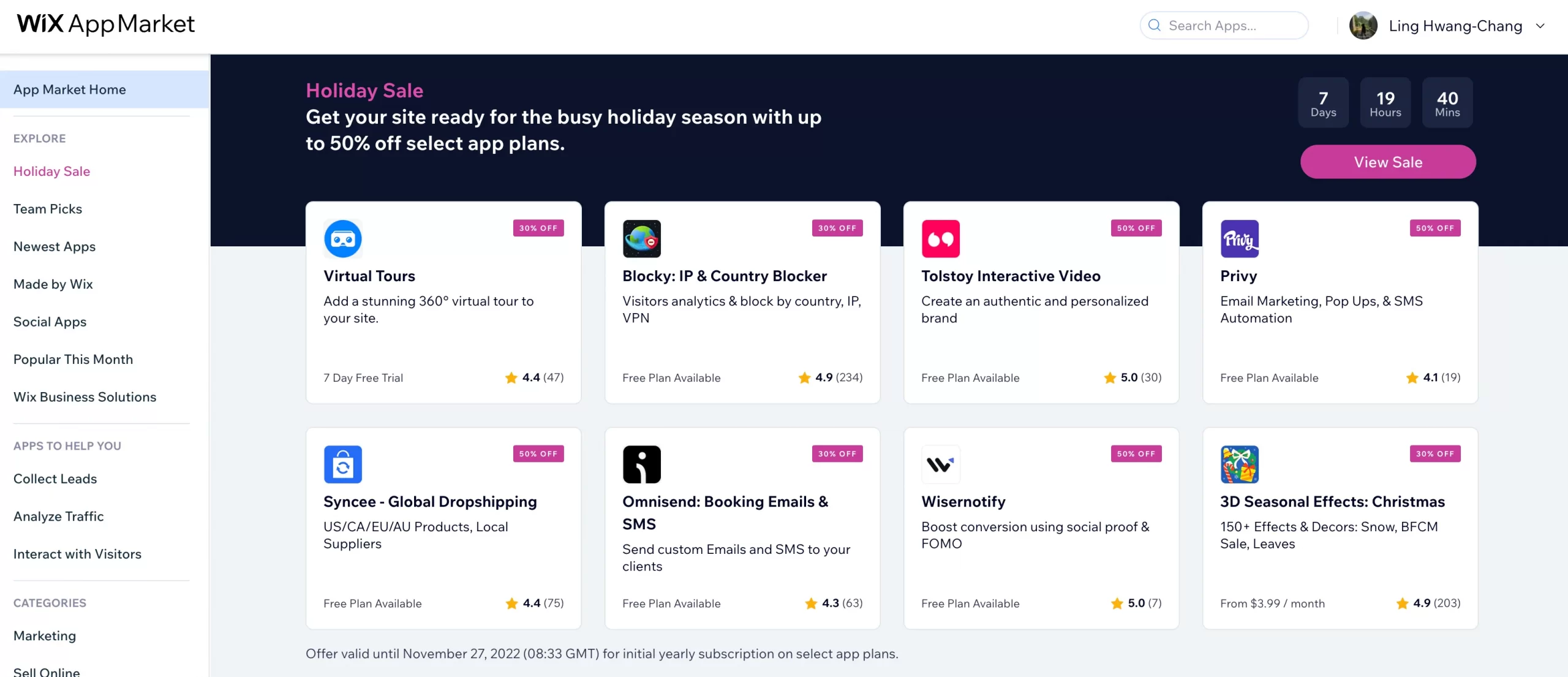
Wix: The Wix App Market combines Wix-developed apps with third-party tools for selling, marketing, communication, and other business tasks. This makes it useful for websites that combine several activities, such as publishing content, taking bookings, and selling products. However, adding an app does not automatically include all its features in your website plan: check its subscription requirements and whether support comes from Wix or the developer.
Squarespace: Squarespace combines built-in features, official integrations, and third-party Extensions. Its Extensions cover tasks such as accounting, shipping, and inventory management, so a smaller directory does not mean it only supports basic website functions. You can connect Extensions on all Squarespace plans, although the connected service may charge separately. If a particular external tool is essential to your business, confirm that the connection supports the data and actions you need before choosing Squarespace.

Shopify: Shopify stands out for its broad selection of commerce-focused apps, including product reviews, subscriptions, product customization, and order-management tools. This gives merchants more options when their requirements go beyond standard storefront features. The trade-off is managing the resulting app setup: paid apps may charge recurring, one-time, or usage-based fees, and compatibility with your theme, plan, and other apps needs checking.
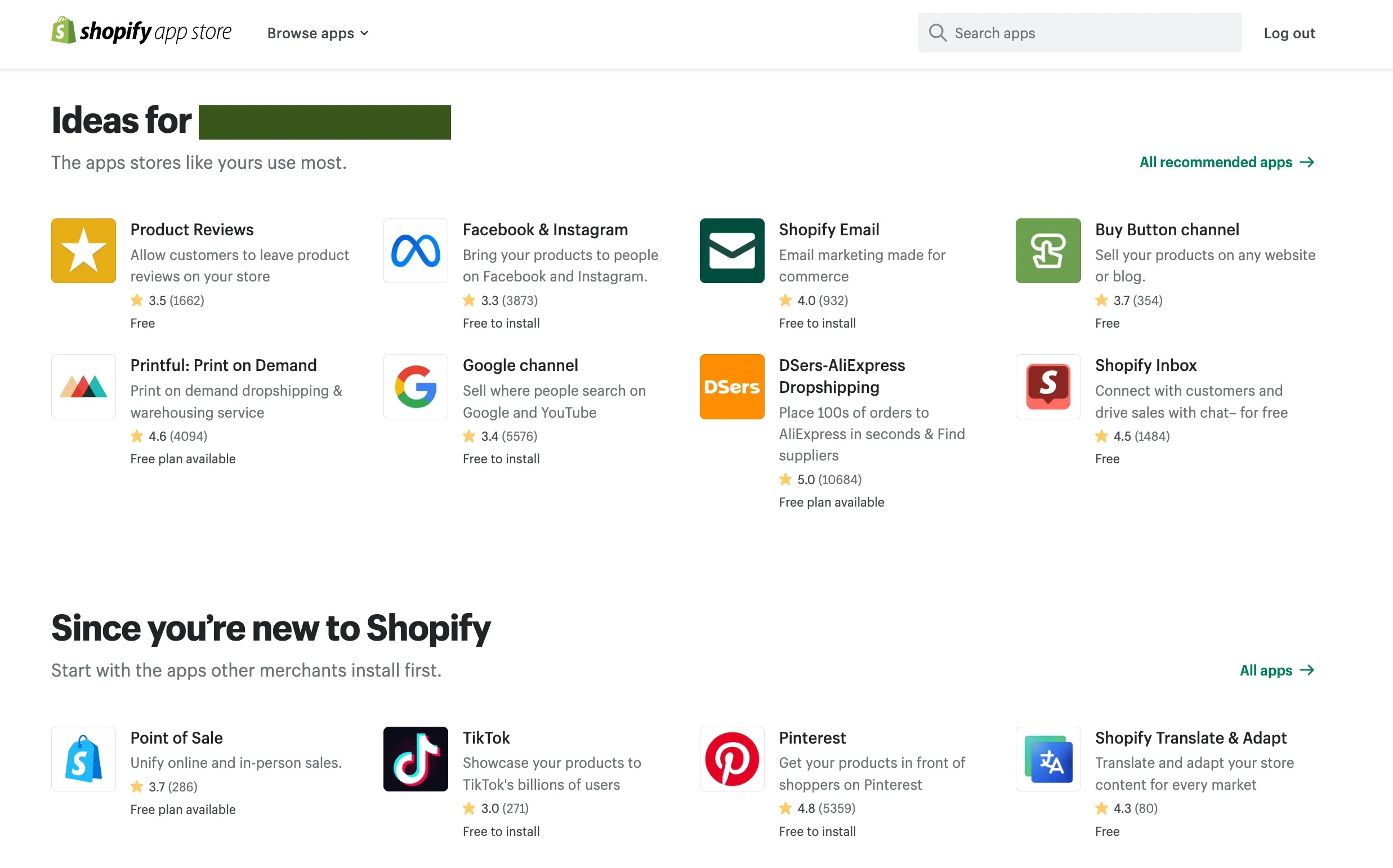
For specific options, explore our selection of Shopify apps and shortlist only those that address a gap in your store.
Before choosing a platform, list your essential external tools and check what each integration actually does. For example, sending new orders to an accounting service is different from also syncing refunds and inventory. Compare that coverage alongside subscription costs and developer support.
Our verdict:
Shopify is the strongest choice here for stores that need a wide range of specialized commerce apps. Wix suits businesses combining website and business-management functions, while Squarespace remains a practical option when its built-in tools and available integrations already cover your workflow.
SEO and Blogging
Wix, Squarespace, and Shopify all provide tools for optimizing pages and publishing blog content. The differences become more useful when you look beyond basic SEO fields: how much control do you need over technical settings, and how will readers navigate your articles?
SEO tools and control
All three platforms let you edit SEO titles and meta descriptions. Having these controls is a starting point, not a reason to expect one platform to rank above another.
- Wix: Wix lets you manage SEO settings by page type and customize individual pages. Beyond titles and descriptions, its settings include controls for structured data and robots meta tags. This is useful if you want to apply consistent defaults across your content while making page-specific adjustments when needed.
- Squarespace: Squarespace provides SEO titles and descriptions for pages and supported collection items, including blog posts and products. For a business publishing service pages and articles, these built-in settings cover routine on-page work without requiring a separate SEO plugin.
- Shopify: Shopify lets you edit search engine listings for products, collections, pages, and blog posts. It also generates and updates XML sitemaps automatically. This supports stores optimizing both their catalog and supporting articles, although the available SEO fields should not be confused with unrestricted control over the site’s underlying structure.
None of these platforms guarantees immediate Google indexing or higher rankings. Your content, internal linking, technical implementation, and competition still affect search performance.
Blogging and content organization
- Wix: Wix Blog supports both categories and tags. You can also display post lists filtered by category or tag elsewhere on your website. For example, a business can show relevant advice articles on a service page rather than sending every visitor to the main blog feed.
- Squarespace: Squarespace also supports categories and tags, alongside excerpts, comments, and blog presentation settings. These tools suit websites where articles, photography, and other editorial content are central to the visitor experience. However, categories and tags are not an advantage exclusive to Squarespace.
- Shopify: Shopify lets you create multiple blogs and organize posts within them using tags. A store could separate buying guides from company news, then use tags to group related topics. Its native organization differs from the separate category-and-tag system in Wix and Squarespace, but it can still support a store’s content strategy.
Our verdict:
Wix stands out for accessible SEO configuration and flexible blog organization. Squarespace suits content-led websites that value blog presentation, while Shopify is a practical fit when articles support an online store. There is no clear overall SEO winner based on these features alone.
Customer Support
All three platforms provide help centers for setup and troubleshooting. When you need assistance from a support agent, the main differences are the contact channels, operating hours, and access included with your plan. The comparison below focuses on English-language support.
- Wix: Wix offers callbacks, chat, and email support, with available options depending on your language, time zone, and issue. English callbacks are available 24/7, while English live chat operates Monday through Friday, from 2 AM to 6 PM EST. This makes Wix worth considering if you prefer discussing a problem by phone rather than explaining it entirely through messages.
- Squarespace: Squarespace offers email support 24/7 and English live chat Monday through Friday, from 4 AM to 8 PM ET. It does not offer phone support. Email provides an option outside chat hours, but it should not be confused with an immediate live conversation—an important distinction if you usually manage your website during evenings or weekends.
- Shopify: Shopify provides 24/7 chat support across all plans, making it a practical choice for merchants who need to contact support outside regular business hours. Phone and email access depend on your plan or subscription; they are not standard support channels for Basic, Grow, and Advanced. Shopify Plus includes additional phone and email support.
Our verdict:
Shopify has the advantage for round-the-clock chat, while Wix is a stronger fit if English-language callbacks are your priority. Squarespace suits users comfortable with email and weekday live chat. These differences show when and how you can get help, not which provider will resolve every issue fastest.
Security
Wix, Squarespace, and Shopify provide hosted websites with SSL/TLS protection, which encrypts data traveling between visitors’ browsers and your website. All three also document PCI DSS compliance for their payment environments, helping protect cardholder data during payment processing.
These protections do not remove the need to secure your own account. All three platforms support two-factor authentication for administrator accounts. Enable it, give staff only the access they need, and review the permissions granted to third-party apps and integrations.
Our verdict:
All three cover core website and payment-security requirements. SSL and PCI compliance alone do not establish a security winner, so they should not be the deciding factor in this comparison. Your account settings, access controls, and connected services also matter.
Wix vs Squarespace vs Shopify: Which Platform Fits Your Business?
At the end of the day, there is no single platform that fits every business. The right choice depends on what your website needs to handle day to day, from publishing content and taking bookings to managing products, inventory, and orders:
If you run a service-based business: Choose Wix or Squarespace
If your website mainly promotes your services, collects leads, takes bookings, or accepts occasional payments, consider Wix and Squarespace. Wix gives you more freedom to arrange page elements and combine website functions such as bookings, content, and selling. Meanwhile, Squarespace takes a more structured approach and can suit businesses where visual presentation and content are central to the website.
Also, if selling products is only a secondary part of the business, you may not need a platform built primarily around eCommerce operations.
If you run a portfolio or content-led website: Choose Squarespace or Wix
For photographers, designers, consultants, publishers, and other content-led businesses, website presentation and content organization may matter more than advanced inventory tools. Squarespace provides a structured visual editing experience and built-in blogging features; similarly, Wix also gives you more direct control over page layouts.
On the other hand, consider Shopify when the website is expected to evolve into a product-focused store rather than primarily serving as a portfolio or publishing site.
If you run a small online store: Compare all three
If you sell a relatively straightforward range of products and need standard features such as product pages, payments, shipping, and order management, all three platforms can be viable. The choice comes down to how much of your day-to-day work involves eCommerce operations versus general website management.
So check your product options, variant requirements, payment providers, shipping rules, and integrations before choosing a plan. A platform that works for a small catalog may become restrictive as your product range or operational requirements grow.
If you run a growing eCommerce business: Choose Shopify
What if inventory, fulfillment, multiple sales channels, or retail operations are becoming a larger part of your business? In that case, Shopify deserves closer consideration. Its storefront tools are built around product and order management, while its app ecosystem can extend the store when your requirements become more specialized.
This does not mean every growing store needs Shopify. Before switching, you should compare the workflows you actually need, including inventory locations, fulfillment rules, POS, payment processing, and third-party integrations.
If you combine services and product sales: Choose Wix, Squarespace, or Shopify based on your main workflow
Some businesses need both channels: for example, a service business that sells physical products, a consultant offering paid digital content, or a brand that combines bookings with an online store. In these cases, compare the complete workflow rather than choosing a platform based on its strongest individual feature.
Wix and Squarespace can suit businesses where services, content, and selling need to coexist. Shopify, on the other hand, may make more sense when product sales and inventory gradually become the core of the business.
These are starting points, not fixed rules. Your product structure, payment providers, integrations, budget, and plans for growth can change which platform fits your business.
Chosen your next platform?
If you already run a store, LitExtension can help assess which data can move and what needs separate setup.

When Should You Consider Migrating?
Comparing platforms is one thing; deciding whether your existing store should move to a different platform is another. If your current platform no longer fits the way your business sells, manages products, or handles day-to-day operations, migrating can be a practical step to consider rather than continuing to work around its limitations.
You may want to consider moving to another platform if:
- Your store has outgrown platform limits: You need more products, variants, inventory locations, or selling capabilities than your current platform can comfortably support.
- Your daily operations have become too complicated: You rely on workarounds to manage inventory, fulfillment, orders, or other core store processes.
- You need integrations your current platform cannot provide: An essential payment provider, fulfillment service, marketing tool, or business system is unavailable or does not support the workflow you need.
- Third-party tools are adding too much complexity: You increasingly depend on apps or custom solutions to provide functionality that you need as part of your core store operations.
- Your business model is changing: For example, you are moving from a simple website to a product-focused store, expanding into multiple sales channels, or adding more complex inventory and fulfillment requirements.
>>> If you currently sell on Wix and Shopify fits your needs better, review our Wix to Shopify migration service to see which store data can move and what needs separate setup.
Take the Stress Out of Store Migration!
Let LitExtension handle your data transfer with a well-mapped process designed for accuracy and convenience..
Before starting, agree on which data will be migrated and which parts of the new storefront need separate setup. Review these areas with your migration provider:
- Store data: Identify the products, categories, customers, orders, variants, images, reviews, and other data you need to transfer. Check which data can be migrated and which elements need to be configured separately on the new platform.
- URL structure: Compare your current URLs with the URL structure supported by the new platform. Map important old URLs to their corresponding new URLs before the migration.
- 301 redirects: Set up 301 redirects for URLs that change so visitors and search engines can reach the corresponding pages on the new store.
- SEO elements: Review metadata, canonical URLs, internal links, and other important SEO settings after migration. Do not assume that these elements will transfer exactly as they were on the old platform.
- Store functionality: Check payment methods, shipping rules, apps, integrations, customer accounts, and other workflows that your business relies on. Some functionality may need to be recreated or configured separately.
- Testing: Test products, collections, checkout, redirects, navigation, and other critical pages before directing customers to the new store.
Identifying these requirements helps define the scope of the data transfer and the work needed to launch your new store.
Wix vs Squarespace vs Shopify – FAQs
Which is easiest for beginners: Wix, Squarespace, or Shopify?
Wix suits beginners who want to arrange website elements themselves, while Squarespace suits those who prefer a more structured approach to design. Shopify is a practical starting point when the main task is setting up products and managing orders. All three can be used without coding; the easiest choice depends on whether you spend more time designing pages or running a store.
Is Shopify worth the cost compared with Wix and Squarespace?
Shopify can justify its total cost when its inventory, fulfillment, and sales-channel tools save time or replace workarounds. It is not automatically better value for a portfolio, service website, or straightforward store. Compare the plan, apps, payment fees, and any POS subscription needed for your actual setup—not just the advertised monthly price.
Can I use Wix, Squarespace, or Shopify for free?
Wix offers a free website plan, but connecting a custom domain requires a paid plan, and accepting online payments requires a payment-enabled plan. Squarespace and Shopify offer free trials rather than permanent free website plans. A free trial lets you evaluate the platform; it should not be treated as a free long-term store.
Can I add Shopify to an existing Wix or Squarespace website?
Yes. Shopify Buy Button lets you embed products or collections into a Wix or Squarespace website using supported embed features. You need a Shopify subscription that includes Buy Button, and your website plan must support the required code. This adds Shopify-powered purchasing to your existing site; it does not merge both platforms or automatically synchronize two separate store catalogs.
Can I switch between Wix, Squarespace, and Shopify later?
Yes, but switching platforms is not the same as copying an entire website. The data you can transfer depends on the source, destination, and migration method. Expect to rebuild the design and reconnect integrations. You can generally keep a custom domain you control, but you should map changed URLs and set up redirects where supported. Check the destination store before pointing your domain to it.
Moving away from Shopify is also an option. If Wix or Squarespace better matches your requirements, review our Shopify to Wix migration or Shopify to Squarespace migration services for the relevant transfer scope.
How We Compared Wix, Squarespace, and Shopify
This comparison draws on the platforms’ official pricing pages, help centers, and feature documentation. We compared website design, selling tools, integrations, SEO, blogging, support, and security, distinguishing built-in features from capabilities that require a higher plan or a separate service.
For pricing, we compared standard subscription rates on the same billing basis, excluding introductory promotions. We also considered additional costs where relevant, including payment fees, paid apps, and POS subscriptions. Features and availability can vary by plan, country, and payment provider.
Our recommendations reflect how these differences affect three common needs: running a product-focused store, combining services and sales, and publishing a content-led website. They are not based on controlled performance tests or measured support response times, and we do not treat feature availability as proof of better search rankings or service quality.