 Based on 3,000+ reviews on:


Want to migrate from Volusion to Magento effortlessly?
LitExtension’s Volusion to Magento migration service helps you make the switch quickly and confidently. Whether you prefer to use the LitExtension app or let our Magento experts manage the process, your store data will be moved with accuracy and security.
All essential data including products, customers, and orders can be transferred in just three simple steps without disrupting your current operations. Your store stays live and fully functional, so you can keep selling while the migration takes place in the background.
Choose LitExtension for a seamless Volusion to Magento migration experience where data integrity and business continuity come first.
What Data Can Be Migrated From Volusion To Magento


-
Products
- Name, SKU, Short Description, Full Description, Status.
- Manufacturer, Country of Manufacturer, Tax Class, Sort Order in Category.
- Price, Special Price, Special Price From-To Date, Group Price.
- URL Key, Meta Title, Meta Keywords, Meta Description.
- Weight.
- Related Products, Up-sells, Cross-sells.
- Attributes (Name, Values).
- Custom Options (Drop-down, Radio Buttons, CheckBox, Multiple Select, Date, Text Field, Text Area, Time, Date & Time, File).
- Downloadable Products (Price, Files, Max Downloads), Grouped Products (Associated Products), Bundle Products.
- Variants (SKU, Weight, Attributes, Quantity, Images, Price, Special Price, Special Price From-To Date, Name, Group Price).
- Thumbnail Image, Additional Images.
- Quantity, Manage Stock, Availability.
Product Categories
- Name, Description.
- Status, Is Anchor, Sort Order.
- Thumbnail Image.
- URL Key, Meta Title, Meta Description, Meta Keywords.
-
- ID, First Name, Last Name, Date of Birth, Email, Created Date.
- Customer Group.
- Newsletter.
- Billing Address (Company, Address 1, Address 2, Country, State, City, Zip Code, Telephone).
- Shipping Address (Company, Address 1, Address 2, Country, State, City, Zip Code, Telephone).
-
- ID, Order Date, Order Status.
- Order Items (Name, SKU, Option), Product Price, Quantity.
- Sub Price, Discount Price, Tax Price, Shipping Price, Total Price.
- Order Comments.
- Customer Name, Email
- Billing Address: (Company, Address 1, Address 2, Country, State, City, Zip Code, Telephone).
- Shipping Address (Company, Address 1, Address 2, Country, State, City, Zip Code, Telephone).
- Transactions.
- Invoice.
- Credit Memo.
- Shipment.
-
- Name.
-
- Tax Class (Name).
- Tax Rate (Country, Rate).
- Tax Rules.
-
- Name.
- Description.
- Status, Coupon Code, Coupon Date.
- Customer Groups.
- Uses Per Coupon, Uses Per Customer.
- Type Discount, Discount Amount/Percent.
-
- Created Date.
- Status.
- Rate.
- Product.
- User Name, Email.
- Summary.
-
- Created Date.
- Status.
- Title, Description.
- Meta Title, Meta Description, Meta Keywords.
-
- Products (Name, Description, Attribute)
- Categories (Name, Description)
- CMS Page (Name, Description)
- Blogs (Name, Description)
(*) Please note that the data listed above may vary depending on your Source Store.
Additional Options
Clear Sample Data On Magento Before Migration
You can delete the sample data on Magento in accordance with selected entities for migration… More Details →
RecommendedPreserve Order IDs, Customer IDs on Magento Store
This option helps keep your customer ID or order ID the same during your store migration… More Details →
 How It Works Recommended
Create 301 Redirects on Magento Store
Automatically redirect your old store’s URLs to the new ones during the migration… More Details →
RecommendedMigrate Images from Products, Categories, Blog Descriptions
This option helps you to migrate images in descriptions of products, categories, and blog posts… More Details →
Strip HTML Tags from Category and Product Names
Strip HTML tags from category and product names automatically when migrating your store … More Details →
How to Perform Volusion to Magento Migration

Select Volusion as “Source Cart” and Magento as “Target Cart” from the dropdown list. Afterward, enter store URL and follow brief instructions to set up the Magento migration process.

Choose the entities you want within the Volusion to Magento migration such as products, categories, orders, customers, SEO URLs, and even more.

Let’s start the Volusion to Magento migration. Once the migration process is kicked off, it will constantly run even when you turn off your browser.
Migrating your online store from Volusion to Magento can feel overwhelming due to the differences in the nature of each platform. This transferring process requires a meticulous approach to avoid data loss and site crash during the migration.
To migrate from Volusion to Magento successfully, here are two proven methods you could consider.
How to Migrate Volusion to Magento with LitExtension
Manual migration can be time-consuming, error-prone, and technically complex, especially when you’re dealing with large product catalogs, customer data, and order histories. That’s why many merchants choose LitExtension, a trusted migration service designed to make the entire process fast, accurate, and stress-free.
With LitExtension, you don’t need advanced technical skills or coding experience. Our automated migration tool will help you securely transfer all your important store data, including products, orders, and customers, from Volusion to Magento in just a few simple steps. We also ensure that your current store stays live and functional throughout the migration, so your sales won’t be interrupted.
In the guide below, we’ll walk you through exactly how to use LitExtension to migrate your store safely and efficiently.
Step 1. Set up Volusion and Magento
- Before starting the migration, you’ll need to log in to our LitExtension app. Here, you can either use your registered email and password or your Google account for a quick sign-in.
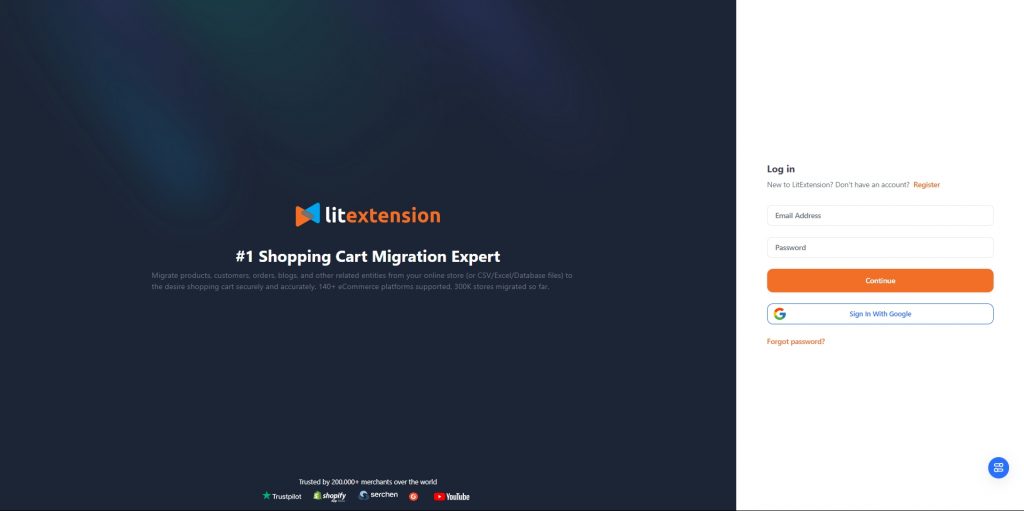
- Then, from the dashboard, click the “Create New Migration” button to get started.
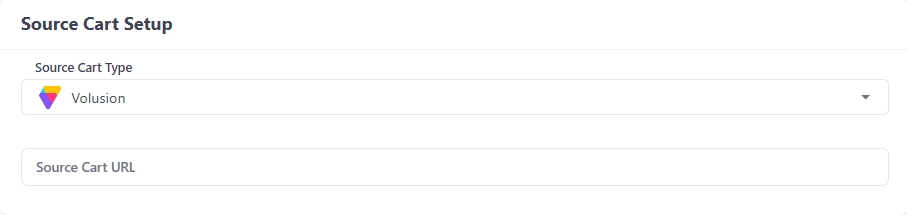
- Next, in the Source Cart Setup section, choose Volusion from the drop-down list. All you need to do here is provide the URL to your source cart so we know where you are moving from.
- Now, scroll down to the Target Cart setup section and select Magento as your Target Cart type
- Here, you’ll need to fill in your Target Cart URL in the corresponding field.
- Then, install the LitExtension Connector to create a virtual bridge between your Magento and Volusion store. Follow along with our video tutorial or watch the instructions if you don’t know how to install our connector.
- Once it’s done, you’ll receive a notification “Connection was successfully installed.”
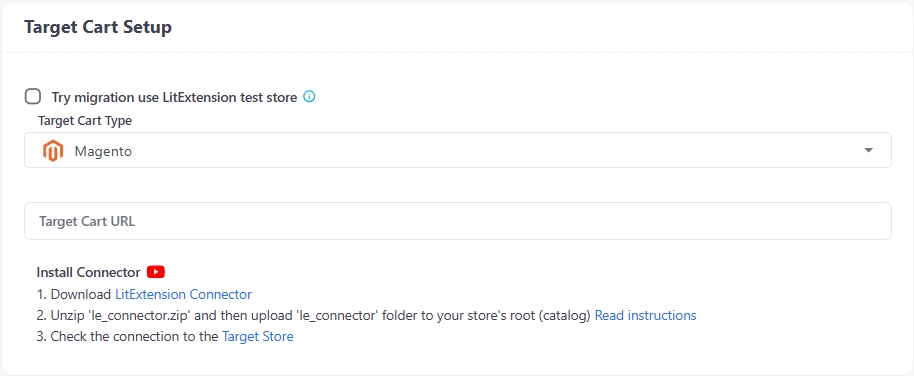
- Lastly, select the “Next: Configure Your Migration” button to proceed.
Step 2. Select data to migrate
Now, let’s move on to the next step: select the data you want to transfer to Magento. You can tick the box corresponding to what you want to bring along, or simply click “Select All” to migrate all data.
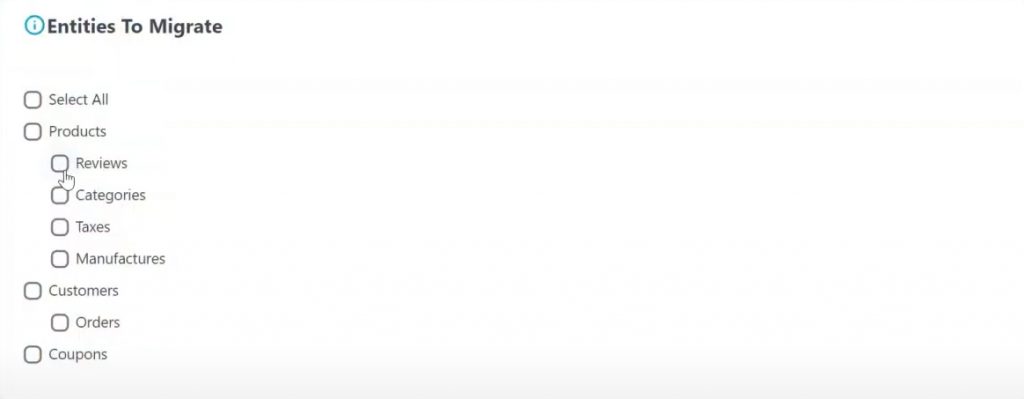
To further enhance your BigCommerce migration, you can consider opting for our Additional Options here. For more information on how that option works, please hover over its name or watch the video next to it.
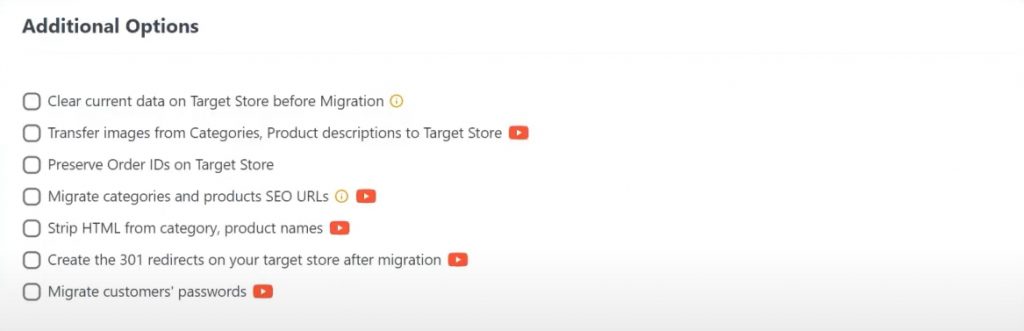
Before proceeding to the next step, make sure to map your Language and Order Status so that your data will be displayed correspondingly on your new BigCommerce storefront.
Once everything is ready, please select “Next: Start Free Demo Migraiton” to preview how our automated migration service works. Or, you can toggle the “Skip Demo Migration” option to go straight to the full migration.
Step 3. Perform the full Volusion to Magento migration
Now that you’ve set up your source and target carts and selected the data you want to transfer, it’s time to run the full Volusion to Magento migration. This is the final and most important step in the process, and LitExtension makes it smooth and straightforward.
Also, rest assured that the migration process runs on secure cloud servers and does not affect the performance of your live store. You can continue accepting orders and serving customers while the migration is in progress. Once the migration is complete, you’ll receive a notification via email.
Manually Import Data from Volusion to Magento
On the other hand, if you prefer full control over your data migration, you can choose to manually migrate your store from Volusion to Magento. While this method requires more time, attention to detail, and technical confidence, it can be a practical solution for store owners with smaller catalogs and less complex customization needs.
However, it’s important to understand that this approach comes with a steeper learning curve. Volusion and Magento use very different data structures, so exporting, cleaning, and reformatting your data correctly is essential to avoid errors during import. You’ll also need to verify that Magento’s field mappings match the format of your exported CSV files, and be prepared to manually upload each data set one at a time. Because of this, manual migration is typically recommended for technically savvy users or those working with a developer.
That said, if you are ready for the manual work, below is the step-by-step guide to manually export data from Volustion and import it into Magento.
Step 1. Export data from Volusion
- From your Volusion Admin panel, navigate to Inventory > Import/Export, then click the Standard Export tab.
- From the Export From dropdown, choose the data type to export (e.g., Products, Categories, Customers, Orders, Reviews), or select “Check All”.
- Select CSV – Comma Delimited Text File as the file format, then click Export, and download the file to your computer.
- Repeat this process for each entity you need.
Step 2. Review and prepare CSV files
- Open each exported CSV in spreadsheet software (e.g, Excel, Google Sheets).
- Clean, validate, and adjust your CSV file to make sure it aligns with Magento’s import schema.
- Save your final CSV files for import.
Step 3. Import your data to Magento
- Log in to your Magento account and go to System > Data Transfer > Import in your Admin dashboard.
- Then, from the drop-down list, select the entity type (Products, Customer, Order) you want to import.
- Next, choose the Import Behavior as below:
- Add/Update: Add new products and update existing ones
- Replace: Overwrite the existing data with the new one.
- Delete: Remove the products that match entries in the imported CSV.
- When all fields marked with an asterisk * are filled, upload your prepared CSV file.
- Click Check Data to validate, then click Import if validation passes.
- Continue the work for the rest of the entities you want to import from Volusion to Magento.
Why Migrate from Volusion to Magento
Choosing the right eCommerce platform is essential for the growth and stability of your online business. Many store owners are now deciding to move from Volusion to Magento, and for good reason. While Volusion may have served as a convenient starting point, it often falls short when it comes to customization, scalability, and long-term flexibility. Magento, on the other hand, is a powerful and future-ready platform that offers far more control and room for expansion.
Here are the key reasons why migrating from Volusion to Magento is a smart move:
1. More flexibility and customization
Volusion is a closed-source SaaS platform, which limits your ability to make deep changes to the store’s functionality and design. Magento is open-source (with both free and enterprise versions), giving you full access to the backend code. This means you can tailor everything, from product pages and checkout flows to SEO structure and customer features, based on your unique business needs.
2.Greater scalability for growing stores
As your store grows, you need a platform that can grow with it. Magento is built for scalability and can handle thousands of products, high traffic volumes, and advanced integrations without slowing down. Volusion may struggle with performance or pricing constraints as your requirements increase.
3.Robust extension ecosystem
Magento has one of the largest marketplaces for eCommerce plugins and extensions. Whether you need advanced shipping options, AI-based product recommendations, or multi-store management, Magento has solutions ready. Volusion’s app ecosystem is much smaller and less frequently updated, which can limit your ability to innovate
4.Stronger community and ongoing development
Magento has a massive global community of developers, agencies, and solution partners. There are constant updates, security patches, and improvements to the platform. Volusion, by contrast, has seen a decline in market share and innovation, leaving many users concerned about its long-term future.
5. Better data ownership and cost control
While Volusion charges monthly fees based on plan tiers, Magento Open Source is free to use. You only pay for hosting, development, and optional extensions, giving you more control over your total cost of ownership. For enterprise users, Adobe Commerce (Magento’s paid version) offers even more robust features with high ROI potential.
To conclude, migrating from Volusion to Magento is not just a technical move; it’s a strategic upgrade that positions your store for long-term success. Whether you’re looking for deeper customization, faster performance, or better scalability, Magento offers the tools and flexibility to meet your goals.


Leave The Work For The Experts
If you’re non-tech, let our Magento migration experts handle your migration from A to Z.
Save your time for more important tasks.

How Your Data Is Secured During Migration?

Server Security

Data Security

Data Access Restriction

GDPR Compliance

NDA

Payment Security
Why choose Automated Migration for Magento Migration


