
If you’re just dipping your toes into online business and trying to puzzle out the differences between Squarespace vs WordPress, then you’re not alone.
Both Squarespace and WordPress offer very contrasting approaches to build up a website as well as provide different eCommerce features. Hence, doing a bit of research about these two platforms before committing is undoubtedly a smart move.
In this article, LitExtension, the #1 eCommerce Migration Tool, will help you cover the ins and outs of both Squarespace vs WordPress in 11 critical aspects:
- Pricing
- Type of web builder
- Ease of use
- Templates and customization
- eCommerce functionality
- Apps and plugins
- Content management and blogging tools
- SEO and marketing
- Security
- Support
- Backup and storage.
Hopefully, by the end, you’ll be able to determine which platform is the perfect fit for your specific objectives, needs, and budget.
An Overview Of Squarespace vs WordPress
Both Squarespace vs WordPress are top-of-the-line solutions for online business. Squarespace is a hosted website builder that has always been heralded for its dedicated customer support and sleek templates.
Meanwhile, WordPress is an open-source content management system (CMS) with the most extensive user base and is widely praised for its high customizability.
About Squarespace
Initially created in 2004 as a blog-hosting service, Squarespace has since grown into one of the most popular hosted website builders.
According to W3Techs, Squarespace currently powers about 2.4% of all websites, or 3.6% of websites whose content management system is known. It’s also used on sections of well-known sites such as Wattpad, Mayo Clinic, and Caltech.
|
Squarespace Pros
|
Squarespace Cons
|
|
– Professionally designed templates
– All-in-one solution (hosting, security, support) – 24/7 customer support |
– Limited access to site’s underlying code
– Fewer third-party integrations and plugins – Potential SEO limitations compared to WordPress |
About WordPress
First launched in 2003, WordPress has evolved into the go-to CMS for both individuals and organizations.
WordPress is by far the most popular CMS in the industry, powering 39.6% of all websites and 58.3% of websites with a known CMS, according to W3Techs. Big names such as Microsoft, Mozilla, and MIT run parts of their websites on WordPress, and CNET recently moved to the platform as well.
There are two versions of WordPress: WordPress.com vs WordPress.org. The former is the hosted solution, while the latter is the self-hosted, open-source one.
In the case of this Squarespace vs WordPress battle, we’ll be solely looking at WordPress.org, which is the open-source version and is what most people are referring to when mentioning “WordPress”.
|
WordPress Pros
|
WordPress Cons
|
|
– Highly customizable and flexible
– Large plugin and theme ecosystem – Free and open-source core software – Strong SEO capabilities – Full control over website data |
– Steeper learning curve for beginners
– Requires more maintenance and updates – More prone to errors if not managed properly |
WordPress vs Squarespace: A Quick Comparison
Here is a quick comparison table of Squarespace vs WordPress:
|
Criterion
|
Squarespace
|
WordPress
|
Who has the edge?
|
|
All-in-one plans from $19–$99/month (billed annually) or $25–$139/month (billed monthly)
|
Free core software; you pay separately for hosting, domain, themes, and plugins
|
WordPress (more budget flexibility)
|
|
|
Drag-and-drop builder, limited customization
|
Open-source CMS, highly customizable
|
A tie
|
|
|
User-friendly, no coding needed
|
Steeper learning curve, more control
|
Squarespace (quicker to get started)
|
|
|
Elegant templates, less flexible for deep customization
|
Thousands of themes, customizable visually or with code
|
WordPress (more choice and flexibility)
|
|
|
Built-in tools plus a smaller, curated Extensions marketplace
|
Tens of thousands of plugins, extensive integrations
|
WordPress (larger ecosystem)
|
|
|
Solid built-in blogging tools, less granular control
|
Advanced blogging tools, full content control
|
WordPress (more content control)
|
|
|
Built-in commerce on all plans, fewer extensions
|
WooCommerce & extensions offer more flexibility
|
WordPress + WooCommerce (for larger, more complex stores)
|
|
|
Fully managed security, free SSL included
|
Depends on your host, update habits, and plugin choices
|
Squarespace (less hands-on work)
|
|
|
24/7 email support, live chat on weekdays, no phone support
|
Community, hosting provider, and third-party support; no official helpdesk
|
Squarespace (official support included)
|
|
|
Unlimited storage & bandwidth (video limits by plan); no one-click site backup
|
Storage depends on hosting plan; backups via your host or plugins
|
A tie
|
WordPress vs Squarespace: Which is better?
So, which one should you choose, Squarespace or WordPress?
All in all, both Squarespace vs WordPress are powerful platforms with their own pros and cons. Hence, the best choice depends on your specific needs, technical skills, as well as your long-term goals for your website.
To sum it up:
- Use Squarespace when:
- You’re a beginner or want a simple, elegant website with minimal technical involvement.
- You need unlimited storage for media-heavy content.
- You prefer an all-in-one solution that includes hosting and domain.
- Use WordPress when:
- You need more control and advanced features.
- You want advanced, plugin-based control over your SEO.
- You want access to a vast ecosystem of plugins and themes.
If you’re currently using WordPress and would like to migrate to Squarespace or vice versa, migrate to WordPress, LitExtension is always happy to help.
Besides Squarespace vs WordPress, we currently support data migration for over 140 of the most popular platforms. At LitExtension, we ensure the accuracy and highest level of security of your data with a 30-day money-back guarantee and 24/7 dedicated support.
Like our Squarespace vs WordPress article? Feel free to check out other related blogs on our website.
#1. WordPress vs Squarespace: Pricing (WordPress has the edge)
WordPress itself is free, so you only pay for the hosting, domain, and add-ons you actually use. This can make it cheaper at the entry level, but costs can grow as you add premium plugins, themes, or developer help. Squarespace bundles hosting, security, and support into one subscription, making your monthly bill easier to predict.
Squarespace pricing
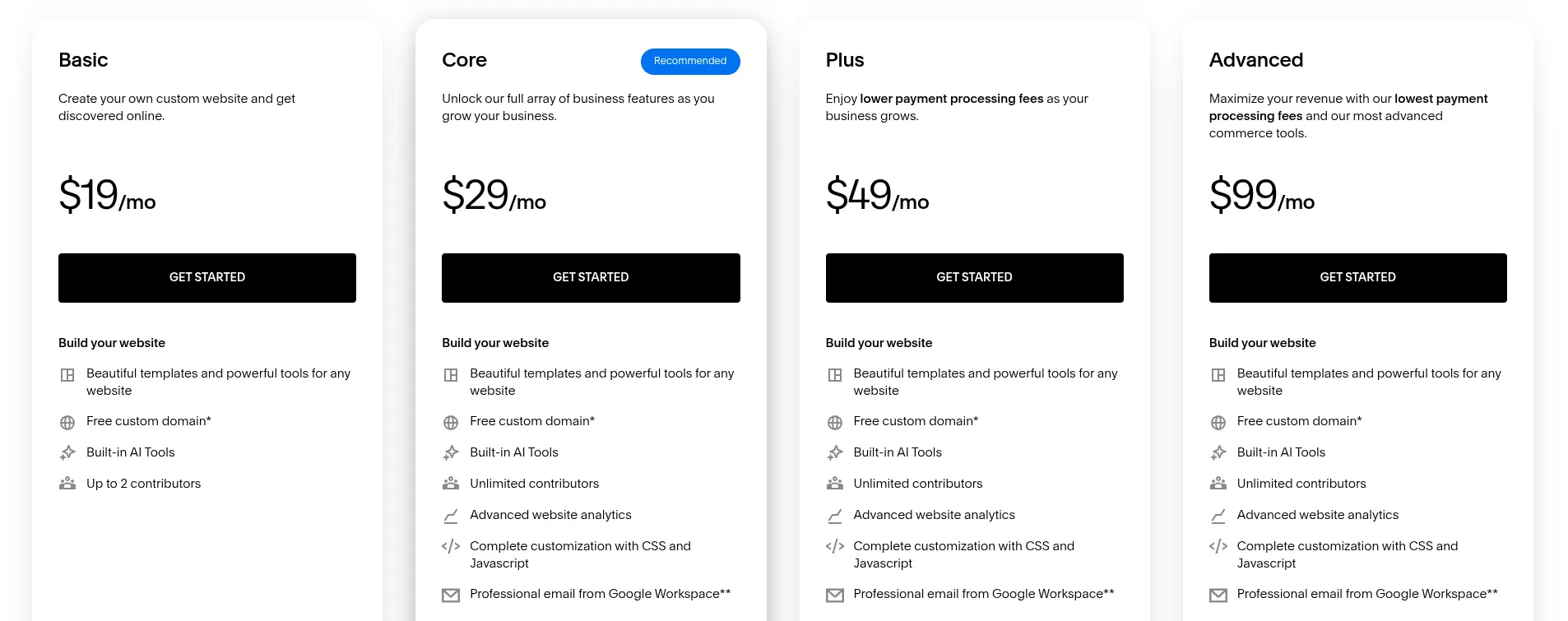
Squarespace currently offers four website plans: Basic, Core, Plus, and Advanced. Prices range from $19 to $99 per month when billed annually (saving up to 36%), or $25 to $139 per month when billed monthly. These plans replaced Squarespace’s former Personal, Business, Commerce Basic, and Commerce Advanced tiers, and the prices above reflect Squarespace’s July 2026 price update.
Before getting into each plan, note that the main differences between Squarespace plans come down to:
- Online store and digital content transaction fees
- Card processing rates with Squarespace Payments
- Advanced commerce tools (discounts, automated taxes and shipping, shipping labels, eCommerce analytics)
- Code injection, advanced code blocks, and premium integrations
- Video storage limits and the number of contributors
Now, let’s break down the 4 Squarespace pricing plans:
- Basic ($19/month billed annually, $25/month billed monthly): Ideal for a personal or simple business website. You get access to all Squarespace templates, unlimited bandwidth, 24/7 customer support, and basic selling features. However, online store sales carry a 2% transaction fee (7% on digital content and memberships), and video storage is capped at 30 minutes.
- Core ($29/month billed annually, $39/month billed monthly): A solid choice for service businesses and small stores. It removes online store transaction fees and adds unlimited contributors, advanced discounts, automated taxes and shipping, carrier-calculated shipping, and eCommerce analytics.
- Plus ($49/month billed annually, $65/month billed monthly): Designed for growing stores. It offers lower card rates through Squarespace Payments (from 2.7% + $0.30), reserved carts and countdown timers for product drops, and elevated support. Note that Plus is only offered in countries where Squarespace Payments is available.
- Advanced ($99/month billed annually, $139/month billed monthly): Built for high-volume sellers, with the lowest card rates (from 2.5% + $0.30), high-traffic checkout, unlimited video storage, and no transaction fees on digital content and memberships.
Features like abandoned cart recovery and subscription products are now available on all plans. You can also try Squarespace free for 14 days (no credit card required), and annual plans include a free custom domain for the first year.
WordPress pricing
Is WordPress completely free?
Well, not exactly. The WordPress software is free to download and use, but you’ll still need to pay for the services and add-ons that keep your site running. The estimated cost breakdown below will give you a good idea of how much you may have to pay.
|
Extras
|
Estimated Price
|
|
Domain
|
$10–$20/year (for a .com domain)
|
|
WordPress hosting
|
$2.49–$144/month (from shared/managed to cloud hosting; renewal rates are usually higher)
|
|
SSL & security
|
Free SSL with most hosts; premium SSL or security services from around $70/year
|
|
Premium themes
|
$30–$200 (one-time or yearly license)
|
|
Premium plugins
|
Free, or about $2–$1,000/year per premium plugin
|
|
Developer fees
|
From around $20/hour or $400/project (freelancers); $3,500+ for a custom build
|
Beyond that, if you want to sell online, you’ll need an eCommerce plugin for WordPress (e.g., WooCommerce, Easy Digital Downloads, or Ecwid). WooCommerce itself is free, but a basic store usually adds costs for hosting, a premium theme, and a few extensions. Hostinger, for example, estimates the recurring cost of a basic WooCommerce store at around $41/month.
#2. WordPress vs Squarespace: Type of web builder (A tie)
Squarespace is a drag-and-drop website builder that provides all the templates, attributes, and security measures right out of the box. On the contrary, WordPress is an open-source CMS that generally has more advanced blogging functions than a website builder.
Ease of use is an essential but often under-appreciated factor when choosing a suitable platform. This includes not only the learning curve to become familiar with the system but also how simple it is to operate on a daily basis.
Squarespace’s website type
With Squarespace, you get an all-in-one platform with hosting, domain, and design tools. Its drag-and-drop interface is user-friendly, even for those without coding experience.
While Squarespace is easy to use, it offers less room for deep customization than WordPress. However, you won’t need to worry about technical aspects as the platform handles security and updates.
You’ll have access to built-in e-commerce features and responsive design. If you need help, you can reach out to their 24/7 email support or live chat on weekdays.
WordPress’s website type
On the other hand, WordPress is a highly flexible, open-source CMS with a wide array of themes and plugins. However, this means you’ll need to arrange your own hosting and domain, although most hosting providers include a free SSL certificate.
From our experience, WordPress is a bit more complex than Squarespace. But if you’re into blogging, you’ll appreciate WordPress’s excellent content management features. Plus, the platform’s flexibility allows you to extend your site’s functionality with numerous plugins or tweak the source code.
#3. Squarespace vs WordPress: Ease of use (Squarespace has the edge)
Squarespace gets you from sign-up to a live site in fewer steps, making it a smart choice if you’re not a tech guru. WordPress involves more setup and ongoing maintenance, but rewards you with more granular control over your site, with or without coding skills.
Squarespace ease of use
Squarespace is an excellent choice for true novices and non-techy users. With Squarespace, you can create a primary site in a few minutes. Being a hosted solution, Squarespace doesn’t require you to sign up for hosting or purchase a domain name to get started. All you need is to register a Squarespace account, pick a template (or let Squarespace’s Blueprint AI guide you through a custom starting design with curated fonts, colors, and layouts), add your content, and you’re ready to get off the ground.

The Squarespace interface is minimal and intuitive, allowing you to make changes to your site easily. You can add, move, or delete images and sections or customize settings, including color palettes, fonts, and page configurations.
Another wonderful thing about Squarespace is that it takes all the maintenance work off your plate. All Squarespace updates are in-house and automatic.
In case you’re still having difficulties with Squarespace, let’s check out our comprehensive Squarespace tutorial.
WordPress ease of use
WordPress is also beginner-friendly once it’s up and running. Its dashboard is fairly intuitive, and you don’t need to know how to code to build a site. The built-in Block Editor (Gutenberg) and Site Editor let you design pages and layouts visually, while popular page builders like Elementor add drag-and-drop editing on top. However, the initial setup takes more time and effort, since you need to choose a host, install WordPress, and pick a theme and plugins. You can find out how to set up a WordPress site in a few simple steps in our detailed WooCommerce tutorial.
Compared to Squarespace, WordPress still has a steeper learning curve. This isn’t because it relies on coding, but because there are more moving parts to manage: hosting, themes, plugins, and how they all work together. Coding is optional and mainly comes into play when you want highly custom designs or functionality beyond what themes and plugins offer.
You’ve also got to be aware that WordPress has a regular update cycle, and you’re responsible for keeping WordPress core, themes, and plugins up to date. WordPress has supported automatic updates for plugins and themes since version 5.5, and many managed hosts handle updates for you. Still, it’s good practice to back up your site and check compatibility before major updates.
#4. WordPress vs Squarespace: Templates and customization (WordPress has the edge)
Though Squarespace’s templates are beautiful and easily customizable, WordPress has many more templates than Squarespace. On top of that, WordPress themes can be customized visually through the Site Editor or page builders, and developers can go even further with code.
Squarespace templates
This platform gets its name on the scoresheet by providing elegant, mobile-optimized templates. You can even utilize one of its prefabricated designs as a baseline and tweak it at your will. Once you’ve selected your Squarespace template, you can make it yours by adding images and videos or changing the fonts, colors, and backgrounds.

Squarespace 7.1 templates all share the same core features and use the Fluid Engine drag-and-drop editor, so you can freely rearrange blocks on any page. For online stores, product details pages can use one of four layouts: Simple, Half, Full, or Wrap. Squarespace has also recently made product pages more flexible, letting you add up to 10 content sections below each product and offer product filters on store pages to help shoppers find items faster.
WordPress themes
When it comes to the number of available themes, WordPress outshines Squarespace. The official WordPress directory alone offers over 15,000 free themes, and you’ll find thousands more premium options from marketplaces and theme developers. Many modern themes are block themes, which you can customize visually with the Site Editor.
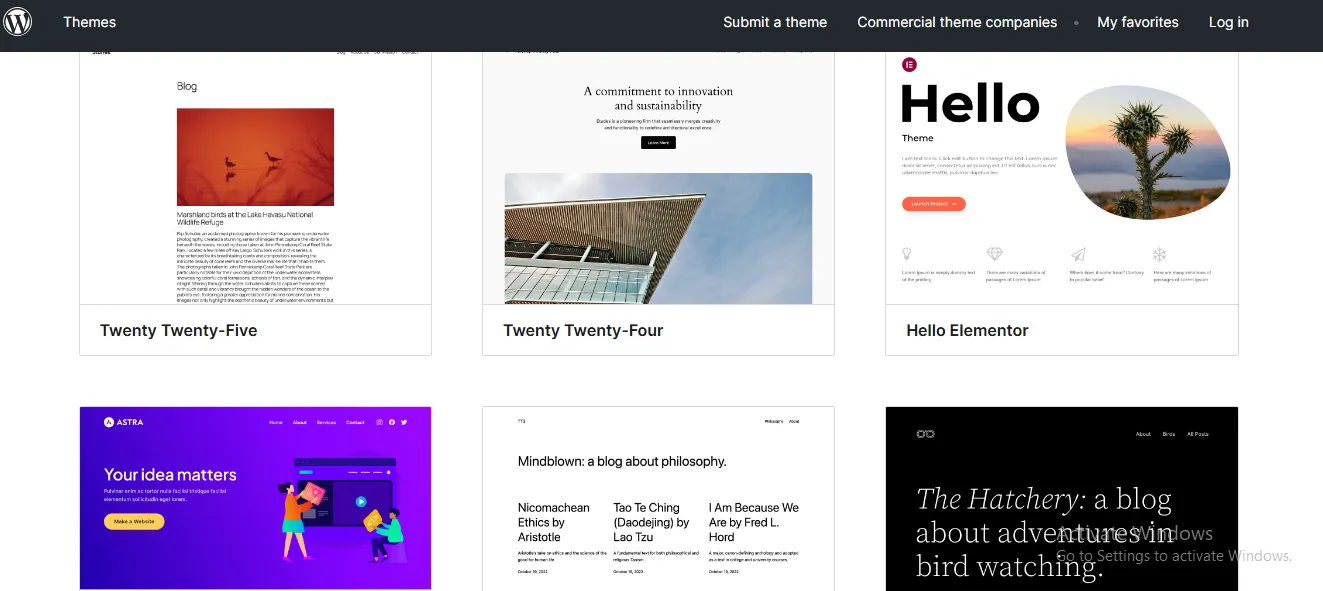
Nevertheless, WordPress’s humongous theme library sometimes turns out to be a double-edged sword. Many themes mean different levels of quality. In fact, some WordPress themes were created years ago, and they were not mobile-optimized. Thus, always check carefully to make sure your theme is mobile-responsive before purchasing.
#5. WordPress vs Squarespace: eCommerce functionality (WordPress has the edge)
While both Squarespace and WordPress offer robust eCommerce features, WordPress (with WooCommerce) gives you more flexibility and customization options, which matters most for medium to large-scale online stores.
Both Squarespace and WordPress provide eCommerce capabilities, but their suitability depends heavily on the complexity and scale of your online store.
- Squarespace is an all-in-one platform best suited for small businesses, solopreneurs, and creatives who need a straightforward online store with built-in tools and minimal configuration. It offers an easy-to-use experience but has limited scalability, fewer payment options, and fewer third-party integrations.
- WordPress (WooCommerce) is a highly flexible and customizable solution, ideal for businesses looking to scale. WooCommerce allows merchants to manage large product catalogs, advanced inventory tracking, multiple shipping methods, and a vast array of payment gateways. This makes it the preferred option for medium to large-scale stores that require complex functionality and customization.
Inventory management: Squarespace vs WooCommerce
Effective inventory management ensures smooth store operations, prevents stockouts, and improves customer satisfaction. Both Squarespace and WooCommerce provide inventory tracking, though they cater to different levels of business complexity.
- Squarespace includes built-in inventory tools that let store owners track stock for each product variant, receive low-stock alerts (on Core and higher plans), and keep inventory in sync with in-person sales through Squarespace POS. It’s a solid option for small to mid-sized businesses, though multi-location inventory requires third-party apps.
- WooCommerce offers highly customizable inventory control with real-time stock tracking, automatic low-stock notifications, backorder settings, and the ability to integrate with advanced warehouse management systems (WMS). It is particularly beneficial for businesses with large product catalogs, multiple warehouses, or complex supply chains.
Dropshipping: Which Platform is Better?
Dropshipping is an increasingly popular business model, and WooCommerce offers more options here than Squarespace.
- Squarespace doesn’t offer built-in dropshipping features. Instead, you can sell print-on-demand products through its Printful integration on any plan, or connect dropshipping extensions such as Spocket and Syncee. The selection is narrower than WooCommerce’s, which can be limiting for large-scale dropshipping businesses.
- WooCommerce offers extensive dropshipping support with plugins like AliDropship, Printify, and Spocket, enabling store owners to fully automate processes like product imports, order fulfillment, supplier management, etc.
Detailed eCommerce Feature Comparison: Squarespace vs WooCommerce
|
Feature
|
Squarespace
|
WooCommerce (WordPress)
|
|
Product Management
|
Physical, digital, service, gift card, and subscription products; up to 6 options and 250 variants per product
|
Supports many product types, including subscriptions, memberships, and bookings (via extensions); unlimited variants
|
|
Order Management
|
Built-in orders panel to view, fulfill, cancel, and refund orders; add tracking numbers and send shipping notifications; export orders to CSV; Commerce APIs (Core and up) for custom workflows
|
Advanced order tracking, automation, and custom workflows
|
|
Inventory Management
|
Simple stock tracking, basic automated alerts
|
Advanced inventory management, low-stock alerts, backorder support
|
|
Shipping & Tax
|
Flat-rate, weight-based, and carrier-calculated shipping (Core and up); automated tax calculations in 100+ countries (Core and up, small per-calculation fee)
|
Multiple shipping options, third-party integrations, automated tax calculations
|
|
Payment Gateways
|
Squarespace Payments (cards, Apple Pay, Google Pay, Klarna, Afterpay, and ACH in the US), Stripe, PayPal, plus in-person payments via Squarespace POS; one store currency per site (multi-currency display requires third-party extensions)
|
100+ payment gateway integrations, including WooPayments, Stripe, PayPal, Square, and Amazon Pay; Apple Pay and Google Pay via supported gateways; multi-currency support (e.g., WooPayments supports 135+ currencies)
|
|
Dropshipping Support
|
Limited; requires third-party apps
|
Full support via integrations like AliDropship, Printful, and Spocket
|
|
Analytics & Reporting
|
Built-in traffic and sales reports (full eCommerce analytics on Core and up)
|
Advanced analytics with customizable reports and Google Analytics integration
|
|
Scalability
|
Best for small to mid-sized stores
|
Best for medium to large-scale stores
|
Need Help to Migrate Your Store from Squarespace to WooCommerce?
LitExtension Automated Migration Tool transfers products, customers, and orders from Squarespace to WooCommerce – fast, accurate, and hassle-free.

#6. Squarespace vs WordPress: Apps and plugins (WordPress has the edge)
Comparing Squarespace vs WordPress, WordPress offers far more add-ons, with tens of thousands of plugins. Squarespace, meanwhile, focuses on built-in features and supplements them with a smaller, curated Extensions marketplace.
Squarespace apps and plugins
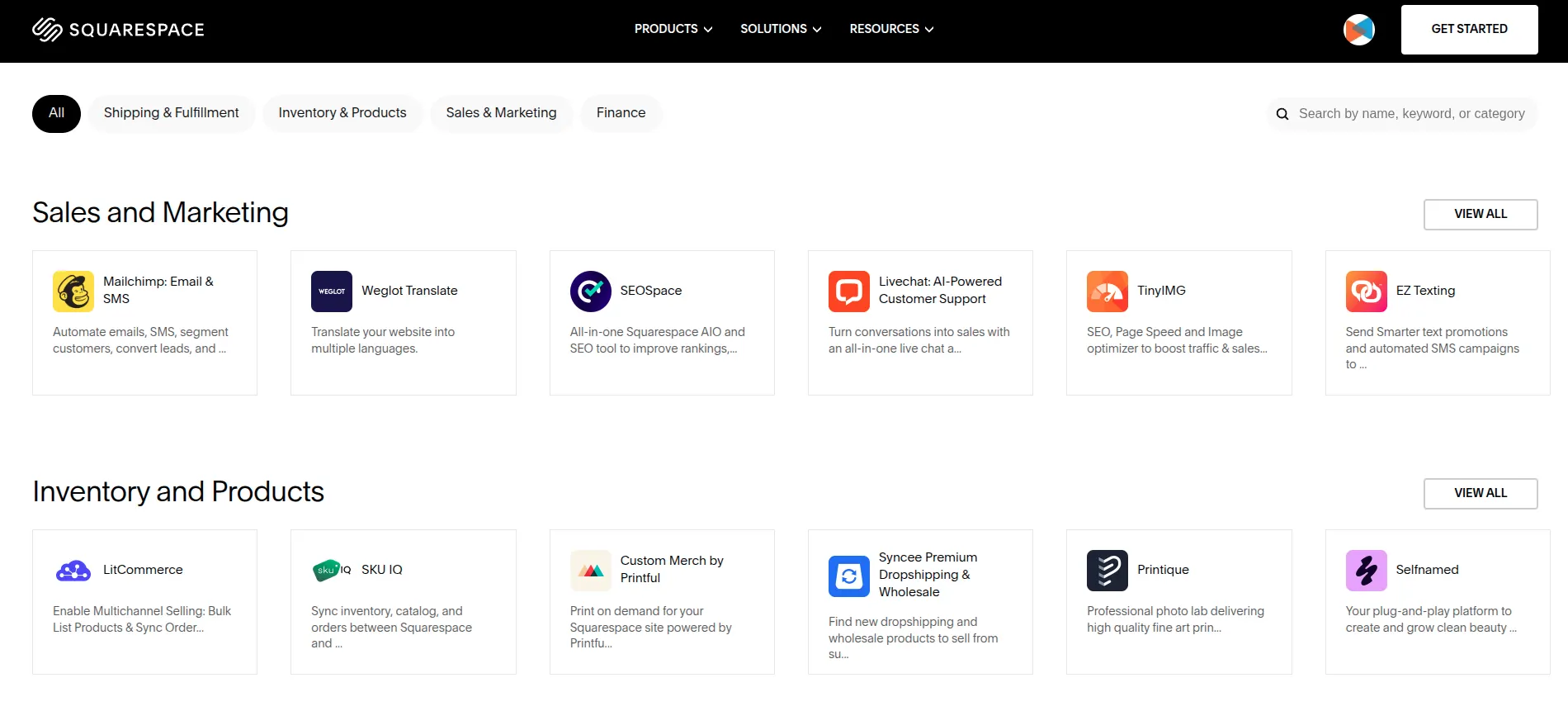
Squarespace covers many needs with built-in tools, including analytics, blogging, Email Campaigns, SMS Campaigns, scheduling, and memberships, which you can also manage on the go through the Squarespace app. For more advanced functionality, you can turn to its app marketplace, Squarespace Extensions.
Squarespace Extensions aren’t as plentiful as WordPress plugins, but they cover most of the essentials. Popular options include Shippo and ShipStation for shipping, Spocket and Syncee for dropshipping, and Weglot for site translation.
WordPress apps and Plugins
Being an open-source platform, WordPress is open to everybody to use and customize. Any developers or programmers can create their own tools, such as themes and plugins, and share them for free or sell them to other WordPress users.
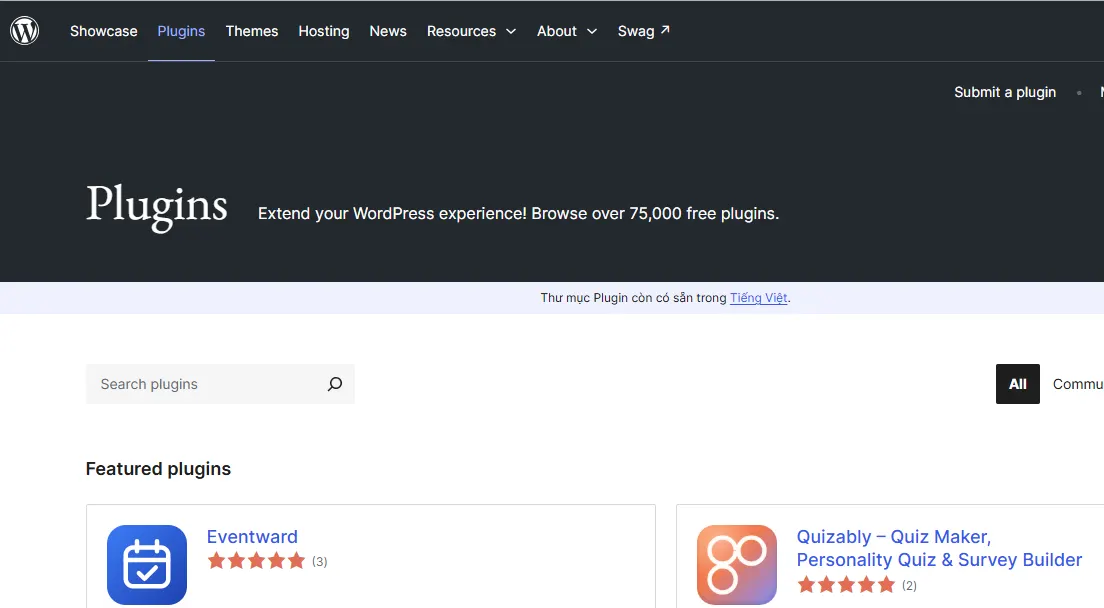
The official WordPress plugin directory now lists over 76,000 free plugins, and thousands more premium plugins are available from third-party developers. Basically, there is always something for your site, from logistics, marketing to payment gateways.
#7. WordPress vs Squarespace: Blogs (WordPress has the edge)
Between Squarespace vs WordPress, WordPress lets you use categories, tags, and custom content structures more flexibly. Squarespace has solid built-in blogging tools that cover most bloggers’ needs, but WordPress gives you deeper control over how your content is organized and managed.
Squarespace blogs
Within Squarespace, blog posts can be tagged, categorized, and edited. They can also be excerpted, and a link to each new post can be automatically pushed to connected social accounts such as Facebook, X (formerly Twitter), and LinkedIn.
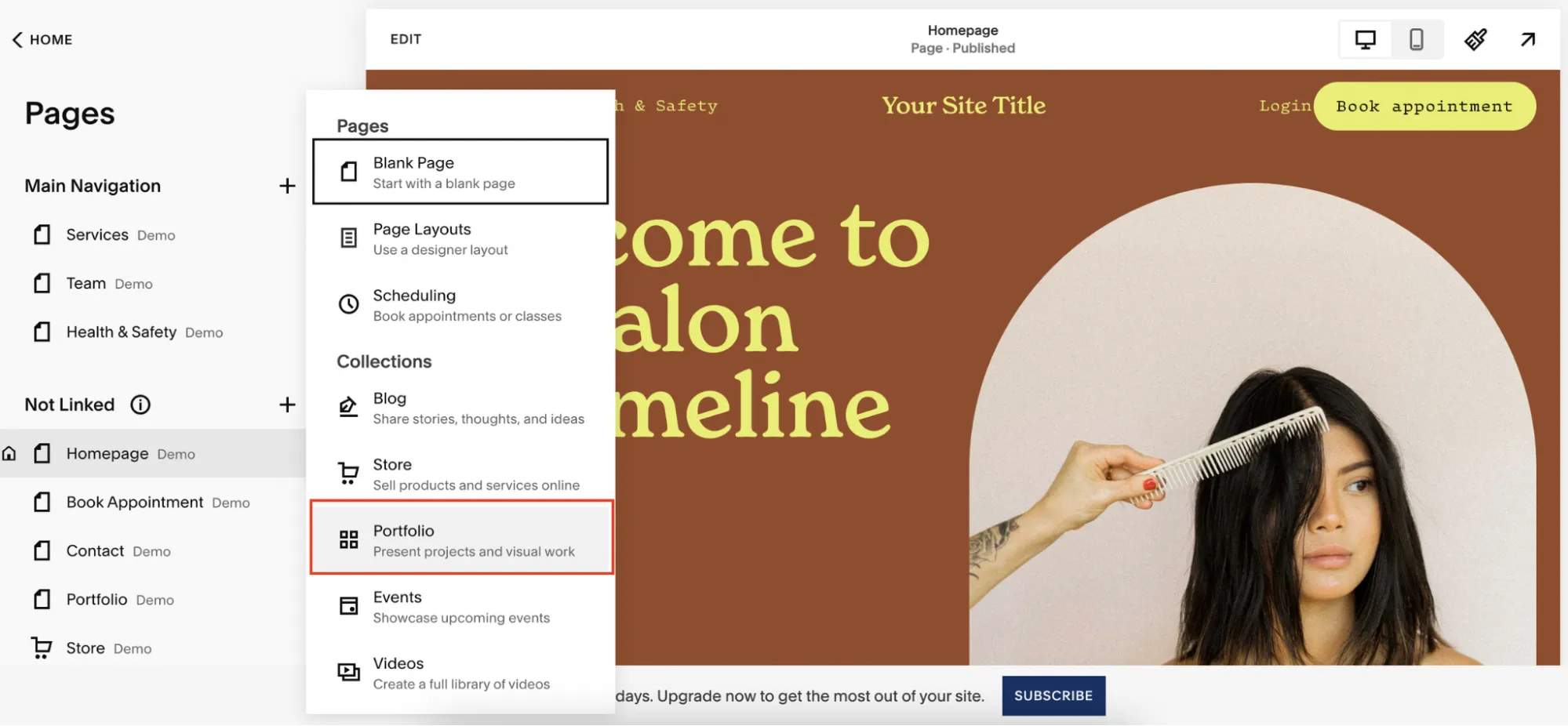
Another great thing about Squarespace’s blogging features is that it offers free blogger templates. Squarespace users are free to choose from a wealth of modern interfaces that display blog posts on the homepage either in a single reverse chronological feed or in a more compact magazine-style grid.
WordPress blogs
What we perceive as the most outstanding feature of WordPress blogging is its ability to restore version history. Specifically, multiple versions of pages and posts can be stored on the system, and you can roll back to any of them at any point.
Also, just like Squarespace, WordPress also has plenty of free WordPress templates that are tailor-made for bloggers.
And in terms of approaches to content management, the main differentiator between Squarespace and WordPress is on-page editing.
With Squarespace, you can go to the page you wish to make some cosmetic tweaks and click on a piece of content to edit it. You’ll then see your edits in context on the page as you make them.
In WordPress, you edit content in the Block Editor, which shows a close visual preview of your final layout as you work, and the Site Editor lets you visually edit headers, footers, and templates. That said, editing still happens inside the dashboard rather than directly on the live page as with Squarespace.
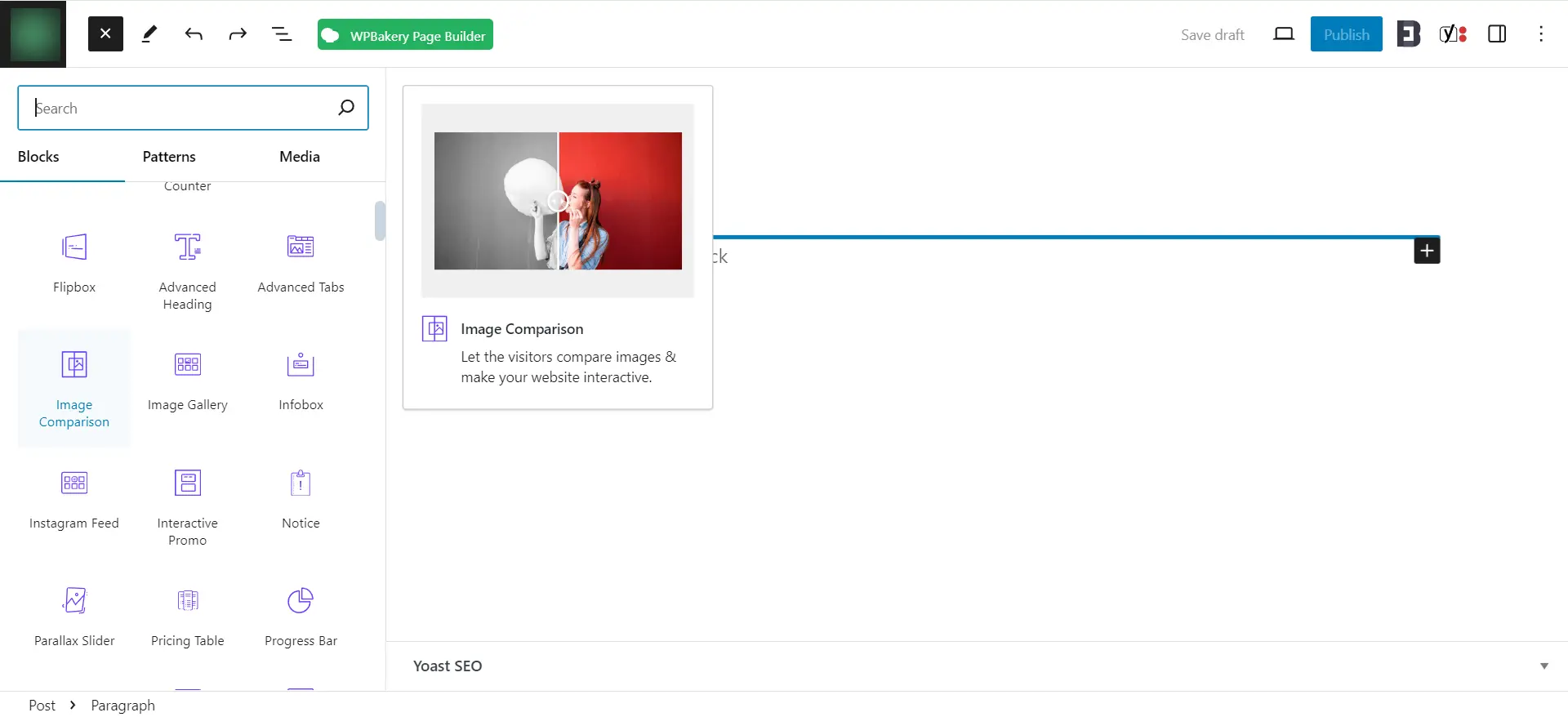
Especially, for serious bloggers who want to customize their own look, WordPress also lets users access HTML directly. Although Squarespace lets you add code blocks (with advanced code blocks and code injection available on Core and higher plans), you don’t get direct access to the main HTML behind your pages and posts.
#8. Squarespace vs WordPress: SEO & Marketing (WordPress has the edge)
WordPress stands out thanks to its extensive library of SEO and marketing plugins, many of which are free and easy to install. Squarespace covers the SEO and marketing essentials out of the box, but offers fewer options for advanced optimization and a smaller pool of third-party integrations.
A visually appealing website with information-rich blog posts is just part of the equation. Your business cannot reach its full potential if customers cannot even find it in the first place; that’s why SEO and marketing tools are essential considerations when choosing between Squarespace and WordPress:
Squarespace’s SEO and marketing
Although Squarespace does not have the extensive plugin ecosystem that WordPress offers, it still provides a pretty decent set of built-in tools to enhance your marketing efforts.
For instance, Squarespace lets users create well-branded email campaigns, and more recently SMS campaigns, directly within the platform. The system also includes built-in analytics that lets you conveniently track engagement and refine marketing strategies based on performance data.
Plus, its Unfold app even offers a huge library of over 400 customizable templates, stylish fonts, filters, and stickers to help businesses maintain a cohesive online presence. You can also consider using its free Image Resizer tool to ensure the store’s visuals are properly formatted for each platform and social network.
How about SEO? Squarespace now covers far more than the basics. Every site includes automatic sitemaps, structured data markup, clean URLs, free SSL, a built-in SEO checklist, and Google Search Console integration. It also offers an AI-powered SEO report that suggests metadata and image alt text, along with an AI Visibility tool to track how your brand appears in AI search results. Still, it doesn’t offer the same depth of control as WordPress’s dedicated SEO plugins.

WordPress’ SEO and marketing
WordPress offers thousands of SEO plugins (many of them free) that help you refine your website’s search performance. Popular options like Yoast SEO, which runs on more than 10 million websites, Rank Math, and SEOPress are excellent for tasks like keyword optimization, metadata enhancements, schema markup, and content structuring.
Beyond SEO, WordPress also integrates with thousands of marketing tools. Businesses looking to encourage repeat purchases, for instance, can implement loyalty and reward systems through plugins like Points and Rewards for WooCommerce. Meanwhile, plugins like OptinMonster help with lead generation and email campaign management, paving the way for much easier connections with your potential customers.
#9. WordPress vs Squarespace: Security (Squarespace has the edge)
Both Squarespace and WordPress can be secure. The difference is that Squarespace handles security for you out of the box, while with WordPress, your site’s security depends on your hosting provider, how regularly you update, and which plugins you install.
Squarespace security
Being a hosted solution, Squarespace takes care of the security tasks for you. It’s the platform’s responsibility to ensure your site stays safe from hackers and all data is backed up.
In fact, all domains connected to Squarespace are protected with free Secure Sockets Layer (SSL) certificates. Besides, Squarespace also provides two-factor authentication, which adds an extra layer of security to your personal and financial information.
WordPress security
Meanwhile, with WordPress, more of the security responsibility falls on you. You’re in charge of keeping WordPress core, themes, and plugins updated, although many hosting providers now include a free SSL certificate and basic protection such as firewalls and malware scanning.
You’ve also got to keep in mind that WordPress’ security risks may stem from non-verified 3rd party plugins.
Because the plugin library is so large, it isn’t realistic to vet every plugin yourself. Stick to well-reviewed, regularly updated plugins from reputable developers, and remove any you no longer use.
#10. Squarespace vs WordPress: Support (Squarespace has the edge)
Every Squarespace plan includes customer support, so if something goes wrong, there’s a dedicated team to contact. With WordPress, help is plentiful but comes from different sources.
Squarespace support
Squarespace customer support is available 24/7 via email, with live chat available on weekdays. This platform has also developed a library of help guides, workshop videos as well as a community forum that can give you insightful responses to almost every question.
The only customer service element that might raise eyebrows is Squarespace’s lack of phone support. Nonetheless, Squarespace creates and tests its own tools, so the chances of your website running into issues are relatively low.
WordPress support
Due to its open-source nature, WordPress.org doesn’t offer official customer service; there’s no live chat, phone, or email line from WordPress itself.
However, most hosting providers offer 24/7 support, and with the enormous user base, you can also seek help from a variety of places: the WordPress forum, a hosting company, a plugin provider, or a peer who has a good command of the system. In addition, you can come across loads of texts, video tutorials, and guidelines compiled by other users.
Apart from that, you can always hire WordPress experts for a more personal level of support. These experts will provide you with WordPress-related services, including installation, design, hosting, module development, and site-building.
#11. WordPress vs Squarespace: Backup and storage (A Tie)
Squarespace wins in storage capacity, while WordPress offers more backup options.
Squarespace’s backup and storage
Squarespace places no caps on bandwidth or storage usage on any plan, which is ideal for content-heavy sites and large product catalogs. The exception is video hosting, which is limited by plan: 30 minutes on Basic, 5 hours on Core, 50 hours on Plus, and unlimited on Advanced.
However, Squarespace doesn’t offer a one-click full-site backup or restore. To keep a copy of your work, you’ll need to manually duplicate your site or individual pages, which can be an extra burden and a potential risk if not done regularly.
WordPress’s backup and storage
WordPress storage depends on the hosting plan you choose. For example, Hostinger’s managed WordPress plans currently range from 20 GB of SSD storage on the entry-level Premium plan to 100 GB of NVMe storage on Cloud Startup. While this is less than Squarespace’s unlimited offering, it’s still sufficient for most websites.
On the backup side, WordPress core doesn’t include a built-in backup tool. However, most hosting providers include automatic backups (Hostinger, for instance, offers weekly backups on its entry plan and daily backups on higher tiers), and plugins like UpdraftPlus or Jetpack VaultPress Backup let you schedule automated backups and restore your site in a few clicks. This gives you more control over how often your data is saved and where it’s stored.
How We Test Squarespace vs WordPress?
Our team of researchers and web developers actually build websites using both Squarespace and WordPress so we can gain first-hand experience with each platform’s features, ease of use, and performance across various scenarios.
To determine whether you should choose WordPress or Squarespace, we will then evaluate each platform using a detailed scoring system across multiple categories. Afterward, the data will be passed to our editorial team so we can turn our insights into digestible findings. This approach allows us to offer comprehensive, up-to-date insights to help users make informed decisions based on their specific needs.
Squarespace vs WordPress: FAQs
Should I use Squarespace to build a website?
Yes, you should use Squarespace to build a website if you want an easy-to-use website builder with stunning pre-made templates.
Should I switch from Squarespace to WordPress?
Yes, you should consider switching from Squarespace to WordPress if you want to have more customization options, more advanced eCommerce features or more ownership over your data.
Nevertheless, if you have lots of important data you can’t afford to mess up with; we highly recommend using our Squarespace to WordPress migration services to ensure a seamless migration experience.
Which platform performs better in terms of page speed and performance?
Squarespace runs on fully managed infrastructure, so performance is consistent and requires little effort from you. WordPress performance depends on your hosting, theme, plugins, and caching setup. A well-optimized WordPress site on quality hosting can be very fast, while a site overloaded with plugins on cheap hosting may lag behind.
Final Words
Now that we’ve broken down the key differences between Squarespace vs WordPress, the choice ultimately comes down to your needs. WordPress stands out with its vast plugin ecosystem and advanced customization options, while Squarespace holds its own with its user-friendliness and built-in design features.
And if you’re thinking about making the switch (whether from Squarespace to WordPress or vice versa), now is the perfect time; LitExtension makes sure you won’t have to navigate the process alone. With over 15 years of experience and more than 300,000 migrations completed for 200,000+ customers worldwide, we know exactly how to make your transition smooth and worry-free. So what are you waiting for? Get in touch with us today!
For extra tips and insights, check our guides and connect with us in our Facebook Community.

