Shopify is generally better for businesses that want to launch and manage an online store without handling hosting, server maintenance, or checkout infrastructure. WordPress is better for content-heavy websites, businesses that need extensive customization, and teams that want greater control over their technology.
For ecommerce, the comparison is slightly more complicated. WordPress is a content management system (CMS), not a complete online store platform by default. Most merchants add WooCommerce to handle products, carts, payments, and orders.
In this Shopify vs WordPress comparison, we’ll examine pricing, ease of use, design, content management, SEO, ecommerce, security, and long-term ownership. We’ll also explain how WordPress.com differs from self-hosted WordPress.org so you can make the right decision for your website.
Shopify vs WordPress: The Short Answer
Quick takeaway:
Choose Shopify if your main goal is to sell products through a managed ecommerce platform. Choose WordPress if content, customization, or control over the underlying website is more important. For a WordPress-based online store, WooCommerce is usually the starting point.
Here is how the two platforms compare across the factors that matter most when building and managing a business website.
| Decision factor | Shopify | WordPress.org + WooCommerce |
|---|---|---|
| Primary purpose | Dedicated ecommerce platform | Flexible CMS with ecommerce added through WooCommerce |
| Best for | Online stores, DTC brands, and merchants seeking simpler operations | Content-led businesses, custom websites, and merchants with technical resources |
| Hosting | Included and managed | Chosen separately by the website owner |
| Ease of use | More straightforward for beginners selling online | More setup decisions and technical responsibilities |
| Pricing | Subscription-based, with potential app and transaction costs | Free core software, with hosting, extensions, and maintenance costs |
| Design and development | Commerce-focused themes and platform APIs | Broad control over themes, code, templates, and content structure |
| Content management | Suitable for standard business pages and blogs | Better suited to complex publishing and content architecture |
| SEO | Strong built-in foundation with platform-specific constraints | Greater technical control, but more implementation responsibility |
| Ecommerce | Native products, checkout, orders, and sales channels | Commerce functionality through WooCommerce and extensions |
| Maintenance | Shopify manages the platform infrastructure | The owner or hosting provider manages more of the stack |
| Long-term control | Operates within Shopify’s hosted ecosystem | Direct control over hosting, application code, and database |
Neither platform is automatically better for every business. Shopify simplifies the operational side of ecommerce, while WordPress offers greater flexibility in how a website is built and maintained.
If you’d like to explore either platform individually, read our Shopify review and WordPress review.
Shopify vs WordPress.com vs WordPress.org: What’s the Difference?
Before comparing features and pricing, it’s important to distinguish WordPress.org from WordPress.com. These services use the same underlying WordPress software but offer different hosting and management models.
WordPress.org provides the free, open-source CMS. You install it on a hosting service of your choice and control the website’s configuration, code, themes, plugins, and database.
WordPress.com is a managed hosting service built around WordPress. Hosting, core updates, and several infrastructure-related tasks are handled by the platform. Its plans provide different levels of functionality, including ecommerce options.
Shopify is a hosted ecommerce platform where online selling is the central product rather than an additional capability.
| Feature | Shopify | WordPress.org | WordPress.com |
|---|---|---|---|
| Hosting | Included | Separate hosting required | Included |
| Core software | Proprietary | Open source | WordPress-based managed service |
| Ecommerce | Built in | Usually added with WooCommerce | Available through supported plans and ecommerce tools |
| Technical control | Within Shopify’s platform | Extensive access to code and infrastructure | Depends on the hosting environment and plan |
| Maintenance | Mostly platform-managed | Owner-managed or delegated to a host | Many infrastructure tasks managed by WordPress.com |
| Pricing model | Subscription | Free software plus operating costs | Hosted subscription plans |
WordPress.com also supports plugins on paid plans, so it should not be described as a platform without plugin functionality. However, the hosting environment, available developer tools, and service terms still differ from running WordPress on your own server.
You can review the distinction in the official WordPress.com vs WordPress.org guide.
For the remaining comparisons, WordPress refers to self-hosted WordPress.org unless stated otherwise. When we discuss online selling, we mean WordPress with WooCommerce installed.
Shopify vs WordPress: Which Is Better for Your Business?
The most useful way to choose between Shopify and WordPress is to start with your business model rather than compare individual features in isolation.
| Business type or requirement | Recommended starting point | Why |
|---|---|---|
| First-time merchant with limited technical experience | Shopify | Combines hosting, ecommerce management, checkout, and platform maintenance. |
| Direct-to-consumer brand launching a dedicated online store | Shopify | Provides an integrated commerce foundation and a streamlined setup process. |
| Blog, portfolio, magazine, or content-heavy business website | WordPress | Offers stronger publishing, content organization, and editorial flexibility. |
| Existing WordPress website adding a small online store | WordPress + WooCommerce | Can reuse the existing content infrastructure and add commerce functionality. |
| Retail business connecting physical and online sales | Shopify | Provides a first-party POS ecosystem integrated with its online store. |
| Business requiring unusual content models or proprietary workflows | WordPress | Gives developers extensive access to code, databases, and custom application logic. |
| Wholesale business | Depends | Shopify offers native B2B features; WooCommerce offers flexible extension-based and custom approaches. |
| Company with an established development team and custom infrastructure | Often WordPress | The team may benefit from controlling the entire technology stack. |
| Content-driven business wanting Shopify checkout | Hybrid setup | WordPress can manage publishing while Shopify provides commerce functionality. |
These recommendations are starting points, not universal rules. A highly customized Shopify store may be more suitable than WooCommerce for one business, while another may benefit from keeping its existing WordPress infrastructure.
To make the decision more reliable, document your required sales channels, content structure, integrations, technical resources, and expected operating costs over the next few years.
Shopify vs WordPress Pricing: Which Costs Less?
Quick takeaway:
WordPress can have a lower starting cost when you use an inexpensive hosting setup and handle maintenance yourself. Shopify offers more predictable platform costs because hosting and core infrastructure are included. The cheaper option depends on the complete operating requirements of your website.
Comparing Shopify’s subscription price with WordPress’s free software price does not provide a fair cost comparison. You need to consider hosting, extensions, payment processing, maintenance, and development on both sides.
How much does Shopify cost?
Shopify uses subscription plans with different levels of features, support, and transaction-related benefits.
Its published pricing includes the following plans when billed annually:
- Basic: $29 per month, or $348 per year.
- Grow: $79 per month, or $948 per year.
- Advanced: $299 per month, or $3,588 per year.
- Plus: Starting from $2,300 per month, subject to applicable terms.
The monthly billing rates differ from the annual billing rates. You should confirm current prices, promotions, and plan conditions on the official Shopify pricing page.
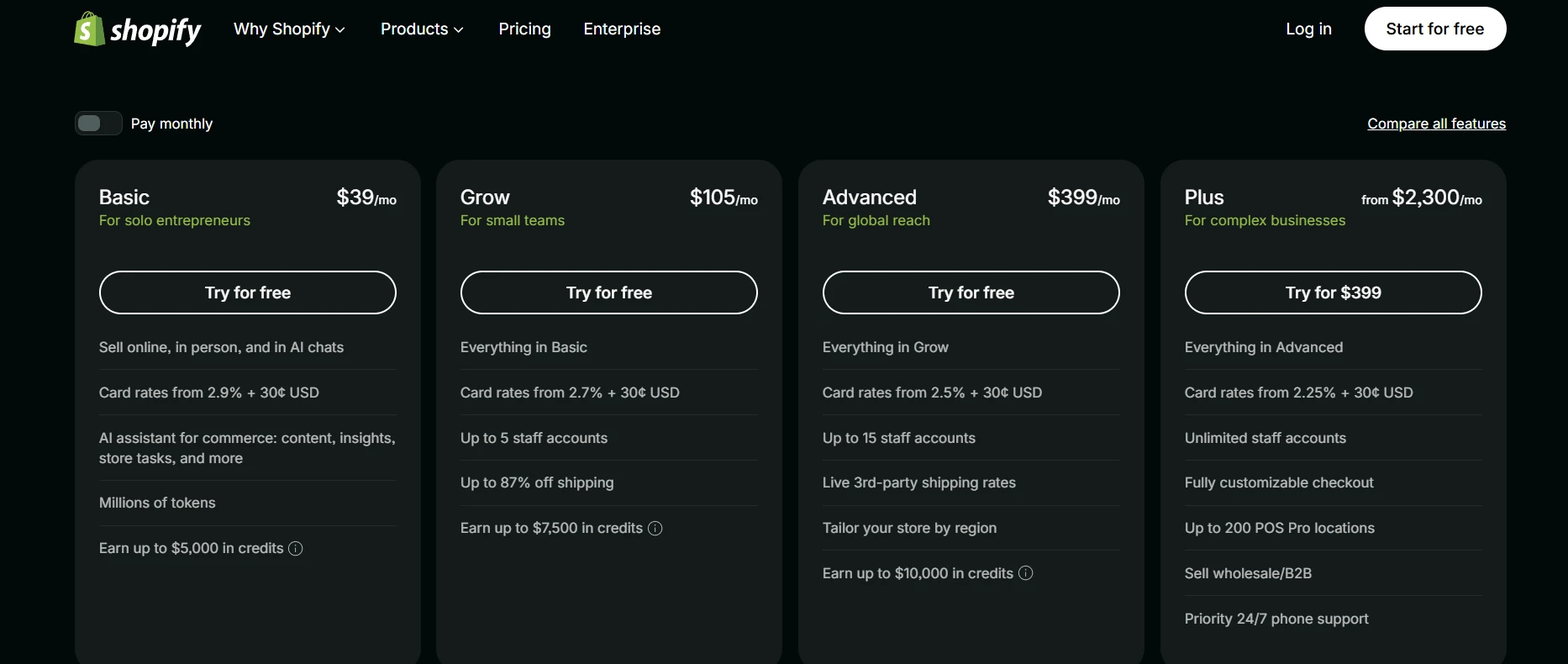
Every Shopify plan includes the platform’s hosting infrastructure. However, merchants may still pay for a custom domain, paid theme, apps, payment processing, and professional development.
For a more detailed explanation of optional costs, see our Shopify pricing guide.
How much does WordPress and WooCommerce cost?
WordPress and WooCommerce core software are free to download and use. However, running a production website requires additional services.
Typical expenses include hosting, a domain name, premium themes or plugins, security and backups, payment processing, and technical maintenance.
Unlike Shopify, WordPress has no universal subscription because each business can build a different technology stack.
For example, a small business may use basic hosting, a free theme, and a limited selection of extensions. Another may require managed hosting, custom integrations, performance monitoring, and regular developer support.
WooCommerce confirms that its core platform has no platform fee or revenue share. The store owner pays for the hosting, payment processing, and additional services required. See the official WooCommerce pricing overview and our WooCommerce pricing guide.
Comparing the actual cost of ownership
The following examples illustrate how costs can differ for small stores. They use explicit planning assumptions rather than actual merchant invoices or guaranteed market prices.
| Cost scenario | Illustrative first-year cost | What’s included in the assumption |
|---|---|---|
| Lean Shopify Basic store | $363–$603 | $348 annual subscription, approximately $15 domain, free theme, and $0–$240 in annual apps. |
| Shopify Basic with premium tools | $1,363–$1,963 | $348 subscription, approximately $15 domain, $400 one-time theme, and $600–$1,200 in annual apps. |
| Lean DIY WordPress/WooCommerce store | $135–$515 | Approximately $15 domain, $120–$300 hosting, free theme, and $0–$200 in extensions. |
| Professionally maintained small WooCommerce store | $1,295–$2,495 | Approximately $15 domain, $300–$600 hosting, $80 theme, $300–$600 extensions, and $600–$1,200 maintenance. |
These illustrative budgets exclude payment processing, taxes, marketing, inventory, and bespoke development. They also assume that the premium themes are one-time purchases; actual theme and extension renewal conditions vary.
After the first year, recurring costs may change as initial theme purchases drop out of the budget, promotional hosting prices expire, and extension subscriptions renew.
These scenarios are not feature-equivalent quotations. A store using several Shopify apps may provide a different set of capabilities from a WooCommerce store using paid extensions.
What this means: WordPress may cost less for a technically capable owner running a simple website. Shopify can provide better value to a small team that would otherwise need to pay someone to manage hosting, updates, security, and compatibility.
The decision should be based on your total cost of ownership, not the lowest advertised entry price.
Ease of Use and Website Setup
Shopify is generally easier for beginners setting up an online store, while WordPress requires more decisions about the underlying website. The difference becomes especially noticeable during the initial configuration and ongoing maintenance.
Setting up a Shopify store
Shopify provides a guided process for creating a store, adding products, choosing a theme, configuring payments, and setting up shipping.
The admin combines products, orders, customers, discounts, and other commerce-related operations in one interface.
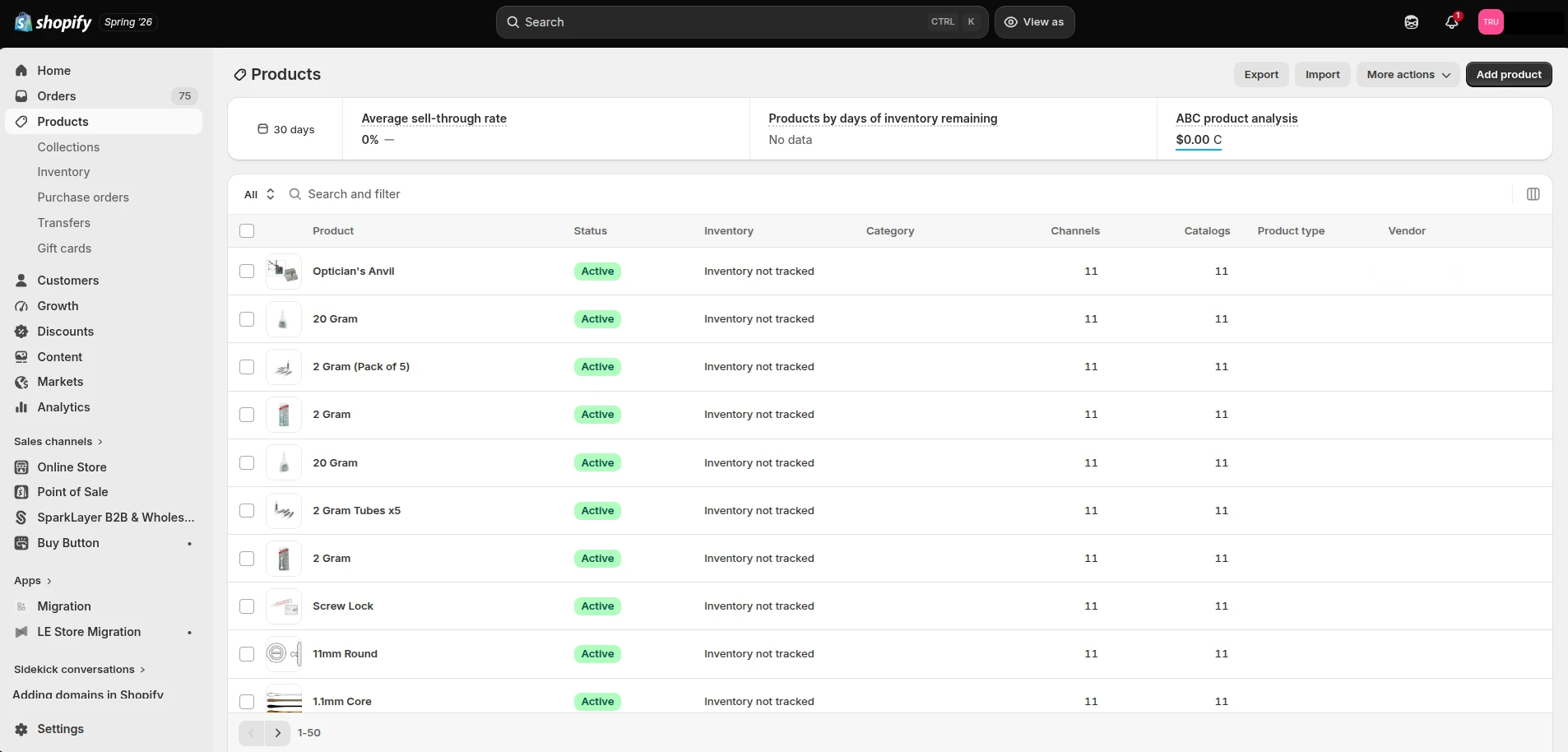
Shopify manages core hosting and platform updates, reducing the number of infrastructure decisions merchants need to make.
That does not mean a complete store is ready to launch immediately. You still need to prepare product information, shipping rules, taxes, legal policies, payment settings, design, and analytics. You should also test the customer journey before accepting real orders.
For most first-time merchants, Shopify’s advantage is that these tasks happen within an established ecommerce system rather than a collection of separately configured tools.
Setting up a WordPress website
WordPress is straightforward for publishing content, but building a complete online store involves additional steps.
A typical self-hosted WordPress ecommerce project includes:
- Choosing a hosting provider and domain.
- Installing WordPress and configuring the website.
- Installing WooCommerce.
- Selecting a compatible theme.
- Setting up products, checkout, payments, shipping, and taxes.
- Installing additional plugins where required.
- Configuring security, backups, caching, and monitoring.
- Testing compatibility, website performance, and transactions.
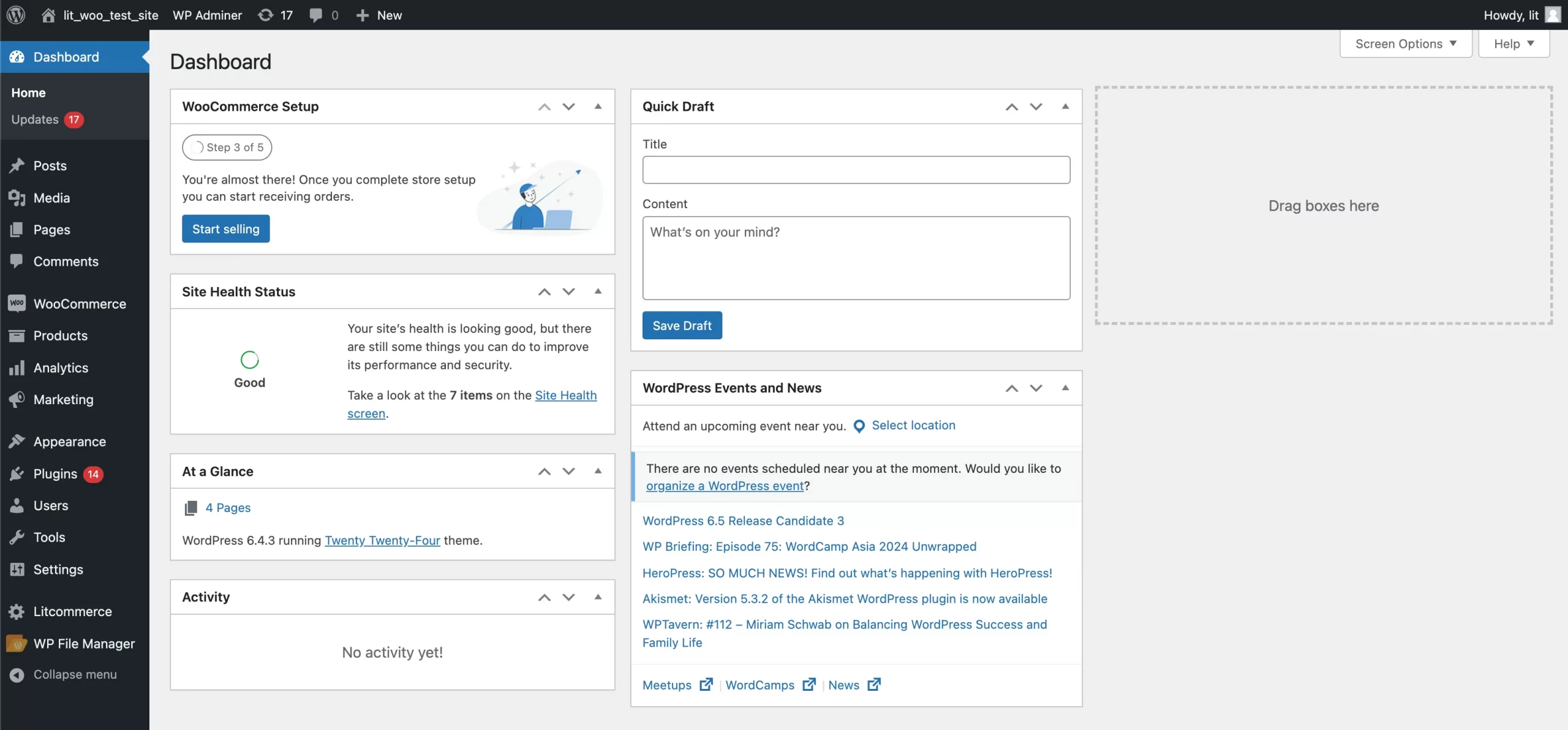
Managed WordPress hosting can handle some infrastructure and security tasks, making this process easier. Certain hosts also provide one-click installation, staging environments, backups, and automatic updates.
However, someone still needs to maintain the overall WordPress application and confirm that themes, plugins, and custom code remain compatible.
Our assessment: Shopify is the simpler choice for merchants who want to concentrate on products and customers. WordPress is attractive when controlling the website’s architecture is worth the additional technical responsibility.
Themes, Website Design, and Customization
Quick takeaway:
Shopify makes it easier to create a commerce-focused storefront using a compatible theme. WordPress gives businesses broader freedom over page layouts, content models, code, and site architecture.
Shopify themes and design tools
Shopify themes are designed around ecommerce requirements, including product pages, collections, navigation, merchandising, and responsive shopping experiences.
Merchants can adjust colors, typography, sections, templates, and other storefront elements through the theme editor.
The Shopify Theme Store includes free and premium designs covering different industries, catalog sizes, and storefront styles.
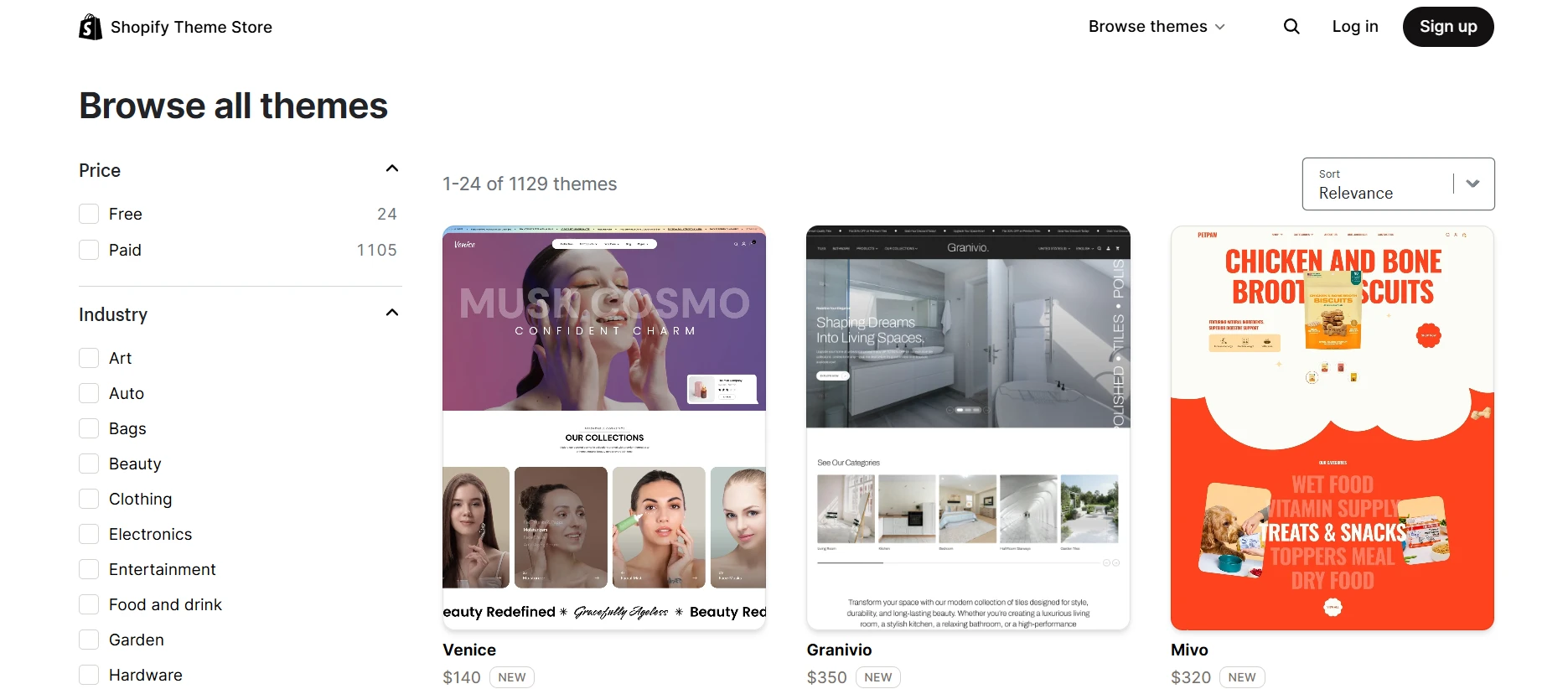
Developers can customize Shopify storefronts using Liquid, CSS, JavaScript, platform APIs, and supported development tools.
The main limitation is the hosted architecture. Shopify does not give merchants unrestricted access to every infrastructure and application component.
For most standard ecommerce storefronts, this is an acceptable tradeoff. Businesses with unusual requirements should verify whether the necessary customization is supported before committing to the platform.
WordPress themes and design flexibility
WordPress provides a much broader range of website-building approaches. Businesses can use classic themes, block themes, page builders, custom templates, or fully bespoke development.
The WordPress Theme Directory provides thousands of free designs, with additional premium options available from commercial developers.

WordPress is especially useful when a website requires more than a conventional ecommerce layout. For example, a business might combine a store with a directory, course library, editorial publication, or custom member portal.
Developers can create custom post types, taxonomies, templates, and application functionality to support these requirements.
However, flexibility introduces complexity. A poorly selected combination of themes, builders, and plugins can create inconsistent design, unnecessary scripts, and maintenance problems.
Which is better? Shopify usually provides a more direct path to a polished online store. WordPress offers greater freedom when your website requires specialized architecture or custom development.
Content Management and Blogging
Content management is one of the clearest differences between Shopify and WordPress.
WordPress is generally the better choice for websites where publishing and content organization are central to the business. Shopify provides essential blogging tools, but ecommerce remains its primary focus.
Shopify content management
Shopify allows merchants to create pages, publish blog posts, organize articles into blogs, and edit search listing information.
These features are suitable for many ecommerce content strategies, including product guides, announcements, gift ideas, educational articles, and brand stories.
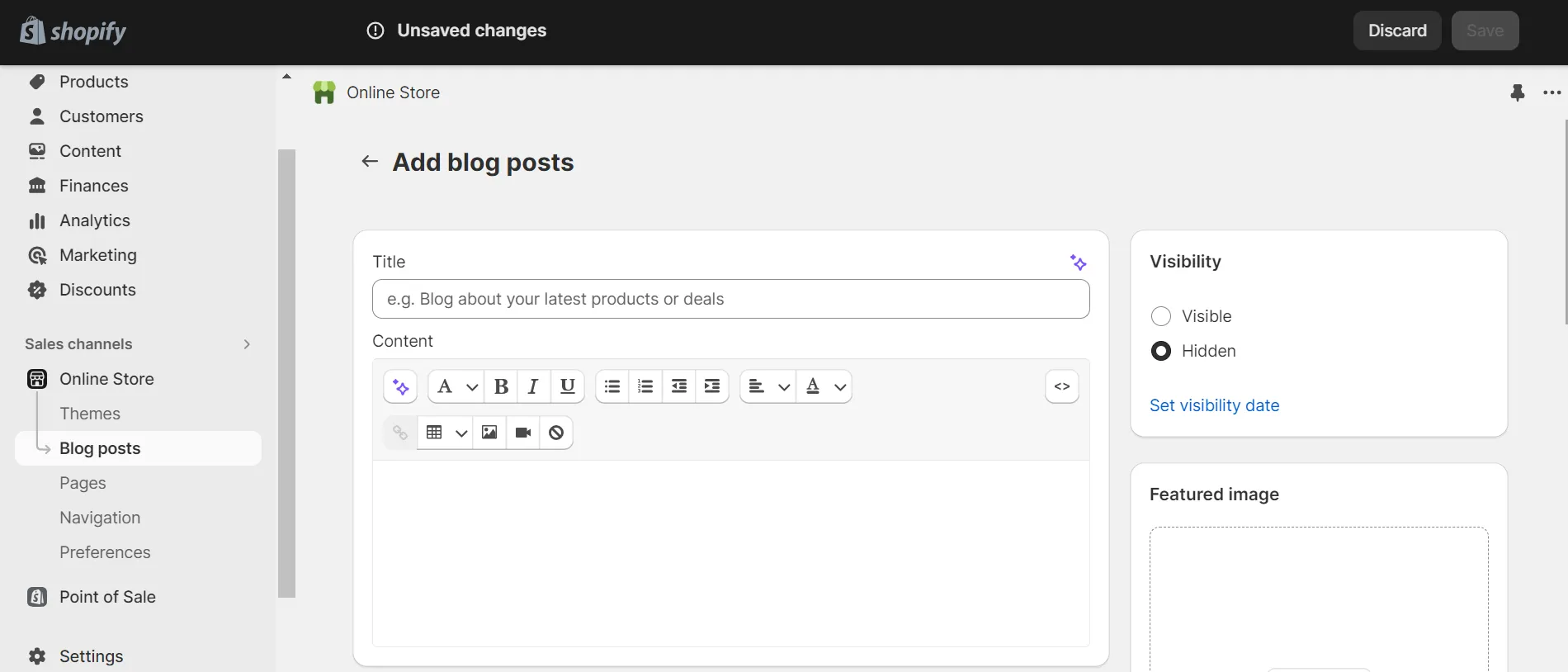
Shopify also supports structured content through metafields and metaobjects, allowing developers and merchants to manage information beyond standard product descriptions.
However, its content architecture and publishing workflows remain more constrained than WordPress for websites with complex editorial requirements.
For a typical online store publishing a few articles each month, Shopify’s built-in tools may be sufficient.
WordPress content management
WordPress offers more extensive content management capabilities, including categories, tags, authors, archives, reusable blocks, custom post types, taxonomies, revisions, and user roles.
These features become valuable when a website needs to manage multiple types of content, such as:
- Blog articles, tutorials, and industry news.
- Resource libraries and downloadable materials.
- Case studies and customer stories.
- Business directories and searchable listings.
- Courses, learning resources, or membership content.
- Custom content relationships across different website sections.
A business with a substantial content marketing operation may benefit from maintaining a dedicated editorial system rather than adapting a commerce platform to serve as its primary CMS.
WordPress does not automatically produce a better content strategy. Taxonomies, internal links, templates, and publishing workflows still require planning. Its advantage is the control available to build them.
Our assessment: Shopify works well for content that supports a store. WordPress is stronger when content itself is a major part of the website’s purpose or acquisition strategy.
Shopify vs WordPress for SEO
Quick takeaway:
Both Shopify and WordPress can perform well in organic search. WordPress offers more control over technical SEO and content architecture, while Shopify provides a managed foundation with fewer infrastructure decisions. Neither platform receives an automatic ranking advantage simply because of its CMS.
Search performance depends on much more than platform selection. Content quality, search intent, internal linking, technical accessibility, backlinks, page performance, and user experience all contribute to SEO outcomes.
Shopify SEO capabilities
Shopify includes essential SEO functions, including editable page titles and meta descriptions, XML sitemaps, canonical tags, image alt text, and URL redirects.
Merchants can customize search listings for products, collections, pages, and articles directly through Shopify’s admin.
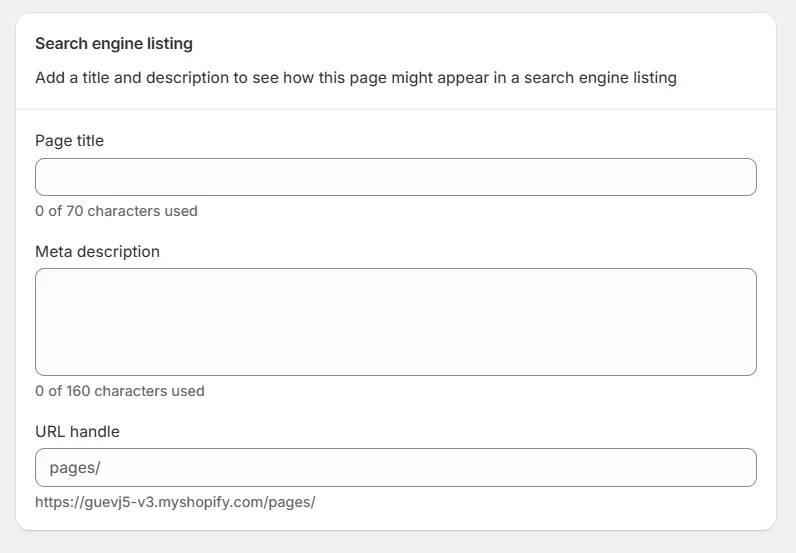
Shopify’s hosted infrastructure also removes certain server-level maintenance responsibilities that can otherwise affect website performance and reliability.
However, Shopify has platform-specific constraints. Some URL directory structures are predefined, and advanced technical changes must work within Shopify’s supported architecture.
For example, businesses with complex content types or unusual URL requirements may need additional planning to achieve their preferred information architecture.
WordPress SEO capabilities
WordPress provides extensive control over URL structures, metadata, templates, internal links, taxonomies, schema markup, crawl directives, and technical integrations.
Plugins such as Yoast SEO and Rank Math make many SEO settings accessible through the admin. Developers can also customize templates and structured data directly.
This flexibility is useful for websites with large content libraries, custom landing page systems, specialized taxonomies, or advanced technical requirements.
However, greater control also introduces more ways to make mistakes. Conflicting plugins, accidental indexation of low-value archives, poor hosting, broken redirects, and unnecessary scripts can create SEO problems.
Which platform is better for technical SEO and AI search?
| SEO requirement | Shopify | WordPress |
|---|---|---|
| Basic on-page SEO | Built-in controls | Native controls and SEO plugins |
| XML sitemaps | Automatically generated | Core functionality and plugin options |
| URL customization | Some fixed directory patterns | Greater control over permalink structures |
| Custom structured data | Possible through themes, apps, or custom code | Possible through plugins and direct template development |
| Advanced content taxonomy | More constrained | Highly customizable |
| Server-level technical changes | Managed platform with limited direct access | Controlled through the chosen hosting environment |
| AI search visibility | Depends on content, accessibility, and search systems | Depends on content, accessibility, and search systems |
Neither Shopify nor WordPress guarantees inclusion in Google AI Overviews or other AI-generated search experiences. Accurate content, accessible pages, clear information architecture, and reliable product or business information remain important regardless of the CMS.
For a content-heavy publication that needs extensive technical customization, WordPress has a practical advantage. For an online store with a relatively straightforward content structure, Shopify’s SEO capabilities may be more than sufficient.
Ecommerce Features: Shopify vs WordPress with WooCommerce
Shopify provides ecommerce functionality as its core product, while WordPress requires an ecommerce layer such as WooCommerce.
Shopify includes product management, inventory, checkout, orders, discounts, shipping settings, customer management, and multiple sales channels.
WooCommerce adds products, carts, checkout, orders, coupons, tax configuration, shipping, and payment integrations to WordPress. Extensions and custom development can expand these capabilities.
Both systems can support established ecommerce businesses, but the way they are assembled and maintained is different.
| Commerce requirement | Shopify | WordPress + WooCommerce |
|---|---|---|
| Store setup | Integrated into the platform | Requires WooCommerce configuration |
| Product management | Native product and inventory tools | WooCommerce product and inventory tools |
| Checkout | Shopify-managed checkout infrastructure | Checkout managed through WooCommerce and the website’s hosting stack |
| Payment gateways | Shopify Payments and supported external providers | WooPayments and compatible third-party gateways |
| Subscriptions and specialized selling | Native capabilities or apps, depending on the requirement | Extensions or custom development |
| POS | First-party Shopify POS ecosystem | Third-party or custom WooCommerce-compatible solutions |
| Technical ownership | Core commerce infrastructure managed by Shopify | Application and infrastructure managed by the site owner or partners |
The key distinction is not that one platform can sell products and the other cannot. Both can. Shopify standardizes more of the commerce foundation, while WooCommerce gives businesses greater freedom to assemble their own systems.
For an ecommerce-specific comparison of checkout, inventory, extensions, and operational features, read our Shopify vs WooCommerce comparison.
Payment processing and transaction fees
Payment costs deserve particular attention because they increase with order volume.
Shopify offers Shopify Payments and supported third-party payment providers. In the United States, the published standard online card rate for Shopify Basic starts at 2.9% + $0.30 per transaction, subject to applicable conditions.
Shopify may apply additional third-party transaction fees when merchants use external payment providers instead of Shopify Payments. The exact rates depend on the plan, payment method, and market. Check the Shopify Payments documentation for the applicable terms.
WooCommerce does not charge a platform-wide revenue share. Merchants pay the rates charged by their selected payment provider.
For example, WooPayments publishes its own processing fees, which may differ by country, card type, currency conversion, and other factors. See the WooPayments fees documentation.
A meaningful comparison should use your expected order volume, average order value, payment mix, and international sales rather than headline processing rates alone.
B2B and wholesale selling
Shopify provides native B2B features on its Basic, Grow, Advanced, and Plus plans.
Supported features include company profiles, catalogs, quantity rules, volume pricing, and net payment terms, with differences between plans.
For example, Basic, Grow, and Advanced have limits on active B2B catalog assignments, while Shopify Plus provides additional capabilities such as direct company catalog assignment, deposits, and partial payments.
Businesses should review the Shopify B2B features by plan before deciding which subscription is necessary.
WooCommerce supports wholesale operations through specialized extensions, customer roles, pricing rules, and custom development. This approach can provide extensive flexibility but requires businesses to select and maintain the relevant components.
International and AI-assisted commerce
Shopify provides tools for selling across markets, currencies, languages, payment methods, and sales channels. Availability varies depending on the country, payment setup, and subscription plan.
WooCommerce can also support international stores, although translation, currency conversion, payments, regional taxes, and catalog management may require additional plugins or services.
Another area of development is AI-assisted shopping.
Shopify’s Agentic Storefronts allow eligible stores to make products discoverable through supported AI shopping channels. Merchants can manage their participation and view related performance information through Shopify’s admin.
The experience differs by channel. For example, ChatGPT can help customers discover eligible Shopify products, with purchases completed through the merchant’s online store checkout. Other channels may support additional checkout options where available.
Product eligibility, supported markets, and checkout capabilities vary. These features should not be interpreted as guaranteed product visibility or sales through AI systems.
WordPress and WooCommerce merchants can also participate in AI-driven product discovery through compatible integrations and product feeds. The implementation depends on the services and systems they choose.
Apps, Plugins, and Integrations
Both platforms offer extensive ecosystems for adding functionality, but they approach extensions differently.
Shopify has a centralized app marketplace. WordPress supports a much broader open-source and commercial plugin ecosystem, with more freedom over installation and customization.
Shopify apps
The Shopify App Store includes solutions for product reviews, subscriptions, customer support, marketing, fulfillment, reporting, design, and other business needs.
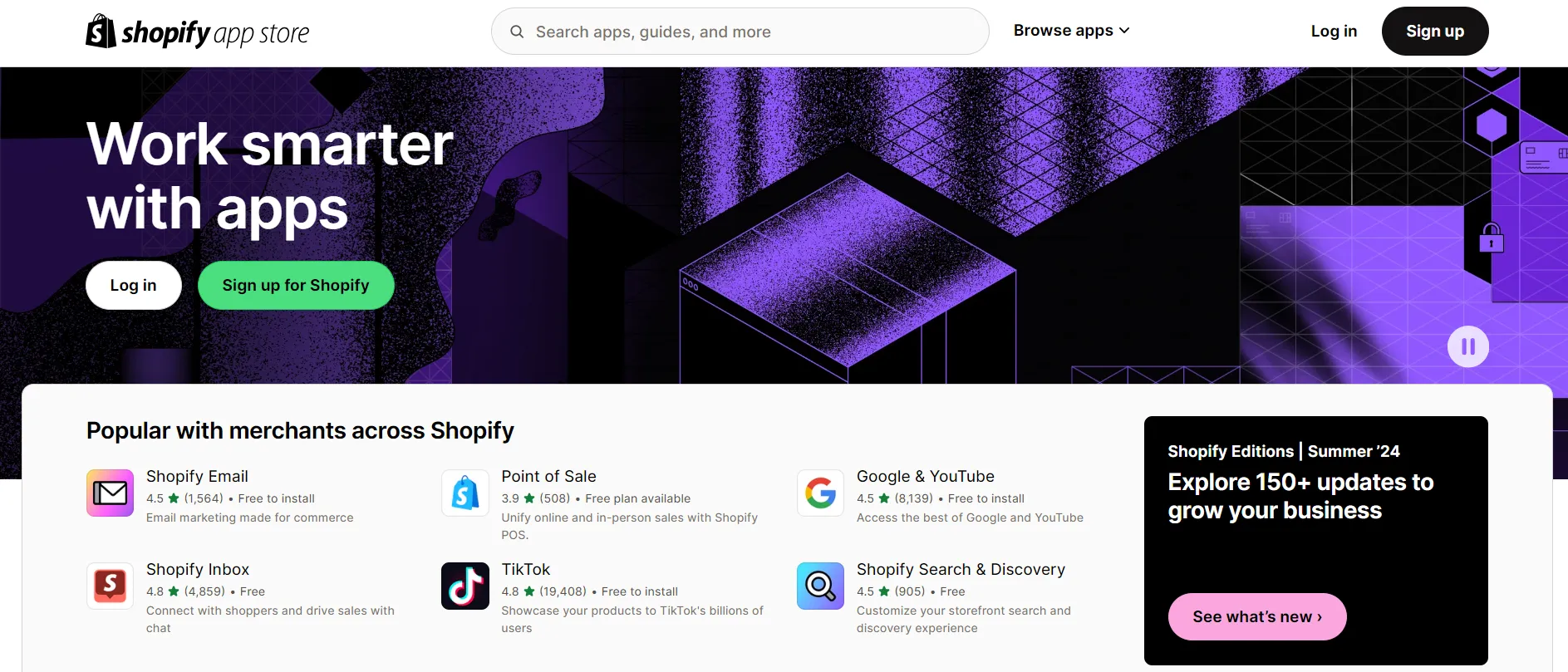
Installing an app generally requires less infrastructure work than deploying a custom server-side application.
However, merchants still need to evaluate app quality, data permissions, compatibility, support, and recurring fees.
Some stores become dependent on several paid apps for important business processes, making costs and vendor relationships more complicated over time.
WordPress plugins
The WordPress Plugin Directory provides tens of thousands of free plugins, with many additional commercial products available through independent vendors.
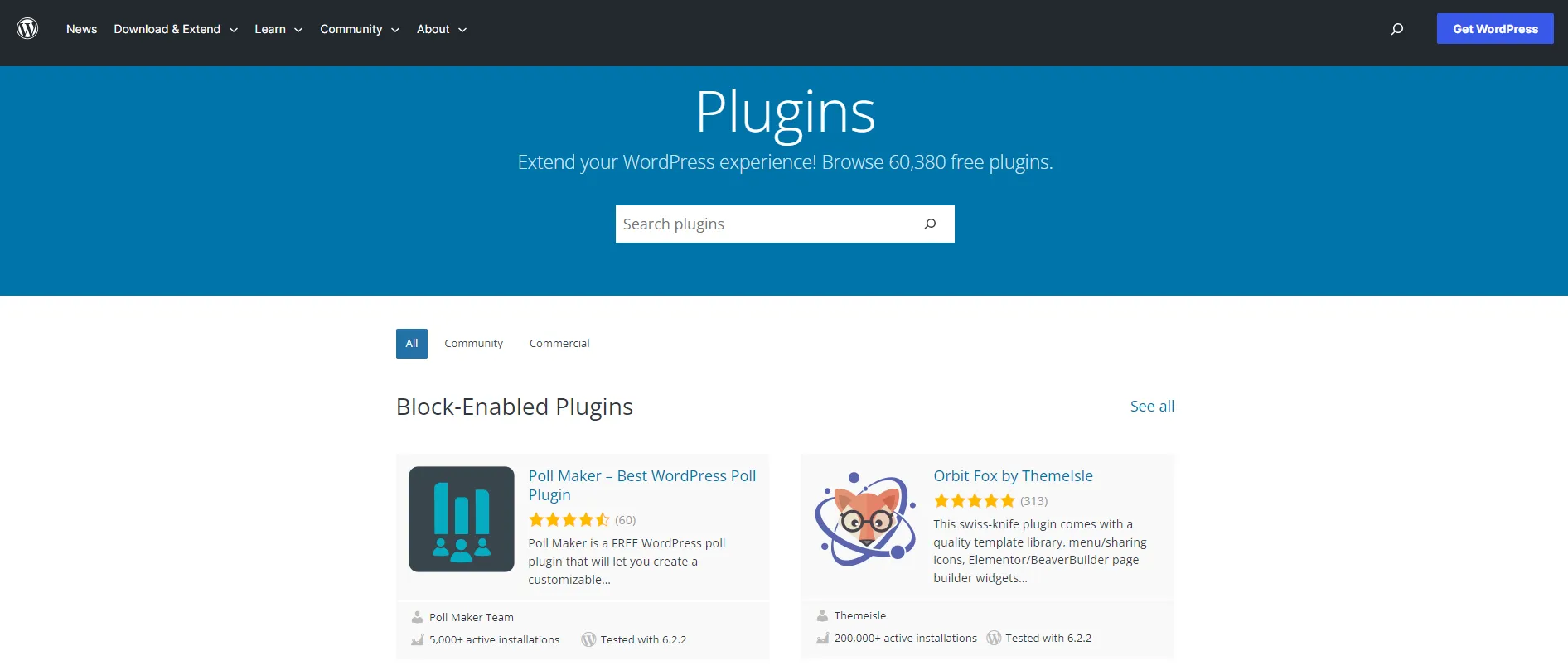
WordPress plugins can add everything from contact forms and SEO tools to advanced content types, membership systems, ecommerce features, and custom integrations.
The advantage is flexibility. Businesses can often choose between multiple approaches to the same requirement or build their own solution.
The tradeoff is maintenance. Different plugins may have different release cycles, support policies, performance characteristics, and compatibility requirements.
Before choosing any Shopify app or WordPress plugin, consider:
- Whether the feature already exists in your current platform.
- How frequently the product is maintained.
- Compatibility with your other tools.
- Security and data permissions.
- Performance impact.
- Customer support quality.
- Ongoing subscription or licensing costs.
- What happens if you remove or replace the extension.
Our assessment: Shopify simplifies app discovery and integration within its hosted ecosystem. WordPress offers broader development freedom, but requires stronger oversight of the complete plugin stack.
Performance, Security, and Website Maintenance
Quick takeaway:
Shopify reduces the infrastructure and security responsibilities placed on merchants. WordPress can deliver excellent performance and security, but results depend more heavily on hosting, configuration, development quality, and ongoing maintenance.
Shopify performance and security
Shopify manages its hosting environment, platform infrastructure, and core ecommerce system.
Merchants do not need to configure the underlying server or maintain Shopify’s core checkout infrastructure.
Shopify is certified as PCI DSS Level 1 compliant, and the company provides documentation explaining the scope of its PCI compliance.
However, this does not eliminate every security responsibility. Merchants still need to manage account access, staff permissions, app connections, fraud risks, and relevant privacy obligations.
Performance also depends on storefront implementation. Large images, heavy themes, excessive scripts, and poorly chosen apps can affect page speed even when hosting is managed.
WordPress performance and security
WordPress performance depends on the hosting environment and application configuration.
A well-optimized WordPress website can perform extremely well, especially with appropriate caching, a content delivery network, optimized media, and carefully selected plugins.
However, the site owner or technical partner must manage more variables, including:
- Hosting resources and server configuration.
- WordPress core, theme, and plugin updates.
- Compatibility between extensions.
- Backups and recovery procedures.
- Security monitoring and access control.
- Database performance and caching.
- Deployment and quality assurance processes.
WordPress supports automatic updates, and managed hosting providers can take responsibility for some of these tasks. Nevertheless, businesses must still ensure that the complete website remains reliable after changes.
Neither platform guarantees strong Core Web Vitals simply by being used. The design, content, scripts, and third-party integrations added to the website have a substantial impact on real-world performance.
Customer support
Shopify provides a centralized support system for its platform, including documentation, AI-assisted assistance, community resources, and plan-dependent support channels.

Available support channels and the scope of assistance depend on your subscription and the issue involved. Shopify does not necessarily provide direct support for third-party apps or custom code.
You can review the current options in Shopify’s support documentation.
WordPress support is distributed across its community, hosting providers, theme developers, plugin vendors, and agencies.
This provides merchants with a wide range of specialist support options. However, diagnosing a problem can require coordination between several parties.
Our assessment: Shopify provides a clearer platform support structure, while WordPress allows businesses to select and manage their own technical partners.
Scalability, Ownership, and Long-Term Control
Both Shopify and WordPress can support growing businesses. Their approaches to scaling are different.
Shopify provides managed infrastructure that allows merchants to grow without directly engineering their own hosting environment. Higher plans and specialized services support additional operational requirements.
For businesses with limited technical resources, this can make growth easier to manage.
The tradeoff is dependence on Shopify’s platform capabilities, pricing, APIs, app ecosystem, and development roadmap.
WordPress provides more direct control over the application, hosting environment, codebase, and database.
This is valuable when a business requires specialized workflows, proprietary integrations, unusual content models, or direct access to its technical infrastructure.
However, greater control does not make scaling automatic. High-traffic WordPress and WooCommerce websites need appropriate hosting, database optimization, monitoring, deployment processes, and technical support.
| Long-term consideration | Shopify | WordPress |
|---|---|---|
| Infrastructure scaling | Managed by the platform | Managed through the selected hosting and development stack |
| Application code | Customizable within supported platform boundaries | Direct access to open-source code |
| Database access | Primarily through supported APIs and exports | Direct database control |
| Platform dependency | Higher dependence on a single hosted ecosystem | More freedom to change hosts and application components |
| Technical maintenance | Core platform managed by Shopify | Shared between the business, developers, and hosting providers |
| Data portability | Supported exports and APIs, with platform-specific limitations | Broad access to application data, with extension-specific migration considerations |
The right choice depends on whether your business treats technical ownership as an advantage or as work it would prefer to outsource.
What Should You Consider Beyond the Feature List?
A platform can meet your initial requirements and still become difficult to manage as the business grows.
For that reason, we recommend considering the ongoing operating model, not just the features available on launch day.
| What Shopify merchants should evaluate | What WordPress merchants should evaluate |
|---|---|
| Recurring app costs and reliance on individual app providers | Ongoing plugin updates, compatibility testing, and maintenance costs |
| Whether checkout, B2B, or custom workflows fit the available platform capabilities | Whether selected extensions support required commerce functionality reliably |
| How fixed URL structures and the content system fit future publishing plans | Whether the website’s taxonomy and custom content structure will remain manageable |
| How easily business data can be exported or moved later | How hosting, plugin, and custom development choices affect portability |
| Which features require higher subscriptions or additional paid services | Who will handle security, backups, troubleshooting, and technical support |
| How future integrations depend on Shopify APIs and platform rules | How custom integrations will be documented and maintained |
Consider a business that starts with a small product catalog and a basic blog.
Shopify may be the natural choice if the business expects to concentrate on product launches, fulfillment, and new sales channels. Its managed commerce infrastructure reduces the number of systems the team needs to operate.
If the same business expects to develop a large educational library, a custom directory, or a complex content membership system, WordPress may offer a more suitable foundation.
These are illustrative scenarios rather than results of a controlled platform test. Actual implementation complexity depends on the business’s requirements and the developers involved.
The more clearly you can define your future content, integrations, sales channels, and maintenance responsibilities, the easier it becomes to choose a sustainable platform.
Can Shopify and WordPress Work Together?
Yes. Shopify and WordPress can be combined, so choosing one platform does not always mean abandoning the other.
A business can use WordPress as its main website and content management system while Shopify handles certain commerce operations.
Shopify offers a Sell on WordPress integration that connects a Shopify business with a WordPress website.
Shopify also provides Buy Buttons for embedding supported purchase experiences into external websites.
A hybrid approach may be suitable when:
- You already have a well-established WordPress website with valuable content and organic traffic.
- You want Shopify to manage ecommerce operations without rebuilding your entire publishing system.
- Content remains the primary focus of the website, with commerce serving as an additional revenue channel.
- You need to retain particular WordPress functionality while introducing Shopify products or checkout.
However, a hybrid setup is not necessarily simpler. You may need to coordinate product information, website design, domains, analytics, customer journeys, and tracking across both systems.
Evaluate the integration as a technical architecture decision, including its recurring costs and maintenance requirements.
What Happens If You Switch Between Shopify and WordPress?
Even after choosing a platform, your business requirements may change. You might move from WordPress to Shopify to simplify store operations, or move from Shopify to WordPress and WooCommerce to gain more control over content and customization.
Both platforms provide ways to export important information, but platform migration is more than transferring products or blog posts.
Depending on the source and target systems, a migration may involve:
- Products, variants, categories, and collections.
- Product images and other media.
- Customers, addresses, and historical orders.
- Pages, blog posts, and content metadata.
- SEO URLs, redirects, canonical tags, and structured data.
- Storefront themes and page templates.
- Apps, plugins, and custom functionality.
- Payment, shipping, tax, and checkout configurations.
- Analytics, tracking, product feeds, and external integrations.
Some data can be transferred between platforms, while design and platform-specific functionality may need to be recreated or replaced.
For example, a WooCommerce theme cannot simply be installed on Shopify. Similarly, custom functionality built around Shopify’s APIs may need a different implementation on WordPress.
SEO also requires attention during replatforming. Changes to URLs, content structure, internal links, redirects, and indexing settings can affect organic visibility.
Before migrating, inventory your existing store data, verify what the target platform supports, test representative records, and prepare a separate plan for design, integrations, and SEO.
If you’re considering a move from WordPress or WooCommerce to Shopify, LitExtension can help transfer supported store data, including products, customers, and orders. You can explore our WordPress to Shopify migration service to understand the available migration scope and support options.
Need Help to Migrate Your Store?
Transfer your supported WooCommerce store data to Shopify with LitExtension. Start with a demo migration to review the results before moving your store.
Shopify vs WordPress: FAQs
Is Shopify or WordPress better for ecommerce?
Shopify is generally better for merchants who want a dedicated, hosted ecommerce platform with less technical maintenance. WordPress with WooCommerce is a strong choice for businesses that need greater control over website content, code, hosting, and specialized functionality. The best option depends on your requirements and technical resources.
Is WordPress cheaper than Shopify?
WordPress can cost less because its core software is free and you can choose inexpensive hosting and extensions. However, a production website still requires hosting, a domain, maintenance, security, and potentially paid development. Shopify has a recurring subscription but includes hosting and core platform maintenance. Compare total ownership costs rather than software prices alone.
Is Shopify better than WordPress for SEO?
Neither platform automatically ranks better in Google. Shopify includes essential SEO controls and managed hosting, while WordPress gives website owners more flexibility over URLs, templates, structured data, and content architecture. Content quality, technical implementation, internal linking, and site performance are generally more important than the CMS itself.
What’s the difference between WordPress.com and WordPress.org?
WordPress.org provides free, open-source WordPress software that you install with a hosting provider of your choice. WordPress.com is a managed hosting service built on WordPress, with different subscription plans and included infrastructure services. Both use WordPress software, but their hosting responsibilities and available configurations differ.
Do I need WooCommerce to sell products on WordPress?
No, but WooCommerce is one of the most widely used ways to add ecommerce functionality to WordPress. It provides products, carts, checkout, payments, and order management. You can also use other ecommerce plugins or connect Shopify’s commerce tools to a WordPress website.
Which platform is easier for beginners?
Shopify is generally easier for beginners who want to build an online store because hosting, checkout, platform updates, and core ecommerce operations are managed within one system. WordPress is approachable for publishing content, but creating and maintaining a self-hosted ecommerce website involves more technical decisions.
Can I use Shopify and WordPress together?
Yes. You can manage content through WordPress while using Shopify to provide products and purchasing functionality. Shopify supports integrations for selling on WordPress, including its Sell on WordPress connection and Buy Buttons. You should plan the setup carefully to keep navigation, analytics, domains, and the customer experience consistent.
Can I migrate from WordPress to Shopify without losing SEO?
A well-planned migration can preserve much of your existing SEO value, but no platform migration is completely risk-free. Keep important content and URLs where possible, map changed URLs to relevant destinations, implement permanent redirects, transfer supported metadata, update internal links, and monitor indexing and traffic after launch.
Is WordPress better for blogging than Shopify?
WordPress is generally better for complex blogging and publishing requirements because it supports custom content types, taxonomies, editorial roles, and extensive template customization. Shopify’s blogging tools are suitable for many online stores that publish guides, announcements, and other supporting content.
Final Verdict: Should You Choose Shopify or WordPress?
The Shopify vs WordPress decision comes down to how your business intends to operate its website.
- Shopify is the stronger starting point when ecommerce is your main priority and you want a managed platform. It reduces the need to manage hosting, checkout infrastructure, and platform updates, making it particularly attractive for first-time merchants, DTC brands, and teams with limited technical resources.
- WordPress is the stronger option when publishing, customization, or technical control is central to your business. Combined with WooCommerce, it can support substantial ecommerce operations while allowing developers to tailor the website’s architecture to specialized needs.
If you want managed WordPress hosting without operating your own server, WordPress.com is also worth considering as a separate option.
Before making your final decision, evaluate the website’s primary purpose, required features, content strategy, integrations, budget, and maintenance responsibilities. A platform that fits your operating model is usually a better long-term investment than one selected solely for its initial price or feature count.