A Shopify export blog posts process is necessary when you need to back up content, reuse articles, or move them to another platform. However, Shopify does not offer a built-in export button for blog posts, leaving you to find a suitable alternative based on your content volume and technical experience.
This article will walk you through the available methods for exporting Shopify blog posts, from manual options to bulk export and full store migration. You’ll learn:
- How to export blog posts from Shopify manually;
- How to perform Shopify export blog posts in bulk;
- How to export Shopify blog posts as part of a full migration.
Keep reading for the details!
How to Export Blog Posts from Shopify Manually?
Unfortunately, there’s no built-in feature for Shopify export blog posts on the admin. Thus, if you only have a small number of articles or prefer a cost-effective manual approach, here are two methods you can perform.
1. Copy and paste blog posts
This is the simplest way to perform a Shopify export blog posts process if your store only has a few articles.
- From your Shopify admin, go to Content > Blog posts.
- Open the blog post you want to export.
- In the Content editor, click Show HTML (<>).
- Copy the entire HTML code.
- Paste it into a Google Docs, Word, .html, or .txt file.
- Repeat these steps for the remaining posts.
We recommend creating a separate file for each article and using its handle as the file name. However, information such as tags, authors, publication dates, featured images, and SEO settings may need to be saved separately.
2. Export via Shopify API
If you have a larger blog, Shopify’s GraphQL Admin API lets you retrieve multiple posts and save them in JSON format. This method requires some technical knowledge but preserves more article data than manual copying.
First, go to Settings > Apps and sales channels > Develop apps and create a custom app. Under Admin API access scopes, grant the app read_content access. Then, install the app and save its Admin API access token securely.
Next, use Terminal, Postman, or another API client to send the following GraphQL request:
curl -X POST \
“https://YOURSTORE.myshopify.com/admin/api/2026-07/graphql.json” \
-H “Content-Type: application/json” \
-H “X-Shopify-Access-Token: YOUR_ACCESS_TOKEN” \
-d ‘{
“query”: “query { articles(first: 250) { nodes { title handle body tags author { name } createdAt publishedAt blog { title } image { url altText } } pageInfo { hasNextPage endCursor } } }”
}’ > blog_articles.json
Replace YOURSTORE with your Shopify subdomain and YOUR_ACCESS_TOKEN with the token generated earlier. The resulting blog_articles.json file will contain each post’s title, handle, HTML body, blog name, tags, author, publication dates, and featured image.
Shopify returns blog posts through cursor-based pagination. If hasNextPage is true, use the returned endCursor in another request to retrieve the next batch.
Finally, convert the JSON file into CSV using Excel Power Query, Google Sheets, or a Python or Node.js script. Your CSV can include fields such as title, handle, body, blog, tags, author, image_url, created_at, and published_at.
Before importing the file to another platform, review its formatting carefully. You may need to adjust the column names, HTML content, image URLs, and publication statuses to match the destination platform’s requirements.
How to Perform Shopify Export Blog Posts in Bulk?
The manual methods above can become time-consuming when you have hundreds of blog posts. Exporting through the Shopify API may also feel challenging if you lack technical experience.
In this case, you will need a third-party app to handle the Shopify export blog posts task in bulk. After testing several options, we recommend BulkFlow for its user-friendly interface and ability to process large data volumes. It also helps preserve blog content, SEO metadata, images, and formatting during the export.
You can start with their forever-free plan to explore the features before upgrading to paid options.
Step 1: Install app
To get started, you’ll first need to add BulkFlow to your Shopify store. You can find Bulk Import, Migrate & Update on the Shopify App Store and select Install.
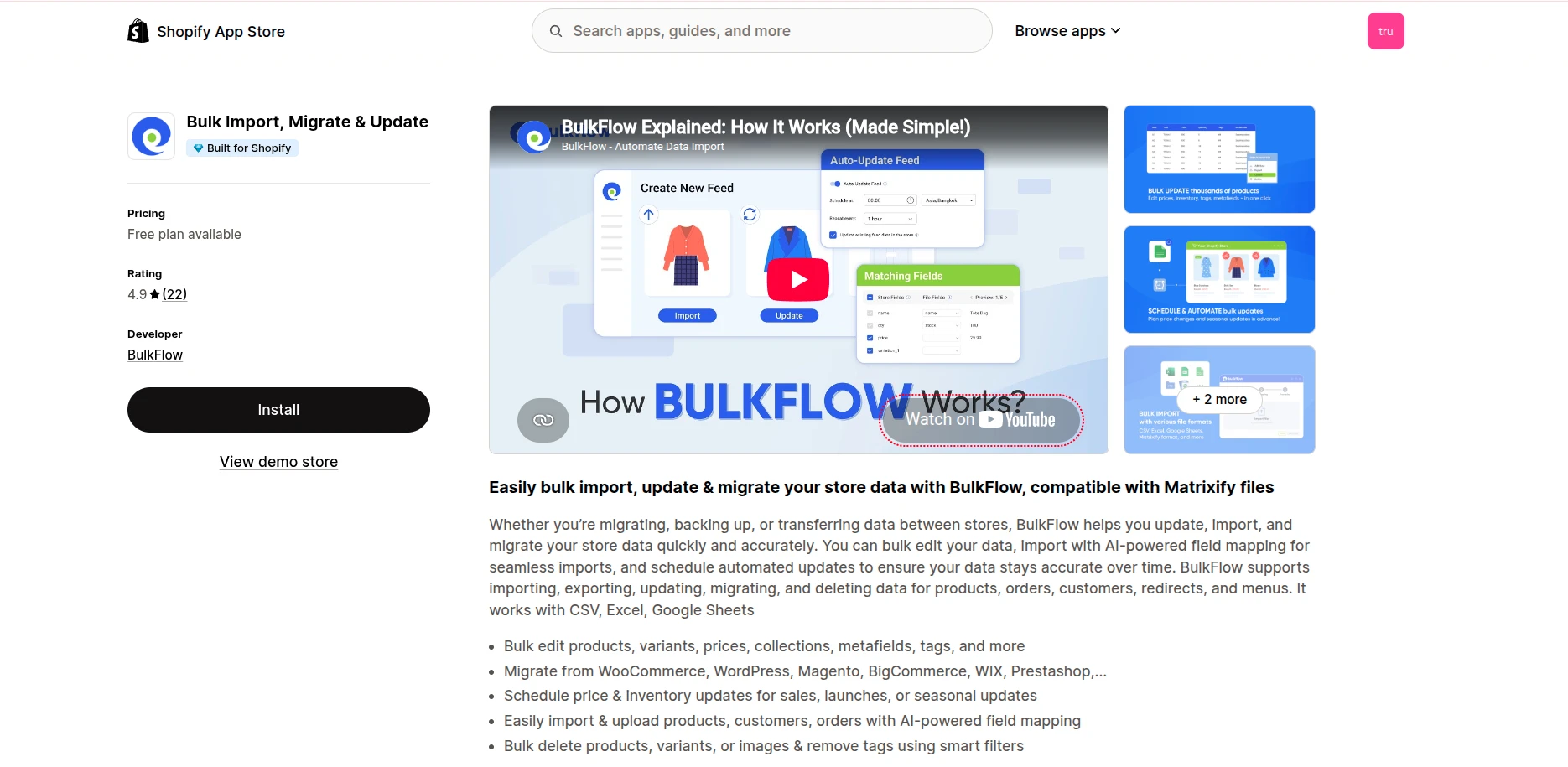
After reviewing the required permissions, confirm the installation and open the app from Shopify Admin > Apps.
Step 2: Create a new feed
Once you’re inside the BulkFlow dashboard, select Create New Feed > Export and name your feed.
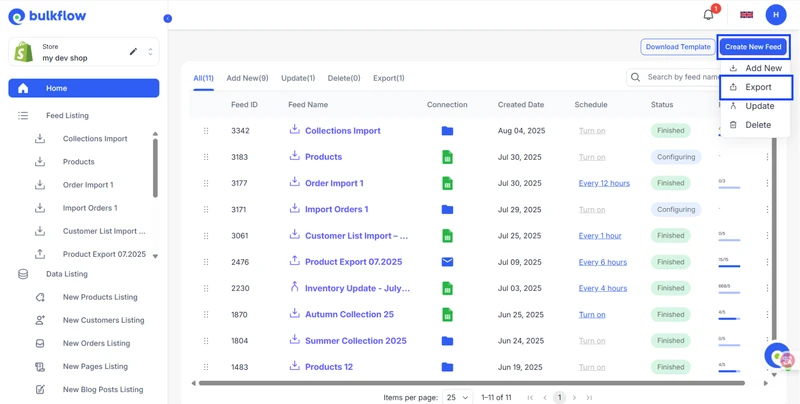
Next, you can choose where you want to receive the Shopify export blog posts file. BulkFlow currently provides two destination options:
- Send to Email: The file will be sent to one or multiple email addresses for quick access and sharing.
- FTP/SFTP: The file will be uploaded automatically to a secure server using the details you provide.
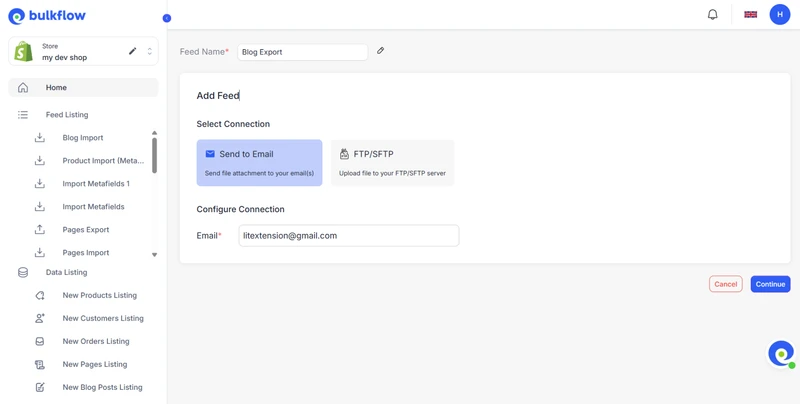
When everything looks correct, click Continue to customize the blog post data included in your export.
Step 3: Customize data for export
At this stage, BulkFlow allows you to select the exact blog post fields you want to export. Depending on your needs, these may include ID, Title, Body HTML, Template Suffix, Image Src, and other available fields.
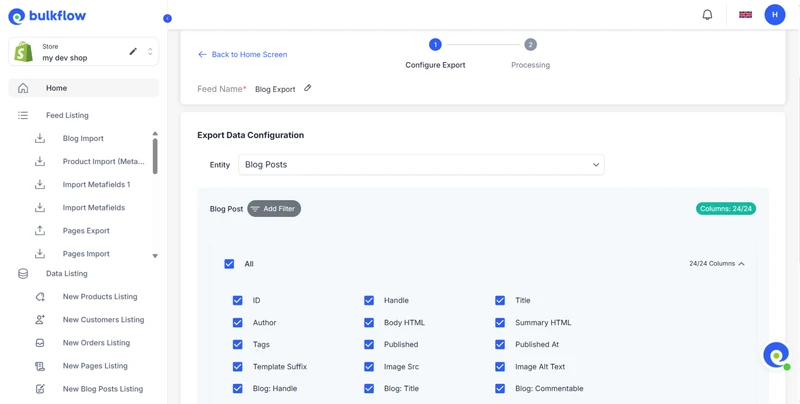
If you do not need every article, you can also narrow down the export by applying filters. For example, BulkFlow can include only posts created within a particular date range or carrying specific tags.
Step 4: Run the Shopify export blog posts
Finally, click Export and follow the process through the activity log. Remember to check Failed Items for any errors.
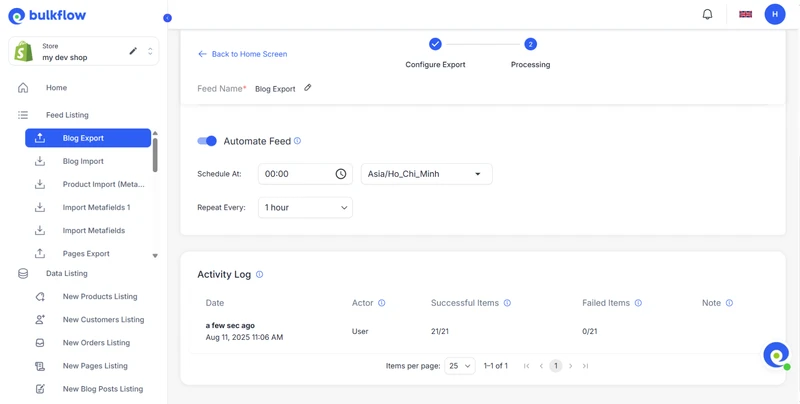
For regular backups or data synchronization, you can also schedule BulkFlow to perform Shopify export blog posts automatically.
How to Export Shopify Blog Posts for Full Migration?
The solutions covered earlier are suitable when you only want a copy of your Shopify blog posts for backup or reuse. A full platform migration is more complex, as your articles must be transferred alongside products, customers, orders, categories, and other connected store data.
For a more hands-off approach, LitExtension offers the All-in-One Migration Service. Our experts take care of the entire project, ensuring your blog posts and other essential data are moved accurately to your new eCommerce platform.
Step 1. Consult with LitExtension experts
To begin, our experts learn about your Shopify export blog posts requirements, target platform, and migration goals. You can also choose other data to migrate, including products, customers, orders, collections, pages, and reviews. Any custom requirements will then be documented in a tailored SLA.
Step 2. Set up pre-migration
Based on the agreed plan, we connect your Shopify store with the target platform and prepare the necessary data mapping. For blog posts, this may cover titles, body HTML, tags, authors, featured images, publication dates, and URLs, alongside your other selected entities.
Step 3. Run demo migration
Next, we transfer a sample of your Shopify blog posts and other chosen data. This lets you review how the content, formatting, images, and related store information appear on the new platform before approving the full migration.
Step 4. Perform full migration
After the demo is approved, our experts begin the full Shopify export blog posts and store migration process. Your articles will be transferred together with products, customers, orders, and other selected entities while our team closely monitors the progress.
Step 5. Test the migration results
Once the transfer is complete, we perform automated and manual checks across the migrated store. For blog posts, we verify the content, formatting, images, tags, authors, URLs, and publication details, along with the accuracy of other migrated data.
Step 6. Perform post-migration tasks
If new blog posts, orders, customers, or other data appear on Shopify after the full migration, our post-migration services help bring them across. Within 60 days, your package includes:
- Unlimited Recent Data Migration, free when the new data is within 5% of the original package
- Unlimited Smart Update
- Two re-migrations
Step 7. Contact customer support
Throughout the project, your dedicated Personal Assistant will keep you informed and help resolve any questions about your Shopify blog posts or other migrated data. You can contact our team through tickets, email, phone, online meetings, or a private Slack channel, with responses typically provided within 12 hours.
Let Our Experts Handle Your Store Migration!
With the All-in-One Migration Service, our experts take care of everything, ensuring a seamless and stress-free migration.

Shopify Export Blog Posts: FAQs
How to download blog posts and pages from Shopify?
For a small amount of content, you can copy the HTML of each post or page manually. For bulk downloads, you can use Shopify API or third-party app like BulkFlow. If the export is part of a complete store migration, LitExtension can transfer your blog posts, pages, and other selected data to the new platform.
Does Shopify let you export blog posts natively?
No. Shopify does not provide a built-in feature for exporting blog posts from the admin dashboard. You will need to copy them manually, retrieve them through Shopify API, use an app such as BulkFlow, or choose LitExtension for a full store migration.
Can I export Shopify blog posts to another platform?
Yes. BulkFlow can export your blog posts into a structured file for later import. If you want to move them alongside products, customers, orders, collections, and other data, our LitExtension All-in-One Migration Service can handle the complete transfer to your target platform.
Will exporting blog posts affect my SEO rankings?
Exporting blog posts alone does not directly affect SEO rankings. However, rankings may change after migration, and no service can guarantee they will remain the same. BulkFlow helps preserve data such as SEO metadata, images, and formatting, while LitExtension can maintain blog URLs or set up 301 redirects to reduce potential SEO disruption.
Is there a free way to export Shopify blog posts?
Yes. You can copy each article manually, use the Shopify API, or try BulkFlow’s Free Forever plan. Among these free options, BulkFlow is the easiest to use and can efficiently export a large number of blog posts.
Conclusion
That wraps up all the methods you can use to export Shopify blog posts. We hope this guide helps you choose the right approach based on your blog volume, technical experience, budget, and migration goals.
If you plan to move your entire store away from Shopify, LitExtension offers both:
- Automated Migration Tool for self-service migration
- All-in-One Migration Service for expert assistance from start to finish.
Contact our experts for a free consultation and a migration plan tailored to your store. For more helpful guides, feel free to explore our other Shopify tutorials.