
As long as you have financial or technical resources, it isn’t hard to set up a Magento store. However, the real art lies in optimizing that store to make it stand out from the crowd and resonate with your target audience. That’s why we have compiled a list of 15 tried-and-true Magento tips to help you unleash more selling opportunities.
Our Magento 2 tips and tricks would span across all the crucial aspects of selling and managing a Magento store, including:
- Magento performance tips
- Security and maintenance tips
- SEO tips
- UX tips
- Customization and extension tips
- Payment and shipping optimization tips
- Multi-store and localization tips
- Analytics and reporting tips
Let’s explore!
Overview of Magento and Its Importance for eCommerce
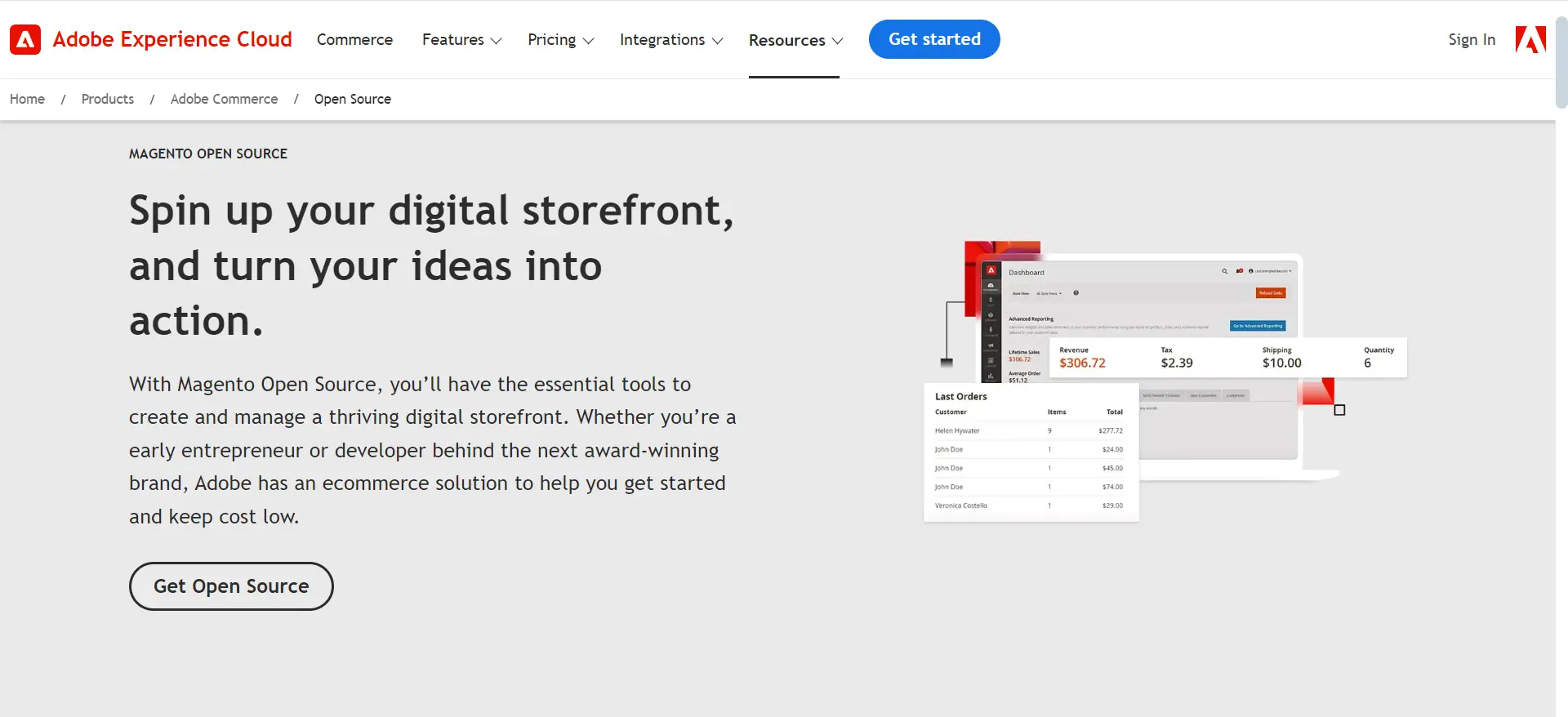
Magento is an open-source platform well-known for its scalability and enterprise-grade eCommerce capabilities. Thanks to its robust architecture, rich Magento features, and extensive customization options, Magento has empowered over 250,000 online stores worldwide, including household names like HP, Canon, and Bulgari.
Magento Performance Optimization Tips
#1 Enable Varnish caching
If you’re looking for Magento tips to speed up your Magento store, enabling Varnish caching is a no-brainer. Technically, Varnish works by storing frequently accessed content in RAM. When a visitor returns to a previously viewed page, Varnish serves the cached version instantly instead of reloading everything all over again.
To implement Varnish caching:
- Verify your hosting provider’s Varnish support.
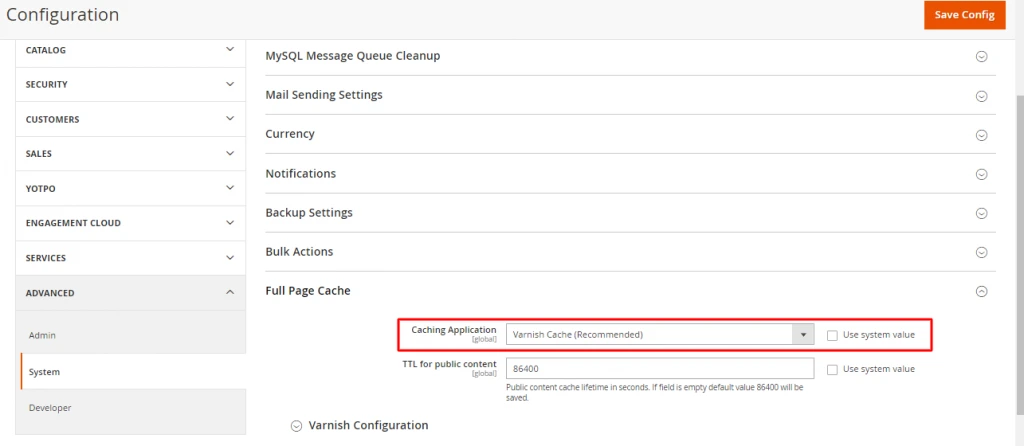
- Navigate to “Stores” > “Configuration” > “Advanced” > “System” > “Full Page Cache” in your Magento admin panel.
- Disable “Use system value” and select Varnish as the caching application.
- Configure Varnish settings as needed.
#2 Implement a Content Delivery Network (CDN)
If your store has a global customer base, you should definitely consider using a Content Delivery Network (CDN) to optimize your Magento store performance. CDNs cache your website’s static content on servers distributed worldwide and serve visitors your content from the nearest geographical location.
Let’s say your Magento store is based in the US but has a visitor from France. Instead of the data traveling from the original server in the US, a CDN delivers it from a server nearest to France.
To implement a CDN for your Magento store, you can consider opting for CDN providers like Cloudflare or renting server services in specific regions where most of your customers come from.
Security & Maintenance Tips for Magento
#3 Regularly update Magento core
Outdated installations are vulnerable to attacks and common Magento issues, which can lead to data breaches, financial losses, and damage to your reputation. For example, the Magento 1Vinai Patch addressed a critical Remote Code Execution vulnerability affecting all Magento 1 versions.
Hence, one of the Magento tips you should keep in mind is to regularly upgrade your Magento to the latest version.
#4 Implement strong password policies
Weak passwords are a major security risk, especially for eCommerce platforms like Magento. Therefore, by implementing strong password policies, you will protect not only your admin access but also the customer’s important information.
Magento SEO Tips
#5 Implement schema markup
If you want to boost your store’s click-through rate on SERPs, implementing schema markups directly or via a trusted Magento extension should be at the top of your SEO checklist. For those of you who are not familiar with the term yet, setting schema markup means you tell Google how you want your web pages to display under its special search results (aka rich results).

To implement schema markup for your Magento store, you can use Google’s Structured Data Markup Helper or Structured Data for SEO by outer/edge.
#6 Create and submit XML sitemaps
XML sitemaps help search engines discover and index your store’s pages more efficiently. This is crucial for large Magento stores with numerous products and categories.
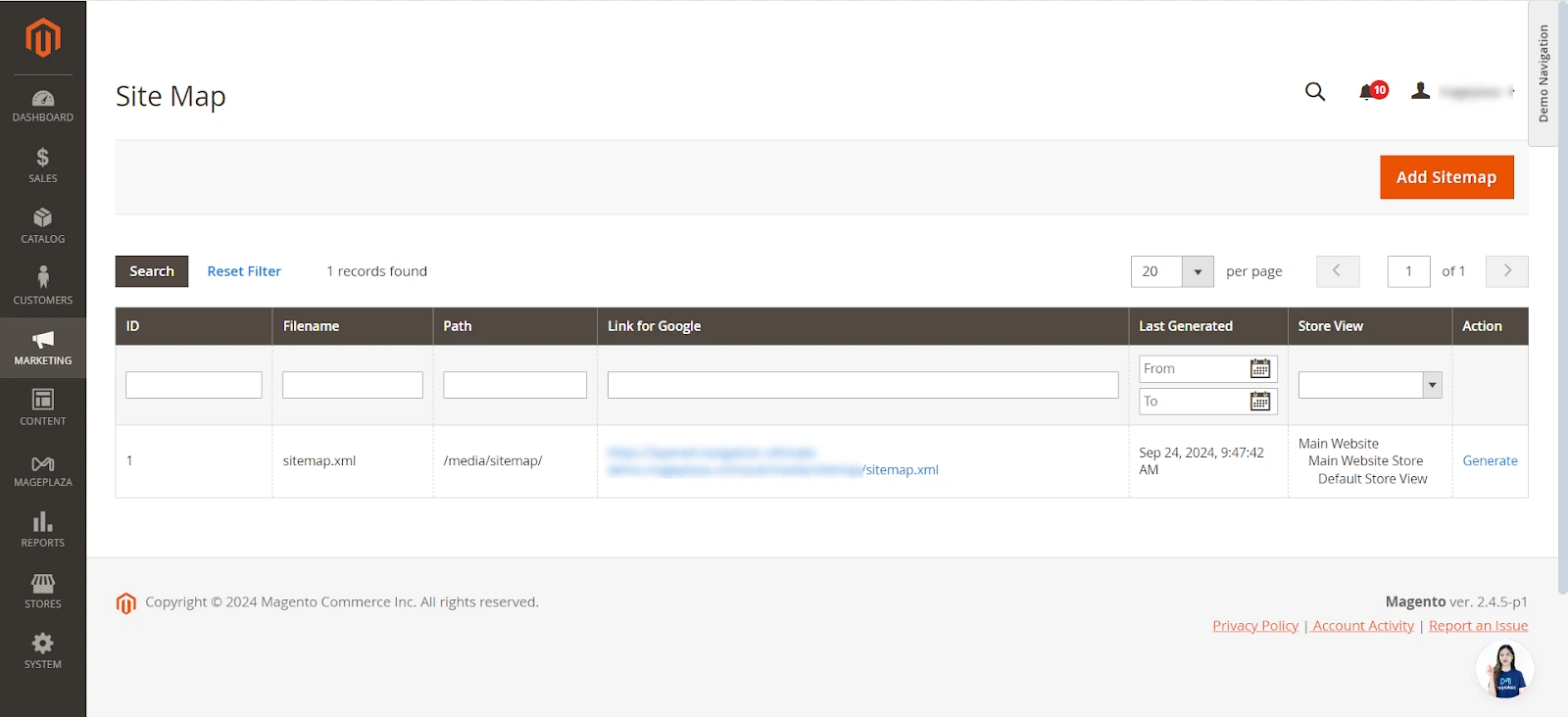
To generate an XML sitemap of your Magento store, navigate to Marketing > SEO & Search > Site Map. Afterward, copy the sitemap link in the Link for Google section and use Google Search Console to submit your sitemap to Google.
Magento User Experience (UX) Tips
#7 Implement responsive design
Customers nowadays can access your website from any device and view your store under any screen type. Therefore, applying effective Magento tips to ensure your store is responsive across devices is essential for conversions.
Here are some Magento tips and tricks, to improve your website’s responsiveness:
- Simplify your navigation: Create a collapsible menu for mobile devices and ensure that the search function is prominently displayed and easily accessible.
- Use flexible layouts: Design your site to adapt seamlessly to various screen sizes and orientations. You can use CSS media queries and flexible grid systems to ensure content reflows appropriately across devices.
- Leverage touch-friendly elements: Enlarge buttons and interactive elements to at least 44×44 pixels for easy tapping on touch screens. Also, implement swipe gestures for image galleries and product browsing to enhance your customers’ mobile experience.
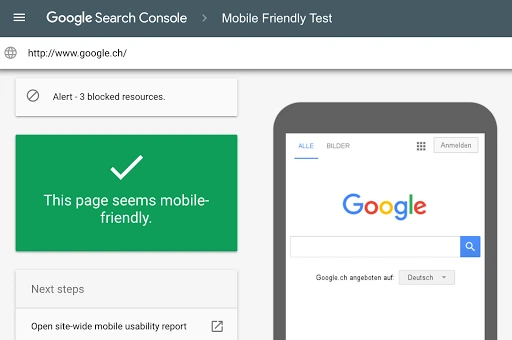
- Test rigorously: Use tools like Google Search Console’s Mobile-Friendly Test and conduct real-device testing across various smartphones and tablets to ensure your store is truly responsive.
#8 Optimize the checkout process
An unnecessarily complicated checkout process is among the top reasons your customers abandon their carts. Hence, optimizing your checkout process is one of the proven-effective Magento tips you can try to boost your store’s conversion.
- One-page checkout: Consolidate the entire checkout process onto a single page, reducing the number of steps and potential drop-off points. Use accordion-style sections to organize information clearly.
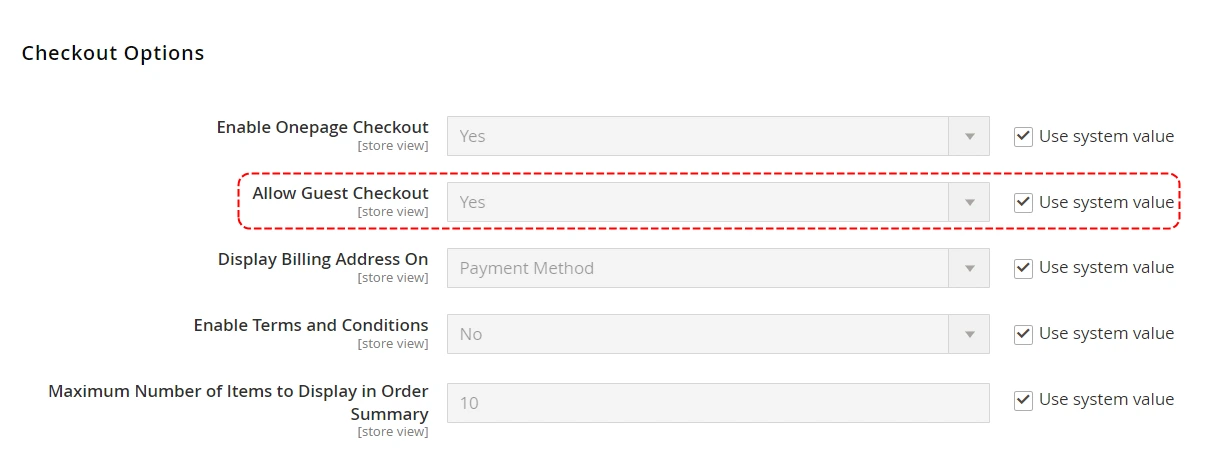
- Guest checkout option: Navigate to Stores > Configuration > Sales > Checkout in the Magento admin panel. Then, Set “Allow Guest Checkout” to “Yes” under the Checkout Options section.
- Progress indicator: Implement a clear, visual progress bar showing the steps in the checkout process. This helps users understand where they are and how much is left to complete.
- Address auto-completion: Integrate address lookup APIs to auto-complete shipping and billing addresses, reducing user effort and potential errors.
- Saved payment methods: For returning customers, offer the option to save payment information securely for future purchases, speeding up the checkout process.
Customizations & Extensions Tips
#9 Test thoroughly in a staging environment
Testing customizations, extensions, and custom Magento inventory management features in a staging environment is crucial for maintaining your Magento store’s stability and performance. That’s why you should follow these Magento 2 tips and tricks when testing your store:
- Setting up a dedicated staging environment that closely mirrors your production setup, including server configurations, PHP version, and database structure.
- Using Git for version control of your Magento codebase. Create separate branches for each customization or extension implementation to manage your changes efficiently.
- Conducting comprehensive testing, including unit testing with PHPUnit, integration testing to ensure new features work correctly with existing functionality, and user acceptance testing (UAT) with stakeholders before pushing to production.
- Monitoring performance impacts using Magento’s built-in profiler or tools like New Relic APM. Pay special attention to database queries, API calls, and front-end load times to identify potential bottlenecks.
#10 Regularly audit and remove unused extensions
Whether you’re an extension savvy or not, it’s a best practice to periodically audit the extensions you’re using and remove inactive ones. This will benefit your store in many aspects, from tightened security to fewer extension conflicting issues, etc.
- Scheduling monthly or quarterly audits of all installed extensions using Magento’s admin panel (System > Web Setup Wizard > Extension Manager).
- Analyzing extension usage by implementing tracking mechanisms and utilizing Magento’s logging capabilities to monitor which extensions are actively used.
- Assessing performance impact using Magento’s built-in performance tools or third-party solutions. Look for extensions causing slow database queries or excessive JavaScript/CSS loading times.
- Following a safe removal process for unused extensions:
- Back up your entire Magento installation and database before removal.
- Use Magento’s composer to remove the extension: composer remove vendor/package-name
- Clean up the database by removing related tables and configuration entries.
- Clear Magento cache and reindex after removal: php bin/Magento cache:clean and php bin/Magento indexer:reindex
- Updating dependencies after removing extensions. Check for and resolve any dependency conflicts, and update your composer.json file to reflect the changes in your project’s dependencies.
Magento Payment and Shipping Optimization Tips
#11 Offer multiple payment options
Alongside optimizing your Magento shipping workflow, offering flexible checkout methods is vital. Payment is the last and also the most important step in your customer’s buying journey. So, if you want to minimize your cart abandonment rate, ensure that your customers can check out in their preferred payment method.
You can consider offering the following payment options to your customers:
- Credit and debit cards (Visa, Mastercard, American Express)
- Digital wallets (PayPal, Apple Pay, Google Pay)
- Buy Now, Pay Later services (Afterpay, Klarna)
- Bank transfers
- Cash on delivery (for applicable regions)
#12 Implement real-time shipping rates
Besides diversifying your payment methods, displaying real-time shipping rates directly inside the Magento shopping cart is one of the top Magento tips we’d suggest to boost your conversion. By providing your customers shipping costs based on their location, order weight, and chosen shipping method, you can build trust and reduce the likelihood of cart abandonment due to unexpected shipping costs.
Currently, Magento supports various carriers, including big names like FedEx, UPS, USPS, and DHL. To illustrate the process, we’ll show you how to set up real-time shipping rates with FedEx in Magento:
- In your Magento admin panel, go to Stores > Configuration > Sales > Shipping Methods.
- Find the FedEx section and enable it.
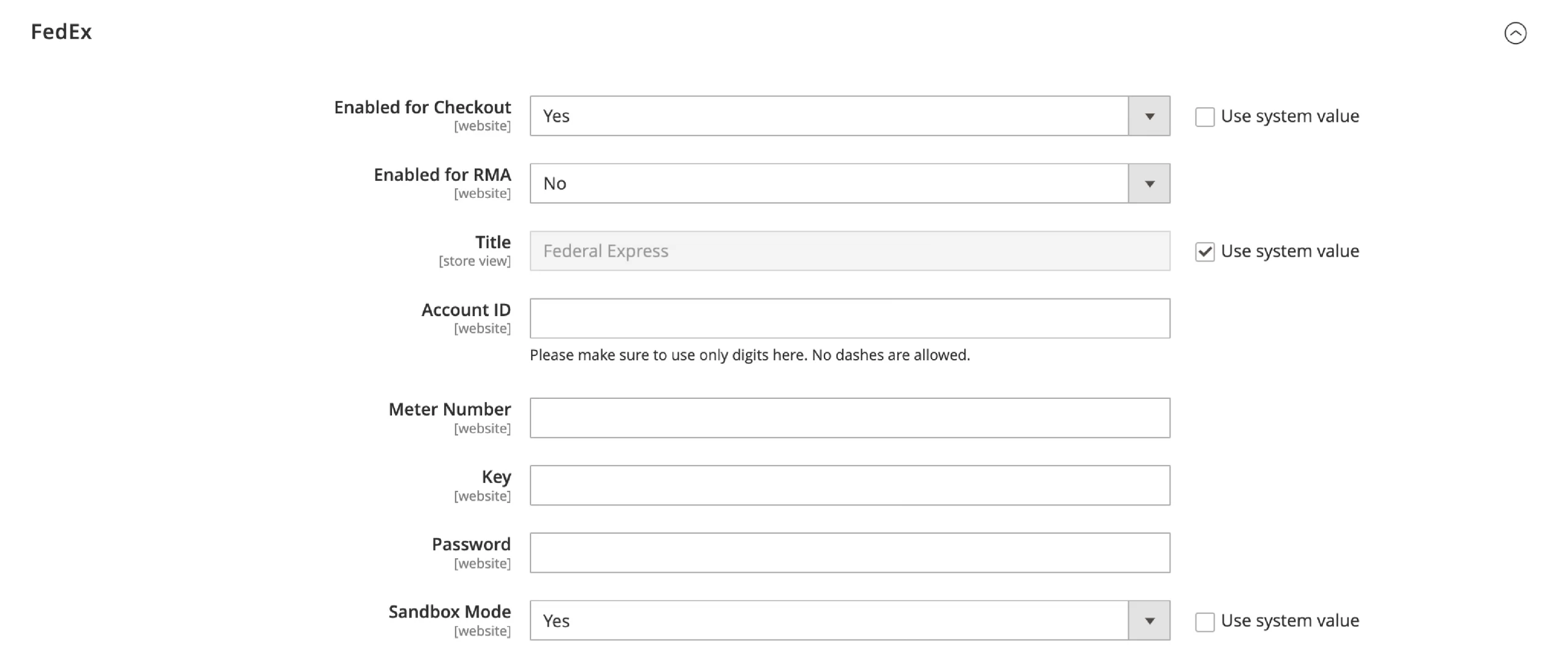
- Enter your FedEx account details, including your account number, meter number, key, and password.
- Configure your preferences for allowed shipping methods, handling fees, and free shipping thresholds.
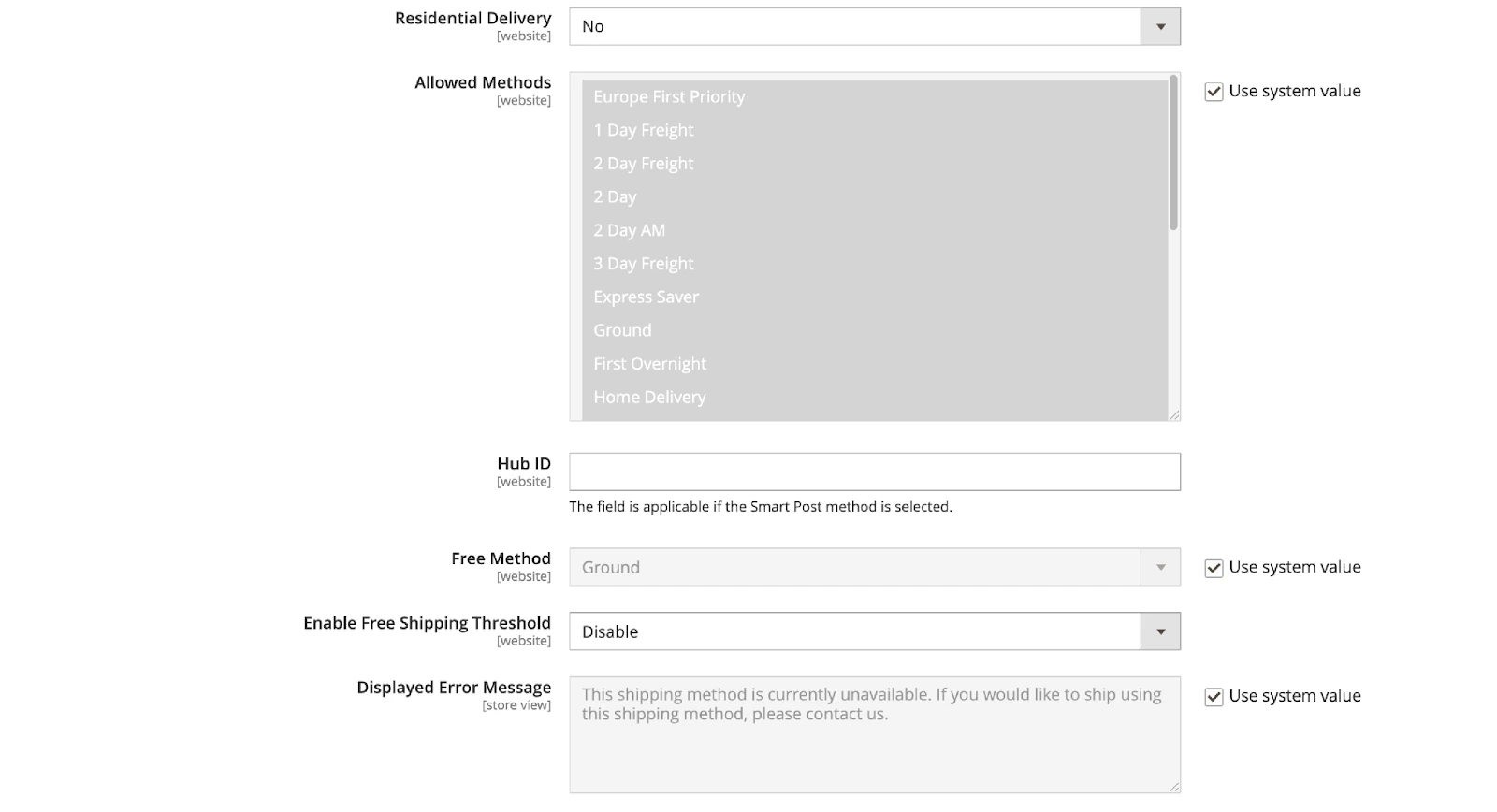
- Save the configuration and test thoroughly to ensure accurate rates are being displayed.
Magento Multi-Store and Localization Tips
#13 Maintain proper language translations
If you have a global audience base, alongside managing proper Magento 2 redirects for regional URLs, you’ll certainly need some localization Magento tips to personalize your store for different countries. The first step is to enable language translation for your store by following our instructions below:
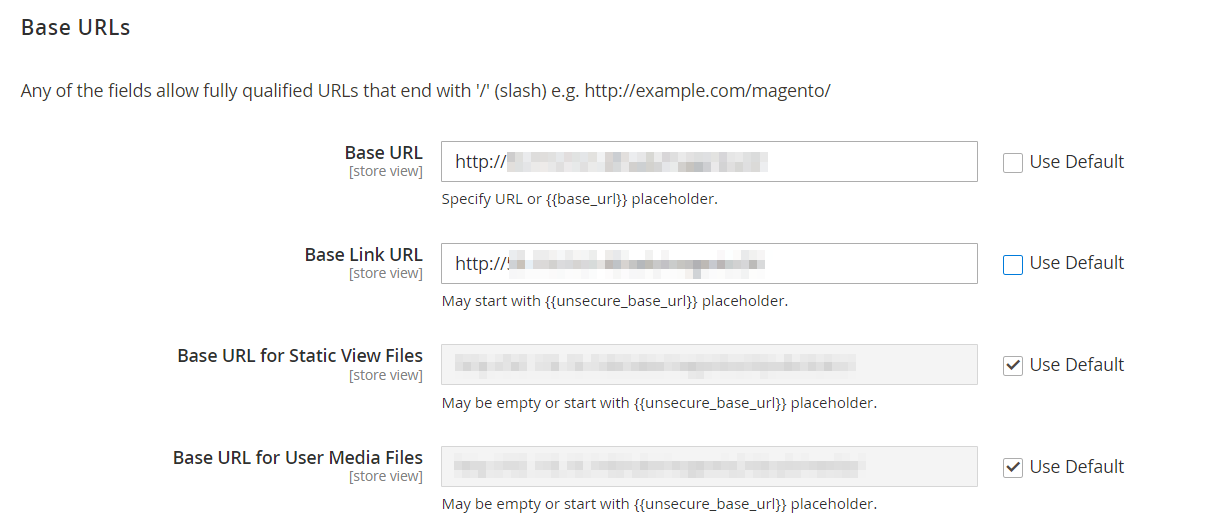
- Create separate store views for each language
- Install official Magento language packs using Composer
- Configure language settings in Magento admin panel
- Set up URL structure for language-specific store views
👉 Check our Magento Multi Stores guide for detailed instructions with screenshots.
After adding Magento language packs, keep these Magento tips in mind to ensure your translations are always properly translated:
- Consider using professional translation services for accuracy
- Feature a language switcher in a prominent place on your website
- Translate all key pages comprehensively and consistently (homepage, product pages, catalog pages, and blog pages)
- Regularly update and review your translations
- Utilize Magento’s inline translation tool for quick edits
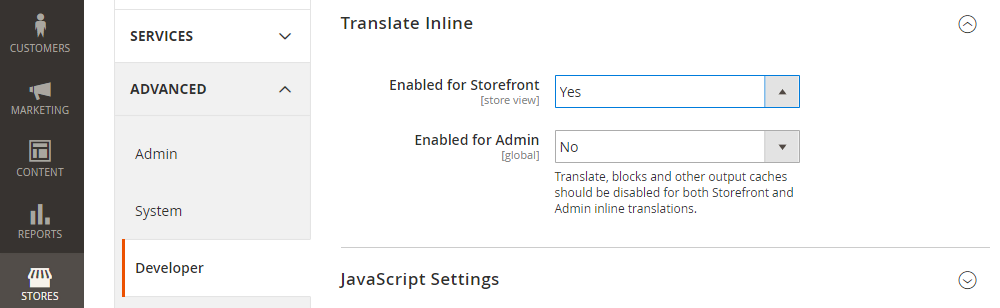
#14 Customize pricing and currency per region
Besides language and connecting the right regional Magento payment gateway, customers in different countries have different pricing expectations. Hence, one of the Magento tips you should give a try is implementing geographic pricing.
Here are the steps to follow:
- On your Admin menu, navigate to Stores > Settings > Configuration.
- In the left-handed panel, expand Catalog and choose the Catalog underneath.
- Go to the Price section and then set Catalog Price Scope to Website instead of Global.
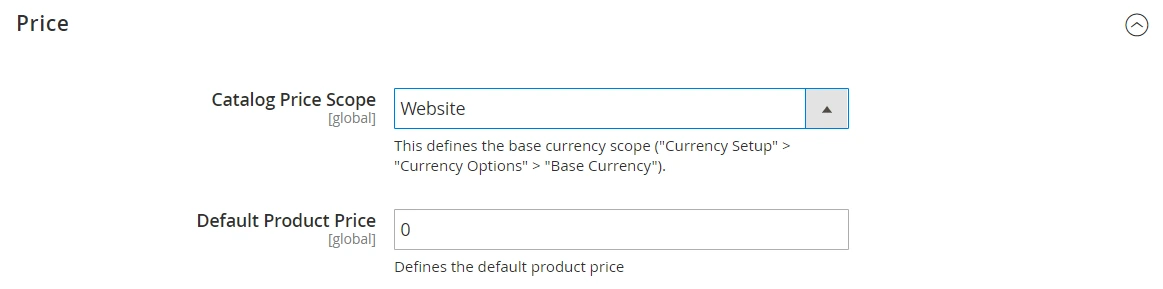
However, Catalog Price Scope is an exclusive feature for Adobe Commerce Edition only. Hence, if you’re using the Magento Open Source version, we’d suggest using the Magento 2 Multiple Store View Pricing extension of BSS Commerce.
Magento Analytics and Reporting Tips
#15 Integrate your Magento store with Google’s analytics tools
Once you install Magento 2 and get your store running, tracking user data becomes essential. Magento’s built-in reports are great. However, to gain deeper insights into your site’s performance, one of the Magento tips we highly recommend is integrating your store with Google’s analytics tools.
Here are three most popular Google’s reporting tools and the main metrics they help track:
Tool | What it is | Main metrics tracked |
Google Analytics | Web analytics service that tracks and reports website traffic |
|
Google Data Studio | Data visualization and reporting tool |
|
Google Tag Manager | Tag management system for simplified implementation of tracking codes |
|
#15 Add heatmaps to track your customers’ on-site behaviors
Lastly, while backend operations rely on your Magento order management system, frontend conversion requires understanding user intent. Consider adding a heatmap if you want to optimize from the smallest elements of your website’s important pages. By providing you visual representations of user interactions, heatmaps will help you identify areas where your customers struggle or mostly engage with.
When selecting a heatmap tool, consider factors such as ease of integration, pricing, additional features (like session recordings or A/B testing), and compatibility with other analytics tools you may be using. Some heatmap tools that are popular with Magento stores are Hotjar and Mouseflow.
Magento Tips – FAQs
How often should I update Magento?
You should update Magento whenever a security patch is released and plan regular maintenance updates at least once or twice a year. Security patches should be applied as soon as possible because outdated Magento versions can expose your store to vulnerabilities. For larger stores, it is best to follow a structured update cycle. Review new patches regularly, test them in a staging environment, back up your store, then deploy them during low-traffic periods.
How can I improve my Magento store’s loading speed?
You can improve Magento loading speed by enabling production mode, using full-page caching, configuring Varnish or Fastly, optimizing images, reducing heavy extensions, and keeping indexes updated on schedule. You should also optimize JavaScript and CSS, deploy static content properly, use a reliable hosting environment, and monitor slow database queries. For high-traffic stores or a complex Magento multi store setup, server architecture, cache configuration, and background processing can make a major difference.
How can I attract customers to my Magento store?
You can attract customers to your Magento store by improving SEO, optimizing product pages, creating keyword-rich metadata, using clean URLs, generating sitemaps, and setting up proper robots.txt rules. You should also use Magento’s built-in marketing features, such as cart price rules, catalog price rules, coupons, newsletters, product recommendations, loyalty programs, and promotional campaigns. Strong content, email marketing, paid ads, social media, and remarketing can also help bring more qualified traffic.
Why should I use a staging environment for Magento?
You should use a staging environment to test updates, extensions, theme changes, code deployments, and configuration changes before applying them to your live store. This helps prevent downtime, broken checkout flows, design issues, performance problems, and data-related errors.
Additionally, a staging site gives you a safer place to test the full customer journey, including product pages, cart, checkout, payment, shipping, emails, and admin workflows. Once everything works correctly, you can deploy the tested changes to production with lower risk.
Final Thoughts
Starting an online store is easy, but scaling and optimizing it isn’t. Therefore, we hope you make the best out of our Magento tips above to drive more sales, enhance your customer experience, boost your SEO rankings and more.
However, if managing Magento’s technical demands ever becomes too overwhelming, replatforming might be your best next step. A Magento to Shopify migration is a popular choice for merchants seeking a more streamlined, hosted solution without sacrificing powerful eCommerce capabilities.
If you find this article helpful, check out LitExtension’s articles on Magento platform, which range from tutorials, tips, tricks and more.
And don’t forget to join our active Facebook Community for all the relevant insights from 20,000+ global entrepreneurs like you.

