
Webflow pricing depends on the website you’re building and how you plan to manage it. Site and Ecommerce plans cover hosting and publishing, while Workspace plans support development and collaboration. Understanding how these fit together helps you choose the right setup and calculate your total cost, including any optional extras.
In this article, we’ll help you:
- Compare Webflow’s Site, eCommerce, and Workspace plans;
- Understand seat pricing, transaction fees, and optional add-ons;
- Learn how Site and Workspace plans work together;
- Estimate your total cost and choose the right setup for your business.
Webflow Pricing: Site Plans Compared
First, let’s explore Webflow pricing for Site plans, which cover hosting and publishing individual websites. Your choice depends on how much content you manage, the traffic you expect, and the features your website needs. We’ll also cover Team and Enterprise here, although Webflow classifies them as Platform plans that combine Site and Workspace capabilities.
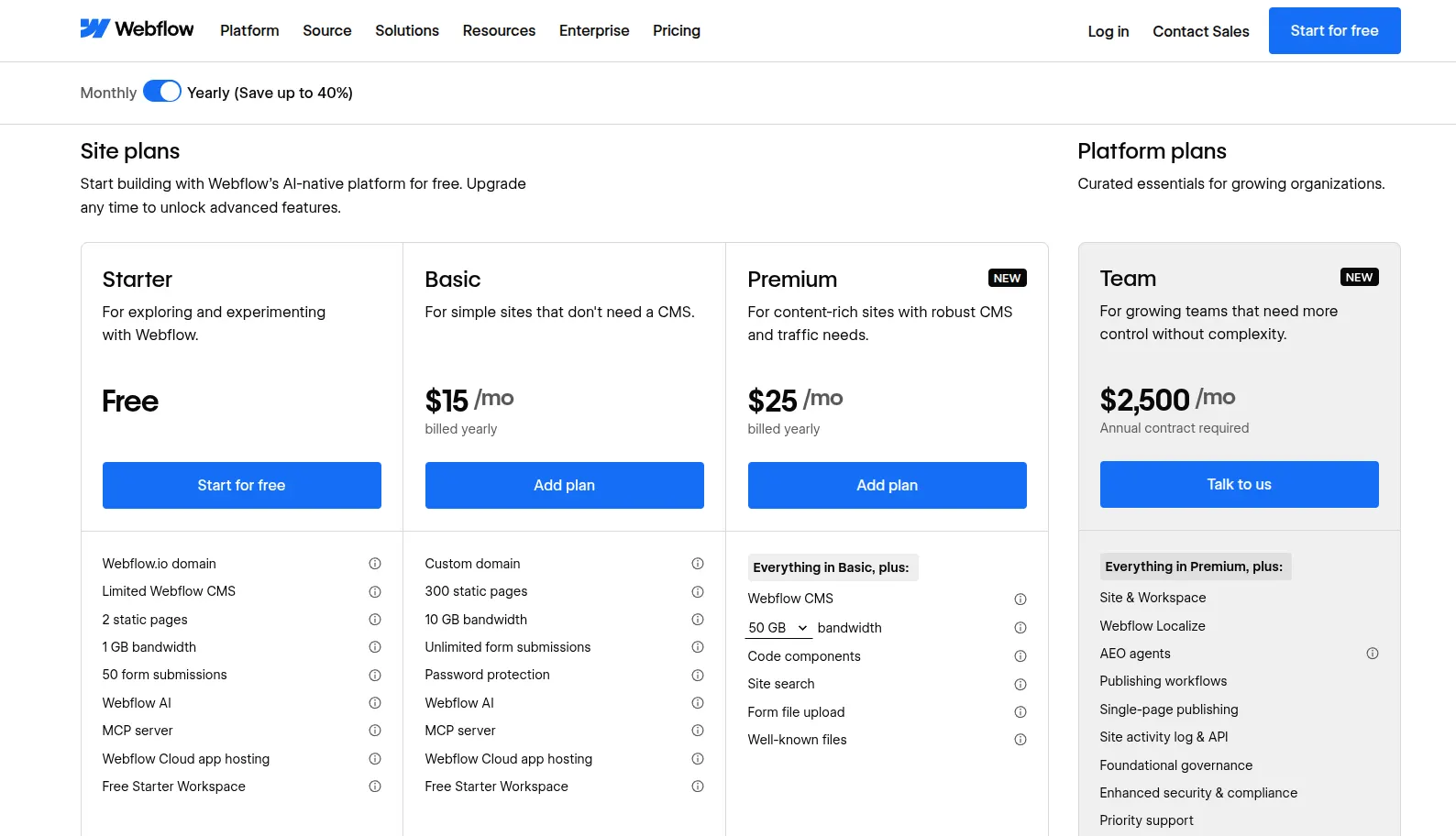
Starter
Price: Free
Best for: Beginners learning Webflow and designers testing website ideas.
Before committing to a subscription, you can use Starter to get comfortable with Webflow and see how it fits your workflow. There’s no financial pressure to finish quickly, which gives you room to experiment. The limits become restrictive once you move beyond testing and start putting together a complete website.
Key features:
- Free Webflow.io subdomain.
- 2 static pages.
- 50 CMS items.
- 20 CMS Collections.
- 1 GB of monthly bandwidth.
- 50 form submissions per site.
- Free Starter Workspace.
Basic
Price: $15/month, billed yearly.
Best for: Small business websites, landing pages, and simple portfolios.
For straightforward websites, Basic offers good value without adding unnecessary complexity. In our view, it works well when you only update a few pages occasionally, but the lack of CMS support makes it less suitable for regular publishing.
Key features:
- Custom domain publishing.
- Webflow badge removal.
- 300 static pages.
- 10 GB of monthly bandwidth.
- Unlimited form submissions.
- Password protection.
- Custom code support.
Premium
Price: From $25/month, billed yearly.
Best for: Blogs, directories, and businesses that publish content regularly.
Premium offers a worthwhile step up when maintaining content starts taking more of your time. Its value comes from making regular updates easier to organize, so your website can grow without every new entry becoming a separate page to manage. For businesses that publish consistently, that improvement justifies the additional spending.
Key features:
- 20,000 CMS items.
- 40 CMS Collections.
- Configurable bandwidth, up to 2.5 TB/month.
- Site search.
- Form file uploads.
- Code components.
- Well-known file hosting.
Team
Price: $2,500/month, with an annual contract.
Best for: Organizations with multiple contributors and complex website operations.
At this level, you’re investing in how your organization runs its website. Team’s substantial price jump needs a clear business case, particularly around time spent coordinating changes and reviewing releases. It earns its place when those tasks have become a recurring operational burden.
Key features:
- 500 static pages.
- 100 CMS Collections.
- 5 full seats.
- 5 limited seats.
- 2 localization locales.
- 600 content management API requests per minute.
- Site activity log and API.
- 24/7 priority support.
Enterprise
Price: Custom quote.
Best for: Large organizations with specific scale and governance requirements.
Enterprise gives you room to negotiate a package around specific organizational requirements. The strongest approach is to enter that discussion with clear priorities and measurable expectations. This helps you assess the proposal on what your business actually needs, rather than paying for capabilities simply because they’re available.
Key features:
- CMS item, static page, and bandwidth limits tailored to your needs.
- Flexible roles and granular access controls.
- Design approval workflows.
- Private staging with a dedicated staging domain.
- Single sign-on (SSO) and SCIM user provisioning.
If Webflow pricing no longer fits your budget or growth plans, LitExtension can help you move your store data to other Webflow alternatives. Contact us to discuss your migration options with our experts.
Webflow Migration Made Easy With LitExtension!
LitExtension offers great migration solutions that help you transfer your data from Webflow to a new one accurately, painlessly with utmost security.

Webflow Ecommerce Pricing: Standard, Plus, and Advanced
Next, let’s look at the plans built for selling online. Webflow eCommerce pricing adds store features such as checkout, payments, and shipping management. The main differences between Standard, Plus, and Advanced are catalog capacity, transaction fees, and staff access. All prices below are in USD and billed yearly.
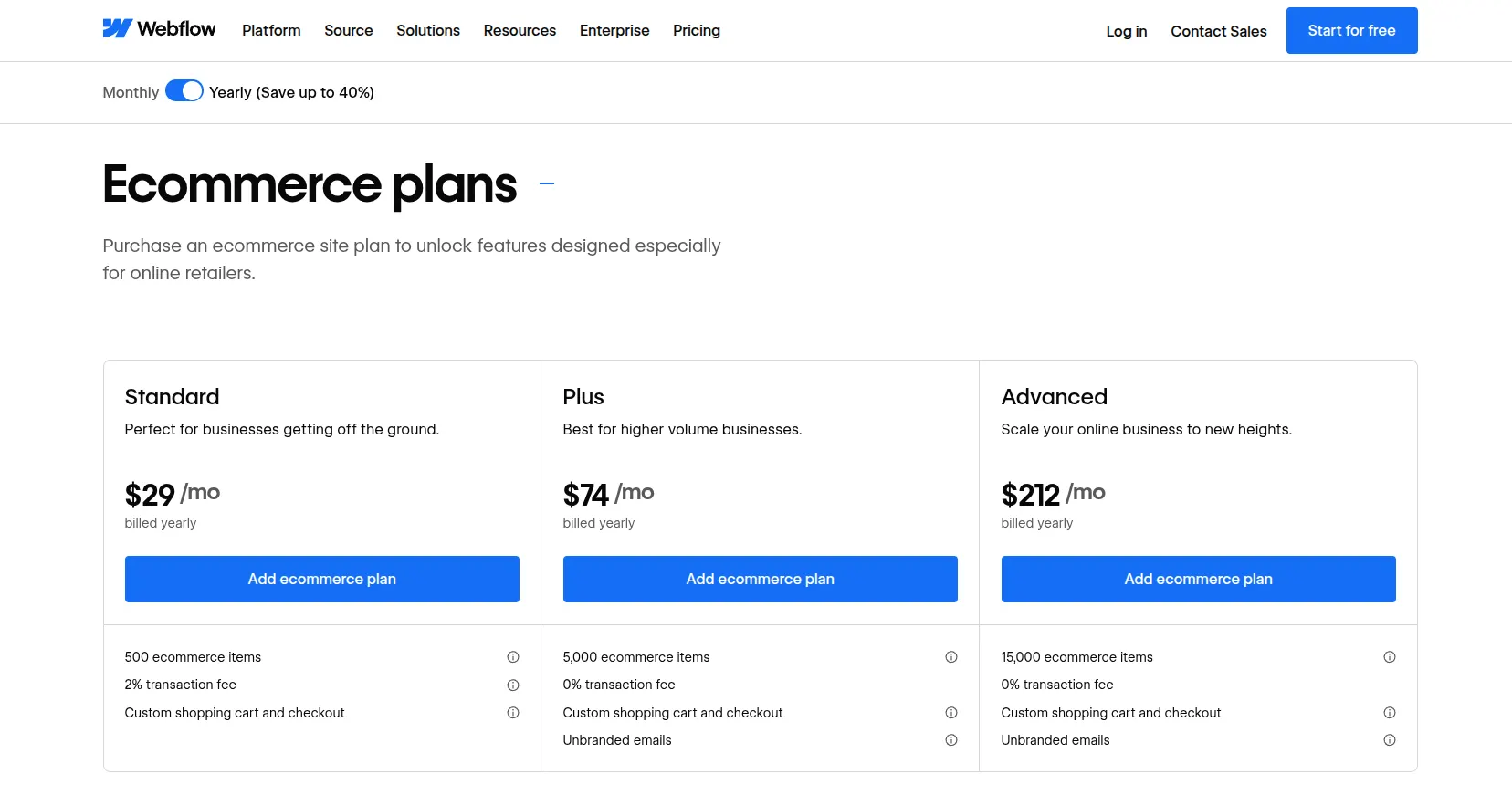
Standard
Price: $29/month, billed yearly.
Best for: New stores with small catalogs and modest sales.
Standard’s biggest advantage is its lower upfront commitment. That leaves more of your launch budget for product photography, content, and promotion. However, the subscription price is only part of the picture, so it’s worth reviewing your total selling costs as orders grow.
Key features:
- 500 ecommerce items, including products, variants, and categories.
- 2,000 CMS items across 20 Collections.
- 50 GB of monthly bandwidth.
- 3 staff accounts.
- Custom shopping cart and checkout.
- Customizable order emails.
- Stripe and PayPal payments.
- Automatic tax calculation.
- Custom shipping rules.
- Unlimited sales volume.
- 2% Webflow transaction fee, plus payment processing fees.
Plus
Price: $74/month, billed yearly.
Best for: Growing stores that need more capacity and want to remove Webflow’s additional transaction fee.
Plus offers the strongest balance between cost and room to grow. The higher subscription comes with meaningful improvements, so you’re paying for more than extra catalog space. As a result, this is the most practical tier to evaluate when Standard starts becoming expensive or restrictive.
Key features:
- 5,000 ecommerce items.
- Up to 10,000 CMS items.
- 40 CMS Collections.
- 100 GB of monthly bandwidth.
- 10 staff accounts.
- Order emails without Webflow branding.
- Form file uploads.
- Faster site-search indexing.
- 0% Webflow transaction fee; payment processing fees still apply.
Advanced
Price: $212/month, billed yearly.
Best for: Stores with extensive product and variant catalogs, or teams that need additional staff access.
With Advanced, the extra spending goes mainly toward a larger catalog and more staff access. It keeps Plus’s CMS capacity, bandwidth, unbranded emails, and 0% Webflow transaction fee, so the selling experience stays largely the same. That makes the upgrade worthwhile when you need the higher limits, but there’s little reason to pay more before then.
Key features:
- 15,000 ecommerce items.
- 15 staff accounts.
There is no higher standard eCommerce tier. If you outgrow its catalog allowance, you’ll need to reassess your product structure or consider a platform with greater capacity.
Webflow Workspace Plans and Seat Pricing
Now that we’ve covered website hosting, let’s explore Webflow pricing for the workspace where you build and manage your projects.
There are separate options for in-house teams and client work, each with a free plan to get you started. As your workload grows, you can upgrade for more staging space and collaboration tools, but you’ll still need a paid Site plan to publish on your own domain.
In-house teams
For your own company websites, the decision comes down to how many projects you’re preparing and how much control your team needs. Core gives you more room to build, whereas Growth adds controls that become valuable as more people contribute.
The main options are:
| Plan | Price, billed yearly | Key features |
| Starter | Free | 2 staging sites; 2 pages per staged site |
| Core | $19/month | 10 staging sites; 300 pages per staged site; custom code; code export; 1 Shared Library |
| Growth | $49/month | Unlimited staging sites; staging password protection; 301 redirects; site-specific access; site-level roles; publishing permissions |
Each includes one full seat for the Workspace owner.
There’s no reason to upgrade solely because your live website attracts more visitors. Instead, choose Core when staging limits interrupt your work, and Growth when managing access and publishing becomes a recurring task.
Additional collaborators are billed separately according to the access they need:
| Seat type | Price, billed yearly | Access |
| Full | $39/month per seat | Website design and administration |
| Limited | $15/month per seat | Content editing and component-based page building |
| Free | $0 | Reviewing and commenting |
Assigning seats by responsibility keeps your costs under control. A teammate who only reviews changes does not need the same paid access as someone designing the website.
Freelancers and agencies
When you build websites for clients, project organization and handover matter just as much as design. The freelancer and agency options within Webflow pricing address that workflow, making them the more practical choice for managing client work.
Here’s how the options compare:
| Plan | Price, billed yearly | Key features |
| Starter | Free | 2 staging sites; 1 client seat per paid site |
| Freelancer | $16/month | 10 staging sites; full staging CMS access; guest access to client Workspaces; client payments; 1 Shared Library |
| Agency | $35/month | Unlimited staging sites; unlimited Shared Libraries; site-level roles; publishing permissions |
One full owner seat is included; additional team seats use the rates above.
For an independent designer, Freelancer provides a useful balance between cost and project capacity. Agency becomes the better investment once managing several builds and coordinating contributors starts slowing delivery.
Client payments also simplify the financial handover: clients can pay for their Site plans and add-ons directly. As a result, you can keep responsibility for the build without taking on their ongoing hosting expenses.
Webflow Additional Services & Add-ons
Beyond Site and Workspace plans, Webflow offers optional paid add-ons to help you reach new markets, test website improvements, and understand visitor behavior. These include Localization, Optimize, and Analyze, which we’ll explore below. All prices shown are based on annual billing.
Localization
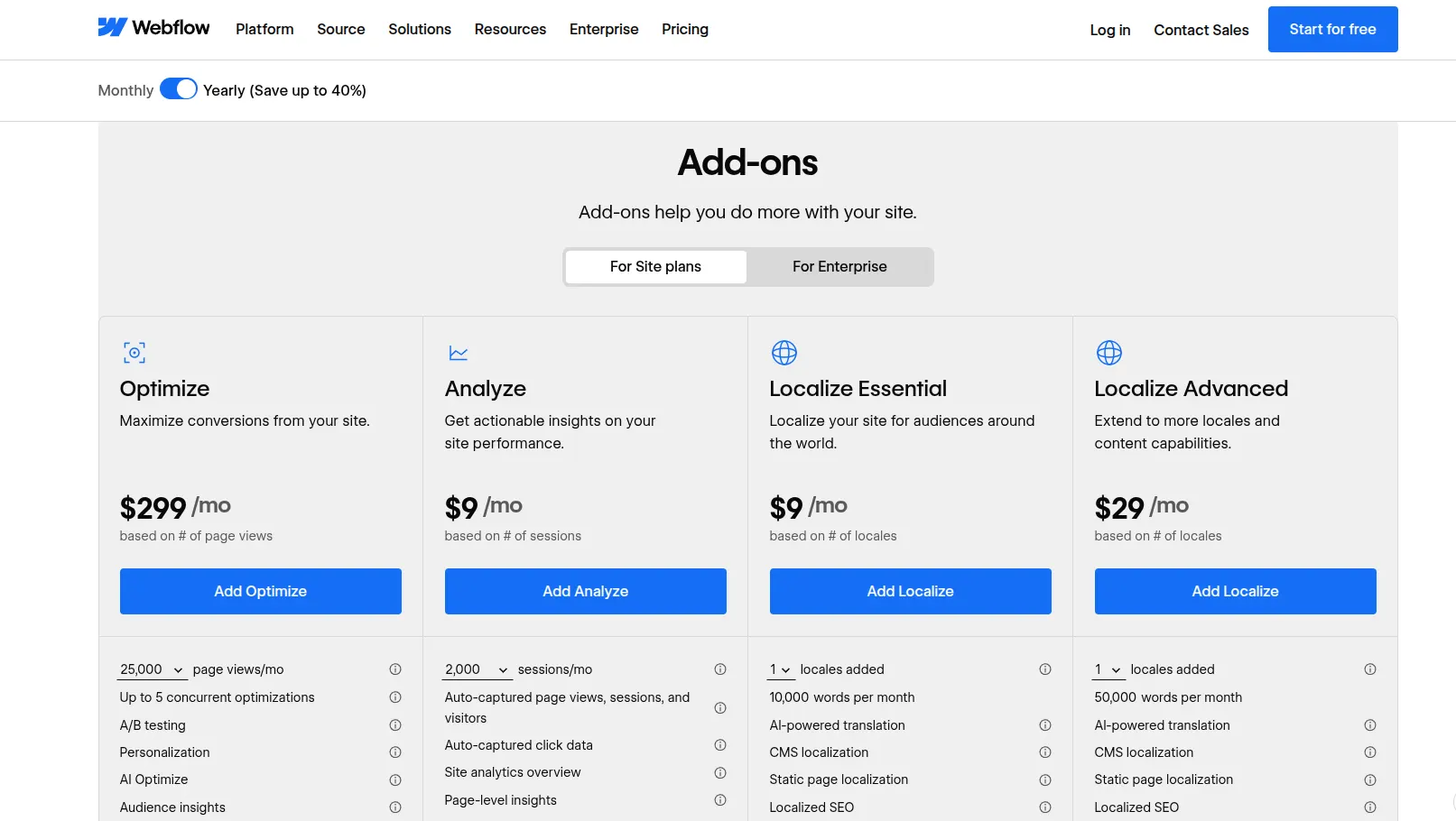
Price: Essential starts at $9/month per added locale; Advanced starts at $29/month per added locale. Enterprise pricing is custom.
Best for: Businesses maintaining websites for multiple languages or regions.
For a multilingual website, keeping everything within the same workflow makes ongoing updates easier to manage. Localization’s value comes from reducing that coordination work, but each additional locale increases your total Webflow pricing costs. It’s therefore better to prioritize markets you can actively support instead of launching several language versions at once.
Key features:
- AI translation.
- CMS and static page localization.
- Localized SEO and styles.
- Up to 3 added locales on Essential.
- Up to 10 added locales on Advanced.
- Asset localization, localized URLs, and automatic visitor routing on Advanced.
Essential is a practical starting point. You’ll need Advanced for more locales or greater control over the experience visitors receive in each market.
Optimize
Price: From $299/month, based on page views. Enterprise pricing is custom.
Best for: Marketing teams with steady traffic and an ongoing conversion improvement program.
Rather than relying on instinct when changing a page, you can use Optimize to test your decisions. Its subscription is a substantial addition to your budget, so it earns its place when you have enough traffic and a clear testing routine. Without those, you’ll struggle to turn the investment into useful findings.
Key features:
- A/B testing.
- Personalization.
- AI Optimize.
- Audience targeting and insights.
- Up to 5 concurrent optimizations.
- Unlimited concurrent optimizations on Enterprise.
Choose your capacity around the tests you’ll actually run. Enterprise becomes relevant when you need more simultaneous experiments or advanced targeting and integrations.
Analyze
Price: From $9/month, based on sessions. Enterprise pricing is custom.
Best for: Website owners and teams that want performance insights directly within Webflow.
With a lower starting cost, Analyze is an accessible addition to your Webflow pricing budget. The real value comes from using those findings to decide what to improve next. Before adding it, check whether it answers questions your existing analytics setup leaves unresolved.
Key features:
- Automatic page view, session, and visitor tracking.
- Click tracking.
- Site analytics overview.
- Page-level insights.
- Shareable insights.
- Consent management integrations.
Your session volume determines the pricing tier, so budget around expected traffic rather than the entry price alone.
Webflow Workspace vs Site Plans: How They Work Together
To understand how these parts of Webflow pricing fit together, think of a Site plan as the subscription for your website and a Workspace plan as the subscription for your working environment. One covers hosting and publishing; the other supports building projects and collaborating with your team.
Choose a Site plan if you run:
- Small business websites showcasing services and contact details.
- Personal portfolios presenting creative or professional work.
- Blogs and content websites with regularly published articles.
- Company websites with growing content and traffic needs.
Choose a paid Workspace plan if you work as part of:
- Freelance businesses managing multiple client projects.
- Agencies building and maintaining client websites.
- In-house teams coordinating design, content, and publishing.
So, do you need both?
Every account includes a free Workspace, so you can pair it with a paid Site plan without paying for two subscriptions. For a single website, this is a practical starting point. A paid Workspace becomes useful as your project workload or collaboration needs grow, but it does not replace the Site plan required for custom-domain hosting.
How Much Does Webflow Really Cost? The Perfect Plan for Your Business
Your actual Webflow pricing depends on the combination of plans and extras your business needs. To make budgeting easier, the examples below match common business types with practical setups. These starting subscription budgets are in USD based on annual billing, excluding taxes, domains, templates, and third-party tools.
| Business type | Recommended setup | Starting monthly budget |
| Personal portfolios and simple service websites | Basic Site plan + free Workspace | $15 |
| Blogs and content-focused businesses | Premium Site plan + free Workspace | $25 |
| Small online stores | Standard Ecommerce plan + free Workspace | $29, plus transaction and processing fees |
| Growing online stores | Plus Ecommerce plan + free Workspace | $74, plus processing fees |
| Stores with extensive catalogs | Advanced Ecommerce plan + free Workspace | $212, plus processing fees |
| Freelancers building client websites | Freelancer Workspace + separate hosting for each live client site | $16 for the Workspace, plus Site plans |
| Agencies managing multiple projects | Agency Workspace + separate hosting for each live client site | $35 for the Workspace, plus Site plans |
| Organizations needing coordinated publishing and governance | Team Platform plan | $2,500 with an annual contract |
For a straightforward business website, $15–$25 per month is a sensible starting subscription budget. There’s no need to add a paid Workspace unless your workflow requires it. However, Premium bandwidth options, extra seats, and paid add-ons can increase that figure.
For online stores, compare subscription costs with selling fees. Using the annual-billing rates above, Plus costs $45 more per month than Standard. Our calculation puts the break-even point at approximately $2,250 in monthly sales subject to Standard’s 2% fee. Beyond that level, removing the fee offsets the subscription difference, even before considering Plus’s higher limits.
If you’re moving an existing store, data migration also belongs in your launch budget. LitExtension can help you plan and handle the transfer.
Let Our Experts Handle Your Store Migration!
With the All-in-One Migration Service, our experts take care of everything, ensuring a seamless and stress-free migration.
Webflow Pricing: FAQs
Do I need both a Site plan and a Workspace plan?
You need a Workspace, but you don’t need to pay for both. Every account includes a free Workspace, which you can pair with a paid Site or Ecommerce plan. Upgrade your Workspace only when you need more staging capacity or collaboration tools.
What replaced the CMS and Business plans?
The Premium Site plan replaced both CMS and Business in Webflow’s May 2026 pricing update. It combines them into one plan with expanded CMS capacity and configurable bandwidth.
Does Webflow include A/B testing?
Yes, through Webflow Optimize, a paid add-on rather than a standard Site plan feature. Pricing starts at $299/month and varies by page-view volume. It also includes personalization and audience targeting.
Is Webflow worth it?
Yes, if design flexibility and control over your website are priorities. It offers strong value for branded business websites and content-driven projects. However, Webflow pricing becomes harder to justify if you only need a basic website and won’t use its design capabilities.
Does Webflow charge transaction fees?
Yes. The Standard Ecommerce plan charges a 2% transaction fee, whereas Plus and Advanced charge no Webflow transaction fee. Stripe or PayPal processing fees still apply on all three plans.
Conclusion
That wraps up our guide to Webflow pricing. For a single website, a paid Site plan paired with the free Workspace is a practical starting point. Online sellers need an Ecommerce plan, and paid Workspaces become useful when managing projects or contributors requires more control.
The best choice is the plan that covers your current needs at a cost you can sustain. If Webflow is the right fit for your business, our LitExtension experts can help you transfer your existing store data. Contact us to discuss your Webflow migration and get a tailored quote today.
Also, we have plenty more to share, so explore our other eCommerce blog posts for platform breakdowns, comparisons, and practical guides!

