As AI in eCommerce moves product discovery beyond traditional search, customers can now ask AI assistants for recommendations and compare products through natural conversations. Shopify Agentic Storefronts help merchants reach these customers through platforms such as ChatGPT, Google AI Mode and Gemini, Microsoft Copilot, and Meta.
In this guide, we’ll cover:
- What Shopify Agentic Storefronts are and their benefits;
- Available AI channels, requirements, and considerations;
- How to manage Agentic Storefronts;
- Tips to improve product visibility across AI shopping channels.
Let’s get started!
What Are Shopify Agentic Storefronts?
Shopify Agentic Storefronts is a built-in sales channel that helps your products appear across supported AI shopping platforms. Instead of connecting with each platform separately, Shopify uses its catalog infrastructure to keep product details, pricing, and availability available to AI agents from one place.
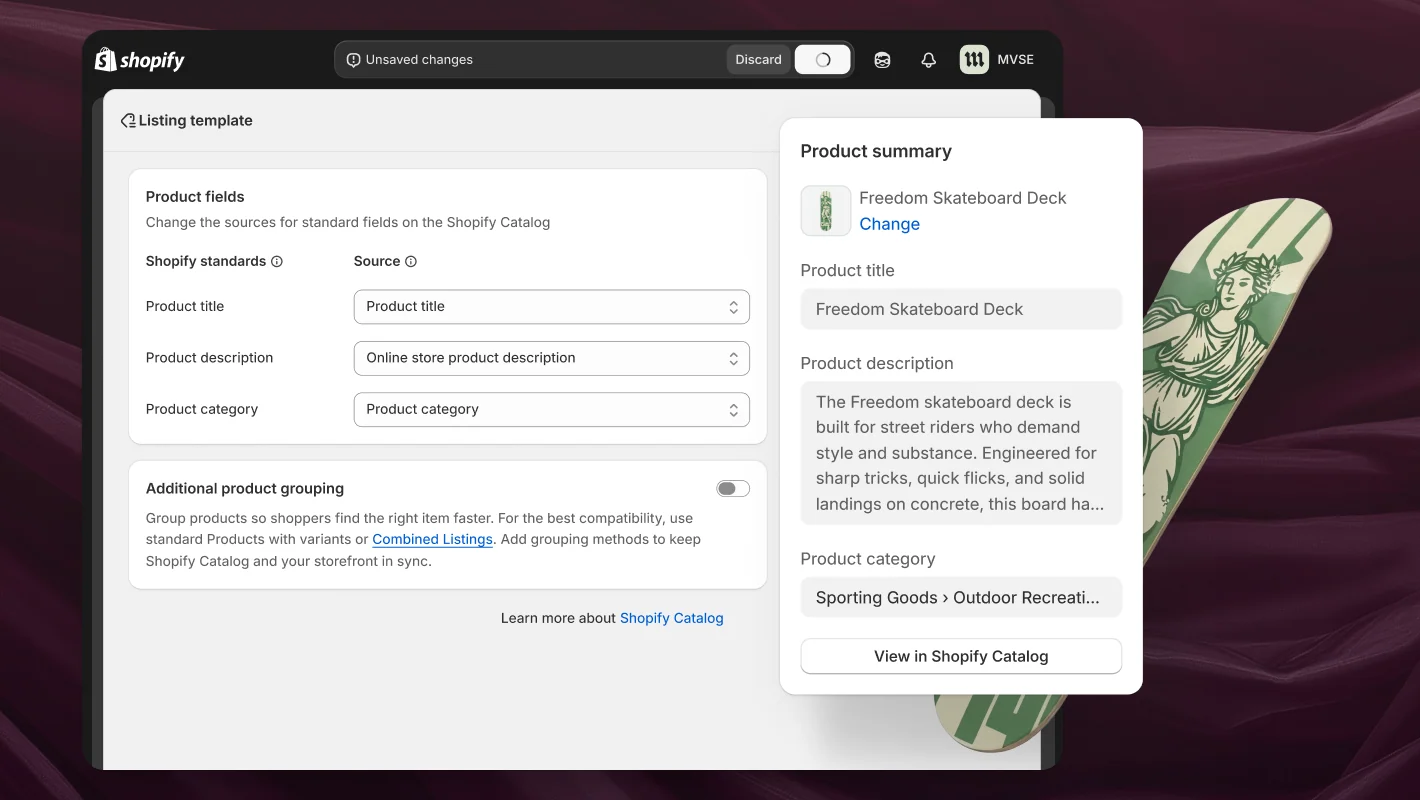
You can manage these channels through the Agentic section in Shopify Admin, while orders and customer information continue to flow into your existing Shopify operation. For the broader technology and shopping model behind this feature, see our guide to Shopify agentic commerce.
Benefits of Shopify Agentic Storefronts
Agentic Storefronts Shopify gives you a practical way to expand into AI shopping without building and maintaining a separate connection for every platform. The key benefits include:
- One connection for multiple AI channels: Shopify can distribute your products across supported platforms, reducing the work required to manage separate integrations.
- Accurate product information: Prices, inventory, variants, and product attributes remain synchronized across AI shopping experiences.
- More control over your brand: Product data, policies, FAQs, and brand guidance help AI agents represent your business more accurately.
- Clearer performance insights: Channel attribution, search trends, and customer topics show how people discover and purchase your products.
- Ownership of customer relationships: You remain the merchant of record, while orders and post-purchase interactions stay within your Shopify operation.
If these benefits make Shopify the right next step for your business, LitExtension experts can migrate your essential store data accurately while you focus on preparing for new AI shopping opportunities.
Shopify Migration Made Easy With LitExtension!
LitExtension offers great migration solutions that help you transfer your data from the current eCommerce platform to a new one accurately, painlessly with utmost security.

Shopify Agentic Storefront Channels Compared
The benefits above apply across Shopify Agentic Storefronts, but each channel handles product discovery and checkout differently. Requirements also vary, especially around store location, product feeds, and direct checkout. The table below gives you a clearer view before you decide where to sell.
| Channel | Product discovery source | Requirements | Key considerations |
| ChatGPT | Shopify Catalog |
|
|
| Google AI Mode and Gemini | Google Merchant Center through the Google & YouTube sales channel, a third-party feed provider, or manual upload |
|
|
| Microsoft Copilot | Shopify Catalog |
|
|
| Meta | Shopify Catalog, plus the Facebook and Instagram by Meta sales channel for shoppable ads |
|
|
| Shop | Shopify Catalog |
|
|
| Other channels | Shopify Catalog |
|
|
How to Manage Shopify Agentic Storefronts
Shopify brings the setup and ongoing management of Agentic Storefronts into a dedicated section of your admin. Here is how to use it to get your store ready for AI shopping channels and maintain its visibility over time.
Access the Agentic Storefronts dashboard
To open the dashboard, go to Shopify admin > Sales channels > Agentic.
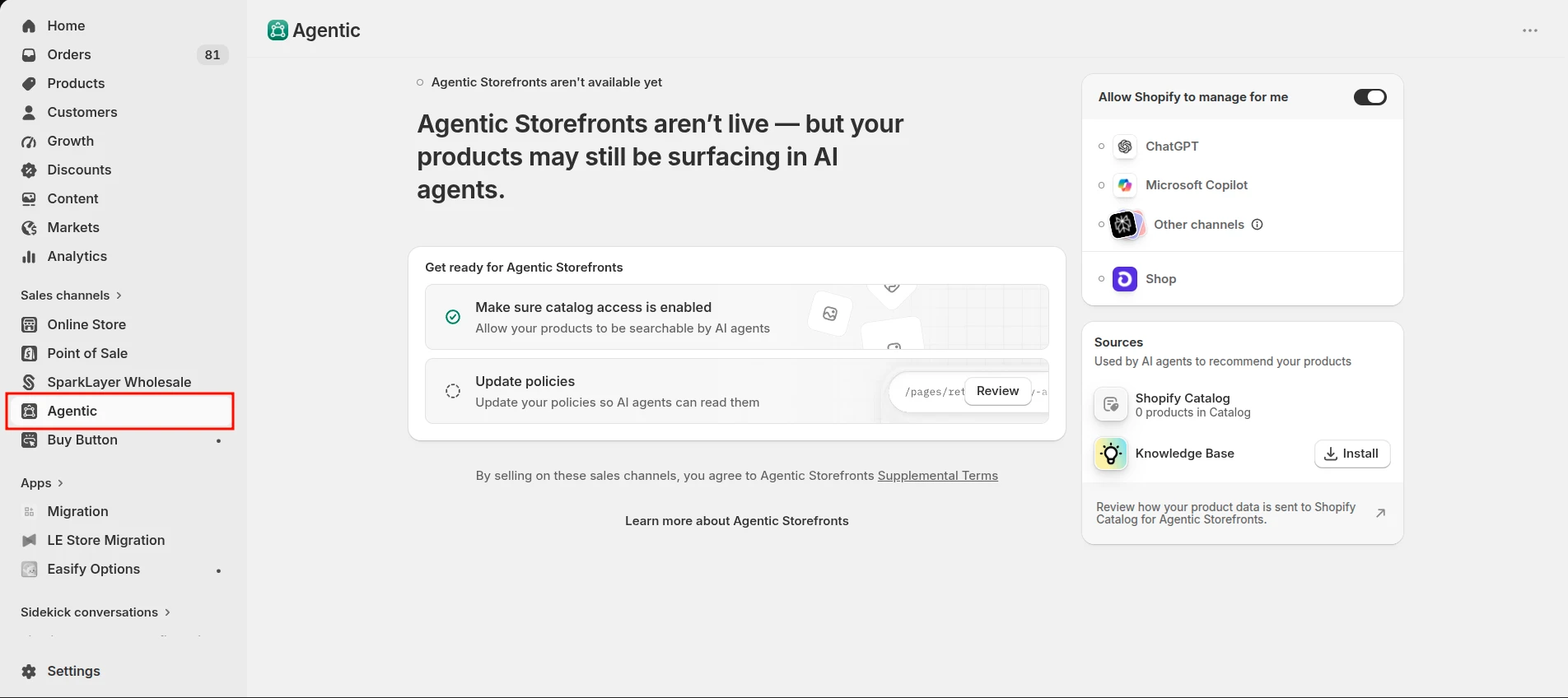
You must be the store owner or have both of the following staff permissions:
- Products > View
- App and sales channel > Agentic
From this dashboard, you can manage channel access, review direct checkout availability, preview product visibility, and analyze performance across your active AI channels.
Configure Agentic Storefronts settings
By default, Shopify enables Allow Shopify to manage for me. This gives available AI channels access to your products through Shopify Catalog, activates direct checkout where supported, and automatically enrols your store in new agentic storefront channels.
If you prefer to manage these settings manually:
- From your Shopify admin, go to Sales channels > Agentic.
- Deactivate Allow Shopify to manage for me
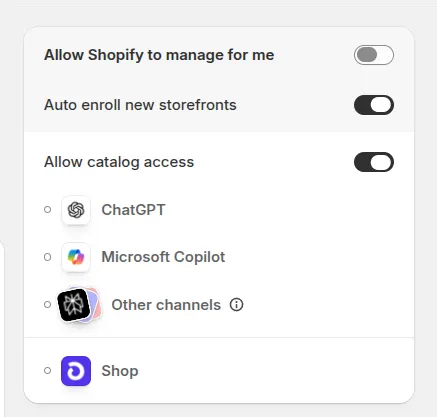
- Change the settings based on what you want to control:
| Your goal | Setting to change |
| Remove Shopify Catalog access for all existing and future third-party channels | Deactivate Shopify Catalog access. This does not remove your products from Shop. |
| Keep Shopify Catalog access but opt out of automatic enrolment in new channels | Deactivate Auto enroll new storefronts. |
| Remove Shopify Catalog access for a specific AI channel | Open the individual settings for ChatGPT, Microsoft Copilot, or Meta, and deactivate access for that channel. |
| Control direct checkout in supported AI channels | Adjust Direct checkout for Google AI Mode and Gemini, Microsoft Copilot, or Meta. |
- Click Save.
Removing Shopify Catalog access may take up to seven days to stop product data sharing. Your products may also remain discoverable through web crawling, search indexing, or other external sources.
Monitor Agentic Storefronts performance
The Agentic dashboard shows how each AI channel contributes to your store through four main metrics:
- Sales: Total sales attributed to the channel.
- Orders: Number of orders received.
- Online store sessions: Visits referred from the AI channel.
- Online store conversion: Percentage of referred sessions that result in a sale.
To view channel-level performance:
- Go to Sales channels > Agentic.
- Select Sales, Orders, Online store sessions, or Online store conversions from the analytics menu.
- Set the reporting period if needed.
- Click an AI channel to open its report.
Sales figures combine referral-based purchases and orders completed through direct checkout. If you want a broader view, open Explore > Understand your performance on agentic channels > Review to see total sales across your Shopify Agentic Storefronts.
Performance reporting is not currently available for headless stores.
Review product discoverability and ranking
Getting products into Shopify Catalog does not guarantee that every AI platform will recommend them. You can use Shopify’s search preview tool to understand which products may appear for particular shopping queries.
To run a preview:
- Go to Sales channels > Agentic.
- Enter a product-related query in Enter a search query to see how you might rank. Alternatively, select one of the suggested queries.
- Choose an AI channel under Preview this search to see how the results might appear in its chat interface.
If your products rank among the global top results, Shopify displays them under Your products that could rank for this query. Each product includes a Listing quality indicator and more detailed Listing insights.
Treat these results as directional rather than guaranteed rankings. Individual AI channels may reorder Shopify Catalog results using their own relevance and recommendation systems.
Review Shopify Catalog product data
After checking where your products may rank, review the data that AI agents use to understand them. Shopify Catalog shares structured attributes such as:
- Product title and description
- Images
- Price and availability
- Options and variants
- Product category
- Other relevant product attributes
Pay particular attention to the signals shown in Listing insights:
- Description completeness: Detailed descriptions help AI agents match products with conversational searches.
- Image coverage: Multiple relevant images give AI channels more ways to represent the product.
- Product reviews: Verified ratings and reviews can signal trust and popularity.
- Variant and option completeness: Clear sizes, colors, styles, and stock information help agents match specific purchase intent.
- Shop policy completeness: Published shipping, return, refund, and other store policies strengthen the credibility of the listing.
If your store keeps important product information in metafields, metaobjects, tag prefixes, or specially formatted titles, use Shopify Catalog Mapping to connect the correct data sources. Shopify Catalog continuously updates dynamic information such as pricing and inventory, but the underlying data must still be complete and properly structured.
Set up for stores on the Agentic plan
This setup applies specifically to businesses that use Shopify’s Agentic plan while keeping an existing non-Shopify storefront. It is different from managing Shopify Agentic Storefronts on a standard Shopify plan.
Before selling through AI channels, you must add your business details, upload a business registration document, and complete identity verification in Sales channels > Agentic.
You will then need to complete the setup based on how customers purchase:
- For ChatGPT product discovery: Import eligible products into Shopify, provide an external URL for each product, verify your existing store domain, and publish the required store policies. Customers are sent to your existing storefront to complete checkout.
- For channels with direct checkout: In addition to product discovery, configure a payment provider, shipping rates, taxes, discounts where applicable, and your order-management process.
- For Google AI Mode and Gemini: Install the Google & YouTube sales channel and synchronize your products and shipping information.
- For Meta: Install Facebook and Instagram by Meta and activate product-feed synchronization.
- For Microsoft Copilot: Make eligible products available through Shopify Catalog and activate the channel when the option becomes available in your admin.
Direct checkout is disabled by default on the Agentic plan. After completing product discovery, checkout, and order-management setup, you must manually opt in to each supported channel and activate direct checkout.
Keep your product prices and inventory synchronized after launch. For a small, relatively stable catalog, periodic CSV imports may be sufficient. Stores with frequent inventory or pricing changes should consider real-time synchronization through the GraphQL Admin API, webhooks, or an appropriate PIM connector.
Opt out of Shopify Agentic Storefronts
Some merchants may prefer to opt out because their products require careful consultation, contain complex compatibility details, or could be recommended in the wrong context. Shopify lets you stop sharing product data with third-party agentic storefronts through Shopify Catalog, but this is not a complete opt-out from every form of AI discovery.
Here’s how to turn off Agentic Storefronts in Shopify
- Go to Shopify admin > Sales channels > Agentic.
- Deactivate Allow Shopify to manage for me.
- Deactivate Shopify Catalog access to remove access for existing and future third-party channels.
- Deactivate Auto enroll new storefronts to prevent automatic enrollment in new channels.
- Click Save.
It may take up to seven days for Shopify Catalog to stop sharing your product data. Direct checkout is also deactivated when Shopify Catalog access is turned off.
However, this setting has two important limitations:
- Products can still appear on Shop. Shop is a Shopify-owned channel, so its Shopify Catalog access cannot be deactivated from the Agentic dashboard.
- AI platforms may still find public products elsewhere. This includes web crawling, search indexing, and external product feeds. Blocking AI crawlers through robots.txt only affects open-web discovery and does not disable Shopify Catalog distribution for active channels.
To hide a product from all AI channels, set it to Unlisted or use the seo.hidden metafield. This also removes it from search engines, sitemaps, and your store search. If organic visibility matters, consider adding clear compatibility rules and exclusions to your structured product data instead, helping AI channels avoid unsuitable recommendations.
How to Optimize Your Store for AI Product Discovery
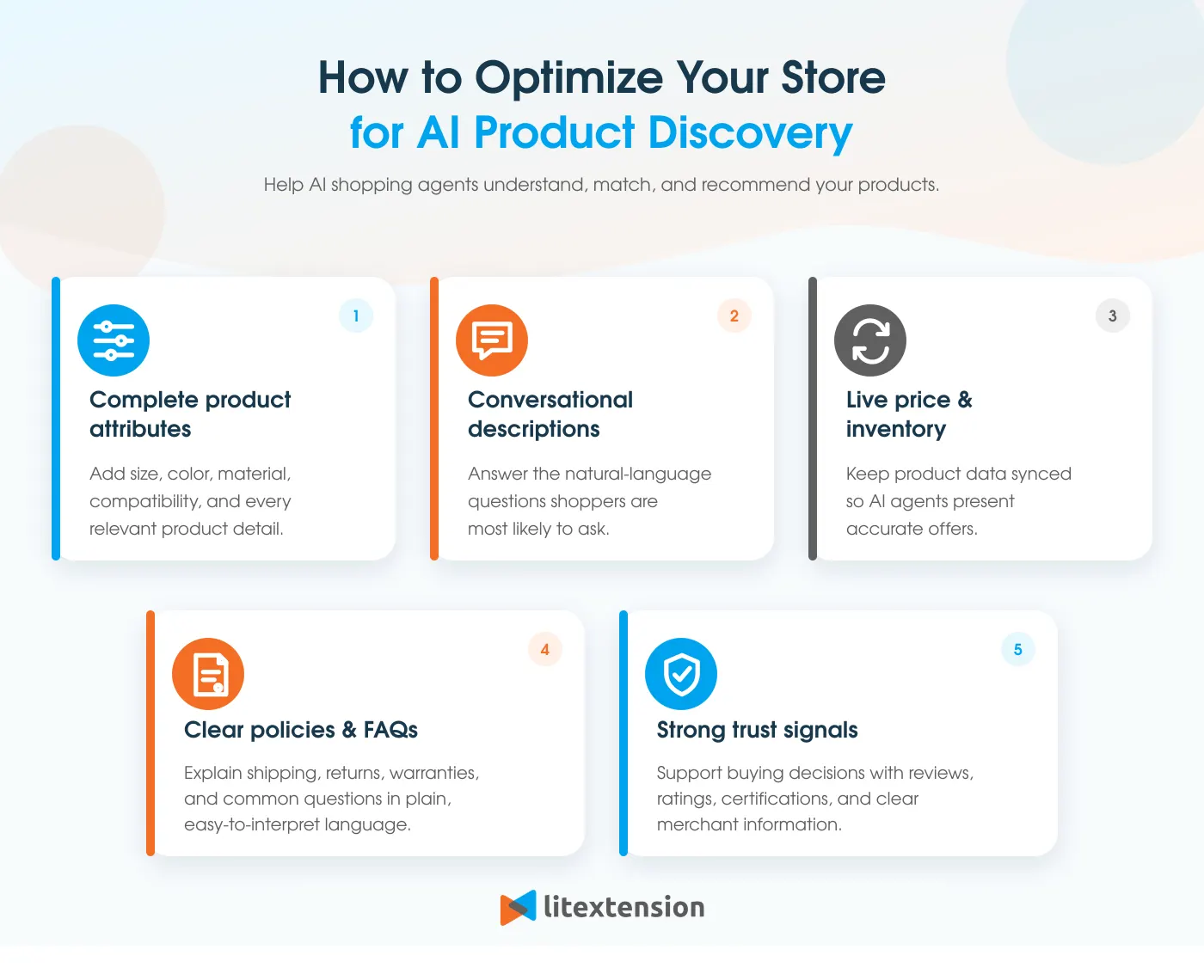
Product eligibility alone does not guarantee strong visibility in Shopify Agentic Storefronts. AI channels need complete, accurate, and well-structured information to understand your products and match them with relevant customer requests. The following areas have the greatest impact on how clearly your catalog can be interpreted.
1. Complete every relevant product attribute
A complete product record gives AI agents more context when comparing your items with a customer’s request. Each listing should include an accurate title, category, description, price, availability, images, options, and variants.
Details such as material, size, colour, compatibility, intended use, and technical specifications should also be added where relevant. If this information is stored in metafields, metaobjects, or other custom fields, Shopify Catalog Mapping can connect the correct data sources to your listings.
2. Write descriptions for conversational searches
Traditional product descriptions often focus on brand messaging, while AI shoppers tend to search with complete questions or detailed needs. Your copy should therefore explain what the product does, who it suits, when it should be used, and any limitations customers should know.
For example, instead of describing an item only as a “lightweight travel backpack,” include practical details such as its capacity, laptop size compatibility, water resistance, and suitability for short trips. This gives AI agents clearer information for matching conversational searches.
If you need extra support, check out these AI tools for eCommerce that can help with product content and other day-to-day store tasks.
3. Keep prices and inventory synchronized
Current pricing and availability help AI channels recommend products that customers can actually purchase. Outdated data may result in unavailable items being displayed, incorrect prices, or orders that your store cannot fulfil.
The right synchronization method depends on how frequently your catalog changes. Periodic CSV updates may suit a small, stable catalog, while stores with fast-moving inventory should consider real-time synchronization through the GraphQL Admin API, webhooks, or a PIM connector.
4. Improve store policies and FAQs
Complete shipping, return, refund, and privacy policies help AI channels understand how your store handles the purchase and post-purchase experience. They also give customers more confidence when deciding between similar products.
Your FAQs should cover recurring questions about delivery times, returns, warranties, sizing, compatibility, and product care. For stores on the Agentic plan, this information can also be maintained through the Shopify Knowledge Base app so AI shopping agents have access to current store details.
5. Strengthen product trust signals
AI channels may consider customer trust and product popularity alongside listing relevance. Verified reviews, strong ratings, multiple relevant images, and consistent product information can make a listing more credible and competitive.
Image coverage should show the product from different angles and in realistic use cases. Meanwhile, verified reviews should provide useful context about quality, fit, performance, or customer experience rather than relying only on an overall rating. These signals cannot guarantee placement, but they can strengthen listing quality and improve the product’s chances of being surfaced for relevant searches.
Shopify Agentic Storefronts: FAQs
Are Shopify Agentic Storefronts automatically enabled?
Yes. Agentic Storefronts are active by default for eligible Shopify stores, with Allow Shopify to manage for me enabled. Stores using the Agentic plan are an exception, as direct checkout must be activated manually.
How do I track sales from each Agentic Storefront?
Go to Shopify admin > Sales channels > Agentic, select Sales from the analytics menu, and click an AI channel to view its report. You can also review orders, sessions, conversion rates, and total sales across all channels.
Can I hide selected products from AI channels?
Yes. You can set a product to Unlisted or use the seo.hidden metafield. However, this also removes the product from Shop, search engines, sitemaps, and your online store search.
Does Agentic Storefronts analytics work with headless stores?
No. Shopify Agentic Storefronts performance analytics are not currently available for headless stores.
Do Agentic Storefronts support B2B products?
No. Agentic Storefronts currently support direct-to-consumer sales only. Shopify automatically excludes identifiable B2B-only products, while products sold to both B2B and D2C customers may appear with their D2C prices.
Final Thoughts
As you can see, Shopify Agentic Storefronts open another path for customers to discover and purchase your products through AI channels. However, strong results still depend on choosing the right channels, maintaining accurate product data, and monitoring how your listings perform.
If you are moving to Shopify, LitExtension experts can migrate your products, customers, orders, and other essential data, giving your store a reliable foundation for AI-powered product discovery.
For more practical guides, platform updates, and growth tips, check out our other Shopify blog posts.