
Choosing between OpenCart vs WooCommerce can be quite a challenge, especially when both platforms offer the flexibility to build and manage an online store. OpenCart is a standalone platform with built-in multi-store functionality, whereas WooCommerce is a WordPress-based solution that brings together eCommerce and content management.
So, which one should you choose?
OpenCart is worth considering if you’re looking for a dedicated eCommerce platform with straightforward multi-store management. On the other hand, WooCommerce may be a better fit if you’re familiar with WordPress and want to take advantage of its blogging and content marketing capabilities.
In this detailed OpenCart vs WooCommerce comparison, we will walk you through their pricing and other essential features to help you make the right decision for your business.
OpenCart vs WooCommerce: Quick Verdict
If you’re looking for a dedicated eCommerce solution with built-in multi-store management, OpenCart might be your best bet. It allows you to operate multiple storefronts from a single installation, making it a practical choice for merchants managing several brands or stores.
On the other hand, WooCommerce has the upper hand when it comes to content marketing and WordPress integration. With access to WordPress’s blogging features, SEO tools, and extensive plugin ecosystem, it is particularly suitable for businesses that want to combine online selling with content-driven marketing.
Before jumping into the detailed comparison, let’s take a quick look at how OpenCart vs WooCommerce stack up against each other across the most important eCommerce features.
| Criteria | OpenCart | WooCommerce |
|---|---|---|
| Platform Type | Standalone, open-source eCommerce platform | Open-source eCommerce plugin for WordPress |
| Pricing & Total Cost of Ownership | Free core software; hosting, extensions, and maintenance costs vary | Free core plugin; hosting, extensions, and maintenance costs vary |
| Ease of Use & Setup | Dedicated eCommerce dashboard; some technical knowledge may be needed for setup | Familiar WordPress interface; especially convenient for existing WordPress users |
| Themes & Customization | Customizable themes and extensions; advanced changes may require coding | Extensive WordPress themes, plugins, and customization options |
| Product & Store Management | Built-in product, inventory, customer, and order management | Built-in product, inventory, customer, and order management |
| SEO & Marketing Capabilities | Built-in SEO settings; advanced marketing tools available through extensions | WordPress blogging capabilities and a broad range of SEO and marketing plugins |
| Performance & Scalability | Depends on hosting, store configuration, and installed extensions | Depends on hosting, WordPress configuration, and installed plugins |
| Payment Gateways & Transaction Fees | Multiple payment gateways; processing fees depend on the provider | Multiple payment gateways; processing fees depend on the provider |
| Security & Maintenance | Requires regular updates, backups, and security management | Requires regular WordPress, WooCommerce, and plugin maintenance |
| Multi-Store & International Selling | Built-in multi-store functionality; multilingual and currency options available | Multiple stores through WordPress Multisite; international selling features available through settings and extensions |
| Apps, Extensions & Integrations | Dedicated OpenCart Marketplace with extensions and integrations | WooCommerce Marketplace and the broader WordPress plugin ecosystem |
| Customer Support | Community forums, documentation, and commercial support options | Documentation, community resources, and support options depending on the product or service |
As you can see, OpenCart vs WooCommerce have quite a few things in common, especially when it comes to customization and store management. However, their differences become more noticeable once you dig deeper into the costs, built-in features, and day-to-day management.
OpenCart vs WooCommerce: Key Architectural Difference
The verdict
Although both are open-source eCommerce solutions, OpenCart is a standalone platform, while WooCommerce operates as a plugin within WordPress. This is the biggest difference between OpenCart vs WooCommerce, affecting how you set up, manage, and customize your online store.
OpenCart – A standalone eCommerce platform
OpenCart is a dedicated eCommerce platform that works independently of any content management system (CMS). You can install it directly on a compatible web server and manage your store through its own administration dashboard.
Built specifically for online selling, OpenCart comes with essential tools for managing products, customers, orders, and extensions. It also follows a Model-View-Controller (MVC) architecture, which separates the application’s data, business logic, and presentation components. This makes OpenCart a practical choice for merchants who prefer a standalone eCommerce system without relying on an additional CMS.
WooCommerce – A WordPress-based eCommerce plugin
Unlike OpenCart, WooCommerce is built on top of WordPress, meaning you’ll need a WordPress website to run your online store. Once installed, WooCommerce adds eCommerce functionality to WordPress, including product listings, shopping carts, checkout, and order management. At the same time, you can take advantage of WordPress’s content management capabilities to create blog posts, landing pages, and other marketing content.
Another advantage of this architecture is its flexibility. You can extend your store’s functionality through WooCommerce extensions and WordPress plugins. However, you’ll also need to maintain compatibility between WordPress, WooCommerce, and your installed plugins.
Pricing & Total Cost of Ownership
The verdict
Though both platforms offer free core software, there’s no answer to which option is cheaper in the OpenCart vs WooCommerce comparison. WooCommerce may be particularly cost-effective if you already have a WordPress website, while OpenCart’s built-in eCommerce features may help reduce the need for certain third-party integrations.
OpenCart pricing breakdown
As an open-source eCommerce platform, OpenCart is free to download and install. You can access its core features without paying any licensing fees.
However, there are several expenses you should take into account:
- Web hosting: You can choose your own hosting provider or use a managed hosting service. For example, OpenCart’s hosting partner, ScalaHosting, lists its Entry Cloud plan at a regular renewal price of $39.95/month, with lower promotional rates available depending on the subscription term.
- Domain name: Pricing depends on your domain extension and registrar.
- Themes: OpenCart offers free themes, but premium designs may require a one-time purchase or ongoing payments.
- Extensions: While some extensions are free, advanced features and integrations may require paid modules.
- Maintenance and development: Additional expenses may arise if you hire developers for customizations, updates, or troubleshooting.
If you prefer not to handle hosting yourself, OpenCart also promotes a fully hosted solution through ScalaHosting. This can help simplify server management, although the subscription cost will depend on your selected plan. For a full breakdown of how much this platform costs, please check out our detailed OpenCart pricing here.
WooCommerce pricing breakdown
Just like OpenCart, WooCommerce is free to download, install, and use. There are no mandatory monthly platform fees, which makes it an appealing option for merchants looking to build an online store on WordPress. Nevertheless, WooCommerce comes with additional expenses:
- Web hosting: According to WooCommerce’s official pricing guide, hosting typically costs $25–$350/month for most stores, depending on traffic and performance requirements.
- Domain name: You’ll need to register and renew a domain, unless it’s already included in your hosting package.
- Themes: You can start with a free WooCommerce-compatible theme or purchase a premium one.
- Extensions: WooCommerce estimates $29–$299/year per extension for additional functionality.
- Maintenance and development: You may need professional assistance for advanced customizations, security, and plugin compatibility.
Another thing worth noting is that WooCommerce doesn’t charge additional platform transaction fees. However, payment processing providers will still charge their own fees, which we’ll discuss in the Payment Gateways & Transaction Fees section. We have compiled a detailed breakdown of the true cost of running a WooCommerce website, so please check out our WooCommerce pricing here.
OpenCart vs WooCommerce pricing: Real-world examples
To help you understand the differences between OpenCart vs WooCommerce pricing, we’ve prepared two illustrative scenarios based on the needs of a small online store and a growing eCommerce business.
Scenario 1. Small online store
Let’s say you’re launching a small online store with a limited product catalog, a basic storefront, and only a few essential extensions. Here’s a possible first-year budget for each platform:
| Expense | OpenCart | WooCommerce |
|---|---|---|
| Core platform | Free | Free |
| Web hosting | $20–$50/month | $25–$60/month |
| Domain name | $13–$25/year | $13–$25/year |
| Themes | $0–$90 | $0–$130 |
| Paid extensions | $0–$150 | $0–$299 |
| Estimated first-year cost | $253–$865 | $313–$1,174 |
For a small store, OpenCart may have a lower initial cost, depending on the hosting and extensions you choose. However, WooCommerce can also be affordable, particularly if you already have a WordPress website or can rely on free themes and plugins.
Scenario 2. Growing online store
Now, suppose your business is expanding. You’re handling more products, receiving more traffic, and looking to add advanced features such as marketing automation, inventory management, or additional integrations. Here’s how your first-year budget might change:
| Expense | OpenCart | WooCommerce |
|---|---|---|
| Core platform | Free | Free |
| Web hosting | $55–$170/month | $60–$180/month |
| Domain name | $13–$25/year | $13–$25/year |
| Themes | $0–$90 | $0–$130 |
| Paid extensions | $150–$600 | $150–$900 |
| Estimated first-year cost | $823–$2,755 | $883–$3,215 |
As your business grows, both platforms may require more investment in hosting and additional functionality. OpenCart’s standalone architecture and built-in eCommerce features may help reduce the need for certain extensions, while WooCommerce offers flexibility through its WordPress plugin ecosystem.
Ease of Use & Setup
The verdict
Between OpenCart vs WooCommerce in terms of ease of use, WooCommerce has a slight advantage. Its guided onboarding process makes the initial configuration more approachable. Nevertheless, OpenCart can be just as straightforward to install when your hosting provider offers a one-click installer.
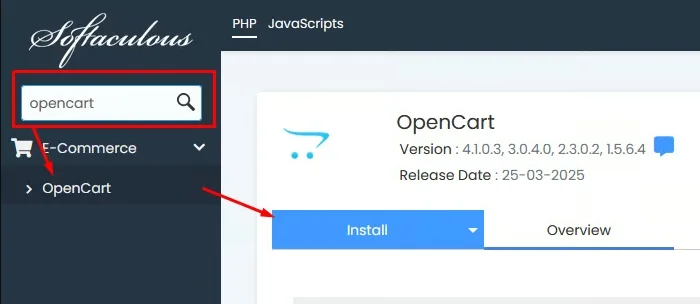
OpenCart gives you two main ways to get started. The first option is to use a hosting provider that supports a one-click installer such as Softaculous. With this approach, you can install OpenCart without manually uploading and configuring its files.
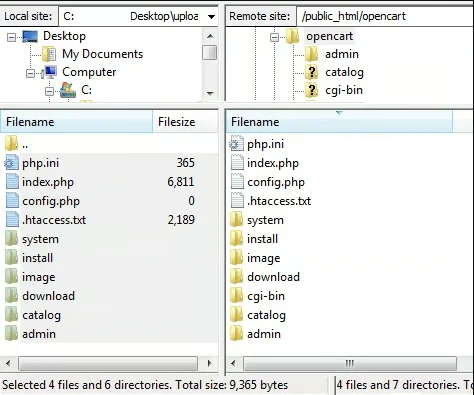
The second option is manual OpenCart installation. You’ll need to upload the platform files to your server, create a database, configure the installation settings, and complete setup. This approach requires some technical knowledge, especially if you’re unfamiliar with FTP, web hosting, or database management.
Once everything is ready, OpenCart provides a dedicated administration dashboard where you can manage products, customers, orders, extensions, and store settings.
Meanwhile, if you’re already familiar with WordPress, getting started with WooCommerce is pretty straightforward. You can install WooCommerce directly from the WordPress dashboard by navigating to Plugins > Add New Plugin, searching for WooCommerce, and activating it.
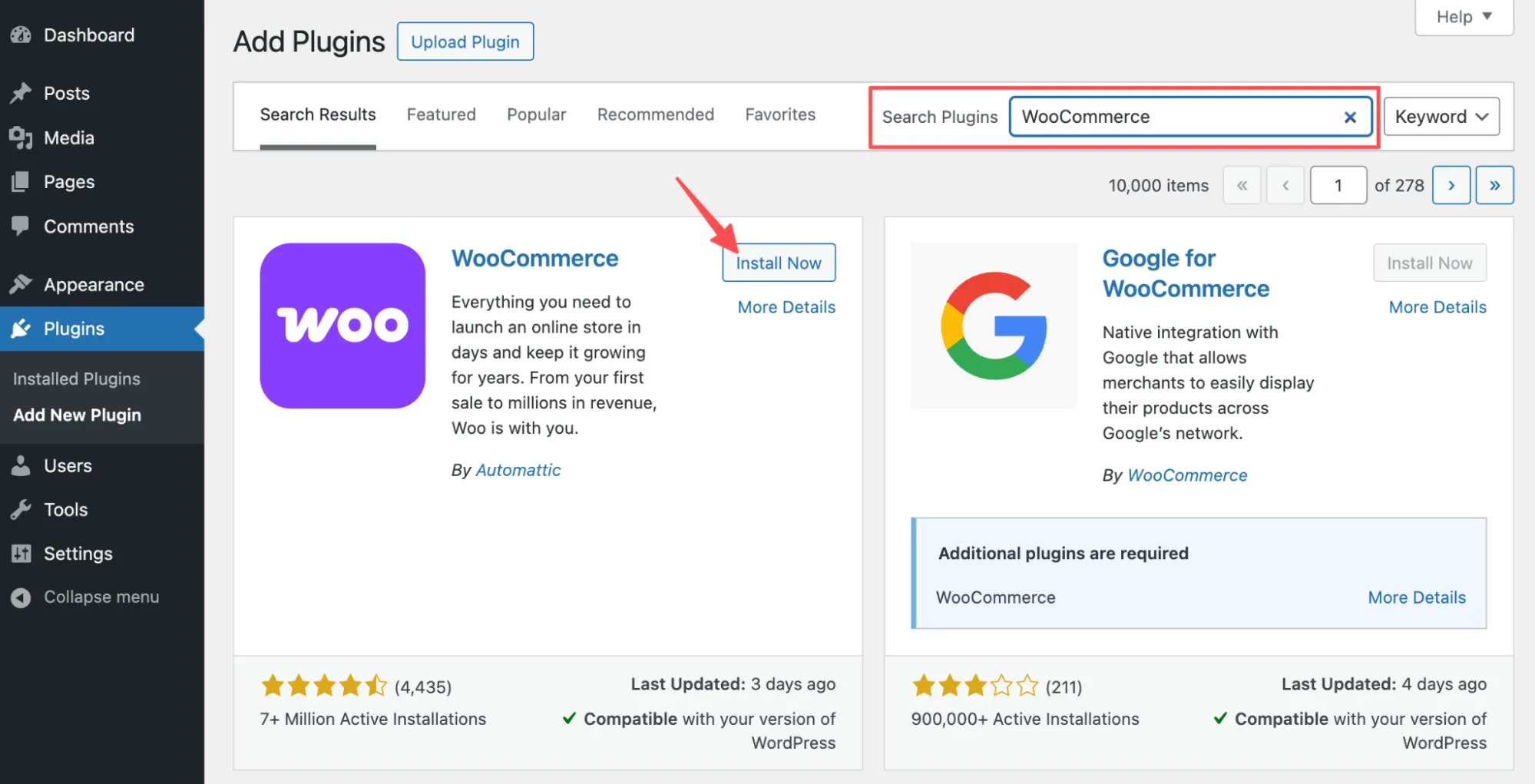
Once the plugin is activated, WooCommerce provides an onboarding wizard to help you configure your store. What’s more, the platform uses the familiar WordPress administration interface. This makes it especially convenient for merchants who already manage their websites through WordPress.
Themes & Customization
The verdict
In the OpenCart vs WooCommerce comparison, WooCommerce has a slight edge in themes and customization. Its integration with WordPress and support for block themes make storefront design more approachable. However, OpenCart remains a solid choice for merchants who want a customizable, eCommerce-focused storefront and don’t mind handling more technical adjustments.
OpenCart comes with a default theme that provides a basic storefront layout. If you want something more unique, you can explore additional free and premium themes through the OpenCart Marketplace.
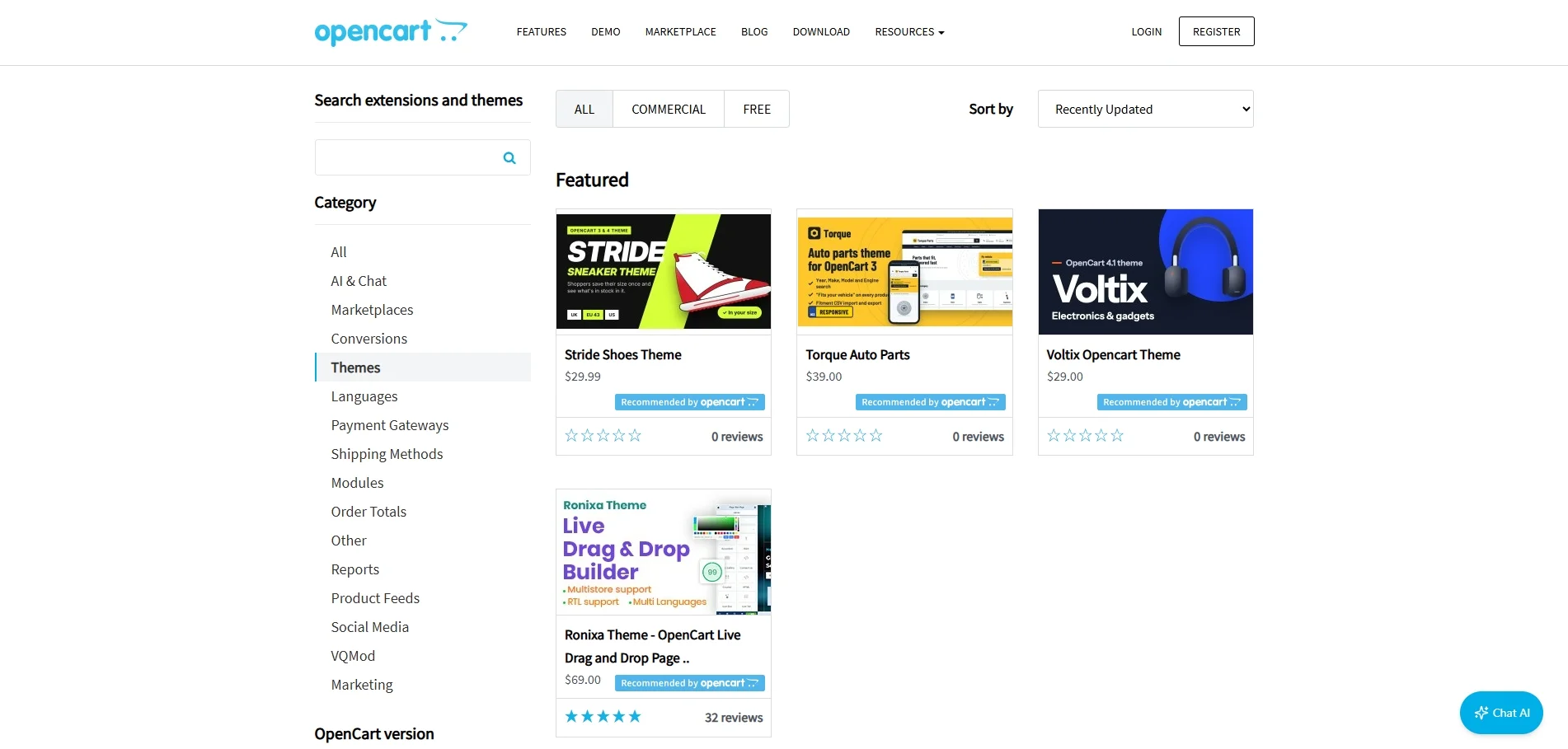
When it comes to customization, OpenCart provides several built-in tools to adjust your store’s appearance:
- Theme settings: Select your storefront theme, configure your logo, and adjust basic store settings.
- Layout management: Arrange modules such as banners, featured products, and category menus in different positions.
- Theme Editor: Modify storefront templates using Twig without directly editing server files.
These options give you reasonable control over your store’s appearance. However, if you want to make significant changes to the design or create custom layouts, you’ll likely need some knowledge of HTML, CSS, or Twig.
On the other hand, WooCommerce themes, both free and premium options, give you plenty of flexibility when it comes to storefront design.

Additionally, the platform comes with a WordPress Site Editor, which allows you to customize your storefront visually when using a compatible block theme without writing a single line of code. For example, you can:
- Adjust colors, typography, and layouts to match your branding.
- Customize headers, footers, and navigation menus.
- Modify product pages, shop layouts, cart pages, and checkout templates using blocks.
- Create reusable patterns to maintain a consistent design across your website.
Nevertheless, the available customization options depend on your chosen theme. Classic themes may use different editing tools, while advanced functionality or custom designs may still require additional plugins or development work.
Product & Store Management
The verdict
When comparing OpenCart vs WooCommerce for product and store management, both platforms offer the essential tools needed to manage products, inventory, and orders effectively. OpenCart is particularly suitable for merchants who prefer a dedicated eCommerce administration system, while WooCommerce offers a wider variety of default product types and the flexibility of the WordPress ecosystem.
As a standalone eCommerce platform, OpenCart comes with a dedicated administration dashboard for managing your daily store operations. From the Catalog section, you can create products, organize them into categories, set prices, manage inventory, and configure product attributes.
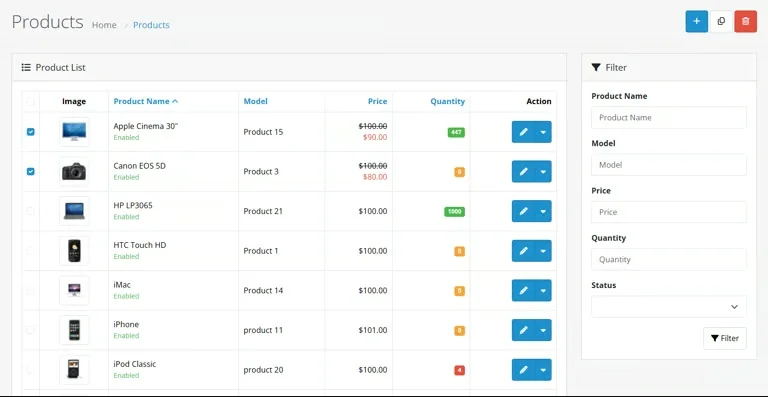
OpenCart also provides several useful product management features, including:
- Offer different sizes, colors, and configurations. OpenCart 4’s variant system supports separate pricing, SKUs, and inventory for individual variants.
- Configure special prices and quantity-based discounts.
- Assign products to categories, manufacturers, and related-product lists.
- Track stock quantities and configure product availability.
Similarly, WooCommerce also provides a comprehensive set of tools for managing products, inventory, and orders, all within the familiar WordPress dashboard. One of its notable strengths is the variety of product types supported by default, including simple products, variable products, grouped products, external/affiliate products, and downloadable products.

In addition, WooCommerce inventory management allows you to organize products into categories, manage stock levels, configure low-stock notifications, and make bulk product updates. You can also extend these capabilities with additional WooCommerce plugins if your business requires more advanced inventory management or order workflows.
SEO & Marketing Capabilities
The verdict
In the OpenCart vs WooCommerce comparison, WooCommerce has the upper hand in SEO and content marketing thanks to its WordPress integration and extensive plugin ecosystem. However, OpenCart also provides essential SEO and marketing tools, making it a viable option for merchants with straightforward requirements.
OpenCart comes with built-in SEO features, allowing you to customize meta titles, descriptions, and SEO-friendly URLs without relying on additional extensions. It also provides several marketing tools, including discount coupons, promotional emails, and affiliate management. Notably, OpenCart 4.1 introduced a built-in blogging system, allowing merchants to create articles and organize content without a third-party blog extension.
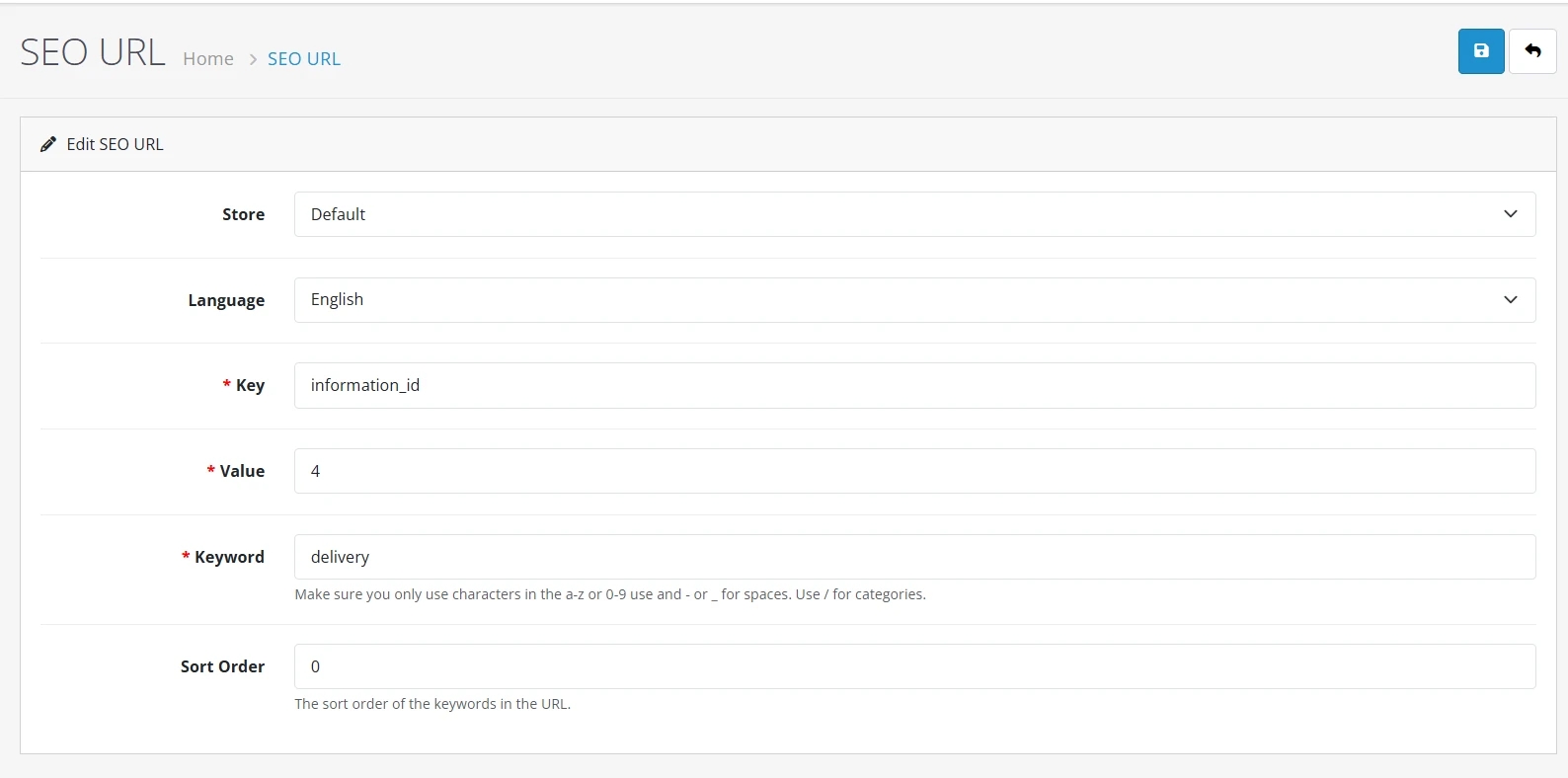
Nevertheless, more advanced features, such as automated marketing workflows and specialized SEO tools, may still require additional extensions.
On another hand, since WooCommerce runs on WordPress, you can take advantage of its blogging capabilities and content management tools to support your SEO strategy. What’s more, WooCommerce works with popular SEO plugins like Yoast SEO and Rank Math, which offer features such as XML sitemaps, metadata optimization, and structured data.
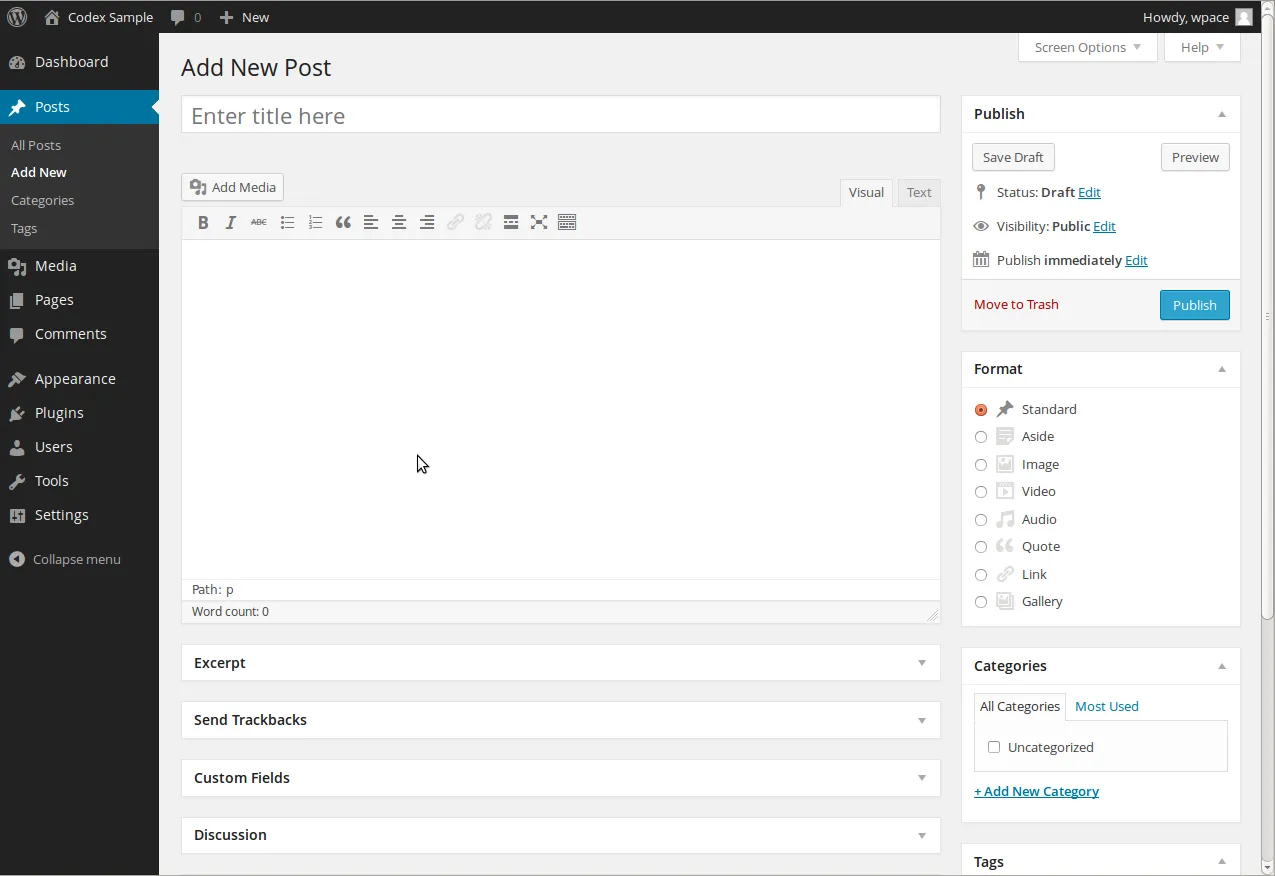
For marketing, WooCommerce includes built-in discount coupons and supports additional tools like MailPoet for email campaigns and marketing automation. Overall, WooCommerce offers greater flexibility for businesses that rely heavily on organic traffic and content-driven marketing.
Performance & Scalability
The verdict
When comparing OpenCart vs WooCommerce performance, there’s no universal winner. Both platforms can support growing online stores, but their speed and scalability largely depend on hosting resources, caching, database optimization, and installed extensions.
As a standalone eCommerce platform, OpenCart operates independently of WordPress, allowing merchants to configure hosting and server resources based on their needs.
However, performance may vary depending on your product catalog, database queries, and installed extensions. Larger stores may require stronger hosting, caching solutions, and database optimization to maintain fast loading times.
Similarly, WooCommerce performance depends on your WordPress hosting, active theme, plugins, and store configuration. However, merchants on this platform can leverage the High-Performance Order Storage (HPOS). It uses dedicated database tables to improve order data management and scalability, available by default for new WooCommerce installations since version 8.2.
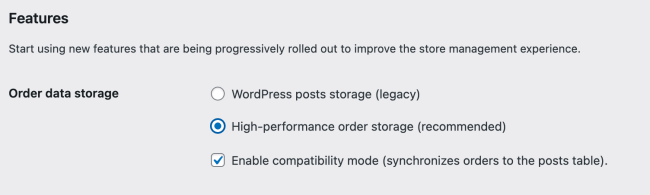
Additionally, merchants can improve performance through caching, CDNs, image optimization, and regular database maintenance. In other words, with the right infrastructure, WooCommerce can support large catalogs and increasing order volumes, although resource-intensive plugins may affect performance.
Payment Gateways & Transaction Fees
The verdict
In the OpenCart vs WooCommerce comparison, both platforms offer flexible payment options, with processing fees depending on your chosen provider. However, WooCommerce provides a particularly convenient payment experience through WooPayments and its extensive payment gateway integrations.
OpenCart supports various payment methods through built-in options and additional extensions, including bank transfers, cash on delivery, and gateways such as PayPal. You can install and configure payment extensions through the OpenCart admin panel. However, payment processing fees depend on your chosen provider, transaction type, and business location.
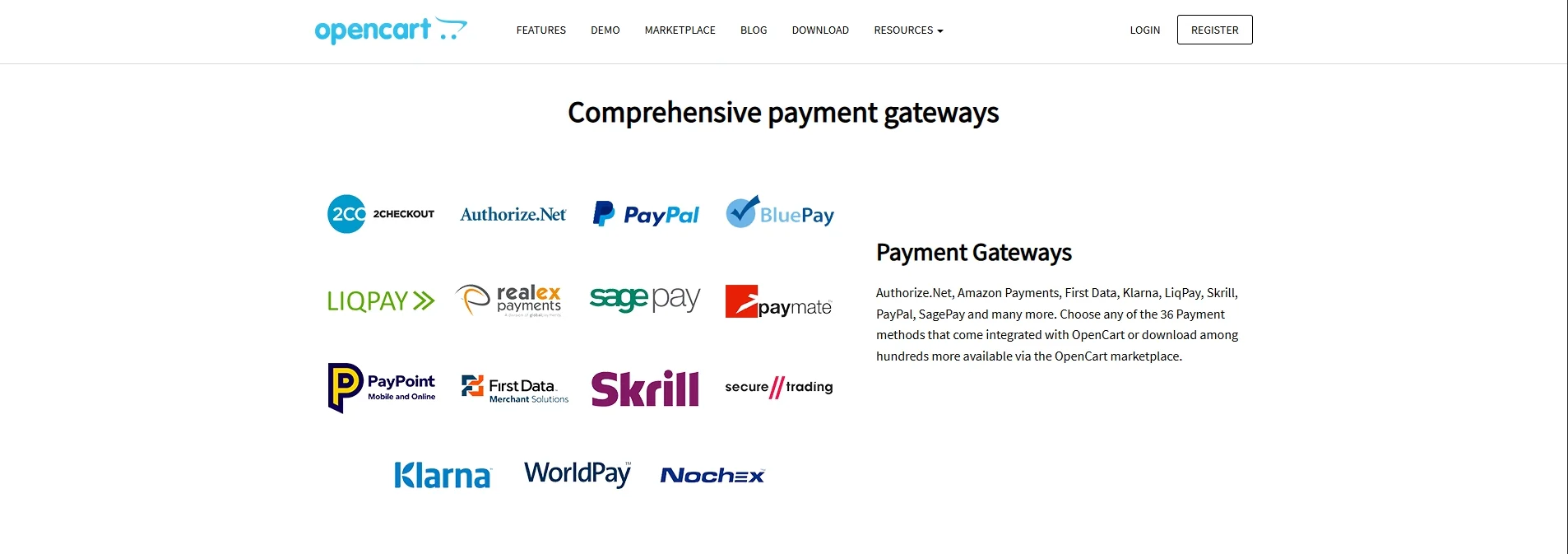
Meanwhile, WooCommerce supports the best payment providers, including Stripe, PayPal, and WooPayments, along with offline methods such as bank transfers and cash on delivery.
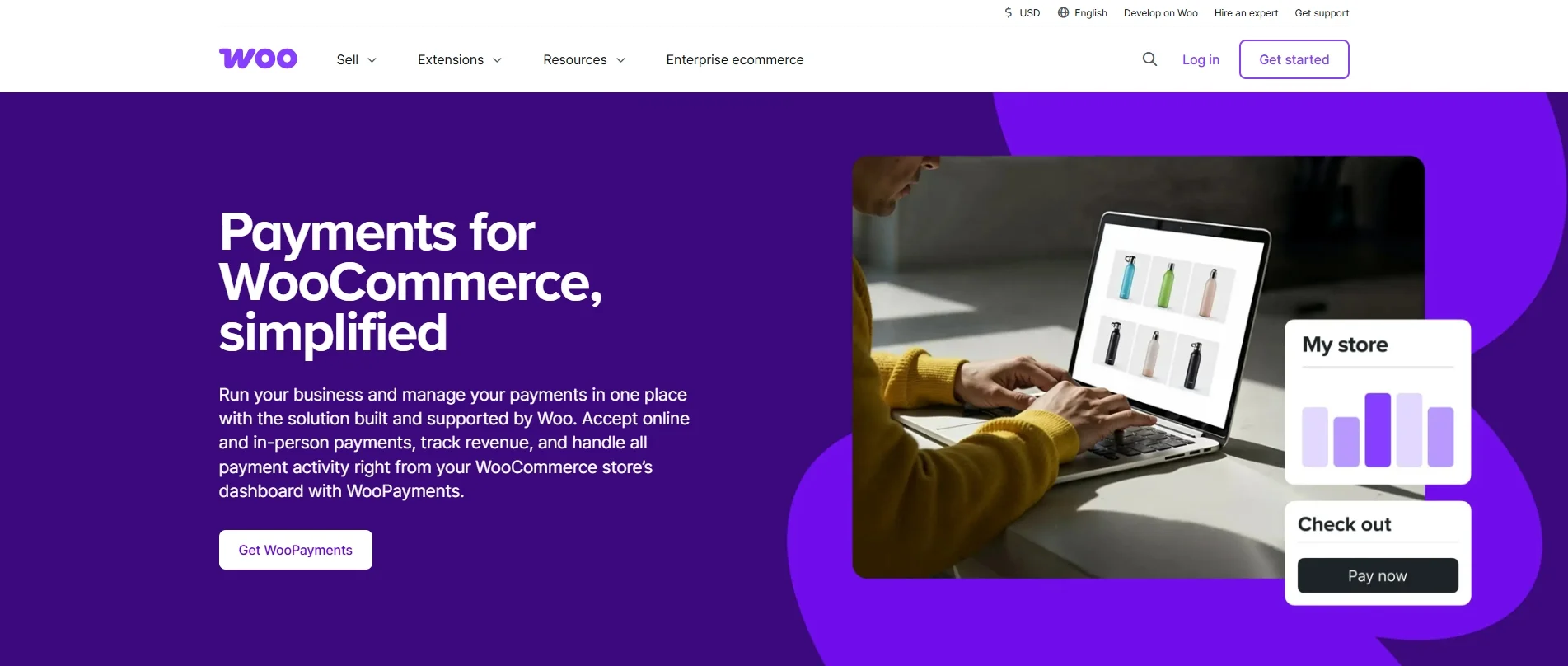
One advantage is that WooCommerce doesn’t charge additional platform transaction fees, regardless of which payment processor you choose. For example, WooPayments currently charges US-based merchants 2.9% + $0.30 per online card transaction, with an additional 1.5% for international cards and 1% for currency conversion when applicable.
Security & Maintenance
The verdict
When it comes to OpenCart vs WooCommerce security, neither platform is automatically more secure. Both require regular updates, reliable hosting, and proper security practices to protect customer information and maintain store stability.
OpenCart supports HTTPS connections and provides an administration tool for OpenCart import, export, backups and restoration. However, store owners are still responsible for updating OpenCart, maintaining extensions, securing their hosting environment, and performing regular backups.
On the other hand, WooCommerce benefits from the WordPress security ecosystem, including security plugins, monitoring tools, and backup solutions.
That said, managing a WooCommerce store involves maintaining several components: WordPress core, WooCommerce, themes, and installed plugins. Hence, you’ll need to keep these components updated, use HTTPS, and test major updates to avoid compatibility issues.
Multi-Store & International Selling
The verdict
In the OpenCart vs WooCommerce comparison, OpenCart has an advantage in built-in multi-store management. Meanwhile, WooCommerce offers flexible international selling capabilities through WordPress Multisite and additional extensions.
One of OpenCart’s standout features is its native multi-store functionality. You can manage multiple storefronts from a single installation and administration panel, with different domains, themes, and store settings.
What’s more, OpenCart supports multiple languages and currencies, allowing merchants to customize the shopping experience for international customers. These capabilities make OpenCart particularly convenient for businesses operating several stores or targeting different markets.
WooCommerce also supports multiple storefronts through WordPress Multisite, which lets you run separate stores within one WordPress installation. However, each store maintains its own product and order data by default. You’ll need additional integrations if you want to synchronize inventory or other information across stores.

For international selling, WooCommerce supports multilingual setups through WordPress translation plugins. It also allows merchants to offer multiple currencies through extensions or WooPayments’ multi-currency feature. These options provide considerable flexibility, although configuring and maintaining them may require additional effort.
Apps, Extensions & Integrations
The verdict
In the OpenCart vs WooCommerce comparison, WooCommerce has an advantage in extension variety, thanks to its dedicated marketplace and the broader WordPress plugin ecosystem. Nevertheless, OpenCart also offers plenty of extensions to expand your store’s functionality.
OpenCart has a dedicated marketplace with over 13,000 extensions and themes, covering payment gateways, shipping methods, marketing tools, product feeds, and more. You can choose from free and paid extensions or develop custom modules to meet specific business needs.
However, before installing an extension, make sure it’s compatible with your OpenCart version and actively maintained by its developer.
Meanwhile, one of WooCommerce’s biggest strengths is its flexibility. Whether you want to automate marketing campaigns, offer subscription products, or connect third-party services, there’s a good chance you’ll find a suitable extension.
The official WooCommerce Marketplace provides free and premium solutions for payments, shipping, marketing, and store management. You can also explore additional plugins through WordPress. However, keep in mind that some advanced extensions require paid subscriptions, and installing too many plugins may introduce compatibility or performance issues.
Customer Support
The verdict
When comparing OpenCart vs WooCommerce customer support, both platforms offer documentation, community forums, and professional assistance. However, the support available depends on whether you need help with the core platform, a third-party extension, or custom development.
OpenCart provides several support options, including:
- Documentation: Official guides for installation, configuration, and store management.
- Community forums: Free discussions where merchants and developers can exchange solutions.
- Dedicated support: Professional technical assistance through OpenCart’s commercial support service.
You can also submit support tickets for general OpenCart questions or marketplace-related issues.
On the flipside, WooCommerce offers documentation, community support, and dedicated assistance for eligible WooCommerce.com products. For the free core plugin, merchants can seek help through the WordPress.org support forum.
Meanwhile, customers using WooCommerce.com products can access the WooCommerce Help Desk for product-related assistance. However, third-party plugins and themes purchased elsewhere are generally supported by their respective developers. Additionally, For advanced customizations, WooCommerce also recommends working with a professional agency or developer.
OpenCart vs WooCommerce: Which Should You Choose?
Choosing between OpenCart vs WooCommerce ultimately comes down to your business needs. OpenCart is worth considering if you prefer a standalone eCommerce platform with built-in multi-store management. Meanwhile, WooCommerce is an excellent option if you want to combine online selling with WordPress’s content management capabilities.
Choose OpenCart If You…
- Want a dedicated eCommerce platform without relying on WordPress.
- Need to manage multiple storefronts from a single administration panel.
- Prefer built-in store management features and are comfortable handling technical configurations.
- Have access to developers familiar with OpenCart for advanced customizations.
Choose WooCommerce If You…
- Already have a WordPress website and want to add eCommerce functionality.
- Rely heavily on blogging, SEO, and content marketing to attract customers.
- Prefer visual storefront customization through compatible WordPress block themes.
- Want access to a broad ecosystem of plugins and third-party integrations.
At the end of the day, neither platform is a perfect fit for every business. Consider your technical resources, budget, and long-term goals before making the final decision.
OpenCart vs WooCommerce: FAQs
Is OpenCart better than WooCommerce?
It depends on your business needs. OpenCart is a great choice if you prefer a standalone eCommerce platform with built-in multi-store management. Meanwhile, WooCommerce is better suited for WordPress users and businesses focusing on SEO, content marketing, and flexible customization. Neither platform is universally better.
Is OpenCart cheaper than WooCommerce?
Both OpenCart and WooCommerce are free, open-source platforms. However, you’ll still need to pay for hosting, domains, themes, extensions, and maintenance. Neither is necessarily cheaper, as the total cost depends on your store’s requirements, hosting provider, and additional features.
Which is faster, OpenCart or WooCommerce?
Neither OpenCart nor WooCommerce is inherently faster. Website speed depends on hosting resources, caching, database optimization, themes, and installed extensions. Both platforms can deliver good performance when properly configured, so testing them under similar conditions is the best way to compare their speed.
Which platform is better for SEO, OpenCart or WooCommerce?
WooCommerce generally offers more flexibility for SEO and content marketing thanks to its WordPress integration and plugins like Yoast SEO and Rank Math. However, OpenCart also supports essential SEO features, including customizable meta titles, descriptions, and SEO-friendly URLs. Both can perform well with proper optimization.
Can I migrate from OpenCart to WooCommerce?
Yes, you can migrate from OpenCart to WooCommerce using manual methods or an automated migration service. With LitExtension, you can transfer supported data such as products, categories, customers, and orders. Additional options, including 301 redirects, can help manage URL changes during migration. Available options depend on your store’s configuration.
Final Words
So, which platform should you choose in the OpenCart vs WooCommerce comparison? Well, there’s no one-size-fits-all answer!
OpenCart is worth considering if you prefer a standalone eCommerce platform with built-in multi-store management. Meanwhile, WooCommerce might be your best bet if you’re already familiar with WordPress and want greater flexibility for SEO, content marketing, and customization.
Ultimately, the right choice depends on your budget, technical expertise, and long-term business goals. We hope this comparison has helped you find the platform that best suits your needs.
And if you’re planning to switch platforms, LitExtension’s OpenCart to WooCommerce migration service can help you transfer your store data with minimal manual effort. For more expert tips and insights on eCommerce platforms and business growth, don’t forget to check out our LitExtension Blog and Resources.


