A Shopify gift card gives store owners a simple way to offer flexible store credit to customers, helping businesses increase cash flow and encourage repeat purchases. Therefore, if you’re learning about this feature, you’ve come to the right place!
In this guide, we explain everything you need to know about Shopify gift card, including:
- What is it
- How does it work
- How to add gift card to your Shopify store
- How to manage Shopify gift cards
- Tips for promoting and marketing your gift cards
Let’s get started!
What Are Shopify Gift Cards?
Shopify Gift Cards are digital vouchers or prepaid cards that customers can purchase and use as an alternative payment method on your Shopify store. Customers can redeem the value of each gift card by entering its unique code during checkout.
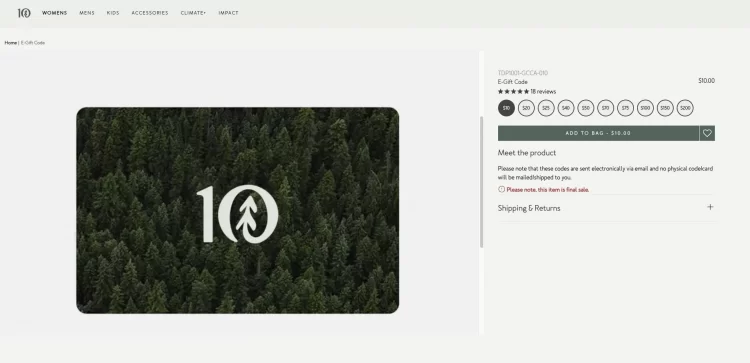
Whether for birthdays, holidays, or special occasions, a gift card provides the perfect gift for shoppers looking to treat their loved ones. However, the physical Shopify Gift Cards similar to those found on Amazon, Google Play, or any other online store gift card cannot currently be used.
Using gift cards is one of the best ways to increase sales on Shopify. Here are some compelling reasons why offering gift cards is a wise investment:
- Expand your customer base: Gift cards act as mini advertisements for your business, extending your reach to new potential customers who may have yet to discover your store. When recipients redeem gift cards, they can explore your products, become loyal customers, and spread the word about their positive experiences.
- Boost sales and revenue: Gift cards have been proven to drive incremental business sales and revenue. When customers order Gift Cards, they are essentially pre-paying for products or services, ensuring future purchases in your store. Additionally, recipients of gift cards often spend more than the card’s value, leading to higher average order values and increased profitability.
- Enhance customer loyalty: By offering Gift Cards, you provide a valuable incentive for customers to return to your store. Gift card recipients often become repeat customers. This fosters long-term customer relationships, increases customer retention, and generates positive word-of-mouth referrals.
- Drive brand awareness and visibility: Your brand is showcased each time customers use Gift Cards. This reinforces brand awareness and serves as free advertising when customers share their gift card experiences with others. As a result, your store gains valuable exposure, attracting potential customers and building a solid brand presence in the market.
How Do Shopify Gift Cards Work?
Now that we’ve learnt what a gift card is, let’s see how it works in your Shopify store.
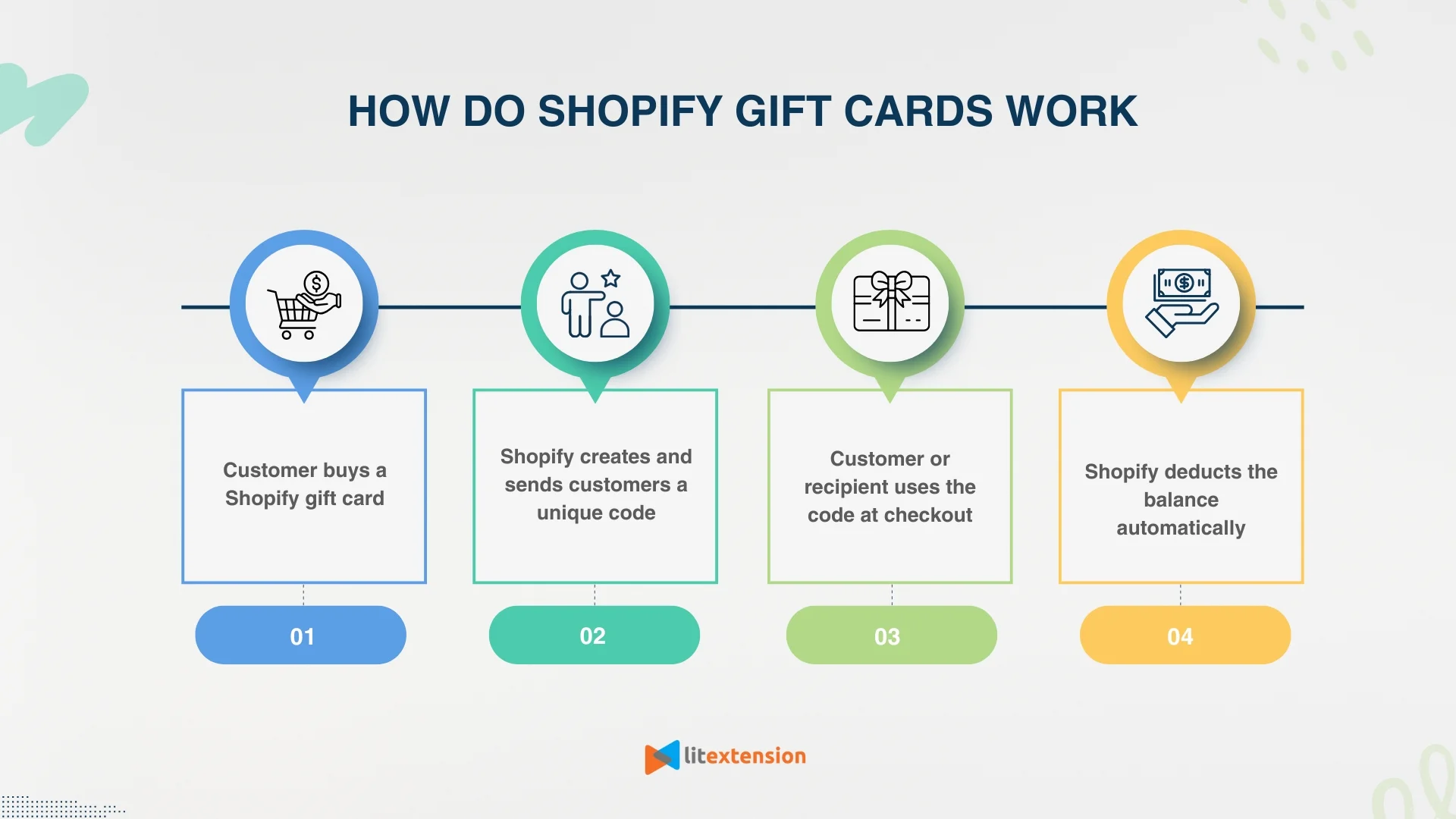
Shopify gift cards work as prepaid balances that customers can apply at checkout. When a customer buys a gift card, Shopify generates a unique code and sends it by email to the recipient. Next, the customer enters the gift card code during checkout to pay for an order. Shopify then deducts the used amount and keeps the remaining balance available for future purchases.
In addition, Shopify tracks every gift card inside the admin dashboard. This system allows store owners to monitor sales, redemptions, and active balances without manual calculations.
Explore smarter ways to use Shopify:
- What is Shopify? How does Shopify work?
- 15 Shopify Features Every 6-Figure Store Must Master
How to Add Shopify Gift Cards In Five Steps?
Follow these five steps to generate Gift Cards for your Shopify store.
Step 1: Log in to Shopify store
First, log in to your Shopify account, and access your Shopify store Admin Dashboard.
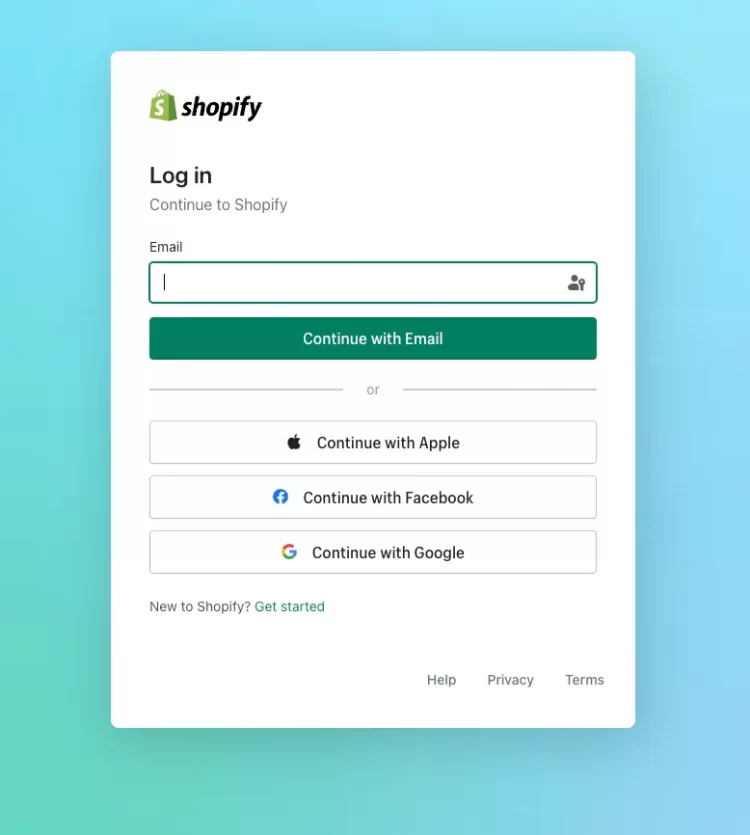
Shopify Login Dashboard
Step 2: Add Shopify gift card product
#1 From the left-side menu, click on “Products”> “Gift cards”.
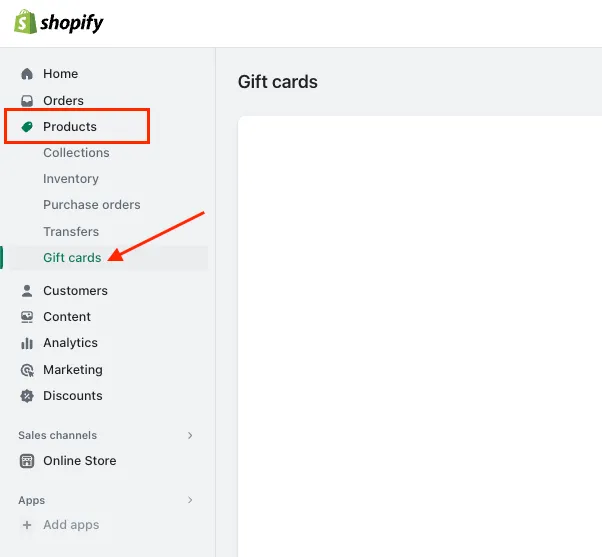
Go to the Gift Cards section from the Shopify Admin dashboard
#2 Next, you can choose whether the customers can buy Gift Cards as a product or directly get gift card codes. Let’s click “Add gift card product” to create one for customers to purchase.
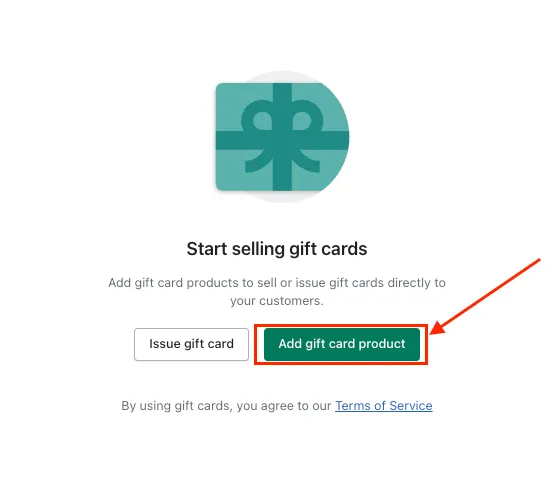
Add Gift Cards as Products on the Shopify store
Step 3: Customize gift card settings
#1 Fill in the necessary details for your gift card, such as the product title, description, and images. You can see in the screenshot down below, I created a Birthday Gift Card as an example.
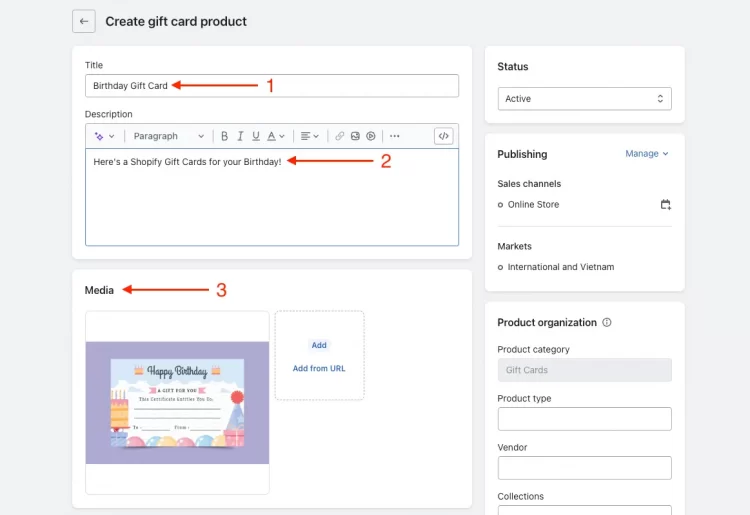
Customize Gift Cards product
#2 Scroll down to the “Denominations” section and set the gift card’s price.
Each denomination is saved as a variant for the customers to choose from. Click “Add denomination” to create a new option.
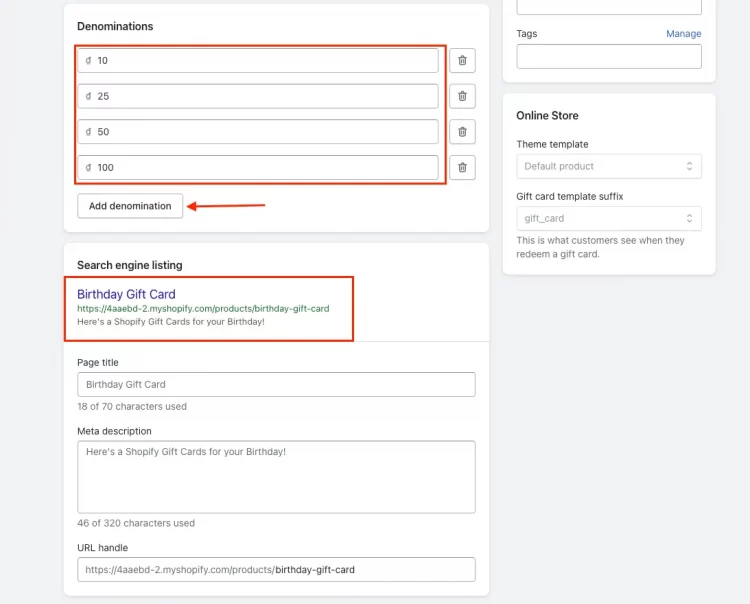
Set up Gift Cards pricing
#3 You can also choose to personalize the preview of your search engine listing or keep it as it is.
Step 4: Update gift card product status and collection (if needed)
Below are some additional steps to customize your Gift Cards, you can skip them if you want to.
#1 In the “Publishing” section, you can choose whether to make the gift card available for sale immediately or set a future start date.
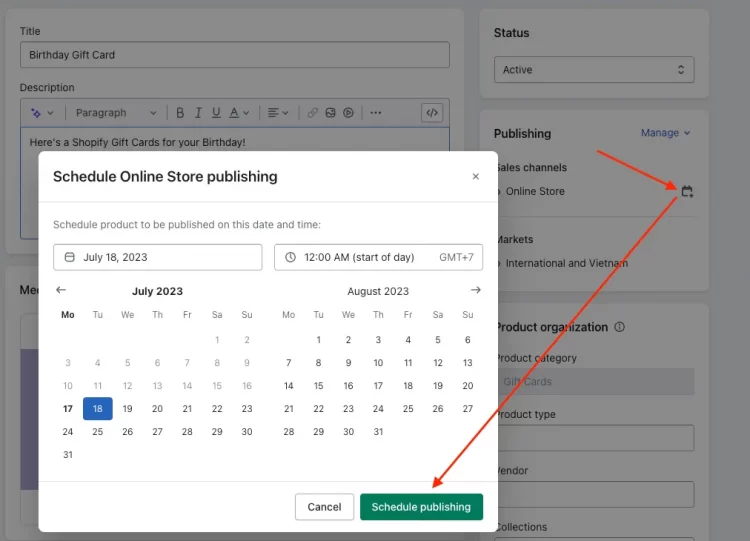
Set up Gift Cards publishing schedule
#2 If you have created specific collections for your gift cards, assign the product to the relevant group. You can also add the related keywords tags to make the gift card product easier to find.
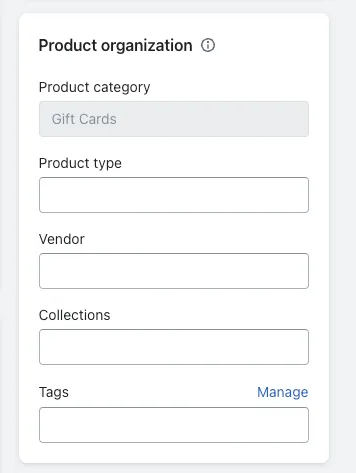
Assign Gift Cards to Product collection and tags
Step 5: Save your changes
Once you have finished customizing the gift card settings, click “Save” to apply the changes, and you have successfully added the Gift Cards to your store.
Unlock the full potential of Shopify:
- 10 Best Shopify CRMs to Intergrate With Your eCommerce Store
- Shopify Audiences: What It Is, How It Works & Best Practices
How to Manage Your Shopify Gift Cards?
Once you have successfully created and launched Gift Cards for your online store, the next thing is managing these cards effectively. Here’s a step-by-step guide on how to manage your Shopify Gift Cards:
Step 1: Access Shopify gift card sales information
From your Shopify admin dashboard, go to the “Orders” section.
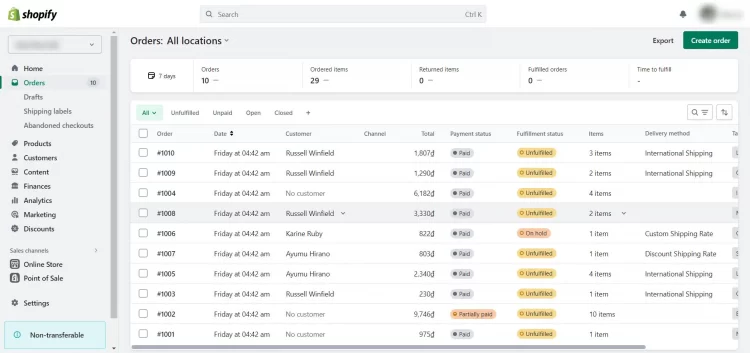
Check Gift Cards orders
Here you can find all Shopify Gift card orders and other orders placed in your store.
Step 2: Understand the gift card sales report
Go to “Reports”> Filter Categories “Finances” and click “Gift card sales” to access the Report.
The gift card sales report provides valuable information about your Gift Cards transactions, such as:
The date the gift card was sold
The order number
Customer name
Gift card value
Applied discounts
Total sales
This report helps you track and analyze your Gift Cards sales performance.
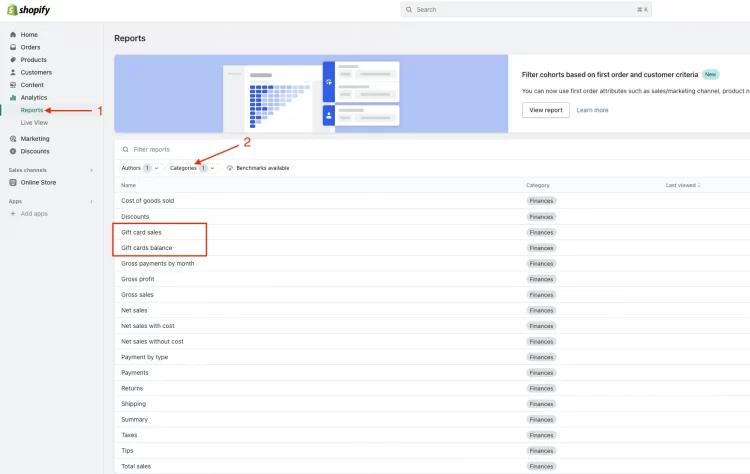
Check and review Shopify Gift Cards Sales and Balance Report
Step 3: Review the Shopify gift cards balance report
Similar to accessing the Gift Cards Balance Report. This report gives you a comprehensive overview of the daily Gift Cards balance. It includes valuable information, such as:
Opening balance
Issued value
Sold value
Disabled value
redeemed value
Refunded value
Adjustment value (for Shopify Plus users)
Closing balance
Net change
Step 4: Manage active Shopify gift cards
To view a complete list of your active gift cards, go to “Products”> “Gift cards”.
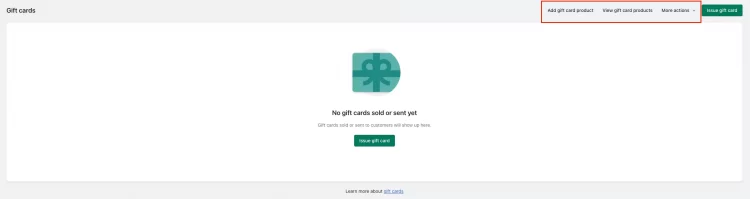
Manage active Shopify Gift Cards
Here, you can see each gift card’s details, including customer information, current balance, and purchase date. This helps you keep track of individual gift cards and their usage.
Remember to regularly review your gift card reports and monitor the Shopify Gift Cards balance to stay informed about your gift card program’s performance. Use these insights to improve your business with gift cards in your Shopify store.
Tips for Promoting and Marketing Your Shopify Gift Cards
Now that you know how to create and manage Shopify Gift cards, here are some practical tips to help you successfully promote and market your gift cards:
#1. Display gift card options on your storefront
Make your gift cards visible and accessible on your website’s homepage or navigation menu.
Use eye-catching graphics and compelling call-to-action buttons to encourage customers to explore and purchase gift cards.
Communicate the value and benefits of your gift cards to attract potential buyers.
#2. Create gift card campaigns and special offers
Develop targeted marketing campaigns specifically promoting your gift cards.
Offer special promotions, such as discounts, bonus values, or bundled packages, to incentivize customers to purchase gift cards.
Highlight the versatility and convenience of gift cards as ideal presents for special occasions.
#3. Integrate ift cards into email marketing and social media
Leverage your email marketing campaigns to promote gift cards to your subscriber list.
Create custom messages promoting gift cards’ convenience and versatility.
Use social media platforms to craft compelling content. Showcasing your gift cards and encouraging followers to share with their networks.
Continuously adapt your marketing efforts based on these insights to optimize gift card promotions and drive more sales. Good luck!
Shopify Gift Card – FAQs
Does Shopify have gift cards?
Shopify has a built-in gift card feature that lets you sell gift cards as a product in your store. Shopify also lets you issue gift cards manually from the admin when you need store credit for a customer.
How do I redeem a Shopify gift card?
A customer redeems a Shopify gift card by entering the gift card code at checkout. Shopify applies the balance automatically, and Shopify keeps any remaining balance available for the next purchase.
Where can I spend my Shopify gift card?
A customer can spend a Shopify gift card only in the store that issued the gift card. This rule means a customer cannot use the same code across other Shopify stores.
Can I use a Shopify gift card on Amazon?
A customer cannot use a Shopify gift card on Amazon. A Shopify gift card works only inside the issuing store, so Amazon checkout does not accept Shopify gift card codes.
Conclusion
With the step-by-step guide, you can confidently set up and manage Shopify Gift Cards, ensuring a seamless experience for you and your customers. By harnessing the power of Shopify Gift Cards, you can enhance your eCommerce strategy and drive growth for your business in 2023 and beyond.
To get more helpful advice for your online stores, visit our LitExtension blog and sign up for our LitExtension Resources. If you’re considering switching to Shopify, LitExtension – the #1 Shopping Cart Migration Expert, is ready to assist you with the fastest and most affordable solution!
Find everything you need to succeed with Shopify:
- Shopify POS System: Pricing, Features, Setup, & More
- Shopify Markets: Go Local To Drive Sales Global