If you're comparing OpenCart vs Shopify, you likely already know what each platform does – the real question is which one fits your store. OpenCart offers full control through a free, self-hosted setup, while Shopify trades that control for speed and convenience.
In this guide, we break down both platforms across these aspects between OpenCart and Shopify so you can make the right call for your business:
Category | OpenCart | Shopify | Winner |
Free core, but hosting, themes, and extensions add up (~$500-$3,700+/year) | $5–$399/month plans, plus fees and apps | Shopify | |
Requires self-hosting, FTP, database setup | No hosting needed, guided setup with AI assistant | Shopify | |
Needs extensions for POS, abandoned cart, B2B | POS, abandoned cart, B2B built in | Shopify | |
1,700+ themes, functional but less polished | ~1,200 themes, drag-and-drop editor | Tie | |
13,000+ extensions, generally cheaper | 16,000+ apps, strictly reviewed | OpenCart | |
Basics built in, advanced tools need extensions | SEO and native marketing suite built in | Shopify | |
Self-managed – SSL, permissions, protection | PCI Level 1, GDPR, built-in fraud protection | Shopify | |
Forum, tickets, paid Enterprise support | 24/7 chat, phone/email for Plus | Shopify |
Quick Overview of OpenCart vs Shopify
OpenCart is an open-source platform requiring users to manage their hosting and technical setup. While Shopify is a fully hosted, subscription-based platform that provides an all-in-one solution for users to set up and manage their online stores.
Pros & cons
Before making a final call, it helps to see the strengths and trade-offs of each platform side by side. Here's a quick summary of what stands out – and what to watch out for – with OpenCart vs Shopify.
Pros | Cons | |
OpenCart | • Free and open-source, no licensing fees • Full control over code, hosting, and infrastructure • Multi-store, multi-language, and multi-currency built into the core at no extra cost • Large extension marketplace with many free options • Lightweight – a basic installation uses around 50 MB of disk space | • Requires self-hosting and server management knowledge • Core features are basic without extensions • No native POS, abandoned cart recovery, or B2B tools • Extension quality varies and compatibility issues can arise |
Shopify | • Fast setup, no hosting or server management needed • Built-in SEO tools, abandoned cart recovery, and 24/7 support • Native B2B features rolled out to all plans • Access to 16,000+ apps for extending functionality • Modern, guided admin – minimal learning curve | • Monthly subscription cost, plus transaction fees on non-Shopify Payments • Less control over server-level configuration • Can get expensive as you add premium apps and themes |
Which platform should you go for?
So we’ve just analyzed the difference between the two dominant eCommerce platforms, OpenCart and Shopify, in terms of essential features. Each platform has pros and cons, so between OpenCart vs Shopify, which one is best for you? It greatly depends on the needs of your business.
Choose OpenCart if:
- You are tech-savvy and comfortable with coding and server management.
- You require extensive customization and control over your store's design and functionality.
- You plan to operate multiple online stores.
- You are on a tight budget and prioritize a free, open-source solution.
Choose Shopify if:
- You prioritize ease of use and a user-friendly interface.
- You prefer a hosted solution with built-in security and maintenance.
- You need reliable and responsive customer support.
- You value scalability and plan to grow your business significantly.
Pricing (Shopify Wins)
The Verdict
Shopify has a more transparent and more predictable pricing system than OpenCart in the long run. While OpenCart's initial cost might seem lower due to its open-source nature, hidden expenses can quickly accumulate.
OpenCart
OpenCart itself is free to download and install. There are no monthly license fees for the core platform. But “free” software doesn't mean a free store, and this is where merchants often get surprised. You're responsible for every piece of infrastructure and add-on yourself.
Here's what you'll actually pay for:
- Core platform: Free (self-hosted)
- Domain name: $10–$50 per year
- Hosting: roughly $15–$30+ per month for decent optimized hosting; basic shared hosting can be cheaper
- Premium theme: $20–$100 (usually one-time)
- Extensions: $20–$200+ each, depending on what you need (payment gateways, SEO tools, shipping modules, etc.)
- SSL certificate: $0–$150 per year
- Developer/agency work (optional): $2,500–$10,000+ for custom builds, though a DIY store skips this entirely
The appeal is real control over your budget. A lean, self-managed store can run for under $500 a year, which is genuinely hard to beat. The catch is transparency. Because costs are scattered across hosting, themes, and extensions, it's easy to underestimate the total, and the numbers climb fast once you need paid extensions for features Shopify includes out of the box.
Shopify
In contrast, Shopify has a more structured pricing model with 5 distinct plans.
- Starter (for social commerce or link in bio): $5/month
- Basic (for a new business): $39/month
- Grow (for a growing business): $105/month
- Advanced (for large-scale business): $399/month
- Shopify Plus (for enterprises): start from $2,300/month for a 3-year contract.
Hosting, security, and support are all handled, but the headline price is rarely what you actually pay. Transaction fees and app subscriptions stack up fast, and third-party payment gateways quietly eat into your margins on every sale.
Those extras show up in the annual numbers. A new Basic store runs about $1,500–$3,000 a year, growing stores on Grow land around $4,000–$8,000, and established stores on Advanced can push past $10,000. Shopify's cost scales with your business, so budget for it accordingly.
Ease of Use (Shopify Wins)
The Verdict
Shopify is the winner of the ease of use round due to its effortless installation process and friendly management system. OpenCart is more complicated to set up because you’ll need basic technical knowledge of hosting, FTPs, security updates, etc.
OpenCart
OpenCart is self-hosted, which means setup takes more work than most competitors. Before you even see the admin dashboard, you need to:
- Buy hosting that supports PHP 8.0+ and a MySQL database
- Download the OpenCart package and upload it via FTP or your host's file manager
- Create a database and connect it during the installation wizard
- Set an admin username, password, and email
- Delete the install folder for security once setup finishes
Many hosting providers offer a one-click OpenCart installer (through Softaculous, for example), which reduces manual work. Still, if you're not comfortable with FTP, databases, or basic server settings, this stage can feel intimidating. You can follow six steps in our OpenCart tutorial to seamlessly set up a successful online store.
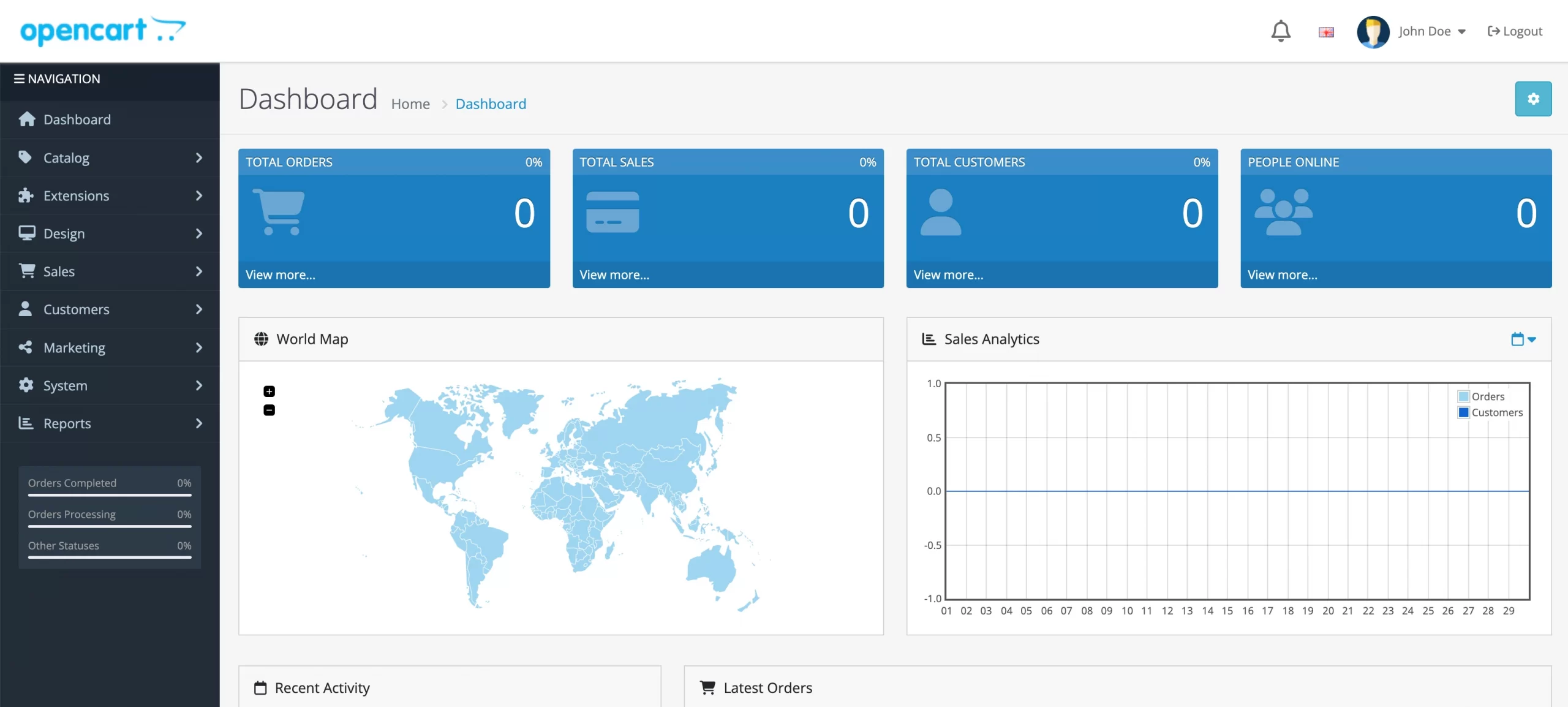
Opencart admin dashboardOnce you're past setup, OpenCart's admin panel is functional but feels dated, with text-heavy menus and settings that often require extra clicks. Daily tasks like managing products, orders, and customers are straightforward once you're familiar with the interface, though the detailed product forms can feel overwhelming for simple updates.
Here is a review from an OpenCart user:
I've tried nearly every cart/e-commerce system available and Opencart is my preferred choice. Written in PHP in a MVC(L) structure, Opencarts layout and system are very easy to understand and build on.
Dave H., OpenCart G2 Review.
Shopify
The most significant gap between OpenCart vs Shopify regarding ease of use is technical skills. With Shopify, you don’t need a line of code to create and manage your store. Start building your new Shopify store by providing your info, such as email, address, and store name and you will get into the Shopify dashboard.
Shopify's built-in setup guide walks you through the rest. Its AI assistant, Sidekick, can also suggest theme edits or answer setup questions, making the process even faster for beginners.
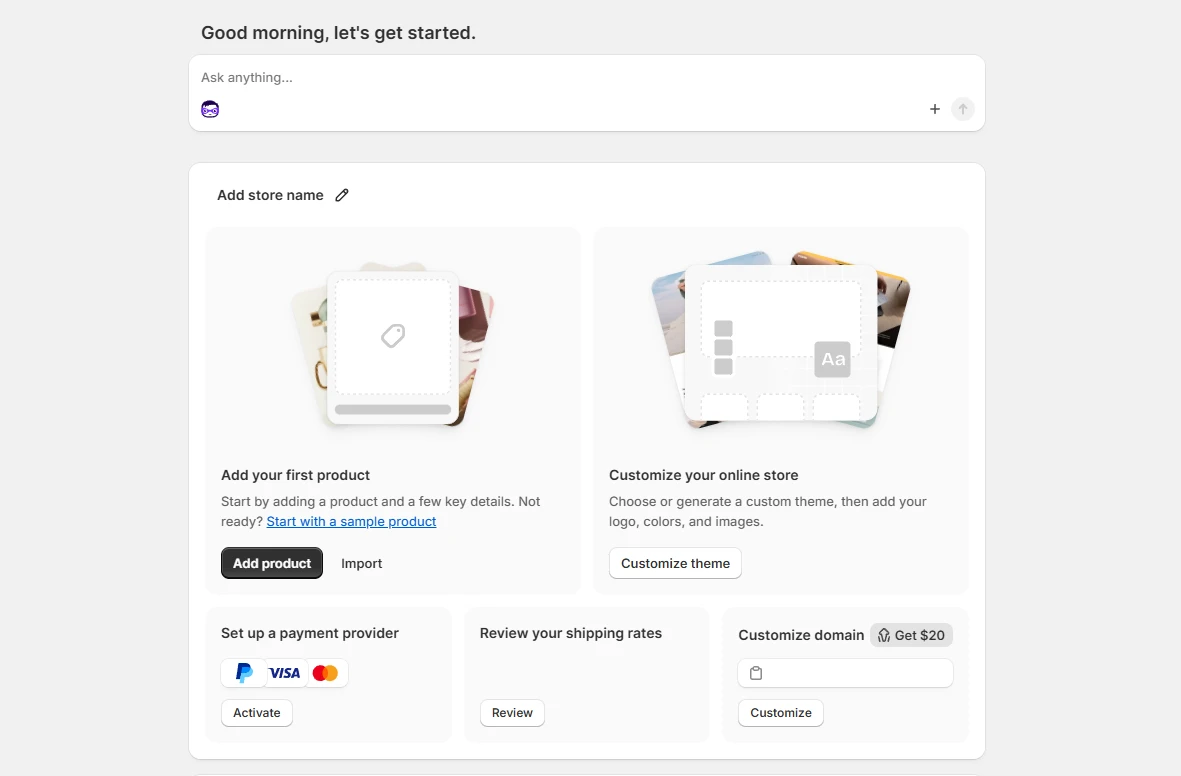
The dashboard itself feels modern and guided. Everyday tasks like adding products, checking orders, or reviewing sales sit in clearly labeled sections, and most settings come with explanations rather than raw config options. You're rarely left guessing what something does.
Shopify Migration Made Easy With LitExtension!
LitExtension offers great migration solutions that help you transfer your data from the current eCommerce platform to a new one accurately, painlessly with utmost security.

eCommerce Features (Shopify Wins)
The Verdict
Both platforms are highly capable, but Shopify wins by making more eCommerce features available natively. Thus, it requires less setup and delivers a smoother out-of-the-box experience.
Choosing between OpenCart vs Shopify often comes down to how each platform handles the practical stuff – multi-currency, POS, B2B, and everything else that keeps a growing store running smoothly. The table below breaks down how each one stacks up feature by feature.
Feature | OpenCart | Shopify |
Product limit | Unlimited products, categories, and manufacturers | Unlimited products included on all plans |
Multi-store management | Multi-store built into the core at no extra cost | Multiple storefronts supported, but full multi-store setup is more common on higher-tier or Plus plans |
Multi-language | Natively supports 40+ languages | Supported through Shopify Markets, with localized languages and domains |
Multi-currency | Multi-currency built into the core, though smoother display and auto-conversion usually need an extension | Multi-currency setup through Shopify Payments and Markets, with a 1.5–2% conversion fee |
Digital products | Supported natively – just upload the file and set the price | Supported natively, no extra app required |
Point of Sale (POS) | Not built in – requires a third-party POS extension to sync in-store and online orders | Shopify POS included for in-person selling, connecting sales, inventory, and customer data |
Abandoned cart recovery | Not built in – requires an extension | Built-in abandoned cart recovery with automatic emails |
B2B / wholesale | Possible through customer groups and extensions, but not a dedicated native system | Native B2B features – company profiles, custom catalogs, volume pricing, and payment terms – rolled out to all plans |
Payment gateways | Wide support through extensions, including major providers like PayPal and Stripe | Over 300 supported payment gateways |
Shipping integrations | Multiple shipping options including flat-rate and weight-based shipping, expandable via extensions | Built-in real-time carrier rates, with deeper discounts through Shopify Shipping |
As you can see, OpenCart can technically match most of what Shopify offers, but almost everything past the basics – POS, abandoned cart recovery, smooth multi-currency – means installing and configuring an extension yourself. Shopify ships with more of this working out of the box, which matters most for merchants who want functionality now rather than a project to build later.
Design & Themes (A Tie)
The Verdict
Regarding theme, OpenCart vs Shopify is a tie. Both platforms are equally great when it comes to theme and customization.
OpenCart
The official OpenCart repository features over 1,700 themes, spanning both free community templates and premium designs. That's a decent selection, but the overall vibe leans functional over polished – most themes look serviceable rather than cutting-edge, and quality varies a lot depending on the developer.
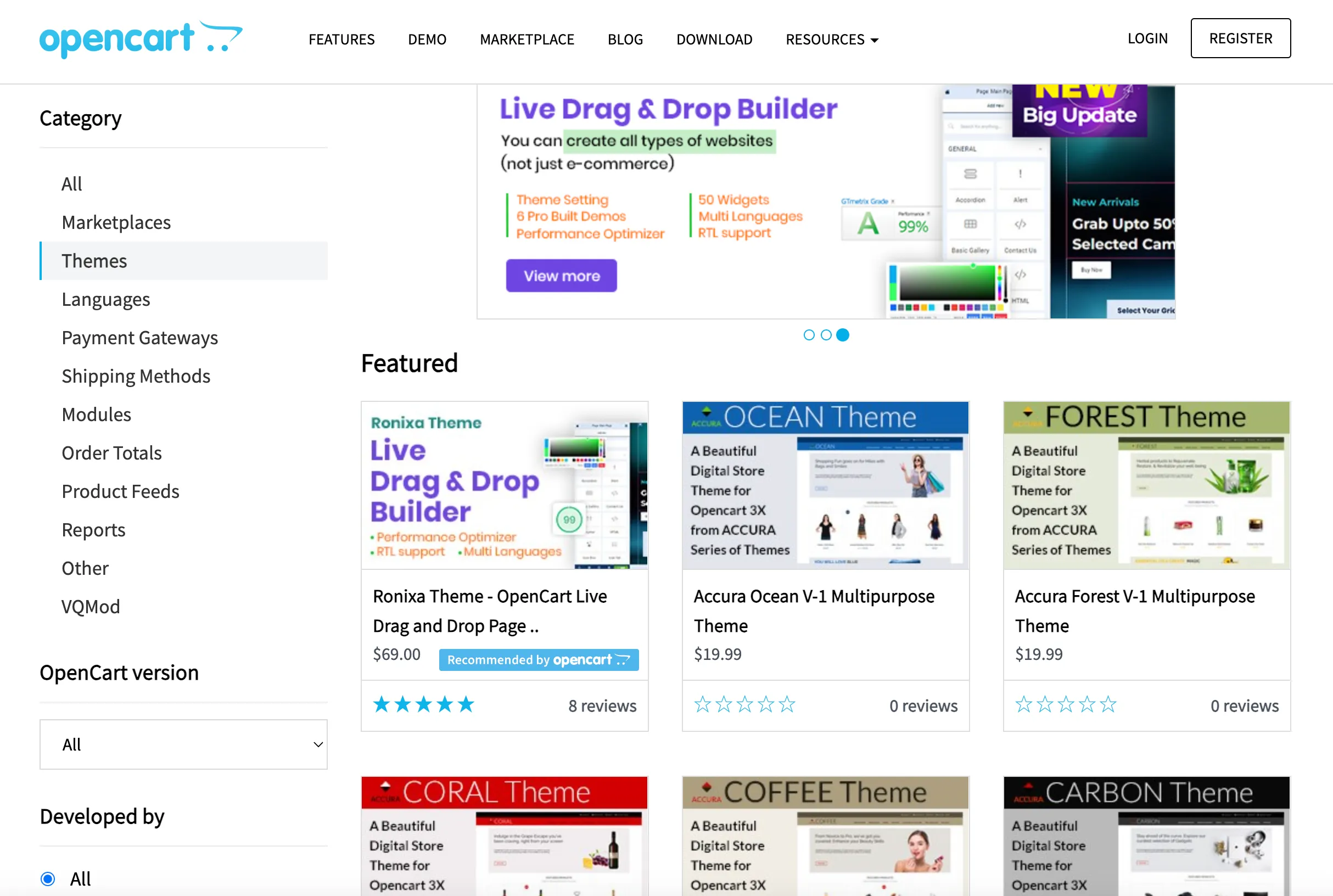
Customization is where OpenCart demands more effort. The default theme editor lets you tweak colors, layouts, and basic settings. But deeper changes – custom sections, unique layouts, advanced animations – usually mean editing template files directly or hiring a developer familiar with OpenCart's theme structure.
Shopify
Meanwhile, Shopify has nearly 1200 free and premium professional, eye-catching, and mobile-responsive eCommerce website templates you can use for your online store. You can check out my pick of 30+ best Shopify themes.
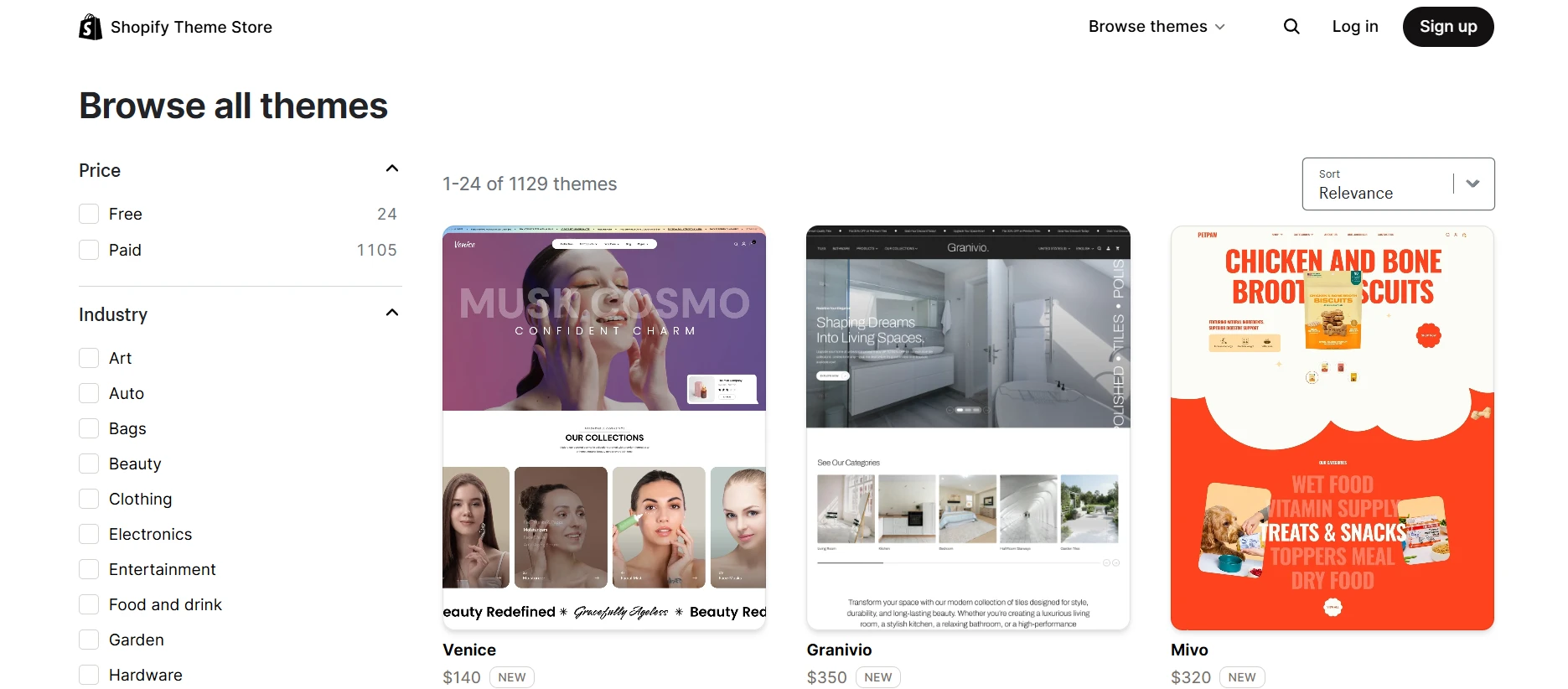
Customization is genuinely one of Shopify's strongest points. Themes built on Online Store 2.0 use flexible sections and blocks you can rearrange, add, or remove directly in the theme editor – no code required. You can independently swap layouts for the homepage, product pages, and collection pages, adjust fonts and colors via a visual style guide, and preview changes live before publishing.
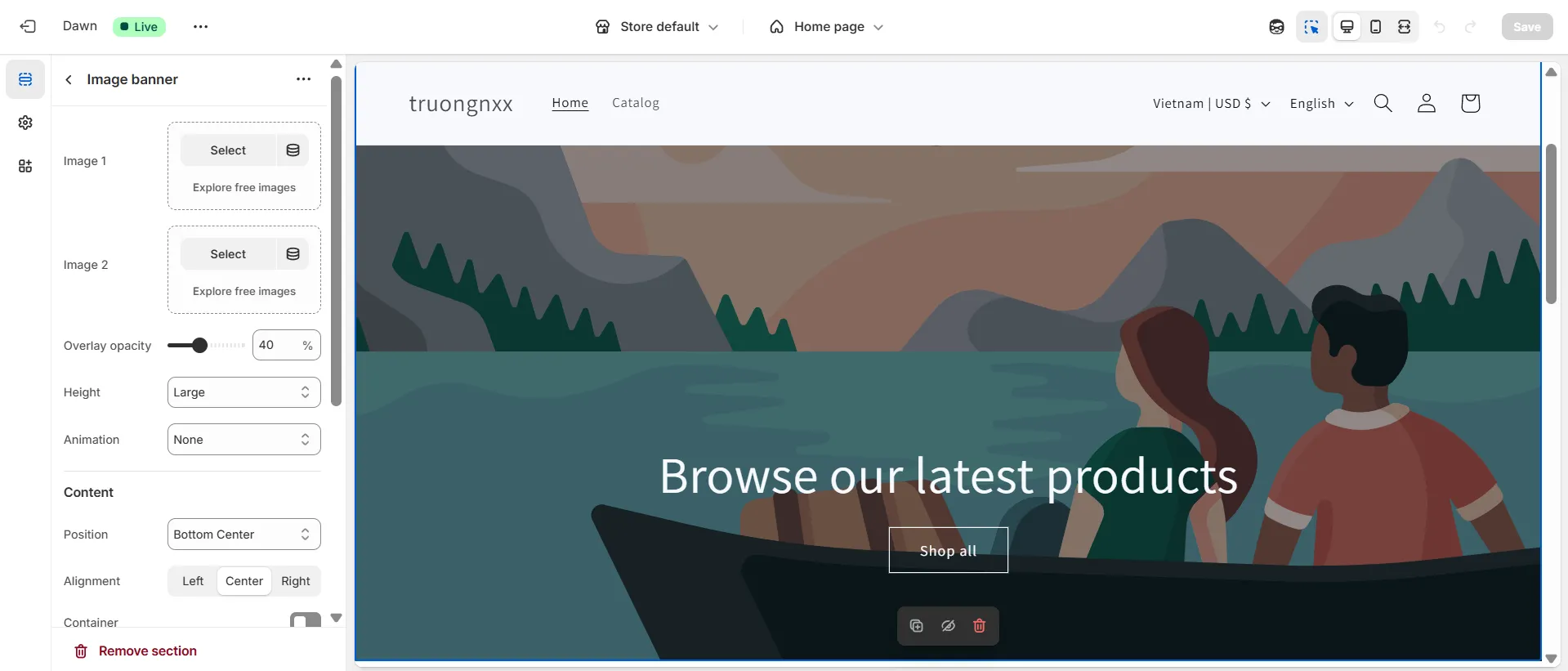
You can also go the extra mile by using Liquid to interact with your theme's HTML, CSS, and JavaScript to build fully custom sections or storefronts. Shopify Plus merchants also get Checkout Extensibility for custom checkout experiences. It's approachable for beginners, but with real room to grow for brands that want full creative control.
Extensions & Apps (OpenCart Wins)
The Verdict
OpenCart wins since the extensions are cheaper than Shopify. It has more tools for your store and allows you to use custom code to increase your site's ability.
OpenCart
In the OpenCart vs Shopify comparison, OpenCart stands out for its affordable extension ecosystem, with over 13,000 add-ons available. Also, the OpenCart developer community has made it easy to customize your store cheaply.
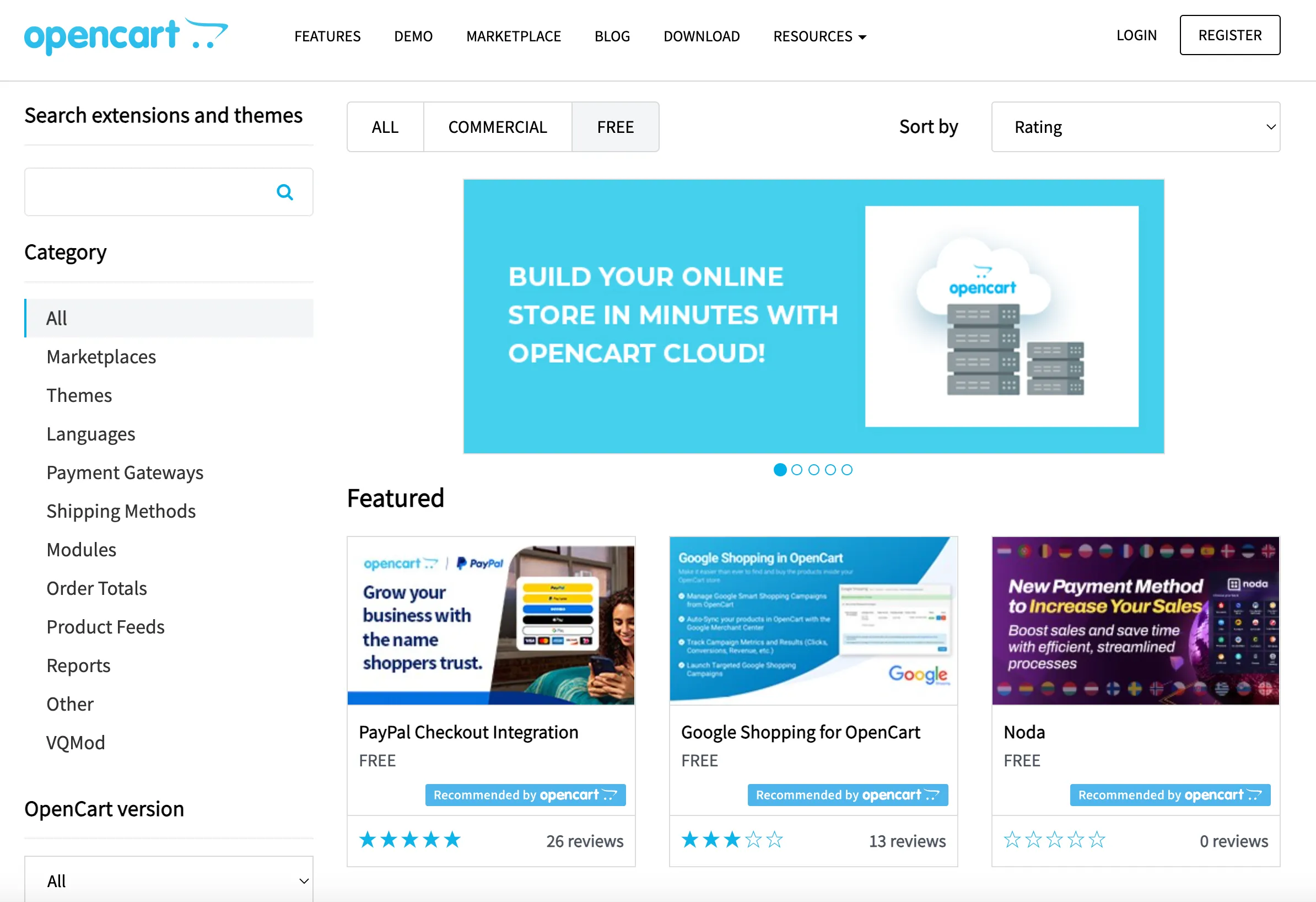
A plus for OpenCart over Shopify is that most extensions are for eCommerce. Choosing OpenCart for your e-store will benefit you greatly since all these apps directly support your work. More than that, you can use your coding skills to create custom fields that combine with the extensions.
Shopify
Shopify is also famous for its vast number of apps available (over 16,000 apps). More specifically, these apps contribute a specific purpose to your store and connect it to another tool (like Xero or Zendesk). As a result, this wide range of apps is one of the considerable justifications that make Shopify a robust eCommerce platform.
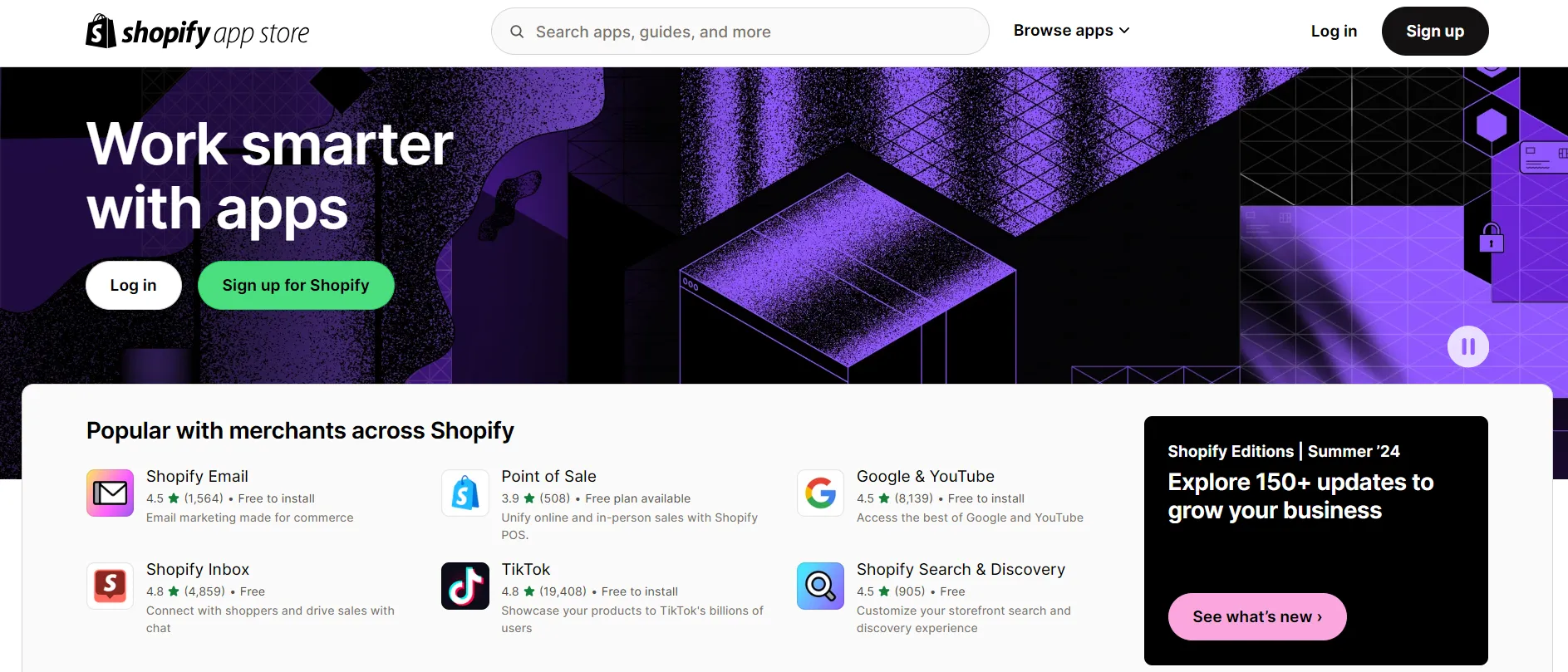
The bright side of having such a massive app store is that you have many options regarding adding functionality to your store or integrating it with other tools. However, Shopify tends to provide apps and add-ons for simple and popular functionalities, such as AMP or a drag-and-drop page builder, instead of including them in its built-in features. As a result, an extension may cost you more money.
But what I love about Shopify apps is that they're all strictly reviewed for quality and functionality, providing a smooth and reliable experience.
SEO & Marketing (Shopify Wins)
The Verdict
Shopify wins in this OpenCart vs Shopify competition. Its SEO fundamentals come built in and its native marketing suite keeps growing, while OpenCart requires extensions and often a developer to reach the same level of functionality.
OpenCart
As an open-source nature, OpenCart will allow for the customization of robots.txt, sitemaps, FAQ schema, and other technical aspects crucial for SEO performance. However, that comes at a cost and requires a bit of a learning curve. You will need some technical knowledge to utilize its SEO capabilities fully.
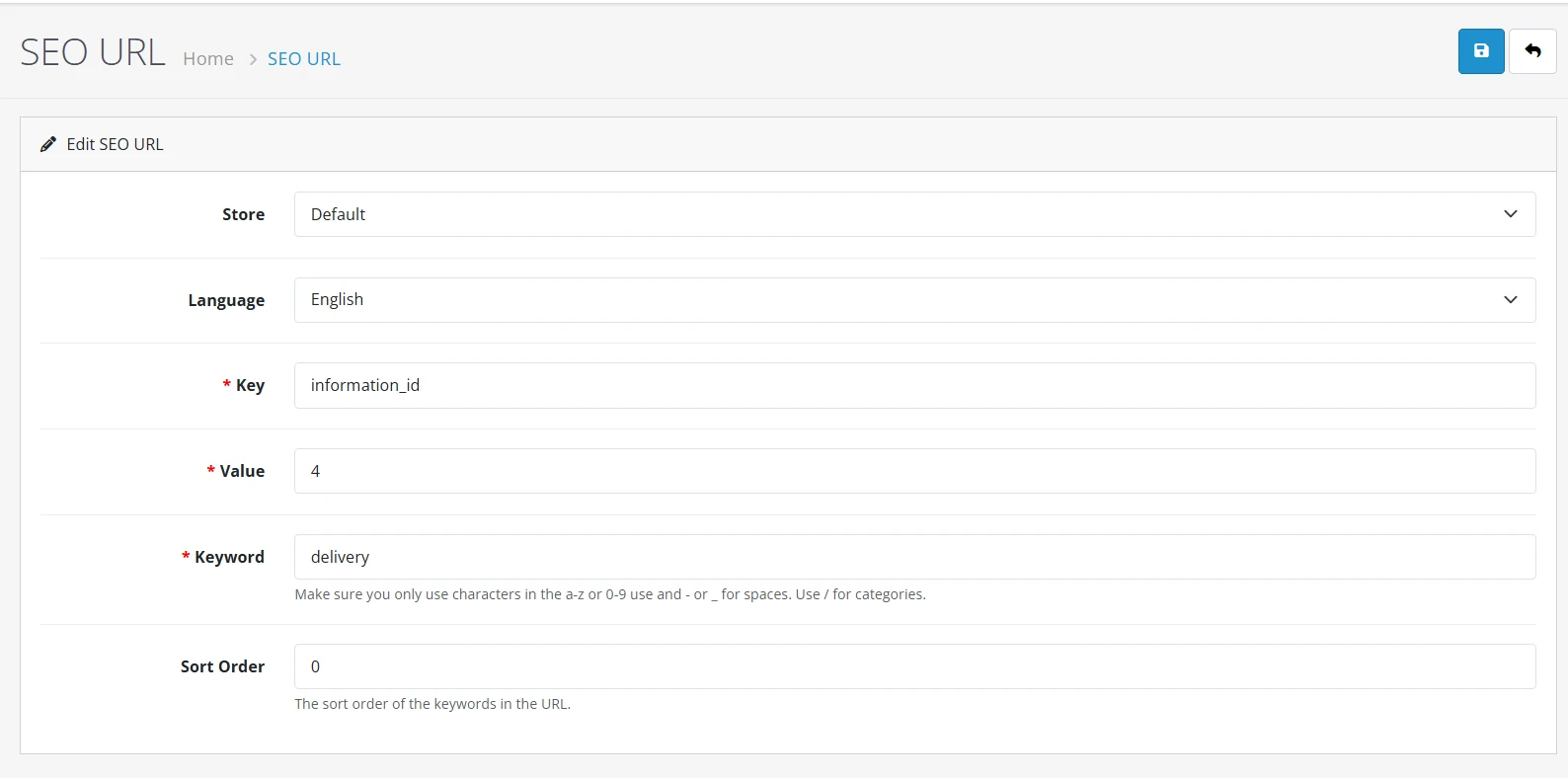
On the bright side, a wide range of SEO extensions are available in the OpenCart Marketplace, offering features like SEO audits, keyword tracking, and advanced optimization tools. Also, you can use our OpenCart SEO tips to optimize your SEO performance better.
The same “bring your own tools” approach applies to marketing. OpenCart doesn't ship with native email marketing, automation, or customer segmentation – you'll need extensions for abandoned cart recovery, newsletters, or loyalty programs. The upside is flexibility: since everything is modular, you can build a marketing stack that's tailored exactly to your store rather than working within a fixed toolset.
Shopify
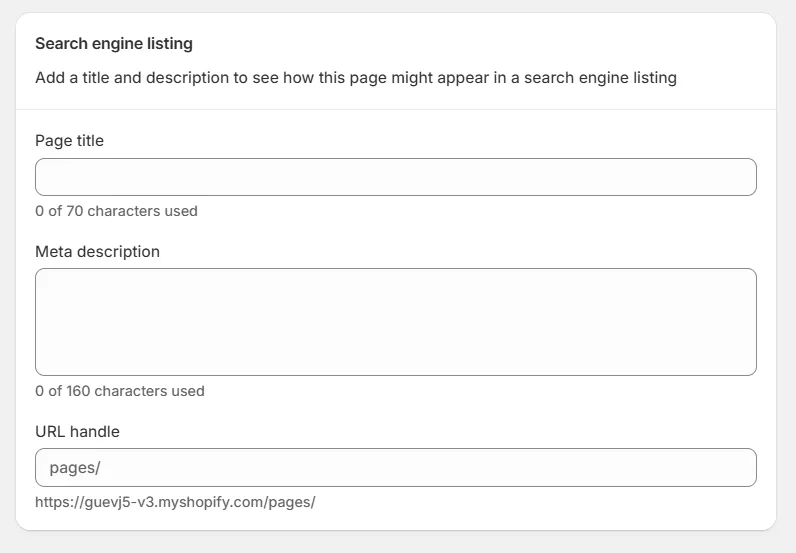
With Shopify, most of the SEO fundamentals are already built in rather than requiring separate installs. Meta titles, descriptions, alt text, and URL handles are editable directly on every product, page, and collection, and Shopify auto-generates sitemaps and canonical tags without extra setup.
Marketing follows a similar philosophy. Shopify has been steadily bringing more native tools into the platform rather than relying purely on third-party apps. In 2026, it expanded its native marketing capabilities to bring email, SMS, customer segmentation, and automation directly into the platform, letting merchants manage campaigns without juggling separate subscriptions.
For merchants who outgrow the native tools, Shopify's App Store connects to dedicated platforms like Klaviyo or Omnisend for deeper segmentation, predictive analytics, and multi-channel campaigns – so you're not locked into the basics as your marketing needs grow.
Security (Shopify Wins)
The Verdict
Comparing OpenCart vs Shopify for security, Shopify offers a more hands-off experience with built-in protection, whereas OpenCart requires merchants to manage security themselves.
OpenCart
Using an open-source platform such as OpenCart requires setting up and securing your own store. OpenCart is not responsible for protecting your website. Therefore, there are several tasks you need to take to ensure the security of your shops, such as directory and folder protection and file permissions.
For instance, enabling SSL for your OpenCart website and admin panel is necessary too. Therefore, it can prevent your data from being stolen when transferred back and forth by any middleman. You can activate the SSL or HTTPS by navigating to Settings → Server → Hit “Yes” at the option “Use SSL”.
Shopify
On the other hand, Shopify offers users a range of security solutions for their stores, customers, and finances. This is one of the main benefits of Shopify vs self-hosted solutions.
Shopify is PCI Level 1 compliant for credit card processing, which means it follows the highest standards for server security and provides PCI compliance to protect payment processing.
Secondly, this leading SAAS platform also helps you protect your customer data from harm under the GDPR (General Data Protection Regulation). This process will limit login attempts and ensure that app developers can only access the data they need.
Lastly, a fraud protection system will flag potentially fraudulent orders so you can review them before processing. An order has been flagged, so there might be a risk associated with it. Thus, you can manually check this while fulfilling the order.
Support (Shopify Wins)
The Verdict
Apparently, Shopify provides better support for your store. For OpenCart, you need to find your own support on the OpenCart forum or use a paid service to get the assistance you need.
OpenCart
Any merchants prefer a hosted cart over an OpenCart for customer support. Apparently, customer service is nonexistent with most open-source solutions.
OpenCart has 4 types of support:
- Support ticket: you submit a ticket for general questions (support time: Monday – Friday on a workday)
- Help docs: all the docs for your store management
- Community support: a community forum that allows everybody to share their knowledge and experience in running an online business
- Enterprise support: which may cost from $10 to $300
Shopify
As a hosted eCommerce platform, Shopify gives its customers complete support. In addition, you can even hire an exceptional support team for your store. Currently, Shopify offers these support channels:
- Sidekick (AI assistant): Free on every plan since January 2026, handles common questions directly inside the admin
- Live chat: Available 24/7 on every plan, with a human advisor, typically with a five-minute queue
- Community forum: More than 900,000 users for peer-to-peer help
- Phone callbacks and email: Reserved for Shopify Plus and Retail merchants
That last point is a real gap if you're on a standard plan and hit something urgent. But for most day-to-day issues, Sidekick and live chat cover the basics well.
OpenCart vs Shopify: FAQs
Which is cheaper, OpenCart or Shopify?
OpenCart is generally cheaper if you only consider software licensing, as it's free to download and use. However, you'll need to pay for hosting, a domain, extensions, and ongoing maintenance.
Shopify has a monthly subscription fee, but it includes hosting, security, and many built-in features, making costs more predictable.
What are the benefits of choosing Shopify over OpenCart?
Shopify offers a fully hosted solution with built-in hosting, security, payment processing, and regular updates. It also includes more native eCommerce features, making it easier to launch and manage an online store without relying heavily on extensions or technical maintenance.
Do I need coding skills to use OpenCart or Shopify?
Shopify is designed for users with little to no technical experience. OpenCart is relatively easy to manage for everyday tasks, but customizing your store or adding advanced functionality often requires some coding knowledge or developer support.
Is it worth using open-source alternatives to Shopify?
Open-source platforms are a great choice if you want full control over your store and don't mind handling hosting, maintenance, and customization. If you prefer an all-in-one solution with less technical work, a hosted platform like Shopify is usually the better fit.
Can I migrate my store from OpenCart to Shopify (or vice versa)?
Yes. You can migrate from OpenCart to Shopify using CSV files, migration tools, or professional migration services. With LitExtension, we help you transfer products, customers, orders, URLs, and other store data automatically while minimizing downtime.
Final Words
We hope this comparison guide helped you get a clearer picture of how OpenCart vs Shopify stack up – and which one actually fits the way you want to run your store.
- Choose OpenCart if you want full control over your store's code and infrastructure, don't mind handling setup yourself, and are comfortable relying on extensions or a developer to fill in the gaps.
- Choose Shopify if you want to launch fast, manage your store without touching code, and prefer built-in tools – SEO, marketing, POS, B2B, support – ready to go from day one.
If you're moving from OpenCart to Shopify (or the other way around), LitExtension can handle the entire migration for you – products, customers, orders, and more – with a Free Demo Migration so you can see exactly what your new store will look like before committing.
Don't forget to check out our blog to get more tips and news.