Since its release, one of the key reasons Shopify has gained such widespread popularity is its ability to combine eCommerce functionality with built-in blogging features. Hence, many site owners – who originally built their content on CMS platforms like WordPress – now want to migrate WordPress blog to Shopify as they start selling online.
Unfortunately, at the moment, Shopify does not support blog migration from WordPress in bulk. But no worries! In this guide, we will show you two practical alternatives to get it done:
Let's begin!
Method 1: Migrate WordPress Blog to Shopify With A Dedicated Migration App
Since both platforms are built on entirely different content models, the migration from WordPress to Shopify is unlikely to be straightforward.
Hence, to avoid data loss or SEO disruption, your best choice is to work alongside seasoned migration professionals with years of experience under their belt, like the LitExtension team.
Indeed, after booking their All-in-One Migration service, all you have to do is simply outline your migration needs. From there, the experts will take over and execute your WordPress blog migration to Shopify in a controlled, accurate, and fully managed process:
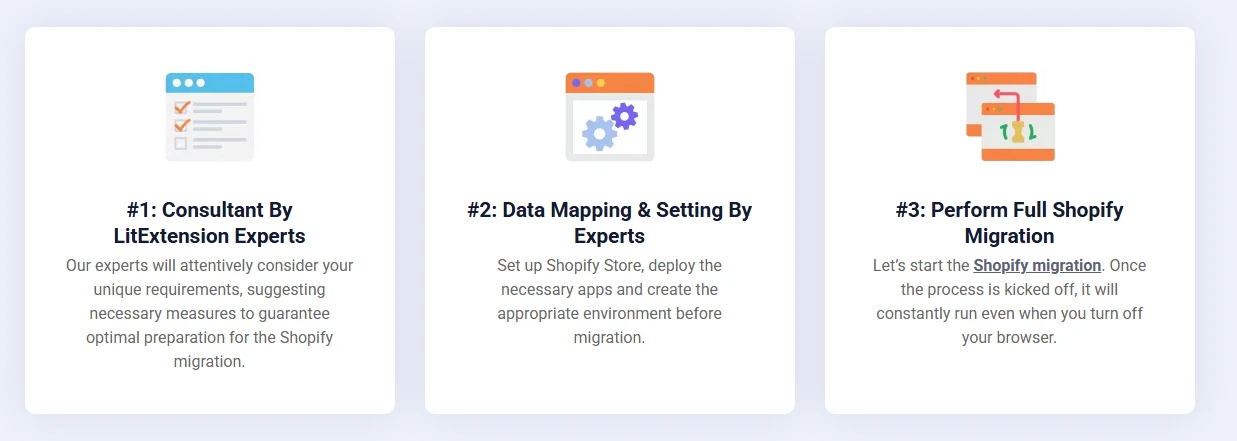
Step 1. Technical consultation
First, we will take time to gather information and understand more about your current WordPress blog.
All you have to do is provide us with details about your migration requests and your existing content. Our team will use this information to evaluate how your WordPress blog can be adapted to Shopify’s blogging environment. Any technical constraints, content limitations, or special cases are identified early to ensure your expectations are aligned before any migration work begins.
And once the scope and responsibilities are clearly defined, the agreement is documented in an SLA (Service Level Agreement). The migration only proceeds after you approve these terms, and any additional costs related to custom or manual handling will be disclosed in advance.
Step 2. Pre-migration preparation
Next, we will move on to preparing your Shopify store and configuring essential settings so that it can receive your WordPress blog data smoothly.
At the same time, the migration logic is designed in detail, and we also set up essential connection paths between WordPress and Shopify to ensure smooth migration. If your WordPress blog relies on custom fields or non-standard structures, the migration rules will be refined so the content remains usable instead of being forced into an incompatible format.
Step 3. Demo WordPress to Shopify blog migration
Now, before committing to a full transfer, we will pick a selected portion of your WordPress blog content to carry out a small sample migration.
The goal of this preview is to confirm how your content appears on Shopify and that formatting and metadata behave as expected. It also gives us an opportunity to address potential issues, if any, before actually scaling up into the full migration.
Note: For WordPress sites with fewer than 2,000 blogs, this demo step is optional and only performed upon request.
Step 4. Full WordPress to Shopify blog migration
Once the demo results are approved (or skipped if unnecessary), our full migration begins.
As mentioned earlier, at this stage, our experts will handle the entire migration process for you, including data transfer, backend operations, system monitoring, etc.
All WordPress blog content is migrated according to the predefined rules to ensure consistency across posts, images, and metadata. And better yet, as part of the All-in-One service, additional options in the Automated package (such as 301 redirects for blog URLs) are applied automatically without extra charges.
Step 5. Quality assurance after migration
After the migration is completed, a comprehensive review will be conducted to verify results.
Every content type (posts, media assets, metadata, and links) will be thoroughly checked to confirm it has been transferred correctly. And if any discrepancies are found (though that's often unlikely), you can trust us to handle them right away.
Step 6. Post-migration services
Beyond the initial migration, we still provide support services to help you navigate both new changes on your site and ongoing WordPress updates. These post-migration services include:
- Recent data migration allows newly created or updated WordPress blog content to be transferred again after the main migration, with no limit on the number of runs (as long as the added data does not exceed 5% of the original volume).
- Remigration gives you the option to request up to two complete re-migrations at no additional cost if refinements are needed.
- Smart update enables on-demand synchronization of changes from WordPress to Shopify after the migration has finished.
Alongside these services, a 60-day technical support period is included, during which our experts assist with troubleshooting where applicable.
Migrate from WordPress to Shopify!
LitExtension provides a well-optimized All-in-One migration service for your data transfer.

Method 2: Migrate WordPress Blog to Shopify with An Import Plugin
All in all, working with reputable migration experts like LitExtension is still the safest option.
That said, if you prefer a hands-on, DIY approach and are comfortable troubleshooting issues on your own, using an import plugin can also get the job done. Note, however, that you must handle formatting errors, missing data, failed imports, or other issues entirely on your own if they do occur:
Step 1. Install an import plugin on Shopify
First, go to your Shopify admin panel and open the Shopify App Store.
Then, search for a blog or content import app and install the one that best fits your needs. Some common choices you can consider include Matrixify, EZ Importer, Firebear Import & Export Tool, or StoreRobo.
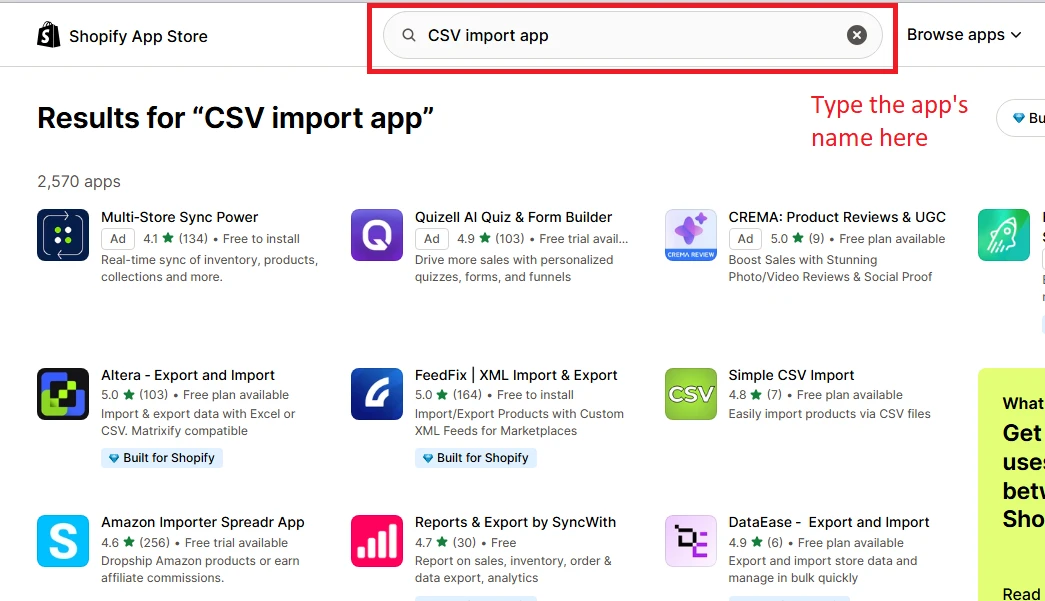
Step 2. Export your WordPress blog data
Next, go to the WordPress dashboard and navigate to Tools > Export in the left-hand menu.
An Export screen will appear. Here, you can choose to export “All content” (including pages, comments, and custom post types) or select “Posts” specifically.
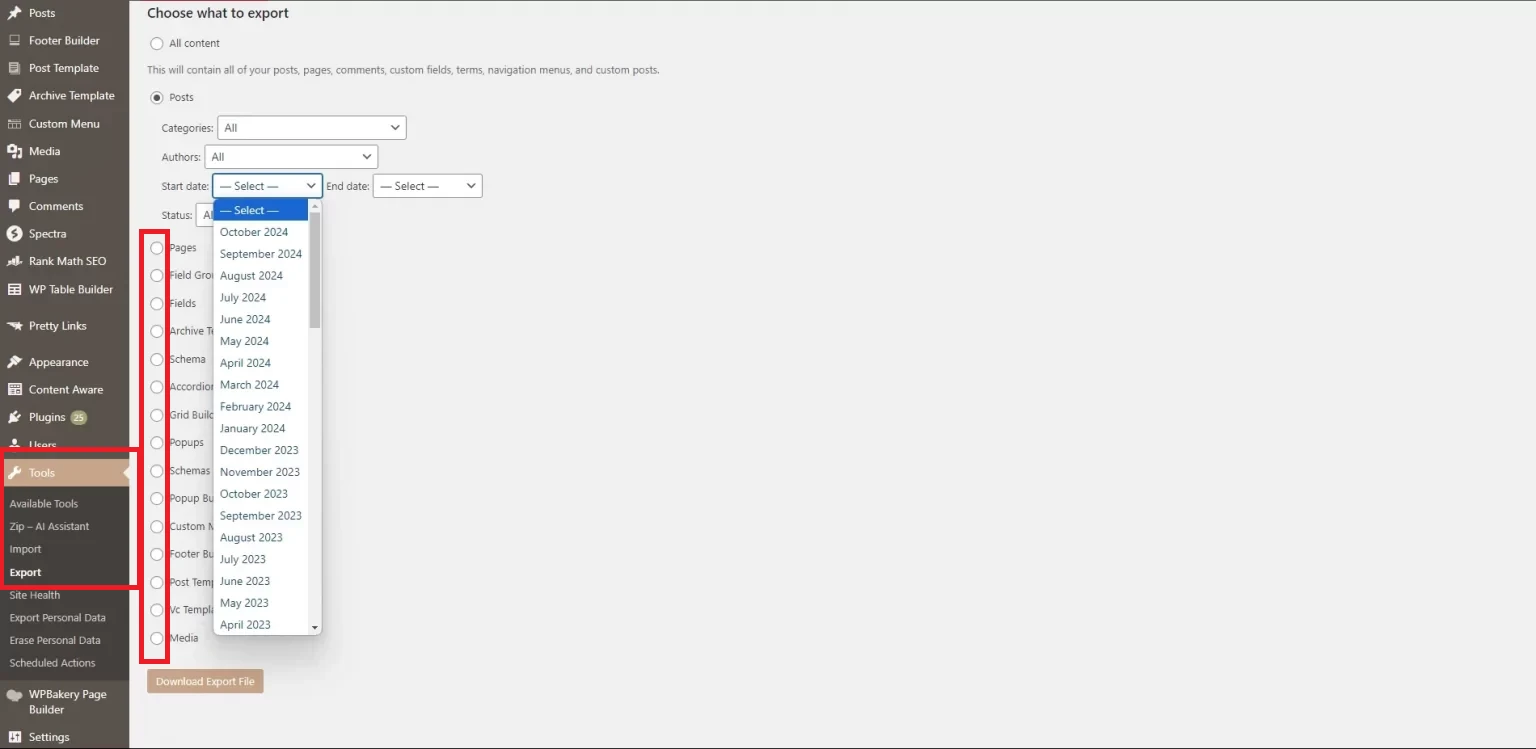
After choosing your desired options, click the “Download Export File” button. A WordPress Extended RSS (WXR) file, in XML format, will be downloaded to your computer.
Step 3. Customize the export file
Now, before importing the file into Shopify, you will need to review and modify this XML file manually (usually into CSV with appropriate columns) so it matches the format expected by your chosen Shopify import app.
To avoid errors, it’s best to access the import app’s dashboard on Shopify and download a sample CSV file; most import apps usually provide one.
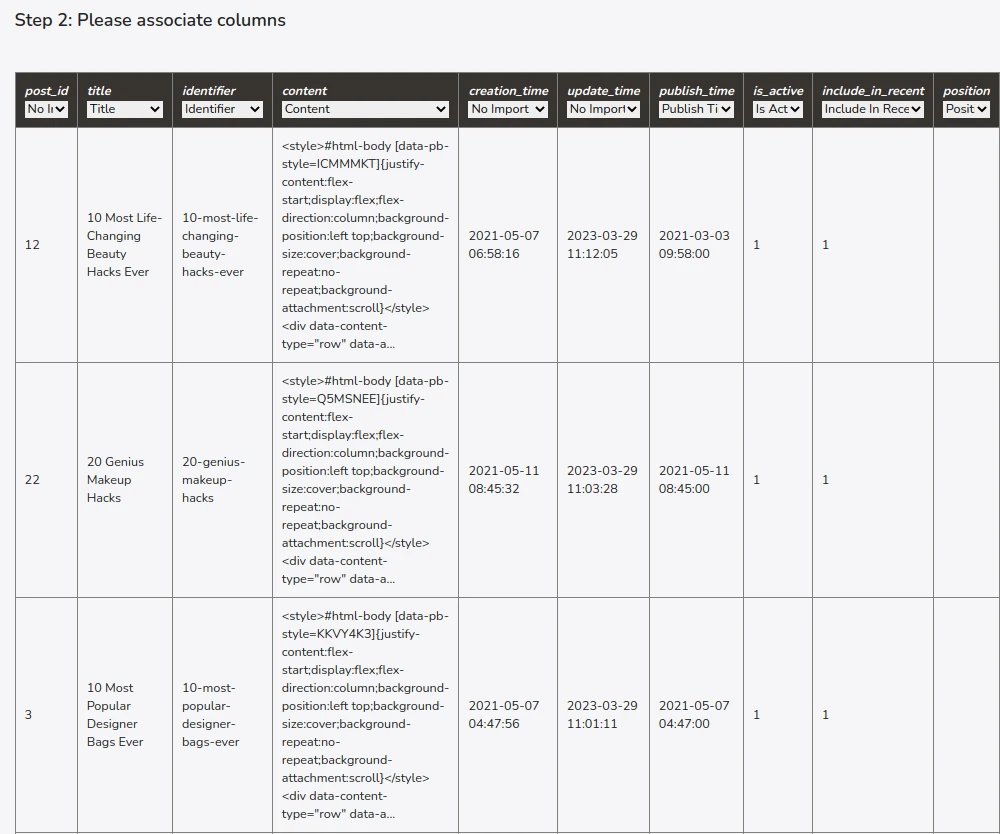
Then, use this sample as a reference and adjust your WordPress export file accordingly. For instance, for blog posts, typical required fields include ID, title, content, excerpt, publish date, permalink, categories, tags, and any custom fields you want to keep.
Step 4. Import the file into Shopify
Lastly, once the CSV file has been properly adjusted, return to your Shopify import app and locate the Import function. Then, upload the finalized CSV file and start the import process. And that’s how to import blog from WordPress to Shopify!
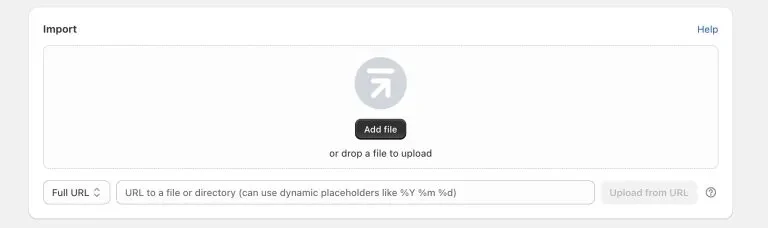
Remember, after the import is completed, you should take time to review the results directly on your Shopify blog. Any issues discovered at this stage will need to be fixed (manually, of course) to avoid further troubles down the line.
Tips for Migrating WordPress Blog to Shopify Successfully
Lastly, for the smoothest WordPress-to-Shopify blog migration, you should audit your current site, back up everything, document your SEO data, and submit your new sitemap in Google Search Console after the migration is completed:
1. Audit your current site
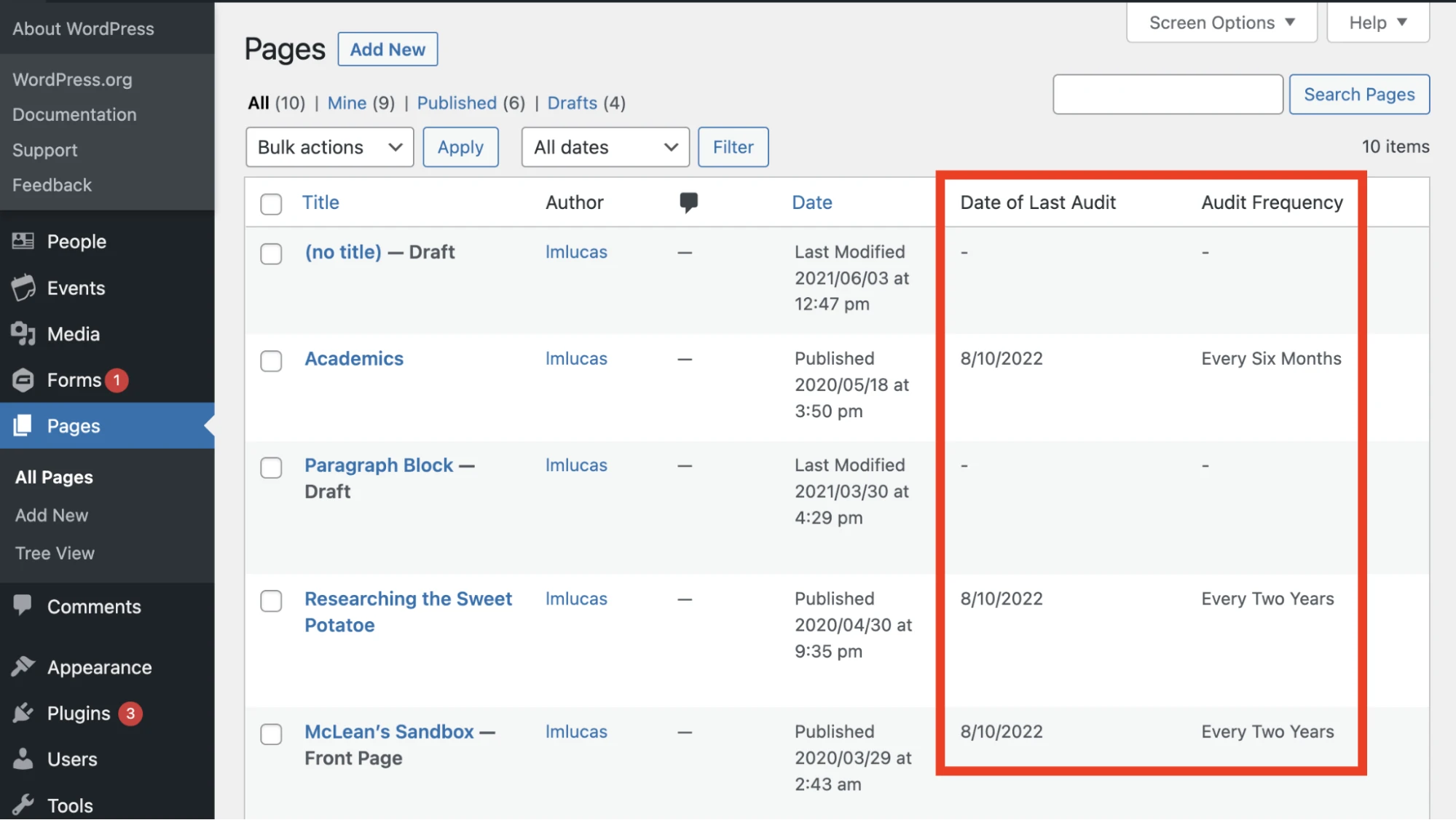
For starters, before the migration starts, you should review your WordPress blog carefully to understand exactly what needs to be moved. Go through your blog posts, pages, categories, tags, authors, and media files, and identify which content is still relevant and which can be left behind.
In addition, this is also the right time to note any custom fields, plugins, or special content structures that your blog relies on. Make a list of these elements, so you know which data needs special handling during export or manual adjustment after migration.
2. Back up everything
Secondly, always create a full backup of your WordPress site before migrating, including your database, blog content, media files, and any custom configurations related to your blog.
You can use a reliable backup plugin or your hosting provider’s backup feature to generate a downloadable copy. And most importantly, make sure to store this backup in more than one location (e.g., cloud storage and a local drive); that way, you can restore your site quickly if something goes wrong.
3. Document your SEO data
Another important task is to collect and document all important SEO-related information from your WordPress blog, including:
- URLs
- Meta titles
- Meta descriptions
- Internal links
- Image alt text
- Any custom SEO fields created by plugins.
Store this information in a spreadsheet or document so you can reference it later when setting up your Shopify blog. That way, it will be easier to compare WordPress data with Shopify content after migration and identify missing or mismatched fields.
4. Submit your new sitemap in Google Search Console
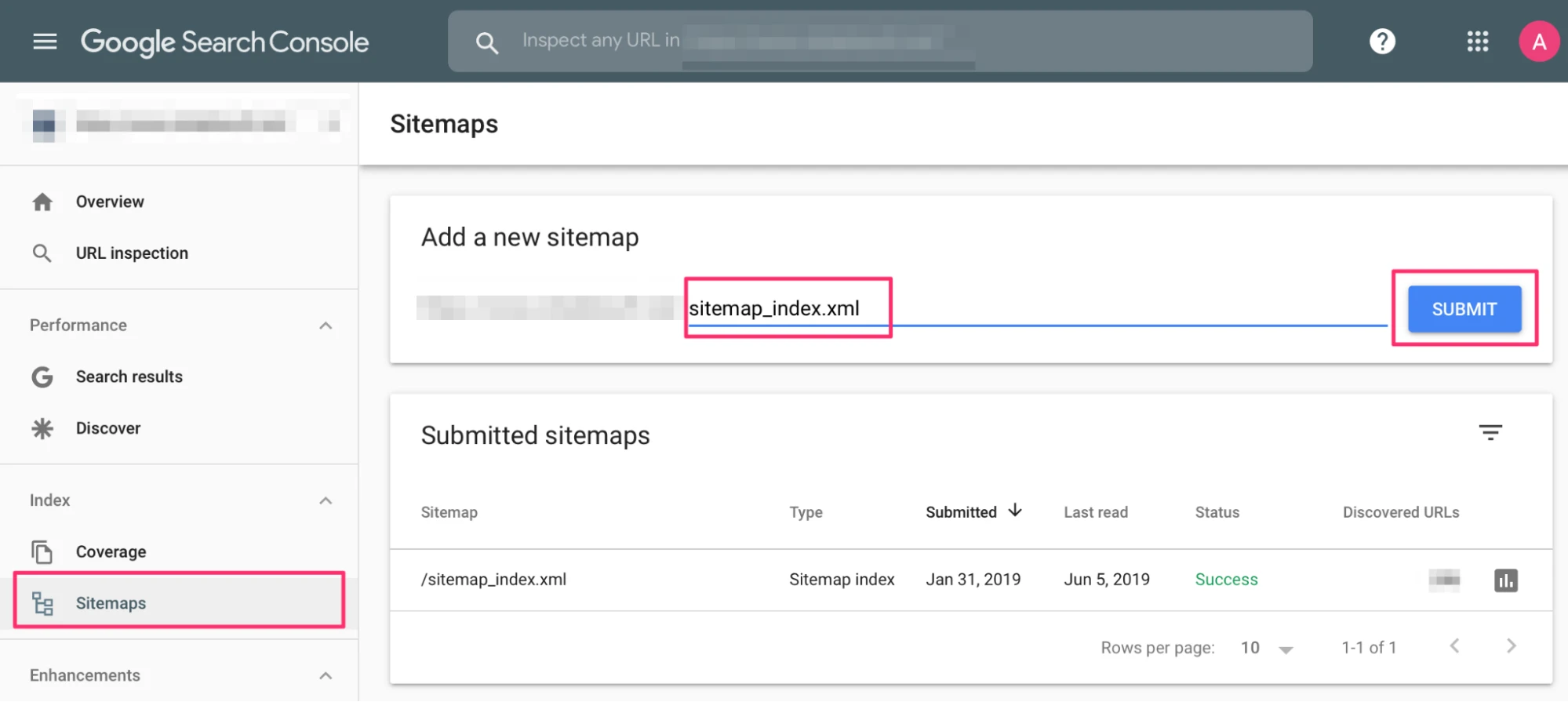
Last but not least, after your Shopify blog goes live, don't forget to generate a new sitemap and submit it through Google Search Console so that Google can discover your new blog URLs faster.
Once submitted, monitor indexing status and crawl reports to ensure your new pages are being indexed correctly. If any issues appear, you can address them early before they impact your blog’s visibility in search results.
Migrate WordPress Blog to Shopify: FAQs
Can I directly transfer my entire WordPress site to Shopify?
No, you cannot directly transfer your entire WordPress site to Shopify in one smooth process due to the fundamental differences in how the two platforms are built. WordPress is a highly customizable content management system, and Shopify is a dedicated eCommerce platform with a specific, standardized structure.
What methods can I use to migrate my WordPress blog content?
Migrating a WordPress blog can be done via plugins, manual FTP/phpMyAdmin transfer, or hosting migration services like LitExtension.
Will I lose my blog images during the migration?
You will not lose your blog images during migration if the process is done correctly. However, images are frequently broken or appear as missing links if the migration is not executed properly.
How long does the migration take?
Migration times range from 2-3 hours for personal device transfers to several weeks or months for complex corporate data projects.
Final Words
All in all, learning how to migrate WordPress blog to Shopify is entirely feasible.
For simpler blogs, a DIY import plugin is usually sufficient. But if you want a smooth, risk-free migration with no technical burden on your side, then LitExtension remains the most reliable choice. With over 15 years of hands-on experience working with 200,000+ merchants worldwide, we will deliver a fully managed, efficient, and accurate blog migration, so you can move your business to Shopify with confidence!
For more tips and guidance, check our blog or join our Facebook Community.