The features of an eCommerce website determine whether visitors buy or leave. Get them right and your store converts. Get them wrong and no amount of traffic fixes it. This guide covers 30+ must-have eCommerce website features – what you need to launch, what to add as you grow, and what separates stores that scale from stores that plateau.
TL;DR
- Find products: site search, navigation, breadcrumbs, sorting, filtering
- Present products: product pages, variants, videos, reviews, recommendations
- Close the sale: shopping cart, guest checkout, payment methods, shipping, SSL, order tracking
- Keep customers: accounts, wishlist, loyalty, email opt-in, push notifications
- Grow the store: coupons, social commerce, personalization, live chat, product feed
- Run the business: inventory, CRM, analytics, multi-currency, international shipping, returns, FAQ, blog
- B2B stores also need: custom pricing, quote management, bulk ordering, account hierarchies, ERP integration
- Red flag: if your platform requires paid plugins for more than two of these features, you’re paying a plugin tax that compounds over time
What Features Does an eCommerce Website Need? A Complete List
Below is the complete list of retail eCommerce website features every online store should have – whether you’re building your first store or auditing an existing one. Each feature includes a platform check question: ask it about your current or prospective platform before committing.
B2B stores have additional requirements covered in the B2B section at the end. Each feature includes a platform check question: ask it about your current or prospective platform before committing.
1. Site search with autocomplete
Most shoppers who know what they want go straight to the search bar. A search function that handles typos, partial words, and category terms — and returns relevant results instantly — keeps them on your site instead of heading to a competitor.
Autocomplete suggestions speed things up further. Lowe’s search is a useful benchmark: it returns product suggestions, corrects misspellings, and filters results by category without the shopper having to ask.
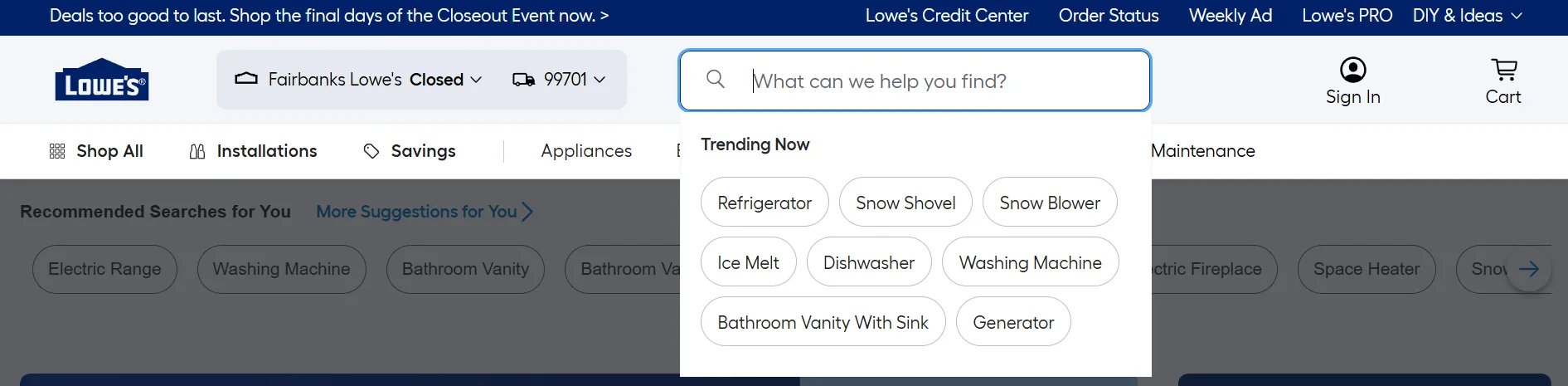
Platform check: Does your platform include autocomplete search natively, or does it require a third-party plugin?
2. Intuitive navigation and mega menu
Your menu should organize products the way shoppers think about them, not the way your backend is structured. For stores with large catalogs, a mega menu that shows subcategories upfront saves shoppers from clicking through multiple layers.
Alibaba’s mega menu is a useful reference: dense but organized, so a shopper landing anywhere on the site can orient themselves immediately.
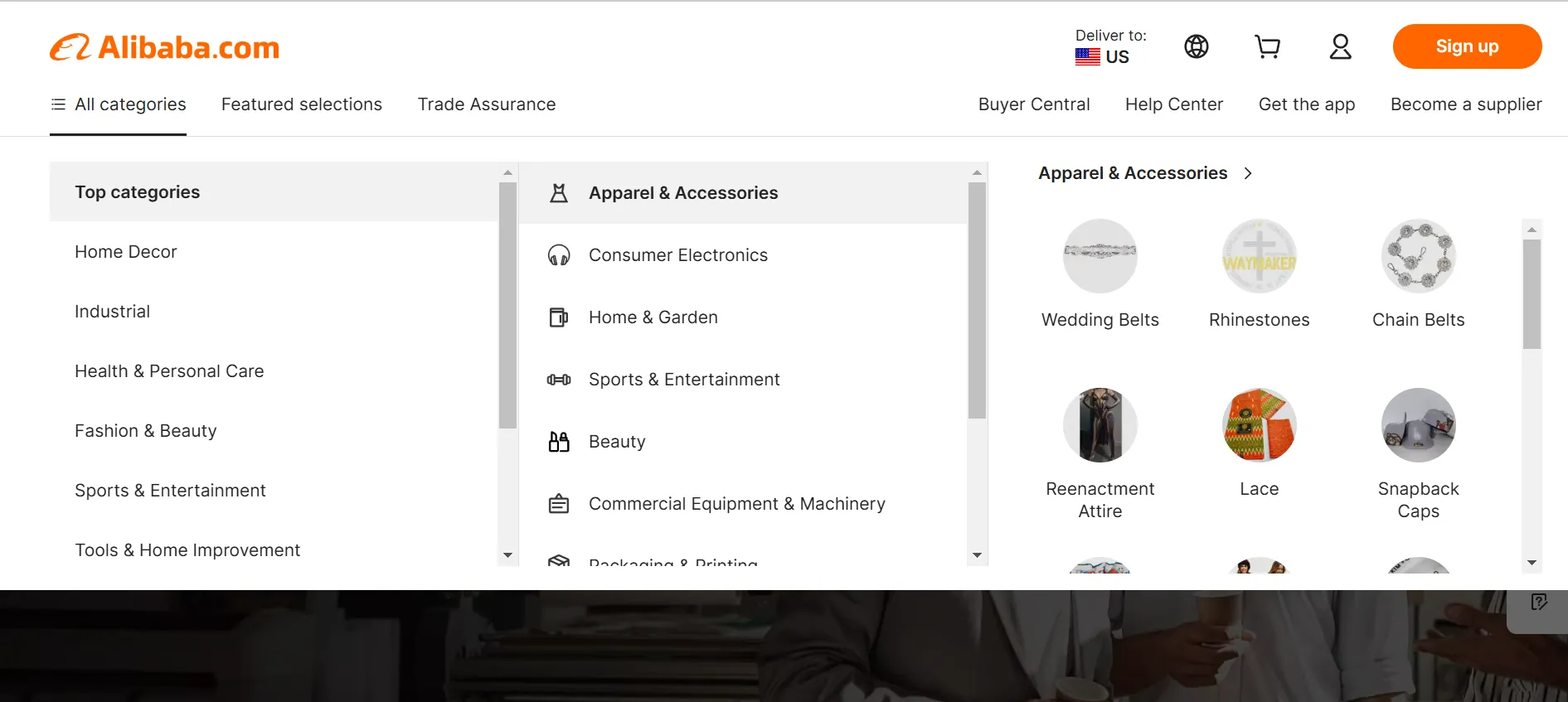
Platform check: Does your platform support mega menus for large catalogs natively, or does it require a plugin?
3. Breadcrumbs
Breadcrumbs show shoppers exactly where they are in your site structure and make it easy to step back without hitting the browser’s back button. They also help search engines understand your site hierarchy, which supports SEO.
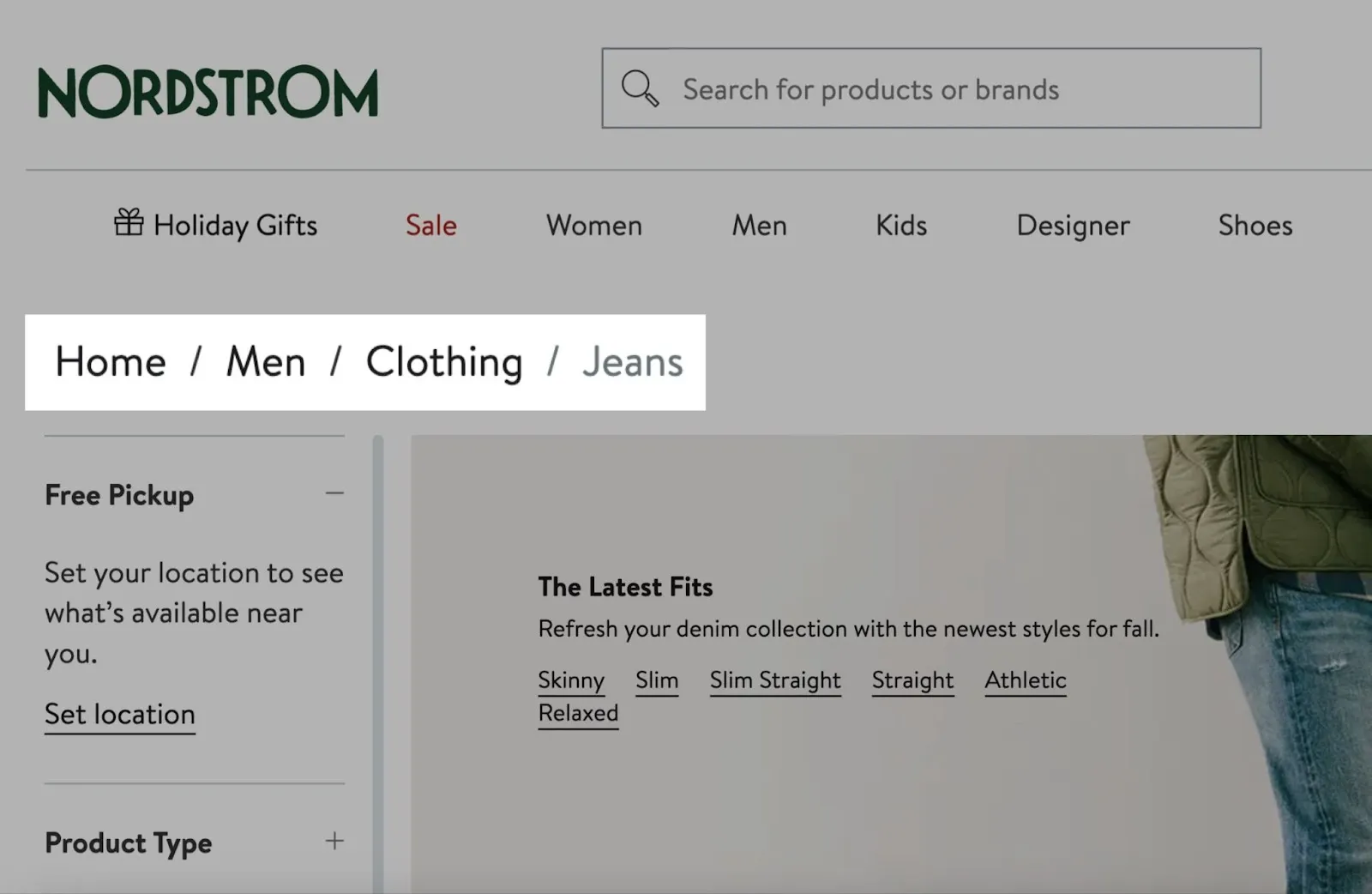
Platform check: Does your platform generate breadcrumbs automatically, or do they require manual setup?
4. Product sorting
Sorting by price, popularity, newest, and relevance lets shoppers reorganize your catalog based on what matters most to them at that moment — without changing what’s available, just the order they see it in.
Platform check: Does your platform support custom sort options on category pages without custom development?
5. Product filtering and faceted search
Filtering by attributes — size, color, material, price range, use case — lets shoppers narrow a large catalog to exactly what they want without scrolling through everything you carry.
Gymshark handles this cleanly: filters by price, relevancy, and newest are consistently available across category pages. Allbirds goes further, letting shoppers filter by activity, color, and material — making even a focused catalog feel navigable.
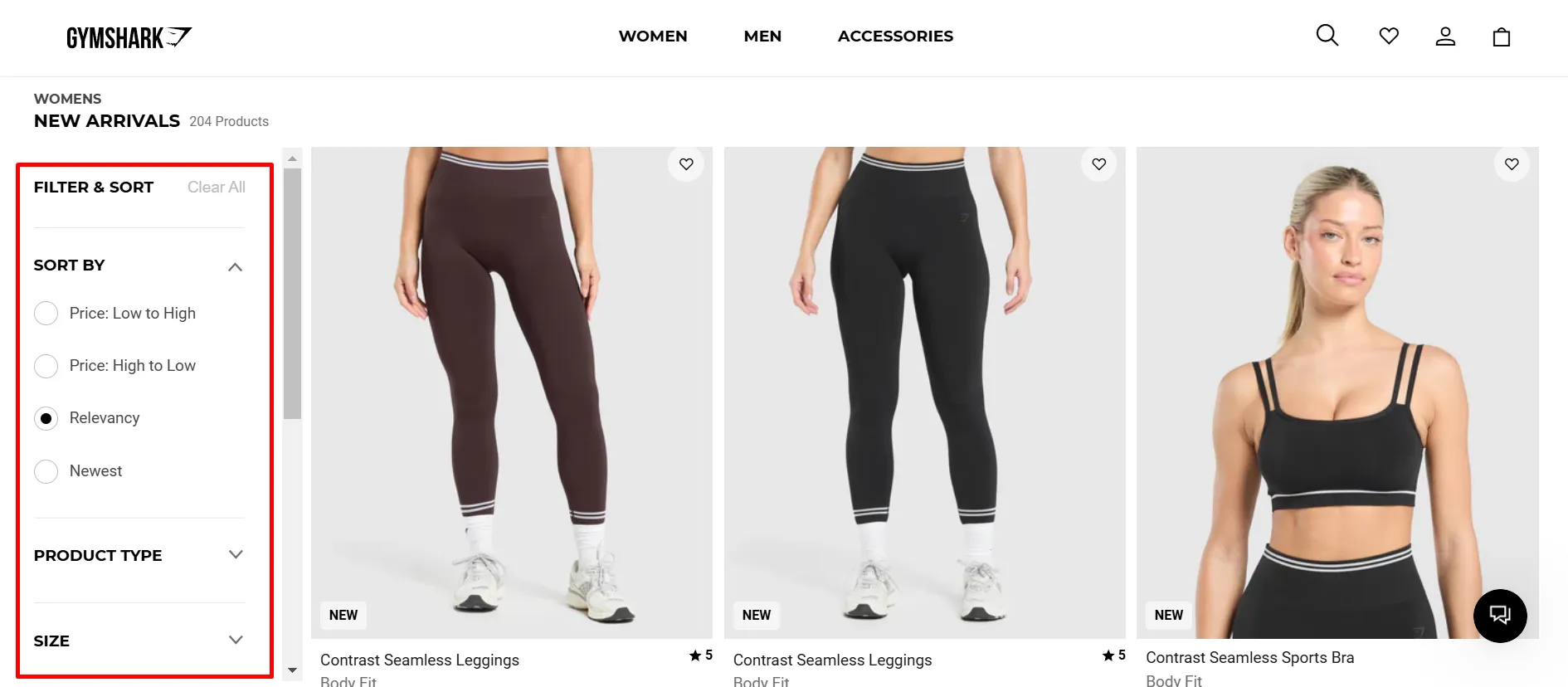
For larger catalogs, faceted filtering — applying multiple filters at once — matters most. Without it, a shopper looking for a blue waterproof jacket in size M has to do that work manually.
Platform check: Does your platform support faceted filtering natively? Does performance hold up as your catalog scales past 500–1,000 SKUs?
6. Customizable product pages
A product page needs to give shoppers everything they need to feel confident: high-quality images from multiple angles, a detailed description, dimensions or specifications, and clear pricing. The more complete the page, the fewer questions a shopper has before buying.
IKEA sets a useful benchmark: every product includes multiple images, materials, dimensions, and assembly details. Nothing is left to the imagination.
Platform check: Can you fully customize product page layouts without developer access?
7. Product variants
When a product comes in multiple sizes, colors, or materials, all options should live under one listing — not scattered across separate pages. Shoppers shouldn’t have to search for the “blue version” of something they’re already looking at.
Nike handles this well: size, width, and color are all selectable on a single product page, with availability updating in real time.
Platform check: Does your platform support product variants natively? Can you set different prices or images per variant?
8. Product videos
Video gives shoppers a view of a product that static images can’t match — how it moves, how it’s used, how it fits. For clothing, electronics, furniture, and anything with a tactile quality, video reduces uncertainty and increases conversion.
Notebook Therapy includes short videos alongside photos on every listing, giving shoppers enough context to buy without hesitation.
Platform check: Does your platform support video embeds on product pages natively?
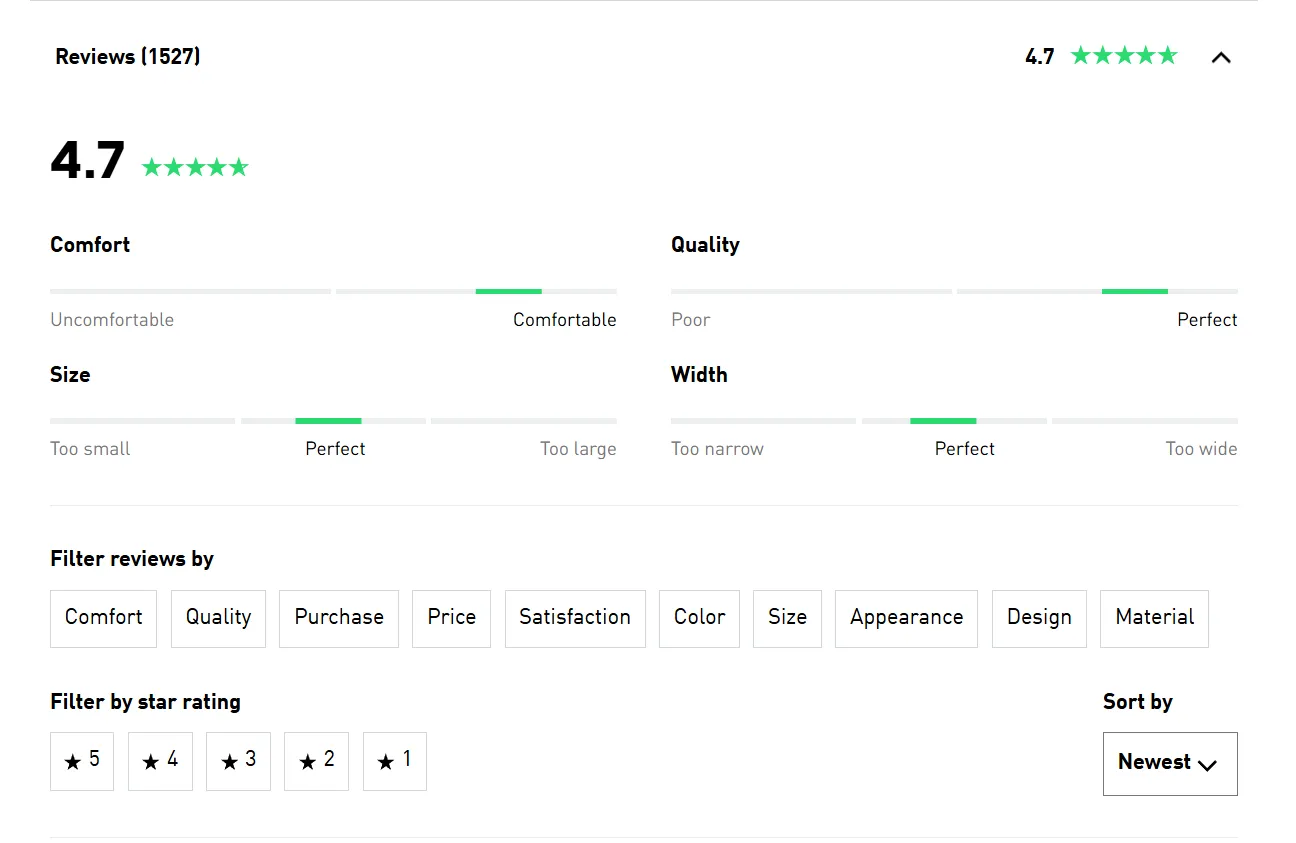
9. Product reviews and ratings
Reviews are the most powerful trust signal on a product page. According to the Baymard Institute, the vast majority of shoppers read reviews before buying. Show star ratings prominently, make reviews easy to find, and include customer photos where possible.
Death Wish Coffee shows thousands of verified reviews on every product page. For a commodity like coffee, that volume of social proof is what closes the sale.
Platform check: Is review functionality — including photo reviews and star ratings — available without a paid app?
10. Product recommendations and related items
“Customers also bought,” “recently viewed,” and “you might also like” modules help shoppers discover products they didn’t search for and lift average order value when the recommendations are actually relevant. Generic recommendations based only on category membership add noise. Recommendations based on real purchase and browsing behavior add value.
Platform check: Does your platform include a native recommendation engine, or does it require a third-party app?
11. Shopping cart
A cart that’s easy to access, easy to edit, and persistent across sessions is the baseline. Shoppers should be able to add items, change quantities, remove products, and see a running total without friction. A cart that disappears when a session ends loses real sales.
Platform check: Does your platform support persistent carts for returning visitors?
12. Guest checkout
Forcing account creation before purchase is one of the top reasons shoppers abandon at checkout. Guest checkout removes that barrier for first-time buyers. You can invite them to create an account after the purchase — when they’ve already committed.
Platform check: Does your platform support guest checkout on your current plan?
13. Multiple payment methods
Credit and debit cards are the baseline. Add PayPal, Apple Pay, and Google Pay at minimum. Buy Now Pay Later (BNPL) options like Klarna or Afterpay are increasingly expected in fashion, electronics, and home goods. For many shoppers, payment options aren’t just convenient — they’re the reason they trust a store enough to complete the purchase.
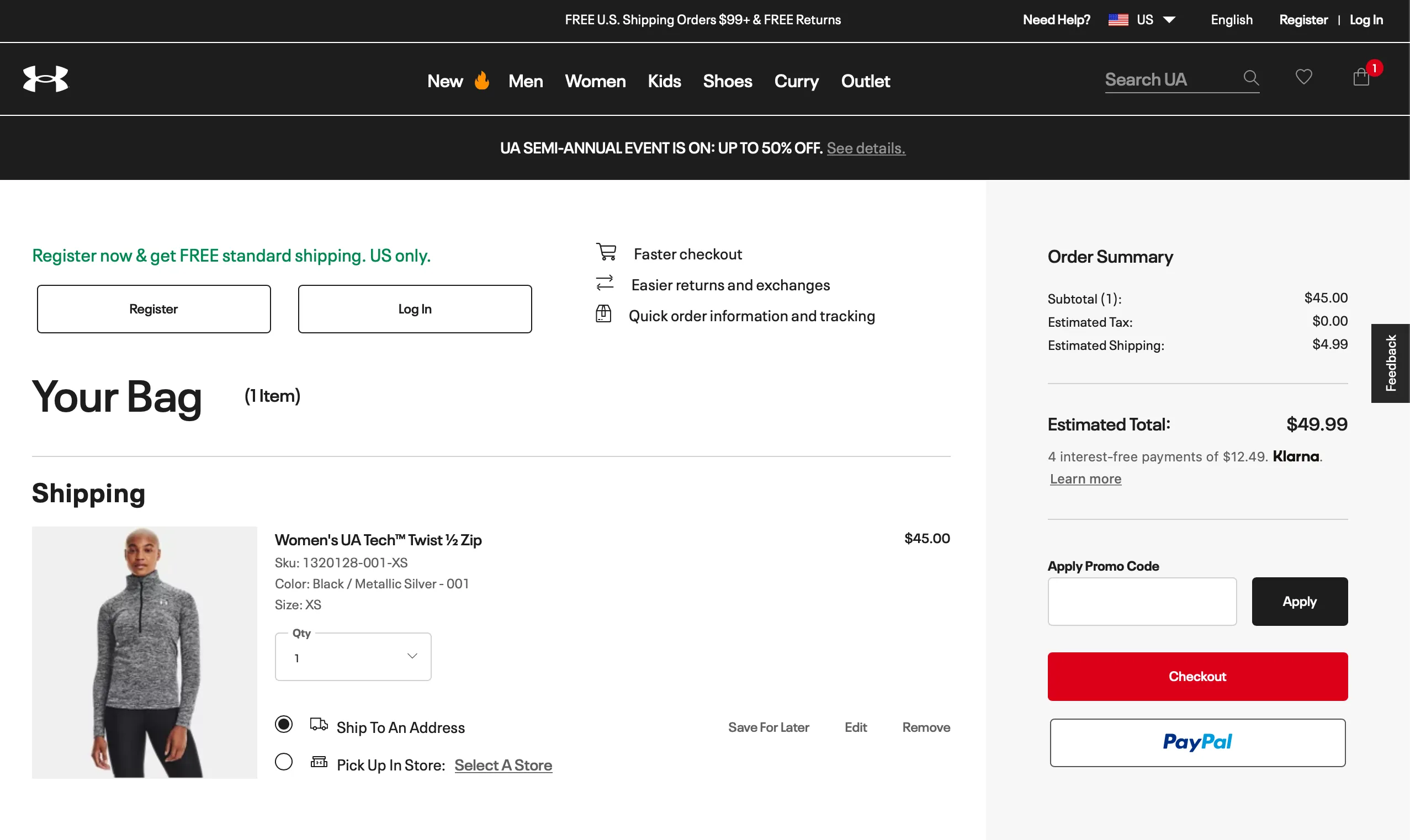
Platform check: Which payment gateways does your platform support natively? Are there transaction fees on top of gateway fees?
14. Shipping options and calculator
Show calculated shipping rates based on location before the final confirmation step. Unexpected shipping costs at checkout are the single biggest abandonment trigger. Offering multiple shipping options — standard, express, free above a threshold — gives shoppers control and reduces the surprise cost problem.
Platform check: Does your platform support real-time carrier rate calculation and multiple shipping zones?
15. SSL and secure checkout
SSL is the padlock icon in the browser address bar. Without it, browsers warn visitors that your site is not secure — and most leave immediately. Pair it with recognizable payment logos and trust badges at checkout to reduce hesitation at the moment it matters most.
For stores taking card payments, PCI DSS compliance is required. Most hosted platforms handle this automatically, but worth confirming on self-hosted setups.
Platform check: Is SSL included on all plans? Does the platform maintain PCI compliance at the hosting level?
16. Order tracking and post-purchase communication
The purchase doesn’t end at the confirmation page. Shoppers who don’t receive timely updates contact support — which costs time and erodes trust. Real-time tracking with estimated delivery dates and automated shipping notifications handle this without manual effort.
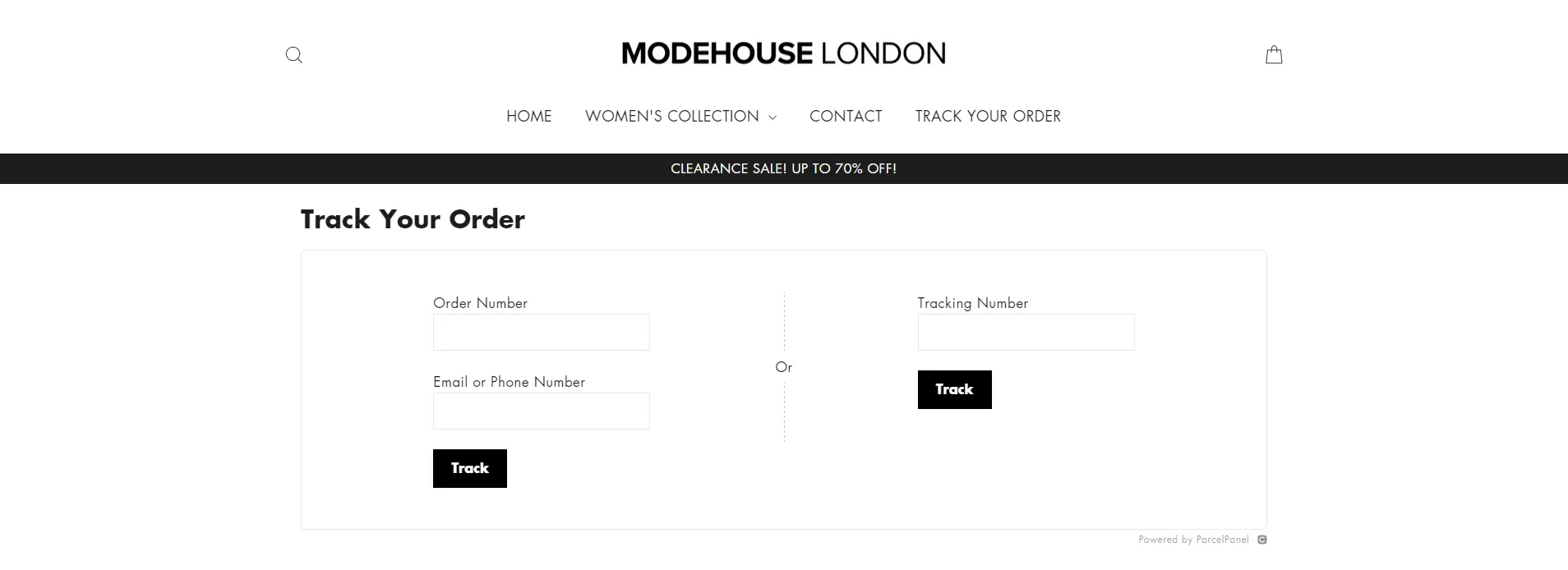
Tools like AfterShip integrate with most platforms and automate the full update flow.
Platform check: Does your platform provide native order tracking, or does it require a third-party integration?
17. Customer accounts and login
Customer accounts make the second purchase faster. Saved addresses, stored preferences, and visible order history reduce checkout time for returning buyers and give them a reason to come back directly rather than through a paid ad.
Social login — signing in with Google or Facebook — removes the friction of creating and remembering another password. Small change, meaningful impact on sign-up rates, particularly on mobile.
Platform check: Is social login available natively, or does it require a plugin?
18. Wishlist
A wishlist lets shoppers save products they want but aren’t ready to buy yet. For the shopper, it’s a convenience feature. For you, it’s a signal of intent you can act on — with a price-drop notification, a targeted email, or a seasonal promotion timed to when they saved it.
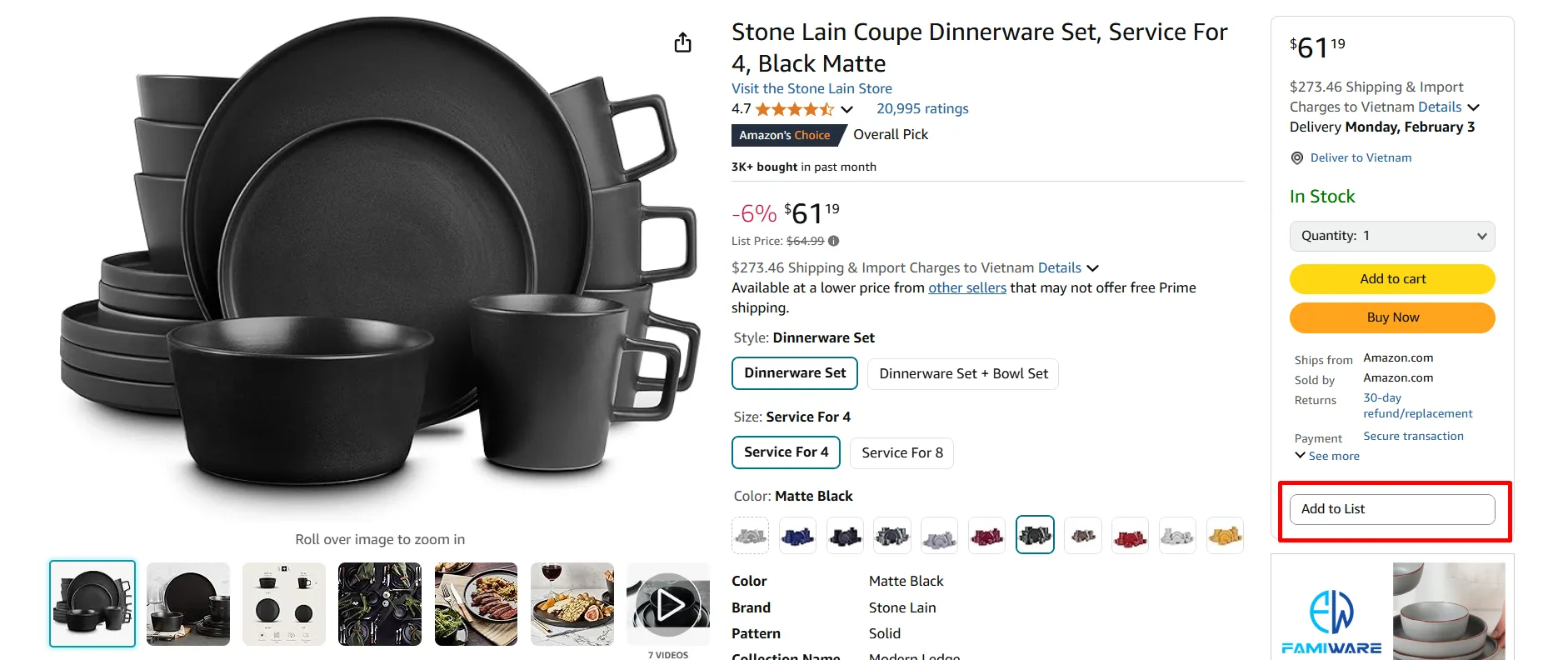
Amazon’s wishlist is the standard most shoppers are familiar with: one click to save, easy to revisit.
Platform check: Is wishlist functionality available on your current plan without a plugin?
19. Loyalty program
Loyalty programs work best when they give customers a reason to spend more to reach the next level — and make each level feel meaningfully different. Points redeemable for discounts are the baseline. What makes programs like Sephora’s Beauty Insider effective is the combination of tangible rewards with a sense of progress that keeps customers engaged between purchases.

You don’t need Sephora’s scale to start. A simple points-per-dollar structure with a clear redemption path is enough. Add tiers once you have enough purchase data to set achievable thresholds.
Platform check: Is a loyalty program available natively, or does it require a third-party integration like Smile.io or LoyaltyLion?
20. Email and SMS opt-in
Most first-time visitors don’t buy. A well-placed opt-in form — header, footer, or exit-intent popup with a clear offer — turns a visit into a relationship you can build on. Pair it with an automated welcome sequence and abandoned cart emails sent within an hour of abandonment.
SMS works alongside email for time-sensitive moments: flash sales, restock alerts, limited drops. Open rates are significantly higher than email, so keep messages infrequent and relevant.
Platform check: Does your platform include native email capture and automation, or does it require a third-party tool like Klaviyo or Mailchimp?
21. Push notifications
Push notifications reach shoppers directly on their device, even when they’re not on your site. Most useful for time-sensitive moments — a restock, a flash sale, a cart sitting idle for 24 hours. Keep them infrequent and relevant. A notification that feels like noise gets disabled permanently.
Platform check: Is push notification functionality available natively, or does it require a third-party app?
22. Coupon codes and promotional tools
Discounts drive acquisition and re-engagement, but the mechanics matter. A flat percentage off is the starting point — the real value comes from rule-based promotions: minimum order thresholds, category-specific discounts, first-purchase offers, and time-limited campaigns tied to seasonal moments.
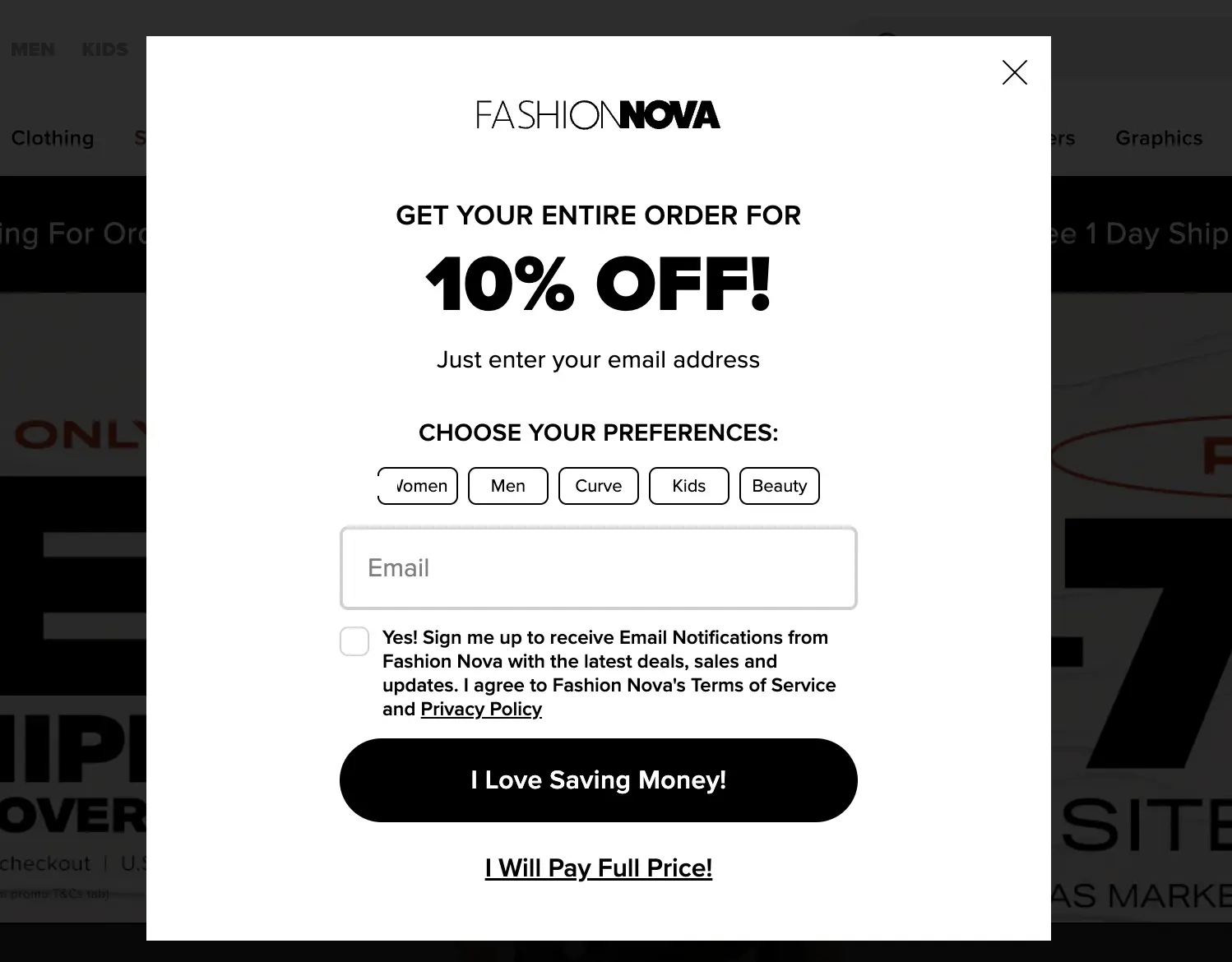
Display active promotions where shoppers are most receptive: homepage banners, product pages, and at checkout as a final nudge.
Planning seasonal promotions takes more than a discount code. Download LitExtension’s 2026 eCommerce Strategy Calendar to map your campaigns around the key retail moments of the year.
Platform check: How flexible is your platform’s discount engine? Can you run rule-based promotions natively, or are complex discount structures plugin-dependent?
23. Social commerce and UGC
Social commerce — shoppable posts, TikTok Shop integration, Instagram product tags — brings your catalog to where your audience already spends time. For younger demographics especially, product discovery increasingly happens on social platforms rather than search engines.
User-generated content (UGC) like customer photos, unboxing videos, and tagged posts is more trusted than brand-produced imagery and significantly cheaper to produce. A post-purchase email asking for photos, a branded hashtag, or a small incentive for tagging can build a steady stream of it.
Platform check: Does your platform support native social commerce integrations with Instagram and TikTok?
24. Personalization
Personalization works best when it’s based on real behavior — what a shopper browsed, bought, or saved. Dynamic content, targeted offers, and behavior-triggered emails all lift revenue when they’re actually relevant to the shopper seeing them.
Drink Flyers uses a version of this well: educational sections like “What is a CBD cocktail?” appear inline with products, reducing hesitation for first-time buyers without requiring them to search for information separately.
Platform check: Does your platform support behavior-based personalization natively, or does it require a third-party app?
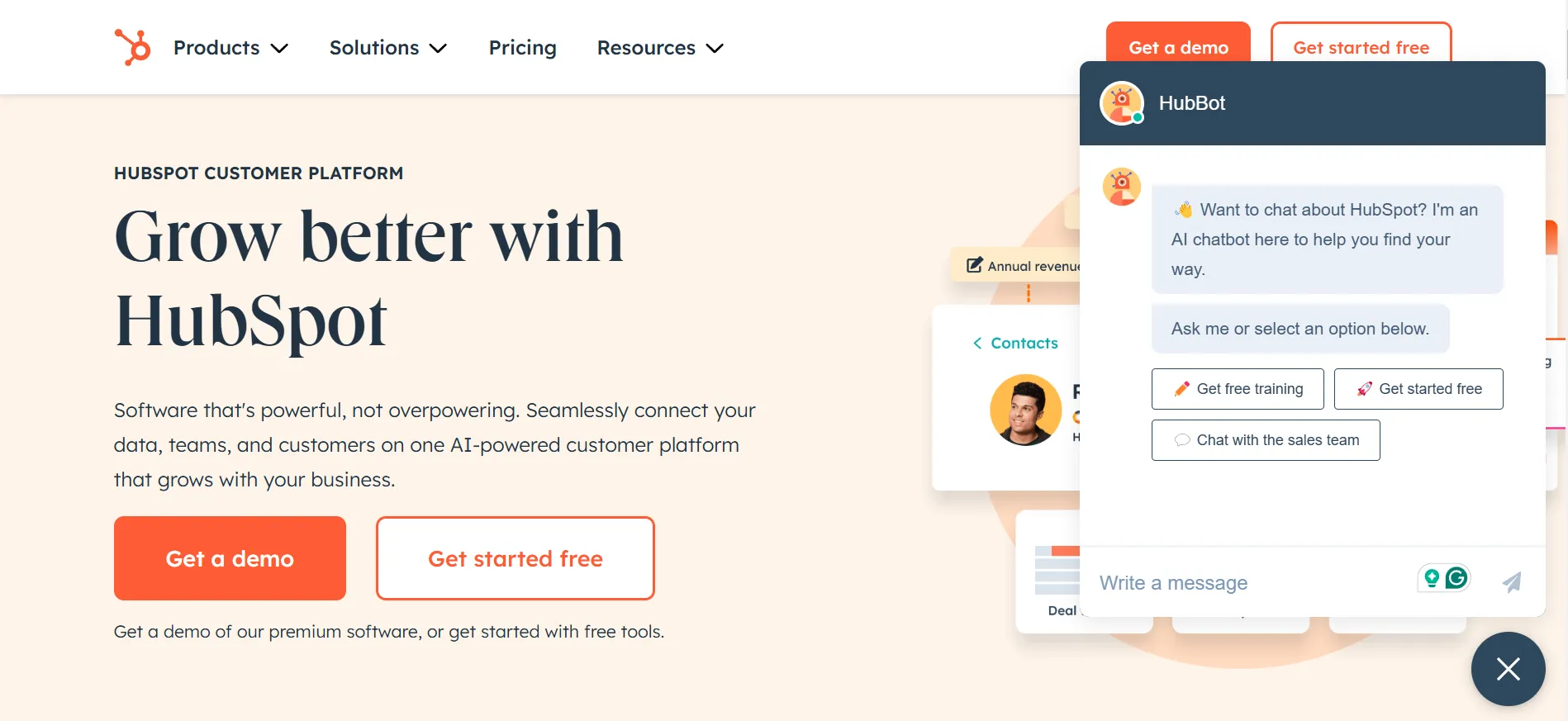
25. Chatbots and live chat
A chatbot handles questions that would otherwise reach your support inbox at 2am: order status, return policy, sizing, product availability. Done well, it keeps shoppers moving toward purchase rather than waiting for an email reply. Route simple, repeatable queries to the bot. Route anything requiring judgment to a person.
Platform check: Does your platform include native chat functionality, or does it require a third-party integration?
26. Product feed and multi-channel selling
A product feed lets your catalog automatically sync to external channels — Google Shopping, Meta Commerce Manager, marketplaces — with accurate titles, descriptions, prices, and images. Without it, you’re managing listings manually across every channel, which doesn’t scale.
Platform check: Does your platform support automatic product feed generation for Google Merchant Center and Meta?
27. Inventory management
Real-time inventory tracking prevents the worst outcome in eCommerce: a customer places an order you can’t fulfill. Good inventory management shows accurate stock levels on product pages, triggers low-stock alerts, and updates automatically when orders come in.
Platform check: Does your platform include real-time inventory tracking with low-stock alerts natively?
28. CRM integration
A CRM gives you a structured view of your customer relationships: who bought what, when, how often, and at what value. With that data you can build segments and reach each group with something relevant. A win-back email to a customer who hasn’t purchased in 90 days, or a VIP offer to your top spenders, runs automatically once configured.

Zoho, HubSpot, and Klaviyo all integrate with major platforms. The key question is how cleanly your platform exports customer and order data for segmentation.
Platform check: Does your platform expose customer and order data via API for CRM sync?
29. Analytics and reporting
Every store needs Google Analytics 4 connected and properly configured — tracking sessions, revenue, conversion rate, and which pages and traffic sources drive purchases. Your platform’s native reporting should cover order volume, average order value, top products, and customer lifetime value.
The stores that grow consistently know which products are underperforming, which traffic sources convert, and where in the funnel they’re losing customers — and they check that data regularly.
Platform check: Does your platform integrate natively with Google Analytics 4? What data is available in the built-in dashboard without third-party tools?
30. Multiple currencies and international shipping
If you sell globally, shoppers need to see prices in their local currency and shipping rates calculated to their location before checkout. Unexpected currency conversions and flat international shipping rates are two of the most common reasons international shoppers abandon.
Platform check: Does your platform support automatic currency switching and multi-zone shipping rates?
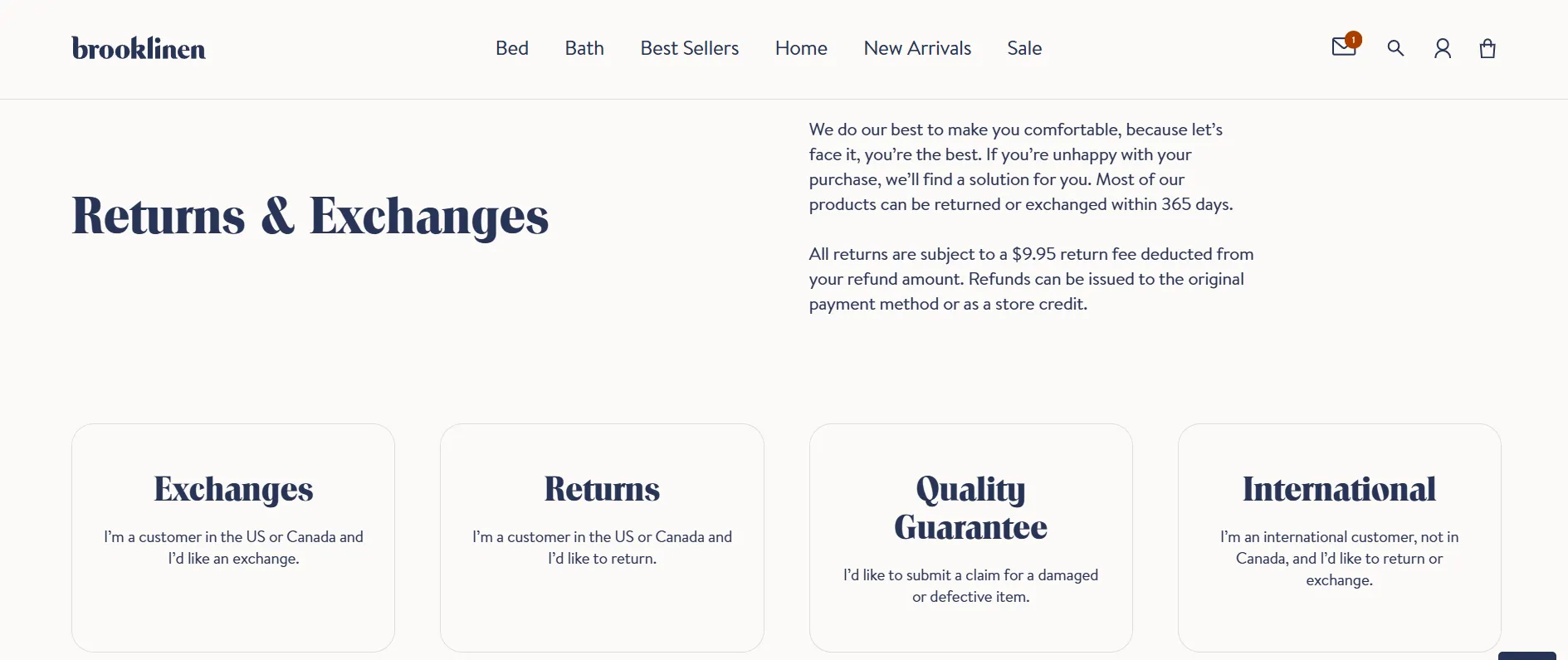
31. Return policy management
A clear, easy-to-find return policy reduces purchase hesitation before it becomes abandonment. Brooklinen’s 365-day return policy is a useful benchmark — not because every store needs those terms, but because the policy is prominently placed and clearly written.
Platform check: Does your platform include a native policy page builder, or do return policy pages require custom setup?
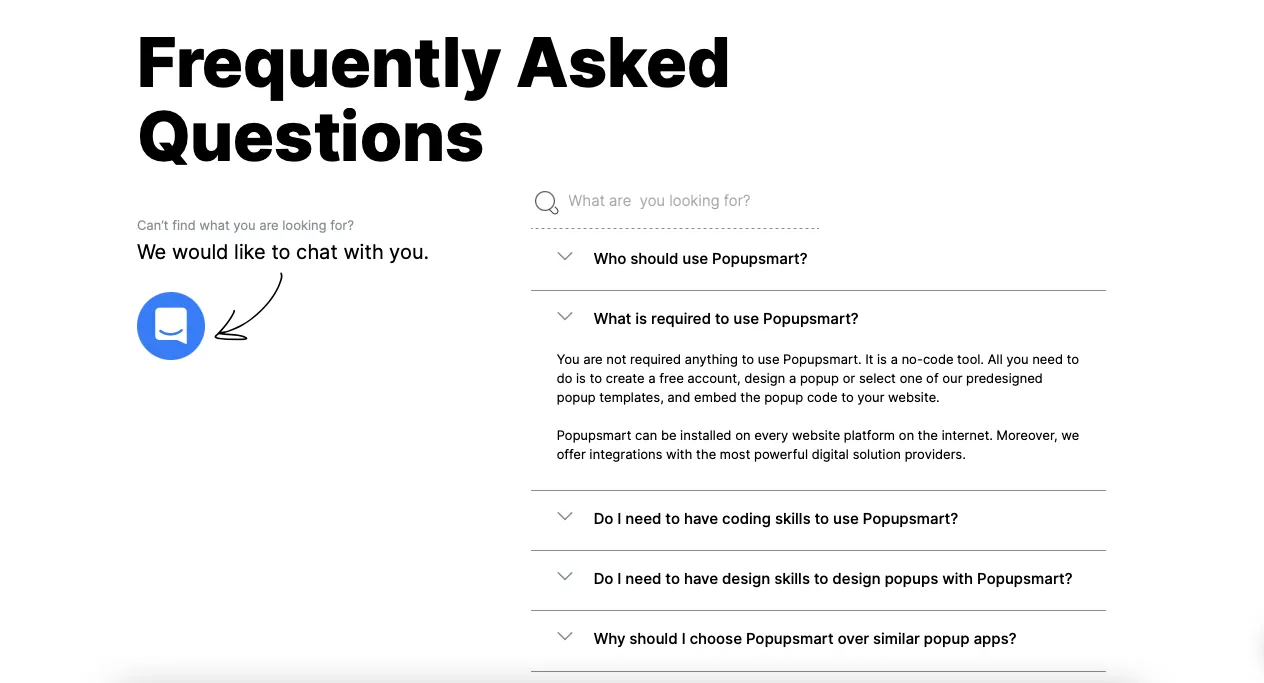
32. FAQ page
A well-maintained FAQ page answers the questions shoppers have before they contact support — reducing ticket volume and keeping shoppers moving toward purchase. Organize it by topic and keep it current. A good FAQ page also targets People Also Ask boxes in search, which is a useful organic traffic opportunity that costs nothing extra.
Platform check: Does your platform include native FAQ functionality, or does it require a custom page?
33. Blog and content management
A blog lets you target informational keywords your product and category pages can’t rank for. It builds topical authority in your niche and gives you content worth sharing. Almond Surfboards links their blog, surfboard guides, and brand story seamlessly from their main navigation — editorial content and commerce reinforce each other.

Platform check: Is a blog included natively on your platform, or does it require a separate CMS?
B2B eCommerce Website Features: What’s Different
The 33 features above apply to both B2C and B2B stores. But B2B eCommerce involves more complex buying processes — multiple stakeholders, negotiated pricing, bulk ordering, and longer purchasing cycles — which require an additional layer of functionality.
If you run a wholesale, manufacturing, or distributor business, these are the features your platform also needs to support:
Custom pricing and customer-specific catalogs
B2B buyers expect pricing that reflects their negotiated terms — not a public price list. Your platform should support account-specific pricing, customer group discounts, and the ability to show or hide products based on the buyer’s account type. A distributor buying 500 units shouldn’t see the same price as a retailer buying 10.
Quote and RFQ management
Not all B2B transactions happen at a fixed price. A request-for-quote (RFQ) workflow lets buyers submit a quote request and your team respond with custom pricing before the order is placed. This is standard in manufacturing, industrial supply, and wholesale — and most B2C platforms don’t support it natively.
Bulk ordering and quick order pad
B2B buyers often know exactly what they need and want to order it fast. A quick order pad — where buyers can enter SKUs or upload a CSV to add multiple products at once — is significantly more efficient than browsing category pages for a buyer placing a 50-line order.
Multi-user accounts and approval workflows
In B2B, the person browsing isn’t always the person who approves the purchase. Account hierarchies let you set up company accounts with multiple users, assign spending limits by role, and require manager approval before an order is submitted.
Purchase orders and net payment terms
Many B2B buyers pay on net 30, net 60, or net 90 terms — not by credit card at checkout. Your platform needs to support purchase order (PO) numbers, invoicing, and flexible payment terms as native checkout options.
ERP and CRM integration
B2B operations typically run on ERP systems (NetSuite, SAP, Microsoft Dynamics) that manage inventory, pricing, and fulfillment. Your eCommerce platform needs to sync with these systems in real time — otherwise pricing, stock levels, and order data will be out of sync across channels.
Reorder functionality
B2B buyers often purchase the same products on a recurring basis. A one-click reorder from order history, or a saved order template, removes friction from the repeat purchase process and reduces the chance they go elsewhere.
When Your Platform Can’t Keep Up — and What to Do About It
Most stores don’t fail because of bad products. They fail because the platform they launched on can’t support the features their business now needs — and they keep patching the gap with plugins.
The pattern is consistent: a store launches on a platform that felt right at the time. The business grows. You need faceted filtering, a loyalty program, a one-page checkout. Each missing feature gets solved with a paid plugin — $20 here, $40 a month there. Within a year, you’re running six or seven third-party apps, each with its own update cycle, conflict risk, and support queue.
This is the plugin tax. And it’s worth paying attention to.
When the plugin tax is a signal
A plugin or two is normal. But if you’re going through this checklist and answering “need a plugin for that” more than two or three times, the problem isn’t your app stack. It’s the platform underneath it. Specific patterns to flag:
- Guest checkout or reduced checkout steps require a paid app
- Product filtering breaks down on catalogs over 500 SKUs without a third-party search tool
- Basic SEO controls like editable meta fields, canonical tags, URL slugs are locked behind a higher pricing tier
- Inventory tracking or multi-currency support requires a separate integration
- B2B features like custom pricing or quote management aren’t available on your current plan
These are platform ceiling problems. They don’t get cheaper to solve the longer you stay.
What to do about it
If you’re building your first store, use this checklist as a platform selection tool. Before committing, run through the list and ask: are these available natively, on the plan I can afford, without custom development?
If you’re on an existing platform, the calculation is straightforward: what does it cost to keep patching versus what does it cost to move? When ongoing plugin and maintenance costs approach migration cost, migration typically wins – financially and operationally.
If you’ve been adding plugins to compensate for platform limitations, it’s worth knowing what the alternative looks like. Book a free consultation with LitExtension and we’ll walk you through what a migration to a better-fit platform would actually involve – no commitment required.
Let Our Experts Handle Your Store Migration!
With the All-in-One Migration Service, our experts take care of everything, ensuring a seamless and stress-free migration.

Ecommerce Website Features: FAQs
What features should an eCommerce website have?
Prioritize the must-have tier before launch: mobile-first design, site speed, SSL, intuitive navigation, strong product pages, a frictionless checkout, and order tracking. These directly affect whether first-time visitors convert and whether they trust your store enough to complete a purchase.
Which eCommerce features have the biggest impact on conversion rates?
Checkout friction is the highest-leverage area guest checkout, one-page checkout, and multiple payment options collectively address the leading causes of cart abandonment. After checkout, product page quality (visuals, descriptions, reviews) and site speed have the most direct impact on conversion.
What should I look for when choosing an eCommerce platform?
Run through the must-have feature tier and ask whether each is available natively, on an affordable plan, without custom development. Pay particular attention to checkout flexibility, mobile performance, and SEO controls since these are the areas where platform limitations most commonly force merchants toward costly plugins or eventual migration.
How do I know if my current platform is missing important features?
Use this checklist as an audit. If you're consistently answering "need a plugin for that" in the must-have tier, or if your plugin costs are compounding month over month, your platform may have reached its ceiling for your business stage. The platform check section above covers how to evaluate this.
How can eCommerce sites succeed?
Get the fundamentals right first – fast load, clear navigation, strong product pages, frictionless checkout. Then build retention: email, loyalty, post-purchase follow-up. The stores that plateau are usually missing either the right features for their stage or a platform that supports them without a plugin tax. Fix those two things and most of the growth opportunity opens up.
Conclusion
The features that matter most aren’t the most complex ones. They’re the ones your customers encounter on every visit — how easy it is to find a product, how confident they feel on the product page, how frictionless the checkout is, and how well you follow up after the sale.
Use this list as a working audit. Go through each feature and ask the platform check question. If the answers keep coming back as another plugin, another workaround, another developer invoice, that’s worth paying attention to.
A free consultation with LitExtension is the lowest-risk way to find out what the alternative looks like. We’ll walk you through what a migration to a better-fit platform would actually involve — no downtime, no commitment.
For more insights, check out our Store Growth blog collection or join the LitExtension community group where you can meet like-minded professionals.