WooCommerce, a WordPress plugin, has always been one of the best platforms for you to run your online store. It’s true that WooCommerce can bring you plenty of benefits, but WooCommerce might not be your forever perfect fit, especially when your business needs something easier to use but still powerful. Then, a platform with both robust built-in features and high customization, like BigCommerce, might be a better destination. The question is: How to move your store from WooCommerce to BigCommerce?
To all sellers who are now demanding to switch from WooCommerce to BigCommerce, LitExtension – #1 Shopping Cart Migration Expert is here to solve your problem and make it easier for you to proceed with your migration. We are going to take you through the data migration process using the following steps:
Let’s check them out!
WooCommerce to BigCommerce: The Preparation
As always, the first part of the preparation is to truly understand the basic knowledge of what you are going to do. Here we are now talking about BigCommerce migration or data migration in general and how to do it with LitExtension. Below is some information that you may want to spend a minute reading before starting:
Methods of data migration
Currently, there are 3 methods to perform cart-to-cart migration.
- Migrate manually.
- Hire a developer or agency.
- Use automated migration services like LitExtension.
Benefits of LitExtension migration service
The LitExtension migration service helps you transfer all business-critical data during your shopping cart migration. This data includes Customers, Products, Orders, Payment information, and much more. Amazingly, the whole process is automated, meaning you won’t need much technical knowledge to perform WooCommerce to BigCommerce migration.
LitExtension will simplify the process of moving your eCommerce business from one platform to another, saving you time while maximizing your store’s efficiency. Let’s see how you can transfer all your data with just a few clicks!
Need Help to Migrate to BigCommerce?
LitExtension Automated Migration Tool transfers products, customers, and orders
from WooCommerce to BigCommerce – fast, accurate, and hassle-free.

#1. Back up the WooCommerce database
Data migration might not always be a simple journey, as it involves several phases to get your data to the Target store. Therefore, protecting databases is an important step. If you still feel insecure, go with LitExtension’s All-in-One migration services, and our expert will support you from start to end of the WooCommerce to BigCommerce migration.
In case you choose to do it yourself, follow these steps to back up the WooCommerce database manually:
- Go to your WooCommerce store back-end, and navigate to “Tools” > “Export”. From there, you can export all of your site content, such as your posts, pages, comments, custom fields, etc., to XML files. If you, on the other hand, don’t want to export all of your content, you can choose the specific fields you want to export.
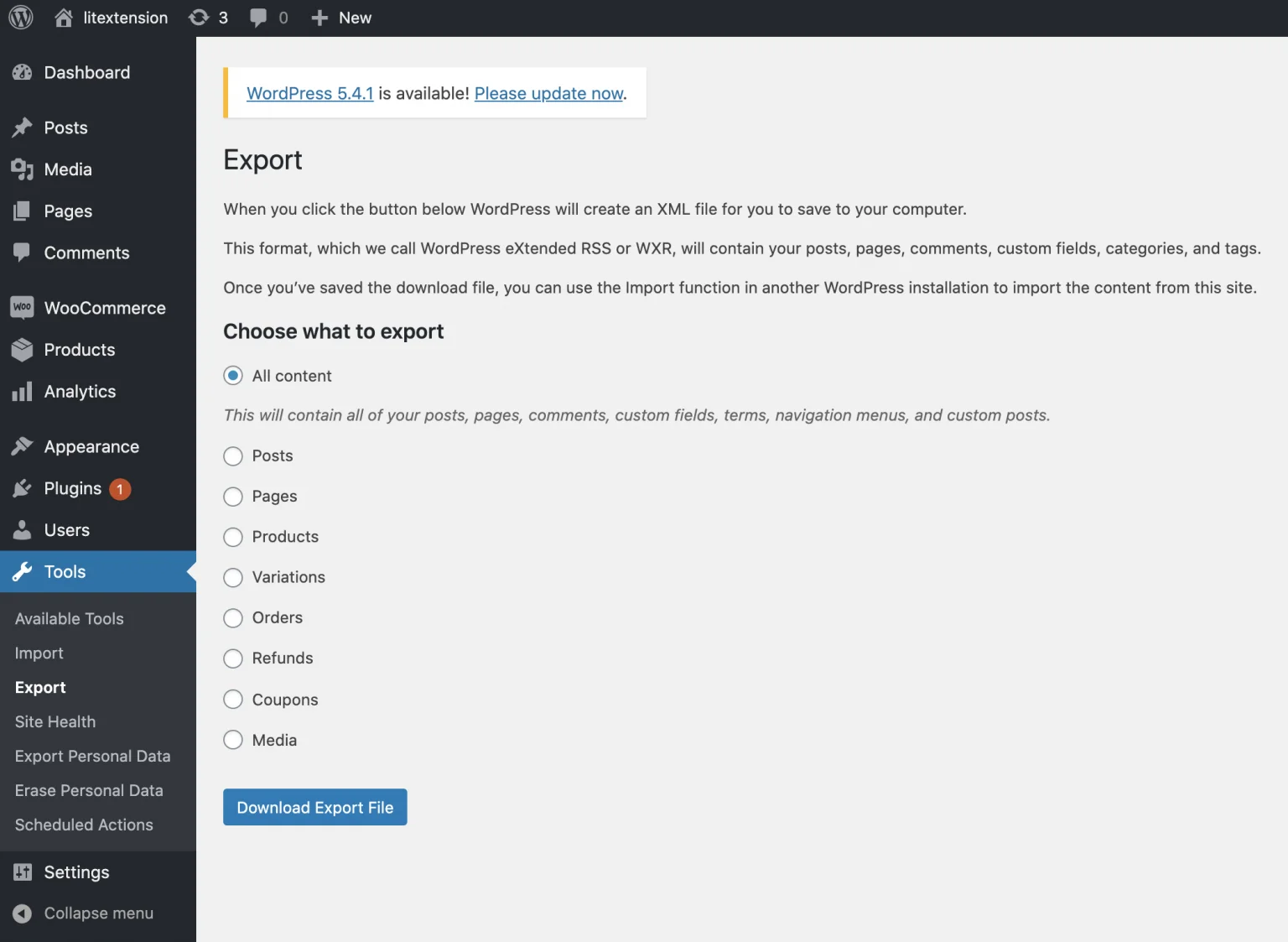
- Click “Download Export File” to download the XML files and save them. With this default function, your data will be compressed into XML files.
In case you want to go further, such as exporting products with images, some WooCommerce plugins (free and paid versions) will help you deal with that.
#2. Build up a new BigCommerce store
After backing up the Source cart, the next thing you have to do is to build and complete your Target cart. Get access to the BigCommerce website and click “Register” to create your account. BigCommerce offers customers a 15-day free trial with no credit card required and no strings attached.
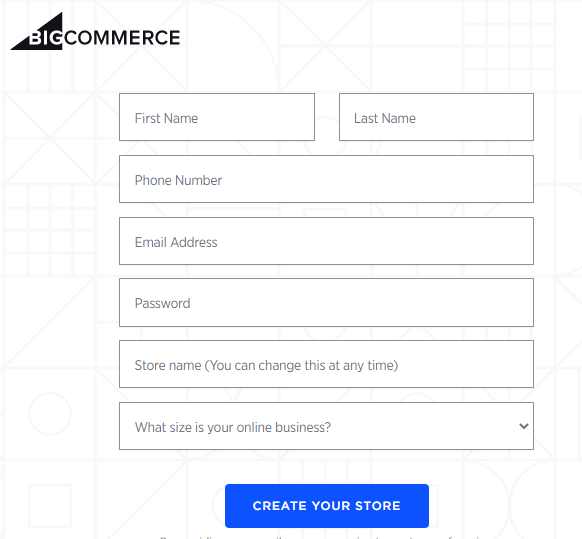
The information you need to fill in the BigCommerce registration form is your email address and password, as well as the proposed or existing store’s name and other general details about your business. Completing this form will take you directly to your new BigCommerce store’s dashboard. In case you need more assistance, you can always contact the BigCommerce support team via multiple channels 24/7.
Our LitExtension team will help you to take a deep dive into BigCommerce and WooCommerce through the articles below:
WooCommerce to BigCommerce: Perform Migration
#1. Set up Source Cart and Target Cart
To get started, please register for a LitExtension account by clicking the “Login Button” at the top right of our website. Next, click “Sign up” to create a new account if you have not had one, or log in using your existing Google or Facebook account. Once you are ready, let’s migrate!
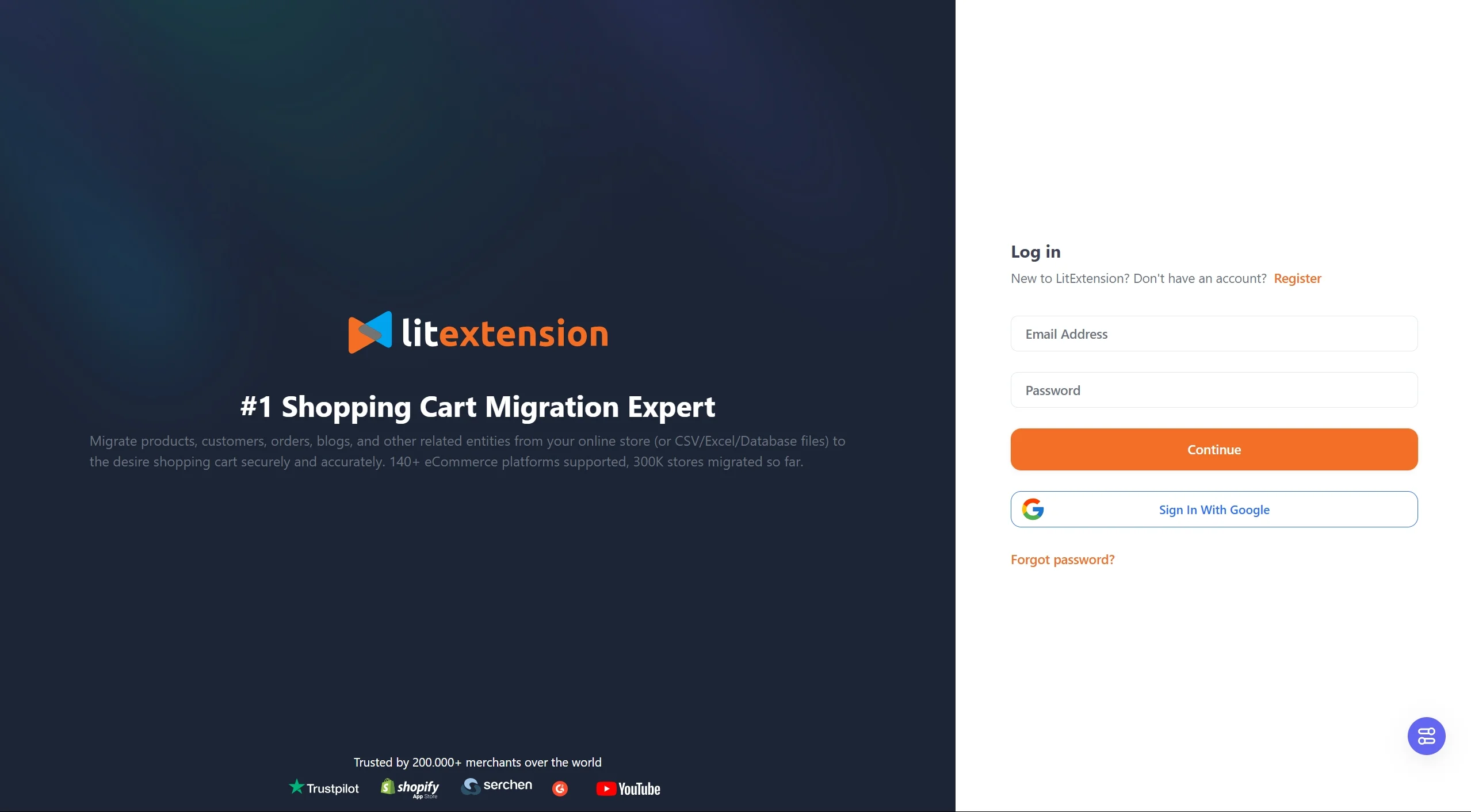
Simply choose the “Create New Migration” option, and there will be a page where you can start filling in the information of your Source and Target carts. In summary, you will set up the connector for WooCommerce and get the API details of BigCommerce.
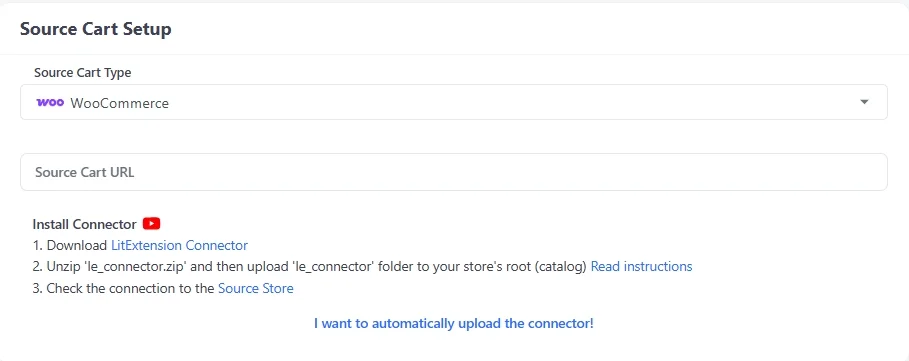
With WooCommerce: Choose the option for WooCommerce from the Source Cart’s drop-down list and enter your store URL.
Follow the instructions to download the “le_connector” file. This connector has only one function, which is to create a bridge between your WooCommerce database and the LitExtension App.
Extract the zip file and upload the Connector folder to WooCommerce’s root folder on your server. Once you are done, a notification will appear on your screen: “Connection was successfully installed”.
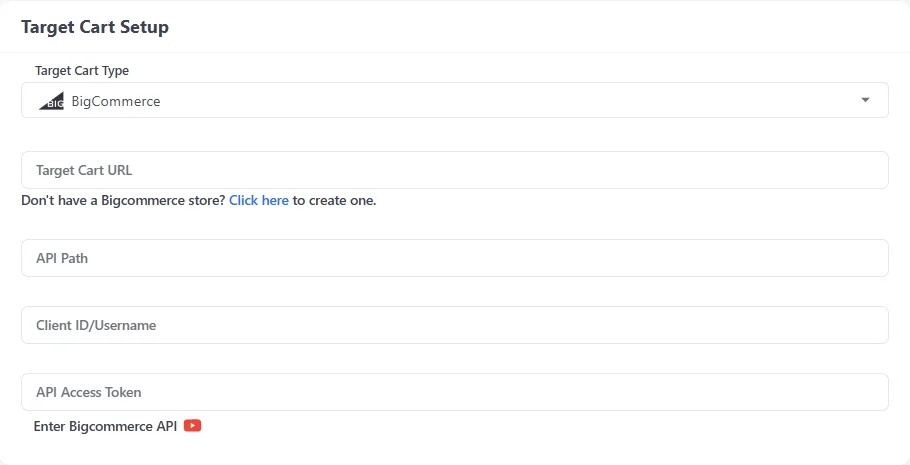
With BigCommerce: Move to the Target Cart part, choose BigCommerce from the drop-down list, and enter your store URL. Moreover, please provide your API Path, API token, and Client ID/Username.
Once everything is set up, let’s get to the next part of our migration by clicking the “Next: Configure your Migration” option at the end of the page.
#2. Select entities to migrate
At this step, you must choose the entities you want to migrate from WooCommerce to BigCommerce. Conveniently, LitExtension allows you to transfer all of the crucial data, including products, customers, orders, and so on. You can choose to migrate only a few or click “Select all” to migrate all of them.
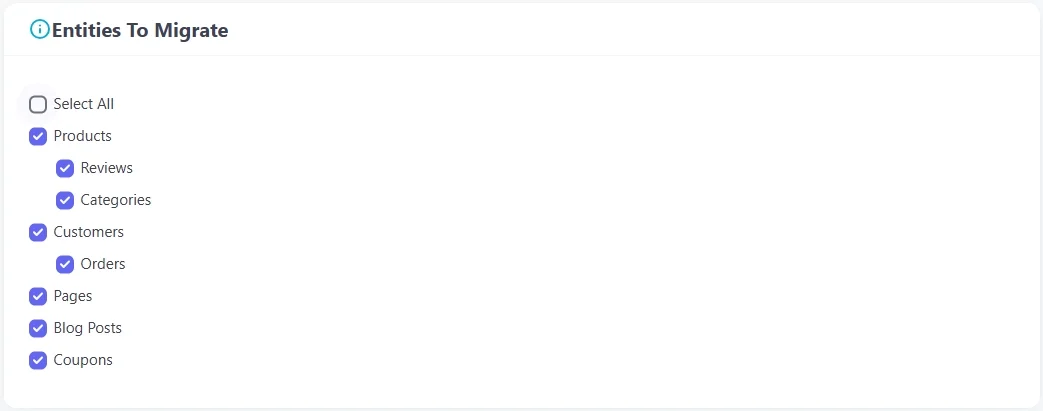
But keep in mind that due to BigCommerce’s restriction, it’s impossible to migrate Order ID to this platform. To solve this problem, we’ll transfer your “pre_order ID” field to the “external ID” field. However, please note that this action cannot guarantee a unique order ID when searching.
Not only can you select these basic options, but you can also modify your migration even further with our Additional Options, such as preserving product IDs on Target Store and Strip HTML Tags from the category. You can also match Languages, Order Status, and Customer Groups together to display consistently in the new BigCommerce store.
Especially, LitExtension offers 301 Redirects option. With this option, you can automatically transfer the paths of your old URLs to the new ones. After the website re-platforming, you can still preserve your SEO ranking and consumer experience.
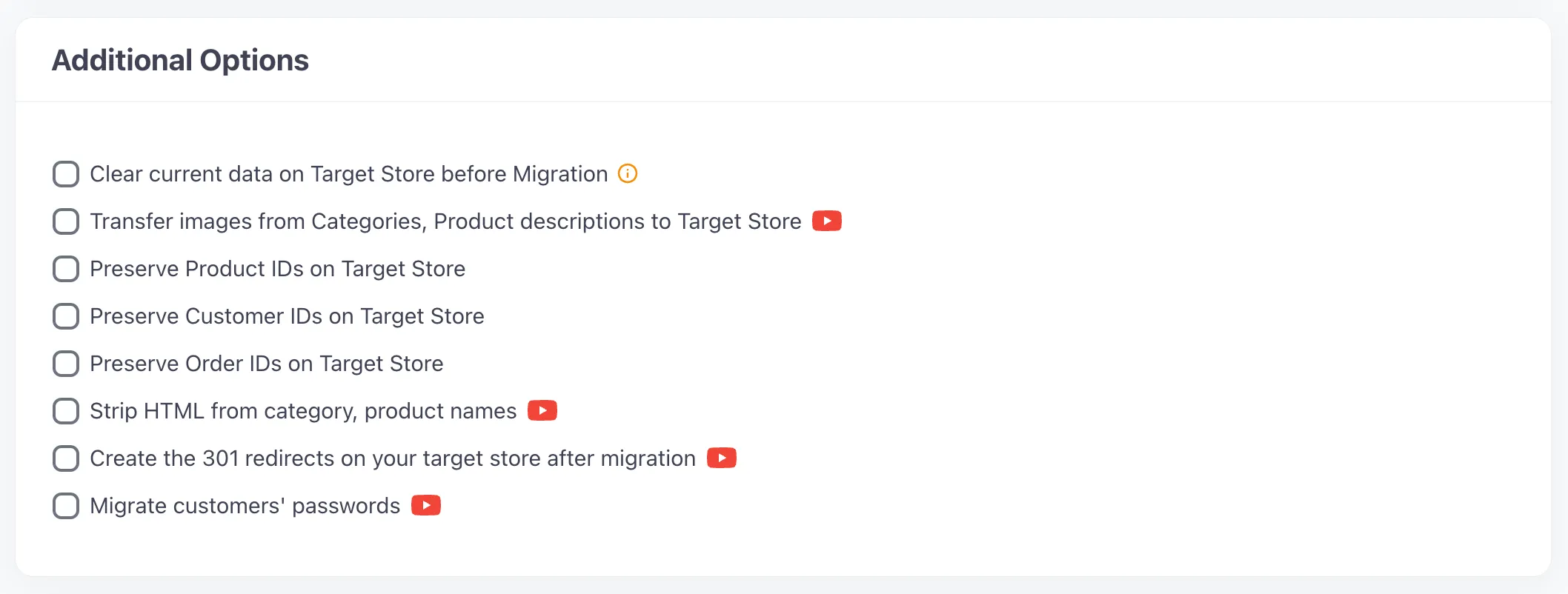
Finally, it’s important to adjust your order status and language in order to have exactly the same information on your new BigCommerce store after migration.
#3. Run full migration process
Before making the full migration from WooCommerce to BigCommerce, you can even try out our Demo Migration, which has a protocol similar to the actual migration. Simply click “Start Free Demo Migration” to run the demo. This Demo mode will limit the number of entities to 200.
You can observe this procedure by checking the data transfer status shown on the screen. This test migration needs about 20 minutes of processing, depending on the number of entities you choose. Finally, you will get a notification email for the result as soon as your migration is complete.
Please check the Demo migration result, and if you’re sure that there are no issues with the outcome, now it’s time to finally get to the Full migration. You can choose the “Skip Demo Migration” option and get straight to the Full migration process.
Once the migration starts, it will run seamlessly on the server. Therefore, there’s no need to keep your device on while the data is being transferred.
WooCommerce to BigCommerce: Post-migration Activities
#1. Check the migration result
Congratulations! Now that you have transferred all your data to the new BigCommerce store, click on “Check result” to double-check everything. You may consider following the checklist below:
- Ensure all your products are displayed on both the front end and back end.
- Make sure all your products appear in the appropriate categories and in the onsite search.
- Examine every link that leads to menus, headers, footers, and inside the pages.
- Sample a purchase in your new store.
- You can find a more detailed checklist on How to check results after full migration on your BigCommerce store. Otherwise, you can contact the LitExtension support team for further assistance.
#2. Choose a theme for your new store
Better store display leads to better business performance. Choosing suitable themes for your store plays an important part in bringing customers good experiences while surfing your site.
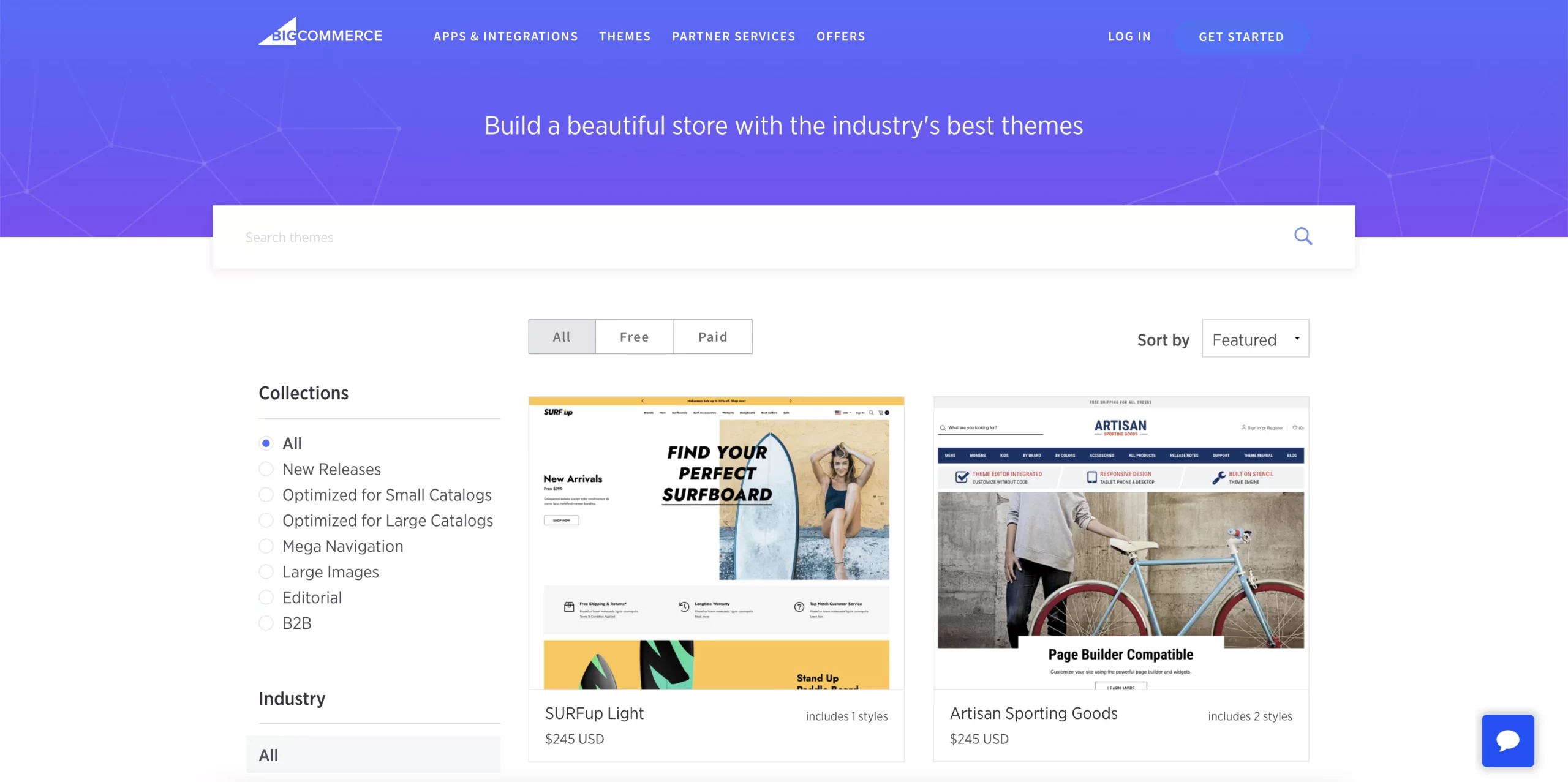
If you are wondering what theme is the best option for you, try discovering some themes on BigCommerce Theme Store here with these templates:
- Vault (Free)
- Cornerstone (Free)
- Chiara (Paid)
- Runway (Paid)
Or, you can check our list of 8 best BigCommerce themes here.
#3. Add necessary apps and extensions
Building your store on BigCommerce means you might have a large business with many other services to develop, such as email marketing, shipping service… Each additional service has its own mission. For your convenience, BigCommerce has multiple apps that are built to help you complete the mission more efficiently.
- Marketing & Communication: Klaviyo, FavSEO
- Shipping: AfterShip
- Store designing: Shogun Page Builder
- Product review: Trustpilot Reviews
#4. LitExtension’s additional options
During the migration process, your old WooCommerce store continues to operate normally, so new orders and customers have been added while setting up your new BigCommerce store. This is when our services, such as Recent Data Migration, Smart Update, and Re-migration, will be most useful. Below are some definitions to help you determine the best time to experience our wonderful features.
- Recent Data Migration helps you transfer all the data that has newly appeared or been added to your BigCommerce store during and after the migration.
- Smart Update allows you to update edited data and simultaneously migrate data that recently appeared in your BigCommerce store during and after the migration.
- Re-migration service enables you to migrate your data all over again.
Within 60 days of completing the full migration, you can use these services for free or at a charge (if the total amount of new data for Recent Migration exceeds 5% of the total data included in your initial migration package). For more information, please visit our Terms & Conditions.
#5. Other website factors
The fact that you have moved to a brand-new place. Though the migration process with LitExtension helps you decrease a lot of tasks, there are still several things to proceed with after migrating. Here is the checklist for a better new BigCommerce store:
- Change DNS and switch domain
- Set up your shipping
- Choose the payment method
- Try placing some orders
WooCommerce to BigCommerce Migration: Is This Worth It?
#1. Basic summary of WooCommerce and BigCommerce
We have two of the most effective eCommerce platforms in the world to consider: WooCommerce and BigCommerce. Now you are switching between them because you believe the new one might be a better fit for your business goal at the moment. Why don’t we take a closer look at what kind of goal or quality the best match for WooCommerce and BigCommerce is by reading the information below?
WooCommerce is an open-source plugin for WordPress that is used for changing an existing WordPress website into a fully functional ecommerce website.
- Choose WooCommerce if you already have a WordPress website and want to transform it into an online store.
- WooCommerce comes with the advantage that you’ll gain full control over your website.
- It would be much more preferable if you already have a light set of technical knowledge.
- Also, WooCommerce is an ideal choice if you have a tight budget at the beginning.
✧ Read on: WooCommerce Review – Full Features Review & How to Setup WooCommerce?
BigCommerce is the leading hosted solution in the market that makes it simple to launch and run an online store.
- Choose BigCommerce if you want a straightforward solution to build your online store.
- Strong built-in features.
- From a general view, BigCommerce is an easy-to-use platform.
- BigCommerce can first come with little hassle, but it becomes simple once you get familiar with its terminology.
- The platform is responsive and provides all the features you need to grow and succeed.
- BigCommerce is also ideal for those who want to focus on the eCommerce side instead of website customization.
✧ Read on: BigCommerce Review – How Does BigCommerce Work?
#2. Is it worth migrating from WooCommerce to BigCommerce?
To decide whether to migrate from WooCommerce to BigCommerce, let’s pick out the 3 best words to describe BigCommerce: simple, advantageous, and powerful. BigCommerce offers many essential eCommerce features that an online store needs. With BigCommerce’s stunning features, you can manage your products, process orders, dive into multiple currencies, multiple channels, and so on.
BigCommerce offers flexible plans for customers at 4 levels: Standard Plan, Plus Plan, Pro Plan, and BigCommerce Enterprise. It has high flexibility and might be the best eCommerce software you can ever get.
Let’s LitExtension write down some more detailed benefits you can get with BigCommerce:
Features | Details |
Ease of Use | • Setup tutorial is available • Customization can be complex for beginners |
Themes & Designs | • 100+ responsive themes to choose from • 12 free themes are provided • Style Editor - easily customize any theme ✧ See our list of Best BigCommerce themes |
SEO & Marketing | • Good website speed & powerful SEO functions • Great range of necessary marketing tools |
Payment Options | • Multiple payment gateways • BigCommerce POS: allow selling at brick-and-mortar stores • Allow refund payments to customers |
Pricing | • Starting from $29.95/month, extra fee if surpass earnings threshold for each plan • 15-day free trial • No free plan |
Apps & Extensions | • More than 900 apps covering multiple sales and design functions. • Mobile app available for seller ✧ See our list of BigCommerce apps you shouldn't miss |
Let Our Experts Handle Your Store Migration!
With the All-in-One Migration Service, our experts take care of everything, ensuring a seamless and stress-free migration.
WooCommerce to BigCommerce: FAQs
Is BigCommerce better than WooCommerce?
BigCommerce is better than WooCommerce if you want a hosted eCommerce platform with built-in hosting, security, updates, support, and fewer day-to-day technical maintenance tasks. It is also a strong fit for growing stores that need scalable product management, multi-channel selling, B2B features, and a more managed backend.
How to migrate from WooCommerce to BigCommerce?
To migrate from WooCommerce to BigCommerce, you can use the LitExtension Automated Migration tool with 3 simple steps:
- Set up Source Cart and Target Cart
- Select entities to migrate
- Run full migration process
How much does a WooCommerce to BigCommerce migration cost?
The cost depends on your data volume, migration method, store complexity, and support needs. With LitExtension, our WooCommerce to BigCommerce migration starts from $29 for the Automated Migration tool, and from $129 for the All-in-One Migration package. You can try a completely free demo with up to 100 entities to experience the process firsthand.
How long does a WooCommerce to BigCommerce migration take?
A WooCommerce to BigCommerce migration can take from a few hours to several days for data transfer only. The exact time depends on your source store, target setup, server performance, number of entities, and data complexity.
A complete replatforming project can take longer because it may include theme setup, app replacement, SEO redirects, checkout testing, payment setup, shipping configuration, and staff review. For larger or more complex stores, you should plan enough time for demo migration, QA, and post-migration updates.
What are the risks of migrating from WooCommerce to BigCommerce?
The main risks include missing data, incorrect product variations, broken images, customer and order mismatch, lost SEO URLs, broken redirects, plugin-generated data issues, and checkout configuration errors.
WooCommerce and BigCommerce use different data structures, so custom fields, plugins, subscriptions, memberships, and advanced product options may need extra handling. To reduce risk, back up your store, run a demo migration, map data carefully, create 301 redirects, test checkout, and review all migrated records before going live.
Conclusion
The journey of building your own business as an online seller always comes with difficulties and challenges. Different stages require different ideas and facilities, so it’s necessary to update your business platforms and tools when the old ones become obsolete.
Understanding your pain point and knowing that this market is very competitive, LitExtension – #1 Shopping Cart Migration Service Expert always does our best to provide you with the most up-to-date features that perfectly match your needs. With the assistance of current automated migration solutions such as LitExtension, cart-to-cart migration has indeed become less of a struggle. We hope that with this article, you can now migrate from WooCommerce to BigCommerce with ease!
Remember that you can always gain more practical knowledge about eCommerce with our tips and tricks on LitExtension Blog. Finally, if you find our article helpful, please share it on your social media channels!