Broken links and 404 pages hurt not only your customer experience but also your rankings on search engines. Therefore, setting up proper Wix redirects is an SEO tactic you must implement periodically.
Don’t know where to get started? No worry! In this guide, LitExtension will guide you through all you need to know about redirects in Wix, including:
- The types of redirects
- When to set up Wix redirects?
- How to set Wix redirects?
- How to double-check your Wix redirects?
- Notes when using Wix redirects
Understanding The Common Types Of Redirects
There are several common types of redirects used in web development, each serving different purposes. Here’s an overview of the most common types and their differences:
Redirect type | Purpose | SEO impact | Best for |
301 redirects | 301 redirects Indicate that a page has permanently moved to a new URL | This redirect type passes full link equity to the redirected page | Recommended for SEO when permanently moving content |
302 redirecs | 302 redirects are used when a URL is changed temporarily | It may pass link equity, but not as reliably as a 301 | Use only for truly temporary moves |
307 redirects | HTTP 1.1 successor of the 302 redirect | Treated similarly to a 302 by major crawlers | Use a 301 for most cases, except when content is genuinely moved temporarily and the server is HTTP 1.1 compatible |
Meta Refresh | A page-level redirect rather than a server-level redirect | Passes some link equity but is not recommended for SEO | Avoid using due to poor usability and potential loss of link equity |
Clearly, unless it is something special, we highly recommend choosing 301 redirects over the others since this type of redirect is the best method for setting redirects in most cases.
When Should You Use Wix Redirects?
One of the greatest Wix features that we really appreciate about the website builder is that it offers automatic redirection for all URLs hosted on your Wix site. For instance, if you change a product page’s URL from mystore.com/product/t-shirt to mystore.com/product/winter-t-shirt, then you don’t have to be concerned about setting Wix redirects– the system already does it for you.
Nevertheless, in other instances, setting up 301 redirects on Wix is highly recommended. For example, you might want to set up redirects for your Wix site if you:
- Migrate from another platform to Wix: Wix has its own URL structure. This means some URL formats from your old site might not be compatible with Wix’s structure. Therefore, you must set redirects Wix to avoid broken links and losing your SEO juice after migrating to Wix. (we’ll discuss this more in-depth below)
- Want to fix broken links: If you have changed the structure of your website or removed pages, setting up redirects will help guide visitors to the correct, updated pages instead of encountering 404 errors.
- Create some URLs for seasonal campaigns: When you have pages that are only relevant for a specific time period (e.g. a BFCM landing page), you can use redirects to point users to current, relevant content when the original page is no longer active.
- Have rebranded and changed your domain: If you’ve changed your domain name or are rebranding your business, Wix redirects will ensure that traffic to your old domain or branded URLs is seamlessly directed to your new pages.
How to set redirects on Wix site?
Now that you have a better understanding of Wix redirects and when to set them, let us show you how to create 301 redirects Wix.
How to set up Wix redirects for a single page on your site?
If you found out that some of the links on your Wix site are broken, follow the steps below to manually set up Wix manage 301 redirects:
- Within your Wix dashboard, go to Site & Mobile app > Website & SEO > SEO
- Under the Tools and settings section, go to URL Redirect Manager block > Choose the Go to URL Redirect Manager button.
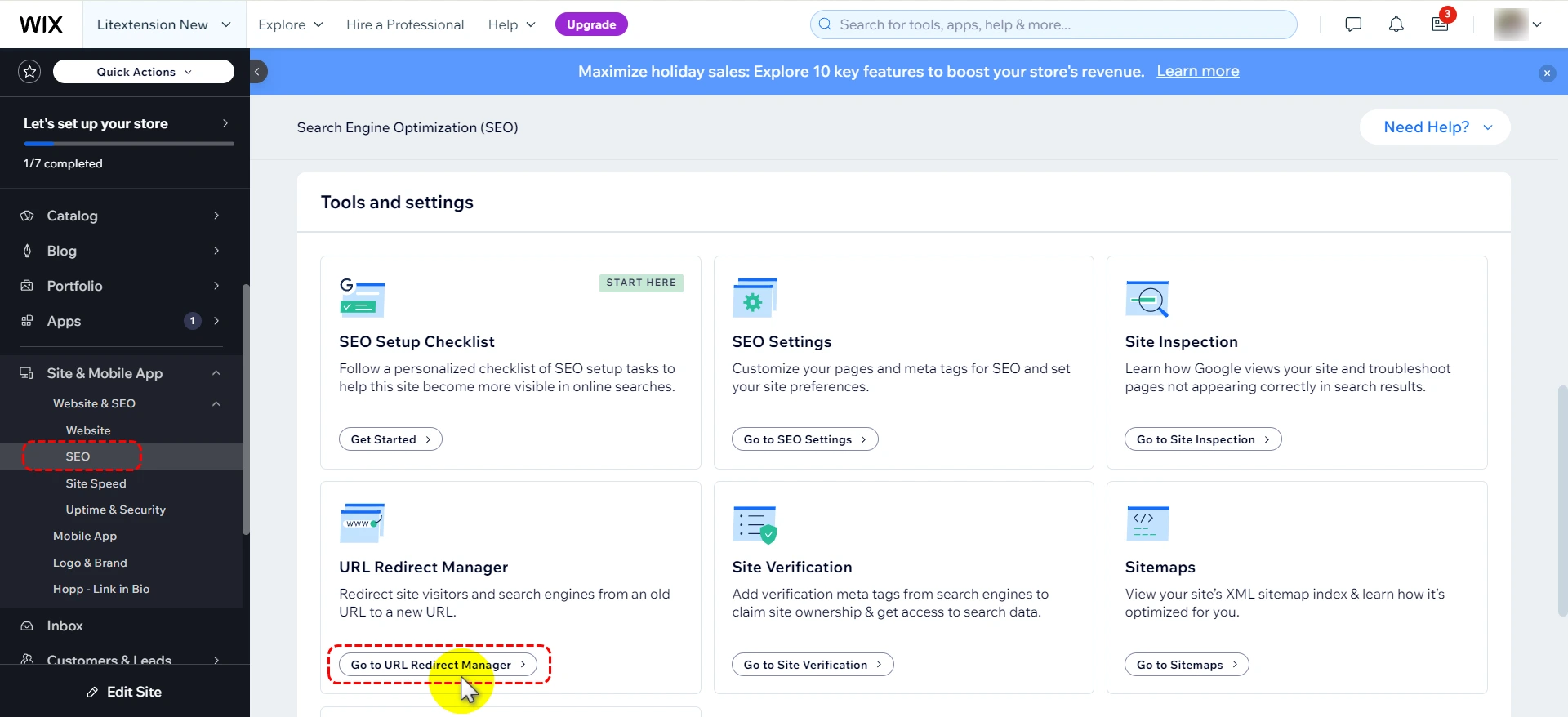
3. Click + New Redirect button at the top right corner of your screen
4. Choose Single redirect.
5. Input the old URL you want to set up Wix redirect from (e.g., /old-product) under the Old URL
6. Input the new URL that you want to set up a redirect to (e.g., /new-product) under the New URL.
-
- For URLs on your Wix site: Simply type in your new page’s URL slug and choose it from the drop-down.
- For URLs from an external site: Enter the whole URL that you want to redirect to.
7. Finally, click Save, or hit Save & Add Another to add more Wix redirects.
How to set up Wix redirects for multiple pages at once?
When migrating to Wix, you need to be aware that the way certain URLs on Wix might be a bit different from how they looked on your old website.
For instance, your product pages on your old site might have looked like this:
“mysite.com/products/product-name”
But on Wix, they look like this:
“mysite.com/product-page/product-name”
So does it mean you have to manually redirect all the URLs for your 1,000 products? Fortunately, nope. If that’s the case, Wix’s Group Redirect functionality will enable you to set up Wix redirects for multiple URLs simultaneously.
Here is how to set up Wix’s Group Direct:
- Within your Wix dashboard, go to Site & Mobile app > Website & SEO > SEO
- Under the Tools and settings section, go to URL Redirect Manager block > Choose the Go to URL Redirect Manager button.
- Click + New Redirect button at the top right corner of your screen
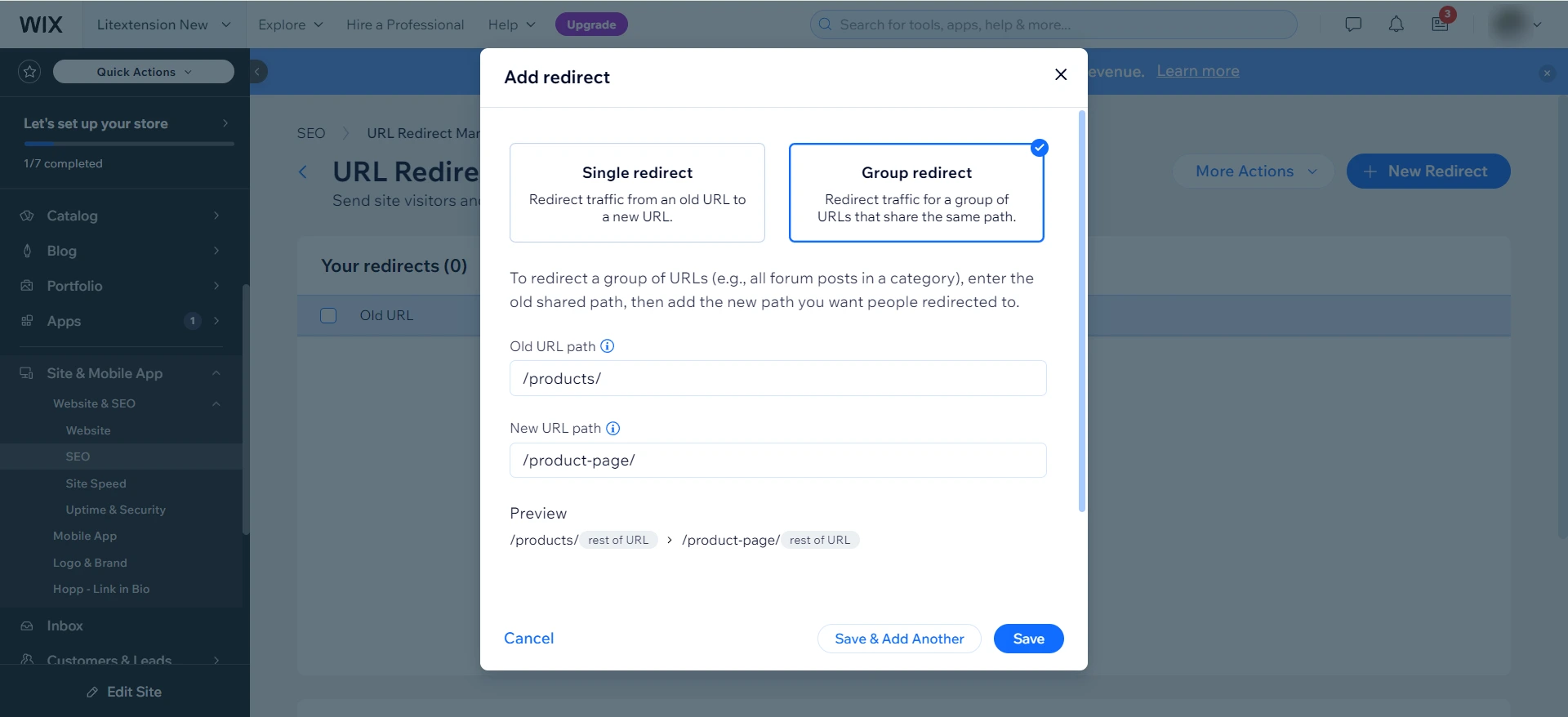
- Then, select the Group Redirect option
- Input the original path for the group of pages under the Old URL Path. With the example above, enter /products
- Input the new path for the group of pages under the New URL Path. With the example above, enter /product-page in this field.
- Click Save & Close or Save & Add another to redirect other groups of URLs.
How to check the Wix redirects are set up correctly?
Since proper Wix redirects should redirect you from the old to new URL, to test a redirect link, simply enter the old URL you set up for redirection. If you’re automatically taken to the new URL you set up, your Wix redirects are working properly.
Can’t set up Wix redirects? It’s very likely that you have made redirect loop errors. A redirect loop is a tricky situation that happens when you set up redirects that end up chasing each other in circles.
Let’s analyze it under the example below so you can better visualize it:
- You start with a webpage at “/blog”.
- You change it to “/our-blog” and set up a redirect from “/blog” to “/our-blog”.
- Later, you decide to switch back to “/blog” and try to redirect “/our-blog” to “/blog”.
This creates a redirect loop problem because:
- The first redirect says: “/blog” should go to “/our-blog”
- The second redirect says: “/our-blog” should go to “/blog”
So that explains why when you try to set up this second redirect in Wix, you’ll get an error message like in the screenshot below:
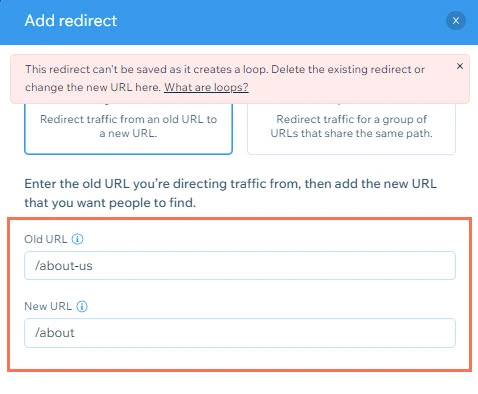
The solution for this is very simple: instead of creating a new redirect, you should remove the original redirect (in this case, blog to our-blog)..
Important Notes When Using Wix Redirects
Here are a few notes to keep in mind when configuring Wix redirects:
- You cannot use a source link containing a # in the URL.
- Each Wix site allows a maximum of 5,000 redirects.
- 301 redirects are only functional with custom domains. Setting up a 301 redirect from free Wix URLs to a Premium site is not possible. If unsure about your domain’s connection to Wix, verify using the Wix Domain Assistant.
- Creating a 301 redirect from your homepage via the URL Redirect Manager is not possible. However, you can redirect your homepage by redirecting from one domain to another.
And if you bulk redirect a group of URLs using the Wix’s Group Redirect Too, then note that it isn’t possible to:
- Include spaces in either the old or new path.
- Use a path that’s already been used in another redirect (single or group).
- Redirect from your site’s home page.
- Add group redirects for external domains.
- Redirect multiple pages to a single page
Frequently asked questions
Where can I view the redirects in Wix?
You can view redirects in Wix from your site dashboard. Go to SEO & GEO, scroll to Tools and settings, then open URL Redirect Manager. From there, you can see your existing 301 redirects, edit them, delete them, or use the view option to test whether a redirect opens the correct destination page.
Why is my Wix redirect not working?
A Wix redirect may not work if your domain is not properly connected to Wix, the redirect was created incorrectly, or the redirect has not taken effect yet. Wix notes that redirects can take a few minutes to start working after setup.
Redirect issues can also happen because of redirect conflicts or redirect loops. For example, if one URL redirects to another URL that redirects back to the first one, the redirect cannot work properly.
How many types of Wix redirects are there?
For URL redirects, Wix mainly supports single redirects and group redirects. A single redirect sends one old URL to one new URL. A group redirect sends a set of URLs with the same path structure to a new path structure.
Wix also supports domain forwarding, which redirects one domain to another domain. This is useful when moving from an old domain to a new Wix domain while keeping traffic and SEO value as much as possible.
Can I redirect my domain to Wix?
Yes, you can redirect your domain to Wix, but your site must be upgraded and connected to a domain first. You can connect a domain you already own to Wix, then assign it as a secondary domain and redirect it to your primary Wix domain. This is commonly used when moving a site to Wix from another platform. You can connect your old domain, set up page-level 301 redirects, and then forward the old domain to your new Wix site.
Conclusion
Whether you’ve built your website with Wix from the first days or have just migrated from another platform to Wix, ensure that your Wix redirects are always properly set up. This is important not only to your user experience but also search rankings.
Hence, we hope after reading this guide, you can know the detailed steps on how to set up Wix redirects and troubleshoot common issues on your own.
Don’t forget to check out LitExtension’s articles on Wix and join our active Facebook Community to get constantly-updated actionable eCommerce insights.