
Squarespace has gained an excellent reputation for its top-of-the-class features that support personal blogging. However, if you want to monetize this easy-to-use platform, Squarespace could be a good solution to kickstart your online business. Here’s in this article, we’ll break down Squarespace pricing to better monetize from this platform:
Without further ado, let’s get started!
Want to Migrate to Squarespace?
LitExtension offers a great migration service that helps you transfer your data accurately.

How Much Does Squarespace Cost?
Squarespace pricing starts around $16/month for a Basic plan (paid annually) for basic sites. Then, there are higher tiers like Core ($23/month), Plus ($39/month), and Advanced ($99/month).
Let’s first take a quick look at these Squarespace subscription pricing plans to figure out Squarespace's monthly cost and how much a Squarespace website costs.
Pricing | Basic | Core | Plus | Advanced |
Monthly paid | $25/month | $36/month | $56/month | $139/month |
Annually paid | $16/month save 36% | $23/month save 36% | $39/month save 30% | $99/month save 28% |
FEATURES | ||||
Free Custom Domain (annually paid ONLY) | Yes | Yes | Yes | Yes |
SSL Security | Yes | Yes | Yes | Yes |
Unlimited Bandwidth | Yes | Yes | Yes | Yes |
Mobile-Optimized Websites | Yes | Yes | Yes | Yes |
Complete Customization with CSS and JavaScript | — | Yes | Yes | Yes |
Advanced Website Analytics | — | Yes | Yes | Yes |
Contributors | 2 | Unlimited | Unlimited | Unlimited |
Fully Integrated eCommerce | — | Yes | Yes | Yes |
Sell Unlimited Products | — | Yes | Yes | Yes |
Point of Sale | — | — | Yes | Yes |
Customer Accounts | — | — | Yes | Yes |
Advanced Merchandising Features | — | — | Yes | Yes |
Abandoned Cart Recovery | — | — | — | Yes |
Advanced Shipping | — | — | — | Yes |
Online Store Transaction Fees | 2% | 0% | 0% | 0% |
But is Squarespace free?
Not really! While Squarespace does not offer a completely free plan, it does provide a 14-day free trial for all new registered websites.
During the free trial, you can try out most of Squarespace's features for free and test the platform to see if it suits your website needs. However, there are some limitations to the free trial:
- Your trial website remains private.
- You won't be able to connect your own custom domain fully.
- Some advanced features or selling functions are unavailable.
- Some premium third-party extensions and integrations might not be accessible.
Once the trial period expires, you will need to subscribe to a paid plan to publish your website.
Now, let’s do a full analysis of the four main Squarespace pricing plans and learn all about Squarespace pricing.
#1. Basic Plan (or Personal)
- Price: $25/month or $16/month when billed annually, plus a 2% online store transaction fee.
- Best for: Individuals and creatives who need a simple website (e.g., a portfolio, blog, or basic landing page), without selling products or services.
Key Features | Missing Features |
Unlimited bandwidth and storage | No product or service selling |
Award-winning website templates | Limited marketing tools |
Built-in SEO features | No eCommerce functionality |
Suitable for blogs and portfolios | Not designed for business growth |
The Basic plan is Squarespace’s most affordable option and works best for users who primarily need a visually polished website rather than a revenue-generating platform.
With unlimited bandwidth and storage, it can comfortably handle traffic without performance concerns, which is ideal for blogs, personal brands, or creative portfolios. The included SEO tools also help improve basic search visibility without requiring technical setup.
That said, keep in mind this plan is strictly for content-focused websites. You cannot sell products or services; not to mention, marketing capabilities are limited compared to higher tiers. In short, if monetization or business growth is your goal (whether long- or short-term), you will likely need to upgrade sooner rather than later.
#2. Core Plan (or Business)
- Price: $36/month or $23/month when billed annually; 0% transaction fee.
- Best for: Small businesses that want a professional website with light selling capabilities and built-in marketing tools.
Key Features | Missing Features |
Ability to sell products and services | Features for full-scale stores |
Pop-ups and announcement bars | Advanced eCommerce abilities |
Integrated email campaigns | Advanced shipping tools |
Unlimited collaborators | |
Advanced website analytics | |
Zero transaction fees |
The Core plan introduces basic commerce functionality suitable for small businesses that want to test online selling without committing to a full eCommerce setup.
In addition to selling features, users gain access to marketing tools, such as pop-ups, announcement bars, and email campaigns, which help improve visibility and engagement. Unlimited collaborators and enhanced analytics also make this plan more practical for teams.
Still, while you can sell products and services, you don’t get the deeper commerce features needed to scale efficiently, such as abandoned cart recovery, subscriptions, or advanced shipping calculations. As a result, businesses with growing order volumes often find themselves upgrading to the Plus plan that we are going to discuss below.
#3. Plus Plan (or Basic Commerce)
- Price: $56/month or $39/month when billed annually; 0% transaction fees.
- Best for: Online stores that need solid eCommerce functionality without advanced shipping, subscriptions, or automation tools.
Key Features | Missing Features |
0% transaction fees | Abandoned cart recovery |
Product and inventory management | Subscription selling |
Customer accounts | Advanced shipping calculations |
Discounts, coupons, and promotions | |
Social selling via Instagram and Facebook |
Like the Core plan, the Plus plan also removes transaction fees entirely, which makes it a very predictable and scalable option for online stores.
Better yet, Squarespace includes all essential eCommerce tools such as product management, inventory tracking, and checkout optimization, allowing store owners to manage daily operations efficiently. Customer accounts also enable better retention strategies and personalized promotions.
That said, this plan still lacks some high-impact revenue features. Abandoned cart recovery, subscriptions, and advanced shipping options are not included, which may limit growth for stores with complex logistics or recurring revenue models.
#4. Advanced Plan (or Advanced Commerce)
- Price: $139/month or $99/month when billed annually.
- Best for: Growing or large eCommerce businesses that need advanced sales, shipping, and automation features to scale.
Key Features | Missing Features |
0% transaction fees Abandoned cart recovery Subscription selling Real-time carrier shipping rates Advanced shipping options API access for custom integrations | Affordable upfront cost |
True to its name, the Advanced plan is Squarespace’s most powerful standard subscription plan, designed for businesses that are serious about scaling.
Features like abandoned cart recovery and subscriptions directly support revenue growth; at the same time, real-time carrier-calculated shipping rates improve pricing accuracy and customer trust. API access also opens the door to custom integrations and more advanced workflows.
Sure, this is undeniably the most expensive non-enterprise plan. Nevertheless, in our opinion, the added tools can quickly justify the cost for stores with higher order volumes or complex operational needs.
#5. Enterprise Squarespace Cost
- Price: Custom pricing (contact Squarespace for a quote).
- Best for: Companies with multiple or global brands that require centralized website management, strict brand governance, and enterprise-grade security.

Key Features | Missing Features |
Enterprise-level custom templates | Public, fixed pricing |
Centralized user roles and permissions | Self-serve onboarding |
Single Sign-On (SSO) integration | Designed for small teams |
Brand governance and approval workflows | |
Advanced security features | |
High-traffic and multi-site scalability | |
Dedicated account manager and priority support |
Last but not least, Squarespace Enterprise is built for organizations with complex digital ecosystems rather than single websites. Instead of managing each site independently, enterprises can oversee multiple brands, teams, and properties from a centralized environment.
On the other hand, since pricing is customized, this plan is clearly not intended for cost-sensitive businesses or smaller teams. Its value lies in operational efficiency, security, and governance rather than standalone website features.
Notable brands using Squarespace Enterprise: Barn2Door, Raymond James Stadium, Ylopo.
Squarespace Pricing Plan Comparison
Personal Plan vs Business Plan
The Personal plan ($25/month) doesn't support eCommerce features, while the business plan is fully integrated with eCommerce. Basically, if you opt for the Squarespace business plan ($36/month), you'll be armed with more superb features & functions.
Besides, the business plan also includes:
- Sell unlimited products
- Accept donations
- Gift cards
Regarding core functions:
- Professional email from Google
- Premium integrations and block
- Complete customization with CSS and JavaScript
When it comes to marketing features:
- Advanced website analytics
- Promotional pop-ups and banners
Besides, while the Squarespace personal pricing plans only enable limited access to the Squarespace Video Studio App, the Bussiness plan gives you full access.
If you want to add a live chat feature to your Squarespace website, ThriveDesk live chat is a great option. It allows you to provide real-time customer support directly on your site, improving engagement and customer satisfaction. Setting it up is easy – just follow the simple integration steps provided by ThriveDesk.
Basic eCommerce vs Advanced eCommerce
The Basic eCommerce plan charges you $36/month. Compared to the basic eCommerce, the advanced eCommerce ($65/month) facilitates your online business as this Squarespace pricing plan includes the following amazing eCommerce features:
- Abandoned cart recovery
- Sell subscriptions
- Advanced shipping
- Advanced discounts
- Commerce APIs
Additional Squarespace Pricing
Domain & Hosting
- Cost: $10 – $20 per year.
A custom domain (like www.yourwebsite.com) is included for free with the first year of any annual Squarespace plan. After the first year, renewal costs typically range from $10 – $20 per year, depending on the domain extension (.com, .org, etc.) and the domain registrar you use.
Unlike Magento or other open-source eCommerce platforms, Squarespace users will not have to worry about purchasing a web hosting service. This website builder includes free hosting for every store owner on Squarespace, regardless of their tiers. Besides, you will get a free SSL Certificate to secure your website better.
Apps & Integrations
- Cost: start from $0 per month.
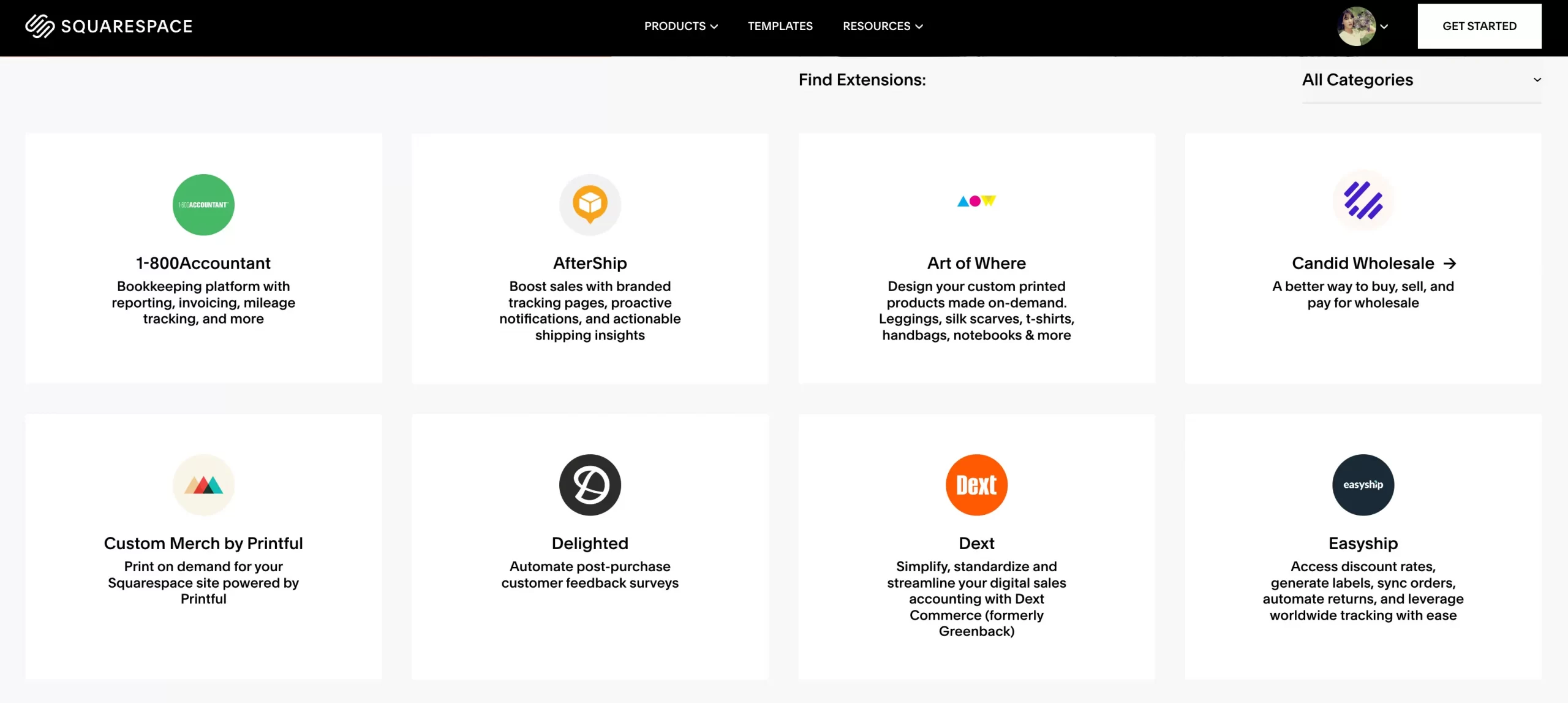
When it comes to integrations, Squarespace cost for all extensions is either free-of-charge or subscription-based. The price for each extension is flexible depending on your selection, but it might add up to $75 to your monthly Squarespace pricing plan.
Unfortunately, Squarespace doesn’t offer a bewildering variety of apps and add-ons to further enhance your store’s capabilities. However, these extensions are carefully selected and neatly divided into four main categories: shipping and Fulfillment, Finance, Inventory and Products, and Sales and Marketing. Store owners can easily find their desired integrations on the Squarespace extensions page and connect them directly to their sites.
Besides, if you want to improve your business, it’s worth investing in the Squarespace Email Marketing tool. This powerful function is available for every website. However, the free version only comes with limited features, such as building mailing lists or sending up to 3 trial blast campaigns.
For that reason, you can sign up for the email marketing plans. The plans allow you to set up more campaigns per month and access more features.
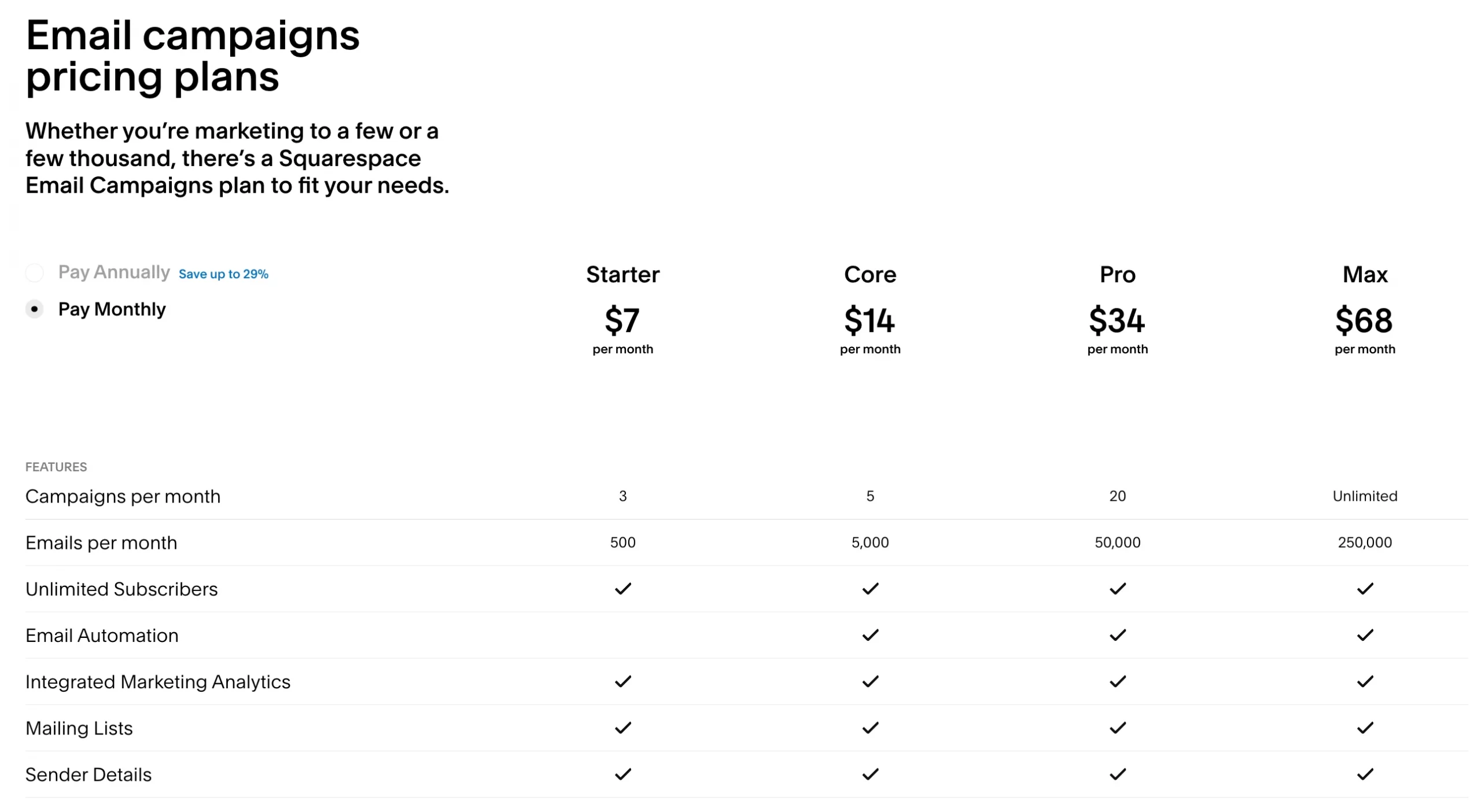
The Squarespace cost for the advanced email marketing tool ranges from $7 to $68 per month. The higher the tier, the more campaigns, emails, and functions you will get each month.
Themes & Website Templates
- Cost: Free (included in subscription plan).
One significant feature of this website builder is that all Squarespace themes are available for free. You can opt for whichever template you like without any financial concerns. Moreover, Squarespace offers hundreds of elegant and eye-catching website templates on its App Market.
These Squarespace themes are divided into 16 distinct categories so that store owners can easily locate the best option for their stores.

If you want to create a unique theme for your online business, consider hiring a website designer to work their magic on your site. These professionals will help you build a store from scratch, add vital eCommerce features, or optimize your store's SEO score. However, the price for this service is not fixed.
Transaction Fees
- Cost: 0 – 3% per transaction.
When doing business on Squarespace, there are two types of fees that you need to pay attention to, which are the Squarespace transaction fee and the payment processor fee.
Squarespace transaction fee charges 3% of the final order total for every purchase on the site. However, only Business package users have to pay for this additional cost. If you are currently on Squarespace Basic Commerce or Advanced Commerce, there won’t be any transaction fee added to your monthly expense.
Meanwhile, the Squarespace payment processor fee is applied for every transaction regardless of your pricing plan. It is charged by your payment service provider and may vary depending on the gateways. Currently, Squarespace only offers a limited selection of payment methods, including Stripe, PayPal, Square, and Afterpay.
Each processor has different charging terms, so check the corresponding documentation for more information.
Developers
Squarespace website cost for developers varies greatly depending on experience, the complexity of your project, and their hourly rates. You may need to hire one if you need API access (Advanced Commerce).
In case you need support, you can also opt to go with a Squarespace web developer, desiring simplicity and proficiency to create a stunning web design for your Squarespace store.
How to Save Your Money on Squarespace
Use 10% Squarespace Coupon Codes
Squarespace distributes a plethora of promotion codes through its website coupon page, affiliate partner program, and advertisements. You can take advantage of this opportunity to save more on your subscription plan.
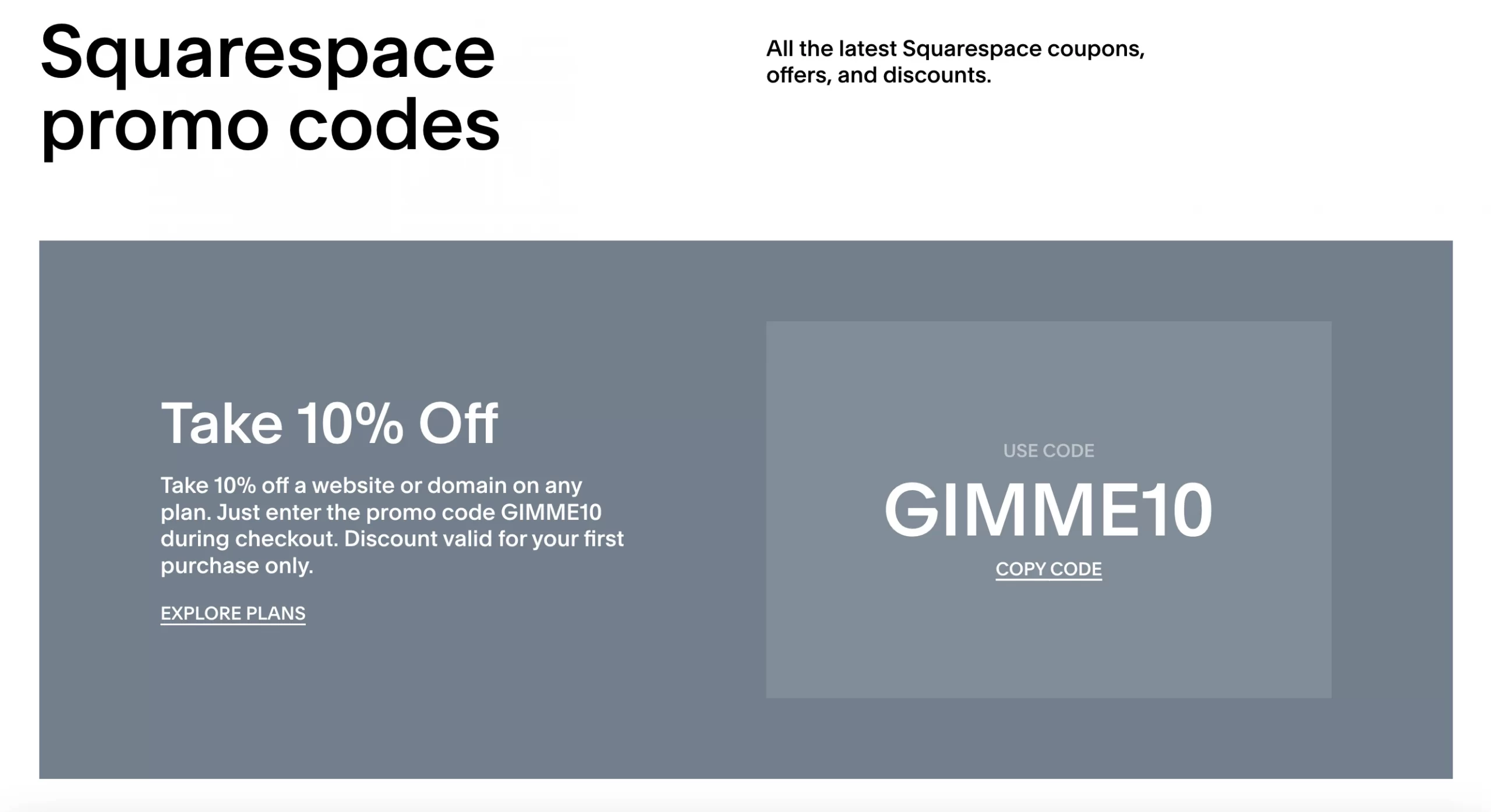
Please remember that only one coupon code can be used during checkout. Squarespace doesn’t allow the combination of different codes to get more discounts. Therefore, make sure to look for the best promotion before entering your code.
Use 50% Squarespace Student Discount
Are you a student wanting to kickstart a side hustle to earn your daily bread?
Squarespace offers financial aid specifically designed for undergraduates with the Squarespace Student program. When verifying your student status on Student Beans, you can get a 50% discount on any annual Squarespace pricing plan.

Before proceeding with this program, please note that this promotion code is only applied to a new annual subscription plan. After the first full year of using this promotion, you will need to pay the full price of your chosen pricing plan.
Choose Annual Plan, Save Up to 36% Yearly
If you pay monthly:
The price of these Squarespace eCommerce pricing plans ranges from $25 to $72 per month.
If you pay annually:
When you plan for a long period of time, consider opting for an annual pricing plan to save up to 36%. If paying for a yearly Squarespace eCommerce pricing package, the monthly expense will range from $16 to $52 instead of $25 to $72.
Besides, with an annual pricing plan, you can save more with a free custom domain name for the first year upon registration.
Factor in transaction fees to avoid paying more long-term
Last but not least, keep in mind that the monthly or annual price alone does not tell the full story. Even though the Basic plan appears cheaper at first, part of your revenue will be continuously deducted as your store starts generating sales!
Let's say your store makes $4,000 in monthly sales. The 2% transaction fee required for Basic subscribers will equal $80 per month, which quickly narrows (and can even eliminate) the price gap between Basic and higher-tier plans billed annually. At that point, upgrading to Core at $23/month with zero transaction fees actually makes more financial sense.
In short, the takeaway is simple: always estimate your expected sales and compare the total cost, not just the plan price. If your store is more than a side project or you plan to scale, a higher-tier Squarespace plan with 0% transaction fees can be cheaper overall and far more sustainable in the long run.
Squarespace Pricing vs Competitors
Pricing Ranges | About Platforms | |
 |
| Wix offers a good balance of user-friendly design and a wide range of features, with a vast collection of templates and apps/extensions. |
 | Site plans
Workspace plans
| Webflow is a flexible website builder for designers and developers who want complete control over their site's appearance and functionality. |
 | Main plans
Alternative solutions
| Shopify is a top eCommerce solution with a robust feature set for online store management and marketing, though it may offer less design flexibility than Wix, Squarespace, or Webflow. |
 | Range from $100 to $3,000, based on various factors (hosting, domain, themes, plugins, etc). | WordPress is a highly flexible platform due to its open-source nature, allowing for limitless customization with the right development knowledge. |
Note: All pricing is based in the US. | ||
- You may also like: Squarespace Alternatives: 7 Website Builders for You
How We Researched Squarespace's Pricing?
To gain a comprehensive understanding of Squarespace's pricing, we took a methodical approach by analyzing each tier and its included features on their pricing page. Additionally, we compared Squarespace's offerings to those of its competitors, such as Wix, to gain a better perspective.
To fully understand the long-term costs associated with Squarespace, we considered domain renewals and potential add-ons and researched user reviews to determine how Squarespace pricing scales with business growth.
Squarespace Cost – FAQs
How much does it cost to own a website on Squarespace?
There are 2 main costs:
- Subscription fee: from $25/month to $72/month.
- Domain: free for the first year (manually paid), and then typical renewal costs are $10-$20 per year.
Do I have to pay for a Squarespace website?
Yes, you need a paid subscription to build and publish a live Squarespace website. They offer a 14-day free trial.
Does Squarespace take a percentage of sales?
The answer may depend on you pricing tiers: - Business Plan: Yes, 3% transaction fee.
- Commerce Plans: No transaction fees.
How much is a domain after 1 year on Squarespace?
Domain renewal costs range from $10-$20 per year, depending on the specific domain name and registrar.
Does Squarespace have hidden fees?
Squarespace doesn't have outright hidden fees, but there are a few costs that might not be immediately obvious:
- Domain renewal
- Transaction fees
- Apps and integrations
- Premium templates
- Developer cost
Is GoDaddy or Squarespace cheaper?
GoDaddy is generally cheaper for basic needs, with lower starting prices (around $10/month) and limited free options. On the other hand, Squarespace costs more upfront but offers superior, design-focused templates, better eCommerce tools, and more advanced features for creatives and businesses wanting a polished online presence.
How to get 50% off Squarespace?
To get 50% off Squarespace, you should the student discount, which gives 50% off your first year of an annual plan (after verifying your student status through Student Beans or TOTUM). You can also consider a special Black Friday/Cyber Monday offer, though those are seasonal.
What is the downside of Squarespace?
The main downsides of Squarespace are limited design flexibility (locked into templates), fewer third-party integrations compared to WordPress, potential higher costs as you scale, and certain eCommerce limitations for low-tier plans (e.g, no multi-currency selling).
Conclusion
Regarding Squarespace website cost, this platform clearly has leverage over other competitors in the market. Squarespace offers the most inexpensive plan to kickstart your business ($25 per month) and top-of-the-class free website templates. Apart from the pricing plan they chose, users will only pay for the additional integrations and transaction fees.
Squarespace is a good eCommerce platform for your online business. If you are considering performing a Squarespace migration to make full use of this website builder, don’t hesitate to contact LitExtension. We are available 24/7 via live chat, email, and support ticket system.
We hope that this article has given you a rough estimate of how much Squarespace costs. In case you have any questions or inquiries, please join our Facebook Community and visit LitExtension blog to get more eCommerce tips and news.
✨ Related post:


