
When it comes to eCommerce platforms, most people immediately think of industry giants like Shopify, Magento, or WooCommerce. That said, alongside these established names, newer competitors like Sellfy have also carved out their own space as well, though many still wonder whether it actually guarantees long-term value. No worries; that's what our Sellfy review is for!
In the next sections, we will evaluate how the platform performs across nine essential areas that directly influence day-to-day operations and future growth, including:
- Store setup
- Template & customization
- Product & inventory management
- Payment gateways
- SEO & marketing
- Integrations & extensions
- Analytics
- Customer support
- Pricing
By the end, you’ll have a clear understanding of whether Sellfy truly aligns with your business needs. Let's begin!
Is Sellfy Legit?
Yes, Sellfy is absolutely legit and worth it if you are a digital creator, solo entrepreneur, or small business owner who values predictable pricing.
On the other hand, keep in mind that Sellfy is not built for complex eCommerce operations, since its customization depth is rather moderate and inventory management lacks advanced features.
To help you further determine whether it aligns with your specific business model, let’s break down Sellfy across nine critical evaluation criteria below.
Sellfy Review 2026: 9 Important Criteria to Keep In Mind
To provide a balanced and objective assessment, we evaluated Sellfy across nine core areas that directly impact day-to-day ecommerce operations and long-term scalability:
1. Store setup (4 out of 5)
Verdict: Sellfy is one of the fastest eCommerce platforms to launch, particularly for digital creators. Still, keep in mind that its streamlined onboarding and simplified configuration limit advanced store architecture and scalability.
Regarding store setup, Sellfy offers a 14-day free trial with full feature access and no credit card requirement.
After entering your store name and answering a few initial questions, you will be directed through three core steps: adding products, customizing your storefront, and connecting payment gateways. The process is quite straightforward: for most users, a basic store can go live within 15 to 60 minutes, even without technical experience.
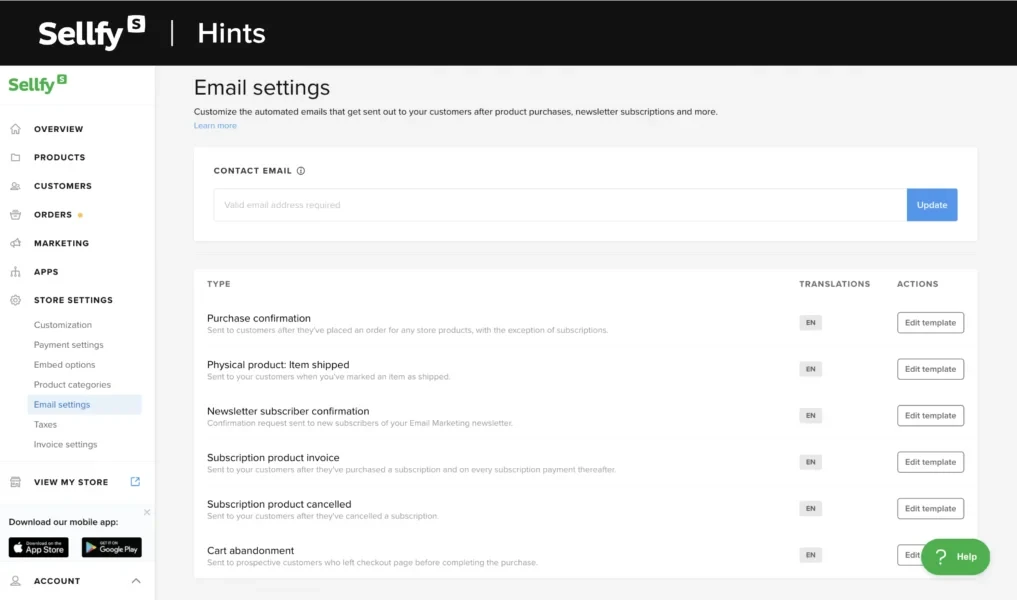
Each new store is assigned a default URL in the format yourstore.sellfy.store, and users can connect a custom domain at any time. The dashboard is structured into clear sections (Overview, Products, Orders, Marketing, Apps, and Store Settings) to further reduce navigation friction. Better yet, for digital sellers, delivery is fully automated: customers will receive download links via email immediately after purchase, so there is no need for manual fulfillment setup.
That said, Sellfy’s simplicity does come with structural limitations. There is no multi-store management under a single account, no advanced checkout customization, and limited tax rule configuration. Workflow automation during onboarding is also fairly minimal compared to other eCommerce platforms.
2. Template & customization (3.5/5)
Verdict: Sellfy provides sufficient design flexibility for creators who prioritize speed and ease of use. However, its customization depth and template variety are limited compared to larger ecommerce platforms.
At the moment, Sellfy includes approximately 11 pre-designed themes, which are mobile-responsive and tailored toward different creator niches, including musicians, photographers, writers, and course creators.
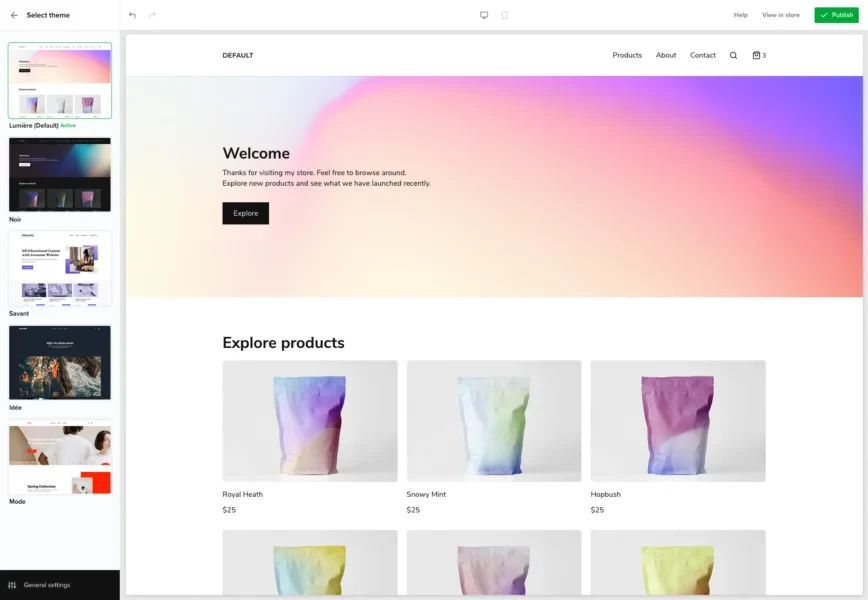
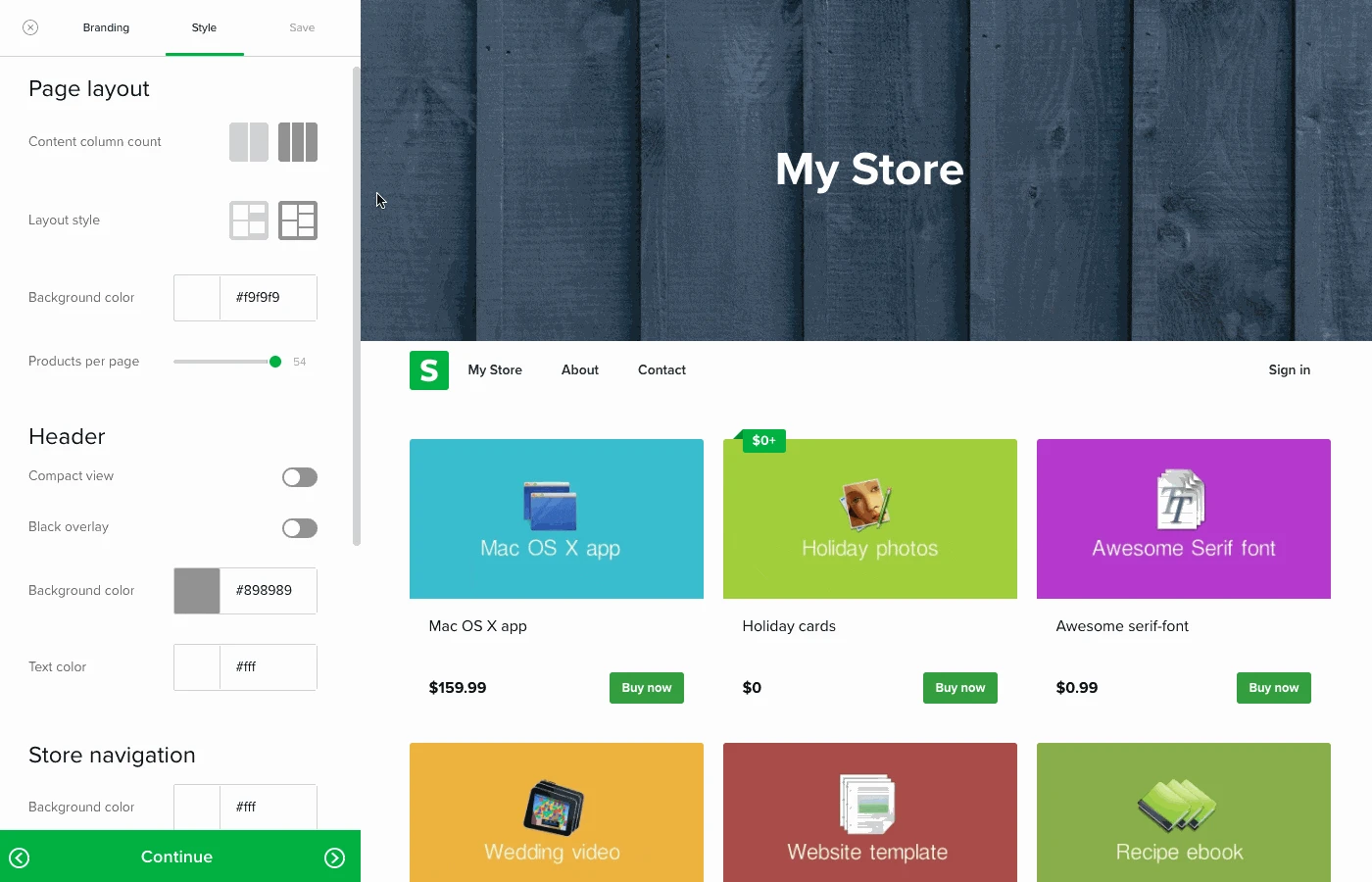
The customization interface allows users to modify logos, colors, fonts, hero sections, text blocks, product grids, testimonials, and custom pages. It's also possible to preview their storefront in both desktop and mobile views directly within the editor.
Nevertheless, keep in mind that the editor is not fully drag-and-drop, since layout adjustments are handled through sidebar module positioning rather than free-form placement. Worse, there is no theme marketplace, no third-party template ecosystem, and limited support for advanced CSS or JavaScript customization. Hence, compared to platforms offering hundreds (ff not thousands) of themes and granular layout builders, Sellfy’s design capabilities definitely feel quite moderate.
3. Product & inventory management (3.5/5)
Verdict: Sellfy is particularly strong for digital products, subscriptions, and simple product catalogs. However, it lacks the advanced inventory systems required for complex physical product operations.
Currently, Sellfy supports five primary product types: digital products, physical products, subscriptions, print-on-demand merchandise, and freebies.
One of its most notable advantages is digital file support of up to 20 GB per product, which is generous compared to many competitors. This high limit makes it suitable for high-resolution media, video courses, large software packages, and audio libraries.
Better yet, subscription products allow recurring billing models, which makes Sellfy suitable for membership content or ongoing digital releases. Additionally, the built-in Print-on-Demand system enables creators to design and sell branded merchandise without holding inventory, as production occurs per order.
And when it comes to inventory management, Sellfy includes both manual stock input per product or variant and basic variant creation. However, variant management lacks matrix combinators: for example, size and color combinations must be created manually. Also, there is no automated stock replenishment, no barcode or SKU automation tools, and no advanced bulk inventory import/export systems.
Similarly, shipping configuration for physical products must be set manually, and Sellfy does not integrate real-time carrier rates from providers like FedEx, DHL, or UPS. As a result, it is best suited for creators selling limited SKUs rather than merchants managing extensive physical inventories.
4. Payment gateways (3.5/5)
Verdict: Sellfy’s payment infrastructure is simple, reliable, and cost-effective. While gateway options are a bit limited, the absence of platform transaction fees is still quite a strong competitive advantage.
From our research, Sellfy supports two payment processors: Stripe and PayPal:
- Through Stripe, merchants can accept Visa, Mastercard, Apple Pay, and Google Pay.
- PayPal provides global payment access via bank accounts and PayPal balances.
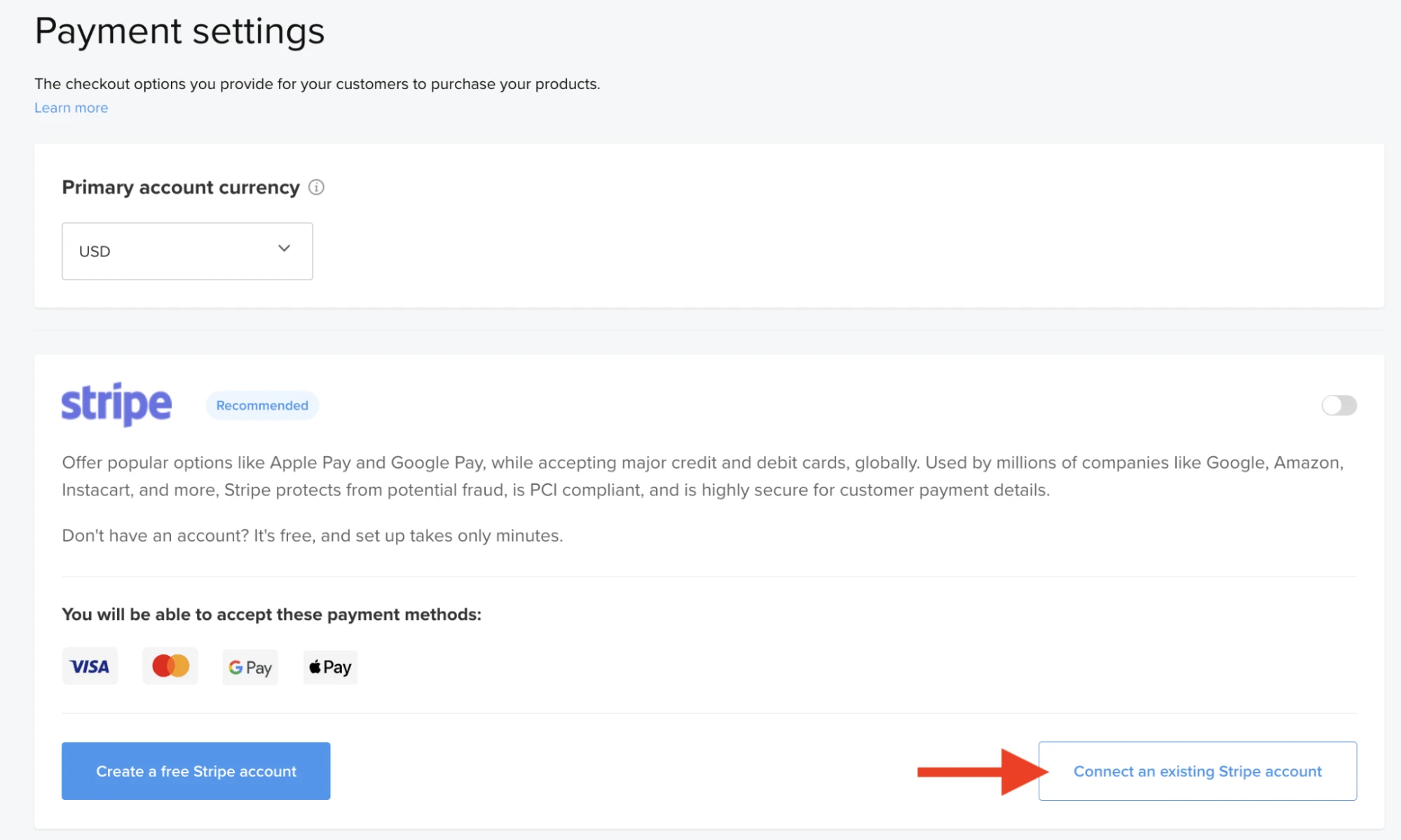
Better yet, one significant advantage is that Sellfy charges 0% transaction fees; merchants only pay the standard processing fees imposed by Stripe or PayPal. As a result, the cost structures feel very predictable, particularly beneficial for small businesses and creators with tighter margins.
Nevertheless, payment flexibility is limited compared to platforms that support dozens of regional gateways. There is no built-in support for providers such as Square or Klarna, and payment localization options depend on Stripe's availability in specific countries. Multi-currency configuration is largely handled through Stripe rather than through advanced native Sellfy controls.
In short, for most creators, Stripe and PayPal are sufficient. On the other hand, if you are an internationally diversified merchant, then the payment ecosystem is still quite narrow at the end of the day.
5. SEO & marketing (3.5/5)
Verdict: Sellfy provides essential SEO and marketing tools tailored to creators and small businesses. However, advanced automation, structured SEO controls, and content marketing features are limited.
From an SEO perspective, Sellfy includes editable meta titles, meta descriptions, and social preview images for products and pages. Stores are indexable, and an automatic sitemap is generated. We also find that an SEO preview tool is available directly within the theme editor. In short, these features provide the basic requirements for search engine visibility.
Nevertheless, Sellfy lacks advanced SEO capabilities such as structured data customization, canonical tag management, granular hreflang configuration, and built-in blogging functionality. Worse, there is no native content marketing module, meaning long-form SEO strategies require external platforms.
In compensation, on the marketing side, Sellfy offers quite a rich asset, including:
- Built-in email campaigns (up to 50,000 email credits per year for higher plans)
- Abandoned cart emails
- Percentage-based discount codes
- Sale campaigns
- Upsell popups (available on Business plans and above).

Better yet, Sellfy integrates with Google Analytics, Facebook Pixel, Twitter/X Pixel, Patreon, and Zapier (which connects to over 8,000 third-party applications).
6. Integrations & extensions (3/5)
Verdict: Sellfy covers essential integrations and offers strong expansion potential through Zapier. However, its own native ecosystem is limited.
So far, Sellfy only includes a very small set of direct, built-in integrations, which include Google Analytics, Facebook Pixel, Twitter/X Pixel, Google Merchant Center, Patreon, and Facebook Live Chat.
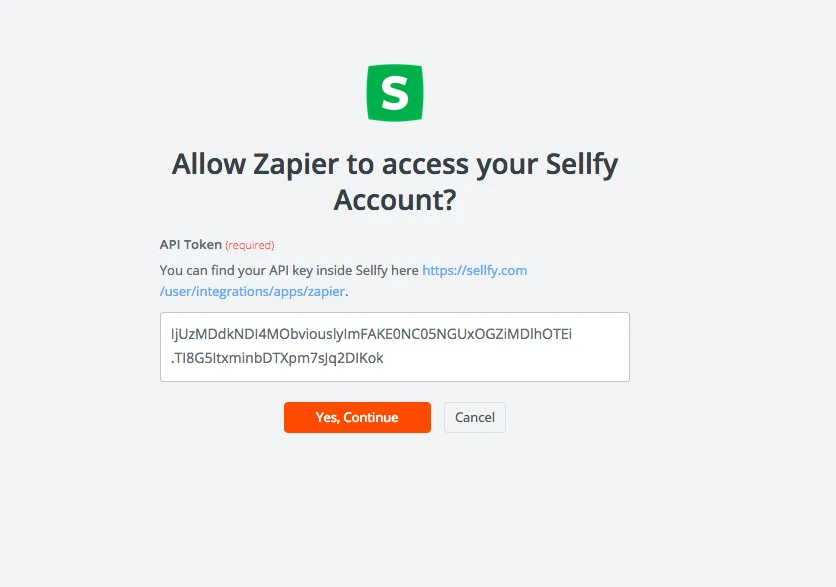
Aside from that, there is no dedicated app store or plugin marketplace, so users cannot browse and install hundreds of third-party extensions directly within the platform. To compensate for that, you may consider integrating Sellfy with Zapier, which connects the platform to more than 8,000 external applications, including CRM systems, marketing automation platforms, SMS tools, reporting dashboards, accounting software, and productivity tools.
7. Analytics (4/5)
Verdict: Sellfy provides clear, accessible performance tracking tailored to small businesses and creators. Still, while it covers essential ecommerce metrics, the platform still lacks advanced analytics tools required for data-driven growth at scale.
Sellfy includes a built-in analytics dashboard available across plans, which tracks key metrics such as:
- Total website visits
- Number of purchases
- Conversion rate (visits to purchases)
- Total revenue
- Top-performing products by revenue
- Traffic sources
- Geographic breakdowns by country (including visits, purchases, conversion rate, and revenue).
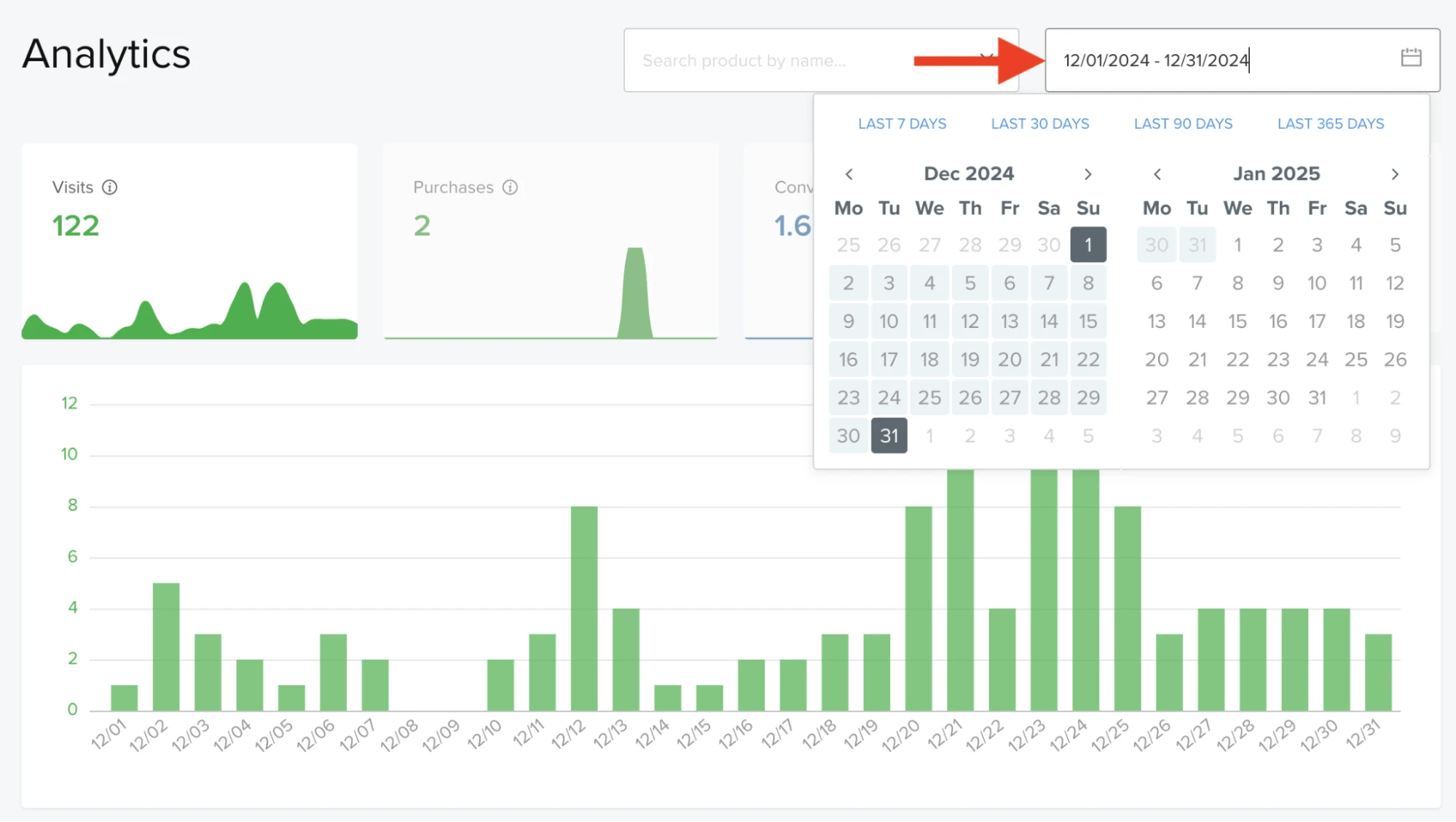
Better yet, users can also filter reports by specific date ranges or individual products, and order data can be exported to CSV or Google Sheets for further analysis. Not to mention, integration with Google Analytics allows merchants to extend tracking capabilities, and Facebook and Twitter/X pixel support enables advertising performance measurement.
8. Customer support (3.5/5)
Verdict: Sellfy delivers reliable documentation and responsive email-based support. Nevertheless, it lacks real-time communication channels and a premium support infrastructure found in larger platforms.
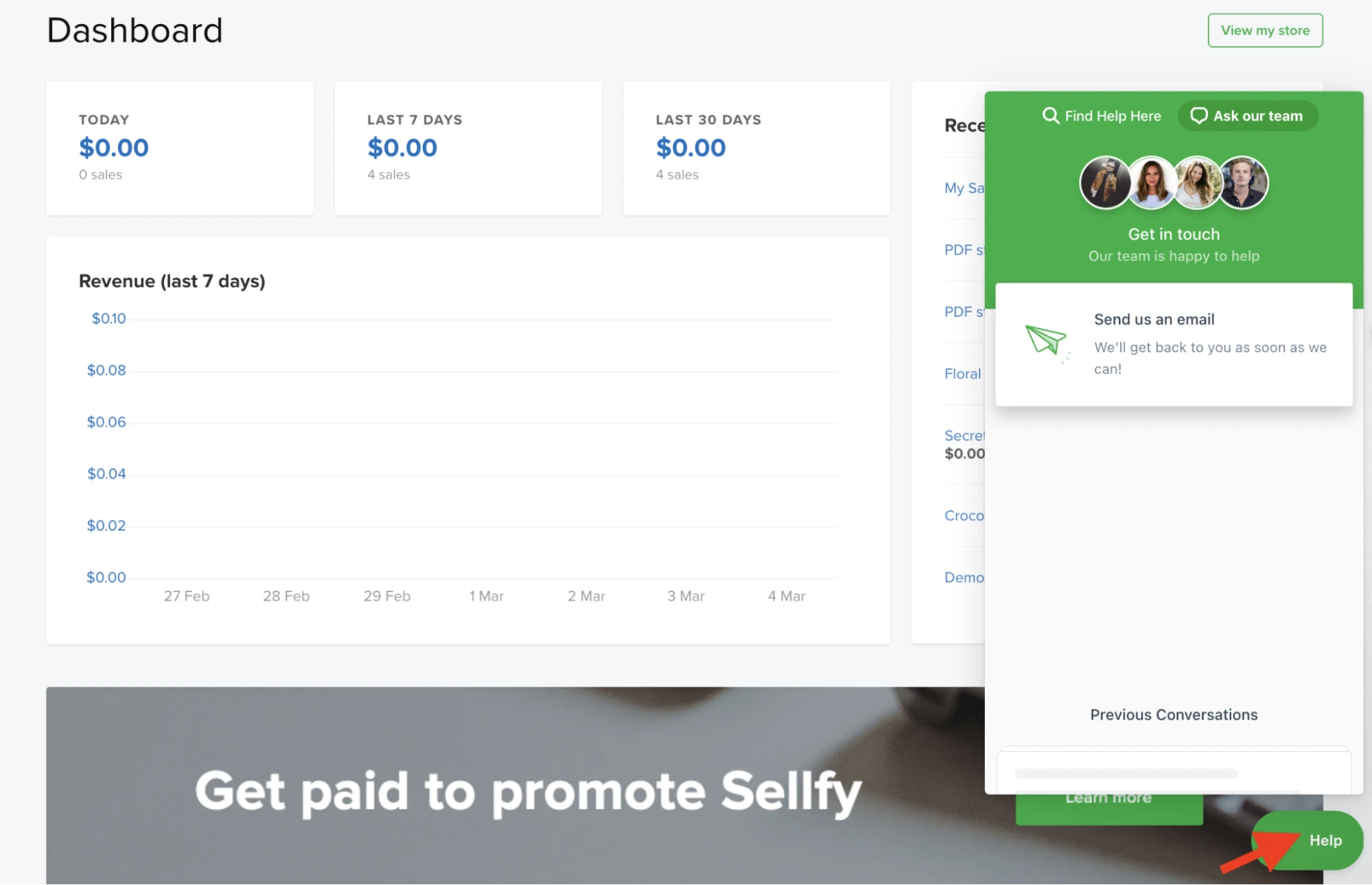
Sellfy offers a comprehensive Help Center divided into two main categories: store-owner questions (“I'm selling”) and buyer questions (“I'm buying”). Additionally, the platform includes contextual help buttons that suggest relevant documentation depending on the page a user is viewing, which helps improve accessibility.
In addition, users can contact support directly from within the dashboard via a ticket-based email system. Many user reports suggest response times within a few hours, particularly on higher-tier plans. Premium users even receive priority handling.
One downside, however, is that Sellfy does not provide 24/7 live chat support or phone support. Not to mention, unlike many other competitors, Sellfy doesn't have a dedicated account manager for lower-tier plans or an official user community forum. Hence, for larger businesses requiring immediate troubleshooting or personalized account management, the support structure may feel rather limited.
9. Pricing (4/5)
Verdict: Sellfy’s pricing model is transparent and creator-friendly. With zero platform transaction fees and predictable subscription tiers, it offers strong value for digital sellers.
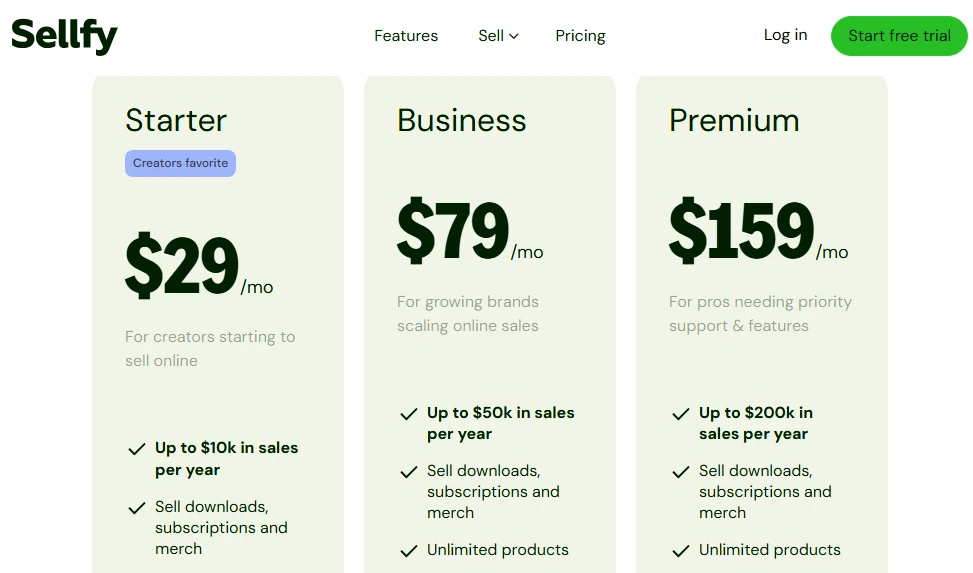
Currently, Sellfy offers three main subscription tiers:
- Starter ($29/month)
- Business ($79/month)
- Premium ($159/month)
All plans allow unlimited products and include built-in analytics and marketing tools. Better yet, the platform provides a 14-day free trial with full feature access.
And as mentioned above, one of Sellfy’s strongest pricing advantages is that it charges 0% transaction fees. Merchants only pay the processing fees required by Stripe or PayPal, typically around 2.9% plus $0.30 per transaction, depending on the region.
However, one small thing to keep in mind is that the plans are structured around annual revenue caps. For example, the Starter plan often includes a revenue limit of around $10,000 per year; meanwhile, the Business and Premium tiers increase that threshold to $50,000 and $200,000, respectively.
Top 5 Sellfy Alternatives
While Sellfy works well for digital creators and small businesses prioritizing simplicity, it’s not the only option available. Depending on your business model, growth goals, and required feature depth, you may find a better fit elsewhere.
Below is a side-by-side comparison of major Sellfy alternatives to help you evaluate which platform aligns best with your needs:
Platform | Advantages over Sellfy | Limits | Pricing |
Fourthwall | • 370+ customizable products (apparel, drinkware, decor, accessories, pet gear) | • No built-in organic discovery marketplace | • Free: $0/month (5% fee on memberships & digital sales) |
Shopify | • 3,000+ apps & integrations | • Apps & premium themes increase costs | • Basic: $39/month |
Gumroad | • Extremely fast setup | • 10% transaction fee | • Free to start |
Payhip | • Built-in affiliate marketing & coupons | • Limited design flexibility | • Free: 5% fee |
Ecwid (by Lightspeed) | • Works with existing websites (WordPress, Squarespace, etc.) | • Limited design customization in builder | • Free |
Our Methodology
To ensure this review is accurate, unbiased, and practical, our team followed a structured evaluation framework when testing Sellfy.
- Step 1: First, we created a fully functional test store using Sellfy’s Starter plan. That way, we could experience the onboarding flow, dashboard navigation, storefront customization, and checkout process exactly as a real merchant would.
- Step 2: Next, we tested all supported product types in terms of upload limits, automation workflows, inventory handling, variant creation, and shipping configuration to assess operational flexibility.
- Step 3: We then evaluated the technical foundation of the platform, including SEO settings, marketing tools, and third-party integrations such as Google Analytics and Facebook Pixel. We also analyzed the platform’s payment structure and transaction fee model to understand its cost predictability.
- Step 4: Finally, we reviewed publicly available user feedback to validate our hands-on findings, particularly regarding customer support responsiveness and long-term usability.
In short, the result is a criteria-based review grounded in real testing. Our aim is to ensure you can make an informed decision based on practical performance rather than promotional claims.
FAQs
Is Sellfy a legitimate platform?
Yes, Sellfy is a legitimate, well-regarded e-commerce platform specifically designed for creators to sell digital products, subscriptions, and print-on-demand merchandise.
How much does it cost to sell on Sellfy?
Prices on Sellfy range from $29 to $159 per month (billed monthly) or lower with annual plans ($22–$119/month), with limits on annual sales volume.
How does Sellfy pay out?
Sellfy pays out instantly, transferring earnings directly to your connected Stripe or PayPal account as soon as a customer completes a purchase. There are no waiting periods for weekly or monthly payouts.
Can I make money on Sellfy?
Yes, you can absolutely make money on Sellfy by selling digital products, subscriptions, physical merchandise, or print-on-demand items.
Final Words
Throughout this Sellfy review, it's quite clear that Sellfy excels in speed of setup, predictable pricing, digital product delivery, and built-in marketing tools. Still, keep in mind that the platform may feel restrictive for merchants planning complex product catalogs, international payment flexibility, or highly customized storefronts.
We hope our analyses help you in making the best decision for your business. For even more guidance and eCommerce tips, check out our blog or join our Facebook Community.


