
Jimdo is a beginner-friendly website builder designed to help individuals and small businesses create a website quickly without needing to touch a single line of code. Its reputation mostly stems from its AI-powered setup process, which builds a basic site for you based on your answers to a few simple questions. But in 2025, is it still worth your time? Let's find out in this in-depth Jimdo review!
Our team has put the platform to the test across the following key areas:
- Jimdo pricing
- Ease of website building
- Design and templates
- Inventory management
- Payment gateways
- Shipping
- SEO & marketing features
- Security
- Support
Keep reading to see how it measures up!
Jimdo Review – Our Quick Verdict (3.0/5)
Overall, Jimdo is a solid starting point for beginners and small websites, offering an intuitive setup and affordable pricing. However, its limited templates, lack of scalability, and minimal advanced features may hold users back as their needs grow.
Overall Rating: 3.0/5 – Great for first-time users, but lacks the power and flexibility for long-term or large-scale growth.
Category | Rating (Out of 5) | Highlights | Limitations |
Website Builder | 3.0 | Easy setup with AI-driven assistance | No theme previews before purchase; very limited customization |
Templates | 2.5 | Allows HTML/CSS editing for advanced users | Only 16 outdated themes with no live demos |
eCommerce | 3.0 | Supports product variants, manual stock updates, and flat-rate shipping | Capped at 100 products; only Stripe and PayPal supported; basic shipping tools |
SEO & Marketing | 2.5 | Beginner-friendly SEO setup; mobile-optimized; basic keyword guidance | No built-in newsletter, CRM, or campaign tools |
Pricing | 3.0 | Very affordable plans, including a free version | Limited features even on paid tiers |
Security | 2.5 | SSL encryption and automatic backups included | Lacks advanced security controls or standout protections |
Support | 4.0 | Fast support response times and helpful knowledge base | Faster response only on higher-tier plans |
In fact, on platforms like Trustpilot and G2, Jimdo review also received mixed opinions from users. Some reviews highlight Jimdo's ease of use and support as its best features, such as:
“A really intuitive website development tool.
I love the drag and drop elements feature that puts the guesswork and CSS out of commission. You can have as many or as few elements on a single webpage. You would rarely need to deploy code, which is good for newbies. When I started out, it didn't take me long to figure out the element addition, page creating, and interlinking. That is how easy it is to build your first website on Jimdo.”
— By Abhishek K. on G2
“Thanks for the good work (again)!
Always a pleasure to interact with the support team, keep up the good work!”
On the other hand, Jimdo is not highly recommended due to its outdated and lack of robust features, as seen in these comments:
“Jimdo doesn't want to modernize…
My website has 15 years. It is not modern. Jimdo doesn't want to modernize its website builder cms. It has abandoned its users. That's a pity.”
— By Rosana on Trustpilot
“Very outdated website builder
The number of templates available is limited, and the customization options for these templates are quite basic. This made it difficult for me to create a unique website that stood out from my competitors.”
— By Umesh Usti L. on G2
Jimdo Review: Pro & Cons
Here’s a quick snapshot of Jimdo’s key strengths and weaknesses before we jump into the detailed Jimdo review:
Pros | Cons |
Very easy setup with AI builder | Limited customization and outdated templates |
Budget-friendly pricing | No advanced eCommerce or marketing tools |
Decent beginner-level SEO | Can’t preview themes before buying |
Built-in SSL and backups | Only two payment gateways supported |
Helpful support with fast replies | Not scalable for growing businesses |
Who Is Jimdo For?
This Jimdo review shows that Jimdo is built for people who want a website that feels straightforward to set up, easy to manage, and quick to publish without touching any technical settings. The platform works best when a website has a clear purpose, simple pages, and no need for advanced customization or complex business operations.
We would recommend Jimdo for:
- First-time website builders who want a guided setup that helps them publish a clean site quickly, even if they have never built a website before.
- Small business owners who need a simple website to present their services, share contact information, and build trust online without spending weeks on design decisions.
- Freelancers and solo entrepreneurs who want a basic online presence that supports their personal brand and makes it easy for clients to learn about their work and reach out.
- Personal projects or portfolios where the goal is to showcase content in a simple format, and the website does not rely on advanced SEO tools, custom layouts, or deep integrations.
However, this Jimdo review also makes it clear that Jimdo may not be the right match for users who expect fast growth or need more control over how their site looks and performs. The platform can feel limiting if a business needs stronger SEO features, more flexible design options, or an eCommerce setup that can handle larger catalogs, complex shipping rules, and more advanced selling tools.
Jimdo Pricing (3.0/5)
In our Jimdo review, this platform's pricing shows a clear focus on simplicity, with three paid plans designed for small websites and basic online stores. Every tier is listed clearly on their website, helping users understand costs quickly before committing.
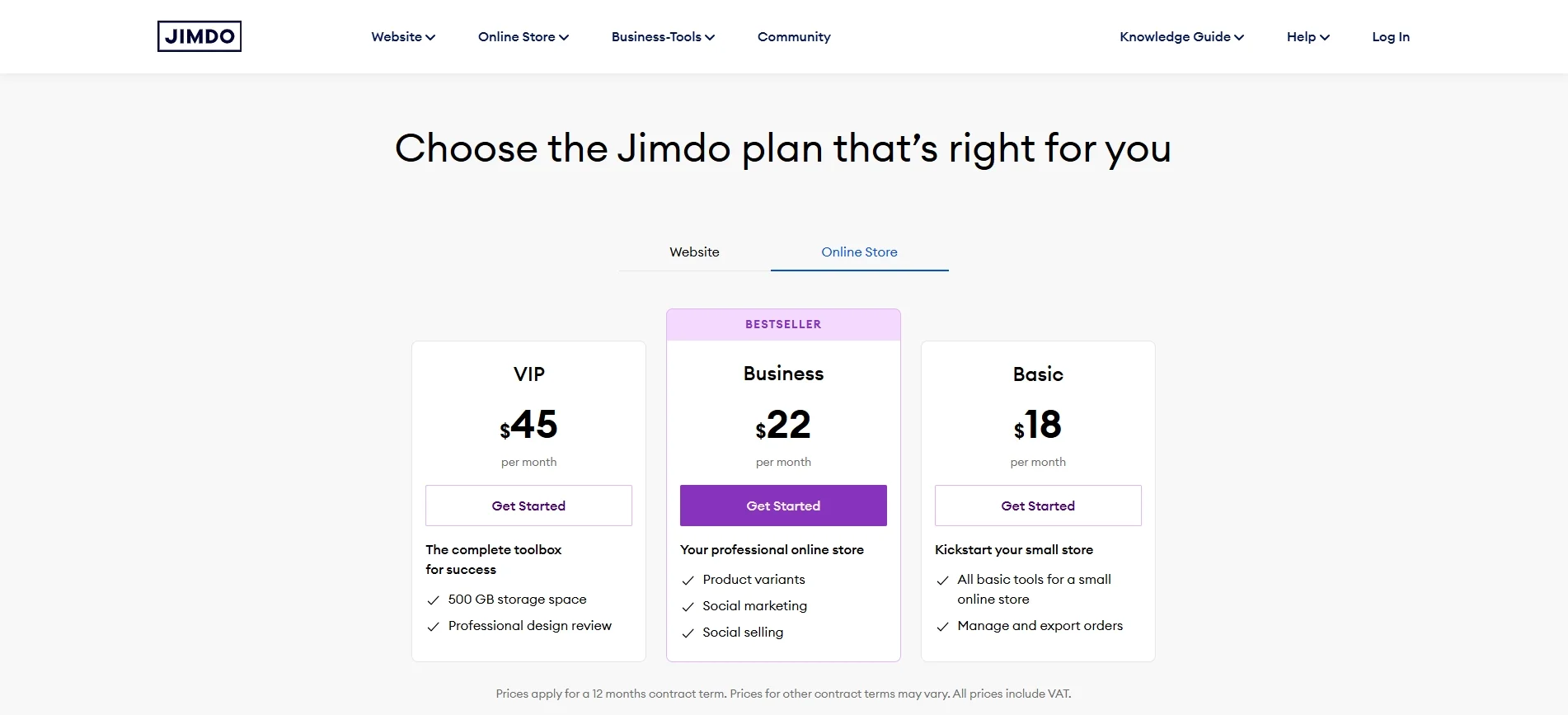
First, Jimdo offers the Basic plan at $18 per month, which targets small online stores and simple websites with limited needs. This plan includes essential tools such as an online store, secure HTTPS hosting, a free domain, and mobile optimization. However, this plan limits product features, as it does not support product variants, discount codes, or social selling, which can restrict selling flexibility.
Next, Jimdo positions the Business plan at $22 per month as its most popular option. This plan unlocks important selling features, including product variants, discount codes, social selling, and more product layouts. The Business plan also increases storage to 50 GB and supports up to 50 website pages, which suits small businesses that want more room to grow without paying a premium price.
At the top tier, Jimdo provides the VIP plan at $45 per month, which targets users who want the full feature set and higher support priority. This plan offers 500 GB of storage, unlimited website pages, professional design analysis, and faster customer support responses within one hour. The VIP plan also includes all online store features, making it suitable for businesses that want more support and fewer limits.
The best thing I'd like to mention in this Jimdo review is that Jimdo doesn't charge transaction fees across all plans. This feature is a clear advantage against competitors like Wix, Squarespace, and Shopify. However, please note that this platform lacks deeper customization, strong marketing automation, and scalable eCommerce features, even at the highest tier.
Overall, Jimdo pricing feels fair for simple websites and small stores, but the value drops for businesses that need advanced control or long-term scalability.
Ease of Website Building (3.0/5)
Jimdo nails the setup experience and keeps things simple for beginners. But between the meh AI designs and the frustrating pay-first-preview-later approach with themes, it's hard to give it full marks in our Jimdo review. A solid 3 out of 5 feels fair enough.
Building a website with Jimdo kicks off on a high, user-friendly note. You can sign up in just a few clicks using your Google, Facebook, or Apple account. Once you're in, just hit “Create New Website,” and Jimdo gives you two clear options to get started.

The first option, “No coding required,” is designed for those who want a quick, no-fuss setup. All you have to do is answer a series of AI-generated questions about your business, main goals, target audience, favorite color tones, and more. Based on that, Jimdo's AI will produce a few custom site designs for you. The downside? The designs it comes up with are okay… just okay. They're clean, sure, but nothing eye-catching or standout.
Now, if you're more hands-on (or maybe even a little tech-savvy), you might try the second option: the editor for coding experts. Here, you choose from a gallery of themes, then either use basic tools like drag-and-drop menus or go full manual with HTML and CSS editing.
Unfortunately, Jimdo doesn't actually let you preview these themes properly (except for the thumbnail images) before you commit. And to make matters worse, you have to pay for the theme before you can even start editing it. That means if the one you picked turns out not to fit your needs, you've basically thrown money down the drain and might have to repeat that process a few times before landing on one that works.
Design & Templates (2.5/5)
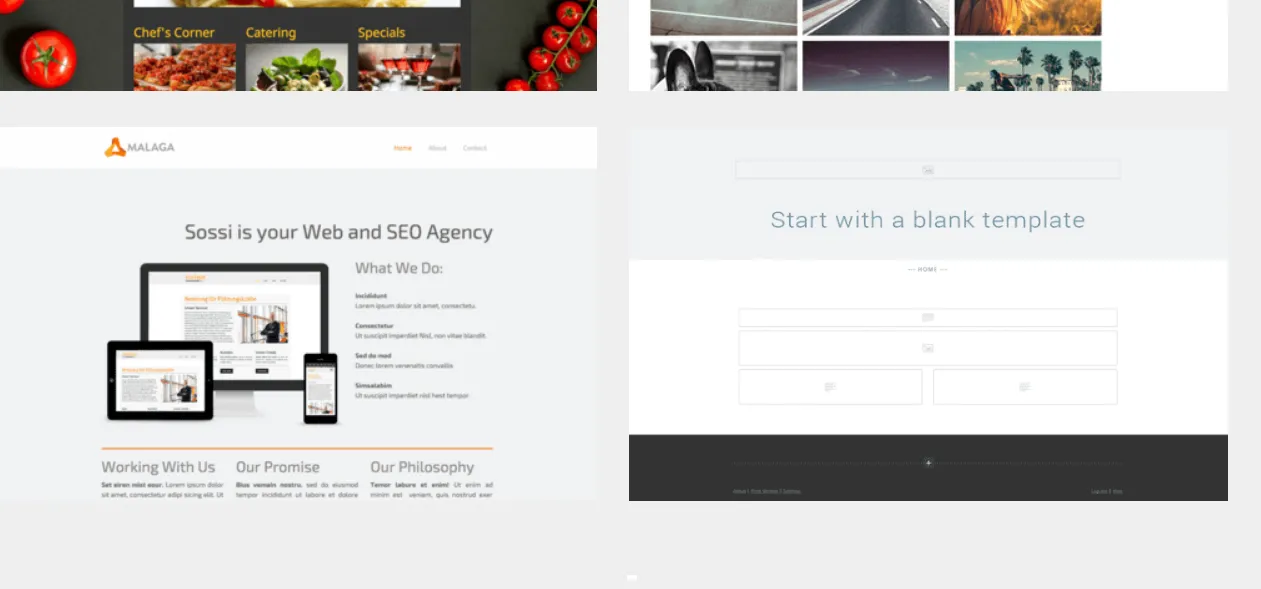
If you go with the manual route to build your site, you're given a grand total of… just 16 themes. Yes, only 16. That's an incredibly limited selection, especially compared to other builders that offer dozens, if not hundreds, of options!
Given such a tiny library, no free previews, and designs that feel a bit behind the times, it's hard to recommend Jimdo's templates with confidence. That's why it only earns 2.5 out of 5 in our Jimdo review.
And that's not the only frustrating part in our Jimdo reviews. As mentioned earlier, you don't get to see how these themes actually look before paying for them. There's no detailed preview, no live demo, nothing; just one simple thumbnail image and a lot of guesswork.
To make things worse, some of those 16 themes look… well, kind of outdated. They're usable, sure, but you'll probably need to roll up your sleeves and spend some extra time polishing things up.
Jimdo eCommerce Tools (3 out of 5)
In this section of the Jimdo review, we will cover the three essentials: inventory management, payment options, and shipping.
Inventory management
Jimdo does a pretty good job of covering basic inventory needs. You can offer different variants of the same product (sizes, colors, or styles) without creating separate listings for each. When something sells out, it automatically shows a “sold out” label to customers, so you don't risk overselling. There's also the option to update stock levels manually whenever you restock or make offline sales, which is handy for small, hybrid operations.
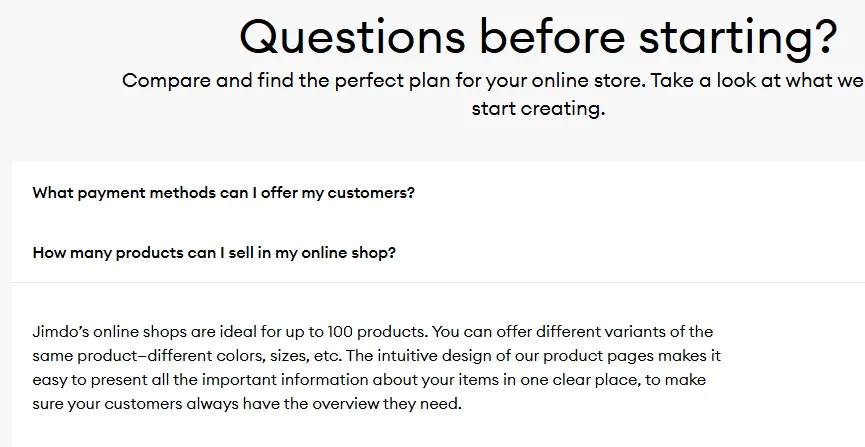
But here's the thing: Jimdo recommends itself for stores with no more than 100 products. And that makes sense since the features are clearly not equipped for larger inventories; you won't find advanced functionalities like inventory syncing across multiple channels and marketplaces. There's no native import/export function, either, meaning you'll need third-party tools to update products in bulk or move data elsewhere.
Payment
When it comes to payment, Jimdo approaches payment gateways with a strong focus on simplicity and quick setup, which helps small online stores start accepting payments without dealing with complex technical steps. The platform supports common payment methods, including PayPal, credit cards, and similar options, which cover the basic needs of many small businesses.
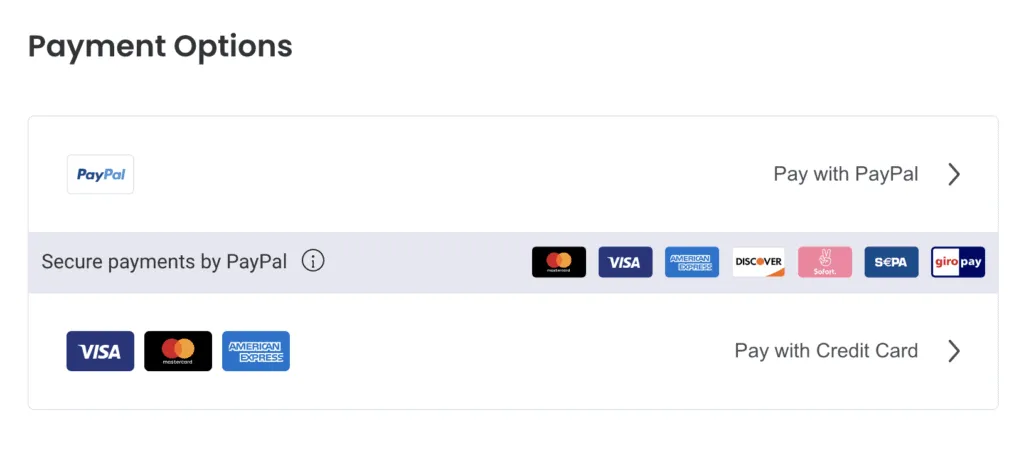
Jimdo includes payment gateway access across all online store plans, which means users do not need to upgrade just to activate payments. The platform allows store owners to set up payments directly from the dashboard, which keeps the process clear and manageable for beginners.
However, Jimdo also shows clear limitations in this area. The platform offers fewer payment gateway options compared to more advanced eCommerce solutions, and it does not support complex checkout rules, regional gateway customization, or advanced payment flows.
Overall, Jimdo payment gateways work well for small stores with simple selling needs, but businesses that require broader payment options or more checkout control may find the platform restrictive over time.
Shipping
Regarding shipping, you can set flat-rate shipping, offer free shipping for big orders, and even calculate shipping based on order value or weight. If desired, consider setting country-specific shipping rates, which we highly recommend for international selling.
Unfortunately, there are still a couple of caveats. First, while you can set rates for each country, you can't set different rates for regions within a country (like states in the U.S. or provinces in Canada). Second, Jimdo only lets you use one shipping carrier at a time. That's a major drawback if you rely on comparing rates or juggling multiple carriers to optimize delivery speed and cost.
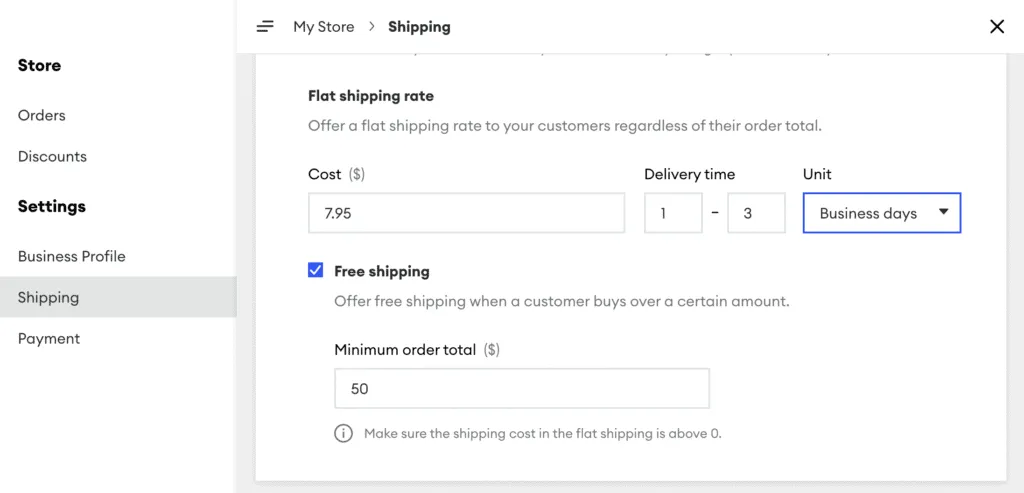
All in all, Jimdo's eCommerce tools are clean, simple, and perfect for small businesses with straightforward needs. But as your store grows and your operations get more complex, these tools might start holding you back! So we're giving Jimdo's eCommerce tools a soft 3 out of 5. Not bad for beginners, but definitely not future-proof.
SEO & Marketing Feature (2.5/5)
Jimdo's SEO and marketing tools feel like they were made for small shops and first-time site owners who want something that works without feeling overwhelmed. They'll get you on Google and help customers reach out, but they won't take you very far beyond that. That's why this part gets a 2.5 out of 5 in our Jimdo review — great as a starting point, but not much room to grow.
If you're just getting your online store off the ground, Jimdo gives you a surprisingly smooth start when it comes to SEO. Simply put, you don't have to know much about SEO at all, as Jimdo quietly and automatically handles the technical aspects:
- Auto-generating a 404 page
- Making sure your site is mobile-friendly
- Setting up clean, readable URLs
- Creating an XML sitemap for Google to crawl.
It covers eight key ranking factors right from the get-go, and you don't have to touch a line of code. You can also head into your SEO settings and choose three main keywords or phrases you want your site to rank for. Jimdo will then give you suggestions and practical tips on how to use those keywords in your content. Sure, all these are not advanced SEO by any means, but it's a confidence boost for beginners who want clear, actionable direction.

Marketing, on the other hand, is where Jimdo feels a bit thin. You do get basic contact forms, social selling, and the ability to set up email forwarding. But beyond that? There's no built-in newsletter tool, no CRM, no automation, and no integrated campaign manager. If you want to run serious marketing efforts, you'll need to piece them together using third-party tools.
Security (2.5/5)
Every website you create comes with SSL encryption right out of the gate, which means all the information flowing between your site and your visitors is protected.
Jimdo also takes care of daily automatic backups; if any issue arises, you can roll your site back to a previous version without breaking a sweat. On top of that, the platform gets regular security updates and patches to keep bugs and vulnerabilities in check.
All in all, it's enough to give you peace of mind if you're running a small site or just getting started. Nevertheless, these features are pretty standard across most modern website builders. There's nothing particularly unique or advanced here. That's why its security earns a 2.5 out of 5 from our Jimdo review team: solid for basic protection but not a standout.
Customer Support (4.0/5)
When things go sideways (as they sometimes do), Jimdo's support has your back. And the good news is, the higher your plan, the faster they get back to you!
- If you're on the Free plan, you can expect a reply within 1–2 business days. Not ideal if you're in a rush, but totally fair for a no-cost account.
- Step up to the middle-tier plans, and you'll hear back in about 4 hours.
- And if you're on a top-tier plan, support responds within just 1 hour, which is genuinely impressive for a website builder at this price point.
But what if you're more of a DIY person? Jimdo's got you covered there, too. Their Knowledge Guide is full of step-by-step tutorials and troubleshooting tips that are actually easy to understand (not just tech-speak). There's also the Jimdo Community, where you can connect with other users and swap tips or ask questions. And for those looking to go beyond the basics, the Jimdo Connect Business Academy offers tutorial videos packed with expert advice to help you make the most of your site.

All in all, we're pleasantly surprised by how well Jimdo handles support. Therefore, in this Jimdo review, we're giving their support a well-earned 4 out of 5.
Jimdo Alternatives
As you can see from our Jimdo review, this platform is a decent starting point. Nevertheless, it's not the only game in town nor the strongest! If you're finding its design limits too restrictive, there are plenty of other website builders that might serve you better:
Platform | Advantages Over Jimdo | Limitations |
Wix | Far more design flexibility, 800+ templates, powerful App Market | Can feel overwhelming due to sheer volume of features |
Shopify | Built for selling online, scalable eCommerce tools | Higher pricing, less friendly for content-focused sites |
Squarespace | Sleek templates, strong for blogging and branding | Less intuitive than Jimdo’s AI builder |
Weebly | Drag-and-drop simplicity, decent free plan, good for small shops | Limited customization and fewer updates in recent years |
Zyro | Fast AI-powered builder like Jimdo, very affordable | Fewer features and templates compared to major players |
WordPress.com | Extremely flexible with plugins and themes, great for content | Steeper learning curve, can be overkill for small projects |
Our Methodology: How We Create This Jimdo Review
To provide a balanced and objective Jimdo review, we follow a thorough methodology that focuses on real-world use. Our goal is to assess Jimdo from the perspective of everyday users, not just its features and marketing promises.
Here's a step-by-step breakdown of how we evaluate this platform's capabilities, usability, and value to create this Jimdo review.
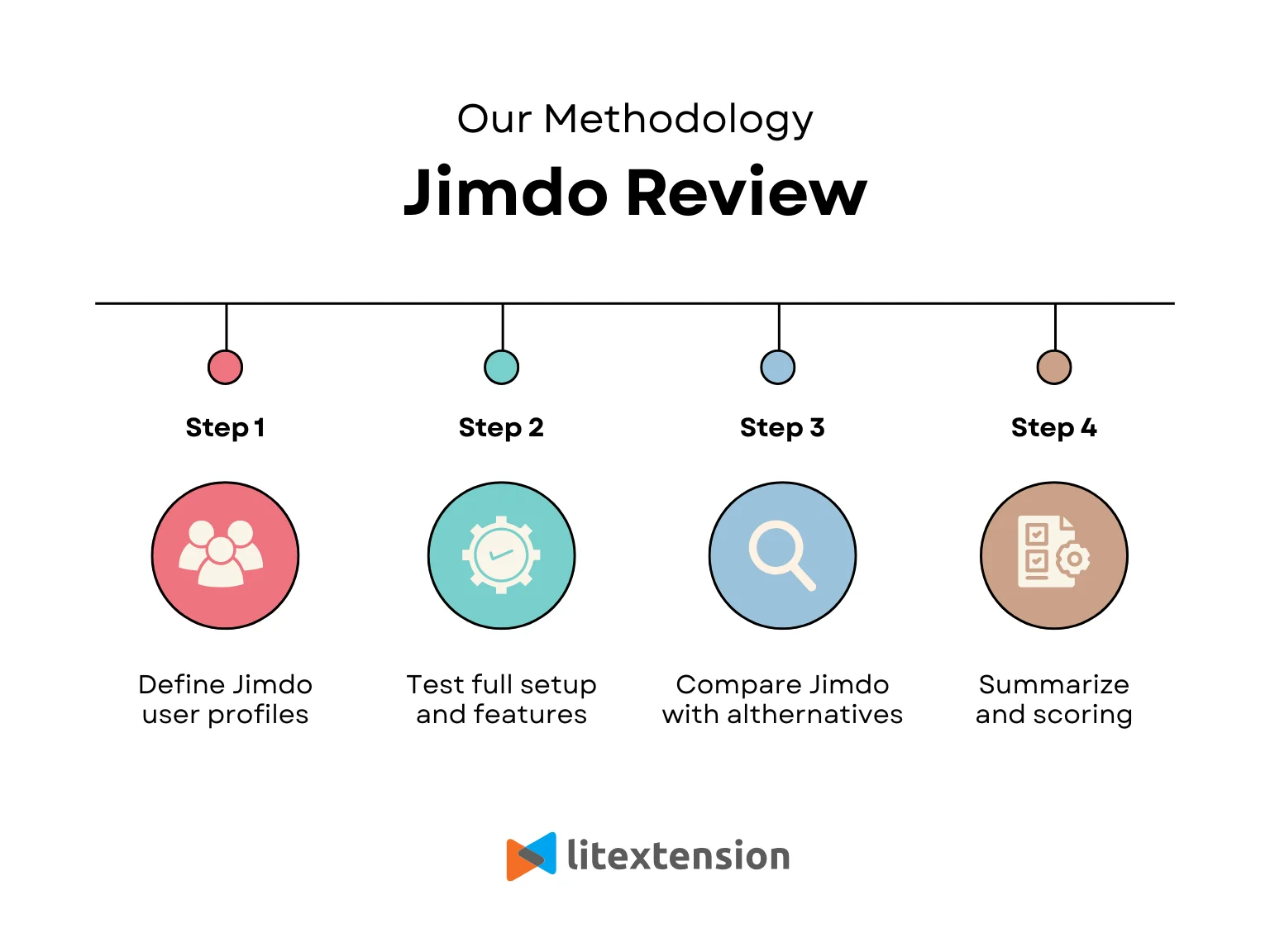
1. Define the Jimdo user profiles
In this Jimdo review, we start by mapping out the most common Jimdo users, such as first-time website builders, freelancers, and small business owners who need a simple site. This step helps our review stay practical, because Jimdo is not built for every type of website, and the “right” verdict depends on the user’s real goals.
2. Test the full setup and website features
Next, we evaluate each core area using hands-on testing and direct comparison. This process includes website building, design flexibility, eCommerce tools, payment setup, SEO features, security, and customer support. Each category receives a score based on ease of use, practical value, and long-term usability.
3. Compare Jimdo with other alternatives
Finally, we look at how Jimdo stacks up against similar website builders and eCommerce platforms. By doing so, we can provide a clearer perspective on what Jimdo does better and where it falls short.
4. Score each section in this Jimdo review
Finally, we summarize our opinions and assign each score based on real testing results, practical value, and how well Jimdo supports a user over time as needs grow. Each rating reflects a balance between what Jimdo does well and what it does not offer, so you can clearly see where the platform fits and where it may become limiting.
Jimdo Review: FAQs
Is Jimdo a good website builder?
Yes, if you're a beginner or running a small personal project; it's easy to use and quick to set up. Nevertheless, it lacks the depth and flexibility of other builders like Wix or Squarespace.
What are the cons of Jimdo?
Jimdo's biggest drawbacks are its limited design flexibility, outdated templates, lack of advanced eCommerce features, and the pay-before-you-preview template policy.
Is Jimdo really free?
Yes, Jimdo offers a completely free plan, but it's very limited. You'll have Jimdo branding on your site, a subdomain instead of a custom one, and no access to eCommerce or advanced features.
What is Jimdo used for?
People typically use Jimdo to build simple business websites, personal blogs, portfolios, or small online stores. It's also quite popular for users who want a fast, code-free way to get online.
Conclusion
Our Jimdo review team has walked through the platform's strengths and exposed its limits so you can make an informed decision. And if Jimdo doesn’t quite meet your expectations, don’t worry; there are several other platforms that might be a better match, depending on your goals!
For more eCommerce tips, check out our blog and join our Facebook Community.


