Every data migration starts the same way: a decision to move critical information from one system to another, and a narrow window to get it right. A data migration checklist is what turns that narrow window into a controlled, repeatable process instead of a stressful one-shot attempt.
In this guide, we’ll walk you through a curated data migration checklist with four main phases that you can apply to almost any replatforming project. Keep reading to discover:
| Phase | Main Goal | Key Activities |
|---|---|---|
| 1. Planning & Preparation | Define what’s moving, who owns it, and how it will happen. | Define scope, identify stakeholders, audit data, prepare the target environment, choose a migration approach, plan backups/rollback, build a timeline. |
| 2. Execution | Move the data safely through a tested process. | Run a test migration, perform the full migration, monitor progress, track errors. |
| 3. Validation | Confirm migrated data is accurate, complete, and functional. | Check record counts, validate relationships, verify files/media, test business functions, run UAT, review quality metrics. |
| 4. Post-Launch Checklist | Keep the new environment reliable after go-live. | Verify access/permissions, optimize performance, update documentation, monitor metrics. |
Let’s get started!
Understanding Data Migration Checklist – A Quick Overview
A data migration checklist is the itemized reference that guides a project from initial data audit through final validation. It’s the working document your team follows step by step, phase by phase, to ensure a smooth, frictionless data transfer.
Types of data migration
Before building a detailed data migration checklist, let’s look at which kind of migration you’re actually running, since the scope changes depending on the type:
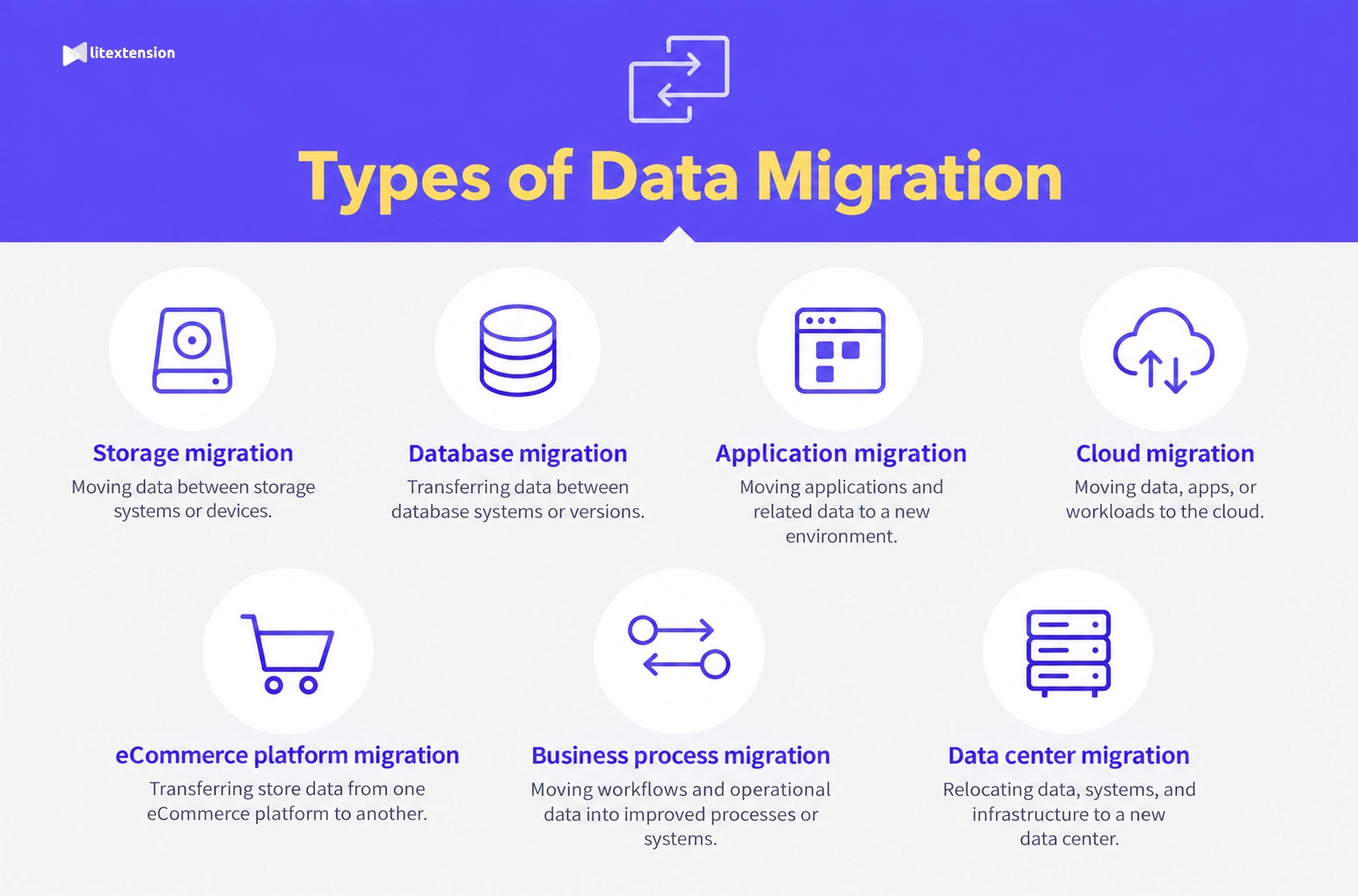
- Storage migration: Moving data between storage systems while the database and application layer stay the same.
- Database migration: Transferring data between database platforms or versions, often requiring schema changes.
- Application migration: Moving data between different applications, usually with some data model transformation.
- Cloud migration: Shifting from on-premises infrastructure to the cloud, or between cloud providers.
- eCommerce platform migration: Moving a live store’s products, customers, and orders to a new platform, which blends elements of all four types above.
- Business process migration: Moving the data and workflows tied to a specific business function, such as HR, finance, or customer service, often as part of a broader restructuring or system consolidation.
- Data center migration: Relocating physical or virtual infrastructure from one data center to another, whether due to a facility change, consolidation, or provider switch.
For a full breakdown, please check out our detailed article on types of data migration here.
Why do you need a data migration checklist?
1. It reduces risk before problems become real
Migration projects commonly face risks like data loss, downtime, or corrupted records. A checklist forces the team to confirm backups, validation rules, and rollback steps ahead of time, so they address those risks while they’re still hypothetical rather than after they’ve already caused damage.
2. It keeps a multi-team project coordinated
A migration rarely involves one person or one team. It touches data owners, developers, QA, and the business stakeholders who use the migrated system afterward. Without a shared document, each group tends to assume someone else is covering a given step, and gaps only surface once they’re expensive to fix. A checklist gives everyone the same reference point, so responsibilities and progress stay visible instead of assumed.
3. It builds in checkpoints instead of one final test
Rather than treating validation as a single event at go-live, a good checklist verifies progress at every phase. That means issues get caught while they’re still small and isolated, not after they’ve spread through the new system.
4. It becomes a reusable template for future migrations
Once documented, a data migration checklist doesn’t just serve the current project. It becomes a starting point for the next one, cutting planning time and reducing the odds of repeating the same mistakes twice.
Now that the overview is clear, let’s move on to the first phase of the data migration checklist.
Phase 1. Planning & Preparation
Planning is where most migration project failures get decided, long before anyone touches the data itself. This phase results in a documented scope, team, environment, approach, and timeline – the foundation everything else in the migration builds on.
1. Define the migration scope
Before any work begins, get specific about what this migration actually covers, since a vague scope is one of the fastest ways for a project to balloon past its original timeline.
- Identify which systems and data sources are included in this migration
- Exclude specific fields, record types, or historical time periods where relevant
- Define what counts as “done” in writing
- Flag any data that will be archived instead of migrated, and where it will live
2. Identify stakeholders and responsibilities
A migration touches more people than the technical team alone, so map out who owns what before work gets underway.
- Assign a single named owner for each data domain (customers, products, orders, etc.)
- Appoint a project lead responsible for overall timeline and coordination
- Designate a QA or testing owner responsible for the validation plan
- Bring in a security or compliance reviewer for regulated data
- Build a communication plan for keeping stakeholders updated through each phase
3. Audit the existing store data
Before anything moves, profile the source data to understand its real condition. This step of the data migration checklist is where most teams discover more complexity than expected.
- Catalog all data sources, including spreadsheets or legacy add-ons often missed in the first pass
- Identify duplicate, missing, or inconsistent records
- List custom fields or non-standard data structures
- Flag any sensitive data requiring special handling or compliance review
4. Prepare the target environment
Once you know what’s moving, get the destination system genuinely ready to receive it, not just technically online.
- Align storage, compute, and schema with what’s coming
- Configure access permissions and authentication in advance
- Run a test confirming the environment can actually receive and process data
- Isolate the environment from production until it’s fully verified
5. Choose your migration approach
Once the scope and environment are settled, the next step in the data migration checklist is how the data will actually move. Most teams choose between three broad approaches, and the right one depends less on preference and more on data volume, technical complexity, and how much risk the business can tolerate.
Method 1. Manual data transfer
Best for:
Very small datasets or simple migrations with only a handful of data types, for example, think a store with a few hundred products and no complex order history.
Manual transfer means exporting data from the source system and importing it into the target system by hand, typically using spreadsheets, CSV files, or the platform’s native import tools, with field mapping done manually as you go. The key advantage is cost: there’s no tool or service fee, and the process is fully transparent since your team controls every step. The trade-off is that it’s slow, error-prone at any real scale, and offers no built-in validation, so mistakes in mapping or formatting often go unnoticed until they cause problems downstream.
Method 2. Use a dedicated migration service
Best for:
eCommerce store owners moving meaningful volumes of product, customer, and order data, especially between different platform types where manual field mapping would be genuinely difficult to get right.
A migration service relies on a purpose-built platform that automates data extraction, field mapping, transformation, and loading, often with built-in validation checks along the way. This is the approach LitExtension is built around, handling the technical heavy lifting of an eCommerce platform migration so your team doesn’t have to reconstruct it manually.
Store Migration Made Easy With LitExtension!
LitExtension offers great migration solutions that help you transfer your data from the current eCommerce platform to a new one accurately, painlessly with utmost security.

The key advantage is speed and accuracy at scale: automated mapping and built-in validation catch errors a manual process would likely miss, and most migrations can run with minimal downtime. The only trade-off is a service cost that scales with data volume and project complexity.
6. Create a backup and rollback plan
Even a well-planned migration needs a documented way back if something goes wrong, so put this in place before execution begins, not after.
- Complete and verify a full source backup before migration starts
- Test the rollback procedure, not just write it down
- Define clear trigger criteria for when a rollback gets called
- Name an owner responsible for making that call
7. Create a migration timeline
With the approach and rollback plan set, pull everything into a single schedule the whole team can work from.
- Set milestones covering planning, execution, validation, and post-launch
- Reserve buffer time for unexpected issues
- Schedule around peak business periods, such as the holiday season for an eCommerce store
- Build in checkpoints for stakeholder sign-off between phases
Phase 2. Data Migration Checklist for Execution
With the plan finalized, phase 2 of this data migration checklist is where the actual data transfer happens. Since the groundwork is done, the focus shifts to testing, running, and tracking the transfer itself.
1. Run a test migration
Before touching production data, run the transfer against a smaller, representative sample first, since this is where most issues surface while they’re still cheap to fix.
- Select a small data subset that reflects real complexity, not just the easy records
- Set up a non-production environment for the test run
- Document every issue found, however small
- Define clear pass/fail criteria before moving to the full migration
2. Perform the full migration
Once the test run is clean, execute the full migration following the exact plan and approach chosen in Phase 1.
- Confirm the test migration’s issues have all been resolved
- Execute according to the documented plan, not improvised on the fly
- Follow the chosen approach (manual, migration service, or freelancer-led) as scoped
- Verify source systems are backed up and ready before starting
3. Monitor the migration progress
While the transfer is running, keep a close eye on it rather than treating it as a “start and walk away” process.
- Track transfer rates and completion status in real time
- Check error logs continuously, not just at the end
- Monitor system performance on both source and target sides
- Set alert thresholds for anything that signals a critical failure
That said, if you choose to migrate with LitExtension, our experts will handle the entire project for you, from start to finish. We’ll handle the data transfer and testing, so you can focus on your business operations instead of constantly checking migration progress.
Let Our Experts Handle Your Store Migration!
With the All-in-One Migration Service, our experts take care of everything, ensuring a seamless and stress-free migration.
4. Track and document migration errors
Every anomaly deserves a record, even the ones that seem minor at the time, since patterns often only become visible in hindsight.
- Log the timestamp, affected record, error type, and resolution status for each issue
- Separate issues that need fixing immediately from ones that can wait until post-launch
- Assign ownership for each open issue
Phase 3. Data Migration Validation Checklist
Once the data has landed in its new home, it’s time to check its integrity. This data migration validation checklist is where you prove that what arrived matches what left, not just in volume, but in accuracy, structure, and function.
1. Check record count and accuracy
Start with the most basic confirmation: did everything that should have moved actually move, and does it match the source?
- Compare row and record counts between source and target
- Run automated reconciliation scripts or checksum comparisons where possible
- Spot-check a sample of records manually for accuracy
- Flag any count mismatches for immediate investigation
2. Validate data relationships
Beyond individual records, confirm that the connections between them survived the transfer intact, since broken relationships often don’t surface until much later.
- Verify foreign key relationships between related tables
- Confirm parent-child hierarchies transferred correctly
- Check that linked records (orders to customers, products to categories) still point to the right place
- Test a few multi-step relationships end to end, not just the direct links
3. Validate transferred files and media
For any migration involving attachments, images, or documents, confirm the assets themselves made the trip along with the records referencing them.
- Confirm product images, customer attachments, and documents transferred successfully
- Check that file links remain correctly associated with their parent records
- Test that assets load and display properly in the new environment
- Identify and re-upload any files that failed to transfer
4. Test business functions
Data presence alone doesn’t confirm success. The workflows that depend on that data need to actually work.
- Run through core workflows like checkout, search, and order processing
- Confirm reporting and analytics pull correctly from the migrated data
- Test integrations that depend on the migrated records
- Document any function that behaves differently than it did pre-migration
5. Perform user acceptance testing
Bring in the people who will actually use the system day to day, since technical validation alone can miss issues rooted in real business logic.
- Involve actual business users in testing, not just the technical team
- Walk through the specific workflows those users rely on most
- Collect and log feedback on anything that feels off or incomplete
- Get formal sign-off from each business stakeholder before moving forward
6. Review data quality metrics
Close the phase by measuring the migrated data against clear quality benchmarks, rather than relying on a general impression that “it looks fine.”
- Measure the migrated dataset against each quality benchmark
- Investigate any metric that falls short of its target
- Document final quality scores for the project record
Phase 4. Data Migration Checklist Post-Launch
Now that we’ve successfully migrated the data, the job is not done here yet. Keep in mind that there might be issues that only surface in the days and weeks after launch, once real users and real traffic put the new system under normal pressure. That’s why don’t forget to run through the final phase of this data migration checklist to ensure everything runs smoothly.
1. Verify user access and permissions
Before anything else, confirm that the people who need access actually have it, and that no one has more access than they should.
- Confirm role-based access carried over correctly from the old system
- Test login and permissions with real user accounts, not just admin accounts
- Check for both under-permissioned users (locked out of what they need) and over-permissioned ones (access they shouldn’t have)
- Fix any permission gaps before flagging the migration as complete
2. Optimize new platform performance
Early performance issues are common even in a clean migration, so treat this as an expected step rather than a sign something went wrong.
- Monitor load times and query performance under real traffic
- Tune indexes and resource allocation where bottlenecks appear
- Address any performance regressions compared to the old system
- Re-test performance after each optimization change
3. Update documentation
Close out the technical side by making sure every reference reflects the new reality, not the old one.
- Update technical documentation and data dictionaries for the new environment
- Revise internal runbooks and support scripts to match new workflows
- Archive migration-specific documentation for future reference
- Note any known limitations or workarounds for the support team
4. Monitor the new system’s metrics
Set a defined window for close monitoring, then a clear point at which the migration project is formally closed out.
- Track data quality, uptime, and user-reported issues in the weeks following launch
- Set alert thresholds for anything that deviates from expected baselines
- Log and resolve any issues reported by end users
- Confirm a formal close-out once metrics stabilize and no open issues remain
Common Data Migration Mistakes to Avoid
Even with a solid data migration checklist, certain mistakes keep showing up in your projects. Most of them trace back to one of the phases already covered; they’re rarely new problems, just familiar ones that slipped through. Here’s what to watch for and how to correct them before they cost you time or data.
| Mistake | Why It Happens | How to Resolve It |
|---|---|---|
| Underestimating data quality issues in the source system | Teams assume the existing data is cleaner than it actually is, skipping a real audit before migration | Run a full data audit in Phase 1 and budget time for cleansing before the transfer, not during it |
| Skipping the test migration | Pressure to move fast, or overconfidence that the full migration will go smoothly | Always run a test migration against a representative sample before executing the full transfer |
| Inadequate stakeholder involvement from the business side | Migration gets treated as a purely technical project, with business users brought in only at the end | Assign named business stakeholders early and involve them in scoping and UAT, not just final sign-off |
| No tested rollback plan | Rollback is written down but never actually tested, so it fails when it’s needed most | Test the rollback procedure in a non-production environment before go-live, not just document it |
| Treating validation as a final step instead of a continuous one | Validation gets scheduled as a single check at the end rather than built into each phase | Build validation checkpoints into every phase, so issues surface while they’re still small |
| No plan for post-launch support and monitoring | Teams consider the migration “done” at go-live and disband before issues have had time to surface | Keep a defined post-launch monitoring window with clear ownership until the system stabilizes |
Data Migration Checklist – FAQs
What is the best data migration tool?
There’s no single “best” tool; the right choice depends on your data volume, platform types, and technical complexity. ETL tools suit complex transformations across multiple systems, and database-native tools work well for same-platform version upgrades. For eCommerce store owners specifically, a dedicated migration service such as LitExtension is often a practical option, since it automates field mapping and includes built-in validation for platform-to-platform moves that would otherwise take significant manual effort to get right.
What are the steps of data migration?
A complete data migration checklist runs through four phases: planning and preparation (scope, stakeholders, backups), execution (test migration, full transfer, monitoring), validation (record accuracy, relationships, business function testing), and post-launch (access verification, performance tuning, ongoing monitoring).
How many types of data migration are there?
Data migration is generally grouped into five core types: storage migration, database migration, application migration, cloud migration, and eCommerce platform migration.
What is the difference between data migration and data integration?
Data migration is a one-time transfer of data from one system to another, typically tied to a platform switch or infrastructure change. Data integration, by contrast, is the ongoing process of connecting and synchronizing data across systems that continue running in parallel. A migration has a defined end point; integration doesn’t.
Conclusion
In short, a data migration checklist turns a high-risk, one-time project into something manageable across four main phases: Planning sets the direction, execution moves the data, validation confirms it’s trustworthy, and post-launch keeps the new system stable once real traffic hits it.
Keep in mind that not every migration is alike, so treat this checklist as a starting framework and adapt it to your own data, platform, and timeline. Whichever approach you choose, the projects that go smoothly are often the ones that follow a plan like this from the very first step.
If you like this article, please check out similar posts on our LitExtension Blog and Resources for more expert insights and eCommerce platform tutorials.