A migration to headless eCommerce may be on your radar if theme workarounds keep piling up or new storefront experiences take too long to launch. Separating the frontend from the commerce backend gives you more control, but it also brings development costs and ongoing responsibilities that deserve a closer look.
So, is the move right for your store? In this guide, we’ll help you assess the following points:
- Understand how headless commerce works;
- Decide whether it fits your store;
- Plan your migration step by step;
- Estimate upfront and ongoing costs;
- Troubleshoot common migration issues.
Let’s get started!
What Is Headless eCommerce?
Headless commerce is an eCommerce architecture that separates the customer-facing storefront (the frontend) from the systems that manage commerce operations (the backend). The two communicate through application programming interfaces, or APIs, rather than relying on the platform’s built-in storefront.
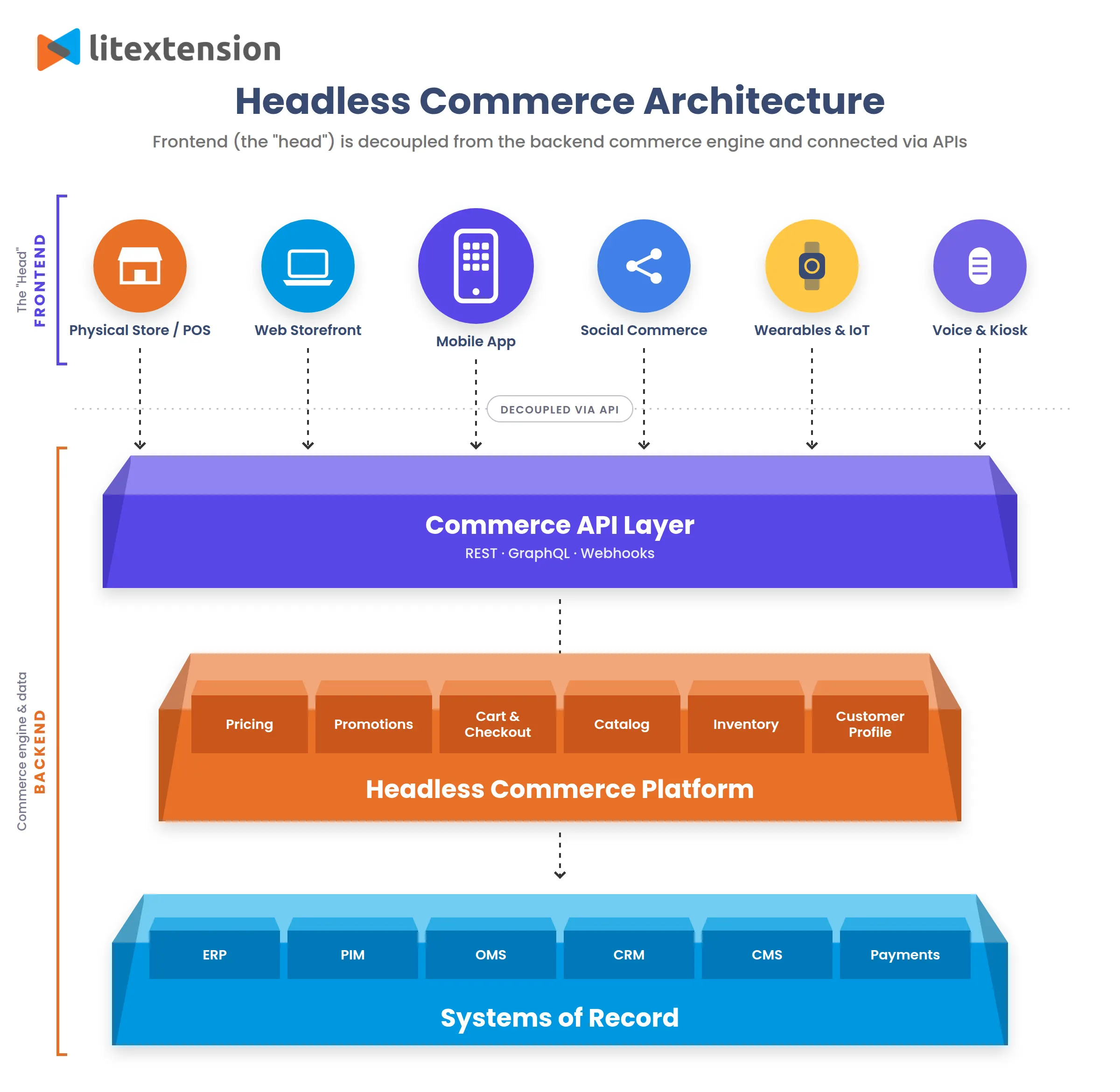
How headless commerce works
A headless setup has three core elements:
- Frontend, which displays the shopping experience;
- Commerce backend, which manages commerce data and business rules;
- APIs, which exchange information between them.
Consider a customer buying a T-shirt. The storefront requests product information from the backend and displays the available options. When the customer selects a size and adds it to their cart, another API request updates the cart. The interface presents the result, while the backend applies the relevant commerce logic.
For example, Shopify’s Storefront API lets a custom storefront manage the cart and send buyers to Shopify’s web checkout. Going headless therefore doesn’t necessarily mean replacing your commerce platform or rebuilding checkout.
Headless vs Traditional commerce
Traditional commerce connects the storefront more closely to the commerce platform’s themes, templates, and development environment. Headless commerce separates that presentation layer, giving developers more freedom over how the storefront is built.
Here is how we would assess the practical differences:
| Area | Traditional commerce | Headless commerce |
| Storefront design | Customize within the platform’s theme system | Build a separate frontend around your requirements |
| Development | Work primarily within the platform’s storefront tools | Manage frontend code and its API connections |
| Apps and integrations | Many extensions are designed for the native storefront | Check compatibility and rebuild frontend integrations where needed |
| Maintenance | Fewer separately managed storefront components | More responsibility for deployment, integrations, and monitoring |
| Best fit | Stores whose needs are well served by existing themes and extensions | Businesses with requirements that justify a custom storefront |
Our view is that headless offers greater architectural freedom, but the value depends on what you do with it. It can support experiences that are difficult to deliver through a standard theme, yet your team must also manage additional hosting, caching, deployment, and integration work. A migration should solve a documented business problem that justifies those responsibilities.
Should You Migrate to Headless eCommerce?
A migration to headless eCommerce makes sense when the current platform is blocking growth: the storefront cannot support the experience customers need, new touchpoints require custom interfaces, or performance audits reveal architectural constraints. For an isolated missing feature or a slow theme, we’d explore a targeted fix first.
To assess whether the move is justified, we recommend looking at both the limitations headless could resolve and the responsibilities it would introduce.
Signs headless eCommerce is worth it
- You sell on several surfaces. Web, mobile app, and kiosk can all pull from one commerce backend through APIs, so you manage products, prices, and orders once instead of once per channel.
- Performance is still poor after tuning. Your store remains slow after optimizing images, scripts, and hosting, with technical audits pointing to the storefront architecture. Core Web Vitals provide useful targets: LCP ≤2.5s, INP ≤200ms, and CLS ≤0.1 at the 75th percentile. Headless could help your developers address those bottlenecks through greater control over rendering, caching, and JavaScript delivery, but the gains depend on implementation.
- Theme workarounds keep piling up. Custom configurators, complex B2B flows, and app-like experiences often hit the limits of theme templates. Headless lets your team build the front end freely while the commerce engine stays behind it.
- You have a team or partner who can own the front end long term. A headless storefront is its own application, so someone has to handle releases, monitoring, and security. Salesforce notes that with a homegrown headless setup, your IT team is responsible for ongoing maintenance, availability, security, and scalability.
Signs you should wait
Even with these potential benefits, headless may introduce more complexity than the business currently needs. We’d reconsider the timing when:
- The main problems are fixable within the existing store. Outdated themes, oversized images, or unnecessary scripts warrant targeted improvements first.
- Standard features already support the growth plan. Existing themes and apps can accommodate the catalog, campaigns, and shopping experience.
- Funding covers launch but not ongoing maintenance. Hosting, monitoring, integration updates, and developer support need an operating budget.
- Daily workflows remain undefined. Marketing and merchandising teams need practical ways to edit pages, preview content, and publish promotions.
- You need to launch quickly. A custom headless storefront requires time for development, integrations, and testing. A ready-made theme may be a better fit when your launch deadline is tight.
Quick diagnostic checklist
Before committing, bring business and technical stakeholders together to answer these questions:
- What specific requirements can’t the current storefront meet?
- Could theme changes, apps, or targeted development solve those limitations?
- What measurable improvements would justify the investment?
- Can the APIs support essential products, pricing, cart, checkout, accounts, and integrations?
- Who will maintain the setup, and is there an ongoing budget?
- Will you keep the commerce backend or change platforms and migrate store data?
We’d proceed once the business case, technical feasibility, and ongoing ownership are clear. Any gaps in these areas deserve further investigation before implementation begins.
How to Perform a Migration to Headless eCommerce
Once you’ve decided that headless fits your business, the next step is defining what will change and how to make the transition. A migration to headless eCommerce can retain the existing commerce backend or replace it alongside the storefront. That decision shapes the development work, data requirements, and launch plan.
Step 1: Audit your store & Define requirements
Before planning the transition, your audit should cover the following areas:
- Data: Products, variants, customers, orders, and custom fields.
- Functionality: Search, discounts, subscriptions, accounts, and checkout rules.
- Integrations: Apps and business systems, including their API availability.
- Performance and SEO: Loading speed, key landing pages, URLs, and tracking.
Then turn the findings into specific, testable requirements. For example, marketers should be able to publish campaign pages without developer help, and B2B customers should see their negotiated prices through checkout. Each requirement needs a priority and a clear acceptance check, with launch essentials separated from later improvements.
Step 2: Choose your backend and frontend stack
Your requirements should guide the technology choices for your migration to headless eCommerce, beginning with whether to retain the existing backend or move to another platform. The main checks include:
- API coverage: Whether products, pricing, inventory, accounts, and checkout support the required shopping journeys.
- Frontend technology: A framework your developers can maintain, with suitable rendering and performance tools.
- Content and hosting: Editing, preview, and publishing capabilities for marketers, alongside reliable deployment and monitoring.
A proof of concept should test a representative journey, such as an account-specific price carried from product page through checkout. This helps expose limitations before you commit to the stack.
Step 3: Plan your rollout and assign responsibilities
With the stack selected, your migration to headless eCommerce needs a delivery plan covering:
- Rollout approach: A complete launch or phased introduction by market, storefront, or component, depending on what the architecture supports.
- Responsibilities: Named owners for development, integrations, data migration, content, SEO, and testing.
- Launch dependencies: Final data updates, domain changes, acceptance checks, and a rollback procedure.
Your milestones should reflect working outcomes, such as a tested checkout, so progress is measured beyond completed development tasks.
Step 4: Prepare and migrate your data
With the rollout plan and responsibilities in place, the next step is preparing your data for the new setup. A data map clarifies what stays in the existing backend, what needs transferring, and how fields will match the destination structure.
When the backend changes, our LitExtension All-in-One Migration Service can manage the store data transfer:
- Discuss your requirements: Our Personal Assistant reviews your source store, target platform, and migration requirements.
- Prepare and map your data: Custom fields, third-party module data, or specialized transformations can be assessed through our Migration Customization Service, with separate fees.
- Run a demo migration: Our Personal Assistant transfers a sample of your data so you can review the results and share feedback.
- Complete the full migration: Following the agreed adjustments, the Personal Assistant runs the full data transfer.
- Test and verify the results: We perform several rounds of testing to check data accuracy and relationships. You can review the results and report discrepancies for correction before delivery.
Your developers should also confirm that the migrated fields are accessible through the APIs used by the new storefront.
Store Migration Made Easy With LitExtension!
LitExtension offers great migration solutions that help you transfer your data from the current eCommerce platform to a new one accurately, painlessly with utmost security.

Step 5: Build the storefront and reconnect integrations
The frontend build brings your requirements into functioning shopping journeys. Development should cover:
- Core commerce: Product pages, search, filters, variant selection, cart, checkout, and customer accounts.
- Integrations: Connections to content, reviews, subscriptions, payments, and operational systems. Existing theme-based widgets may need replacement components.
- Rendering and caching: How pages load, how frequently data refreshes, and how prices and availability stay accurate.
For search visibility, the rendering strategy deserves early attention. Google recommends server-side rendering, static rendering, or hydration instead of dynamic rendering as a long-term workaround.
Step 6: Perform post-migration tasks
With testing complete, the remaining tasks focus on bringing your data up to date and preparing for launch.
- Post-migration data updates: With LitExtension, your Personal Assistant will handle eligible Recent Data Migration and Smart Update tasks, transferring supported new records and updating previously migrated data according to your package terms.
- Storefront launch: Your development team should coordinate the domain switch, final synchronization, and rollback arrangements.
- Post-launch monitoring: Your team should monitor orders, payments, integration errors, and traffic to catch issues that appear once customers start using the storefront.
If anything needs attention, you should contact your development team, platform provider, or integration partner for support with their respective components. For migration-related questions, LitExtension provides up to 60 days of technical support, so you can reach out to your Personal Assistant for help with your migrated data as you settle into the new setup.
How Much Does a Migration to Headless eCommerce Cost?
For planning purposes, a migration to headless eCommerce can require around $20,000–$150,000+ upfront, with complex enterprise projects exceeding $250,000. These are indicative USD budgets for the overall implementation, including storefront development, integrations, data work where needed, and testing.
The scope makes a substantial difference:
| Project scope | Estimated upfront budget |
| Focused storefront build: Retain the backend, use a starter framework, and limit custom features and integrations | $20,000–$50,000 |
| Custom implementation: Build a tailored storefront with a CMS, several integrations, and more extensive migration requirements | $50,000–$150,000 |
| Complex implementation: Support multiple markets, advanced B2B workflows, extensive integrations, or significant backend changes | $150,000–$250,000+ |
Beyond launch, a practical starting allowance is $1,000–$5,000 per month for a relatively lean setup and $5,000–$15,000+ per month for a more demanding one. This should account for hosting, software subscriptions, monitoring, and routine developer support. Major new features and transaction fees need separate consideration.
Your migration to headless eCommerce will generally cost less when the existing backend stays and essential features already have compatible APIs. Costs rise when developers need to rebuild app functionality, connect legacy systems, or support different pricing and purchasing rules across markets.
For the cost of headless data migration, our LitExtension All-in-One Migration Service starts at $129. Your Personal Assistant handles migration preparation, execution, testing, and agreed post-migration tasks. Custom fields, third-party module data, or specialized transformations may incur separate customization fees.
We recommend comparing the first-year total cost of your migration to headless eCommerce, including implementation and ongoing operation. Itemized quotes also make it easier to check that data migration, testing, and launch support have been included without counting the same work twice.
Headless eCommerce Migration Troubleshooting
Even with careful planning, a few issues may surface after your migration to headless eCommerce. If something doesn’t look or work as expected, the checks below will help you narrow down the cause and get things back on track.
Missing or incorrectly mapped store data
You might notice missing images, empty custom fields, or orders linked to the wrong customers. The first thing to establish is whether the information is missing from the backend or simply isn’t reaching the storefront.
How to fix it:
- Compare source and target records to identify missing data, incorrect values, and broken relationships.
- Check API permissions and queries if the backend contains the correct information.
- Review frontend mapping when the API returns data that the storefront displays incorrectly.
- Report migration-related discrepancies to your LitExtension Personal Assistant for investigation and correction within the agreed scope.
Apps and integrations that no longer work
An app may remain installed while its reviews widget or subscription options disappear. Some features depend on code embedded in the old theme and need a different connection to the headless storefront.
How to fix it:
- Confirm headless compatibility with the app provider.
- Implement the required API, SDK, or replacement component for theme-dependent features.
- Verify credentials, permissions, and webhook deliveries when connected systems stop syncing.
- Test the complete workflow after restoring the integration.
Cart, checkout, and customer account errors
A cart that empties after refreshing or a login page that repeatedly redirects customers can interrupt purchases. Reproducing the issue helps your developers trace where the session or checkout handoff breaks.
How to fix it:
- Verify cart persistence across refreshes, navigation, and domains.
- Check cart validity and checkout URLs. For Shopify, request a fresh checkoutUrl when the existing one is stale.
- Review authentication callbacks and token expiry for login failures.
- Validate customer-to-order relationships when order history is missing or incorrect.
SEO traffic drops after launch
A traffic dip can be worrying, but it helps to distinguish lost search visibility from missing tracking data. Search Console clicks offer a useful comparison when analytics reports fewer visits.
How to fix it:
- Compare Search Console and analytics trends to determine whether the decline affects search traffic or reporting.
- Fix broken URLs and redirects, sending old pages directly to relevant replacements.
- Check indexing directives, canonicals, and rendered content on affected pages.
- Update sitemaps and internal links to reflect the live URL structure.
- Monitor indexing and rankings after fixes. Google notes that temporary fluctuations can occur while it processes URL changes.
Slow pages or outdated storefront data
Sluggish pages or outdated prices and stock levels can point to inefficient requests or caching problems. Comparing backend values, API responses, and displayed content helps locate the delay.
How to fix it:
- Trace slow requests using browser developer tools and server logs.
- Reduce repeated API calls and unnecessary sequential requests.
- Optimize heavy JavaScript and third-party scripts.
- Review cache expiry, invalidation, and synchronization for outdated information.
- Keep personalized cart and account responses out of shared caches.
After each fix, test the affected shopping journey again to confirm that customers see the expected result.
Migration to Headless eCommerce: FAQs
Is headless eCommerce worth it for small businesses?
Headless commerce can be worthwhile when a small business needs a shopping experience that standard themes and apps cannot support. However, development and maintenance costs can outweigh the benefits for a straightforward store. We’d consider improving the existing setup first unless there’s a clear business case for a custom frontend.
Is headless eCommerce better for SEO?
Headless eCommerce can support strong SEO, but it doesn’t automatically improve rankings. It gives developers control over rendering, performance, URLs, and structured data, while making them responsible for implementing these correctly. Missing rendered content, broken redirects, or incorrect canonicals can hurt visibility after launch.
When should I switch to headless eCommerce?
A migration to headless eCommerce makes sense when recurring storefront limitations prevent you from delivering important customer experiences or business workflows. Examples include complex product configuration, custom B2B journeys, or content requirements that existing tools cannot accommodate. Your team should also have the budget and technical resources to maintain the new setup.
How long does a migration to headless commerce take?
As a planning estimate, a focused project retaining the existing backend may take 2–4 months, while a custom implementation involving backend changes and several integrations may take 4–9 months or longer.
Will my store go offline during the migration to headless eCommerce?
With LitExtension, we guarantee no store downtime during the data migration. Your existing store stays live and continues accepting orders while we transfer your data. Your development team will coordinate the separate headless storefront launch and any required cutover arrangements.
Conclusion
We hope this guide helps you plan your migration to headless eCommerce with a clearer understanding of the work involved. The strongest projects begin with a specific business need, a realistic budget, and a team prepared to maintain the new setup.
If your transition includes changing commerce platforms, LitExtension’s All-in-One Migration Service lets our experts handle the data transfer, validation, and post-migration updates. For custom fields or third-party module data, we’ll assess the customization needed for your target platform.
You can contact our experts for a free consultation, or explore more migration guides on our LitExtension blog.