
After being in this industry for quite a while, we must say that there’s no one-size-fits-all eCommerce solution, and WooCommerce is no exception. While it’s a great platform for building an online store, it may not be the perfect match for every online retailer. Hence, it’s par for the course if the well-known WooCommerce doesn’t suit your needs and you’re here researching other WooCommerce alternatives.
If that’s your intention, we’ve got you covered. In this article, LitExtension – #1 eCommerce Migration Tool will present the top 10 best WooCommerce alternatives for your consideration, including:
- Shopify
- SureCart
- BigCommerce
- Squarespace
- Wix
- OpenCart
- Adobe Commerce
- PrestaShop
- Ecwid
- Square Online (formerly Weebly)
With each platform, we will walk you through its key features, the cost, and who should use that platform. We also note whether each option is hosted, open-source, or WordPress-based, so you can jump straight to the ones that match your technical comfort.
Without further delay, let’s check it out!
Key takeaways
- Best overall hosted option: Shopify, with 24/7 support, 16,000+ apps, and plans from $39/month.
- Best for staying on WordPress: SureCart, which moves checkout and order processing off your server, with a free plan to start.
- Best for large catalogs and B2B: BigCommerce or Adobe Commerce.
- Best for free, self-hosted control: OpenCart or PrestaShop.
- Best for adding a store to an existing website: Ecwid, from $5/month with zero transaction fees.
Planning to Migrate Away from WooCommerce?
Move your WooCommerce store to Shopify, BigCommerce, Wix, or another platform with LitExtension’s automated tool or All-in-One service.

Why Should You Consider WooCommerce Alternatives?
While WooCommerce is widely recognized as a powerful and flexible solution for building online stores, we’ve seen many of our clients decide to move away from it due to its limitations and drawbacks.
Therefore, we have compiled a list of common issues that online merchants are experiencing. These are also the deciding factors that encourage store owners to seek WooCommerce alternatives.
#1. WooCommerce is not actually “free”
WooCommerce’s open-source nature, while attractive at first glance, often translates into a cascade of hidden costs. Although the core plugin is free, building a truly functional and competitive online store requires investing in various paid extensions, premium themes, and, potentially, ongoing developer support.
From our experience, these seemingly small expenses quickly add up, especially for businesses with specific requirements, such as advanced reporting, intricate shipping rules, or specialized integrations. The allure of a “free” platform can quickly fade as the true cost of ownership becomes apparent.
#2. Performance optimization requires constant attention
Maintaining a fast-loading WooCommerce store can feel like a never-ending process. Numerous factors influence website speed, including hosting upgrades, caching, database queries, and clean code. However, we’ve observed that even with diligent optimization efforts, WooCommerce stores tend to slow down as product catalogs expand and customer bases grow. This performance degradation directly impacts the user experience, which may lead to higher bounce rates and lower conversion rates.
#3. Merchants have to take full responsibility for security matters
While WooCommerce receives regular security updates to its core plugin, the responsibility for establishing and maintaining a secure online store rests on merchants. Selecting and vetting secure plugins, implementing security protocols, and staying on top of vulnerabilities require ongoing monitoring and a high level of technical expertise.
These tasks can be overwhelming for business owners already juggling multiple operational demands. As a result, many of them look for WooCommerce alternatives that can take this responsibility off their shoulders.
#4. Limited customer support
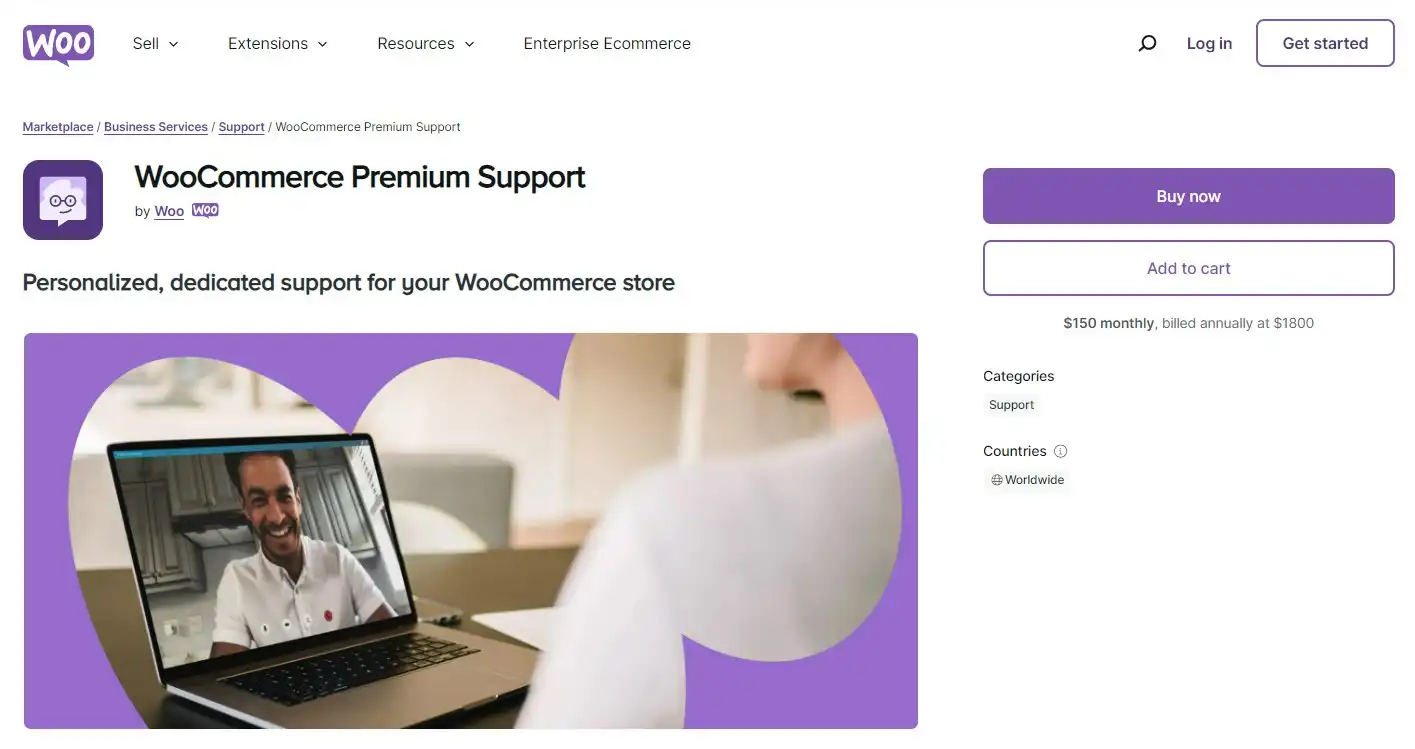
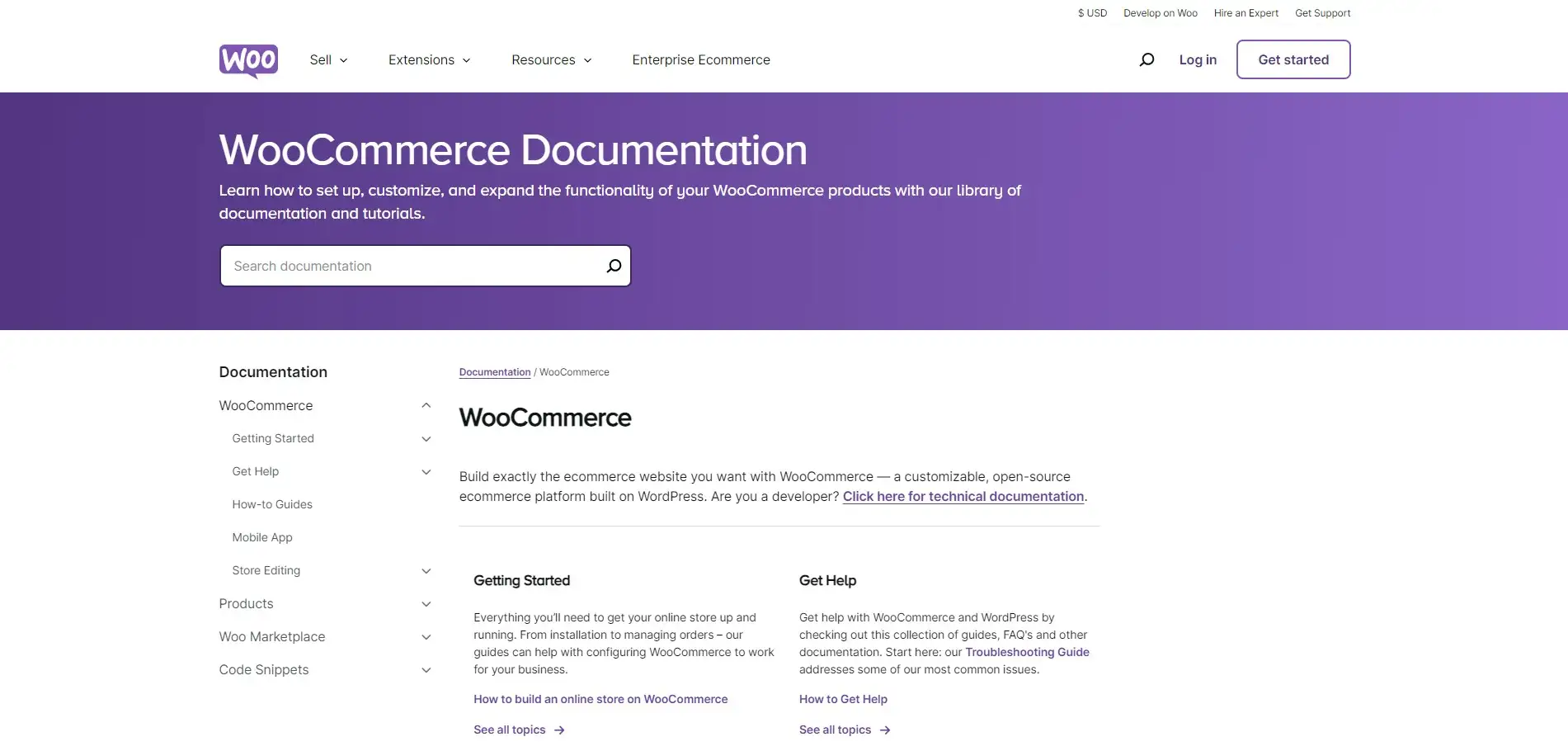
WooCommerce offers ticket-based support (live chat or email) only for products purchased on WooCommerce.com, and there’s no phone support. If you only use the free plugin, you’ll mostly rely on community forums, documentation, and third-party developers for troubleshooting. While this approach works for common issues, finding timely and reliable help for complex or unique challenges can become difficult and time-consuming.
This lack of dedicated support can be particularly challenging for non-technical users or those facing urgent issues, such as a broken checkout during a sale. That’s why many merchants in this situation start comparing WooCommerce alternatives.
#5. Plugin conflicts and update maintenance
A typical WooCommerce store runs on WordPress core, the WooCommerce plugin, a theme, and a stack of extensions, all developed and updated separately. Each update can introduce compatibility issues, from broken layouts to checkout errors, especially when a plugin hasn’t caught up with the latest WooCommerce version.
To stay safe, merchants often have to test updates on a staging site before applying them to the live store. Over time, this routine eats into the hours you could spend on marketing and sales, and it’s one of the most common reasons merchants tell us they’ve started looking at WooCommerce alternatives.
How We Choose The Best WooCommerce Alternatives
During our years working with hundreds of online merchants, we understand that selecting the right eCommerce platform is a critical decision for any business. Therefore, when curating this list of top WooCommerce alternatives, we focused on solutions that stand out across these key criteria:
- Core functionality and features: We prioritized platforms offering robust eCommerce essentials, including product management, order fulfillment, inventory tracking, and secure payment gateways.
- Ease of use: A user-friendly interface is crucial, particularly for businesses new to online selling. We favored platforms with intuitive dashboards and straightforward setup processes.
- Scalability and customization: As your business grows, your platform should not fall behind. We considered the ability to handle increased traffic, expanded product catalogs, and advanced customization.
- Pricing and value: We evaluated the overall value of each platform, considering subscription plans, transaction fees, and the features included in each tier.
- Customer support and resources: Reliable support is essential for troubleshooting issues. We examined the availability of documentation, tutorials, and responsive support channels.
Comparison of Top 10 WooCommerce Alternatives
Before getting to the nitty-gritty, let’s take a brief look at all the WooCommerce alternatives that we believe are the best for you.
|
Platform |
Type |
Best for |
Highlight features |
Pricing |
|
Shopify |
Hosted |
Hassle-free hosted selling |
✓ Fully hosted, no server maintenance |
– Basic: $39/month |
|
SureCart |
WordPress plugin |
WordPress users who want a lighter store |
✓ Headless checkout that runs off your server |
– Launch: free (2.9% transaction fee) |
|
BigCommerce |
Hosted |
Large catalogs and B2B sellers |
✓ Rich built-in features, fewer apps needed |
– Core: $39/month |
|
Squarespace |
Hosted |
Creatives and design-led brands |
✓ Award-winning, mobile-responsive templates |
– Basic: $25/month |
|
Wix |
Hosted |
Beginners who want design freedom |
✓ Drag-and-drop Wix Editor and Wix Studio |
– Free plan |
|
OpenCart |
Open-source |
Budget-conscious, multi-store sellers |
✓ Lightweight and free to download |
Free software; you pay for hosting, domain, themes, and extensions |
|
Adobe Commerce |
Open-source (Magento Open Source) / Paid (Adobe Commerce) |
Enterprises with complex needs |
✓ Handles huge catalogs and high traffic |
– Magento Open Source: free software + hosting costs |
|
PrestaShop |
Open-source |
International SMBs |
✓ Multi-language and multi-currency built in |
– Classic: free software + hosting costs |
|
Ecwid |
Hosted (embeddable) |
Adding a store to an existing site |
✓ Sell on any website, social media, and marketplaces |
– Starter: $5/month |
|
Square Online (formerly Weebly) |
Hosted |
Businesses already using Square POS |
✓ Free plan that can sell online |
– Free: $0/month |
#1 Shopify – Best for Hassle-Free Hosted Selling
While WooCommerce offers a high level of flexibility, its open-source nature demands technical expertise. Meanwhile, Shopify comes out as a powerful option among the best WooCommerce alternatives, particularly for users seeking simplicity and ease of use without compromising on features.

Highlight features:
- Hosted solution for effortless management: Unlike WooCommerce, which requires self-hosting and maintenance, Shopify is a fully hosted platform. This means Shopify handles technical aspects like server upkeep, security, and software updates for you.
- Intuitive drag-and-drop interface: Shopify’s theme editor simplifies website design and product management, so you can build and customize your store without coding. You can choose from 800+ free and paid themes on the Shopify Theme Store, with prices ranging from free to around $500.
- Extensive app store ecosystem: The Shopify App Store offers over 16,000 apps, ranging from marketing automation tools to advanced analytics. This wide selection lets you tailor your store’s functionality to your needs, rivaling the customization options of WooCommerce plugins.
- Integrated payment processing: Shopify offers its own payment gateway, Shopify Payments, alongside support for third-party providers. Note that if you use a third-party provider, Shopify adds a transaction fee of 2% (Basic), 1% (Grow), 0.6% (Advanced), or 0.2% (Plus).
- 24/7 customer support: Shopify offers 24/7 support on all plans via live chat, with priority phone support on Shopify Plus. From what we’ve seen, this is a deciding factor for many merchants leaving WooCommerce.
Pros & cons
|
Pros |
Cons |
|
– No hosting, security, or update work on your side |
– Extra transaction fees if you don’t use Shopify Payments |
Pricing
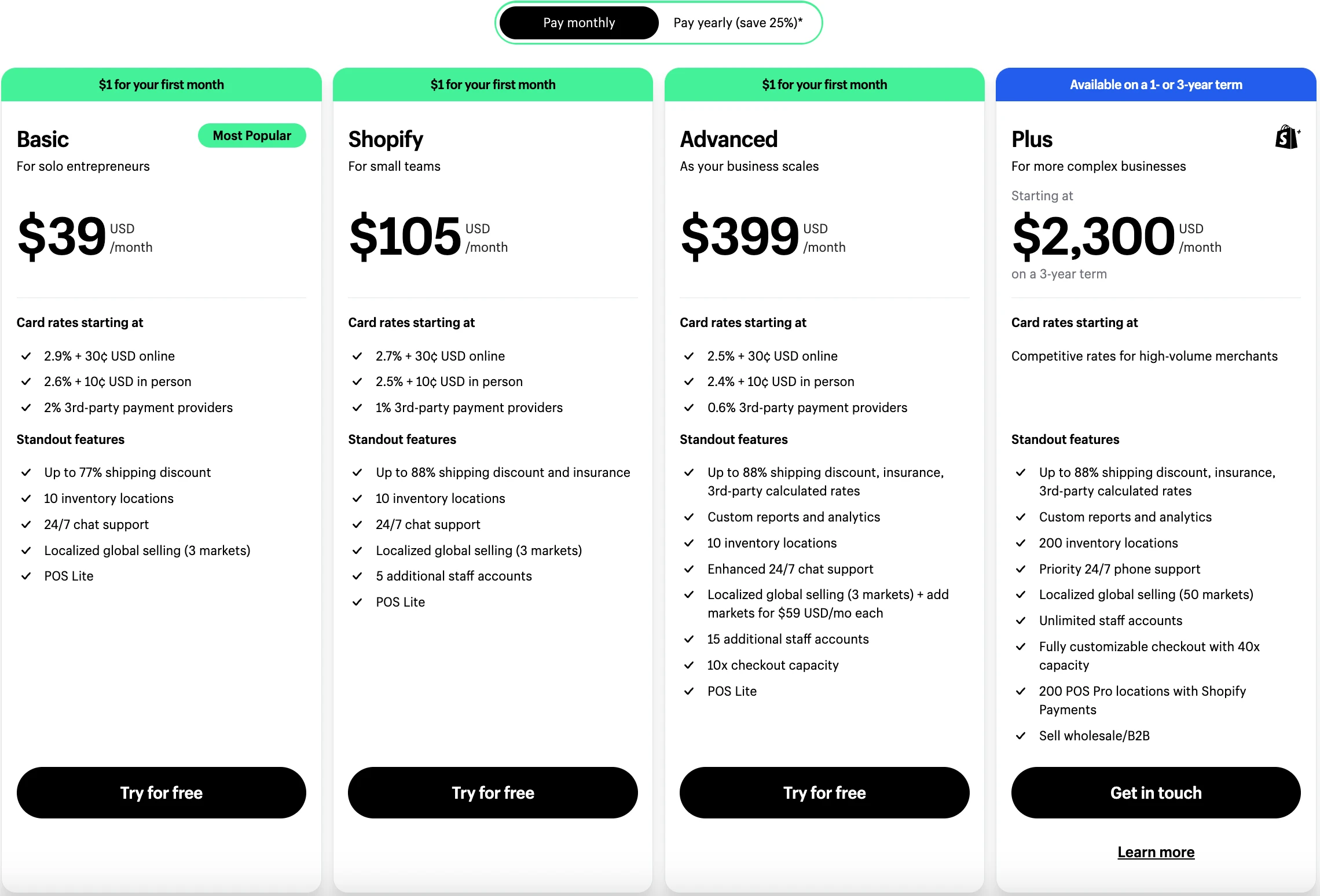
Shopify currently offers four main plans for new merchants:
- Basic: $39/month ($29/month billed yearly), with essential tools to launch an online store.
- Grow: $105/month ($79/month billed yearly), with more staff accounts and lower card rates.
- Advanced: $399/month ($299/month billed yearly), with third-party calculated shipping and the lowest standard card rates.
- Plus: from $2,300/month, for high-volume and enterprise businesses.
You can start with a 3-day free trial, then pay $1/month for your first 3 months on a selected plan.
Who should use Shopify
Choose Shopify over WooCommerce if you’d rather pay a predictable monthly fee than manage hosting, plugins, and security yourself. It stands out as an excellent fit for:
- Non-technical users: Those seeking an intuitive platform to launch and manage their online stores without technical hurdles.
- Businesses prioritizing speed and convenience: Shopify’s hosted solution and user-friendly interface enable swift setup and operation.
- Growing businesses: Scalable plans and app integrations cater to evolving business needs as sales volume increases.
Ready to Move from WooCommerce to Shopify?
LitExtension Automated Migration Tool transfers your products, customers, orders, and more from WooCommerce to Shopify, fast and accurately. Try a free demo first.
#2 SureCart – Best for WordPress Users
As WooCommerce stores grow, they often struggle with plugin bloat, slower performance, and rising costs. Features such as subscriptions, advanced checkouts, or license keys typically require premium add-ons, which can push total expenses higher than expected.
SureCart takes a different approach. It’s still a WordPress plugin, but it runs order processing, data storage, and checkout on its own cloud infrastructure, and it includes most commerce features in the core product. This makes it a practical option among WooCommerce alternatives for merchants who want to keep their WordPress site.

Highlight features:
- Headless eCommerce for WordPress: SureCart handles checkout, orders, and customer data on its own servers instead of your WordPress database. This reduces the load on your site and helps keep pages fast during traffic spikes.
- Visual checkout builder: You can design checkout pages with native blocks for Gutenberg, Bricks, or Elementor (and shortcodes for builders like Divi), then add order bumps and one-click upsells without extra plugins.
- Flexible payment options: SureCart supports one-time purchases, subscriptions, installment plans, and donations. It works with Stripe, PayPal, Mollie, and Razorpay, plus digital wallets like Apple Pay and Google Pay (depending on the processor), across 135+ currencies.
- Built-in affiliate and licensing tools: Every plan includes an affiliate program and software licensing with license keys and secure file delivery, which suits merchants selling software or digital products.
- Growing user base: SureCart currently powers over 80,000 stores and holds a 4.8/5 rating on WordPress.org.
Pros & cons
|
Pros |
Cons |
|
– Keeps your site on WordPress with less plugin load |
– Still requires WordPress hosting and maintenance |
Pricing
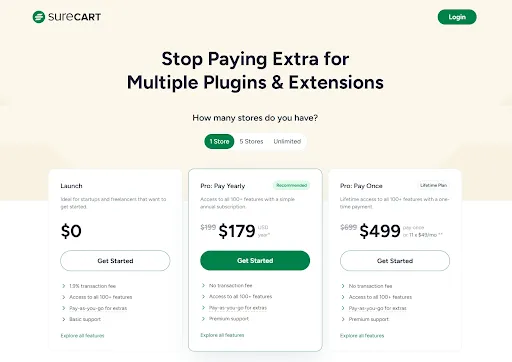
SureCart gives every user access to its full set of 100+ features. The main difference between plans is the transaction fee and the number of stores:
- Launch (Free): full feature access with a 2.9% fee per transaction (payment processor fees are charged separately).
- Pro (Yearly): removes the transaction fee, from $199/year for one store.
- Pro (Lifetime): a one-time payment from $699 for one store.
Pro pricing increases with the number of stores you manage (1, 5, or unlimited). There are no monthly plans at the moment.
Who should use SureCart
Choose SureCart over WooCommerce if you love WordPress but are tired of stacking plugins for subscriptions, checkout design, or licensing. It’s a good fit for:
- WordPress users: Those looking for a faster, lighter eCommerce setup.
- Creators and entrepreneurs: Those selling physical or digital products, subscriptions, or services.
- Marketers and small teams: Those who want control over their store without writing code.
If SureCart sounds like your next step, you can migrate to SureCart with your products, customers, and orders.
#3 BigCommerce – Best for Large Catalogs and B2B Sellers
BigCommerce presents itself as a powerful eCommerce platform designed to support businesses of all sizes. Among WooCommerce alternatives, BigCommerce offers one of the most comprehensive and user-friendly solutions, especially for scaling businesses and those seeking built-in features.

Highlight features:
- Powerful built-in features: Unlike WooCommerce, which often relies on plugins for advanced features, BigCommerce provides an extensive suite of built-in tools, including multi-channel selling, advanced reporting, and robust SEO settings.
- Low transaction fees: BigCommerce charges no extra fee when you use its embedded payment providers. If you choose another provider, a fee of 2% (Core), 1% (Growth), or 0.6% (Scale) applies.
- Scalability for growing businesses: BigCommerce offers plans for different stages of growth. Instead of forcing an upgrade, the Scale plan charges a 0.9% fee on sales above its monthly cap, so you can keep growing without a sudden plan jump.
- Headless commerce capabilities: For businesses seeking greater design flexibility, BigCommerce lets you separate your front end and back end, giving you more control over the customer experience than a traditional WooCommerce setup.
- 24/7 support: BigCommerce provides 24/7 live chat and email support on all plans, with 24/7 phone support included from the Growth plan.
Pros & cons
|
Pros |
Cons |
|
– Many advanced features built in |
– Plans auto-upgrade when sales pass $30K (Core) or $100K (Growth) |
Pricing
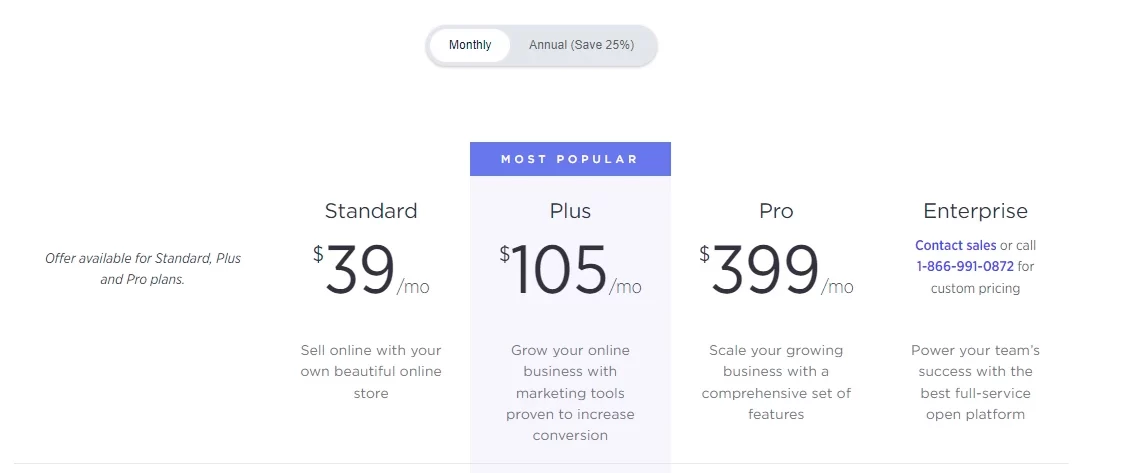
BigCommerce offers a 15-day free trial with no credit card required. Paid plans are based on your trailing 12-month online sales:
- Core: $39/month ($29/month billed yearly) for businesses with up to $30K in online sales.
- Growth: $105/month ($79/month billed yearly) for businesses with up to $100K in online sales.
- Scale: $399/month ($299/month billed yearly), with a 0.9% fee on sales above $33,333/month.
- Performance: custom pricing, starting at $1,499/month billed yearly, for high-volume businesses.
Who should use BigCommerce
Choose BigCommerce over WooCommerce if you need enterprise-grade features without managing servers or a long list of plugins. It’s a strong WooCommerce alternative for:
- Rapidly scaling businesses: Scalable plans and powerful built-in features support growth without frequent platform migrations.
- High-volume sellers: Low fees with embedded payment providers and robust infrastructure make BigCommerce cost-effective for businesses with significant sales volume.
- Businesses seeking comprehensive solutions: BigCommerce’s built-in features minimize the need for third-party apps, streamlining operations.
Ready to switch? Here’s how to migrate from WooCommerce to BigCommerce with all your store data.
#4 Squarespace – Best for Creatives and Design-Led Brands
Squarespace stands out among WooCommerce alternatives for its sleek aesthetics and intuitive design tools, making it a great choice for image-conscious businesses and individuals seeking a visually stunning online presence with straightforward eCommerce functionality.

Highlight features:
- Award-winning templates: Unlike WooCommerce, which relies on third-party themes that often require customization, Squarespace offers a selection of award-winning, mobile-responsive templates that look polished without design knowledge.
- Excellent content management: Squarespace lets you combine blog posts, galleries, and other content with your online store in one place.
- Built-in marketing tools: The platform includes email marketing, social media integration, SEO settings, and automated abandoned cart emails on every plan.
- All-in-one platform: Squarespace is a hosted solution that handles hosting, SSL certificates, and security updates for you, so you can focus on running your business.
- Responsive customer support: Squarespace provides 24/7 email support, live chat on weekdays, and an AI assistant that can hand you over to a human agent.
Pros & cons
|
Pros |
Cons |
|
– Beautiful, ready-to-use templates |
– 2% transaction fee on the Basic plan |
Pricing
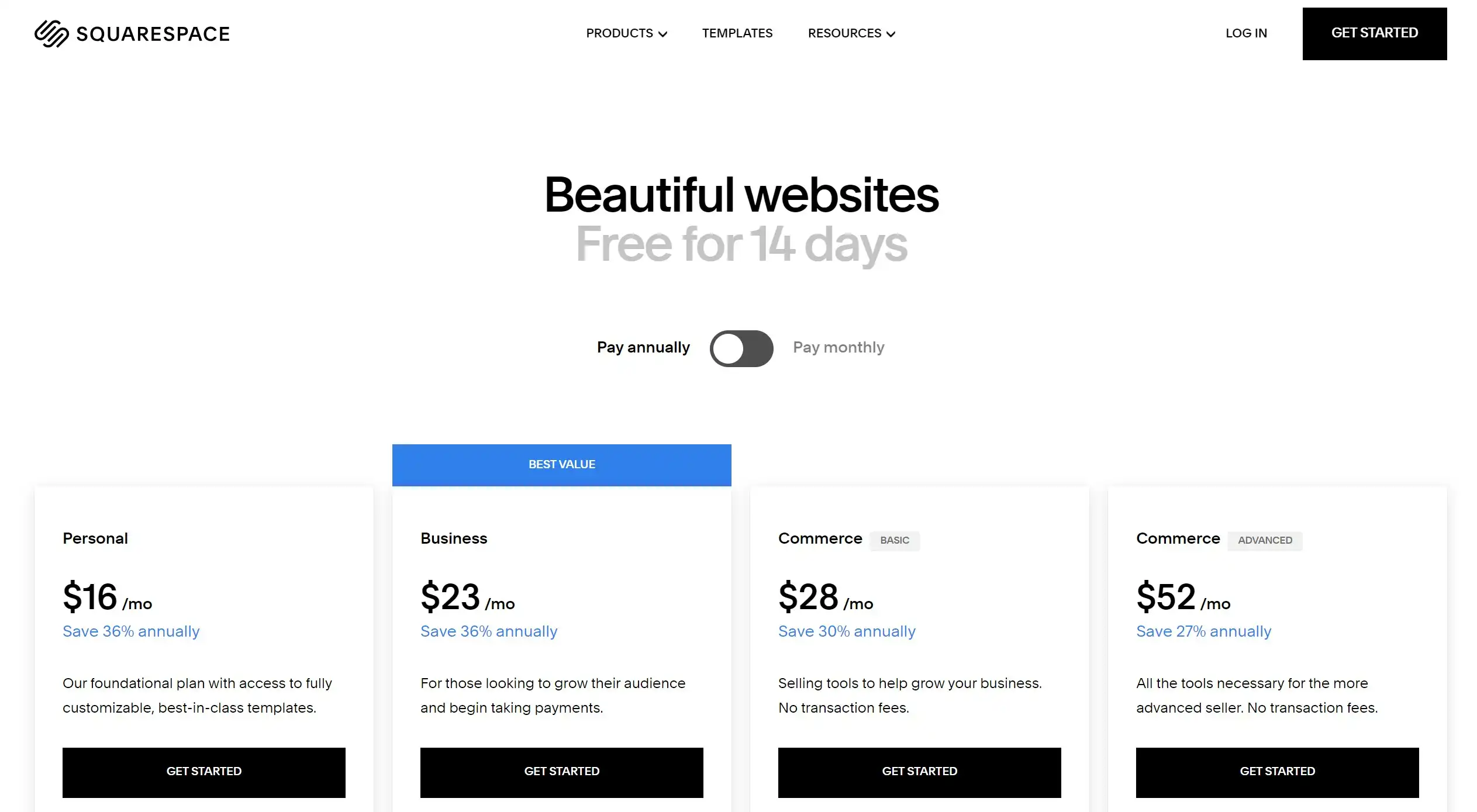
Squarespace offers a 14-day free trial, followed by four main plans:
- Basic: $25/month ($19/month billed yearly), for simple sites and small stores, with a 2% transaction fee.
- Core: $39/month ($29/month billed yearly), with 0% transaction fees and carrier-calculated shipping.
- Plus: $65/month ($49/month billed yearly), with lower card rates.
- Advanced: $139/month ($99/month billed yearly), with the lowest card rates for high-volume sellers.
Who should use Squarespace
Choose Squarespace over WooCommerce if design and content matter more to you than a huge plugin library. It’s a good fit for:
- Creative entrepreneurs and small businesses: Those seeking a visually appealing online store with easy-to-use design tools.
- Users prioritizing content marketing: The seamless mix of content and commerce simplifies content-driven strategies.
- Non-technical users: Squarespace’s intuitive interface and all-in-one platform require minimal technical expertise.
#5 Wix – Best for Beginners Who Want Design Freedom
Wix stands out among the best WooCommerce alternatives for its intuitive drag-and-drop editor and design flexibility. While WooCommerce excels in customization for tech-savvy users, Wix allows anyone, regardless of technical expertise, to craft a visually unique online store.
Highlight features:
- Unmatched design flexibility: Wix’s drag-and-drop editor gives you control over every element of your store’s design. Agencies and designers can also use Wix Studio for more advanced, responsive layouts.
- Extensive template library: Wix offers 2,000+ professionally designed, mobile-responsive templates for various industries. All you have to do is add your products and personal touches before going live.
- Decent app market: The Wix App Market offers 500+ apps for marketing, analytics, shipping, and more, so you can extend your store’s functionality.
- Affordable pricing plans: Wix offers a free plan for basic websites and several affordable premium plans. This tiered pricing offers flexibility and value, particularly compared to WooCommerce’s escalating costs for hosting, themes, and premium plugins.
Pros & cons
|
Pros |
Cons |
|
– Very easy drag-and-drop editor |
– You need the Core plan or higher to accept payments |
Pricing
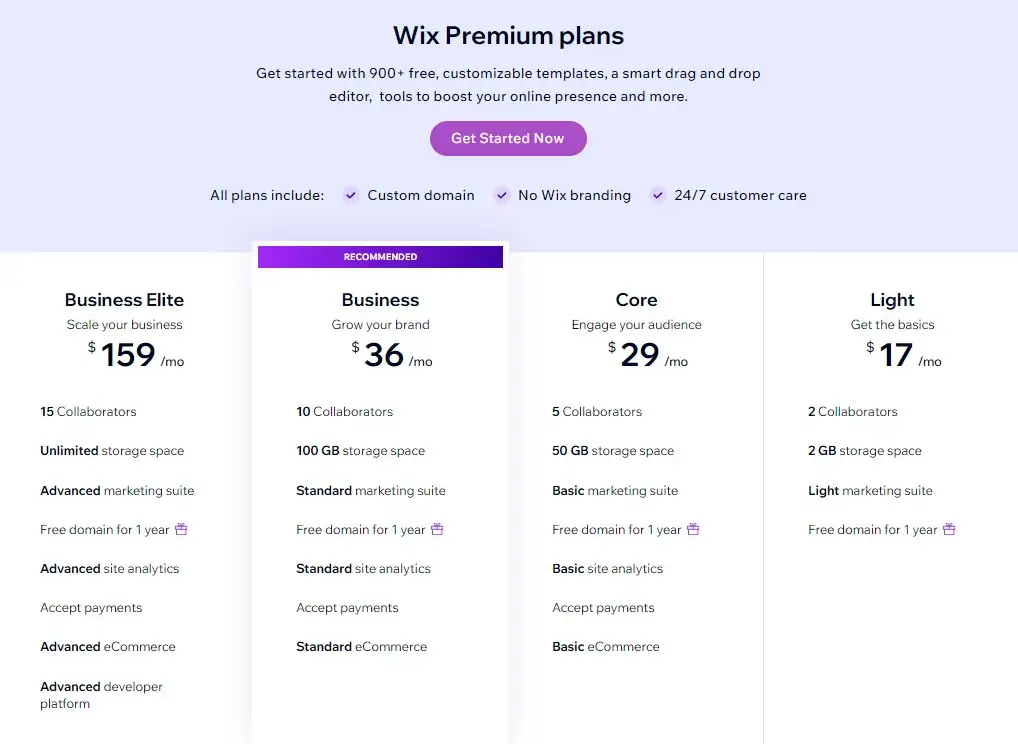
Wix offers a free plan with limited features. To sell online, consider these premium plans (billed yearly):
- Light: $17/month for a custom domain and basic marketing features.
- Core: $29/month for accepting online payments and basic eCommerce.
- Business: $39/month for standard eCommerce features and more storage.
- Business Elite: $159/month for advanced eCommerce, unlimited storage, and priority support.
Who should use Wix
Choose Wix over WooCommerce if you want to build a good-looking store quickly without touching code or managing hosting. Wix is an ideal WooCommerce alternative for:
- Design-focused entrepreneurs: Individuals seeking complete creative control over their store’s look without coding.
- Startups and small businesses: Those on a budget, as Wix’s affordable plans offer good value compared to WooCommerce’s potential hidden costs.
- Non-technical users: Wix’s user-friendly interface and drag-and-drop editor require minimal technical knowledge.
#6 OpenCart – Best for Budget-Conscious Multi-Store Sellers
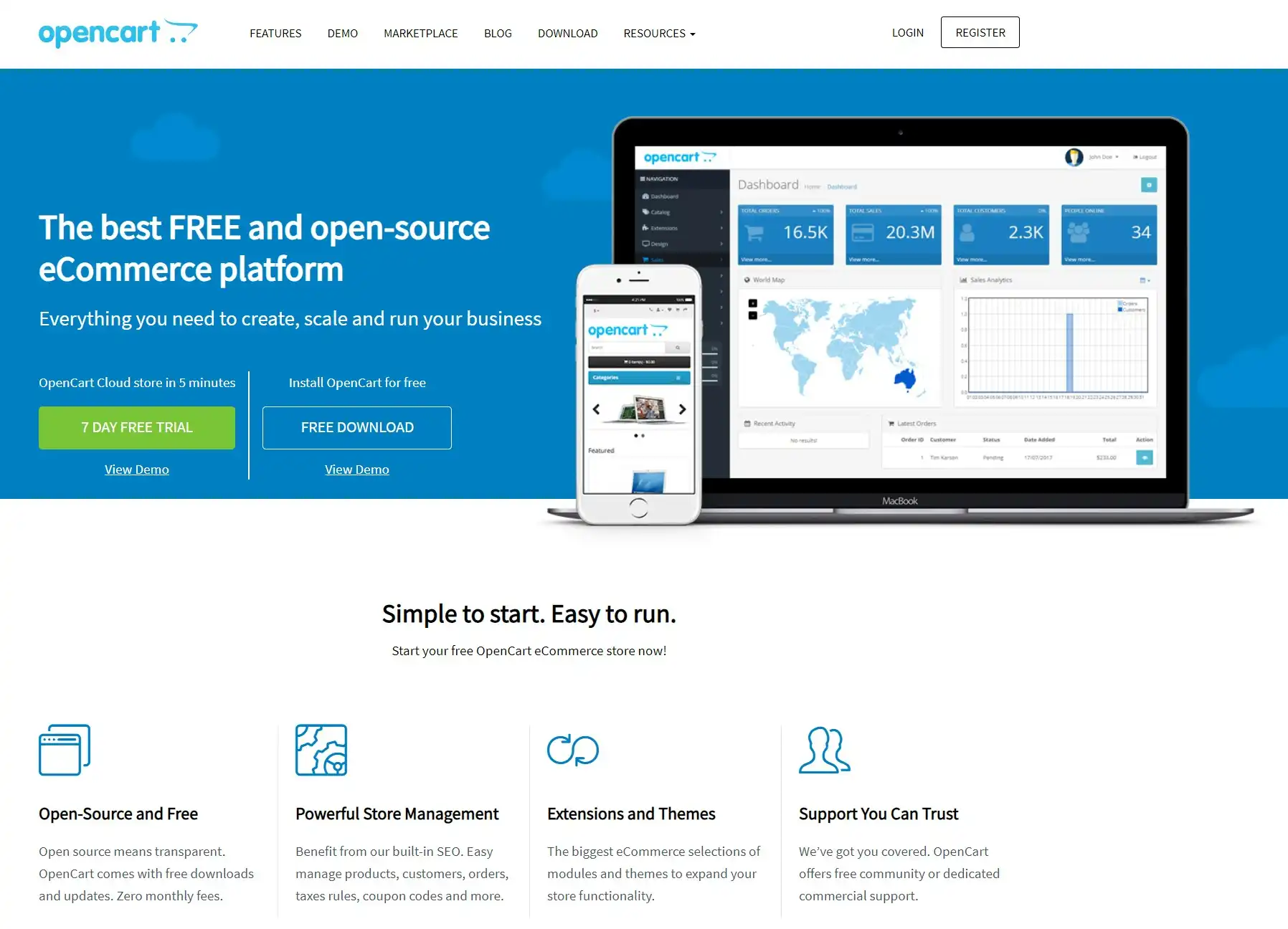
While WooCommerce dominates the open-source eCommerce landscape, OpenCart still shines as one of the most compelling open-source WooCommerce alternatives, particularly for budget-conscious businesses seeking a balance between affordability, flexibility, and ease of use. Its latest version, OpenCart 4.1.0.4, is free to download.
Highlight features:
- Lightweight and fast: OpenCart is known for its lightweight codebase, which, from our experience, often results in faster loading times than a plugin-heavy WooCommerce store.
- User-friendly interface: While not as intuitive as hosted platforms, OpenCart’s dashboard makes it straightforward to manage products, orders, and basic settings.
- Multi-store functionality: OpenCart lets you manage multiple online stores from a single admin. While WooCommerce requires a complex setup for this, OpenCart has it built in, which helps businesses with multiple brands or markets.
- Built-in SEO features: OpenCart offers built-in SEO tools, including customizable meta tags and SEO-friendly URLs.
- Strong community support: The platform has a large community of users and developers, with support forums and documentation.
Pros & cons
|
Pros |
Cons |
|
– Free and open-source |
– You handle hosting, security, and updates |
Pricing
OpenCart, like WooCommerce, is free to download and use. However, you will need to pay attention to several associated costs, including:
- Domain registration: Approximately $10–15 annually.
- Hosting: Variable, starting from $5–10 per month for shared hosting, scaling with store needs.
- Theme: Free or premium options, with prices ranging from $0 to $249.
- Extensions: Many free extensions are available, but premium options vary in price based on functionality.
Please note that these costs are estimates based on our experience working with OpenCart. The actual expense depends on your selection of each element.
Who should use OpenCart
Choose OpenCart over WooCommerce if you want a free, self-hosted store without depending on WordPress. It’s a suitable fit for:
- Budget-conscious businesses: Those seeking a cost-effective solution with a balance between control and ease of use.
- Startups and small businesses: Particularly those with technical aptitude or willing to learn basic web development.
- Businesses in need of multi-store functionality: OpenCart’s built-in feature simplifies managing multiple storefronts.
#7 Adobe Commerce – Best for Enterprises with Complex Needs
Adobe Commerce (formerly Magento) comes in two versions. Magento Open Source is free, open-source, and self-hosted, while Adobe Commerce is the paid edition that adds cloud hosting, B2B features, and AI-powered tools. For businesses with technical resources, both editions are powerful WooCommerce alternatives, offering enterprise-level features and scalability that often go beyond what WooCommerce can handle for high-volume operations.

Highlight features:
- Unmatched scalability: Both editions are known for handling massive product catalogs, high traffic, and complex transactions. Adobe Commerce adds auto-scaling cloud infrastructure for peak seasons.
- Advanced features out of the box: The platform includes multi-store management, layered navigation for product filtering, advanced SEO settings, and robust customer segmentation.
- Flexibility for complex needs: The open architecture allows extensive customization and bespoke development, which suits businesses with unique workflows that go beyond what WooCommerce plugins offer.
- AI-powered tools (Adobe Commerce): The paid edition offers AI-powered semantic search, 13 types of AI-powered product recommendations, and intelligent commerce agents.
Pros & cons
|
Pros |
Cons |
|
– Handles very large catalogs and traffic |
– Requires experienced developers |
Pricing
Magento Open Source is free to download and install, while Adobe Commerce requires a paid license with custom pricing from Adobe’s sales team. With Magento Open Source, you’ll still need to budget for:
- Domain registration: Typically $10–15 per year.
- Hosting: From our experience, starting from around $50 per month and increasing with store complexity.
- Theme development: Custom theme development is often necessary, with a budget that depends on the complexity of your design and features.
- Extensions: Free extensions are available, but advanced functionality often requires premium extensions, which can be costly.
Who should use Adobe Commerce
Choose Adobe Commerce over WooCommerce if your store has outgrown plugins and you have the budget and developers to build exactly what you need. It’s best for:
- Large businesses and enterprises: Those with the resources to invest in development, hosting, and ongoing maintenance.
- Businesses with complex requirements: Stores that need highly customized workflows, B2B features, or integrations beyond standard WooCommerce plugins.
- Tech-savvy merchants: Organizations with in-house developers or access to experienced Adobe Commerce agencies.
Move to Adobe Commerce Effortlessly
Switch from WooCommerce to Magento or Adobe Commerce with LitExtension’s Automated Migration Tool, fast, safe, and complete.
#8 PrestaShop – Best for International SMBs
PrestaShop presents a compelling option for businesses seeking a balance between user-friendliness and advanced customization. While WooCommerce demands more technical setup, PrestaShop offers an accessible platform with robust built-in features and a vibrant community, making it a strong contender among WooCommerce alternatives. Its latest version, PrestaShop 9.2, adds a native One Page Checkout, an “Ask AI” assistant, and a built-in Klaviyo integration.

Highlight features:
- Intuitive back-end interface: PrestaShop’s admin simplifies product management, order processing, and store configuration.
- Multi-language and multi-currency support: PrestaShop is built for global businesses, with native support for multiple languages and currencies. On WooCommerce, the same setup usually needs extra plugins and configuration.
- Extensive customization options: PrestaShop offers 800+ themes and 2,400+ modules, so you can tailor your store’s design and functionality without heavy coding.
- Decent marketing and sales tools: PrestaShop includes built-in tools for discounts, coupons, and promotions.
- Active community and marketplace: Merchants benefit from a large community of developers, designers, and other sellers, along with support forums and documentation.
Pros & cons
|
Pros |
Cons |
|
– Free and open-source |
– Many useful features require paid modules |
Pricing
Similar to WooCommerce and Magento Open Source, PrestaShop Classic is 100% free to download and install. Still, you should consider several additional costs when calculating the total cost of ownership:
- Domain registration: Around $10–15 annually.
- Hosting: Shared hosting plans can start from $5 to $10 per month, but you may need more robust solutions as your store grows.
- Theme: Free and premium themes are available, with premium options typically costing €50 to €200.
- Modules: While many free modules are available, specialized functionality often requires paid modules, with prices varying by feature.
If you’d rather not manage hosting, PrestaShop also offers a Hosted version at €29/month (or €24/month billed yearly), with hosting and support included.
Who should use PrestaShop
Choose PrestaShop over WooCommerce if you sell across countries and want multi-language and multi-currency features without a stack of plugins. It’s the best fit for:
- Small to medium-sized businesses: Those seeking a balance between ease of use, customization, and budget.
- International businesses: The built-in multi-language and multi-currency support streamlines global selling.
- Entrepreneurs comfortable with moderate technical tasks: While easier to manage than WooCommerce in some areas, PrestaShop may still require some technical skills for customization or module installation.
#9 Ecwid – Best for Adding a Store to an Existing Website
Ecwid by Lightspeed distinguishes itself from other WooCommerce alternatives by focusing on effortless integration with existing websites.
While WooCommerce cannot work without WordPress, Ecwid works like a widget you can add to almost any site. It embeds a full-featured online store into various platforms, making it ideal for businesses seeking a simple and non-intrusive eCommerce solution.

Highlight features:
- Flexibility to sell anywhere: Ecwid can add a shoppable storefront to websites built with Wix, Squarespace, WordPress, or even custom-coded sites, and connect to social media and marketplaces.
- Mobile-responsive design: Ecwid automatically optimizes your store for mobile devices, ensuring a seamless shopping experience on smartphones and tablets.
- Simplified inventory management: Ecwid’s dashboard simplifies product management, inventory tracking, and order fulfillment.
- Secure payment processing: Ecwid integrates with various payment gateways, allowing you to accept credit cards, PayPal, and other popular payment methods securely.
- Low-cost entry and zero transaction fees: Ecwid’s Starter plan costs just $5/month, and none of its plans charge transaction fees. This low barrier to entry contrasts with WooCommerce, which requires upfront investments in hosting, themes, and potentially plugins.
Pros & cons
|
Pros |
Cons |
|
– Works with almost any existing website |
– No free plan or free trial |
Pricing
Ecwid currently offers four paid plans:
- Starter: $5/month for up to 10 products.
- Venture: $35/month ($29/month billed yearly) for up to 100 products and social selling.
- Business: $65/month ($49/month billed yearly) for up to 2,500 products, marketplace selling, and a multilingual store.
- Unlimited: $149/month ($119/month billed yearly) for unlimited products, POS integrations, and priority support.
Who should use Ecwid
Choose Ecwid over WooCommerce if you already have a website you’re happy with and just want to start selling on it. Ecwid is an excellent fit for:
- Businesses already established on other platforms: Those seeking to add eCommerce to existing websites without moving to WordPress.
- Entrepreneurs testing the waters: The $5 Starter plan lets you test online selling with minimal upfront cost.
- Small businesses with simple inventory needs: Ecwid’s streamlined inventory system suits businesses with straightforward product catalogs.
#10 Square Online (formerly Weebly) – Best for Businesses Already Using Square POS
Weebly has been part of Square since 2018, and its eCommerce features now live on as Square Online. While WooCommerce excels in customization and flexibility, Square Online stands out among WooCommerce alternatives for its simplicity and its tight connection with Square’s in-person payment tools, making it an easy choice for local businesses that sell both online and offline.

Highlight features:
- Easy site builder: Square Online lets you build an online store with ready-made layouts and simple editing tools, even with little technical knowledge.
- Syncs with Square POS: If you already use Square for in-person sales, your items, orders, and payments are managed in one place.
- Flexible fulfillment options: Even the free plan includes shipping, local delivery, and in-person pickup, plus Afterpay, Apple Pay, and Google Pay at checkout.
- Free plan that can sell online: Unlike many website builders, Square Online lets you start selling on the free plan. You only pay processing fees per transaction.
Pros & cons
|
Pros |
Cons |
|
– Free plan that can accept online payments |
– Higher online processing fee on the free plan (3.3% + 30¢) |
Pricing
Here’s a quick breakdown of Square Online pricing plans:
- Free: $0/month, with a 3.3% + 30¢ fee per online transaction.
- Plus: $49/month, with a 2.9% + 30¢ online transaction fee, customer accounts, and QR code ordering.
- Premium: $149/month, with a 2.9% + 30¢ online transaction fee and advanced features.
- Pro: custom pricing for businesses processing over $250,000 per year.
The Plus and Premium plans come with a 30-day free trial.
Who should use Square Online
Choose Square Online over WooCommerce if you run a local business on Square and want your online store to work with your POS out of the box. It’s an ideal fit for:
- Complete beginners: Those seeking the easiest possible way to build an online store without technical hurdles.
- Local businesses selling in person and online: Restaurants, cafés, and retail shops that already use Square POS.
- Budget-conscious entrepreneurs: The free plan lets you start selling without a monthly fee.
When to Stay on WooCommerce
Switching to one of the WooCommerce alternatives above isn’t always the right move. Based on what we’ve seen from merchants we work with, WooCommerce may still be the better choice if:
- Your website is content-first: If your blog or content site on WordPress drives most of your traffic, WooCommerce keeps content and commerce in the same system.
- You rely on niche plugins: WooCommerce’s huge plugin ecosystem covers very specific needs, such as bookings, memberships, or custom product builders, that some hosted platforms can’t match.
- You have developer resources: If you have an in-house developer or a trusted agency, the extra maintenance is easier to manage, and you get full control over your code and data.
- Your store runs smoothly: If your site is fast, secure, and converting well, a migration may cost more than it saves.
If none of these apply and you keep running into the issues above, it’s probably time to take a closer look at other platforms.
How to Choose the Right WooCommerce Alternative
With ten WooCommerce alternatives on the table, the best choice comes down to how much technical work you’re willing to take on and what you sell.
Hosted vs. self-hosted vs. WordPress-based
|
Criteria |
Hosted |
Self-hosted (open-source) |
WordPress-based |
|
Examples |
Shopify, BigCommerce, Squarespace, Wix, Ecwid, Square Online |
OpenCart, Magento Open Source, PrestaShop |
SureCart |
|
Who handles hosting and security |
The platform |
You |
You (WordPress), with checkout handled by SureCart |
|
Technical skills needed |
Low |
High |
Medium |
|
Typical cost |
Monthly subscription |
Free software + hosting, themes, extensions, developers |
Plugin plan + WordPress hosting |
|
Best for |
Merchants who want to focus on selling |
Merchants who want full control |
Merchants who want to stay on WordPress |
Questions to ask before you switch
- What do you sell? Physical products, digital downloads, subscriptions, or services each fit different platforms.
- What’s your budget? Include not just the subscription, but also apps, themes, transaction fees, and developer time.
- How technical is your team? If nobody can handle servers or code, a hosted platform will save you a lot of trouble.
- How big is your catalog? Large catalogs and complex variants favor BigCommerce, Shopify, or Adobe Commerce.
- Where do you sell? If you sell in person, on marketplaces, or in multiple countries, check each platform’s POS, channel, and multi-language support.
How to Migrate from WooCommerce to Another Platform
Once you’ve picked one of these WooCommerce alternatives, the next step is moving your data without losing sales or search rankings. Here’s what to keep in mind:
- Decide what data to move: Most stores need to transfer products, categories, customers, orders, coupons, reviews, and blog posts. Make a list before you start so nothing gets left behind.
- Protect your SEO: Your URLs will likely change on the new platform. Set up 301 redirects from old URLs to new ones so you keep your search rankings and avoid broken links.
- Test with a demo first: Run a demo migration to see how your data looks on the new platform before moving everything.
- Keep your store running: Plan the migration so your WooCommerce store stays live until the new one is ready, then sync any new orders or customers before launch.
Doing all of this manually with CSV files is slow and error-prone, especially for large stores. That’s where LitExtension comes in. With our Automated Migration Tool, you can move your WooCommerce data to Shopify, BigCommerce, Wix, Adobe Commerce, and many other platforms in a few clicks. You can try a free demo with up to 20 entities per data type, and paid migrations start from $19. If you’d rather leave the whole process to us, our All-in-One Migration Service, from $129, includes 1-on-1 consultation, setup, and multiple rounds of testing before your new store goes live.
Want a Hands-Off WooCommerce Migration?
With the All-in-One Migration Service, the LitExtension team handles your WooCommerce migration from setup to final checks, so you can focus on running your new store.
WooCommerce Alternatives – FAQs
What is the best alternative to WooCommerce?
There is no concrete answer since the best WooCommerce alternative depends on your needs. Shopify is usually the best WooCommerce alternative for stores that want a hosted, easier-to-manage eCommerce platform. It includes hosting, checkout, payments, inventory, analytics, apps, and sales channels in one system. BigCommerce is also a strong option for complex catalogs and larger stores. Meanwhile, Wix can work better for small businesses that want simpler website design with basic eCommerce features.
What are the limitations of WooCommerce?
WooCommerce is flexible, but it depends heavily on WordPress, hosting, plugins, themes, and regular maintenance. You need to manage updates, backups, performance, security, plugin compatibility, and hosting resources. Additionally, costs can also increase as your store grows. The WooCommerce plugin is free, but you may still pay for hosting, premium extensions, payment processing, security tools, custom development, and performance optimization.
Why are people moving away from WooCommerce?
Many businesses move away from WooCommerce because they want less technical maintenance and a more managed eCommerce setup. As traffic, order volume, product data, and integrations grow, WooCommerce can require more work around hosting, speed, plugin conflicts, security, and custom development. Additionally, some stores also move to SaaS platforms for built-in scalability, easier support, smoother updates, and native commerce features that do not rely as heavily on third-party plugins.
What is the best free WooCommerce alternative?
Among free WooCommerce alternatives, OpenCart, PrestaShop, and Magento Open Source cost nothing to download, but you still pay for hosting, a domain, and extensions. If you want a free hosted option, Square Online’s free plan lets you sell online for a per-transaction fee, while SureCart’s free Launch plan gives WordPress users full features with a 2.9% transaction fee. Wix also has a free plan, but you need the Core plan or higher to accept payments.
Which WooCommerce alternative has no transaction fees?
Among WooCommerce alternatives, Ecwid charges 0% transaction fees on all plans, and Squarespace charges none from the Core plan up. Shopify and BigCommerce don’t add extra fees when you use Shopify Payments or BigCommerce’s embedded payment providers, and SureCart Pro removes its fee entirely. Keep in mind that standard card processing fees still apply on every platform.
What is the best WooCommerce alternative for selling digital products?
SureCart is a strong pick for digital products, since it includes secure file delivery, license keys, subscriptions, and affiliate tools on every plan. Shopify is another good option with its own Digital Products app, while Squarespace supports digital downloads natively, with lower digital sales fees on higher plans.
Can I migrate from WooCommerce to another platform?
Yes, you can migrate from WooCommerce to another platform using LitExtension’s Automated Migration Tool, which transfers your store data securely with minimal effort. We support migration from WooCommerce to platforms such as Shopify, BigCommerce, Wix, and Adobe Commerce, without requiring manual CSV exports or complex technical setup.
With LitExtension, you can migrate essential data including products, categories, customers, orders, coupons, images, reviews, and other store information accurately and safely. Try a free demo first to see how we transfer your data, or book a free consultation if you’d like our team to handle the whole migration for you.
Our Final Verdict
There’s no denying that WooCommerce is one of the best eCommerce solutions on the market right now. However, if you’re unsatisfied with it, feel free to consider these WooCommerce alternatives:
- For startups and small businesses seeking an easy-to-use and affordable platform, consider Wix, Squarespace, Ecwid, and Square Online.
- For businesses that want a solution that can easily scale as they grow, consider Shopify, BigCommerce, and Adobe Commerce.
- For merchants who prioritize complete control over their data, consider OpenCart and PrestaShop.
- For WordPress users who want to stay on WordPress with less plugin load, consider SureCart.
Whichever of these WooCommerce alternatives you choose, a smooth data migration is key to a successful switch. In case you want to learn more about WooCommerce before deciding, don’t forget to check out other WooCommerce articles on our blog.

