
When small and mid-sized merchants shortlist an ecommerce platform, two very different names often come up: Zoho Commerce, the hosted store builder from the Zoho ecosystem, and WooCommerce, the open-source plugin behind millions of WordPress stores. That’s why Zoho Commerce vs WooCommerce has become a common question for anyone planning a new store or a platform switch.
In this Zoho Commerce vs WooCommerce guide, our team compares both platforms across 11 criteria, from ease of setup to customer support. By the end, you will know which one fits your business better.
Key Takeaways:
- Zoho Commerce is a hosted, all-in-one SaaS platform. Hosting and SSL come with every plan, and Zoho charges no transaction fee on paid plans.
- WooCommerce is a free, open-source plugin for WordPress. Hosting and premium extensions are paid for separately.
- In the Zoho Commerce vs WooCommerce matchup, Zoho Commerce wins on ease of setup and built-in inventory tools. It also takes security and maintenance off your hands.
- WooCommerce wins on customization and extensions. It also leads on SEO flexibility and payment options, and it scales further.
- Zoho Commerce offers a predictable bill from $15/month (billed annually). WooCommerce costs depend on the hosting and extensions you choose.
Zoho Commerce vs WooCommerce: A Quick Overview
Before going into the detailed Zoho Commerce vs WooCommerce comparison, let’s look at what each platform is and how it works.
What is Zoho Commerce?
Built by Zoho Corporation, the company behind Zoho CRM and Zoho Books, Zoho Commerce is a cloud-based platform for building and running an online store. It was first launched in 2019 and later upgraded to Zoho Commerce 2.0.
As a SaaS solution, Zoho Commerce takes care of the technical side for you. Store owners customize a ready-made template with a drag-and-drop editor. After that, they manage daily tasks from one dashboard. On top of that, the platform syncs natively with other Zoho apps such as Zoho Inventory and Zoho CRM. This native sync is a big advantage for businesses that already work inside the Zoho ecosystem. For a closer look at its features, check out our full Zoho Commerce review.
Brands using Zoho Commerce: Automation Werks, JFA, Thulam Foods.
| Zoho Commerce Pros | Zoho Commerce Cons |
| Free hosting and SSL on every plan | Product caps on every plan (up to 10,000 products) |
| 0% transaction fee on paid plans | Limited code-level customization |
| Strong built-in inventory and B2B features | Smaller extension marketplace |
| Native integration with Zoho apps | No dedicated phone support line for Zoho Commerce |
What is WooCommerce?
WooCommerce is a free, open-source plugin that turns a WordPress website into an online store. Automattic, the company behind WordPress.com, develops the plugin with help from hundreds of independent contributors.
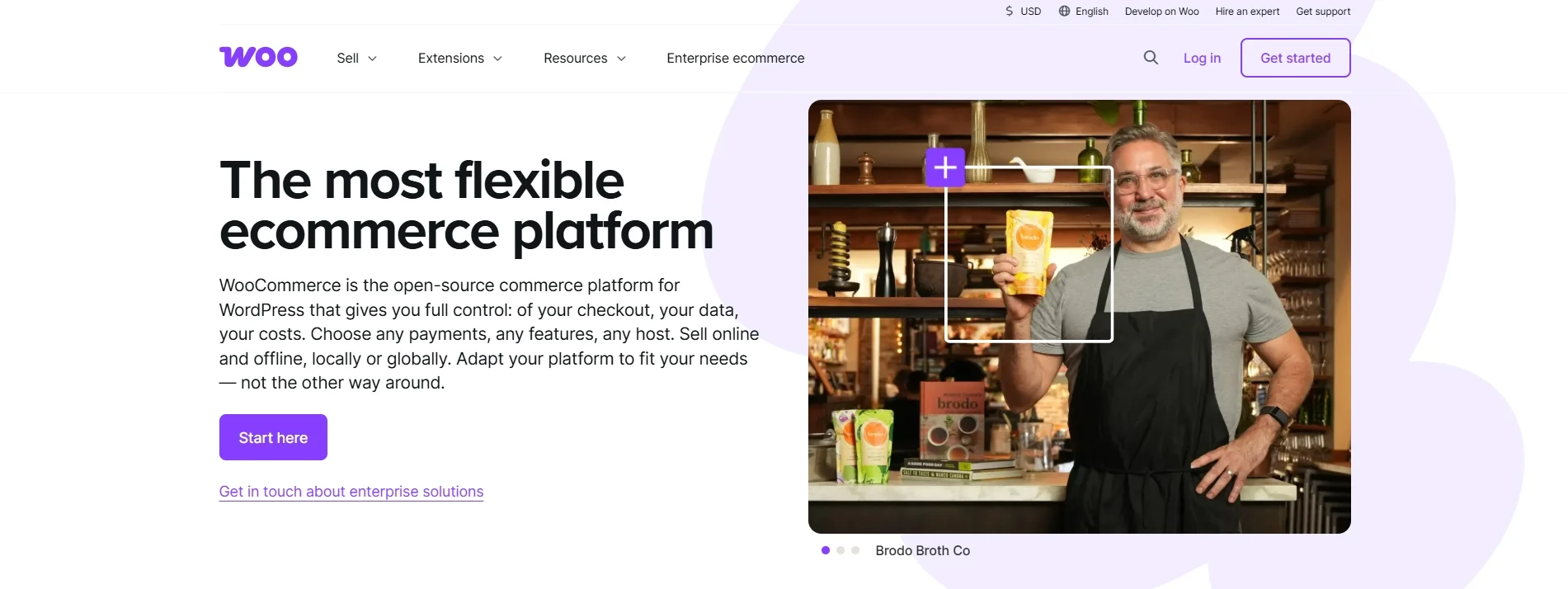
Because WooCommerce is self-hosted, you choose your own hosting provider and keep full ownership of your store data. The plugin currently has more than 8.4 million active installations on WordPress (according to BuiltWith). Such a large user base means store owners can easily find themes and experienced developers for almost any need. You can learn more about its strengths and weaknesses in our detailed WooCommerce review.
Brands using WooCommerce: Scrub Daddy, Caribou Coffee, Nalgene, La Marzocco, Polestar.
| WooCommerce Pros | WooCommerce Cons |
| Free and open-source core plugin | Hosting and maintenance are your responsibility |
| Full control over code and design | Costs grow with premium extensions |
| Huge library of extensions and themes | Steeper learning curve for beginners |
| No product limits | Many advanced features require extra plugins |
Zoho Commerce vs WooCommerce: A Detailed Comparison
Overall, neither platform wins every category in the Zoho Commerce vs WooCommerce matchup. Zoho Commerce suits merchants who want convenience out of the box. On the other hand, WooCommerce rewards merchants who need flexibility and room to grow. The table below sums up how the two platforms compare:
| Criterion | Zoho Commerce | WooCommerce | Winner |
| Platform type | Hosted SaaS with free hosting | Self-hosted WordPress plugin | Tie |
| Ease of setup and use | Drag-and-drop builder, no installation | Requires WordPress and a hosting setup | Zoho Commerce |
| Total cost of ownership | $15-129/month (billed annually), 0% transaction fee | Free plugin; hosting and extensions cost extra | Tie |
| Customization & control | Theme editor and custom code sections | Full open-source code access | WooCommerce |
| Inventory management | Multi-location and batch tracking on higher plans | Core stock management; advanced features via extensions | Zoho Commerce |
| Extensions & integrations | Native Zoho apps and Zoho Marketplace | Woo Marketplace and WordPress plugin library | WooCommerce |
| SEO & marketing tools | Built-in SEO basics and marketing tools | WordPress content power plus SEO plugins | WooCommerce |
| Payment gateways | Zoho Payments plus regional third-party gateways | 100+ gateways, including WooPayments | WooCommerce |
| Security & maintenance | Managed by Zoho, PCI-DSS compliant | Depends on your host and your updates | Zoho Commerce |
| Scalability | Up to 10,000 products, Enterprise on request | No product cap, scales with hosting | WooCommerce |
| Customer support | Email support with callbacks | Woo Helpdesk for purchased products, community forums | Zoho Commerce |
1. Platform type (It’s a tie)
The Verdict:
It’s a tie. Zoho Commerce suits merchants who want a ready-made store with hosting handled for them. On the other hand, WooCommerce suits merchants who want full ownership of their store and its data.
Zoho Commerce platform type
The first key difference in Zoho Commerce vs WooCommerce is how each platform is delivered.
Zoho Commerce is a hosted SaaS platform, which means Zoho runs every store on its own servers. Hosting is free and unlimited on every plan, and bandwidth is unlimited as well. In addition, each store gets a free SSL certificate along with a global CDN that speeds up page loading for international shoppers.
Because the platform is fully hosted, you never have to install software or pick a server. Every plan also comes with a free subdomain, so your store can go live right away. If you want your own domain, though, you need to buy one from Zoho’s domain service or another registrar. Alternatively, you can map a domain you already own.
This rental model also shapes what happens if you leave. You can cancel your Zoho Commerce subscription at any time, and Zoho keeps your store and its data for three months after cancellation.
WooCommerce platform type
On the other hand, WooCommerce takes the opposite approach: it is an open-source plugin that adds eCommerce features to a WordPress website. Therefore, you need a WordPress site and a hosting provider before you can sell anything.
To make this choice easier, WooCommerce lists trusted hosts on its official website. Options range from WordPress.com, whose Commerce plan includes hosting and priority support, to managed hosts like Pressable and SiteGround. For large businesses, WordPress VIP offers enterprise-grade hosting built for Woo stores. As a result, you can match your hosting to your budget and traffic.
The biggest advantage of this self-hosted model is ownership. In WooCommerce’s own words, open source means you “retain full ownership of your store’s content and data forever.” However, the quality of your hosting directly shapes your store’s speed and uptime, so choosing a reliable host is crucial.
2. Ease of setup and use (Zoho Commerce wins)
The Verdict:
Zoho Commerce wins the ease-of-use round of Zoho Commerce vs WooCommerce. Its all-in-one setup gets a store online faster, with fewer technical steps and free expert onboarding on higher plans.
Zoho Commerce ease of setup and use
Getting started with Zoho Commerce is straightforward. After signing up for the 14-day free trial, which requires no credit card, you choose a prebuilt theme and customize it with the drag-and-drop editor. Since hosting and SSL are already in place, no installation or coding is needed to launch.

After launch, daily work happens in one dashboard. Product and order management sit next to shipping and marketing settings, so you don’t have to jump between separate tools. On top of that, Zoho Commerce lets you add team members with predefined roles such as Admin and Staff. Each role only sees the modules it needs, which keeps the backend simple for non-technical staff.
For merchants who want extra guidance, Zoho also offers free expert onboarding. The Professional plan includes 2 hours of onboarding assistance, and the Premium plan includes 4 hours. Thanks to this help, even first-time sellers can set up their store correctly from the start.
WooCommerce ease of setup and use
By contrast, setting up WooCommerce involves a few more steps.
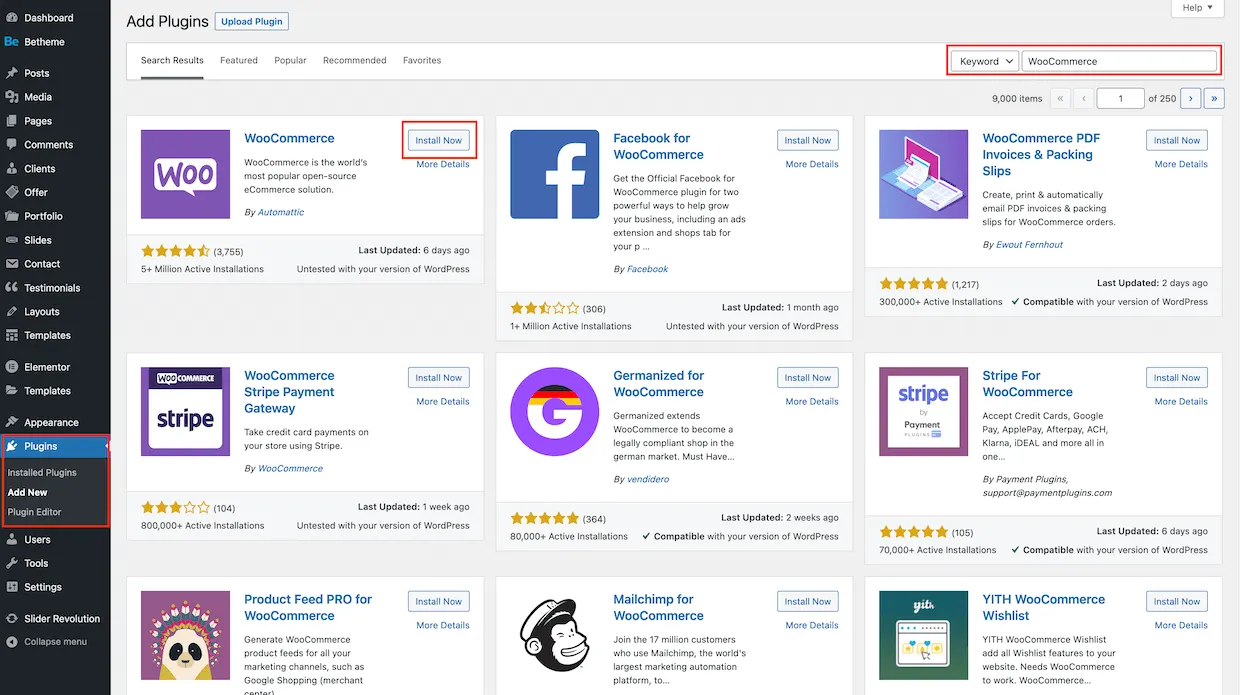
First, you need a domain and a hosting plan with WordPress installed. After that, you install the WooCommerce plugin from your WordPress dashboard and go through its optional Setup Wizard. This wizard lets you add many free services with a single click, which saves some configuration time.
Fortunately, some hosts make the process faster. For example, Bluehost preinstalls WordPress and WooCommerce, and the WordPress.com Commerce plan comes with WooCommerce ready to use. Once the store is running, you can also manage orders on the go with the free WooCommerce mobile app for Android and iOS.
Even so, WooCommerce has a steeper learning curve than Zoho Commerce since beginners need to learn the WordPress admin area, and they must also understand how themes and plugins work together. Hence, merchants without technical experience often need more time, or a developer, to get everything right.
3. Total cost of ownership (It’s a tie)
The Verdict:
It’s a tie. Zoho Commerce wins on predictable pricing. In contrast, WooCommerce can cost less for lean stores, but its bill is harder to forecast as your needs grow.
Zoho Commerce total cost of ownership
Cost is where the Zoho Commerce vs WooCommerce decision gets trickier. Zoho Commerce uses a clear subscription model, and its official pricing page currently lists the following plans:
| Zoho Commerce plan | Billed annually | Billed monthly |
| Standard | $15/month | $19/month |
| Professional | $49/month | $59/month |
| Premium | $79/month | $99/month |
| Plus | $129/month | $159/month |
| Enterprise | Contact sales | Contact sales |
On top of that, Zoho charges no transaction fee on any paid plan, and there are no setup or maintenance fees. You can also upgrade or downgrade at any time, with charges pro-rated to the new plan.
That said, a few costs sit outside the plan price. Extra users and extra inventory locations are sold as add-ons. Similarly, a custom domain must be bought separately, and third-party apps carry their own fees.
Payment processing is another cost to factor in. For instance, Zoho Payments in the US charges 2.90% + 30¢ per domestic card transaction. International cards cost an extra 1.5%, and each dispute comes with a $15 fee.
WooCommerce total cost of ownership
Unlike Zoho’s fixed plans, WooCommerce pricing works very differently. The core plugin is free, but a working store still needs several paid components:
- Hosting: For example, WordPress.com Business costs $25/month and Commerce costs $45/month (both billed annually). Both plans charge 0% WooCommerce transaction fees.
- Domain: Usually a yearly fee paid to your registrar or host.
- Themes and extensions: Many are free, but premium ones are sold as yearly subscriptions. For example, the official Product Bundles extension costs $79/year, including updates and support.
- Payment processing: WooPayments charges 2.9% + $0.30 per transaction with US-issued cards, plus 1% for cards issued outside the US. There is no setup or monthly fee.
- Development and maintenance: Optional, but common for custom stores.
To put these numbers into perspective, our team calculated a simple example. A store on the WordPress.com Business plan with one premium extension like Product Bundles would pay about $31.58/month ($25 plus $79 divided by 12). That is cheaper than Zoho Commerce’s Professional plan at $49/month.
Nevertheless, the WooCommerce bill can climb quite quickly: each new premium extension adds another yearly renewal, and growing stores often upgrade to pricier managed hosting. In short, WooCommerce gives you more control over spending, but it requires very careful budgeting.
4. Customization & control (WooCommerce wins)
The Verdict:
WooCommerce wins this part of the Zoho Commerce vs WooCommerce comparison. Its open-source code gives you full control over both design and functionality, which a SaaS builder like Zoho Commerce cannot match.
Zoho Commerce customization & control
In Zoho Commerce, most design work happens in the theme editor and its store customization panel. For deeper changes, you can add custom sections with your own code, including Liquid tags and JavaScript, as long as your theme supports this option. Developers can also make these sections editable through the Properties panel, so non-technical staff can update them later.

Beyond design, higher plans unlock more business-level customization. The Professional plan adds custom fields and customizable business workflows. Moving up, the Premium plan lets you create business-specific custom modules and manage custom functions. Zoho Commerce also provides a REST API for products and orders, which developers can use to build custom integrations.
Still, you always work within the limits Zoho sets for its platform. You cannot edit the platform’s core code, and some changes are only possible if your theme supports custom sections.
For most small stores, this is enough. However, businesses with unique logic may find it restrictive.
WooCommerce customization & control
In comparison, WooCommerce gives you far more freedom. Since the plugin is open source, developers can edit any part of its code and pair it with any WordPress theme.
On top of that, WooCommerce offers hooks and filters for changing almost any behavior. Developers can also connect outside services through the REST API and webhooks. Thanks to these tools, it can support almost any business model, from digital downloads to affiliate products.
Design flexibility is just as strong. Store owners can build product pages with modular blocks, and developers can create fully custom themes from scratch. If you lack in-house skills, WooCommerce also lists 171 vetted Woo Agency Partners that build custom features for merchants.
That said, deep customization only pays off when your data is set up correctly from the start. If you are migrating to WooCommerce from another platform, LitExtension’s All-in-One Migration Service can take care of the data transfer and your special requirements. Extra custom work, such as mapping custom fields, is quoted separately based on your needs.
Let Our Experts Handle Your WooCommerce Migration!
With the All-in-One Migration Service, our experts take care of your data transfer and custom requirements, so your new WooCommerce store is ready from day one.

5. Inventory management (Zoho Commerce wins)
The Verdict:
Zoho Commerce wins. On inventory, the Zoho Commerce vs WooCommerce gap is clear: Zoho offers advanced inventory features natively, without the need for extra plugins.
Zoho Commerce inventory management
Inventory management is one of Zoho Commerce’s strongest areas. Every plan includes inventory tracking and pickup locations. From the Professional plan, you can also sell assembly or kit items made from several products. Upgrading to Premium then adds 3 inventory locations as well as serial number and batch tracking, which helps businesses that sell regulated or perishable goods.
At the top tier, the Plus plan works almost like a small warehouse system. It adds purchasing and unit of measure (UoM) conversion, along with barcode generation. Stock counting and picklists are also included, which speeds up order fulfillment. Businesses that need even more control can sync their store with Zoho Inventory.
The main drawback is the product cap. Zoho Commerce limits stores to 500 products on Standard and 2,500 on Professional. Premium and Plus both allow up to 10,000 products, so very large catalogs may not fit.
WooCommerce inventory management
Similarly, WooCommerce covers the inventory basics well out of the box. Store owners can enable stock management and set low-stock or out-of-stock thresholds that trigger email alerts. In addition, WooCommerce can hold stock for unpaid orders and accept backorders. You can even choose whether to show stock levels to shoppers.
To keep track of stock, the built-in Analytics section includes a dedicated Stock report. Moreover, WooCommerce sets no limit on the number of products you can list. Therefore, large catalogs are not a problem as long as your hosting can handle them.
However, advanced features require extensions. Multi-warehouse stock and barcode scanning are not part of the core plugin. As a result, merchants with complex inventory needs must add and pay for extra tools, which also adds more parts to maintain.
6. Extensions & integrations (WooCommerce wins)
The Verdict:
WooCommerce wins. In terms of extensions, Zoho Commerce vs WooCommerce is hardly a contest, as Woo’s library is far larger, even though Zoho Commerce offers tighter integration with Zoho apps.
Zoho Commerce extensions & integrations
Zoho Commerce shines when it comes to the Zoho ecosystem. It connects natively with Zoho apps such as Zoho CRM and Zoho Books. Customer and product data can sync both ways with Zoho CRM, and sales flow straight into Zoho Books for accounting. For other tools, Zoho Flow links your store with 300+ apps through automated workflows.
Third-party integrations are available too, though the list is shorter. Zoho Commerce connects with Google Shopping and Mailchimp for marketing, and with Avalara for automated taxes. For shipping, it integrates with 9 carriers and shipping services, including UPS and USPS. These integrations can generate labels and show live carrier rates at checkout, with live rates available from the Professional plan.
Beyond built-in integrations, you can install extensions from Zoho Marketplace. This marketplace hosts over 2,000 extensions, but that number covers all Zoho products, so the selection for Commerce is much narrower. For anything else, developers can use the Zoho Commerce REST API to connect systems that have no native connector.

WooCommerce extensions & integrations
In terms of sheer size, however, WooCommerce has one of the largest ecosystems in ecommerce. The official Woo Marketplace offers both extensions and themes, built by WooCommerce itself and by third-party developers. Products bought there come with support from WooCommerce.com and a 30-day money-back guarantee.
Beyond that marketplace, the WordPress.org directory lists over 78,000 free plugins. Many of them work with WooCommerce, so you can find a tool for almost any feature. Popular integrations include Google Ads and Mailchimp, as well as HubSpot and Facebook.
This huge choice does come with a catch. Since plugins come from many developers, their quality and compatibility vary. Hence, you should check reviews and update history before installing a plugin, especially on a live store.
7. SEO & marketing tools (WooCommerce wins)
The Verdict:
WooCommerce wins the SEO side of Zoho Commerce vs WooCommerce. WordPress and its SEO plugins give you more control over content and rankings. Zoho Commerce, however, is easier for merchants who want built-in marketing tools from day one.
Zoho Commerce SEO & marketing tools
Zoho Commerce covers the SEO essentials well. You can set custom SEO titles and descriptions for every product and category page, and blog posts get their own SEO fields. The platform also auto-generates a sitemap that updates as you add content. Besides, you can customize your robots.txt file to control which pages search engines crawl.
URL changes are handled safely, too. Zoho Commerce supports canonical tags by default, which helps avoid duplicate content issues. When a product URL changes, you can set up 301 redirects directly in the SEO settings to keep your rankings.
On the marketing side, Zoho Commerce includes a solid set of built-in tools. Every plan comes with basic coupons and abandoned cart recovery. From the Professional plan, you also get advanced coupons and automatic discounts, plus WhatsApp Commerce. Besides, AI-powered product recommendations and funnel analytics with A/B testing help you improve conversions without extra apps.
WooCommerce SEO & marketing tools
Going one step further, WooCommerce strengthens SEO thanks to WordPress, one of the strongest content platforms around. You get full control over URL structures and a built-in blog for content marketing. Moreover, popular SEO plugins such as Yoast WooCommerce SEO add even more optimization options. Since content and products live on the same site, building topical authority becomes much easier.
For marketing, the core plugin already handles coupons well. WooCommerce supports both percentage and fixed-amount coupons, with usage limits and restrictions by product or customer. In addition, the built-in Analytics section offers 11 reports, including an Order attribution report that shows where your sales come from.
Many other marketing features come through extensions. For example, you can connect Google Ads or Mailchimp to run campaigns. As a result, the setup takes more effort, but you can build exactly the marketing stack your store needs.
8. Payment gateways (WooCommerce wins)
The Verdict:
WooCommerce wins. It gives you a much wider choice of payment gateways worldwide.
Zoho Commerce payment gateways
Payment options are another clear gap in Zoho Commerce vs WooCommerce. Zoho Commerce supports both offline and online payments on all plans. For online payments, you can use Zoho’s own Zoho Payments or connect gateways like PayPal and Stripe. Several other providers are available, including Authorize.net and 2Checkout.

Many of these gateways are regional. For example, Razorpay works only in India, and Mercado Pago covers Latin American countries. Hence, you should check which gateways are available in your country before choosing Zoho Commerce.
Multi-currency selling is also limited by plan. The Professional plan supports checkout in 2 currencies, and the Premium plan raises this to 5 currencies. Currently, Zoho lists this multi-currency checkout as an early access feature.
WooCommerce payment gateways
Compared with Zoho’s regional list, WooCommerce supports more than 100 payment gateways, including Stripe and PayPal. Offline methods come built in as well, so you can accept bank transfers or cash on delivery right away. Because of this wide selection, merchants in almost any market can find a gateway that fits their customers.
For a native option, WooPayments lets you manage payments directly in your WooCommerce dashboard. It also supports Apple Pay and Google Pay for faster checkout. However, WooPayments is only available in select countries, so some merchants need a third-party gateway instead.
On another note, selling in multiple currencies requires a separate extension in WooCommerce. Even so, the large number of gateways and extensions means you can set up almost any payment flow you need. To compare the top options, see our list of the best payment gateways for WooCommerce.
9. Security & maintenance (Zoho Commerce wins)
The Verdict:
Zoho Commerce wins. For security, Zoho Commerce vs WooCommerce comes down to who does the work, and Zoho’s managed infrastructure removes most security and maintenance tasks from your plate.
Zoho Commerce security & maintenance
Since Zoho hosts every store, it also takes care of security. Each plan comes with a free SSL certificate to encrypt customer data. Moreover, Zoho Commerce is PCI-DSS compliant, which matters for any store that handles card payments.
Maintenance is equally hands-off. Zoho manages the servers and platform updates, so store owners never have to install patches. In other words, you can focus on selling without worrying about outdated software.
Zoho Commerce also helps you control who can access your store. Team members get predefined roles with customizable permissions, and the Super Admin can prevent others from deleting or unpublishing the store. When someone leaves, you can mark their account as inactive without deleting it.
WooCommerce security & maintenance
On the contrary, security is a shared responsibility with WooCommerce. Your host secures the server, but you must keep WordPress and every plugin up to date. Likewise, you need to arrange SSL and regular backups, although many hosts include them. For example, SiteGround’s managed WooCommerce plans come with daily backups and a free SSL certificate.
On the positive side, WooCommerce takes security seriously at the code level. It runs a bug bounty program on HackerOne, where researchers can report vulnerabilities and get rewarded. Extra protection is also available through Jetpack, which adds security features and backups.
Security matters just as much when you switch platforms. If you migrate your store to WooCommerce with LitExtension, your data is transferred accurately and securely, with no manual copying involved.
10. Scalability (WooCommerce wins)
The Verdict:
WooCommerce wins. Its lack of plan caps makes it the better choice for fast-growing or large stores.
Zoho Commerce scalability
Growth potential is a deciding factor in Zoho Commerce vs WooCommerce for many merchants. Zoho Commerce scales well for small and mid-sized stores, but each plan has clear limits. The Standard plan allows 500 products and 2 users, with up to 2,000 customer accounts and 50 GB of file storage.
Higher plans raise these limits step by step. Professional allows 2,500 products and 5 users, with unlimited customer accounts and 100 GB of storage. At the top, Premium and Plus both offer unmetered storage, but they still cap stores at 10,000 products and 10 users.
For businesses that outgrow these plans, Zoho offers a custom Enterprise option built for large-scale operations. Extra users and locations can also be bought as add-ons. Still, a fast-growing catalog may hit the product cap sooner than expected.
WooCommerce scalability
In contrast, WooCommerce sets no limit on the number of products or orders; instead, performance depends on your hosting and setup. A growing store can upgrade from shared hosting to managed or enterprise-grade hosting, such as WordPress VIP.
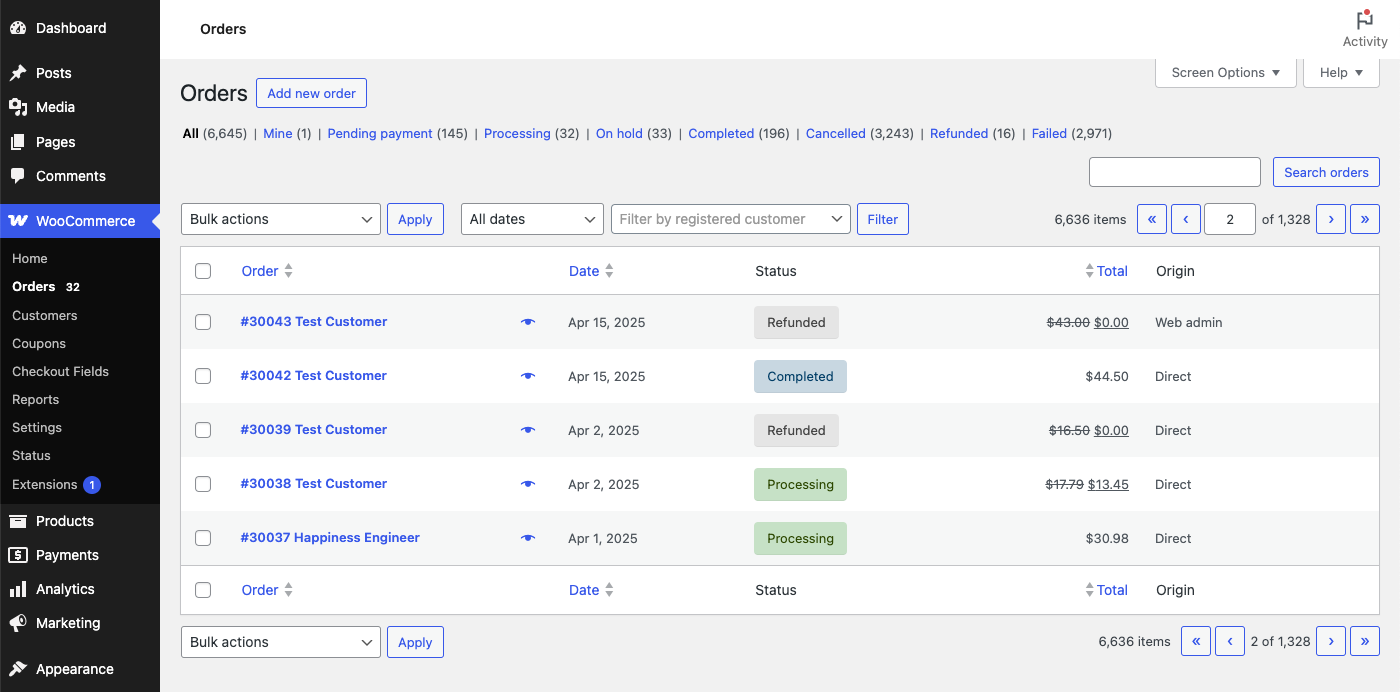
The core plugin is also built to handle more data. Since WooCommerce 8.2, new stores use High-Performance Order Storage (HPOS) by default. This feature stores orders in dedicated database tables, which reduces load and helps stores scale. Well-known brands such as Polestar and Nalgene also run their stores on WooCommerce.
Of course, scaling WooCommerce costs time and money. Larger stores need stronger hosting and caching, and many also need ongoing developer support. Nevertheless, there is no hard ceiling, so the platform can grow with your business.
11. Customer support (Zoho Commerce wins)
The Verdict:
Zoho Commerce wins the support round of Zoho Commerce vs WooCommerce. Having one vendor responsible for the whole platform makes it easier to get help.
Zoho Commerce customer support
Zoho Commerce mainly offers support via email at [email protected]. For self-service help, there is searchable documentation and a community forum. Live chat is also available, but currently only in India.
Keep in mind that Zoho Commerce does not list a dedicated phone line for store owners to call. Rather, support starts by email, and the Zoho team can call you back or set up a remote session when an issue needs a closer look. On top of that, the Professional and Premium plans include free expert onboarding hours, which helps new merchants avoid setup mistakes.
The biggest advantage is the single point of contact. Since Zoho runs the hosting and the software, you don’t need to figure out who is responsible for an issue.
WooCommerce customer support
As for WooCommerce, support depends on what you use. WooCommerce.com offers help via live chat or email for products purchased on its marketplace, but only for the latest version. It also does not cover customizations, so custom code issues go to your developer.
For the free core plugin, store owners mostly rely on community forums and documentation. Fortunately, WooCommerce’s huge user base means most common questions already have answers online.
Hosting issues, on the other hand, go to your host. Some hosts offer strong support, such as Bluehost’s 24/7 support or priority support on WordPress.com’s Commerce plan. For bigger projects, you can also hire one of the vetted Woo Agency Partners.
Zoho Commerce or WooCommerce: Which One Should You Choose?
The right answer to the Zoho Commerce vs WooCommerce question depends on your technical skills and growth plans. Here’s a quick guide to help you decide.
Choose Zoho Commerce if…
- You run a small or mid-sized business and don’t have a developer.
- You want hosting and security handled for you.
- Your team already uses Zoho apps like Zoho CRM or Zoho Books.
- You need built-in B2B features, such as price lists and quote requests on the Premium plan.
- Your catalog will stay under 10,000 products.
- You prefer a fixed monthly cost with no platform transaction fee.
Choose WooCommerce if…
- You want full ownership of your store’s code and data.
- Your business relies on content marketing and SEO built on WordPress.
- You need specific extensions or payment gateways for your market.
- You expect a large or fast-growing catalog.
- You have a developer, or a budget for managed hosting and maintenance.
If WooCommerce is the right fit and your store currently runs on another platform, the migration doesn’t have to be complicated. With LitExtension’s All-in-One Migration Service, a dedicated expert manages your whole project, from setting up the target store to testing the results.
Leave the WooCommerce Migration Work to LitExtension
From setting up your WooCommerce store to the final checks, a dedicated LitExtension expert manages your migration from start to finish.
FAQs
Is WooCommerce really free?
Yes, the WooCommerce plugin itself is free and open source. However, running a store still involves paying for hosting and a domain. Premium themes or extensions add to the bill if you need them, and payment processing fees apply as well, for example 2.9% + $0.30 per US card transaction with WooPayments.
Is Zoho Commerce good for small businesses?
Yes, Zoho Commerce is a good fit for many small businesses. The Standard plan starts at $15/month (billed annually) and already includes free hosting with a drag-and-drop store builder. Keep in mind that this plan is limited to 500 products and 2 users, so growing stores may need a higher plan.
Does Zoho Commerce charge transaction fees?
No, Zoho Commerce does not charge transaction fees on any of its paid plans. Nevertheless, your payment gateway still charges its own processing fees. For example, Zoho Payments in the US charges 2.90% + 30¢ per domestic card transaction.
Which is better for SEO, Zoho Commerce or WooCommerce?
WooCommerce is generally better for SEO. It runs on WordPress, which offers full control over URLs and content, along with powerful SEO plugins. That said, Zoho Commerce still covers the essentials, such as custom meta tags and 301 redirects.
Can I migrate from WooCommerce to Zoho Commerce without losing data?
Yes, but mainly for product data. Zoho’s official guide explains how to export products from WooCommerce as a CSV file and import them into Zoho Commerce. Product images are handled separately, as you send them to Zoho’s team in a zip file for uploading. Since the guide focuses on products, you should ask Zoho how to transfer customers and orders before you start.
Is Zoho Commerce better than WooCommerce?
It depends on your needs, since Zoho Commerce vs WooCommerce has no single winner. Zoho Commerce is better for merchants who want an easy, all-in-one hosted store, especially those already using Zoho apps. On the other hand, WooCommerce is better for businesses that need deeper customization and more room to scale.
Need Help to Migrate Your Store to WooCommerce?
LitExtension Automated Migration Tool transfers products, customers, and orders to WooCommerce – fast, accurate, and hassle-free.
Our Methodology
To build this Zoho Commerce vs WooCommerce comparison, our team followed 4 steps:
Step 1: Define the comparison criteria
We started by listing the questions store owners ask most often before choosing a platform. From there, we grouped them into 11 criteria, from platform type to customer support, so both platforms are judged on the same points.
Step 2: Collect data from official sources
For Zoho Commerce, we checked its official pricing page in USD, in both monthly and yearly billing modes.
Its plan comparison page and help center then gave us the details on limits and features. For WooCommerce, we reviewed the plugin’s WordPress.org listing and the documentation on WooCommerce.com. We also looked up the prices of WooCommerce’s recommended hosts and official extensions to see what a real store would pay.
Step 3: Calculate the total cost
Next, we compared Zoho Commerce’s plan prices with the cost items a WooCommerce store usually adds up, such as hosting and paid extensions. We also factored in the payment processing fees on both platforms. This step shows the real price gap between the two platforms instead of only their starting prices.
Step 4: Pick a winner for each criterion
Finally, we rated how well each platform handles every criterion for a typical small or mid-sized online store. A platform wins when it clearly serves that store better. When the answer depends on the merchant’s priorities, we marked the criterion as a tie.
Since pricing and features change over time, we will keep reviewing this article and update it whenever either platform makes a major change.

